Category: Business Intelligence

Power BI Workspace roles

Power BI has 4 roles. Those roles, in order of increasing access/capabilities, are Viewer, Contributor, Member, and Admin. Before granting roles to users in your environment, it’s best to have a solid understanding of what each role has access to and is capable of doing.

The table below provides a list of capabilities of each role. As you will see, each roles “absorbs” or “inherits” the capabilities of all the roles below it in the hierarchy – for example, the Contributor can do everything the Viewer can do plus more, and the Member can do everything the Contributor can do plus more.


The Power BI Workspace roles

ViewerContributorMemberAdmin
View dashboards, reports, and workbooks in the workspaceEverything that the Viewer can doEverything that the Contributor can doEverything that the Member can do
Read data from dataflows in the workspaceAdd, edit, delete content workspacesAdd other users as members, contributors, or viewers to the workspaceUpdate and delete the workspace
Row-level security applies to viewersSchedule refreshes and use the on-premises gateway within workspaces Publish and update the workspace appAdd and remove other users of any role from the workspace
Feature dashboards and reports from workspacesShare and allow others to reshape items from the workspace
Have access to the lineage viewFeature the workspace app
Have full access to all datasets within a workspace

A few things to keep in mind regarding roles:

  • Only the Member and Admin roles can perform access related tasks and publish apps.
  • Both Member and Admin roles can update workspaces, but only the Admin role can delete.
  • By default, the Contributor role cannot update apps, but there is a workspace setting that allows Contributors to update apps.
  • Both the Member and Admin roles can add users, but only the Admin role can add other Admins. 
  • A Power BI Pro license is needed to be able to fully utilize the Admin role. 

This article was intended to be an easy read; more detailed information regarding Power BI roles can be found here on the Microsoft site.

Thanks for reading!

Why I am excited about using Microsoft Power BI

Our team at work recently started using the Power BI platform. We are just getting going but I am already loving this tool. Our current enterprise BI platforms are Qlik and OBI (Oracle Business Intelligence), however, Power BI has has gained significant traction in business teams over the last couple years where it used for departmental reporting and analysis.

I see why the business teams love this tool and am excited about bringing it into our portfolio of tools for delivering analytic solutions across the company. These are some of the reasons I like Power BI:

  • First and foremost, we have not yet come across anything that we currently do in Qlik or OBI that we will not be able to do in Power BI. This was very important.

Power BI has a very intuitive and well laid out interface. You can easily switch between the visualizations, the data, and the data model. And within each of those tabs, you easily navigate using the well-placed objects and menu items. I found the interface easy to get accustomed to.

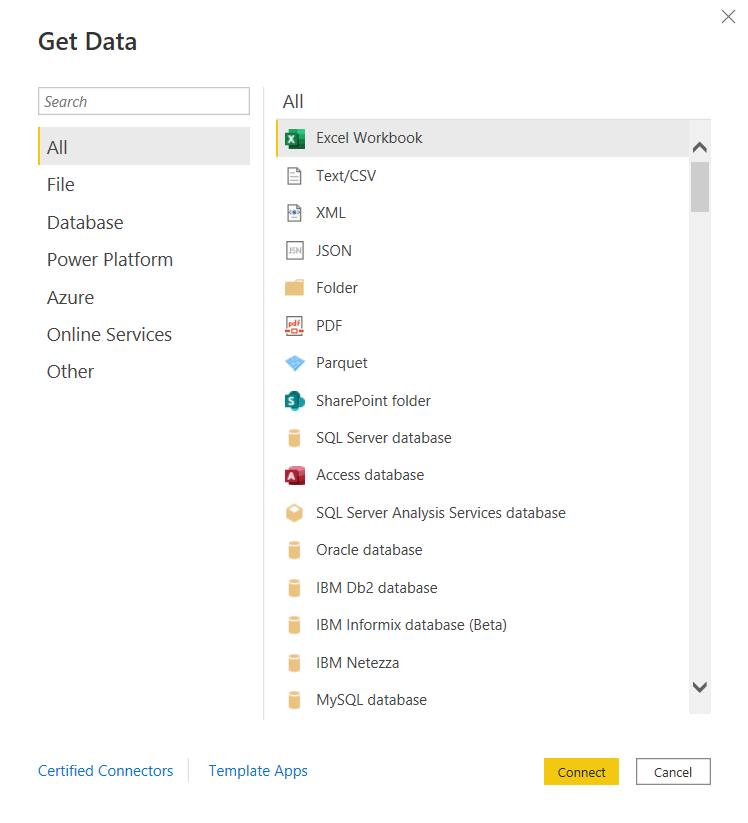
  • You can connect to just about any data source. The list is long. It seems the only source missing is an alien database on Mars. 🙂 I am kidding, but I did not find a native connector for Informix – the most uncommon database that we currently have as a source, but of course, ODBC and JDBC are available for those scenarios. Take a look.

and there are many more!

Some notable connectors are SQL Server Analysis Services, PostgreSQL, Amazon Redshift, Google BigQuery, Snowflake, various Azure data sources, Salesforce, Spark, GitHub, Databricks, and many more.

  • There are many awesome features for handling Excel data. And although we try to avoid Excel data as a source, it’s just not possible at times, and sometimes it makes sense to use those sources. However, the Power Query functionality allows users to perform ETL tasks on any data from any source.
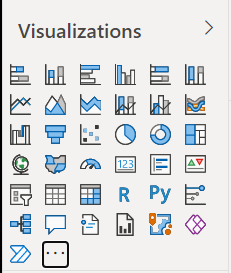
  • Power BI has many built-in visualization options.

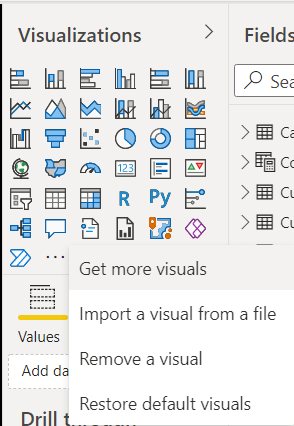
And you have the ability to “get more” from the marketplace.

  • Data modeling in Power BI is based on a methodology that our team is very familiar with: Dimensional Modeling, also known as, Star-Schema Modeling. And this is a proven method that works for efficient analytic solutions. In Power BI, it is also easy to create relationships between tables, change data types, and build hierarchies.
  • Within the data models, you can also use a versatile language called DAX (Data Analysis Expressions) to manipulate data, filter data, build measures, and more. I find that what’s possible with DAX brings Power BI into a whole other tier of flexibility compared to other tools. There is a bit of a learning curve for DAX, but you can start by focusing on a few key functions, and then expand your knowledge over time.
  • As you would expect in any modern BI platform, the security features in Power BI provide for object-level and data-level security. We have set up some simple security scenarios so far and it was straightforward. We will be digging more into setting up some more complex security scenarios soon and will report on that experience.
  • Data profiling features are built into Power BI, which may save you some time from having to jump into another query tool to profile your data.
  • Along with some standard analytic features, such as TopN, conditional formatting, and aggregate functions, Power BI also offers AI visuals, R and Python visuals, and advanced algorithms (such as key influencers and outliers) are available. I can foresee us using these features in the future.
  • Integration options with Office 365, SharePoint, and Teams.
  • Power BI is a great platform for one of the most significant trends in analytics – that is, users clamoring for Self-Service Analytics. With the ability to easily secure and share Power BI datasets, and users able to easily connect and use that data with an intuitive, optional code, tool that they may already have exposure to, it will be easier to implement self-service solutions. There are also some cool features for report consumers, such as personalization of visuals and mobile view.
  • A company called P3Adaptive delivered an awesome training for us, but there are tons of free resources available for learning. A good place to start is the Power BI lessons on Microsoft Learn – Power BI. And then, sign up for Dashboard in a Day (DIAD), a free one-day instructor-led training. You can find and register for DIAD classes here: Microsoft Events – DIAD
  • There are reasons why the Power BI platform has been at the top of the “Gartner Magic Quadrant for Business Intelligence and Analytics Platforms” for the last 3 years. It has a lot going for it and the company seems to be aggressive about continuous improvement.

I look forward to the Power BI journey and the ongoing quest to make our data as valuable as possible for our company.

External Embedded Content in OBIEE or OAS dashboard pages does not display in most web browsers

There is an “issue” or “security feature” (depending on how you look at it) that exists in OBIEE 12c (Oracle Business Intelligence) and in OAS (Oracle Analytics Server). The OBIEE or OAS dashboard pages do not display external embedded content in most browsers.

We use multiple BI platforms, but wanted to avoid sending users to one platform for some reporting and to another for other reporting. This can be confusing to users. To provide a good user experience by directing users to one place for all dashboards and self-service reporting, we have embedded most of the QlikView and Qlik Sense dashboards into OBI pages. With that, the users can be provided with one consistent training and have one place to go.

However, the Qlik embedded content only shows when using the IE (Internet Explorer) browser and the others give some “error” message.

  • The Chrome browser gives this error message:
    “Request to the server have been blocked by an extension.”
  • And the Edge browser gives this message:
    “This content is blocked. Contact the site owner to fix the issue.”

Or you may get other messages, such as (from Oracle Doc ID: 2273854.1):

  • Internet Explorer
    This content cannot be displayed in a frame
    To help protect the security of information you enter into this website, the publisher of this content does not allow it to be displayed in a frame.
  • Firefox
    No message is displayed on the page, but if you open the browser console (Ctrl+Shift+I) you see this message in it:
    Content Security Policy: The page’s settings blocked the loading of a resource at http://<server>/ (“default-src http://<server&gt;:<port>”).
  • Chrome
    No message is displayed on the page, but if you open the browser console (Ctrl+Shift+I) you see this message in it:
    Refused to frame ‘http://<server>/&#8217; because it violates the following Content Security Policy directive: “default-src ‘self'”. Note that ‘frame-src’ was not explicitly set, so ‘default-src’ is used as a fallback

This situation, although not ideal, has been fine since our company’s browser standard is IE and we provided a work-around for users that use other browsers to access the embedded content. But this will change soon since IE is going away.

There are 2 solutions to address the embedded content issue.

  1. Run Edge browser in IE mode for the BI applications sites/URLs.
    1. This would have been a good option for us, but it causes issues with the way we have SSO configured for a group of applications.
  2. Perform some configuration changes as outline below from Oracle Doc ID: 2273854.1.
    1. We ended up going forward with this solution and our team got it to work after some configurations trial and error.

(from Oracle Doc ID: 2273854.1):

For security reasons, you can no longer embed content from external domains in dashboards. To embed external content in dashboards, you must edit the instanceconfig.xml file. 

To allow the external content:

  1. Make a backup copy of <DOMAIN_HOME>/config/fmwconfig/biconfig/OBIPS/instanceconfig.xml
  2. Edit the <DOMAIN_HOME>/config/fmwconfig/biconfig/OBIPS/instanceconfig.xml file and add the ContentSecurityPolicy element inside the Security element:

<ServerInstance>

<Security>

  <InIFrameRenderingMode>allow</InIFrameRenderingMode>
  <ContentSecurityPolicy>
    <PolicyDirectives>
      <Directive>
        <Name>child-src</Name>
        <Value>’self’ http://www.xxx.com http://www.yyy.com</Value>
      </Directive>
      <Directive>
        <Name>img-src</Name>
        <Value>’self’ http://www.xxx.com http://www.yyy.com</Value>
      </Directive>
    </PolicyDirectives>
  </ContentSecurityPolicy>

</Security>

</ServerInstance>

  1. Restart the presentation server component (obips1)

Engage the teams responsible for enterprise browser settings or other appropriate teams at your company as necessary.

NULL values in prompts after upgrade from OBIEE to OAS

After upgrading from OBIEE to OAS (Oracle Business Intelligence to Oracle Analytics Server), the prompts started showing NULL values in the drop downs. This was not happening in OBI because we had the <ShowNullValueWhenColumnIsNullable> config parameter set to “never” for prompts.

This setting looked something like this in OBIEE (note the first line after the <Prompts> tag):

<ServerInstance>

<Prompts>
<ShowNullValueWhenColumnIsNullable>never</ShowNullValueWhenColumnIsNullable>
<MaxDropDownValues>256</MaxDropDownValues>
<ResultRowLimit>65000</ResultRowLimit>
<AutoApplyDashboardPromptValues>true</AutoApplyDashboardPromptValues>
<AutoSearchPromptDialogBox>true</AutoSearchPromptDialogBox>

</Prompts>

</ServerInstance>

In OAS, this parameter needs to be set in the new analytics/systemsettings page. Go to that page and set the option. Then restart by clicking on the Restart button on that page. After a restart, it resolved the issue for us.

We had a similar resolution to an issue we had with “not able to save analyses that contained HTML markup“.

Unable to save analysis with HTML markup in OAS after upgrade from OBIEE

We recently upgraded from OBIEE 12 to OAS 5.5. (Oracle Business Intelligence to Oracle Analytics Server). After the upgrade, we were not able to save analyses that contained HTML markup. We were able to do this before the upgrade.

Turns out, the configuration parameter for this now needs to be set in the new analytics/systemsettings page. Go to that page and enable the option “Allow HTML Content”. Then restart by clicking on the Restart button on that page.

After a restart, it resolved the issue for us.

If this doesn’t resolve it for you, you may need to remove the parameter from the instance config file and try again.

Back up your instanceconfig.xml file. Then edit it by removing the element “EnableSavingContentWithHTML” from the Security section and save the file. You will be removing a line that looks something like this:

“<EnableSavingContentWithHTML>true</EnableSavingContentWithHTML>”

Then go back to the analytics/systemsettings page, confirm “Allow HTML Content” is enabled, and restart again. This hopefully should resolve your issue.

What is data analytics? And what are the different types of data analytics?

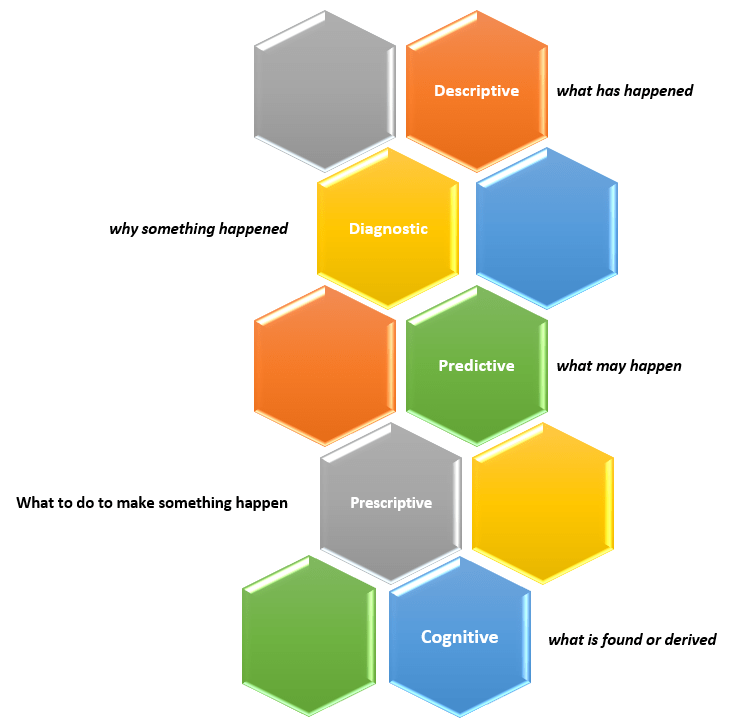
Data analytics is the overall process of capturing and using data to produce meaningful information, including metrics and trends, that can be used to better understand events and help make better decisions. Usually the goal is to improve the efficiency and outcomes of an operation, such as a business, a political campaign, or even an individual (such as an athlete). There are four (4) prevalent types of data analytics – descriptive, predictive, diagnostic, and prescriptive.

  1. Descriptive analytics – provides information about “what has happened”. Examples of questions answered by descriptive analytics include: How much are our sales this month and what is over year-over-year sales increase? How many website visitors did we have and how many signups?
  2. Predictive analytics – provides insight into “what may happen” in the future based on the past. Examples of questions answered by predictive analytics include: Based on previous customer service call patterns and outcomes, what is the likelihood of a customer switching to another provider? Based on a customer’s profile, how much should we charge him for insurance?
  3. Diagnostic analytics – provides information to explain “why something happened”. In addition to the direct data, this may also involve more indirect or macro data sources, such as, weather data, local or national economic data, or competitor data. And it may also involve forming logical theories about the correlation of events. Examples of questions answered by diagnostic analytics include: How effective was the marketing blitz and which channel had the most impact? Did the weather affect sales or was it the price increase?
  4. Prescriptive analytics – provides insight into “what to do to make something happen”. Examples of questions answered by prescriptive analytics include: Based on the results of our test marketing blitz campaign, if we roll out the full campaign with adjustments to the channel spread, how many additional temporary customer service staff will we need to handle the increased volume without long wait times?
The four (4) types of data analytics

Descriptive analytics is the simplest and most common form of analytics used in organizations and is widely referred to as Business Intelligence (BI). There is widespread interest in predictive analytics but less than 50% of companies currently use it as it requires additional, more expensive skills. Diagnostic and prescriptive analytics have always been around because companies have always used information from descriptive analytics to hypothesize “why things happened” and make decisions on “what to do”. But it’s the automation of these types through new methods and the integration of more data inputs that is fairly new. The latter three forms are sometimes called Advanced Analytics or Data Science.

All the types of analytics will require some form of data integration and use some of the same data in an environment, but while descriptive analytics only needs data from the time periods being analyzed and usually from a narrower data set, the predictive, prescriptive and diagnostic analytics produce better results using as much data as is available from a wider timeframe and from a broader set of sources. There is overlap with the different types of analytics because the analysis of “what may happen” is driven by “what has happened” in the past and “why it happened”; and determining “what to do” will be driven by “what has happened”, “why it happened”, and “what may happen”. Companies on the forefront of data analytics will tend to use all four types.

OBIEE Agent sending emails to the wrong recipients

We recently ran into an issue where we had an OBI Agent setup to send personalized reports via email to each recipient but some recipients (about 2%) were receiving the wrong email.

A search of Oracle Support produced Document ID # 2119485.1 as a possible solution.

“OBIEE 11g|12c: Agents Send Emails To Incorrect Recipients When Master Trigger Agent Is Present (Doc ID 2119485.1)”

This document recommended applying patch #s 22821787 and 25545058.

However, we are on OBIEE 12c (12.2.1.2.0) and one of the patches seemed to be for 11g only.

  • Patch # 25545058 seemed to be for 11g only.
  • Patch # 22821787 was for both 11g and 12c versions.

We applied patch # 22821787, but unfortunately, the issue persisted.

After looking around some more, we realized there was another patch but for the 12.2.1.2.180116 release (found in Document ID # 2395331.1). It didn’t match our version, but we decided to explore it anyway.

“OBIEE 12c : Agent Sending The Incorrect Result (Doc ID 2395331.1)”

That was patch # 27072632 but it turns out that patch was superseded by patch # 27916905.

Our admin team tried to apply patch # 27916905, but it had a conflict with the initial patch # 22821787.

We then backed out patch # 22821787 and applied the bundle patch 27916905.

The patch # 27916905 seems to have resolved the “email going to wrong recipients” issue.  Since we applied it, no user has reported they received the wrong email. However, we are not yet 100% sure.

However, we are noticing that some images are not displaying properly which may have been caused by the patch. We are looking into that issue now.

I went through the detailed description of how the patches were found to let you realize that on the Oracle Support site, you may need to do a very thorough search to find any and all patches related to an issue before applying any. The documentation does not necessarily tie them together or they won’t necessarily come up in when you search on the keywords. Note: Before any of the above changes were made, backups were taken so that we could revert to any stage that we wanted to.

BI Application getting ORA-02391 error

Last week we rolled out a new dashboard that uses a new data source.
In one of our BI environments, the application was throwing an error:
“ORA-02391: exceeded simultaneous SESSIONS_PER_USER limit at OCI call OCISessionBegin

This is an Oracle Database error, and not an error directly from the BI Application.

For the “ORA-02391: exceeded simultaneous SESSIONS_PER_USER limit” error …
The Cause is:   An attempt was made to exceed the maximum number of concurrent sessions allowed by the SESSIONS_PER_USER clause of the user profile.
And the Action for resolution is:   End one or more concurrent sessions or ask the database administrator to increase the SESSIONS_PER_USER limit of the user profile.

Turns out the SESSIONS_PER_USER parameter was set too low; it was set to 3 for the user being used to access the database from the BI application. This error could have also been observed from an ETL tool accessing the database with an ID with the same parameter setting.

One of the DBAs bumped this parameter up to 30 for the user, and that resolved the issue.
We requested for this change to be done on the BI application databases in all the environments – Development, Test, QA, and Production.

Although all seems to be well, we will now monitor to see how many sessions the application is using and if there is any negative impact on the source application. This will allow us to determine if we need to make any other adjustments.

Thanks for reading. I hope you found this information useful.

Quality Assurance (QA) for Data Projects or Data Applications

This post discusses Quality Assurance (QA) activities for data projects.

What is Quality Assurance (QA)?  Simply put, Quality Assurance, also called QA, Testing or Validation, is about testing an application or solution to ensure that all the stated/promised/expected requirements are met. It is a critically important activity for all software application development or implementations. Data applications are no different. They need to be tested to ensure they work as intended.

QA stands between development and deployment. And QA makes the difference between a delivered product and a high quality delivered product.

There are a number of things to keep in mind when you plan your Quality Assurance activities for data solutions. I present some of them in this post as suggestions, considerations, or prompting questions. The things mentioned here will not apply to all data applications but can be used as a guide or a check.

People / Teams

The number of people and teams involved in a project will vary depending on the size, scope and complexity of the project.

The technical team building the application needs to perform an initial level of validation of the solution.

If there is a Quality Assurance team that performs the validation tasks, then that team will need to perform the “official” validation.

The business analysts and end-users of the application also need to validate. Where possible, work with as many end users as efficiently possible. The more real users you have testing the application, the better the chances of finding issues early.

Where it makes sense, Test IDs that simulate various types of users or groups should be used to help test various usage and security scenarios. This is particularly useful in automated testing.

On large projects where there is a lot to be tested, it is best to break up the testing across multiple people or teams. This will help to prevent testing fatigue and sloppy testing and result in higher quality testing.

Plan ahead to ensure that access for all the relevant users is set up in the testing environments.

Communication

With all the teams and people involved, it is important to have a plan for how they will communicate. Things to consider and have a plan for include:

  • How will teams communicate within? Email, Microsoft Teams, SharePoint, Shared Files, are some options.
  • How will the various teams involved communicate with each other? In other words, how will cross-team communication be handled? As above, Email, Microsoft Teams, SharePoint, Shared Files, are some options.
  • How will issues and status be communicated? Weekly meetings, Status emails or documents, Shared files available on shared spaces are options.
  • How will changes and resolutions be tracked? Files, SDLC applications, Change Management applications are options.
  • How will teams and individuals be notified when they need to perform a task? Manual communication or automated notifications from tools are options.

Data

The most important thing to ensure in data projects is that the data is high quality, particularly the “base” data set. If the base data is incorrect, everything built on top of it will be bad. Of course, the correctness of intermediate and user-facing data is also just as important, but the validation of the base data is critical to achieving the correct data all over.

  • Ensure that table counts, field counts and row counts of key data are correct.
  • Does the data warehouse data match the source data?
  • Test detailed, low level records with small samples of data
  • Test to ensure that the data and the values conform to what is expected. For example, ensuring that there is no data older than 3 years old, or ensuring that there are no account values outside a certain range. The Data Governance Team may become involved in these activities across all projects.

Next in line is the “intermediate” data such as derived metrics, aggregates, specialized subsets, and more. These will also need to be verified.

  • Are the calculated values correct?
  • Are the aggregates correct? Test aggregate data with small, medium and large sets of data
  • Verify metric calculations

Then the user-facing data or data prepared for self-service usage needs to be validated.

  • Does the data on the dashboard match the data in the database?
  • Are the KPIs correctly reflecting the status?

Test the full flow of the data. The validity of the data should be verified at each stage of the data flow – from the source, to the staging, to the final tables in the data warehouse, to aggregates or subsets, to the dashboard.

Take snapshots of key datasets or reports so you can compare results post data migration.

Some additional data prep might be needed in some cases.

  • These include making sure that you have sourced adequate data for testing. For example, if you need to test an annual trend, then it might be best to have at least a year’s worth of data, preferably two.
  • You may need to scramble or redact some data for testing. Often Test data is taken from the Production environment and then scrambled and/or redacted in order to not expose sensitive information.
  • You may need to temporarily load in data for testing. For various reasons, you may need to load some Production data into the QA environment just to test the solution or a particular feature and then remove the data after the testing is complete. While this can be time consuming, sometimes it’s necessary, and it’s good to be aware of the need early and make plans accordingly.

Aesthetics & Representation of Data

Presentation matters. Although the most critical thing is data correctness, how the data is presented is also very important. Good presentation helps with understanding, usability, and adoption. A few things to consider include:

  • Does the application, such as dashboard, look good?  Does it look right? 
  • Are the components laid out properly so that there is no overcrowding?
  • Are the logos, colors and fonts in line with company expectations?
  • Are proper chart options used to display the various types of data and metrics?
  • Is the information provided in a way that users can digest?

Usage

The data application or solution should be user friendly, preferably intuitive or at least have good documentation. The data must be useful to the intended audience, in that, it should help them to understand the information and make good decisions or take sensible actions based on it.

The application should present data in a manner that is effective – easy to access, and easy to understand.

The presentation should satisfy the analytic workflows of the various users. Users should be able to logically step through the application to find information at the appropriate level of detail that they need based on their role.

A few things that affect usability include:

  • Prompts – ensure that all the proper prompts or selections are available to users to slice and filter the data as necessary. And of course, verify that they work.
  • Drill downs and drill throughs – validate that users can drill-down and across data to find the information they need in a simple, logical manner.
  • Easy interrogation of the data – if the application is ad-hoc in nature, validate that users can navigate it or at least verify that the documentation is comprehensive enough for users to follow.

Security

Securing the application and its data so that only authorized users have access to it is critical.

Application security comprises of “authentication”– access to the application, and “authorization” – what a user is authorized to do when he or she accesses the application.

Authorization (what a user is authorized to do within the application) can be broken into “object security” – what objects or features a user has access to, and “data security” – what data elements a user has access to within the various objects or features.

For example, a user has access to an application (authenticated / can log in), and within the application the user has access to (authorized to see and use) 3 of 10 reports (object-level security). The user is not authorized to see the other 7 reports (object-level security) and, therefore, will not have access to them. Now, within the 3 reports that the user has access to, he or she can only see data related to 1 of 5 departments (data-level security).

All object-level and data-level security needs to be validated. This includes negative testing. Not only test to make sure that users have the access they need, but testing should also ensure that users do not have access that they should not have.

  • Data for testing should be scrambled or redacted as appropriate to protect it.
  • Some extremely sensitive data may need to be filtered out entirely.
  • Can all the appropriate users access the application?
  • Are non-authorized users blocked from accessing the application?
  • Can user see the data they should be able to see to perform their jobs?

Performance

Performance of the data solution is important to user efficiency and user adoption. If users cannot get the results they need in a timely manner, they will look elsewhere to get what they need. Even if they have no choice, a poorly performing application will result in wasted time and dollars.

A few things to consider for ensuring quality around performance:

  • Application usage – is the performance acceptable? Do the results get returned in an acceptable time?
  • Data Integration – is the load performance acceptable?
  • Data processing – can the application perform all the processing it needs to do in a reasonable amount of time?
  • Stress Testing – how is performance with many users? How is it with a lot data?
  • How is performance with various selections or with no selections at all?
  • Is ad-hoc usage setup to be flexible but avoid rogue analyses that may cripple the system?
  • Is real-time analysis needed and is the application quick enough?

These items need to be validated and any issues need to be reported to the appropriate teams for performance tuning before the application is released for general usage.

Methodology

Each organization, and even each team within an organization, will have a preferred methodology for application development and change management, including how they perform QA activities.

Some things to consider include:

  • Get QA resources involved in projects early so that they gain an early understanding of the requirements and the solutions to assess and plan how best to test.
  • When appropriate, do not wait until all testing is complete before notifying development teams of issue discovered. By notifying them early, this could make the difference between your project being on-time or late.
  • Create a test plan and test scripts – even if they are high-level.
  • Where possible, execute tasks in an agile, iterative manner.
  • Each environment will have unique rules and guidelines that need to be validated. For example, your application may have a special naming convention, color & font guidelines, special metadata items, and more. You need to validate that these rules and guidelines are followed.
  • Use a checklist to ensure that you validate with consistency from deliverable to deliverable
  • When the solution being developed is replacing an existing system or dataset, use the new and old solutions in parallel to validate the new against the old.
  • Document test results. All testing participants should document what has been tested and the results. This may be as simple as a checkmark or a “Done” status, but may also include things like data entered, screenshots, results, errors, and more.
  • Update the appropriate tracking tools (such as your SDLC or Change Management tools) to document changes and validation. These tools will vary from company to company, but it is best to have a trail of the development, testing, and release to production.
  • For each company and application, there will a specific, unique set of things that will need to be done. It is best if you have a standard test plan or test checklist to help you confirm that you have tested all important aspects and scenarios of the application.

This is not an all-encompassing coverage of Quality Assurance for data solutions, but I hope the article gives you enough information to get started or tips for improving what you currently have in place. You can share your questions, thoughts and input via comments to this post. Thanks for reading!

BI Application getting ORA-00257 Error

One day this week, we got the following error showing up on our BI dashboards.
“ORA-00257: Archiver error. Connect AS SYSDBA only until resolved.”
This is an Oracle database error (which you may guess based on the “ORA”), and not an error directly from BI application.

If you get this error, it means that the database redo logs are filled up, and cannot be archived due to lack of space on the designated archive area or some other issue. In our case, the “some other issue” was caused by some issues with “commvault”, a software application used for data backup and recovery, among other things.

When this happens, if a user tries to connect to the database, such as the BI Application user in our case, the database will not allow the new connection. The only exception is SYSDBA users will be allowed to connect.

If you are not the database administrator (DBA), you will most likely work with your DBA (as we do) to get this error resolved.
After the issue that caused the problem is resolved and the redo logs are cleared, then the database, and therefore the BI application, will allow new connections as normal.

Thanks for reading and I hope you found this helpful.