Category: Data Integration

Design and implement full and incremental data loads (DP-700 Exam Prep)

This post is a part of the DP-700: Implementing Data Engineering Solutions Using Microsoft Fabric Exam Prep Hub.
This topic falls under these sections:
Ingest and transform data (30–35%)
   --> Design and implement loading patterns
      --> Design and implement full and incremental data loads


Note that there are 10 practice questions (with answers) at the end of each section to help you solidify your knowledge of the material. Also, there are 2 practice tests with 60 questions each available from the hub's main page below the exam topics section.

Introduction

One of the most important responsibilities of a data engineer is moving data efficiently from source systems into analytical platforms. As data volumes grow, loading strategies become critical for performance, scalability, cost management, and data freshness.

In Microsoft Fabric, data engineers frequently design and implement two primary loading patterns:

  • Full Loads
  • Incremental Loads

Understanding when and how to use each approach is a core skill measured in the DP-700 exam.

For the exam, you should understand:

  • The differences between full and incremental loading
  • Advantages and disadvantages of each approach
  • Change detection techniques
  • Watermarking strategies
  • Merge and upsert operations
  • Loading patterns in Lakehouses and Warehouses
  • Performance considerations
  • Common implementation methods using Dataflows Gen2, Pipelines, Notebooks, and SQL

Many DP-700 scenario questions focus on selecting the most appropriate loading strategy for a given business requirement.


Understanding Data Loading Patterns

A data load is the process of moving data from a source system into a destination such as:

  • Lakehouse
  • Data Warehouse
  • Delta Table
  • Analytical Model

The loading strategy determines how data is transferred.

The two most common strategies are:

Full Load
Incremental Load

What Is a Full Load?

A full load reloads all records from the source into the destination every time the process runs.

Example:

Source Table:

CustomerIDName
1Smith
2Jones
3Brown

Every execution loads all three records regardless of whether changes occurred.


Full Load Process

Source Data
Delete Existing Data
Reload Entire Dataset
Destination Table

Some implementations truncate the destination before reloading.


Full Load Characteristics

Loads All Records

Every execution processes the entire dataset.

Simple Logic

No need to identify changed records.

Easy Troubleshooting

The destination always reflects a complete source snapshot.

Higher Resource Consumption

Processing time grows as data volume increases.


Advantages of Full Loads

Simplicity

The implementation is straightforward.

Reduced Change Tracking Requirements

No need for timestamps or change detection.

Easier Validation

Source and destination can be directly compared.

Useful for Small Datasets

When data volume is low, the overhead is minimal.


Disadvantages of Full Loads

Longer Processing Times

Large datasets take longer to reload.

Increased Compute Costs

More resources are consumed.

Greater Network Utilization

All records must be transferred.

Limited Scalability

May become impractical as data volumes grow.


Common Full Load Scenarios

Small Reference Tables

Examples:

  • Countries
  • Product Categories
  • Currency Codes

Initial Data Loads

The first load into a new Lakehouse or Warehouse is typically a full load.

Periodic Snapshot Tables

Some reporting systems intentionally capture full snapshots.


What Is an Incremental Load?

An incremental load transfers only data that has changed since the previous execution.

Instead of processing millions of records, only new or modified records are loaded.


Incremental Load Process

Source Data
Identify Changes
Load New/Changed Records
Update Destination

Incremental Load Characteristics

Processes Only Changes

Only inserts, updates, and sometimes deletes are handled.

Faster Execution

Smaller data volumes are processed.

Lower Costs

Reduced compute and storage consumption.

Greater Complexity

Requires change detection mechanisms.


Advantages of Incremental Loads

Better Performance

Only changed records are processed.

Lower Resource Usage

Reduces compute requirements.

Improved Scalability

Handles large datasets efficiently.

Faster Refresh Times

Supports more frequent data updates.


Disadvantages of Incremental Loads

More Complex Design

Must accurately identify changes.

Requires Metadata

Change tracking information is often needed.

Potential Data Quality Risks

Missed changes can lead to inconsistent results.


Common Incremental Load Scenarios

Large Transaction Tables

Examples:

  • Sales transactions
  • Orders
  • IoT telemetry
  • Customer interactions

Near Real-Time Analytics

Frequent updates benefit from incremental processing.

Enterprise Data Warehouses

Most modern warehouse architectures rely heavily on incremental loads.


Comparing Full and Incremental Loads

FeatureFull LoadIncremental Load
Data ProcessedAll RecordsChanged Records Only
ComplexityLowHigher
PerformanceLowerHigher
ScalabilityLimitedExcellent
Compute CostHigherLower
Initial LoadCommonRare
Large DatasetsPoor FitIdeal

Change Detection Techniques

The success of incremental loading depends on identifying changed records.

Common methods include:

  • Timestamps
  • Watermarks
  • Change Data Capture (CDC)
  • Delta tables
  • Version columns

Timestamp-Based Loading

Many source systems contain columns such as:

Column
CreatedDate
ModifiedDate
LastUpdated

Example:

SELECT *
FROM Sales
WHERE ModifiedDate > '2026-01-01'

Only records changed after the previous load are returned.


Watermarking

A watermark stores the most recent processed value.

Example:

Last Processed Date:
2026-01-01 12:00 PM

Next execution:

SELECT *
FROM Sales
WHERE ModifiedDate > Watermark

After successful processing:

Watermark Updated

High-Watermark Pattern

One of the most common DP-700 exam topics.

Workflow:

Read Watermark
Extract New Records
Load Destination
Update Watermark

This pattern minimizes duplicate processing.


Change Data Capture (CDC)

CDC tracks:

  • Inserts
  • Updates
  • Deletes

Instead of comparing entire tables, the source system records changes.

Benefits:

  • Highly efficient
  • Accurate change detection
  • Reduced processing overhead

CDC is commonly used in enterprise environments.


Delta Tables and Incremental Loads

Microsoft Fabric Lakehouses use Delta Lake technology.

Delta tables support:

  • ACID transactions
  • Versioning
  • Efficient updates
  • Merge operations

These features make incremental processing much easier.


Upserts

An upsert combines:

UPDATE
+
INSERT

Logic:

  • Update existing records
  • Insert new records

Example:

Customer 100 exists:

UPDATE

Customer 101 does not exist:

INSERT

Merge Operations

MERGE is commonly used for incremental loads.

Example logic:

MERGE TargetTable
USING SourceTable
ON TargetTable.CustomerID = SourceTable.CustomerID
WHEN MATCHED THEN UPDATE
WHEN NOT MATCHED THEN INSERT

This is one of the most important SQL patterns for DP-700.


Handling Deletes

Deletes are often overlooked.

Possible approaches:

Soft Deletes

Add:

IsDeleted = True

CDC Delete Tracking

Capture delete operations directly.

Full Reconciliation

Periodically compare source and target.


Loading Patterns in Microsoft Fabric

Several Fabric components support loading operations.

Dataflow Gen2

Best for:

  • Low-code ingestion
  • Power Query transformations
  • Small-to-medium workloads

Data Pipelines

Best for:

  • Orchestration
  • Scheduling
  • Parameterized loads
  • End-to-end automation

Notebooks

Best for:

  • Spark-based transformations
  • Delta MERGE operations
  • Advanced incremental logic

SQL Warehouses

Best for:

  • T-SQL-based loading
  • MERGE statements
  • Data warehouse processing

Common Enterprise Pattern

A common Fabric implementation:

Pipeline
Read Watermark
Notebook
MERGE Into Delta Table
Update Watermark

This pattern is frequently used in production environments.


Choosing Between Full and Incremental Loads

Choose Full Loads When

  • Data volume is small
  • Simplicity is important
  • Initial loading is required
  • Change tracking is unavailable

Choose Incremental Loads When

  • Data volume is large
  • Frequent refreshes are required
  • Performance matters
  • Compute costs must be minimized

Common DP-700 Exam Scenarios

Scenario 1

A table contains 50 million records and receives 10,000 new records daily.

Best approach:

Incremental Load


Scenario 2

A lookup table contains 50 records and changes monthly.

Best approach:

Full Load


Scenario 3

A source system includes a LastModifiedDate column.

Best approach:

Timestamp-Based Incremental Load


Scenario 4

A Lakehouse Delta table must update existing rows and insert new rows.

Best approach:

MERGE Operation


Best Practices

Use Incremental Loads for Large Tables

Avoid unnecessary processing.


Maintain Watermarks Carefully

Improper watermark handling can cause missed records.


Use MERGE for Upserts

This simplifies insert/update processing.


Validate Change Detection Logic

Ensure no records are missed.


Periodically Reconcile Data

Occasional full validation improves data quality.


DP-700 Exam Focus Areas

You should understand:

✓ Full load design

✓ Incremental load design

✓ Watermark patterns

✓ High-watermark processing

✓ Timestamp-based loading

✓ Change Data Capture (CDC)

✓ Delta Lake incremental processing

✓ MERGE operations

✓ Upserts

✓ Delete handling

✓ Lakehouse loading strategies

✓ Pipeline orchestration for data loads


Practice Exam Questions

Question 1

A source table contains 100 million records, but only 5,000 records change daily. Which loading strategy is most appropriate?

A. Incremental load

B. Full load

C. Snapshot load

D. Manual reload

Answer: A

Explanation

Incremental loading minimizes processing by loading only changed records, making it ideal for large datasets with relatively small daily changes.


Question 2

Which loading strategy reloads all source records during each execution?

A. Full load

B. Watermark load

C. Incremental load

D. CDC load

Answer: A

Explanation

A full load processes every record regardless of whether changes have occurred.


Question 3

What is the primary purpose of a watermark?

A. Store the last successfully processed change value

B. Encrypt source data

C. Compress Delta tables

D. Improve security permissions

Answer: A

Explanation

Watermarks track the latest processed timestamp or key value, enabling future incremental loads.


Question 4

A data engineer wants to update existing rows and insert new rows in a Delta table during an incremental load.

Which operation should be used?

A. DELETE

B. TRUNCATE

C. APPEND

D. MERGE

Answer: D

Explanation

MERGE supports upsert functionality by updating matching rows and inserting non-matching rows.


Question 5

Which source column is most commonly used for timestamp-based incremental loading?

A. LastModifiedDate

B. CustomerName

C. ProductCategory

D. PostalCode

Answer: A

Explanation

Timestamp columns such as LastModifiedDate are commonly used to identify changed records.


Question 6

What is a major disadvantage of full loads?

A. Increased complexity

B. Difficulty validating results

C. Higher resource consumption

D. Inability to load new records

Answer: C

Explanation

Full loads require processing all records, increasing compute, storage, and network usage.


Question 7

Which technology captures inserts, updates, and deletes directly from a source system?

A. Data masking

B. Change Data Capture (CDC)

C. Endorsement

D. Dynamic expressions

Answer: B

Explanation

CDC records source-system changes and allows efficient incremental processing.


Question 8

A company needs the simplest possible solution for a reference table containing only 100 rows.

Which approach is most appropriate?

A. CDC

B. Watermark processing

C. Delta MERGE

D. Full load

Answer: D

Explanation

For very small datasets, the simplicity of a full load often outweighs the benefits of incremental processing.


Question 9

Which Microsoft Fabric storage technology provides efficient support for incremental processing through MERGE operations and transaction history?

A. CSV files

B. JSON files

C. Delta tables

D. Excel workbooks

Answer: C

Explanation

Delta tables support ACID transactions, versioning, and MERGE operations, making them ideal for incremental loads.


Question 10

What is the primary benefit of incremental loading compared to full loading?

A. More complex implementation

B. Faster processing and lower resource usage

C. Requires no change tracking

D. Eliminates the need for validation

Answer: B

Explanation

Incremental loading processes only changed records, improving performance and reducing resource consumption.


Exam Tip

For DP-700 scenario questions, focus on the size of the dataset and the frequency of change:

ScenarioBest Choice
Small lookup tableFull Load
Initial migrationFull Load
Large transaction tableIncremental Load
Daily updates to large datasetsIncremental Load
Delta Lake upsertsMERGE
Timestamp tracking availableWatermark-Based Incremental Load

A common exam clue is a statement such as:

“The table contains millions of rows, but only a small percentage changes each day.”

When you see this, it may indicate an Incremental Loading scenario.


Go to the DP-700 Exam Prep Hub main page.

Describe considerations for data ingestion and processing (DP-900 Exam Prep)

This post is a part of the DP-900: Microsoft Azure Data Fundamentals Exam Prep Hub. 
This topic falls under these sections:
Describe an analytics workload (25–30%)
--> Describe common elements of large-scale analytics
--> Describe considerations for data ingestion and processing


Note that there are 10 practice questions (with answers and explanations) for each section to help you solidify your knowledge of the material. Also, there are 2 practice tests with 60 questions each available on the hub below the exam topics section.

In modern data platforms, data ingestion and processing are critical steps that determine how raw data becomes meaningful insights. For the DP-900 exam, you should understand how data enters a system, how it is transformed, and the key design considerations involved.


What Is Data Ingestion?

Data ingestion is the process of collecting and importing data from various sources into a storage or analytics system.

Common Data Sources

  • Databases (relational and NoSQL)
  • Files (CSV, JSON, logs)
  • Streaming data (IoT devices, sensors)
  • Applications and APIs

Types of Data Ingestion


1. Batch Ingestion

  • Data is collected and processed at scheduled intervals
  • Suitable for large volumes of data
  • Higher latency (not real-time)

✔ Example:

  • Daily sales data uploads

✔ Common Azure service:
Azure Data Factory


2. Stream (Real-Time) Ingestion

  • Data is ingested continuously as it is generated
  • Low latency (near real-time processing)

✔ Example:

  • IoT sensor data
  • Live website activity

✔ Common Azure services:

  • Azure Event Hubs
  • Azure Stream Analytics

What Is Data Processing?

Data processing involves transforming raw data into a usable format for analysis.

Typical Processing Tasks

  • Cleaning data (removing errors, duplicates)
  • Transforming formats (e.g., JSON → tabular)
  • Aggregating data (summaries, totals)
  • Enriching data (adding additional context)

Types of Data Processing


1. Batch Processing

  • Processes large datasets at scheduled intervals
  • Efficient for historical analysis

✔ Example:

  • Monthly financial reporting

✔ Common Azure service:

  • Azure Synapse Analytics

2. Stream Processing

  • Processes data in real time as it arrives
  • Enables immediate insights and actions

✔ Example:

  • Fraud detection
  • Real-time dashboards

✔ Common Azure service:

  • Azure Stream Analytics

Key Considerations for Data Ingestion and Processing


1. Latency Requirements

  • Batch → Higher latency (minutes/hours)
  • Streaming → Low latency (seconds)

✔ Choose based on how quickly insights are needed.


2. Data Volume and Velocity

  • Large datasets require scalable solutions
  • High-velocity data requires streaming platforms

✔ Azure services are designed to scale automatically.


3. Data Variety

  • Structured, semi-structured, and unstructured data
  • Requires flexible processing tools

4. Data Quality

  • Ensure accuracy and consistency
  • Clean and validate data during processing

5. Scalability

  • Systems must handle increasing data sizes
  • Cloud platforms provide elastic scaling

6. Cost Optimization

  • Batch processing is generally more cost-efficient
  • Streaming may cost more due to continuous processing

7. Reliability and Fault Tolerance

  • Ensure data is not lost during ingestion
  • Use checkpointing and retry mechanisms

Common Architecture Pattern

A typical analytics pipeline:

  1. Ingestion
    • Batch: Azure Data Factory
    • Stream: Azure Event Hubs
  2. Storage
    • Data lake or storage account
  3. Processing
    • Batch: Azure Synapse Analytics
    • Stream: Azure Stream Analytics
  4. Visualization
    • Reporting tools (e.g., Power BI)

Batch vs Stream — Quick Comparison

FeatureBatch ProcessingStream Processing
Data FlowPeriodicContinuous
LatencyHighLow
Use CaseHistorical analysisReal-time insights
CostLowerHigher

Why This Matters for DP-900

On the exam, you may be asked to:

  • Distinguish between batch and stream processing
  • Identify appropriate ingestion methods
  • Choose Azure services based on scenarios
  • Understand trade-offs (latency, cost, scalability)

Summary — Exam-Relevant Takeaways

Data ingestion = bringing data into the system
Data processing = transforming data for analysis

✔ Two main patterns:

  • Batch → periodic, high latency
  • Streaming → real-time, low latency

✔ Key considerations:

  • Latency
  • Volume and velocity
  • Data quality
  • Scalability
  • Cost

✔ Azure services to know:

  • Azure Data Factory (batch ingestion)
  • Azure Event Hubs (stream ingestion)
  • Azure Stream Analytics (real-time processing)
  • Azure Synapse Analytics (batch processing)

Go to the Practice Exam Questions for this topic.

Go to the DP-900 Exam Prep Hub main page.

Practice Questions: Describe considerations for data ingestion and processing (DP-900 Exam Prep)

Practice Questions


Question 1

What is the primary purpose of data ingestion?

A. To visualize data
B. To store data permanently
C. To collect and import data into a system
D. To delete outdated data

Answer: C

Explanation:
Data ingestion is the process of bringing data into a storage or analytics system.


Question 2

Which type of ingestion processes data at scheduled intervals?

A. Stream ingestion
B. Batch ingestion
C. Real-time ingestion
D. Event-driven ingestion

Answer: B

Explanation:
Batch ingestion processes data periodically, not continuously.


Question 3

Which Azure service is commonly used for batch data ingestion?

A. Azure Event Hubs
B. Azure Data Factory
C. Azure Stream Analytics
D. Azure Virtual Machines

Answer: B

Explanation:
Azure Data Factory is designed for batch ETL/ELT workflows.


Question 4

Which scenario requires stream (real-time) ingestion?

A. Monthly sales reporting
B. Archiving old data
C. Monitoring live sensor data from IoT devices
D. Migrating historical records

Answer: C

Explanation:
Streaming ingestion is used for continuous, real-time data like IoT.


Question 5

What is the primary benefit of stream processing?

A. Lower cost
B. Simpler architecture
C. Real-time insights
D. Reduced storage requirements

Answer: C

Explanation:
Stream processing enables low-latency, real-time analysis.


Question 6

Which Azure service is used for real-time data ingestion at scale?

A. Azure Synapse Analytics
B. Azure Blob Storage
C. Azure Event Hubs
D. Azure Files

Answer: C

Explanation:
Azure Event Hubs is designed for high-throughput streaming ingestion.


Question 7

Which type of processing is BEST suited for historical data analysis?

A. Stream processing
B. Batch processing
C. Real-time processing
D. Event-driven processing

Answer: B

Explanation:
Batch processing is ideal for large, historical datasets.


Question 8

Which factor is MOST important when choosing between batch and stream processing?

A. File format
B. Latency requirements
C. Storage account type
D. Programming language

Answer: B

Explanation:
The key decision is how quickly the data needs to be processed.


Question 9

Which Azure service is used to process streaming data in real time?

A. Azure Data Factory
B. Azure Stream Analytics
C. Azure SQL Database
D. Azure Files

Answer: B

Explanation:
Azure Stream Analytics processes real-time streaming data.


Question 10

Which of the following is a key consideration when designing a data ingestion pipeline?

A. Screen resolution
B. Latency, scalability, and data volume
C. Programming language syntax
D. User interface design

Answer: B

Explanation:
Important considerations include latency, scalability, volume, and data quality.


✅ Quick Exam Takeaways

Data ingestion = bringing data into the system
Data processing = transforming data for analysis

✔ Two main approaches:

  • Batch → scheduled, high latency
  • Streaming → continuous, low latency

✔ Key Azure services:

  • Azure Data Factory → batch ingestion
  • Azure Event Hubs → streaming ingestion
  • Azure Stream Analytics → real-time processing
  • Azure Synapse Analytics → batch processing

✔ Key decision factor:
👉 Do you need real-time insights or not?


Go to the DP-900 Exam Prep Hub main page.

Describe Common Formats for Data Files (DP-900 Exam Prep)

This post is a part of the DP-900: Microsoft Azure Data Fundamentals Exam Prep Hub. 
This topic falls under these sections:
Describe core data concepts (25–30%)
--> Identify options for data storage
--> Describe common formats for data files


Note that there are 10 practice questions (with answers and explanations) for each section to help you solidify your knowledge of the material. Also, there are 2 practice tests with 60 questions each available on the hub below the exam topics section.

In DP-900, Microsoft expects you to understand common data file formats, what type of data they typically store (structured, semi-structured, or unstructured), and why certain formats are used in analytics and Azure storage scenarios.

This topic connects directly to Azure Blob Storage, Azure Data Lake Storage, and analytics pipelines.


Why Data File Formats Matter

Data file formats define:

  • How data is organized inside a file
  • Whether the data is human-readable or binary
  • How efficiently it can be stored and queried
  • Which tools and services can process it

Choosing the right format impacts:

  • Performance
  • Storage cost
  • Analytics capabilities
  • Interoperability between systems

For DP-900, focus on understanding what each format is used for, not deep implementation details.


Common Data File Formats You Should Know

1. CSV (Comma-Separated Values)

CSV is one of the simplest and most widely used formats for structured data.

Key Characteristics

  • Plain text
  • Each row represents a record
  • Columns separated by commas (or other delimiters)
  • No embedded schema
  • Human readable

Example:

CustomerID,Name,City
1,John,Seattle
2,Maria,Austin

Typical Use Cases

  • Data exports and imports
  • Simple datasets
  • Spreadsheet interoperability

Exam Notes

  • Represents structured data
  • Lightweight and easy to move between systems
  • No support for nested structures or data types

2. JSON (JavaScript Object Notation)

JSON is the most common format for semi-structured data, especially in modern applications and APIs.

Key Characteristics

  • Key–value pairs
  • Supports nested objects and arrays
  • Self-describing
  • Human readable
  • Schema-on-read

Example:

{
"CustomerID": 1,
"Name": "John",
"Orders": [
{ "OrderID": 100, "Amount": 50 }
]
}

Typical Use Cases

  • Web APIs
  • Application data
  • Azure Cosmos DB documents
  • Logs and telemetry

Exam Notes

  • Represents semi-structured data
  • Flexible schema
  • Commonly used with Azure Cosmos DB and Azure Data Lake

3. XML (Extensible Markup Language)

XML is another semi-structured format that uses tags to describe data.

Key Characteristics

  • Tag-based hierarchy
  • Supports nested structures
  • Human readable but verbose
  • Self-describing

Example:

<Customer>
<CustomerID>1</CustomerID>
<Name>John</Name>
</Customer>

Typical Use Cases

  • Legacy systems
  • Configuration files
  • Enterprise data exchange

Exam Notes

  • Semi-structured
  • Less common than JSON in modern Azure solutions

4. Parquet

Parquet is a columnar, binary file format optimized for analytics workloads.

Key Characteristics

  • Column-based storage
  • Highly compressed
  • Not human readable
  • Very fast for analytical queries

Typical Use Cases

  • Big data analytics
  • Azure Synapse Analytics
  • Azure Data Lake Storage

Exam Notes

  • Used for large analytical datasets
  • Optimized for performance and storage efficiency
  • Common in modern data engineering pipelines

5. Avro

Avro is a binary format designed for data serialization and streaming.

Key Characteristics

  • Compact binary format
  • Includes schema with the data
  • Efficient for data movement
  • Not human readable

Typical Use Cases

  • Data pipelines
  • Event streaming
  • Big data ingestion

Exam Notes

  • Often used behind the scenes in analytics platforms
  • Supports schema evolution

6. Plain Text Files

Simple text files may also be used to store unstructured or loosely structured data.

Examples

  • Log files
  • Notes
  • Raw exports

Exam Notes

  • Usually treated as unstructured data
  • Stored in Azure Blob Storage or Data Lake

How These Formats Map to Data Types

This mapping is important for DP-900 questions:

FormatData Type
CSVStructured
JSONSemi-structured
XMLSemi-structured
ParquetStructured / Analytics
AvroSemi-structured
TXTUnstructured

Where These Formats Are Stored in Azure

You’ll commonly see these formats stored in:

Azure Blob Storage

  • Primary storage for files
  • Supports all formats (CSV, JSON, Parquet, images, etc.)
  • Used for unstructured and semi-structured data

Azure Data Lake Storage Gen2

  • Built on Blob Storage
  • Optimized for analytics
  • Common for Parquet and Avro files
  • Used with Azure Synapse and Azure Data Factory

Why This Matters for DP-900

On the exam, file formats typically appear in scenarios like:

  • Choosing storage for CSV or JSON files
  • Identifying formats used in analytics pipelines
  • Recognizing Parquet in big data workloads
  • Distinguishing structured vs semi-structured file types

You’re expected to understand purpose and characteristics, not internal file mechanics.


Summary — Exam-Relevant Takeaways

For DP-900, remember:

✔ CSV → structured, simple, text-based
✔ JSON / XML → semi-structured, flexible, self-describing
✔ Parquet → columnar, compressed, analytics-optimized
✔ Avro → binary, schema included, streaming-friendly
✔ TXT → unstructured

And:

  • These formats are commonly stored in Azure Blob Storage or Azure Data Lake Storage
  • Analytics formats (Parquet/Avro) are used with Azure Synapse and big data workloads

Go to the Practice Exam Questions for this topic.

Go to the DP-900 Exam Prep Hub main page.

What Exactly Does an AI Engineer Do?

An AI Engineer is responsible for building, integrating, deploying, and operating AI-powered systems in production. While Data Scientists focus on experimentation and modeling, and AI Analysts focus on evaluation and business application, AI Engineers focus on turning AI capabilities into reliable, scalable, and secure products and services.

In short: AI Engineers make AI work in the real world. As you can imagine, this role has been getting a lot of interest lately.


The Core Purpose of an AI Engineer

At its core, the role of an AI Engineer is to:

  • Productionize AI and machine learning solutions
  • Integrate AI models into applications and workflows
  • Ensure AI systems are reliable, scalable, and secure
  • Operate and maintain AI solutions over time

AI Engineers bridge the gap between models and production systems.


Typical Responsibilities of an AI Engineer

While responsibilities vary by organization, AI Engineers typically work across the following areas.


Deploying and Serving AI Models

AI Engineers:

  • Package models for deployment
  • Expose models via APIs or services
  • Manage latency, throughput, and scalability
  • Handle versioning and rollback strategies

The goal is reliable, predictable AI behavior in production.


Building AI-Enabled Applications and Pipelines

AI Engineers integrate AI into:

  • Customer-facing applications
  • Internal decision-support tools
  • Automated workflows and agents
  • Data pipelines and event-driven systems

They ensure AI fits into broader system architectures.


Managing Model Lifecycle and Operations (MLOps)

A large part of the role involves:

  • Monitoring model performance and drift
  • Retraining or updating models
  • Managing CI/CD for models
  • Tracking experiments, versions, and metadata

AI Engineers ensure models remain accurate and relevant over time.


Working with Infrastructure and Platforms

AI Engineers often:

  • Design scalable inference infrastructure
  • Optimize compute and storage costs
  • Work with cloud services and containers
  • Ensure high availability and fault tolerance

Operational excellence is critical.


Ensuring Security, Privacy, and Responsible Use

AI Engineers collaborate with security and governance teams to:

  • Secure AI endpoints and data access
  • Protect sensitive or regulated data
  • Implement usage limits and safeguards
  • Support explainability and auditability where required

Trust and compliance are part of the job.


Common Tools Used by AI Engineers

AI Engineers typically work with:

  • Programming Languages such as Python, Java, or Go
  • ML Frameworks (e.g., TensorFlow, PyTorch)
  • Model Serving & MLOps Tools
  • Cloud AI Platforms
  • Containers & Orchestration (e.g., containerized services)
  • APIs and Application Frameworks
  • Monitoring and Observability Tools

The focus is on robustness and scale.


What an AI Engineer Is Not

Clarifying this role helps avoid confusion.

An AI Engineer is typically not:

  • A research-focused data scientist
  • A business analyst evaluating AI use cases
  • A data engineer focused only on data ingestion
  • A product owner defining AI strategy

Instead, AI Engineers focus on execution and reliability.


What the Role Looks Like Day-to-Day

A typical day for an AI Engineer may include:

  • Deploying a new model version
  • Debugging latency or performance issues
  • Improving monitoring or alerting
  • Collaborating with data scientists on handoffs
  • Reviewing security or compliance requirements
  • Scaling infrastructure for increased usage

Much of the work happens after the model is built.


How the Role Evolves Over Time

As organizations mature in AI adoption, the AI Engineer role evolves:

  • From manual deployments → automated MLOps pipelines
  • From single models → AI platforms and services
  • From reactive fixes → proactive reliability engineering
  • From project work → product ownership

Senior AI Engineers often define AI platform architecture and standards.


Why AI Engineers Are So Important

AI Engineers add value by:

  • Making AI solutions dependable and scalable
  • Reducing the gap between experimentation and impact
  • Ensuring AI can be safely used at scale
  • Enabling faster iteration and improvement

Without AI Engineers, many AI initiatives stall before reaching production.


Final Thoughts

An AI Engineer’s job is not to invent AI—it is to operationalize it.

When AI Engineers do their work well, AI stops being a demo or experiment and becomes a reliable, trusted part of everyday systems and decision-making.

Good luck on your data journey!

Self-Service Analytics: Empowering Users While Maintaining Trust and Control

Self-service analytics has become a cornerstone of modern data strategies. As organizations generate more data and business users demand faster insights, relying solely on centralized analytics teams creates bottlenecks. Self-service analytics shifts part of the analytical workload closer to the business—while still requiring strong foundations in data quality, governance, and enablement.

This article is based on a detailed presentation I did at a HIUG conference a few years ago.


What Is Self-Service Analytics?

Self-service analytics refers to the ability for business users—such as analysts, managers, and operational teams—to access, explore, analyze, and visualize data on their own, without requiring constant involvement from IT or centralized data teams.

Instead of submitting requests and waiting days or weeks for reports, users can:

  • Explore curated datasets
  • Build their own dashboards and reports
  • Answer ad-hoc questions in real time
  • Make data-driven decisions within their daily workflows

Self-service does not mean unmanaged or uncontrolled analytics. Successful self-service environments combine user autonomy with governed, trusted data and clear usage standards.


Why Implement or Provide Self-Service Analytics?

Organizations adopt self-service analytics to address speed, scalability, and empowerment challenges.

Key Benefits

  • Faster Decision-Making
    Users can answer questions immediately instead of waiting in a reporting queue.
  • Reduced Bottlenecks for Data Teams
    Central teams spend less time producing basic reports and more time on high-value work such as modeling, optimization, and advanced analytics.
  • Greater Business Engagement with Data
    When users interact directly with data, data literacy improves and analytics becomes part of everyday decision-making.
  • Scalability
    A small analytics team cannot serve hundreds or thousands of users manually. Self-service scales insight generation across the organization.
  • Better Alignment with Business Context
    Business users understand their domain best and can explore data with that context in mind, uncovering insights that might otherwise be missed.

Why Not Implement Self-Service Analytics? (Challenges & Risks)

While powerful, self-service analytics introduces real risks if implemented poorly.

Common Challenges

  • Data Inconsistency & Conflicting Metrics
    Without shared definitions, different users may calculate the same KPI differently, eroding trust.
  • “Spreadsheet Chaos” at Scale
    Self-service without governance can recreate the same problems seen with uncontrolled Excel usage—just in dashboards.
  • Overloaded or Misleading Visuals
    Users may build reports that look impressive but lead to incorrect conclusions due to poor data modeling or statistical misunderstandings.
  • Security & Privacy Risks
    Improper access controls can expose sensitive or regulated data.
  • Low Adoption or Misuse
    Without training and support, users may feel overwhelmed or misuse tools, resulting in poor outcomes.
  • Shadow IT
    If official self-service tools are too restrictive or confusing, users may turn to unsanctioned tools and data sources.

What an Environment Looks Like Without Self-Service Analytics

In organizations without self-service analytics, patterns tend to repeat:

  • Business users submit report requests via tickets or emails
  • Long backlogs form for even simple questions
  • Analytics teams become report factories
  • Insights arrive too late to influence decisions
  • Users create their own disconnected spreadsheets and extracts
  • Trust in data erodes due to multiple versions of the truth

Decision-making becomes reactive, slow, and often based on partial or outdated information.


How Things Change With Self-Service Analytics

When implemented well, self-service analytics fundamentally changes how an organization works with data.

  • Users explore trusted datasets independently
  • Analytics teams focus on enablement, modeling, and governance
  • Insights are discovered earlier in the decision cycle
  • Collaboration improves through shared dashboards and metrics
  • Data becomes part of daily conversations, not just monthly reports

The organization shifts from report consumption to insight exploration. Well, that’s the goal.


How to Implement Self-Service Analytics Successfully

Self-service analytics is as much an operating model as it is a technology choice. The list below outlines important aspects that must be considered, decided on, and implemented when planning the implementation of self-service analytics.

1. Data Foundation

  • Curated, well-modeled datasets (often star schemas or semantic models)
  • Clear metric definitions and business logic
  • Certified or “gold” datasets for common use cases
  • Data freshness aligned with business needs

A strong semantic layer is critical—users should not have to interpret raw tables.


2. Processes

  • Defined workflows for dataset creation and certification
  • Clear ownership for data products and metrics
  • Feedback loops for users to request improvements or flag issues
  • Change management processes for metric updates

3. Security

  • Role-based access control (RBAC)
  • Row-level and column-level security where needed
  • Separation between sensitive and general-purpose datasets
  • Audit logging and monitoring of usage

Security must be embedded, not bolted on.


4. Users & Roles

Successful self-service environments recognize different user personas:

  • Consumers: View and interact with dashboards
  • Explorers: Build their own reports from curated data
  • Power Users: Create shared datasets and advanced models
  • Data Teams: Govern, enable, and support the ecosystem

Not everyone needs the same level of access or capability.


5. Training & Enablement

  • Tool-specific training (e.g., how to build reports correctly)
  • Data literacy education (interpreting metrics, avoiding bias)
  • Best practices for visualization and storytelling
  • Office hours, communities of practice, and internal champions

Training is ongoing—not a one-time event.


6. Documentation

  • Metric definitions and business glossaries
  • Dataset descriptions and usage guidelines
  • Known limitations and caveats
  • Examples of certified reports and dashboards

Good documentation builds trust and reduces rework.


7. Data Governance

Self-service requires guardrails, not gates.

Key governance elements include:

  • Data ownership and stewardship
  • Certification and endorsement processes
  • Naming conventions and standards
  • Quality checks and validation
  • Policies for personal vs shared content

Governance should enable speed while protecting consistency and trust.


8. Technology & Tools

Modern self-service analytics typically includes:

Data Platforms

  • Cloud data warehouses or lakehouses
  • Centralized semantic models

Data Visualization & BI Tools

  • Interactive dashboards and ad-hoc analysis
  • Low-code or no-code report creation
  • Sharing and collaboration features

Supporting Capabilities

  • Metadata management
  • Cataloging and discovery
  • Usage monitoring and adoption analytics

The key is selecting tools that balance ease of use with enterprise-grade governance.


Conclusion

Self-service analytics is not about giving everyone raw data and hoping for the best. It is about empowering users with trusted, governed, and well-designed data experiences.

Organizations that succeed treat self-service analytics as a partnership between data teams and the business—combining strong foundations, thoughtful governance, and continuous enablement. When done right, self-service analytics accelerates decision-making, scales insight creation, and embeds data into the fabric of everyday work.

Thanks for reading!

What Exactly Does a Data Engineer Do?

A Data Engineer is responsible for building and maintaining the systems that allow data to be collected, stored, transformed, and delivered reliably for analytics and downstream use cases. While Data Analysts focus on insights and decision-making, Data Engineers focus on making data available, trustworthy, and scalable.

In many organizations, nothing in analytics works well without strong data engineering underneath it.


The Core Purpose of a Data Engineer

At its core, the role of a Data Engineer is to:

  • Design and build data pipelines
  • Ensure data is reliable, timely, and accessible
  • Create the foundation that enables analytics, reporting, and data science

Data Engineers make sure that when someone asks a question of the data, the data is actually there—and correct.


Typical Responsibilities of a Data Engineer

While the exact responsibilities vary by company size and maturity, most Data Engineers spend time across the following areas.


Ingesting Data from Source Systems

Data Engineers build processes to ingest data from:

  • Operational databases
  • SaaS applications
  • APIs and event streams
  • Files and external data sources

This ingestion can be batch-based, streaming, or a mix of both, depending on the business needs.


Building and Maintaining Data Pipelines

Once data is ingested, Data Engineers:

  • Transform raw data into usable formats
  • Handle schema changes and data drift
  • Manage dependencies and scheduling
  • Monitor pipelines for failures and performance issues

Pipelines must be repeatable, resilient, and observable.


Managing Data Storage and Platforms

Data Engineers design and maintain:

  • Data warehouses and lakehouses
  • Data lakes and object storage
  • Partitioning, indexing, and performance strategies

They balance cost, performance, scalability, and ease of use while aligning with organizational standards.


Ensuring Data Quality and Reliability

A key responsibility is ensuring data can be trusted. This includes:

  • Validating data completeness and accuracy
  • Detecting anomalies or missing data
  • Implementing data quality checks and alerts
  • Supporting SLAs for data freshness

Reliable data is not accidental—it is engineered.


Enabling Analytics and Downstream Use Cases

Data Engineers work closely with:

  • Data Analysts and BI developers
  • Analytics engineers
  • Data scientists and ML engineers

They ensure datasets are structured in a way that supports efficient querying, consistent metrics, and self-service analytics.


Common Tools Used by Data Engineers

The exact toolset varies, but Data Engineers often work with:

  • Databases & Warehouses (e.g., cloud data platforms)
  • ETL / ELT Tools and orchestration frameworks
  • SQL for transformations and validation
  • Programming Languages such as Python, Java, or Scala
  • Streaming Technologies for real-time data
  • Infrastructure & Cloud Platforms
  • Monitoring and Observability Tools

Tooling matters, but design decisions matter more.


What a Data Engineer Is Not

Understanding role boundaries helps teams work effectively.

A Data Engineer is typically not:

  • A report or dashboard builder
  • A business stakeholder defining KPIs
  • A data scientist focused on modeling and experimentation
  • A system administrator managing only infrastructure

That said, in smaller teams, Data Engineers may wear multiple hats.


What the Role Looks Like Day-to-Day

A typical day for a Data Engineer might include:

  • Investigating a failed pipeline or delayed data load
  • Updating transformations to accommodate schema changes
  • Optimizing a slow query or job
  • Reviewing data quality alerts
  • Coordinating with analysts on new data needs
  • Deploying pipeline updates

Much of the work is preventative—ensuring problems don’t happen later.


How the Role Evolves Over Time

As organizations mature, the Data Engineer role evolves:

  • From manual ETL → automated, scalable pipelines
  • From siloed systems → centralized platforms
  • From reactive fixes → proactive reliability engineering
  • From data movement → data platform architecture

Senior Data Engineers often influence platform strategy, standards, and long-term technical direction.


Why Data Engineers Are So Important

Data Engineers are critical because:

  • They prevent analytics from becoming fragile or inconsistent
  • They enable speed without sacrificing trust
  • They scale data usage across the organization
  • They reduce technical debt and operational risk

Without strong data engineering, analytics becomes slow, unreliable, and difficult to scale.


Final Thoughts

A Data Engineer’s job is not just moving data from one place to another. It is about designing systems that make data dependable, usable, and sustainable.

When Data Engineers do their job well, everyone downstream—from analysts to executives—can focus on asking better questions instead of questioning the data itself.

Good luck on your data journey!

Data Conversions: Steps, Best Practices, and Considerations for Success

Introduction

Data conversions are critical undertakings in the world of IT and business, often required during system upgrades, migrations, mergers, or to meet new regulatory requirements. I have been involved in many data conversions over the years, and in this article, I am sharing information from that experience. This article provides a comprehensive guide to the stages, steps, and best practices for executing successful data conversions. This article was created from a detailed presentation I did some time back at a SQL Saturday event.


What Is Data Conversion and Why Is It Needed?

Data conversion involves transforming data from one format, system, or structure to another. Common scenarios include application upgrades, migrating to new systems, adapting to new business or regulatory requirements, and integrating data after mergers or acquisitions. For example, merging two customer databases into a new structure is a typical conversion challenge.


Stages of a Data Conversion Project

Let’s take a look at the stages of a data conversion project.

Stage 1: Big Picture, Analysis, and Feasibility

The first stage is about understanding the overall impact and feasibility of the conversion:

  • Understand the Big Picture: Identify what the conversion is about, which systems are involved, the reasons for conversion, and its importance. Assess the size, complexity, and impact on business and system processes, users, and external parties. Determine dependencies and whether the conversion can be done in phases.
  • Know Your Sources and Destinations: Profile the source data, understand its use, and identify key measurements for success. Compare source and destination systems, noting differences and existing data in the destination.
  • Feasibility – Proof of Concept: Test with the most critical or complex data to ensure the conversion will meet the new system’s needs before proceeding further.
  • Project Planning: Draft a high-level project plan and requirements document, estimate complexity and resources, assemble the team, and officially launch the project.

Stage 2: Impact, Mappings, and QA Planning

Once the conversion is likely, the focus shifts to detailed impact analysis and mapping:

  • Impact Analysis: Assess how business and system processes, reports, and users will be affected. Consider equipment and resource needs, and make a go/no-go decision.
  • Source/Destination Mapping & Data Gap Analysis: Profile the data, create detailed mappings, list included and excluded data, and address gaps where source or destination fields don’t align. Maintain legacy keys for backward compatibility.
  • QA/Verification Planning: Plan for thorough testing, comparing aggregates and detailed records between source and destination, and involve both IT and business teams in verification.

Stage 3: Project Execution, Development, and QA

With the project moving forward, detailed planning, development and validation, and user involvement become the priority:

  • Detailed Project Planning: Refine requirements, assign tasks, and ensure all parties are aligned. Communication is key.
  • Development: Set up environments, develop conversion scripts and programs, determine order of processing, build in logging, and ensure processes can be restarted if interrupted. Optimize for performance and parallel processing where possible.
  • Testing and Verification: Test repeatedly, verify data integrity and functionality, and involve all relevant teams. Business users should provide final sign-off.
  • Other Considerations: Train users, run old and new systems in parallel, set a firm cut-off for source updates, consider archiving, determine if any SLAs needed to be adjusted, and ensure compliance with regulations.

Stage 4: Execution and Post-Conversion Tasks

The final stage is about production execution and transition:

  • Schedule and Execute: Stick to the schedule, monitor progress, keep stakeholders informed, lock out users where necessary, and back up data before running conversion processes.
  • Post-Conversion: Run post-conversion scripts, allow limited access for verification, and where applicable, provide close monitoring and support as the new system goes live.

Best Practices and Lessons Learned

  • Involve All Stakeholders Early: Early engagement ensures smoother execution and better outcomes.
  • Analyze and Plan Thoroughly: A well-thought-out plan is the foundation of a successful conversion.
  • Develop Smartly and Test Vigorously: Build robust, traceable processes and test extensively.
  • Communicate Throughout: Keep all team members and stakeholders informed at every stage.
  • Pay Attention to Details: Watch out for tricky data types like DATETIME and time zones, and never underestimate the effort required.

Conclusion

Data conversions are complex, multi-stage projects that require careful planning, execution, and communication. By following the structured approach and best practices outlined above, organizations can minimize risks and ensure successful outcomes.

Thanks for reading!

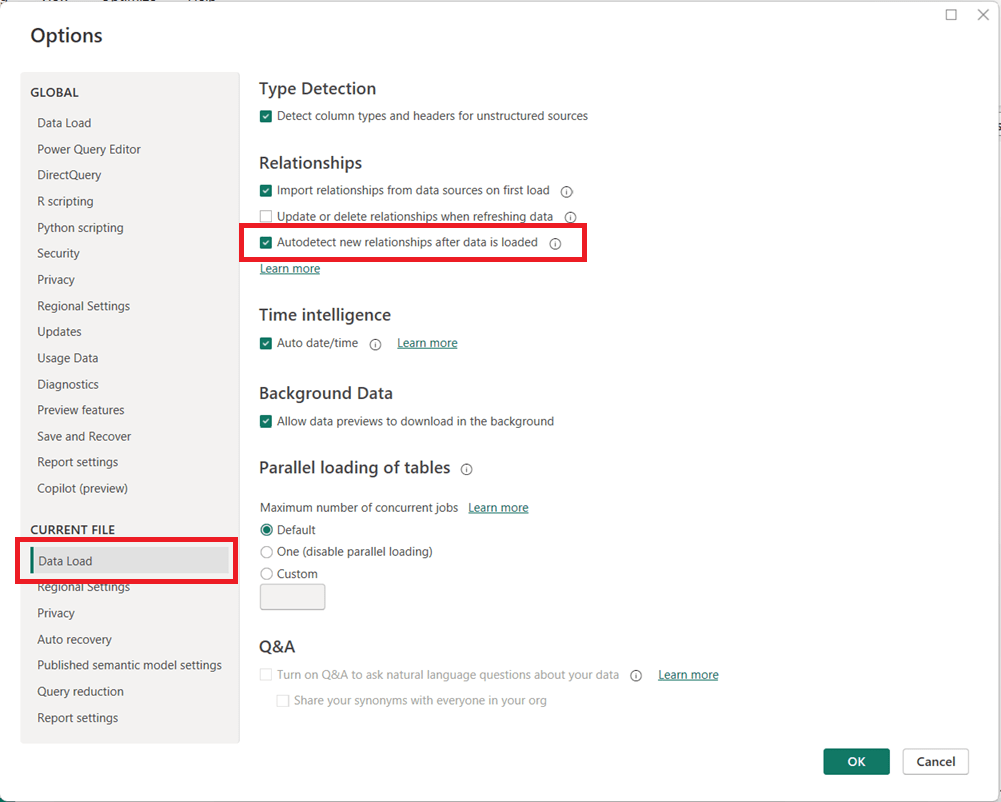
How to turn off “Autodetect New Relationships” in Power BI (and why you may consider doing it)

Power BI includes a feature called Autodetect new relationships that automatically creates relationships between tables when new data is loaded into a model. While convenient for simple datasets, this setting can cause unexpected behavior in more advanced data models.

How to Turn Off Autodetect New Relationships

You can disable this feature directly from Power BI Desktop:

  1. Open Power BI Desktop
  2. Go to FileOptions and settingsOptions
  3. In the left pane, under CURRENT FILE, select Data Load
  4. Then in the page’s main area, under the Relationships section, uncheck:
    • Autodetect new relationships after data is loaded
  5. Click OK

Note that you may need to refresh your model for the change to fully take effect on newly loaded data.

Why You May Want to Disable This Feature

Turning off automatic relationship detection is considered a best practice for many professional Power BI models, especially as complexity increases.

Key reasons to disable it include:

  • Prevent unintended relationships
    This is the main reason. Power BI may create relationships you did not intend, based solely on matching column names or data types. Automatically generated relationships can introduce ambiguity and inactive relationships, leading to incorrect DAX results or performance issues.
  • Maintain full control of the data model, especially when the model needs to be carefully designed because of complexity or other reasons
    Manually creating relationships ensures they follow your star schema design and business logic. Complex models with role-playing dimensions, bridge tables, or composite models benefit from intentional, not automatic, relationships.
  • Improve model reliability and maintainability
    Explicit relationships make your model easier to understand, document, and troubleshoot.

When Autodetect Can Still Be Useful

Autodetect is a useful feature in some cases. For quick prototypes, small datasets, or ad-hoc analysis, automatic relationship detection can save time. However, once a model moves toward production or supports business-critical reporting, manual control is strongly recommended.

Thanks for reading!

Identify When a Gateway Is Required (PL-300 Exam Prep)

This post is a part of the PL-300: Microsoft Power BI Data Analyst Exam Prep Hub; and this topic falls under these sections:
Manage and secure Power BI (15–20%)
--> Create and manage workspaces and assets
--> Identify When a Gateway Is Required


Note that there are 10 practice questions (with answers and explanations) at the end of each topic. Also, there are 2 practice tests with 60 questions each available on the hub below all the exam topics.

Overview

In Power BI, a data gateway acts as a secure bridge between on-premises data sources and the Power BI service in the cloud. Understanding when a gateway is required—and when it is not—is a core skill assessed in the Manage and secure Power BI section of the PL-300 exam.

This topic focuses less on installing gateways and more on decision-making: recognizing data source locations, connection modes, and refresh requirements.


What Is a Power BI Gateway?

A Power BI gateway is software installed on a local machine or server within a private network. It enables the Power BI service to:

  • Refresh data from on-premises sources
  • Query on-premises data in real time (DirectQuery or Live connection)
  • Maintain secure communication without opening inbound firewall ports

There are two main gateway types:

  • On-premises data gateway (standard) – supports multiple users and services
  • On-premises data gateway (personal) – single-user scenarios (limited use, not recommended for enterprise)

When a Gateway Is Required

You must use a gateway when both of the following are true:

  1. The data source is on-premises or in a private network
  2. The Power BI service needs to access the data after publishing

Common Scenarios That Require a Gateway

1. Scheduled Refresh from On-Premises Data

If a dataset connects to:

  • SQL Server (on-premises)
  • Oracle, Teradata, SAP
  • On-premises file shares
  • On-premises data warehouses

…and you want scheduled refresh, a gateway is required.


2. DirectQuery or Live Connections to On-Premises Sources

A gateway is required for:

  • DirectQuery to on-premises SQL Server
  • Live connections to Analysis Services (SSAS) on-premises

This applies even if no refresh schedule exists, because queries are sent at report view time.


3. On-Premises Dataflows

If a Power BI dataflow connects to on-premises data, a gateway is required to refresh the dataflow.


4. Hybrid Scenarios

If a dataset combines:

  • Cloud data (e.g., Azure SQL Database)
  • On-premises data (e.g., local SQL Server)

A gateway is still required for the on-premises portion.


When a Gateway Is NOT Required

A gateway is not needed when Power BI can access the data source directly from the cloud.

Common Scenarios That Do NOT Require a Gateway

1. Cloud Data Sources

No gateway is required for:

  • Azure SQL Database
  • Azure Synapse Analytics
  • Azure Data Lake Storage
  • SharePoint Online
  • OneDrive
  • Power BI semantic models
  • Dataverse
  • Public web data

2. Import-Only Reports Viewed in Power BI Desktop

While working only in Power BI Desktop, no gateway is needed—even for on-premises data—because Desktop connects directly.

A gateway becomes relevant only after publishing.


3. Manual Refresh in Power BI Desktop

If data refresh happens manually in Desktop and the dataset is republished, no gateway is required (though this is not scalable).


Gateway and Connection Mode Summary

Connection ModeOn-Premises SourceGateway Required
Import (Scheduled Refresh)YesYes
Import (Cloud Source)NoNo
DirectQueryYesYes
Live Connection (SSAS)YesYes
Dataflows (On-Prem)YesYes
Desktop-onlyYesNo

Exam-Focused Decision Rules

For the PL-300 exam, remember these rules:

  • On-premises + Power BI Service = Gateway
  • Cloud source = No gateway
  • DirectQuery always needs a gateway if the source is on-premises
  • Desktop usage alone does not require a gateway
  • Hybrid datasets still require a gateway

Common Exam Traps

  • Assuming a gateway is needed for all refresh scenarios
  • Forgetting that Azure SQL Database does NOT require a gateway
  • Confusing publishing with refresh
  • Overlooking gateway needs for dataflows

Key Takeaways

  • Gateways are about location, not data size
  • They enable secure, outbound-only communication
  • The exam tests recognition, not installation steps
  • Focus on where the data lives and how Power BI accesses it

Practice Questions

Go to the Practice Questions for this topic.