Category: Power Query

Describe features of data models in Power BI (DP-900 Exam Prep)

This post is a part of the DP-900: Microsoft Azure Data Fundamentals Exam Prep Hub. 
This topic falls under these sections:
Describe an analytics workload (25–30%)
--> Describe data visualization in Microsoft Power BI
--> Describe features of data models in Power BI


Note that there are 10 practice questions (with answers and explanations) for each section to help you solidify your knowledge of the material. Also, there are 2 practice tests with 60 questions each available on the hub below the exam topics section.

A data model is the foundation of any effective report in Microsoft Power BI. It defines how data is structured, related, and calculated, enabling efficient analysis and meaningful visualizations.

For the DP-900 exam, you should understand how data models work, their key components, and best practices.


What Is a Data Model in Power BI?

A data model is a logical representation of data that includes:

  • Tables
  • Relationships
  • Calculations

It allows Power BI to:

  • Combine data from multiple sources
  • Enable filtering and aggregation
  • Support interactive reporting

Key Features of Power BI Data Models


1. Tables

Data models consist of one or more tables, which can come from:

  • Databases
  • Files (Excel, CSV)
  • Cloud sources

✔ Tables contain rows (records) and columns (fields)


2. Relationships

Relationships define how tables are connected.

Types of Relationships

  • One-to-many (1:*) → Most common
  • Many-to-one (*:1)
  • Many-to-many (:)

Key Concepts

  • Primary key → Unique identifier in one table
  • Foreign key → Reference in another table

✔ Relationships enable filtering across tables


3. Schema Design (Star Schema)

Power BI models commonly follow a star schema:

  • Fact tables → Contain measurable data (e.g., sales)
  • Dimension tables → Contain descriptive data (e.g., customer, product)

✔ This structure improves performance and usability


4. Measures and Calculated Columns

Power BI uses DAX (Data Analysis Expressions) for calculations.

Measures

  • Calculated at query time
  • Used in aggregations (e.g., SUM, AVERAGE)

Calculated Columns

  • Computed during data load
  • Stored in the model

✔ Measures are preferred for performance


5. Data Types

Each column has a defined data type:

  • Text
  • Number
  • Date/Time
  • Boolean

✔ Correct data types ensure accurate calculations and visuals


6. Hierarchies

Hierarchies allow users to drill down into data.

Example

  • Year → Quarter → Month → Day

✔ Used for interactive reporting and exploration


7. Filtering and Cross-Filtering

Relationships enable:

  • Filter propagation between tables
  • Cross-filtering in visuals

✔ Example:
Selecting a product filters related sales data


8. Data Granularity

Granularity refers to the level of detail in data.

  • Fine-grained → detailed (e.g., individual transactions)
  • Coarse-grained → summarized (e.g., monthly totals)

✔ Consistent granularity is important for accurate analysis


9. Model Optimization

Well-designed models:

  • Use fewer tables when possible
  • Avoid unnecessary columns
  • Use measures instead of calculated columns
  • Follow star schema design

✔ Improves performance and usability


10. Relationships Direction (Filter Direction)

Relationships can filter:

  • Single direction (default, recommended)
  • Both directions (used cautiously)

✔ Incorrect settings can lead to ambiguous results


Typical Data Modeling Workflow in Power BI

  1. Load data into Power BI
  2. Clean and transform data (Power Query)
  3. Define relationships
  4. Create measures and calculations
  5. Build reports and visuals

Why This Matters for DP-900

On the exam, you may be asked to:

  • Identify components of a data model
  • Understand relationships and keys
  • Differentiate between measures and calculated columns
  • Recognize star schema design
  • Understand filtering behavior

Summary — Exam-Relevant Takeaways

✔ A data model includes:

  • Tables
  • Relationships
  • Calculations

✔ Key features:

  • Relationships (1:*, :)
  • Star schema (fact + dimension tables)
  • Measures vs calculated columns
  • Hierarchies and filtering

✔ Best practices:

  • Use star schema
  • Prefer measures over calculated columns
  • Maintain consistent granularity

✔ Exam tips:
👉 Fact table = metrics (numbers)
👉 Dimension table = descriptive attributes
👉 Measure = dynamic calculation
👉 Calculated column = stored value


Go to the Practice Exam Questions for this topic.

Go to the DP-900 Exam Prep Hub main page.

Practice Questions: Describe features of data models in Power BI (DP-900 Exam Prep)

Practice Questions


Question 1

What is the primary purpose of a data model in Power BI?

A. To store raw files
B. To define relationships and enable data analysis
C. To manage network connections
D. To create dashboards only

Answer: B

Explanation:
A data model organizes data and defines relationships and calculations for analysis.


Question 2

Which component connects tables together in a Power BI data model?

A. Measures
B. Relationships
C. Dashboards
D. Queries

Answer: B

Explanation:
Relationships define how tables interact and allow filtering across them.


Question 3

Which type of relationship is MOST common in Power BI models?

A. Many-to-many
B. One-to-many
C. One-to-one
D. No relationship

Answer: B

Explanation:
The one-to-many (1:*) relationship is the most common in analytical models.


Question 4

In a star schema, which table typically contains numeric values used for analysis?

A. Dimension table
B. Lookup table
C. Fact table
D. Bridge table

Answer: C

Explanation:
Fact tables store measurable data (e.g., sales, revenue).


Question 5

What is the role of a dimension table in a data model?

A. Store raw transaction data
B. Store aggregated values only
C. Provide descriptive attributes for filtering and grouping
D. Execute calculations

Answer: C

Explanation:
Dimension tables contain descriptive data like customer or product details.


Question 6

Which type of calculation is evaluated at query time in Power BI?

A. Calculated column
B. Measure
C. Table relationship
D. Data type

Answer: B

Explanation:
Measures are calculated dynamically during query execution.


Question 7

Which language is used to create measures and calculated columns in Power BI?

A. SQL
B. Python
C. DAX
D. Java

Answer: C

Explanation:
DAX (Data Analysis Expressions) is used for calculations in Power BI.


Question 8

What is the benefit of using a star schema in Power BI?

A. Increased data duplication
B. Simplified relationships and improved performance
C. Elimination of fact tables
D. Reduced data types

Answer: B

Explanation:
Star schema improves performance and usability by simplifying relationships.


Question 9

What happens when you create a relationship between two tables?

A. Data is duplicated
B. Tables are merged into one
C. Filters can propagate between tables
D. Data types are changed

Answer: C

Explanation:
Relationships allow filtering across related tables.


Question 10

Which feature allows users to drill down through levels such as Year → Month → Day?

A. Measures
B. Hierarchies
C. Relationships
D. Dashboards

Answer: B

Explanation:
Hierarchies enable drill-down analysis in reports.


✅ Quick Exam Takeaways

✔ Data model components:

  • Tables
  • Relationships
  • Measures & calculated columns

✔ Key concepts:

  • Fact table → numeric data
  • Dimension table → descriptive data
  • Relationships → connect tables

✔ Calculations:

  • Measures → dynamic
  • Calculated columns → stored

✔ Design best practice:

  • Use star schema

✔ Exam tip:
👉 Measure = calculated at query time
👉 Calculated column = stored in table
👉 Fact = numbers, Dimension = descriptions


Go to the DP-900 Exam Prep Hub main page.

Identify capabilities of Power BI (DP-900 Exam Prep)

This post is a part of the DP-900: Microsoft Azure Data Fundamentals Exam Prep Hub. 
This topic falls under these sections:
Describe an analytics workload (25–30%)
--> Describe data visualization in Microsoft Power BI
--> Identify capabilities of Power BI


Note that there are 10 practice questions (with answers and explanations) for each section to help you solidify your knowledge of the material. Also, there are 2 practice tests with 60 questions each available on the hub below the exam topics section.

Microsoft Power BI is Microsoft’s business intelligence (BI) and data visualization platform. It enables users to connect to data, transform it, and create interactive reports and dashboards for data-driven decision-making.

For the DP-900 exam, you should understand what Power BI can do, its core components, and its role in an analytics solution.


What Is Power BI?

Power BI is a self-service and enterprise BI tool that allows users to:

  • Connect to multiple data sources
  • Transform and model data
  • Create visualizations and reports
  • Share insights across an organization

Core Capabilities of Power BI


1. Data Connectivity

Power BI can connect to a wide range of data sources:

  • Cloud services (Azure, SaaS apps)
  • Databases (SQL Server, Azure SQL)
  • Files (Excel, CSV)
  • Streaming data sources

✔ Supports both import and direct query modes


2. Data Transformation (Power Query)

Power BI includes Power Query, a tool for:

  • Cleaning data
  • Shaping and transforming data
  • Merging and filtering datasets

✔ Uses a visual interface (no coding required, though M language is available)


3. Data Modeling

Power BI enables users to create data models by:

  • Defining relationships between tables
  • Creating calculated columns and measures
  • Using DAX (Data Analysis Expressions)

✔ Supports star schema design (common in analytics)


4. Data Visualization

Power BI provides a rich set of visualizations:

  • Charts (bar, line, pie, etc.)
  • Tables and matrices
  • Maps and geographic visuals
  • KPIs and gauges

✔ Visuals are interactive and dynamic


5. Reports

A report in Power BI:

  • Is a collection of visualizations
  • Typically spans multiple pages
  • Allows filtering, slicing, and drill-down

✔ Built in Power BI Desktop and published to the cloud


6. Dashboards

A dashboard:

  • Is a single-page view of key metrics
  • Displays pinned visuals from reports
  • Provides a high-level overview

✔ Used for quick insights and monitoring


7. Data Refresh

Power BI supports:

  • Scheduled refresh (periodic updates)
  • Real-time/streaming data updates

✔ Ensures reports reflect current data


8. Sharing and Collaboration

Power BI enables users to:

  • Publish reports to the Power BI Service
  • Share dashboards with others
  • Collaborate across teams

✔ Integrates with Microsoft 365 (Teams, SharePoint)


9. Security

Power BI provides:

  • Row-Level Security (RLS)
  • Data access controls
  • Integration with Azure Active Directory

✔ Ensures users only see authorized data


10. Integration with Azure and Microsoft Ecosystem

Power BI integrates with:

  • Azure Synapse Analytics
  • Azure Data Lake Storage
  • Microsoft Fabric
  • Excel and other Microsoft tools

✔ Plays a key role in end-to-end analytics solutions


Power BI Components


Power BI Desktop

  • Authoring tool for reports
  • Installed on a local machine

Power BI Service

  • Cloud-based platform
  • Used for sharing and collaboration

Power BI Mobile

  • View dashboards and reports on mobile devices

Typical Analytics Workflow with Power BI

  1. Connect to data sources
  2. Transform data (Power Query)
  3. Model data (relationships, DAX)
  4. Create visualizations
  5. Publish reports
  6. Share dashboards

Why This Matters for DP-900

On the exam, you may be asked to:

  • Identify Power BI capabilities
  • Differentiate between reports and dashboards
  • Understand data connectivity and refresh options
  • Recognize Power BI’s role in analytics solutions

Summary — Exam-Relevant Takeaways

✔ Power BI is used for:

  • Data visualization
  • Reporting
  • Business intelligence

✔ Key capabilities:

  • Data connectivity
  • Data transformation (Power Query)
  • Data modeling (relationships, DAX)
  • Interactive visualizations
  • Sharing and collaboration

✔ Key components:

  • Power BI Desktop → report creation
  • Power BI Service → sharing
  • Dashboards → single-page overview
  • Reports → multi-page detailed analysis

✔ Exam tips:
👉 Report = multi-page, detailed
👉 Dashboard = single-page, summary
👉 Power Query = data transformation
👉 DAX = calculations and measures


Go to the Practice Exam Questions for this topic.

Go to the DP-900 Exam Prep Hub main page.
Practice Questions: Identify capabilities of Power BI (DP-900 Exam Prep)

Practice Questions


Question 1

What is the primary purpose of Microsoft Power BI?

A. Managing databases
B. Running virtual machines
C. Creating reports and visualizations from data
D. Developing applications

Answer: C

Explanation:
Power BI is a business intelligence tool used to create reports, dashboards, and visualizations.


Question 2

Which Power BI component is used to create reports?

A. Power BI Service
B. Power BI Mobile
C. Power BI Desktop
D. Azure Portal

Answer: C

Explanation:
Power BI Desktop is the primary tool for building reports and data models.


Question 3

What is the main difference between a report and a dashboard in Power BI?

A. Reports are single-page, dashboards are multi-page
B. Reports are multi-page, dashboards are single-page
C. Reports are only for developers
D. Dashboards cannot contain visuals

Answer: B

Explanation:
Reports are multi-page and detailed, while dashboards are single-page summaries.


Question 4

Which feature in Power BI is used to clean and transform data?

A. DAX
B. Power Query
C. Power Pivot
D. Azure Data Factory

Answer: B

Explanation:
Power Query is used for data transformation and preparation.


Question 5

Which language is used in Power BI for creating calculations and measures?

A. SQL
B. Python
C. DAX
D. Java

Answer: C

Explanation:
DAX (Data Analysis Expressions) is used for calculations and measures.


Question 6

Which Power BI feature allows users to restrict data access to specific rows?

A. Data refresh
B. Row-Level Security (RLS)
C. Power Query
D. Dashboards

Answer: B

Explanation:
Row-Level Security (RLS) ensures users only see data they are authorized to access.


Question 7

Which of the following is a key capability of Power BI?

A. Running operating systems
B. Hosting web applications
C. Connecting to multiple data sources
D. Managing network traffic

Answer: C

Explanation:
Power BI can connect to many different data sources, including databases, files, and cloud services.


Question 8

Where are Power BI reports typically published for sharing and collaboration?

A. Power BI Desktop
B. Power BI Service
C. Azure Virtual Machines
D. SQL Server

Answer: B

Explanation:
Reports are published to the Power BI Service for sharing and collaboration.


Question 9

Which capability allows Power BI to display near real-time data?

A. Scheduled refresh only
B. Streaming datasets
C. Static reports
D. Data export

Answer: B

Explanation:
Streaming datasets enable real-time or near real-time updates.


Question 10

What is the purpose of a Power BI dashboard?

A. To store raw data
B. To create data pipelines
C. To provide a single-page view of key metrics
D. To manage user accounts

Answer: C

Explanation:
Dashboards provide a high-level, single-page summary of important data.


✅ Quick Exam Takeaways

✔ Power BI is used for:

  • Data visualization
  • Reporting
  • Business intelligence

✔ Key features:

  • Power Query → data transformation
  • DAX → calculations
  • Reports → multi-page
  • Dashboards → single-page

✔ Components:

  • Power BI Desktop → build reports
  • Power BI Service → share and collaborate

✔ Security:

  • Row-Level Security (RLS)

✔ Exam tip:
👉 Transform data → Power Query
👉 Create calculations → DAX
👉 Share reports → Power BI Service


Go to the DP-900 Exam Prep Hub main page.

Practice Questions: Configure the Report Page (PL-300 Exam Prep)

This post is a part of the PL-300: Microsoft Power BI Data Analyst Exam Prep Hub; and this topic falls under these sections:
Visualize and analyze the data (25–30%)
--> Create reports
--> Configure the Report Page


Below are 10 practice questions (with answers and explanations) for this topic of the exam.
There are also 2 practice tests for the PL-300 exam with 60 questions each (with answers) available on the hub.

Practice Questions

Question 1

You are designing a report that will be printed on standard paper. Which report page setting should you configure first?

A. Page background transparency
B. Page size
C. Visual interactions
D. Gridline spacing

Correct Answer: B. Page size

Explanation:
When designing reports intended for printing, configuring the page size (such as Letter or custom dimensions) ensures visuals fit the printed format properly. Other settings enhance appearance but do not control layout dimensions.


Question 2

A business user wants all visuals on a page to align evenly without manually adjusting each one. Which feature should you enable?

A. Bookmarks
B. Sync slicers
C. Gridlines and snap to grid
D. Mobile layout

Correct Answer: C. Gridlines and snap to grid

Explanation:
Gridlines and snap-to-grid help maintain consistent spacing and alignment across visuals on the report canvas.


Question 3

You want a report page to display well on mobile devices without changing the desktop layout. What should you configure?

A. Page orientation
B. Drillthrough filters
C. Mobile layout
D. Visual headers

Correct Answer: C. Mobile layout

Explanation:
The mobile layout allows you to rearrange visuals specifically for phone screens while keeping the desktop view unchanged.


Question 4

A report must comply with accessibility requirements. Which report page configuration supports this requirement?

A. Enabling cross-highlighting
B. Adding alt text to visuals
C. Using bookmarks
D. Changing the page wallpaper

Correct Answer: B. Adding alt text to visuals

Explanation:
Alt text enables screen readers to describe visuals to users with visual impairments and is a key accessibility feature in Power BI.


Question 5

You want to guide users to navigate between report pages using buttons. What feature must be configured?

A. Page filters
B. Drillthrough
C. Bookmarks
D. Visual interactions

Correct Answer: C. Bookmarks

Explanation:
Bookmarks capture the current report state and can be linked to buttons to create navigation between pages or report views.


Question 6

A report page should use corporate branding colors behind all visuals without interfering with readability. Which setting should you use?

A. Page wallpaper
B. Visual border color
C. Gridline color
D. Data colors

Correct Answer: A. Page wallpaper

Explanation:
Wallpaper sits behind the report background and visuals, making it ideal for branding without impacting visual clarity.


Question 7

You need slicers on one report page to affect visuals on another page as well. Which configuration supports this?

A. Page size
B. Visual-level filters
C. Sync slicers
D. Drillthrough

Correct Answer: C. Sync slicers

Explanation:
Sync slicers allow slicer selections to be shared across multiple report pages.


Question 8

A report page contains many visuals, but users only need summary information at first. What page-level feature helps improve usability without removing visuals?

A. Hide filter pane
B. Drillthrough
C. Bookmarks with buttons
D. Page background transparency

Correct Answer: C. Bookmarks with buttons

Explanation:
Bookmarks can show or hide visuals and allow users to switch between summary and detailed views without cluttering the page.


Question 9

You want a slicer to affect only visuals on the current report page. Where should the filter be configured?

A. Report-level filter
B. Visual-level filter
C. Page-level filter
D. Drillthrough filter

Correct Answer: C. Page-level filter

Explanation:
Page-level filters apply only to visuals on the current report page, making them ideal for page-specific filtering.


Question 10

A report designer wants to ensure users can clearly see and interact with visuals without unnecessary distractions. Which configuration best supports this goal?

A. Increase gridline visibility
B. Disable visual headers
C. Use a simple page layout with consistent spacing
D. Apply high-contrast wallpaper

Correct Answer: C. Use a simple page layout with consistent spacing

Explanation:
Clear layout, alignment, and spacing improve readability and usability, which is a key objective of report page configuration.


Final Exam Tip

For PL-300, remember that configuring the report page focuses on layout, usability, accessibility, and navigation, not data modeling or DAX. If a question mentions canvas size, layout, navigation, mobile view, or accessibility, it almost always points to this topic.


Go back to the PL-300 Exam Prep Hub main page

How to Perform a Safe DIVIDE in Power BI (DAX and Power Query)

Division is a common operation in Power BI, but it can cause errors when the divisor is zero. Both DAX and Power Query provide built-in ways to handle these scenarios safely.

Safe DIVIDE in DAX

In DAX, the DIVIDE function is the recommended approach. Its syntax is:

DIVIDE(numerator, divisor [, alternateResult])

If the divisor is zero (or BLANK), the function returns the optional alternateResult; otherwise, it performs the division normally.

Examples:

  • DIVIDE(10, 2)5
  • DIVIDE(10, 0)BLANK
  • DIVIDE(10, 0, 0)0

This makes DIVIDE safer and cleaner than using conditional logic.

Safe DIVIDE in Power Query

In Power Query (M language), you can use the try … otherwise expression to handle divide-by-zero errors gracefully. The syntax is:

try [expression] otherwise [alternateValue]

Example:

try [Sales] / [Quantity] otherwise 0

If the division fails (such as when Quantity is zero), Power Query returns 0 instead of an error.

Using DIVIDE in DAX and try … otherwise in Power Query ensures your division calculations remain error-free.

How to replace a NULL value in Power BI Power Query

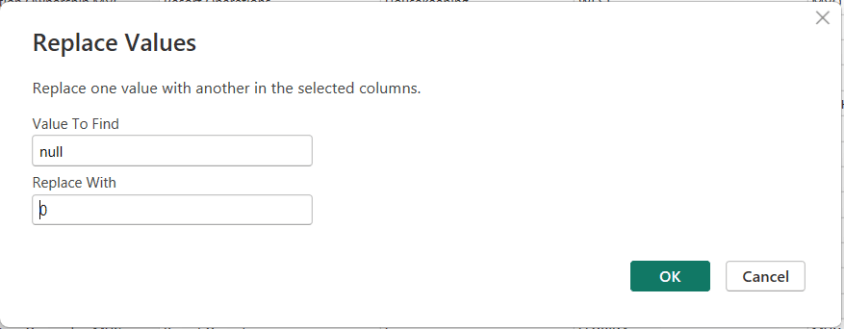
In Power BI, handling NULL values is a common data-preparation step to get your data ready for analysis, and Power Query makes this easy using the Replace Values feature.

This option is available from both the Home menu …

… and the Transform menu in the Power Query Editor.

To replace NULLs, first select the column where the NULL values exist. Then choose Replace Values. When the dialog box appears, enter null as the value to find and replace, and specify the value you want to use instead—such as 0 for numeric columns or “Unknown” for text columns.

After confirming, Power Query automatically updates the column and records the step.

Thanks for reading!

Understanding the Power BI Error: “A circular dependency was detected …”

One of the more confusing Power BI errors—especially for intermediate users—is:

“A circular dependency was detected”

This error typically appears when working with DAX measures, calculated columns, calculated tables, relationships, or Power Query transformations. While the message is short, the underlying causes can vary, and resolving it requires understanding how Power BI evaluates dependencies.

This article explains what the error means, common scenarios that cause it, and how to resolve each case.


What Does “Circular Dependency” Mean?

A circular dependency occurs when Power BI cannot determine the correct calculation order because:

  • Object A depends on B
  • Object B depends on A (directly or indirectly)

In other words, Power BI is stuck in a loop and cannot decide which calculation should be evaluated first.

Power BI uses a dependency graph behind the scenes to determine evaluation order. When that graph forms a cycle, this error is triggered.


Example of the Error Message

Below is what the error typically looks like in Power BI Desktop:

A circular dependency was detected:
Table[Calculated Column] → Measure[Total Sales] → Table[Calculated Column]

Power BI may list:

  • Calculated columns
  • Measures
  • Tables
  • Relationships involved in the loop

⚠️ The exact wording varies depending on whether the issue is in DAX, relationships, or Power Query.


Common Scenarios That Cause Circular Dependency Errors

1. Calculated Column Referencing a Measure That Uses the Same Column

Scenario

  • A calculated column references a measure
  • That measure aggregates or filters the same table containing the calculated column

Example

-- Calculated Column
Flag =
IF ( [Total Sales] > 1000, "High", "Low" )

-- Measure
Total Sales =
SUM ( Sales[SalesAmount] )

Why This Fails

  • Calculated columns are evaluated row by row during data refresh
  • Measures are evaluated at query time
  • The measure depends on the column, and the column depends on the measure → loop

How to Fix

✅ Replace the measure with row-level logic

Flag =
IF ( Sales[SalesAmount] > 1000, "High", "Low" )

✅ Or convert the calculated column into a measure if aggregation is needed


2. Measures That Indirectly Reference Each Other

Scenario

Two or more measures reference each other through intermediate measures.

Example

Measure A = [Measure B] + 10
Measure B = [Measure A] * 2

Why This Fails

  • Power BI cannot determine which measure to evaluate first

How to Fix

✅ Redesign logic so one measure is foundational

  • Base calculations on columns or constants
  • Avoid bi-directional measure dependencies

Best Practice

  • Create base measures (e.g., Total Sales, Total Cost)
  • Build higher-level measures on top of them

3. Calculated Tables Referencing Themselves (Directly or Indirectly)

Scenario

A calculated table references:

  • Another calculated table
  • Or a measure that references the original table

Example

SummaryTable =
SUMMARIZE (
    SummaryTable,
    Sales[Category],
    "Total", SUM ( Sales[SalesAmount] )
)

Why This Fails

  • The table depends on itself for creation

How to Fix

✅ Ensure calculated tables reference:

  • Physical tables only
  • Or previously created calculated tables that do not depend back on them

4. Bi-Directional Relationships Creating Dependency Loops

Scenario

  • Multiple tables connected with Both (bi-directional) relationships
  • Measures or columns rely on ambiguous filter paths

Why This Fails

  • Power BI cannot determine a single filter direction
  • Creates an implicit circular dependency

How to Fix

✅ Use single-direction relationships whenever possible
✅ Replace bi-directional filtering with:

  • USERELATIONSHIP
  • TREATAS
  • Explicit DAX logic

Rule of Thumb

Bi-directional relationships should be the exception, not the default.


5. Calculated Columns Using LOOKUPVALUE or RELATED Incorrectly

Scenario

Calculated columns use LOOKUPVALUE or RELATED across tables that already depend on each other.

Why This Fails

  • Cross-table column dependencies form a loop

How to Fix

✅ Move logic to:

  • Power Query (preferred)
  • Measures instead of columns
  • A dimension table instead of a fact table

6. Power Query (M) Queries That Reference Each Other

Scenario

In Power Query:

  • Query A references Query B
  • Query B references Query A (or via another query)

Why This Fails

  • Power Query evaluates queries in dependency order
  • Circular references are not allowed

How to Fix

✅ Create a staging query

  • Reference the source once
  • Build transformations in layers

Best Practice

  • Disable load for intermediate queries
  • Keep a clear, one-direction flow of dependencies

7. Sorting a column by another column that derives its value from the column

Scenario

In DAX:

  • Column A is being sorted by Column B
  • Column B derives from Column A

Why This Fails

  • Power BI cannot determine which one to evaluate first

How to Fix: you have two options for resolving this scenario …

✅ Create the calculated columns in reverse order

✅Rewrite at least one of the calculated columns to be derived in a different way that does not reference the other column.

Best Practice

  • Keep a clear, one-direction flow of dependencies

How to Diagnose Circular Dependency Issues Faster

Use These Tools

  • Model view → inspect relationships and directions
  • Manage dependencies (in Power Query)
  • DAX formula bar → hover over column and measure references
  • Tabular Editor (if available) for dependency visualization

Best Practices to Avoid Circular Dependencies

  • Prefer measures over calculated columns
  • Keep calculated columns row-level only
  • Avoid referencing measures inside calculated columns
  • Use single-direction relationships
  • Create base measures and build upward
  • Push complex transformations to Power Query

Final Thoughts

The “A circular dependency was detected” error is not a bug—it’s Power BI protecting the model from ambiguous or impossible calculation paths.

Once you understand how Power BI evaluates columns, measures, relationships, and queries, this error becomes much easier to diagnose and prevent.

If you treat your model like a clean dependency graph—with clear direction and layering—you’ll rarely see this message again.

AI Career Options for Early-Career Professionals and New Graduates

Artificial Intelligence is shaping nearly every industry, but breaking into AI right out of college can feel overwhelming. The good news is that you don’t need a PhD or years of experience to start a successful AI-related career. Many AI roles are designed specifically for early-career talent, blending technical skills with problem-solving, communication, and business understanding.

This article outlines excellent AI career options for people just entering the workforce, explaining what each role involves, why it’s a strong choice, and how to prepare with the right skills, tools, and learning resources.


1. AI / Machine Learning Engineer (Junior)

What It Is & What It Involves

Machine Learning Engineers build, train, test, and deploy machine learning models. Junior roles typically focus on:

  • Implementing existing models
  • Cleaning and preparing data
  • Running experiments
  • Supporting senior engineers

Why It’s a Good Option

  • High demand and strong salary growth
  • Clear career progression
  • Central role in AI development

Skills & Preparation Needed

Technical Skills

  • Python
  • SQL
  • Basic statistics & linear algebra
  • Machine learning fundamentals
  • Libraries: scikit-learn, TensorFlow, PyTorch

Where to Learn

  • Coursera (Andrew Ng ML specialization)
  • Fast.ai
  • Kaggle projects
  • University CS or data science coursework

Difficulty Level: ⭐⭐⭐⭐ (Moderate–High)


2. Data Analyst (AI-Enabled)

What It Is & What It Involves

Data Analysts use AI tools to analyze data, generate insights, and support decision-making. Tasks often include:

  • Data cleaning and visualization
  • Dashboard creation
  • Using AI tools to speed up analysis
  • Communicating insights to stakeholders

Why It’s a Good Option

  • Very accessible for new graduates
  • Excellent entry point into AI
  • Builds strong business and technical foundations

Skills & Preparation Needed

Technical Skills

  • SQL
  • Excel
  • Python (optional but helpful)
  • Power BI / Tableau
  • AI tools (ChatGPT, Copilot, AutoML)

Where to Learn

  • Microsoft Learn
  • Google Data Analytics Certificate
  • Kaggle datasets
  • Internships and entry-level analyst roles

Difficulty Level: ⭐⭐ (Low–Moderate)


3. Prompt Engineer / AI Specialist (Entry Level)

What It Is & What It Involves

Prompt Engineers design, test, and optimize instructions for AI systems to get reliable and accurate outputs. Entry-level roles focus on:

  • Writing prompts
  • Testing AI behavior
  • Improving outputs for business use cases
  • Supporting AI adoption across teams

Why It’s a Good Option

  • Low technical barrier
  • High demand across industries
  • Great for strong communicators and problem-solvers

Skills & Preparation Needed

Key Skills

  • Clear writing and communication
  • Understanding how LLMs work
  • Logical thinking
  • Domain knowledge (marketing, analytics, HR, etc.)

Where to Learn

  • OpenAI documentation
  • Prompt engineering guides
  • Hands-on practice with ChatGPT, Claude, Gemini
  • Real-world experimentation

Difficulty Level: ⭐⭐ (Low–Moderate)


4. AI Product Analyst / Associate Product Manager

What It Is & What It Involves

This role sits between business, engineering, and AI teams. Responsibilities include:

  • Defining AI features
  • Translating business needs into AI solutions
  • Analyzing product performance
  • Working with data and AI engineers

Why It’s a Good Option

  • Strong career growth
  • Less coding than engineering roles
  • Excellent mix of strategy and technology

Skills & Preparation Needed

Key Skills

  • Basic AI/ML concepts
  • Data analysis
  • Product thinking
  • Communication and stakeholder management

Where to Learn

  • Product management bootcamps
  • AI fundamentals courses
  • Internships or associate PM roles
  • Case studies and product simulations

Difficulty Level: ⭐⭐⭐ (Moderate)


5. AI Research Assistant / Junior Data Scientist

What It Is & What It Involves

These roles support AI research and experimentation, often in academic, healthcare, or enterprise environments. Tasks include:

  • Running experiments
  • Analyzing model performance
  • Data exploration
  • Writing reports and documentation

Why It’s a Good Option

  • Strong foundation for advanced AI careers
  • Exposure to real-world research
  • Great for analytical thinkers

Skills & Preparation Needed

Technical Skills

  • Python or R
  • Statistics and probability
  • Data visualization
  • ML basics

Where to Learn

  • University coursework
  • Research internships
  • Kaggle competitions
  • Online ML/statistics courses

Difficulty Level: ⭐⭐⭐⭐ (Moderate–High)


6. AI Operations (AIOps) / ML Operations (MLOps) Associate

What It Is & What It Involves

AIOps/MLOps professionals help deploy, monitor, and maintain AI systems. Entry-level work includes:

  • Model monitoring
  • Data pipeline support
  • Automation
  • Documentation

Why It’s a Good Option

  • Growing demand as AI systems scale
  • Strong alignment with data engineering
  • Less math-heavy than research roles

Skills & Preparation Needed

Technical Skills

  • Python
  • SQL
  • Cloud basics (Azure, AWS, GCP)
  • CI/CD concepts
  • ML lifecycle understanding

Where to Learn

  • Cloud provider learning paths
  • MLOps tutorials
  • GitHub projects
  • Entry-level data engineering roles

Difficulty Level: ⭐⭐⭐ (Moderate)


7. AI Consultant / AI Business Analyst (Entry Level)

What It Is & What It Involves

AI consultants help organizations understand and implement AI solutions. Entry-level roles focus on:

  • Use-case analysis
  • AI tool evaluation
  • Process improvement
  • Client communication

Why It’s a Good Option

  • Exposure to multiple industries
  • Strong soft-skill development
  • Fast career progression

Skills & Preparation Needed

Key Skills

  • Business analysis
  • AI fundamentals
  • Presentation and communication
  • Problem-solving

Where to Learn

  • Business analytics programs
  • AI fundamentals courses
  • Consulting internships
  • Case study practice

Difficulty Level: ⭐⭐⭐ (Moderate)


8. AI Content & Automation Specialist

What It Is & What It Involves

This role focuses on using AI to automate content, workflows, and internal processes. Tasks include:

  • Building automations
  • Creating AI-generated content
  • Managing tools like Zapier, Notion AI, Copilot

Why It’s a Good Option

  • Very accessible for non-technical graduates
  • High demand in marketing and operations
  • Rapid skill acquisition

Skills & Preparation Needed

Key Skills

  • Workflow automation
  • AI tools usage
  • Creativity and organization
  • Basic scripting (optional)

Where to Learn

  • Zapier and Make tutorials
  • Hands-on projects
  • YouTube and online courses
  • Real business use cases

Difficulty Level: ⭐⭐ (Low–Moderate)


How New Graduates Should Prepare for AI Careers

1. Build Foundations

  • Python or SQL
  • Data literacy
  • AI concepts (not just tools)

2. Practice with Real Projects

  • Personal projects
  • Internships
  • Freelance or volunteer work
  • Kaggle or GitHub portfolios

3. Learn AI Tools Early

  • ChatGPT, Copilot, Gemini
  • AutoML platforms
  • Visualization and automation tools

4. Focus on Communication

AI careers, and careers in general, reward those who can explain complex ideas simply.


Final Thoughts

AI careers are no longer limited to researchers or elite engineers. For early-career professionals, the best path is often a hybrid role that combines AI tools, data, and business understanding. Starting in these roles builds confidence, experience, and optionality—allowing you to grow into more specialized AI positions over time.
And the advice that many professionals give for gaining knowledge and breaking into the space is to “get your hands dirty”.

Good luck on your data journey!

Exam Prep Hub for DP-600: Implementing Analytics Solutions Using Microsoft Fabric

This is your one-stop hub with information for preparing for the DP-600: Implementing Analytics Solutions Using Microsoft Fabric certification exam. Upon successful completion of the exam, you earn the Fabric Analytics Engineer Associate certification.

This hub provides information directly here, links to a number of external resources, tips for preparing for the exam, practice tests, and section questions to help you prepare. Bookmark this page and use it as a guide to ensure that you are fully covering all relevant topics for the exam and using as many of the resources available as possible. We hope you find it convenient and helpful.

Why do the DP-600: Implementing Analytics Solutions Using Microsoft Fabric exam to gain the Fabric Analytics Engineer Associate certification?

Most likely, you already know why you want to earn this certification, but in case you are seeking information on its benefits, here are a few:
(1) there is a possibility for career advancement because Microsoft Fabric is a leading data platform used by companies of all sizes, all over the world, and is likely to become even more popular
(2) greater job opportunities due to the edge provided by the certification
(3) higher earnings potential,
(4) you will expand your knowledge about the Fabric platform by going beyond what you would normally do on the job and
(5) it will provide immediate credibility about your knowledge, and
(6) it may, and it should, provide you with greater confidence about your knowledge and skills.


Important DP-600 resources:


DP-600: Skills measured as of October 31, 2025:

Here you can learn in a structured manner by going through the topics of the exam one-by-one to ensure full coverage; click on each hyperlinked topic below to go to more information about it:

Skills at a glance

  • Maintain a data analytics solution (25%-30%)
  • Prepare data (45%-50%)
  • Implement and manage semantic models (25%-30%)

Maintain a data analytics solution (25%-30%)

Implement security and governance

Maintain the analytics development lifecycle

Prepare data (45%-50%)

Get Data

Transform Data

Query and analyze data

Implement and manage semantic models (25%-30%)

Design and build semantic models

Optimize enterprise-scale semantic models


Practice Exams:

We have provided 2 practice exams with answers to help you prepare.

DP-600 Practice Exam 1 (60 questions with answer key)

DP-600 Practice Exam 2 (60 questions with answer key)


Good luck to you passing the DP-600: Implementing Analytics Solutions Using Microsoft Fabric certification exam and earning the Fabric Analytics Engineer Associate certification!