Author: thedatacommunity

Components of Oracle Business Intelligence Applications (OBIA)

The Oracle Business Intelligence Applications (OBIA) is made up of a number of components that are brought together to create a great prebuilt BI solution.  The components can be categorized into 4 major components.

1. Prebuilt reports and dashboard content + Embedded dashboard/report building tool
This prebuilt content is contained in the Oracle BI Presentation Services Catalog, and some of the content is built on the Oracle BI Repository metadata.
The tools include Dashboard Editor and Answers.

2. Prebuilt metadata content (Oracle BI Server Repository) + Administration Tool      
This metadata content is contained in the Oracle Business Intelligence Applications repository file (EnterpriseBusinessAnalytics.rpd).
This content is built and administered using the BI Administration Tool, and is built from the metadata in the OBAW.

3. Oracle Business Analytics Warehouse
The prebuilt data warehouse that holds data extracted, transformed, and loaded from the transactional sources.  The OBAW contains best-practice star-schemas and conforming dimensions.

4. Prebuilt ETL processes and tools
Prebuilt Informatica content + Embedded Informatica ETL Tool
+ Prebuilt DAC metadata repository files + Embedded DAC Tool
Informatica is a third-party application that performs the extract, transform, and load operations for the Data Warehouse.  The Informatica content includes Extract-Transform-Load (ETL) repository objects, such as mappings, sessions, and workflows, and is contained in the Informatica repository file (Oracle_BI_DW_Base.rep).
The DAC is a tool that is used for setup, configuration, administration, and monitoring of data warehouse processes.  The DAC content includes repository objects such as tables, subject areas, execution plans, and tasks, and is contained in XML files.
These tools and processes together extract data from sources, such as Oracle EBS or PeopleSoft, and load the data into the OBAW.
Oracle releases PeopleSoft 9.2 – HR, Financials, and SCM

Oracle has released PeopleSoft 9.2 – including HR, Financials and Supply Chain Management. 

You can read the PeopleSoft 9.2 Press Release here, and check out the PeopleSoft 9.2 Data Sheet here.

The release includes over 1000 new features, functions and enhancements.

As for something specifically related to BI/Reporting, here is a clip from the press release:

“PeopleSoft applications take advantage of new real-time, multi-dimensional decision support analysis capabilities enabled by PeopleTools 8.53 with over 60 prebuilt self-service Pivot Grids delivered in release 9.2.”

This is a trend – more reporting/analysis functionality is being built into or integrated into the ERP systems (as opposed to having separate systems that users access separately to get their jobs done).

Enjoy reading.


OBIEE 11g config and log file locations

These are some key log files and config files in OBIEE 11g. These might be frequently accessed for debugging and checking current parameter settings.

bi_server1.log  &  bi_server1-diagnostic.log
(bi_server1.out  &  access.log are also captured in this directory)
[$FMW_HOME]/user_projects/domains/bifoundation_domain/servers/bi_server1/logs

nqserver.log    &    nqquery.log
[$FMW_HOME]/instances/instance1/diagnostics/logs/OracleBIServerComponent/coreapplication_obis1

sawlog.log
[$FMW_HOME]/instances/instance1/diagnostics/logs/OracleBIPresentationServicesComponent/coreapplication_obips1

NQSConfig.INI   &  DBFeatures.INI
[$FMW_HOME]/instances/instance1/config/OracleBIServerComponent/coreapplication_obis1

instanceconfig.xml      &     credentialstore.xml
[$FMW_HOME]/instances/instance1/config/OracleBIPresentationServicesComponent/coreapplication_obips1

config.xml
[$FMW_HOME]/user_projects/domains/bifoundation_domain/config

system-jazn-data.xml
[$FMW_HOME]/user_projects/domains/bifoundation_domain/config/fmwconfig

Oracle Peoplesoft Accounts Payable Data model and dataflow

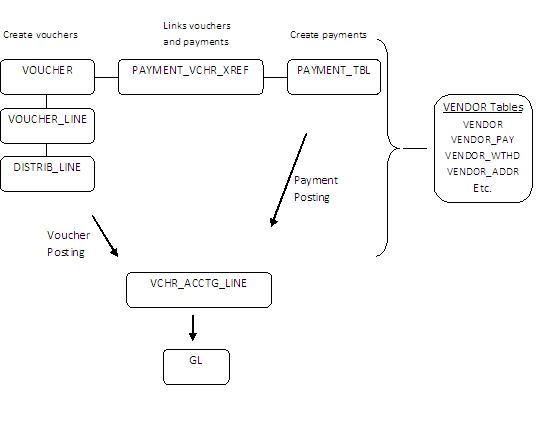
This is a simplified Peoplesoft Accounts Payable data flow and data model. The purpose is to provide a basic understanding of the key tables and how data flows through the module.  Understanding the key tables and the data flow is helpful when creating metrics and reports in tools such as OBIEE or when working with OBIA Financial Analytics, and particularly, with the Accounts Payable dashboard, reports and metrics.

When a voucher is created, the information is recorded in the VOUCHER, VOUCHER_LINE and DISTRIB_LINE tables. 

When payments are created for the vouchers, the information is recorded in the PAYMENT_TBL and PYMNT_VCHR_XREF tables.  The PYMNT_VCHR_XREF table provides a bridge between voucher and payment tables.

When a voucher is posted and when a payment is posted, accounting entries are generated and recorded in VCHR_ACCTG_LINE.

Payments are of course made to vendors.  Vendor primary information is stored in the VENDOR table, but there are many more vendor related tables.

PeoplesoftAccountsPayableDataModelAndFlow

Accounts Payable key table descriptions

VOUCHER AP Voucher Header Table. This Table provides the Invoice Header Information and the Accounting Information as displayed on the Voucher. Budget Checking Exceptions can also be identified on this table.
VOUCHER_LINE AP Voucher Line Table. This Table provides the individual line information for each invoice including description, quantity, unit of measure, unit amount, and extended amount. You can have multiple VOUCHER_LINE to each VOUCHER.
DISTRIB_LINE AP Voucher Distribution Table. This Table provides the Invoice accounting line distribution detail. Budget Checking Exceptions can also be identified on this table. You can have multiple DISTRIB_LINE to each VOUCHER_LINE.
VCHR_ACCTG_LINE AP Accounting Entries. This Table contains all transactions that are journal generated.
PYMNT_VCHR_XREF Voucher Scheduled Payment Table. This Table is often used as a link between the Voucher and the Payment Tables.
PAYMENT_TBL AP Disbursements Table. The Primary Table that the Payments are recorded against at time of the PayCycle Manager.
PYMNT_XREF_VW AP Payment Voucher Information. The View is designed to link the Voucher ID with the Payment Reference.
   
VENDOR Vendor Header Table. This Table represents the high-level Header information related to a specific vendor.
VENDOR_ADDR Vendor Address Table
VNDR_ADDR_PHN Vendor Address Phone Table
VENDOR_LOC Vendor Location Table
VENDOR_CNTCT Vendor Contact Detail Table
VENDOR_PAY Vendor Payment Defaults
VENDOR_WTHD Vendor Withholding Table
VENDOR_WTHD_JUR Vendor Withholding Jurisdiction Table

Oracle PeopleSoft General Ledger data model and data flow

The PeopleSoft General Ledger is a module in the Oracle PeopleSoft Enterprise suite of applications. This post gives a brief overview of the data flow and data model of PeopleSoft General Ledger.  General Ledger applications are generally a central point for key financial reporting and this is also the case for PeopleSoft applications.

Oracle Business Intelligence Applications (OBIA) offers pre-built integration with Oracle Peoplesoft Enterprise, and the tables here are some of the source tables for Oracle Business Intelligence Application Financial Analytics.

PeopleSoftGeneralLedgerDataModelDataFlow

Data is brought into the GL Journal Header (JRNL_HEADER) and Journal Lines (JRNL_LN) tables via a number of methods – spreadsheet template import, flat-file import, or via a load process from other PeopleSoft modules.  There are multiple Journal Lines for each Journal Header.

The Journals are edited, and when valid, they can be Posted.  The Posting creates records in the Ledger table (LEDGER).  Ledger data is a common source for reporting – for example, P&L and Balance Sheet reporting will be done against Ledger data.

Some supporting tables for the GL module are:
GL_ACCOUNT_TBL:  contains the value and description of Account values
PRODUCT:   contains the value and description of Product values
DEPT_TBL: contains the value and description of Department values
BUS_UNIT_TBL_GL:  contains the value and description of Business Unit values
ACCT_TYPE_TBL:  contains the descriptions of Account Types – Asset, Liability, Equity, Expense, Revenue

Oracle EBS Receivables Data Flow and Data Model

The Accounts Receivable function is responsible for managing outgoing invoices to customers who purchased goods or services, and the collection and application of all payments, including payments for invoices.  The Oracle Receivables module (a part of the Oracle EBS Financials Suite) helps the Accounts Receivable departments to manage this function effectively and efficiently.

This post describes a summary of the Oracle Receivables data model and data flow.  Some of these tables are source tables for the Oracle Business Intelligence Applications – Financial Analytics module, specifically providing information for the Payabales dashboard.

OracleReceivablesDataflowDataModel

To be in the position where you need to handle and process a payment in Receivables, you need to have a buyer/payer (most times this is a customer but there are exceptions). Customer records are stored in the HZ_CUST_ACCOUNTS and HZ_PARTIES tables.  Each customer needs to have a site (a location/address of business) for which information is stored in HZ_CUST_ACCT_SITES_ALL and HZ_PARTY_SITES_ALL.

When a customer purchases goods or services from your company, an invoice is generated for the customer.  These invoice transactions are recorded in RA_CUSTOMER_TRX_ALL (invoice headers) and RA_CUSTOMER_TRX_LINES_ALL (invoice lines).

When the customer makes a payment, this generates new transactions.  These are recorded in AR_CASH_RECEIPTS_ALL and AR_CASH_RECEIPT_HISTORY.  If there is adjustment to an invoice, this is recorded in AR_ADJUSTMENTS.

Sometimes payments are received in batches, where a single payment is for multiple invoices.  These batch payments have records in AR_BATCHES.

The AR_PAYMENT_SCHEDULE table holds one record per payment.  Therefore, for payments that pay an invoice in full, there will only be one record related to that invoice.  However, if payments for an invoice are broken up into a payment plan, or if a partial payment is received for an invoice, additional records will be generated in this table for each payment.

I mentioned above that “most times payments are from customers, but there are exceptions”. An example of an exception is “payment from a bank for interest earned”.  The payment is not from a customer and it’s not for goods/services provided.  These types of payments are recorded in AR_MISC_CASH_DISTRIBUTIONS.

These transactions affect accounting which will eventually make their way to the GL (when the Receivables Transfer to GL program is run). The accounting transactions are generated in RA_CUST_TRX_LINE_GL_DIST and AR_RECEIVABLE_APPLICATIONS.

Windows command to find equivalent directory name without space

You may occasionally run into an issue with OBIEE where it cannot locate the Java directories or files.  This is usually because Java has been installed in its default location under “C:Program Files…”.  This post may be helpful in resolving this issue.

At times, some OBIEE processes or programs do not like the spaces in directory or file names.  So, for example, you may get an error because the program does not locate the files under the “C:Program Files…” directory (due to the space in the name).

To resolve this, you will need to update the necessary Environment Variables to use the no-space equivalent of the windows directory.  To find the equivalent no-space name,  from your windows command prompt, go to the relevant directory (for example … cd C:) and enter … dir /X (as shown below).

dirX

Notice to the left of the regular directory name, there is another no-space name.  For example, “Program Files” has a no-space equivalent of PROGRA~1.

Now update all the relevant OBIEE related Environment Variables to use this no-space name instead of the regular name (see example below).

envvar

Workaround for installing OBIEE10g on Windows7

It has been a while since I have had to install OBIEE 10g.  But recently I needed to install it on a Windows 7 laptop.

When installing OBIEE 10g on Windows 7, you may run into the following error.  This post may help you to get around this issue.

obiee_10g_on_Win7

The error reads:
Oracle Business Intelligence is not supported on this Windows version. Oracle Business Intelligence is only supported on Windows XP x86, Windows 2003 x86, Windows 2003 AMD64, Windows 2003 EM64T, Windows Vista x86, Windows Vista AMD64, Windows Vista EM64T, and Windows 2000 x86.

There is a workaround that will allow you to complete the install. Please follow these steps:

– From within Windows Explorer, right-click the setup.exe file and choose Properties.
– Select the Compatability tab, and go to the “Compatability mode” section.
– Check the check-box beside “Run this program in compatibility mode for:”
– And select “Windows Vista” from the drop down box.
– Save your change and then re-run the setup.exe program.

This time you should get past where you encountered the previous message that prevented you from installing the software.

Oracle EBS Payables Data Flow and Data Model

This post gives a quick overview of Oracle Payables data flow and data model for some of the most used tables in the module. This is not a complete coverage of the topic but aims to give a general idea of how records are stored in and moves through the module.

OraclePayablesDataflowDataModel

In Oracle Payables, before an AP transaction can be generated, a supplier must exist in the system.  When suppliers are created, records are created in AP_SUPPLIERS and AP_SUPPLIER_SITES.  Invoices are saved in AP_INVOICES (invoice header records) and AP_INVOICE_LINES (invoice lines records).

Payments generate records in AP_INVOICE_PAYMENTS and AP_PAYMENTS_SCHEDULE.  These tables will have 1 record for an invoice if the invoice is paid using a single payment, but will have multiple records for an invoice if the invoice is paid in installments or with more than one payment.

When an invoice is approved and when it is paid, accounting transactions are generated.  These transactions make their way to the GL_INTERFACE table via Payables Transfer to GL process.  In addition to interfacing with GL, Payables also interfaces with many other Oracle modules, such as, Purchasing, Assets, Projects, Inventory, and others (but will not be covered in this post).

Invoices can be entered into Oracle Payables from external systems via the AP_INVOICE_INTERFACE and AP_INVOICES_LINES_INTERFACE tables.  When the Payables Open Interface Import program is run, the records are brought into the regular header and lines tables (AP_INVOICE and AP_INVOICE_LINES).

When payments are made, the information about the payment is recorded in AP_CHECKS.

These are some of the sources for the star-schemas (dimension and fact tables) used in Oracle Business Intelligence Applications (OBIA) Financials module, and in particular, the Payables dashboard and analyses.

Oracle EBS General Ledger data flow and data model

In just about any ERP financial accounting system, including Oracle EBS General Ledger, the General Ledger module is integrated with other modules, such as Accounts Payable and Accounts Receivable.  The General Ledger will collect and store financial activity information from the other modules, and will be the module that best reflects the overall financial condition of the company. Because of this, the General Ledger is typically heavily used for financial reporting from OBIEE, OBIA, or other tools.

This post aims to provide a quick overview of the data model of Oracle EBS General Ledger and the data flow within the module.

Oracle General Ledger is a part of the Oracle E-Business Suite Financials Application.  Many of the other Oracle Applications modules are integrated with Oracle General Ledger, and send transactions to the General Ledger in the form of journals.

For example, when a company receives an invoice, the transaction is entered into Oracle Payables; and then when the invoice is paid, another transaction is generated in Oracle Payables. There could be tens, hundreds or even thousands of these transactions per day.  This activity is recorded in the Oracle General Ledger in the form of journals.

Similarly, when a company makes a sale, and then when payment is received for that sale, those transactions are recorded in the Oracle Receivables module, and the transactions are also passed on to the Oracle General Ledger with the Transfer program.

Below is a diagram of Oracle General Ledger’s data flow and some of the key tables in the data model.

OracleGL_DataFlow

Oracle EBS Modules and External Systems populate the GL_INTERFACE table through the Transfer program and Load programs respectively.  The Journal Import Process takes those records and loads them into the GL_JE_BATCHES, GL_JE_HEADER and GL_JE_LINES tables. The Posting Process calculates and loads balances from those records into the GL_BALANCES table.

The tables covered here are some of the sources for the OBIA star schemas (fact and dimension tables) used in OBIA Financials, and in particular, the General Ledger dashboard and analyses.

GL_INTERFACE This table holds financial transactions   (journals) transferred from other Oracle Applications modules and external   systems.
GL_JE_BATCHES This table identifies a “batch” of   journals that are related and processed together. Each batch contains one or   more journals.
GL_JE_HEADER Each journal has one journal header   and one record this table
GL_JE_LINES Each journal has one or more journal   lines and are tied together by the journal header

Some other important supporting tables in the GL data model include:

GL_CODE_COMBINATIONS This is the Accounting Flexfield table   and it stores the chart of accounts values, and so the table contains the   valid GL account combinations allowed in the system, along with other   relevant information about the accounts.
GL_LEDGERS This table stores all the Ledgers and   Ledger Sets in the Oracle GL system
GL_PERIODS This   table stores information   about the accounting periods defined in the Oracle GL system. Each row contains   information such as, start date, end date of the period, the period type, the   fiscal year, and the period number.
FND_CURRIENCIES This table stores the list of valid   currencies to be used in Oracle Applications