
If you are unable to see Dashboards or the Administration link after logging in with the administrator ID in OBIEE 11g after upgrading from 10g, this post may help.
Log in to Analytics — http://yourserver:9704/analytics
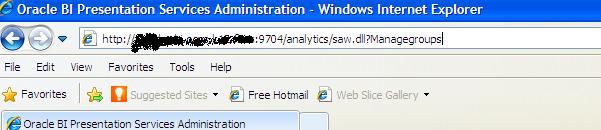
Manually change URL by attaching “saw.dll?Managegroups” to the end after analytics, so it looks like this … http://yourserver:9704/analytics/saw.dll?Managegroups
Select the “Presentation Server Administrators” catalog group and Edit

Add the “BI Administrator Role” Application Role by selecting it in the left and using the arrows to move it to the right.

Log out and log back in with the Administrator ID.
You should now be able to see the “Administration” link at the top right, and also be able to see the dashboards that you had access to by clicking or mousing-over the Dashboards link/dropdown.

 The Data Community
but i am not able to access manage catolg path or previliges path to do this.
LikeLike
Thanks, this helped me
LikeLike