Tag: Power BI

Practice Questions: Configure Subscriptions and Data Alerts (PL-300 Exam Prep)

This post is a part of the PL-300: Microsoft Power BI Data Analyst Exam Prep Hub; and this topic falls under these sections:
Manage and secure Power BI (15–20%)
--> Create and manage workspaces and assets
--> Configure Subscriptions and Data Alerts


Below are 10 practice questions (with answers and explanations) for this topic of the exam.
There are also 2 practice tests for the PL-300 exam with 60 questions each (with answers) available on the hub.

Practice Questions


Question 1

A sales manager wants to receive an email every Monday morning with a snapshot of the latest sales performance report.
Which Power BI feature should you configure?

A. Data alert
B. Subscription
C. Dashboard tile alert
D. Power Automate flow

Correct Answer: B

Explanation:
Subscriptions are schedule-based and designed to send report or dashboard snapshots via email. Data alerts are triggered only by thresholds, not schedules.


Question 2

You need to notify users immediately when total daily revenue drops below $50,000.
Which requirement must be met to configure this?

A. The visual must be in a report
B. The dataset must be DirectQuery
C. The visual must be a dashboard tile showing a single value
D. A Power BI app must be published

Correct Answer: C

Explanation:
Data alerts can only be created on dashboard tiles that display a single numeric value (such as a Card or KPI).


Question 3

A user attempts to create a data alert on a table visual in a report but cannot find the option. Why?

A. Alerts require Power BI Premium
B. Alerts only work on dashboards
C. Alerts cannot be used with imported data
D. Alerts must be created by workspace admins

Correct Answer: B

Explanation:
Data alerts cannot be configured on report visuals. They must be created on dashboard tiles.


Question 4

Which delivery method is supported by both subscriptions and data alerts?

A. Microsoft Teams messages
B. SMS notifications
C. Email notifications
D. Power BI mobile push only

Correct Answer: C

Explanation:
Both subscriptions and data alerts support email notifications. Other delivery methods require additional tools such as Power Automate.


Question 5

A report uses Row-Level Security (RLS). A subscription is created for multiple users.
What will each user see?

A. The same data as the report owner
B. Filtered data based on their RLS role
C. All data in the dataset
D. Only summary-level data

Correct Answer: B

Explanation:
Subscriptions respect Row-Level Security, meaning each user only sees data they are authorized to view.


Question 6

Which scenario is the best use case for a data alert?

A. Sending a monthly executive summary
B. Monitoring KPIs for threshold breaches
C. Distributing weekly dashboards
D. Sharing reports with external users

Correct Answer: B

Explanation:
Data alerts are designed for exception-based monitoring, triggering notifications when values cross defined thresholds.


Question 7

Which content types support subscriptions in Power BI?

A. Dashboards only
B. Reports only
C. Reports, report pages, and dashboards
D. Dashboard tiles only

Correct Answer: C

Explanation:
Subscriptions can be created for reports, individual report pages, and dashboards.


Question 8

A user wants to temporarily stop receiving notifications without deleting the configuration.
Which feature supports this requirement?

A. Data alerts only
B. Subscriptions only
C. Both subscriptions and data alerts
D. Neither feature

Correct Answer: C

Explanation:
Both subscriptions and data alerts can be turned on or off without being deleted.


Question 9

When are data alert conditions evaluated?

A. At fixed times defined by the user
B. Continuously in real time
C. After the dataset is refreshed
D. When a report is opened

Correct Answer: C

Explanation:
Data alerts are evaluated after dataset refresh. If the data doesn’t refresh, the alert won’t trigger.


Question 10

You need to send scheduled updates to users who should not edit reports but must receive consistent insights.
Which approach is MOST appropriate?

A. Grant Build permissions
B. Configure data alerts
C. Create report subscriptions
D. Enable Analyze in Excel

Correct Answer: C

Explanation:
Subscriptions are ideal for read-only, passive distribution of insights without requiring users to interact with reports.


Final Exam Tip

If the question mentions:

  • “Threshold,” “exceeds,” “drops below”Data Alert
  • “Daily, weekly, scheduled email”Subscription
  • “Dashboard tile”Data Alert
  • “Passive consumption”Subscription

Go back to the PL-300 Exam Prep Hub main page
Practice Questions: Promote or certify Power BI content (PL-300 Exam Prep)

This post is a part of the PL-300: Microsoft Power BI Data Analyst Exam Prep Hub; and this topic falls under these sections:
Manage and secure Power BI (15–20%)
--> Create and manage workspaces and assets
--> Promote or certify Power BI content


Below are 10 practice questions (with answers and explanations) for this topic of the exam.
There are also 2 practice tests for the PL-300 exam with 60 questions each (with answers) available on the hub.

Practice Questions

Question 1

What is the primary purpose of certifying Power BI content?

A. To improve report rendering performance
B. To indicate that content is approved and trusted for organizational use
C. To allow content to refresh more frequently
D. To enable sharing with external users

Correct Answer: B

Explanation:
Certification identifies datasets or dataflows that have been formally reviewed and approved, making them trusted sources for enterprise-wide reporting.


Question 2

Which Power BI artifact can be certified?

A. Report
B. Dashboard
C. Dataset
D. App

Correct Answer: C

Explanation:
Only datasets (semantic models) and dataflows can be certified. Reports and dashboards cannot be certified directly.


Question 3

Who determines which users are allowed to certify Power BI content?

A. Workspace Admin
B. Report Creator
C. Power BI Tenant Administrator
D. Dataset Owner

Correct Answer: C

Explanation:
Certification permissions are controlled at the tenant level by a Power BI administrator.


Question 4

A dataset is reliable but still evolving and has not undergone a formal governance review. What should you do?

A. Certify the dataset
B. Delete the dataset
C. Promote the dataset
D. Publish it as an app

Correct Answer: C

Explanation:
Promotion is appropriate when content is useful and reliable but not formally approved through governance.


Question 5

What happens when a dataset is certified?

A. Only admins can access it
B. It appears higher in search results
C. It automatically refreshes more often
D. Reports using it are locked

Correct Answer: B

Explanation:
Certified datasets are prioritized in search and discovery to encourage reuse of trusted data.


Question 6

Which of the following statements about promoted content is true?

A. It requires tenant admin approval
B. It represents the highest level of trust
C. It can be promoted without a formal review
D. Only IT users can promote it

Correct Answer: C

Explanation:
Promoted content does not require formal approval and signals informal trust.


Question 7

Your organization wants a single source of truth for company-wide KPIs. Which approach is best?

A. Create multiple promoted datasets
B. Certify one centrally governed dataset
C. Share reports individually
D. Use dashboards instead of datasets

Correct Answer: B

Explanation:
Certified datasets are intended to serve as enterprise-wide trusted sources.


Question 8

Where do you promote or certify a dataset?

A. Power BI Desktop
B. Dataset settings in the Power BI Service
C. Power Query Editor
D. Workspace app settings

Correct Answer: B

Explanation:
Promotion and certification are configured in the Power BI Service, not in Desktop.


Question 9

Which of the following is a key benefit of certification?

A. Faster data refresh
B. Reduced report load times
C. Improved data governance and reuse
D. Automatic row-level security

Correct Answer: C

Explanation:
Certification improves governance by guiding users toward trusted, reusable datasets.


Question 10

Why can a report not be certified?

A. Reports do not contain data
B. Reports cannot be shared
C. Certification applies only to datasets and dataflows
D. Reports already inherit certification

Correct Answer: C

Explanation:
Certification is applied to the data source, not the visualization layer.


Exam Tips

  • Promoted ≠ Certified
  • Certification requires tenant admin configuration
  • Certified content supports enterprise BI
  • Reports inherit trust from their dataset, not certification directly

Go back to the PL-300 Exam Prep Hub main page
Practice Questions: Create dashboards (PL-300 Exam Prep)

This post is a part of the PL-300: Microsoft Power BI Data Analyst Exam Prep Hub; and this topic falls under these sections:
Manage and secure Power BI (15–20%)
--> Create and manage workspaces and assets
--> Create dashboards


Below are 10 practice questions (with answers and explanations) for this topic of the exam.
There are also 2 practice tests for the PL-300 exam with 60 questions each (with answers) available on the hub.

Practice Questions


1. Where can Power BI dashboards be created?

A. Power BI Desktop
B. Power BI Service
C. Power BI Report Server
D. Microsoft Excel

Correct Answer: B

Explanation:
Dashboards can only be created in the Power BI Service. Power BI Desktop is used to create reports, not dashboards.


2. What is the maximum number of pages a Power BI dashboard can have?

A. One
B. Five
C. Ten
D. Unlimited

Correct Answer: A

Explanation:
Dashboards are single-page canvases designed for high-level monitoring.


3. A business user wants to view KPIs from three different datasets on one screen. What should you create?

A. A report with multiple pages
B. A report using composite models
C. A dashboard
D. A paginated report

Correct Answer: C

Explanation:
Dashboards can display visuals from multiple datasets, while reports are limited to one dataset.


4. How is a dashboard tile created?

A. By importing a dataset
B. By saving a report page
C. By pinning content from a report or Q&A
D. By creating a new visual in the Service

Correct Answer: C

Explanation:
Dashboard tiles are created by pinning visuals, pages, or Q&A results to a dashboard.


5. What happens when a user clicks a visual tile on a dashboard?

A. The tile expands in place
B. The dashboard refreshes
C. The source report opens
D. A detailed tooltip appears

Correct Answer: C

Explanation:
Clicking a dashboard tile opens the underlying report that the tile was pinned from.


6. Which tile types support data alerts in Power BI dashboards?

A. Table and matrix
B. KPI, card, and gauge
C. Any visual
D. Image and text box

Correct Answer: B

Explanation:
Data alerts are supported on KPI, card, and gauge tiles, making dashboards useful for monitoring thresholds.


7. A user shares a dashboard with a colleague, but the colleague cannot see the data. What is the most likely reason?

A. The dashboard is unpublished
B. The dataset has not refreshed
C. The colleague lacks access to the dataset
D. The visuals are not interactive

Correct Answer: C

Explanation:
Sharing a dashboard does not grant dataset access. Users must have permission to the underlying dataset.


8. Which statement about dashboards is TRUE?

A. Dashboards store their own data
B. Dashboards can be edited in Power BI Desktop
C. Dashboards support drill-through
D. Dashboards reflect live dataset data

Correct Answer: D

Explanation:
Dashboards do not store data; they reflect the current state of the underlying datasets.


9. What is a key limitation of Power BI dashboards compared to reports?

A. Dashboards cannot be shared
B. Dashboards cannot include visuals
C. Dashboards have limited interactivity
D. Dashboards cannot refresh data

Correct Answer: C

Explanation:
Dashboards are designed for at-a-glance insights and have limited filtering, slicing, and interaction.


10. What is the primary purpose of a Power BI dashboard?

A. Detailed data exploration
B. Data modeling
C. High-level monitoring and summarization
D. Row-level security configuration

Correct Answer: C

Explanation:
Dashboards are built for monitoring key metrics and summarizing performance across the business.


Final Exam Tip

If a question mentions:

  • Multiple datasets
  • Single-page view
  • Pinned visuals
  • Executive or KPI monitoring

➡️ The correct answer is likely to be Dashboard.


Go back to the PL-300 Exam Prep Hub main page

Practice Questions: Choose a distribution method (PL-300 Exam Prep)

This post is a part of the PL-300: Microsoft Power BI Data Analyst Exam Prep Hub; and this topic falls under these sections:
Manage and secure Power BI (15–20%)
--> Create and manage workspaces and assets
--> Choose a distribution method


Below are 10 practice questions (with answers and explanations) for this topic of the exam.
There are also 2 practice tests for the PL-300 exam with 60 questions each (with answers) available on the hub.

Practice Questions

Question 1

You need to distribute a set of certified reports to 300 business users. Users should not be able to modify the reports, and updates should be centrally managed. What is the best distribution method?

A. Share each report individually
B. Grant Viewer access to the workspace
C. Publish a Power BI app
D. Create email subscriptions

Correct Answer: C

Explanation:
Power BI apps provide centralized, read-only distribution to large audiences and allow content to be updated without re-sharing. This is the recommended enterprise distribution method.


Question 2

Which distribution method is most appropriate for collaboration among report developers?

A. Power BI app
B. Publish to web
C. Workspace access
D. Dashboard subscription

Correct Answer: C

Explanation:
Workspace access allows contributors and members to create, edit, and manage content collaboratively. Apps are designed for consumption, not development.


Question 3

An executive wants to receive a weekly snapshot of a sales dashboard without logging into Power BI. What should you configure?

A. Report sharing
B. Power BI app
C. Dashboard subscription
D. Workspace Viewer access

Correct Answer: C

Explanation:
Subscriptions deliver scheduled email snapshots of dashboards or reports and are ideal for passive consumption.


Question 4

Which distribution method should be used only for non-confidential data?

A. Power BI app
B. Secure embed
C. Workspace Viewer access
D. Publish to web

Correct Answer: D

Explanation:
Publish to web makes reports publicly accessible with no authentication. It is inappropriate for sensitive or internal data.


Question 5

You share a report with a user, but they cannot see the data. What is the most likely cause?

A. The user lacks workspace access
B. The dataset permissions were not granted
C. The report is not certified
D. Row-level security is disabled

Correct Answer: B

Explanation:
Sharing a report does not automatically grant access to the underlying dataset unless permissions are explicitly assigned.


Question 6

Your organization wants users to access Power BI reports inside Microsoft Teams. Which distribution option supports this scenario?

A. Publish to web
B. Power BI Embedded
C. SharePoint or Teams embed
D. Dashboard subscription

Correct Answer: C

Explanation:
Power BI reports can be securely embedded in Teams and SharePoint while respecting Power BI permissions.


Question 7

Which distribution method provides the strongest governance and version control?

A. Individual report sharing
B. Workspace access
C. Dashboard subscriptions
D. Power BI app

Correct Answer: D

Explanation:
Apps allow controlled publishing, versioning, and consistent delivery of approved content to users.


Question 8

You want to distribute reports to external customers using a custom web application. What is the best option?

A. Publish to web
B. Power BI Embedded
C. Share reports
D. Power BI app

Correct Answer: B

Explanation:
Power BI Embedded allows secure integration of reports into custom applications with external users.


Question 9

Which statement about workspace access is true?

A. It is the recommended method for executive distribution
B. It restricts users to read-only access
C. It is intended for collaboration and content management
D. It replaces the need for Power BI apps

Correct Answer: C

Explanation:
Workspace access is designed for creators and collaborators, not for broad report consumption.


Question 10

A question on the PL-300 exam describes a scenario involving production reports, a large audience, and controlled access. Which answer is most likely correct?

A. Share reports
B. Workspace Viewer access
C. Publish to web
D. Power BI app

Correct Answer: D

Explanation:
These keywords strongly indicate the use of a Power BI app, which is the exam’s preferred answer for governed distribution scenarios.


Final Exam Tips

  • Apps = enterprise distribution
  • Workspaces = collaboration
  • Sharing = small, ad hoc access
  • Subscriptions = passive consumption
  • Publish to web = public data only

Go back to the PL-300 Exam Prep Hub main page

Practice Questions: Publish, import, or update items in a workspace (PL-300 Exam Prep)

This post is a part of the PL-300: Microsoft Power BI Data Analyst Exam Prep Hub; and this topic falls under these sections:
Manage and secure Power BI (15–20%)
--> Create and manage workspaces and assets
--> Publish, import, or update items in a workspace


Below are 10 practice questions (with answers and explanations) for this topic of the exam.
There are also 2 practice tests for the PL-300 exam with 60 questions each (with answers) available on the hub.

Practice Questions


Question 1

What happens when you publish a PBIX file from Power BI Desktop to a workspace that already contains a report with the same name?

A. Power BI creates a duplicate report
B. Power BI merges the changes
C. Power BI overwrites the existing report and semantic model
D. Power BI creates a new dataset only

Correct Answer: C

Explanation:
Publishing a PBIX with the same name replaces both the report and the semantic model in the workspace. This behavior is commonly tested on the exam.


Question 2

Which workspace role is required to publish content from Power BI Desktop to a shared workspace?

A. Viewer
B. Contributor
C. Viewer or Contributor
D. Viewer or Member

Correct Answer: B

Explanation:
A Contributor (or higher) role is required to publish content. Viewers have read-only access and cannot publish or update items.


Question 3

Which method allows you to bring an Excel workbook into a Power BI workspace as a report and dataset?

A. Publish from Power BI Desktop
B. Import the Excel file in the Power BI Service
C. Copy from another workspace
D. Use a deployment pipeline

Correct Answer: B

Explanation:
Excel files can be imported directly in the Power BI Service, which creates reports and datasets in the workspace.


Question 4

You need to update a report’s visuals without changing the underlying semantic model. What is the most appropriate action?

A. Delete and recreate the dataset
B. Republish the PBIX
C. Edit the report in the Power BI Service
D. Import the report again

Correct Answer: C

Explanation:
If permissions allow, editing visuals in the Power BI Service updates the report without replacing the dataset.


Question 5

Which action requires you to manually update a workspace app for users to see the change?

A. Adding a user to the workspace
B. Editing a report in the workspace
C. Refreshing a dataset
D. Applying row-level security

Correct Answer: B

Explanation:
Changes made in the workspace do not automatically appear in the app. The app must be republished.


Question 6

Which item can be edited directly in the Power BI Service without using Power BI Desktop?

A. PBIX file
B. Dataflow
C. Dataset schema
D. Power BI template

Correct Answer: B

Explanation:
Dataflows are created and edited directly in the Power BI Service and support centralized data preparation.


Question 7

What is the primary difference between publishing and importing content into a workspace?

A. Publishing creates dashboards; importing does not
B. Importing always overwrites existing content
C. Publishing is done from Desktop; importing is done from the Service
D. Importing does not create datasets

Correct Answer: C

Explanation:
Publishing is typically done from Power BI Desktop, while importing occurs within the Power BI Service using files or other sources.


Question 8

Which workspace role can update reports but cannot publish or update a workspace app?

A. Viewer
B. Contributor
C. Member
D. Admin

Correct Answer: B

Explanation:
Contributors can publish and update content but cannot manage workspace settings or apps, which is restricted to Members and Admins.


Question 9

You want to move the same report through Development, Test, and Production environments. What is the recommended approach?

A. Use My Workspace
B. Import the report multiple times
C. Publish the PBIX to multiple workspaces
D. Share the report with different users

Correct Answer: C

Explanation:
Publishing the same PBIX to separate workspaces supports lifecycle management and environment separation.


Question 10

After importing a PBIX file into a workspace, which action is often required before users can view updated data?

A. Update the app
B. Configure data source credentials
C. Assign workspace roles
D. Enable row-level security

Correct Answer: B

Explanation:
Imported datasets often require credential configuration before refreshes can occur and data becomes available.


Exam Tip

If a question mentions:

  • Overwriting content
  • Workspace roles
  • Publishing vs importing
  • Updating without breaking access

➡️ Focus on workspace permissions, publish behavior, and app update requirements.


Go back to the PL-300 Exam Prep Hub main page

Practice Questions: Configure and Update a Workspace App (PL-300 Exam Prep)

This post is a part of the PL-300: Microsoft Power BI Data Analyst Exam Prep Hub; and this topic falls under these sections:
Manage and secure Power BI (15–20%)
--> Create and manage workspaces and assets
--> Configure and Update a Workspace App


Below are 10 practice questions (with answers and explanations) for this topic of the exam.
There are also 2 practice tests for the PL-300 exam with 60 questions each (with answers) available on the hub.

Practice Questions


Question 1

What is the primary purpose of publishing a workspace app in Power BI?

A. To allow multiple developers to edit reports simultaneously
B. To provide a read-only, curated experience for report consumers
C. To improve dataset refresh performance
D. To apply row-level security to reports

Correct Answer: B

Explanation:
Workspace apps are designed for content consumption, not development. They provide a controlled, read-only experience for users, which is why they are preferred over direct report sharing for large audiences.


Question 2

Which workspace roles can publish or update a workspace app?

A. Viewer only
B. Contributor and Viewer
C. Member and Admin
D. Contributor and Member

Correct Answer: C

Explanation:
Only Members and Admins have permission to publish or update workspace apps. Contributors can create content but cannot manage apps.


Question 3

You update a report in a workspace, but users do not see the changes in the app. What must you do?

A. Refresh the dataset
B. Clear the app cache
C. Republish or update the app
D. Reassign user permissions

Correct Answer: C

Explanation:
Changes made in the workspace do not automatically appear in the app. You must explicitly update (republish) the app for consumers to see the changes.


Question 4

Which feature allows different users to see different content within the same workspace app?

A. Row-level security (RLS)
B. Dataset roles
C. App audiences
D. Visual-level filters

Correct Answer: C

Explanation:
App audiences control content visibility, allowing different groups to see different reports or dashboards without duplicating content.


Question 5

Which permission allows users of an app to build their own reports using the app’s semantic model?

A. Viewer permission
B. Allow reshare
C. Build permission
D. Admin permission

Correct Answer: C

Explanation:
Granting Build permission allows users to connect to the underlying semantic model for scenarios such as Analyze in Excel or creating new reports.


Question 6

What happens to users when a workspace app is updated?

A. They must be re-added to the app
B. Their bookmarks are deleted
C. They automatically see the updated content
D. Their permissions are reset

Correct Answer: C

Explanation:
After an app is updated, users retain access and permissions, and the updated content becomes available automatically without additional action.


Question 7

Which scenario is the best use case for a workspace app?

A. Collaborative report development
B. Testing new visuals
C. Distributing finalized reports to a large audience
D. Debugging DAX calculations

Correct Answer: C

Explanation:
Workspace apps are ideal for broad distribution of production-ready content, while workspaces remain the collaboration area for developers.


Question 8

Which of the following is true about workspace apps?

A. Users can edit reports in an app
B. Apps automatically update when workspace content changes
C. Apps provide a controlled navigation experience
D. Apps replace the need for workspaces

Correct Answer: C

Explanation:
Apps allow creators to control navigation, ordering, and visibility of content. They are read-only and require manual updates.


Question 9

You want to hide a report from most users but make it available to executives using the same app. What should you do?

A. Duplicate the report into a new workspace
B. Use row-level security
C. Create a separate app
D. Use app audiences

Correct Answer: D

Explanation:
App audiences allow selective visibility of content without duplication, making them ideal for role-based access to reports.


Question 10

What is the key difference between a workspace and a workspace app?

A. Workspaces support data refresh; apps do not
B. Workspaces are for collaboration; apps are for consumption
C. Apps allow editing; workspaces do not
D. Apps automatically apply security

Correct Answer: B

Explanation:
A workspace is where content is created and maintained, while a workspace app is the distribution layer for end users.


Exam Tip

If a question mentions:

  • Broad distribution
  • Read-only access
  • Controlled release
  • Audiences
  • Updating without disrupting users

➡️ The correct answer is almost always Workspace App.


Go back to the PL-300 Exam Prep Hub main page

Practice Questions: Identify when a gateway is required (PL-300 Exam Prep)

This post is a part of the PL-300: Microsoft Power BI Data Analyst Exam Prep Hub; and this topic falls under these sections:
Manage and secure Power BI (15–20%)
--> Create and manage workspaces and assets
--> Identify when a gateway is required


Below are 10 practice questions (with answers and explanations) for this topic of the exam.
There are also 2 practice tests for the PL-300 exam with 60 questions each (with answers) available on the hub.

Practice Questions


Question 1

You publish a Power BI report that imports data from an on-premises SQL Server and want to schedule daily refreshes in the Power BI service. What is required?

A. No additional configuration
B. A Power BI app
C. An on-premises data gateway
D. A premium capacity workspace

Correct Answer: C

Explanation:
Scheduled refresh from an on-premises data source requires a gateway to securely connect Power BI service to the local SQL Server.


Question 2

A dataset uses Azure SQL Database in Import mode with scheduled refresh enabled. Is a gateway required?

A. Yes, because scheduled refresh is enabled
B. Yes, because Import mode is used
C. No, because the data source is cloud-based
D. No, because the dataset is small

Correct Answer: C

Explanation:
Azure SQL Database is a cloud data source that Power BI can access directly, so no gateway is needed.


Question 3

You create a Power BI report using DirectQuery to an on-premises SQL Server. When users view the report in the Power BI service, what is required?

A. A gateway
B. A scheduled refresh
C. Import mode
D. Power BI Premium

Correct Answer: A

Explanation:
DirectQuery sends queries at report view time. A gateway is required for on-premises sources.


Question 4

Which scenario does NOT require a Power BI gateway?

A. Importing data from SharePoint Online
B. DirectQuery to an on-premises database
C. Refreshing an on-premises dataflow
D. Live connection to on-premises SSAS

Correct Answer: A

Explanation:
SharePoint Online is a cloud-based service and does not require a gateway.


Question 5

A report combines data from Azure Data Lake Storage and an on-premises file share. What is true?

A. No gateway is required because one source is cloud-based
B. A gateway is required for the on-premises source
C. A gateway is required for both sources
D. Gateways are not supported for mixed data sources

Correct Answer: B

Explanation:
Any on-premises data source used in the Power BI service requires a gateway, even in hybrid datasets.


Question 6

While working in Power BI Desktop, you connect to an on-premises SQL Server and refresh data locally. Is a gateway required?

A. Yes, always
B. Yes, if Import mode is used
C. No, gateways are only needed in the Power BI service
D. No, if DirectQuery is used

Correct Answer: C

Explanation:
Power BI Desktop connects directly to local data sources. Gateways are only required after publishing to the Power BI service.


Question 7

You want to refresh a Power BI dataflow that connects to an on-premises Oracle database. What is required?

A. Power BI Premium
B. A gateway
C. A paginated report
D. An app workspace

Correct Answer: B

Explanation:
Dataflows that use on-premises data sources require a gateway to refresh in the Power BI service.


Question 8

Which connection type always requires a gateway when the data source is on-premises?

A. Import with manual refresh
B. Import with scheduled refresh
C. DirectQuery
D. Both B and C

Correct Answer: D

Explanation:
Scheduled refresh and DirectQuery both require a gateway for on-premises data sources.


Question 9

A report uses a Live connection to an on-premises Analysis Services model. What is required?

A. A dataset refresh schedule
B. A gateway
C. Import mode
D. A certified dataset

Correct Answer: B

Explanation:
Live connections to on-premises Analysis Services require a gateway for real-time queries.


Question 10

Which factor is the most important when deciding if a gateway is required?

A. Dataset size
B. Data refresh frequency
C. Location of the data source
D. Number of report users

Correct Answer: C

Explanation:
Gateway requirements are based on whether the data source is accessible from the cloud or located on-premises.


Exam Tips

  • On-premises + Power BI service = Gateway
  • Cloud sources do not require gateways
  • DirectQuery and Live connections still require gateways
  • Desktop-only work never requires a gateway

Go back to the PL-300 Exam Prep Hub main page

Practice Questions: Assign workspace roles (PL-300 Exam Prep)

This post is a part of the PL-300: Microsoft Power BI Data Analyst Exam Prep Hub; and this topic falls under these sections:
Manage and secure Power BI (15–20%)
--> Secure and govern Power BI items
--> Assign workspace roles


Below are 10 practice questions (with answers and explanations) for this topic of the exam.
There are also 2 practice tests for the PL-300 exam with 60 questions each (with answers) available on the hub.

Practice Questions


Question 1

You need to allow a user to add and remove workspace users and change workspace settings.
Which workspace role should you assign?

A. Viewer
B. Contributor
C. Member
D. Admin

Correct Answer: D. Admin

Explanation:
Only the Admin role can manage workspace access and modify workspace settings. Members can manage content but cannot manage users.


Question 2

A business user needs to view reports and dashboards but should not be able to modify or publish any content.
Which role is most appropriate?

A. Viewer
B. Contributor
C. Member
D. Admin

Correct Answer: A. Viewer

Explanation:
The Viewer role provides read-only access, allowing users to consume and interact with content without making changes.


Question 3

Which workspace role allows a user to create and edit reports but not publish or update a workspace app?

A. Viewer
B. Contributor
C. Member
D. Admin

Correct Answer: B. Contributor

Explanation:
Contributors can create and modify content but cannot publish apps or manage workspace access.


Question 4

A Power BI developer must publish a workspace app but should not be able to add or remove users from the workspace.
Which role should be assigned?

A. Viewer
B. Contributor
C. Member
D. Admin

Correct Answer: C. Member

Explanation:
Members can publish and update workspace apps but cannot manage workspace access, which is restricted to Admins.


Question 5

Which role is required to delete a workspace?

A. Viewer
B. Contributor
C. Member
D. Admin

Correct Answer: D. Admin

Explanation:
Only workspace Admins have permission to delete a workspace.


Question 6

You want to follow best practices for access management by minimizing ongoing maintenance when employees change roles.
What should you use when assigning workspace access?

A. Individual user accounts
B. Distribution lists
C. Azure AD security groups
D. Shareable links

Correct Answer: C. Azure AD security groups

Explanation:
Using Azure AD security groups simplifies governance by allowing access changes to be managed centrally.


Question 7

A user needs to configure scheduled refresh for a semantic model but should not manage workspace access.
Which role is the minimum required?

A. Viewer
B. Contributor
C. Member
D. Admin

Correct Answer: C. Member

Explanation:
Configuring scheduled refresh requires Member or Admin permissions. Contributors cannot manage refresh settings.


Question 8

Which workspace role requires a Power BI Pro license when the workspace is not in Premium capacity?

A. Admin only
B. Contributor only
C. Viewer only
D. All workspace roles

Correct Answer: D. All workspace roles

Explanation:
When a workspace is not in Premium capacity, all users, including Viewers, require a Power BI Pro license to access content.


Question 9

Which statement correctly describes the difference between workspace roles and row-level security (RLS)?

A. Workspace roles control data visibility, RLS controls actions
B. Workspace roles control actions, RLS controls data visibility
C. Both control user actions only
D. Both control data visibility only

Correct Answer: B. Workspace roles control actions, RLS controls data visibility

Explanation:
Workspace roles define what users can do, while RLS defines what data users can see within reports.


Question 10

You are designing a production workspace and want report consumers to have the least privilege possible.
Which role should they be assigned?

A. Viewer
B. Contributor
C. Member
D. Admin

Correct Answer: A. Viewer

Explanation:
The Viewer role follows the principle of least privilege, granting read-only access appropriate for production consumers.


Exam Readiness Checklist

✔ Know all four workspace roles
✔ Understand capabilities vs limitations
✔ Apply least privilege principles
✔ Recognize Admin-only actions
✔ Distinguish workspace roles from RLS


Go back to the PL-300 Exam Prep Hub main page

How to turn off Auto date/time in Power BI and why you might want to

Power BI includes a feature called Auto date/time that automatically creates hidden date tables for date columns in your model. While this can be helpful for quick analyses, it can also introduce performance issues and modeling complexity in more advanced or production-grade reports.

What Is Auto Date/Time?

When Auto date/time is enabled, Power BI automatically generates a hidden date table for every column of type Date or Date/Time. These tables allow you to use built-in time intelligence features (like Year, Quarter, and Month) without explicitly creating a calendar table.

Why Turn Off Auto Date/Time?

Disabling Auto date/time is often considered a best practice for the following reasons:

  • Better Performance
    Each date column gets its own hidden date table, which increases model size and can slow down report performance.
  • Cleaner Data Models
    Hidden tables can clutter the model and make debugging DAX calculations more difficult.
  • Consistent Time Intelligence
    Using a single, well-designed Date (Calendar) table ensures consistent logic across all measures and visuals.
  • More Control
    Custom calendar tables allow you to define fiscal years, custom week logic, holidays, and other business-specific requirements.

How to Turn Off Auto Date/Time in Power BI

You can disable Auto date/time in both Power BI Desktop and at the report level:

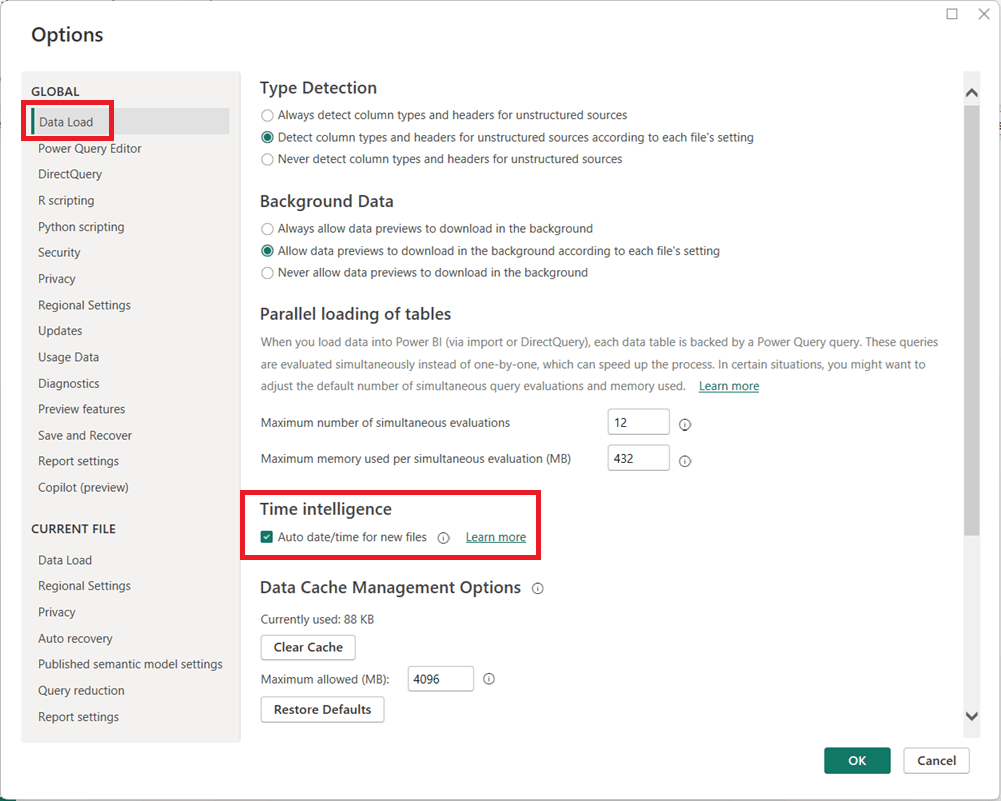
  1. In Power BI Desktop, go to FileOptions and settingsOptions.
  2. Under Global, select Data Load.
  3. Uncheck Auto date/time for new files.
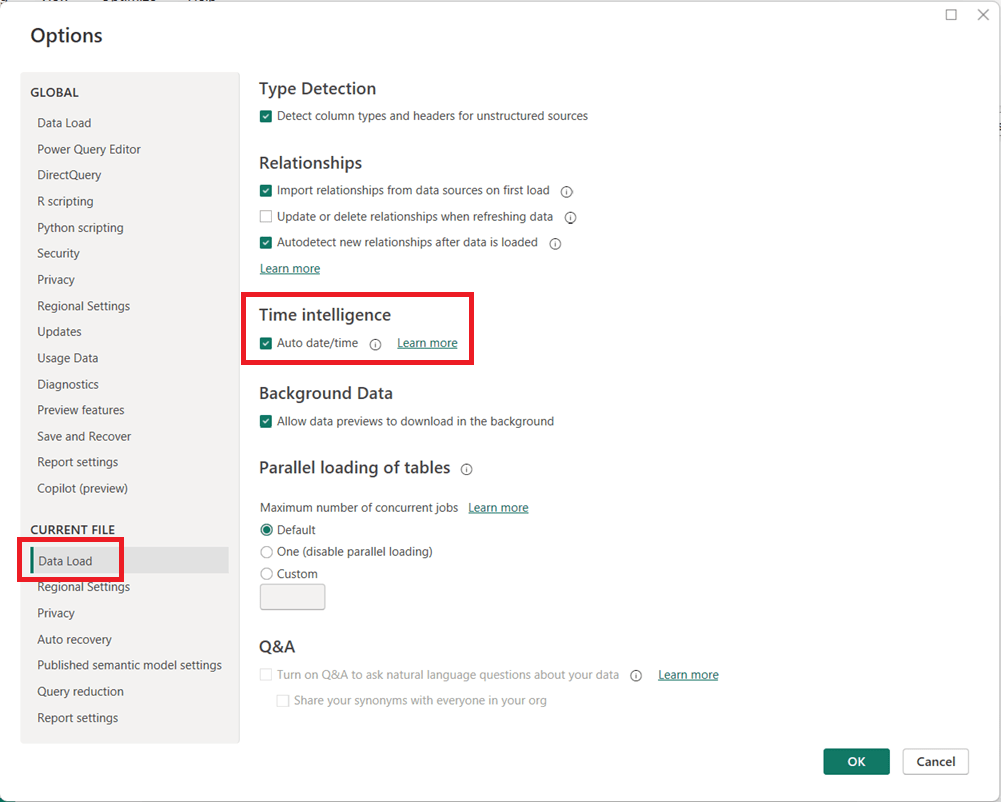
  1. (Optional but recommended) Under Current File, select Data Load and uncheck Auto date/time to disable it for the current report.
  1. Click OK and refresh your model if necessary.

When Should You Leave It On?

Auto date/time can still be useful for:

  • Quick prototypes or ad-hoc analysis
  • Simple models with only one or two date fields
  • Users new to Power BI who are not yet working with custom DAX time intelligence

Final Thoughts

For enterprise, reusable, or performance-sensitive Power BI models, turning off Auto date/time and using a dedicated Date table is usually the better approach. It leads to cleaner models, more reliable calculations, and greater long-term flexibility as your reports grow in complexity.

Thanks for reading!

How to Perform a Safe DIVIDE in Power BI (DAX and Power Query)

Division is a common operation in Power BI, but it can cause errors when the divisor is zero. Both DAX and Power Query provide built-in ways to handle these scenarios safely.

Safe DIVIDE in DAX

In DAX, the DIVIDE function is the recommended approach. Its syntax is:

DIVIDE(numerator, divisor [, alternateResult])

If the divisor is zero (or BLANK), the function returns the optional alternateResult; otherwise, it performs the division normally.

Examples:

  • DIVIDE(10, 2)5
  • DIVIDE(10, 0)BLANK
  • DIVIDE(10, 0, 0)0

This makes DIVIDE safer and cleaner than using conditional logic.

Safe DIVIDE in Power Query

In Power Query (M language), you can use the try … otherwise expression to handle divide-by-zero errors gracefully. The syntax is:

try [expression] otherwise [alternateValue]

Example:

try [Sales] / [Quantity] otherwise 0

If the division fails (such as when Quantity is zero), Power Query returns 0 instead of an error.

Using DIVIDE in DAX and try … otherwise in Power Query ensures your division calculations remain error-free.