Tag: OBIEE

External Embedded Content in OBIEE or OAS dashboard pages does not display in most web browsers

There is an “issue” or “security feature” (depending on how you look at it) that exists in OBIEE 12c (Oracle Business Intelligence) and in OAS (Oracle Analytics Server). The OBIEE or OAS dashboard pages do not display external embedded content in most browsers.

We use multiple BI platforms, but wanted to avoid sending users to one platform for some reporting and to another for other reporting. This can be confusing to users. To provide a good user experience by directing users to one place for all dashboards and self-service reporting, we have embedded most of the QlikView and Qlik Sense dashboards into OBI pages. With that, the users can be provided with one consistent training and have one place to go.

However, the Qlik embedded content only shows when using the IE (Internet Explorer) browser and the others give some “error” message.

  • The Chrome browser gives this error message:
    “Request to the server have been blocked by an extension.”
  • And the Edge browser gives this message:
    “This content is blocked. Contact the site owner to fix the issue.”

Or you may get other messages, such as (from Oracle Doc ID: 2273854.1):

  • Internet Explorer
    This content cannot be displayed in a frame
    To help protect the security of information you enter into this website, the publisher of this content does not allow it to be displayed in a frame.
  • Firefox
    No message is displayed on the page, but if you open the browser console (Ctrl+Shift+I) you see this message in it:
    Content Security Policy: The page’s settings blocked the loading of a resource at http://<server>/ (“default-src http://<server&gt;:<port>”).
  • Chrome
    No message is displayed on the page, but if you open the browser console (Ctrl+Shift+I) you see this message in it:
    Refused to frame ‘http://<server>/&#8217; because it violates the following Content Security Policy directive: “default-src ‘self'”. Note that ‘frame-src’ was not explicitly set, so ‘default-src’ is used as a fallback

This situation, although not ideal, has been fine since our company’s browser standard is IE and we provided a work-around for users that use other browsers to access the embedded content. But this will change soon since IE is going away.

There are 2 solutions to address the embedded content issue.

  1. Run Edge browser in IE mode for the BI applications sites/URLs.
    1. This would have been a good option for us, but it causes issues with the way we have SSO configured for a group of applications.
  2. Perform some configuration changes as outline below from Oracle Doc ID: 2273854.1.
    1. We ended up going forward with this solution and our team got it to work after some configurations trial and error.

(from Oracle Doc ID: 2273854.1):

For security reasons, you can no longer embed content from external domains in dashboards. To embed external content in dashboards, you must edit the instanceconfig.xml file. 

To allow the external content:

  1. Make a backup copy of <DOMAIN_HOME>/config/fmwconfig/biconfig/OBIPS/instanceconfig.xml
  2. Edit the <DOMAIN_HOME>/config/fmwconfig/biconfig/OBIPS/instanceconfig.xml file and add the ContentSecurityPolicy element inside the Security element:

<ServerInstance>

<Security>

  <InIFrameRenderingMode>allow</InIFrameRenderingMode>
  <ContentSecurityPolicy>
    <PolicyDirectives>
      <Directive>
        <Name>child-src</Name>
        <Value>’self’ http://www.xxx.com http://www.yyy.com</Value>
      </Directive>
      <Directive>
        <Name>img-src</Name>
        <Value>’self’ http://www.xxx.com http://www.yyy.com</Value>
      </Directive>
    </PolicyDirectives>
  </ContentSecurityPolicy>

</Security>

</ServerInstance>

  1. Restart the presentation server component (obips1)

Engage the teams responsible for enterprise browser settings or other appropriate teams at your company as necessary.

NULL values in prompts after upgrade from OBIEE to OAS

After upgrading from OBIEE to OAS (Oracle Business Intelligence to Oracle Analytics Server), the prompts started showing NULL values in the drop downs. This was not happening in OBI because we had the <ShowNullValueWhenColumnIsNullable> config parameter set to “never” for prompts.

This setting looked something like this in OBIEE (note the first line after the <Prompts> tag):

<ServerInstance>

<Prompts>
<ShowNullValueWhenColumnIsNullable>never</ShowNullValueWhenColumnIsNullable>
<MaxDropDownValues>256</MaxDropDownValues>
<ResultRowLimit>65000</ResultRowLimit>
<AutoApplyDashboardPromptValues>true</AutoApplyDashboardPromptValues>
<AutoSearchPromptDialogBox>true</AutoSearchPromptDialogBox>

</Prompts>

</ServerInstance>

In OAS, this parameter needs to be set in the new analytics/systemsettings page. Go to that page and set the option. Then restart by clicking on the Restart button on that page. After a restart, it resolved the issue for us.

We had a similar resolution to an issue we had with “not able to save analyses that contained HTML markup“.

Unable to save analysis with HTML markup in OAS after upgrade from OBIEE

We recently upgraded from OBIEE 12 to OAS 5.5. (Oracle Business Intelligence to Oracle Analytics Server). After the upgrade, we were not able to save analyses that contained HTML markup. We were able to do this before the upgrade.

Turns out, the configuration parameter for this now needs to be set in the new analytics/systemsettings page. Go to that page and enable the option “Allow HTML Content”. Then restart by clicking on the Restart button on that page.

After a restart, it resolved the issue for us.

If this doesn’t resolve it for you, you may need to remove the parameter from the instance config file and try again.

Back up your instanceconfig.xml file. Then edit it by removing the element “EnableSavingContentWithHTML” from the Security section and save the file. You will be removing a line that looks something like this:

“<EnableSavingContentWithHTML>true</EnableSavingContentWithHTML>”

Then go back to the analytics/systemsettings page, confirm “Allow HTML Content” is enabled, and restart again. This hopefully should resolve your issue.

OBIEE Agent sending emails to the wrong recipients

We recently ran into an issue where we had an OBI Agent setup to send personalized reports via email to each recipient but some recipients (about 2%) were receiving the wrong email.

A search of Oracle Support produced Document ID # 2119485.1 as a possible solution.

“OBIEE 11g|12c: Agents Send Emails To Incorrect Recipients When Master Trigger Agent Is Present (Doc ID 2119485.1)”

This document recommended applying patch #s 22821787 and 25545058.

However, we are on OBIEE 12c (12.2.1.2.0) and one of the patches seemed to be for 11g only.

  • Patch # 25545058 seemed to be for 11g only.
  • Patch # 22821787 was for both 11g and 12c versions.

We applied patch # 22821787, but unfortunately, the issue persisted.

After looking around some more, we realized there was another patch but for the 12.2.1.2.180116 release (found in Document ID # 2395331.1). It didn’t match our version, but we decided to explore it anyway.

“OBIEE 12c : Agent Sending The Incorrect Result (Doc ID 2395331.1)”

That was patch # 27072632 but it turns out that patch was superseded by patch # 27916905.

Our admin team tried to apply patch # 27916905, but it had a conflict with the initial patch # 22821787.

We then backed out patch # 22821787 and applied the bundle patch 27916905.

The patch # 27916905 seems to have resolved the “email going to wrong recipients” issue.  Since we applied it, no user has reported they received the wrong email. However, we are not yet 100% sure.

However, we are noticing that some images are not displaying properly which may have been caused by the patch. We are looking into that issue now.

I went through the detailed description of how the patches were found to let you realize that on the Oracle Support site, you may need to do a very thorough search to find any and all patches related to an issue before applying any. The documentation does not necessarily tie them together or they won’t necessarily come up in when you search on the keywords. Note: Before any of the above changes were made, backups were taken so that we could revert to any stage that we wanted to.

Error downloading data to Excel in OBIEE 12c

If you get the error …

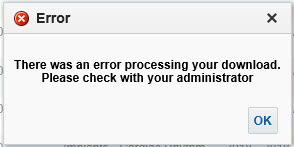
“There was an error processing your download. Please check with your administrator.”

… when Exporting / Downloading data from an analysis in OBIEE, then this post might be helpful.

In OBIEE, you have a few options for exporting / downloading data from an analysis / report as shown below. You can export / download to PDF, Excel 2007+, PowerPoint 2007+, Web Archive (.mht), or in CSV, Tab Delimited, or XML data formats.

OBIEE_Export_Analysis_Data

If you are trying to download data from an analysis and get this error …

OBIEE_Export_to_Excel_Failed

“There was an error processing your download. Please check with your administrator.”
then try the following fix. Note, you might find that you are able to download to CSV, but get the error when you try to download to Excel.

Edit the config.xml file
Located at the directory specified below (for OBIEE 12c):
ORACLE_HOME/user_projects/domains/bi/config/fmwconfig/biconfig/OBIJH

FYI, this is the location of the config.xml file in OBIEE 11g
[MW_HOME]/instances/instance1/config/OracleBIJavaHostComponent/coreapplication_obijh1

Locate the section and the parameter within that section. It may look like below, but there could be more or less parameters within the section than shown here.

<XMLP>
<InputStreamLimitInKB>8192</InputStreamLimitInKB>
<ReadRequestBeforeProcessing>true</ReadRequestBeforeProcessing>
</XMLP>

Change the value of the InputStreamLimitInKB parameter to 0 as shown below…

<XMLP>
<InputStreamLimitInKB>0</InputStreamLimitInKB>
<ReadRequestBeforeProcessing>true</ReadRequestBeforeProcessing>
</XMLP>

Restart the OBIEE services and try your export again.

If it succeeds, then we know for sure that altering this parameter fixes it.
Setting the above parameter value to zero (0) means that there is no limit. So, you may now go back and modify the value to a number that is suitable for your environment, such as, 8192, 15384, 65536, etc.

Upgrading OBIEE 11g to OBIEE 12c – First thing to ensure

Our team is currently in the process of upgrading our OBIEE 11g environments to OBIEE 12c. I have been gathering information about the process and will be sharing information on our experience as we progress.

I wanted to point of the first thing you want to ensure before planning/starting the upgrade from 11g to 12c – this may save you a little time. Or if you have already started, and encountered an error relating to … catalog version is not supported … then this post might be helpful.

You can upgrade the OBIEE catalog from OBIEE 11.1.1.7.x or OBIEE 11.1.1.9.x to OBIEE 12c. This should upgrade without any major issues.
But you may unexpectedly run into the above problem if you had upgraded the OBIEE 11g catalog using patch sets and had not run the full catalog upgrade. This results in the catalog being used as an 11.1.1.7 or 11.1.1.9 environment, but the version stored in the catalog is still older (such as 11.1.1.3 or 11.1.1.5).
Then when you try to upgrade from OBIEE 11g to OBIEE 12c, you get the error because the catalog is still technically not yet on an approved version for upgrade.

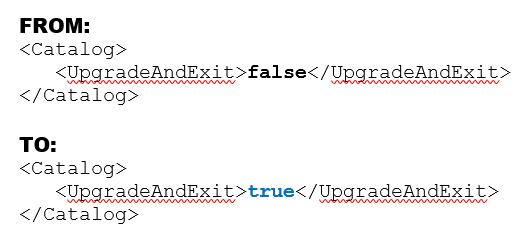
To resolve this, you need to run a full catalog upgrade on the OBIEE 11g catalog. This involves modifying the instanceconfig.xml file as follows:

Change the value of the UpgradeAndExit parameter from “false” to “true” as shown in the example below.

upgradecatalog

Restart the presentation services.
After this is complete, edit the files again and change “true” back to “false“, and restart the presentation services again.

You should now be able to upgrade your catalog to an OBIEE 12c version.

I hope this helps. Thanks for reading.

How to generate detailed Oracle BI (OBIEE) Repository Documentation

In this post, I will show the steps for using the OBIEE “Repository Documentation” utility to generate repository (RPD) lineage information.  I will also provide a couple example of how this documentation (output file) can be used.

To access and run the Repository Documentation utility,  from the BI Admin Tool menu, select Tools -> Utilities.

biadmintool_menu_tools_utilities

From the Utilities dialog, select “Repository Documentation”, and click “Execute…”

utilitiesdialog

In the “Save As” dialog, select the destination and enter the name you would like for the output file.

saverepositorydocumentationdialog

When it finishes, it will generate the output csv file.  Note  – this will likely be a large file.  It will contain all your repository objects.

obieerepositoryoutputfile

The RPD documentation file will contain the following columns:
Subject Area, Presentation Table, Presentation Column, Description – Presentation Column, Business Model, Derived logical table, Derived logical column, Description – Derived Logical Column, Expression, Logical Table, Logical Column, Description – Logical Column, Logical Table Source, Expression, Initialization Block, Variable, Database, Physical Catalog, Physical Schema, Physical Table, Alias, Physical Column, Description – Physical Column

You can use this file to quickly track lineage from physical sources to the logical columns to the presentation columns and identify all the logic and variables in between.
You can also use it to identify where and how much a specified table, column, variable, etc. is used which will help you to identify dependencies and know the effect of making changes or deleting elements.

Development, Data Governance, and Quality Assurance teams may find this information useful in this format.

Disallow online RPD updates in OBIEE

You may want to disable online updates on your OBIEE RPD for performance reasons or because you have a specific development process that prohibits online updates.

To disallow online RPD updates, do the following:
Log into Enterprise Manager. Navigate the tree menu to Business Intelligence -> coreapplication.  Click tabs “Capacity Management”, and “Performance”.

Under the RPD Updates section, check the box for “Disallow RPD updates”.

disallowRPD_updates

This will prevent online RPD updates for all.

If you want to allow a select group of people to have access to perform online updates, such as a lead developer or administrator, then don’t do the above, but instead provide Administrator role to those that should have the access, and remove it from those that should not (and give them BI Author role for example instead).


“The connection has failed” Error when trying to Import Metadata into OBIEE

If you get the error “The connection has failed” when you try to Import Metadata into the RPD, this post may help you to resolve it.

The solution is to: Create an Environment Variable called TNS_ADMIN and set its value to the directory of your tnsnames.ora file.
The TNS_ADMIN variable tells Oracle Client where to find the tnsnames.ora file which contains your data source details.

In case you need the details:
Click the Windows Start menu –> Right-Click on Computer –> select Properties
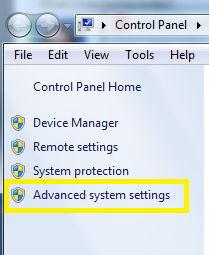
Then click on “Advanced system settings” on the left.
Advanced_System_Settings

Click the “Environment Variables” button.
Then in the Environment Variables window, click New.
Enter the details for the TNS_ADMIN variable.  The value needs to be the path to your tnsnames.ora file, typically located at [ORACLE_HOME]networkadmin. The path will look something like the value shown below (it depends on where Oracle is installed on your system).
TNS_ADMIN_Environment_Variable

 Hope this helps.

WebLogic startup failure – BackendRoot cannot cast to BackendStandard

My colleague from a previous company contacted me recently to help with a problem. OBIEE was not starting up.  They had a power failure the night before, and then OBIEE would not start up.  The system is OBIEE 11g on Linux.

This is the error that was generated when trying to start the WebLogic Admin Server…

——-

<Mar 28, 2014 9:11:35 AM EDT> <Critical> <WebLogicServer> <BEA-000362> <Server failed. Reason: There are 1 nested errors: java.lang.ClassCastException: com.octetstring.vde.backend.BackendRoot cannot be cast to com.octetstring.vde.backend.standard.BackendStandard         at weblogic.ldap.EmbeddedLDAP.start(EmbeddedLDAP.java:303)         at weblogic.t3.srvr.SubsystemRequest.run(SubsystemRequest.java:64)         at weblogic.work.ExecuteThread.execute(ExecuteThread.java:209)         at weblogic.work.ExecuteThread.run(ExecuteThread.java:178) > < Mar 28, 2014 9:11:35 AM EDT> <Notice> <WebLogicServer> <BEA-000365> <Server state changed to FAILED> < Mar 28, 2014 9:11:35 AM EDT> <Error> <WebLogicServer> <BEA-000383> <A critical service failed. The server will shut itself down> < Mar 28, 2014 9:11:35 AM EDT> <Notice> <WebLogicServer> <BEA-000365> <Server state changed to FORCE_SHUTTING_DOWN>

——– 

After trying a few things that did not resolve the issue, an online search helped with the solution. This post was very helpful: https://community.oracle.com/thread/2285489?tstart=0

After reading through the post, we went to the below directory on the OBIEE server (Linux) and examined its contents:

$MIDDLEWARE_HOME/user_projects/domains/bifoundation_domain/servers/AdminServer/data/ldap/ldapfiles

[oracle@[SERVERNAME]]$ cd /u01/product/middleware/user_projects/domains/bifoundation_domain/servers/AdminServer/data/ldap/ldapfiles [oracle@aeledwpbi ldapfiles]$ ls -l total 11308

-rw-r—– 1 oracle oinstall 10071624 Mar 27 08:40 changelog.data
-rw-r—– 1 oracle oinstall    56940 Mar 27 08:40 changelog.index
-rw-r—– 1 oracle oinstall   804359 Mar 27 08:40 EmbeddedLDAP.data
-rw-r—– 1 oracle oinstall     2028 Jun 25  2013 EmbeddedLDAP.delete
-rw-r—– 1 oracle oinstall     3576 Jun 25  2013 EmbeddedLDAP.index
-rw-r—– 1 oracle oinstall        0 Mar 28 12:36 EmbeddedLDAP.lok
-rw-r—– 1 root   root       615242 Mar 27 08:40 EmbeddedLDAP.tran
-rw-r—– 1 oracle oinstall        8 Mar 27 08:40 EmbeddedLDAP.trpos
-rw-r—– 1 oracle oinstall        8 Mar 27 08:40 EmbeddedLDAP.twpos

Note how one of the files (EmbeddedLDAP.tran) is owned by “root”. It seems the power outage caused something unusual to happen resulting in “root” being assigned ownership of the file.

After having the system administrator change the owner from “root” to “oracle” (the OBIEE admin user), we were able to start the OBIEE system back up.