Tag: Microsoft Power BI

Identify Use Cases for and Configure Large Semantic Model Storage Format (DP-600 Exam Prep)

This post is a part of the DP-600: Implementing Analytics Solutions Using Microsoft Fabric Exam Prep Hub; and this topic falls under these sections: 
Implement and manage semantic models (25-30%)
--> Design and build semantic models
--> Identify use cases for and configure large semantic model storage format

Overview

As datasets grow in size and complexity, standard semantic model storage can become a limiting factor. Microsoft Fabric (via Power BI semantic models) provides a Large Semantic Model storage format designed to support very large datasets, higher cardinality columns, and more demanding analytical workloads.

For the DP-600 exam, you are expected to understand when to use large semantic models, what trade-offs they introduce, and how to configure them correctly.


What Is the Large Semantic Model Storage Format?

The Large semantic model option changes how data is stored and managed internally by the VertiPaq engine to support:

  • Larger data volumes (beyond typical in-memory limits)
  • Higher column cardinality
  • Improved scalability for enterprise workloads

This setting is especially relevant in Fabric Lakehouse and Warehouse-backed semantic models where data size can grow rapidly.


Key Characteristics

  • Designed for enterprise-scale models
  • Supports very large tables and partitions
  • Optimized for memory management, not raw speed
  • Works best with Import mode or Direct Lake
  • Requires Premium capacity or Fabric capacity

Common Use Cases

1. Very Large Fact Tables

Use large semantic models when:

  • Fact tables contain hundreds of millions or billions of rows
  • Historical data is retained for many years
  • Aggregations alone are not sufficient

2. High-Cardinality Columns

Ideal when models include:

  • Transaction IDs
  • GUIDs
  • Timestamps at high granularity
  • User or device identifiers

Standard storage can struggle with memory pressure in these scenarios.


3. Enterprise-Wide Shared Semantic Models

Useful for:

  • Centralized datasets reused across many reports
  • Models serving hundreds or thousands of users
  • Organization-wide KPIs and analytics

4. Complex Models with Many Tables

When your model includes:

  • Numerous dimension tables
  • Multiple fact tables
  • Complex relationships

Large storage format improves stability and scalability.


5. Direct Lake Models Over OneLake

In Microsoft Fabric:

  • Large semantic models pair well with Direct Lake
  • Enable querying massive Delta tables without full data import
  • Reduce duplication of data between OneLake and the model

When NOT to Use Large Semantic Models

Avoid using large semantic models when:

  • The dataset is small or moderate in size
  • Performance is more critical than scalability
  • The model is used by a limited number of users
  • You rely heavily on fast interactive slicing

For smaller models, standard storage often provides better query performance.


Performance Trade-Offs

AspectStandard StorageLarge Storage
Memory efficiencyModerateHigh
Query speedFasterSlightly slower
Max model sizeLimitedMuch larger
Cardinality toleranceLowerHigher
Enterprise scalabilityLimitedHigh

Exam Tip: Large semantic models favor scalability over speed.


How to Configure Large Semantic Model Storage Format

Prerequisites

  • Fabric capacity or Power BI Premium
  • Import or Direct Lake storage mode
  • Dataset ownership permissions

Configuration Steps

  1. Open Power BI Desktop
  2. Go to Model view
  3. Select the semantic model
  4. In Model properties, locate Large dataset storage
  5. Enable the option
  6. Publish the model to Fabric or Power BI Service

Once enabled, the setting cannot be reverted back to standard storage.


Important Configuration Considerations

  • Enable before model grows significantly
  • Combine with:
    • Partitioning
    • Aggregation tables
    • Proper star schema design
  • Monitor memory usage in capacity metrics
  • Plan refresh strategies carefully

Relationship to DP-600 Exam Topics

This section connects directly with:

  • Storage mode selection
  • Semantic model scalability
  • Direct Lake and OneLake integration
  • Enterprise model design decisions

Expect scenario-based questions asking you to choose the appropriate storage format based on:

  • Data volume
  • Cardinality
  • Performance requirements
  • Capacity constraints

Key Takeaways for the Exam

  • Large semantic models support very large, complex datasets
  • Use large semantic models for scale, not speed
  • Best for enterprise-scale analytics
  • Ideal for high-cardinality, high-volume, enterprise models
  • Trade performance for scalability
  • Require Premium or Fabric capacity
  • One-way configuration—so, plan ahead
  • Often paired/combined with Direct Lake

Practice Questions:

Here are 10 questions to test and help solidify your learning and knowledge. As you review these and other questions in your preparation, make sure to …

  • Identifying and understand why an option is correct (or incorrect) — not just which one
  • Look for and understand the usage scenario of keywords in exam questions to guide you
  • Expect scenario-based questions rather than direct definitions

1. When should you enable the large semantic model storage format?

A. When the model is used by a small number of users
B. When the dataset contains very large fact tables and high-cardinality columns
C. When query performance must be maximized for small datasets
D. When using Import mode with small dimension tables

Correct Answer: B

Explanation:
Large semantic models are designed to handle very large datasets and high-cardinality columns. Small or simple models do not benefit and may experience reduced performance.


2. Which storage modes support large semantic model storage format?

A. DirectQuery only
B. Import and Direct Lake
C. Live connection only
D. All Power BI storage modes

Correct Answer: B

Explanation:
Large semantic model storage format is supported with Import and Direct Lake modes. It is not applicable to Live connections or DirectQuery-only scenarios.


3. What is a primary trade-off when using large semantic model storage format?

A. Increased query speed
B. Reduced memory usage with no downsides
C. Slightly slower query performance in exchange for scalability
D. Loss of DAX functionality

Correct Answer: C

Explanation:
Large semantic models favor scalability and memory efficiency over raw query speed, which can be slightly slower compared to standard storage.


4. Which scenario is the best candidate for a large semantic model?

A. A departmental sales report with 1 million rows
B. A personal Power BI report with static data
C. An enterprise model with billions of transaction records
D. A DirectQuery model against a SQL database

Correct Answer: C

Explanation:
Large semantic models are ideal for enterprise-scale datasets with very large row counts and complex analytics needs.


5. What happens after enabling large semantic model storage format?

A. It can be disabled at any time
B. The model automatically switches to DirectQuery
C. The setting cannot be reverted
D. Aggregation tables are created automatically

Correct Answer: C

Explanation:
Once enabled, large semantic model storage format cannot be turned off, making early planning important.


6. Which capacity requirement applies to large semantic models?

A. Power BI Free
B. Power BI Pro
C. Power BI Premium or Microsoft Fabric capacity
D. Any capacity type

Correct Answer: C

Explanation:
Large semantic models require Premium capacity or Fabric capacity due to their increased resource demands.


7. Why are high-cardinality columns a concern in standard semantic models?

A. They prevent relationships from being created
B. They increase memory usage and reduce compression efficiency
C. They disable aggregations
D. They are unsupported in Power BI

Correct Answer: B

Explanation:
High-cardinality columns reduce VertiPaq compression efficiency, increasing memory pressure—one reason to use large semantic model storage.


8. Which Fabric feature commonly pairs with large semantic models for massive datasets?

A. Power Query Dataflows
B. DirectQuery
C. Direct Lake over OneLake
D. Live connection to Excel

Correct Answer: C

Explanation:
Large semantic models pair well with Direct Lake, allowing efficient querying of large Delta tables stored in OneLake.


9. Which statement best describes large semantic model performance?

A. Always faster than standard storage
B. Optimized for small, interactive datasets
C. Optimized for scalability and memory efficiency
D. Not compatible with DAX calculations

Correct Answer: C

Explanation:
Large semantic models prioritize scalability and efficient memory management, not maximum query speed.


10. Which design practice should accompany large semantic models?

A. Flat denormalized tables only
B. Star schema, aggregations, and partitioning
C. Avoid relationships entirely
D. Disable incremental refresh

Correct Answer: B

Explanation:
Best practices such as star schema design, aggregation tables, and partitioning are critical for maintaining performance and manageability in large semantic models.

Implement Calculation Groups, Dynamic Format Strings, and Field Parameters (DP-600 Exam Prep)

This post is a part of the DP-600: Implementing Analytics Solutions Using Microsoft Fabric Exam Prep Hub; and this topic falls under these sections: 
Implement and manage semantic models (25-30%)
--> Design and build semantic models
--> Implement Calculation Groups, Dynamic Format Strings,

and Field Parameters

This topic evaluates your ability to design flexible, scalable, and user-friendly semantic models by reducing measure sprawl, improving report interactivity, and standardizing calculations. These techniques are especially important in enterprise-scale Fabric semantic models.


1. Calculation Groups

What Are Calculation Groups?

Calculation groups allow you to apply a single calculation logic to multiple measures without duplicating DAX. Instead of creating many similar measures (e.g., YTD Sales, YTD Profit, YTD Margin), you define the logic once and apply it dynamically.

Calculation groups are implemented in:

  • Power BI Desktop (Model view)
  • Tabular Editor (recommended for advanced scenarios)

Common Use Cases

  • Time intelligence (YTD, MTD, QTD, Prior Year)
  • Currency conversion
  • Scenario analysis (Actual vs Budget vs Forecast)
  • Mathematical transformations (e.g., % of total)

Key Concepts

  • Calculation Item: A single transformation (e.g., YTD)
  • SELECTEDMEASURE(): References the currently evaluated measure
  • Precedence: Controls evaluation order when multiple calculation groups exist

Example

CALCULATE(
    SELECTEDMEASURE(),
    DATESYTD('Date'[Date])
)

This calculation item applies YTD logic to any measure selected in a visual.


Exam Tips

  • Calculation groups reduce model complexity
  • They cannot be created in Power BI Service
  • Be aware of interaction with existing measures and time intelligence

2. Dynamic Format Strings

What Are Dynamic Format Strings?

Dynamic format strings allow measures to change their formatting automatically based on context — without creating multiple measures.

Instead of hardcoding formats (currency, percentage, decimal), the format responds dynamically to user selections or calculation logic.


Common Scenarios

  • Showing % for ratios and currency for amounts
  • Switching formats based on calculation group selection
  • Applying regional or currency formats dynamically

How They Work

Each measure has:

  • A value expression
  • A format string expression

The format string expression returns a text format, such as:

  • "$#,##0.00"
  • "0.00%"
  • "#,##0"

Example

SWITCH(
    TRUE(),
    ISINSCOPE('Metrics'[Margin]), "0.00%",
    "$#,##0.00"
)


Exam Tips

  • Dynamic format strings do not change the underlying value
  • They are essential when using calculation groups
  • They improve usability without increasing measure count

3. Field Parameters

What Are Field Parameters?

Field parameters allow report consumers to dynamically switch dimensions or measures in visuals using slicers — without duplicating visuals or pages.

They are created in:

  • Power BI Desktop (Modeling → New Parameter → Fields)

Types of Field Parameters

  • Measure parameters (e.g., Sales, Profit, Margin)
  • Dimension parameters (e.g., Country, Region, Product)
  • Mixed parameters (less common, but supported)

Common Use Cases

  • Letting users choose which metric to analyze
  • Switching between time granularity (Year, Quarter, Month)
  • Reducing report clutter while increasing flexibility

How They Work

Field parameters:

  • Generate a hidden table
  • Are used in slicers
  • Dynamically change the field used in visuals

Example

A single bar chart can switch between:

  • Sales Amount
  • Profit
  • Profit Margin

Based on the slicer selection.


Exam Tips

  • Field parameters are report-layer features, not DAX logic
  • They do not affect data storage or model size
  • Often paired with calculation groups for advanced analytics

4. How These Features Work Together

In real-world Fabric semantic models, these three features are often combined:

FeaturePurpose
Calculation GroupsApply reusable logic
Dynamic Format StringsEnsure correct formatting
Field ParametersEnable user-driven analysis

Example Scenario

A report allows users to:

  • Select a metric (field parameter)
  • Apply time intelligence (calculation group)
  • Automatically display correct formatting (dynamic format string)

This design is highly efficient, scalable, and exam-relevant.


Key Exam Takeaways

  • Calculation groups reduce measure duplication; Calculation groups = reuse logic
  • SELECTEDMEASURE() is central to calculation groups
  • Dynamic format strings affect display, not values; Dynamic format strings = display control
  • Field parameters increase report interactivity; Field parameters = user-driven interactivity
  • These features are commonly tested together

Practice Questions:

Here are 10 questions to test and help solidify your learning and knowledge. As you review these and other questions in your preparation, make sure to …

  • Identifying and understand why an option is correct (or incorrect) — not just which one
  • Look for and understand the usage scenario of keywords in exam questions to guide you
  • Expect scenario-based questions rather than direct definitions

Question 1

What is the primary benefit of using calculation groups in a semantic model?

A. They improve data refresh performance
B. They reduce the number of fact tables
C. They allow reusable calculations to be applied to multiple measures
D. They automatically optimize DAX queries

Correct Answer: C

Explanation:
Calculation groups let you define a calculation once (for example, YTD) and apply it to many measures using SELECTEDMEASURE(), reducing measure duplication and improving maintainability.


Question 2

Which DAX function is essential when defining a calculation item in a calculation group?

A. CALCULATE()
B. SELECTEDVALUE()
C. SELECTEDMEASURE()
D. VALUES()

Correct Answer: C

Explanation:
SELECTEDMEASURE() dynamically references the measure currently being evaluated, which is fundamental to how calculation groups work.


Question 3

Where can calculation groups be created?

A. Power BI Service only
B. Power BI Desktop Model view or Tabular Editor
C. Power Query Editor
D. SQL endpoint in Fabric

Correct Answer: B

Explanation:
Calculation groups are created in Power BI Desktop (Model view) or using external tools like Tabular Editor. They cannot be created in the Power BI Service.


Question 4

What happens if two calculation groups affect the same measure?

A. The measure fails to evaluate
B. The calculation group with the highest precedence is applied first
C. Both calculations are ignored
D. The calculation group created most recently is applied

Correct Answer: B

Explanation:
Calculation group precedence determines the order of evaluation when multiple calculation groups apply to the same measure.


Question 5

What is the purpose of dynamic format strings?

A. To change the data type of a column
B. To modify measure values at query time
C. To change how values are displayed based on context
D. To improve query performance

Correct Answer: C

Explanation:
Dynamic format strings control how a measure is displayed (currency, percentage, decimals) without changing the underlying numeric value.


Question 6

Which statement about dynamic format strings is TRUE?

A. They change the stored data in the model
B. They require Power Query transformations
C. They can be driven by calculation group selections
D. They only apply to calculated columns

Correct Answer: C

Explanation:
Dynamic format strings are often used alongside calculation groups to ensure values are formatted correctly depending on the applied calculation.


Question 7

What problem do field parameters primarily solve?

A. Reducing model size
B. Improving data refresh speed
C. Allowing users to switch fields in visuals dynamically
D. Enforcing row-level security

Correct Answer: C

Explanation:
Field parameters enable report consumers to dynamically change measures or dimensions in visuals using slicers, improving report flexibility.


Question 8

When you create a field parameter in Power BI Desktop, what is generated automatically?

A. A calculated column
B. A hidden parameter table
C. A new measure
D. A new semantic model

Correct Answer: B

Explanation:
Power BI creates a hidden table that contains the selectable fields used by the field parameter slicer.


Question 9

Which feature is considered a report-layer feature rather than a modeling or DAX feature?

A. Calculation groups
B. Dynamic format strings
C. Field parameters
D. Measures using iterators

Correct Answer: C

Explanation:
Field parameters are primarily a report authoring feature that affects visuals and slicers, not the underlying model logic.


Question 10

Which combination provides the most scalable and flexible semantic model design?

A. Calculated columns and filters
B. Multiple duplicated measures
C. Calculation groups, dynamic format strings, and field parameters
D. Import mode and DirectQuery

Correct Answer: C

Explanation:
Using calculation groups for reusable logic, dynamic format strings for display control, and field parameters for interactivity creates scalable, maintainable, and user-friendly semantic models.


Write calculations that use DAX variables and functions, such as iterators, table filtering, windowing, and information functions (DP-600 Exam Prep)

This post is a part of the DP-600: Implementing Analytics Solutions Using Microsoft Fabric Exam Prep Hub; and this topic falls under these sections: 
Implement and manage semantic models (25-30%)
--> Design and build semantic models
--> Write calculations that use DAX variables and functions, such as

iterators, table filtering, windowing, and information functions

Why This Topic Matters for DP-600

DAX (Data Analysis Expressions) is the core language used to define business logic in Power BI and Fabric semantic models. The DP-600 exam emphasizes not just basic aggregation, but the ability to:

  • Write readable, efficient, and maintainable measures
  • Control filter context and row context
  • Use advanced DAX patterns for real-world analytics

Understanding variables, iterators, table filtering, windowing, and information functions is essential for building performant and correct semantic models.


Using DAX Variables (VAR)

What Are DAX Variables?

DAX variables allow you to:

  • Store intermediate results
  • Avoid repeating calculations
  • Improve readability and performance

Syntax

VAR VariableName = Expression
RETURN FinalExpression

Example

Total Sales (High Value) =
VAR Threshold = 100000
VAR TotalSales = SUM(FactSales[SalesAmount])
RETURN
IF(TotalSales > Threshold, TotalSales, BLANK())

Benefits of Variables

  • Evaluated once per filter context
  • Improve performance
  • Make complex logic easier to debug

Exam Tip:
Expect questions asking why variables are preferred over repeated expressions.


Iterator Functions

What Are Iterators?

Iterators evaluate an expression row by row over a table, then aggregate the results.

Common Iterators

FunctionPurpose
SUMXRow-by-row sum
AVERAGEXRow-by-row average
COUNTXRow-by-row count
MINX / MAXXRow-by-row min/max

Example

Total Line Sales =
SUMX(
    FactSales,
    FactSales[Quantity] * FactSales[UnitPrice]
)

Key Concept

  • Iterators create row context
  • Often combined with CALCULATE and FILTER

Table Filtering Functions

FILTER

Returns a table filtered by a condition.

High Value Sales =
CALCULATE(
    SUM(FactSales[SalesAmount]),
    FILTER(
        FactSales,
        FactSales[SalesAmount] > 1000
    )
)

Related Functions

FunctionPurpose
FILTERRow-level filtering
ALLRemove filters
ALLEXCEPTRemove filters except specified columns
VALUESDistinct values in current context

Exam Tip:
Understand how FILTER interacts with CALCULATE and filter context.


Windowing Functions

Windowing functions enable calculations over ordered sets of rows, often used for time intelligence and ranking.

Common Windowing Functions

FunctionUse Case
RANKXRanking
OFFSETRelative row positioning
INDEXRetrieve rows by position
WINDOWDefine dynamic row windows

Example: Ranking

Sales Rank =
RANKX(
    ALL(DimProduct),
    [Total Sales],
    ,
    DESC
)

Example Use Cases

  • Running totals
  • Moving averages
  • Period-over-period comparisons

Exam Note:
Windowing functions are increasingly emphasized in modern DAX patterns.


Information Functions

Information functions return metadata or context information rather than numeric aggregations.

Common Information Functions

FunctionPurpose
ISFILTEREDDetects column filtering
HASONEVALUEChecks if a single value exists
SELECTEDVALUEReturns value if single selection
ISBLANKChecks for blank results

Example

Selected Year =
IF(
    HASONEVALUE(DimDate[Year]),
    SELECTEDVALUE(DimDate[Year]),
    "Multiple Years"
)

Use Cases

  • Dynamic titles
  • Conditional logic in measures
  • Debugging filter context

Combining These Concepts

Real-world DAX often combines multiple techniques:

Average Monthly Sales =
VAR MonthlySales =
    SUMX(
        VALUES(DimDate[Month]),
        [Total Sales]
    )
RETURN
AVERAGEX(
    VALUES(DimDate[Month]),
    MonthlySales
)

This example uses:

  • Variables
  • Iterators
  • Table functions
  • Filter context awareness

Performance Considerations

  • Prefer variables over repeated expressions
  • Minimize complex iterators over large fact tables
  • Use star schemas to simplify DAX
  • Avoid unnecessary row context when simple aggregation works

Common Exam Scenarios

You may be asked to:

  • Identify the correct use of SUM vs SUMX
  • Choose when to use FILTER vs CALCULATE
  • Interpret the effect of variables on evaluation
  • Diagnose incorrect ranking or aggregation results

Correct answers typically emphasize:

  • Clear filter context
  • Efficient evaluation
  • Readable and maintainable DAX

Best Practices Summary

  • Use VAR / RETURN for complex logic
  • Use iterators only when needed
  • Control filter context explicitly
  • Leverage information functions for conditional logic
  • Test measures under multiple filter scenarios

Quick Exam Tips

  • VAR / RETURN = clarity + performance
  • SUMX ≠ SUM (row-by-row vs column aggregation)
  • CALCULATE = filter context control
  • RANKX / WINDOW = ordered analytics
  • SELECTEDVALUE = safe single-selection logic

Summary

Advanced DAX calculations are foundational to effective semantic models in Microsoft Fabric:

  • Variables improve clarity and performance
  • Iterators enable row-level logic
  • Table filtering controls context precisely
  • Windowing functions support advanced analytics
  • Information functions make models dynamic and robust

Mastering these patterns is essential for both real-world analytics and DP-600 exam success.

Practice Questions:

Here are 10 questions to test and help solidify your learning and knowledge. As you review these and other questions in your preparation, make sure to …

  • Identifying and understand why an option is correct (or incorrect) — not just which one
  • Look for and understand the usage scenario of keywords in exam questions to guide you
  • Expect scenario-based questions rather than direct definitions

1. What is the primary benefit of using DAX variables (VAR)?

A. They change row context to filter context
B. They improve readability and reduce repeated calculations
C. They enable bidirectional filtering
D. They create calculated columns dynamically

Correct Answer: B

Explanation:
Variables store intermediate results that are evaluated once per filter context, improving performance and readability.


2. Which function should you use to perform row-by-row calculations before aggregation?

A. SUM
B. CALCULATE
C. SUMX
D. VALUES

Correct Answer: C

Explanation:
SUMX is an iterator that evaluates an expression row by row before summing the results.


3. Which statement best describes the FILTER function?

A. It modifies filter context without returning a table
B. It returns a table filtered by a logical expression
C. It aggregates values across rows
D. It converts row context into filter context

Correct Answer: B

Explanation:
FILTER returns a table and is commonly used inside CALCULATE to apply row-level conditions.


4. What happens when CALCULATE is used in a measure?

A. It creates a new row context
B. It permanently changes relationships
C. It modifies the filter context
D. It evaluates expressions only once

Correct Answer: C

Explanation:
CALCULATE evaluates an expression under a modified filter context and is central to most advanced DAX logic.


5. Which function is most appropriate for ranking values in a table?

A. COUNTX
B. WINDOW
C. RANKX
D. OFFSET

Correct Answer: C

Explanation:
RANKX assigns a ranking to each row based on an expression evaluated over a table.


6. What is a common use case for windowing functions such as OFFSET or WINDOW?

A. Creating relationships
B. Detecting blank values
C. Calculating running totals or moving averages
D. Removing duplicate rows

Correct Answer: C

Explanation:
Windowing functions operate over ordered sets of rows, making them ideal for time-based analytics.


7. Which information function returns a value only when exactly one value is selected?

A. HASONEVALUE
B. ISFILTERED
C. SELECTEDVALUE
D. VALUES

Correct Answer: C

Explanation:
SELECTEDVALUE returns the value when a single value exists in context; otherwise, it returns blank or a default.


8. When should you prefer SUM over SUMX?

A. When calculating expressions row by row
B. When multiplying columns
C. When aggregating a single numeric column
D. When filter context must be modified

Correct Answer: C

Explanation:
SUM is more efficient when simply adding values from one column without row-level logic.


9. Why can excessive use of iterators negatively impact performance?

A. They ignore filter context
B. They force bidirectional filtering
C. They evaluate expressions row by row
D. They prevent column compression

Correct Answer: C

Explanation:
Iterators process each row individually, which can be expensive on large fact tables.


10. Which combination of DAX concepts is commonly used to build advanced, maintainable measures?

A. Variables and relationships
B. Iterators and calculated columns
C. Variables, CALCULATE, and table functions
D. Information functions and bidirectional filters

Correct Answer: C

Explanation:
Advanced DAX patterns typically combine variables, CALCULATE, and table functions for clarity and performance.

Select, Filter, and Aggregate Data Using DAX

This post is a part of the DP-600: Implementing Analytics Solutions Using Microsoft Fabric Exam Prep Hub; and this topic falls under these sections: 
Prepare data
--> Query and analyze data
--> Select, Filter, and Aggregate Data Using DAX

Data Analysis Expressions (DAX) is a formula language used to create dynamic calculations in Power BI semantic models. Unlike SQL or KQL, DAX works within the analytical model and is designed for filter context–aware calculations, interactive reporting, and business logic. For DP-600, you should understand how to use DAX to select, filter, and aggregate data within a semantic model for analytics and reporting.


What Is DAX?

DAX is similar to Excel formulas but optimized for relational, in-memory analytics. It is used in:

  • Measures (dynamic calculations)
  • Calculated columns (row-level derived values)
  • Calculated tables (additional, reusable query results)

In a semantic model, DAX queries run in response to visuals and can produce results based on current filters and slicers.


Selecting Data in DAX

DAX itself doesn’t use a traditional SELECT statement like SQL. Instead:

  • Data is selected implicitly by filter context
  • DAX measures operate over table columns referenced in expressions

Example of a simple DAX measure selecting and displaying sales:

Total Sales = SUM(Sales[SalesAmount])

Here:

  • Sales[SalesAmount] references the column in the Sales table
  • The measure returns the sum of all values in that column

Filtering Data in DAX

Filtering in DAX is context-driven and can be applied in multiple ways:

1. Implicit Filters

Visual-level filters and slicers automatically apply filters to DAX measures.

Example:
A card visual showing Total Sales will reflect only the filtered subset by product or date.

2. FILTER Function

Used within measures or calculated tables to narrow down rows:

HighValueSales = CALCULATE(
    SUM(Sales[SalesAmount]),
    FILTER(Sales, Sales[SalesAmount] > 1000)
)

Here:

  • FILTER returns a table with rows meeting the condition
  • CALCULATE modifies the filter context

3. CALCULATE as Filter Modifier

CALCULATE changes the context under which a measure evaluates:

SalesLastYear = CALCULATE(
    [Total Sales],
    SAMEPERIODLASTYEAR(Date[Date])
)

This measure selects data for the previous year based on current filters.


Aggregating Data in DAX

Aggregation in DAX is done using built-in functions and is influenced by filter context.

Common Aggregation Functions

  • SUM() — totals a numeric column
  • AVERAGE() — computes the mean
  • COUNT() / COUNTA() — row counts
  • MAX() / MIN() — extreme values
  • SUMX() — row-by-row iteration and sum

Example of row-by-row aggregation:

Total Profit = SUMX(
    Sales,
    Sales[SalesAmount] - Sales[Cost]
)

This computes the difference per row and then sums it.


Filter Context and Row Context

Understanding how DAX handles filter context and row context is essential:

  • Filter context: Set by the report (slicers, column filters) or modified by CALCULATE
  • Row context: Used in calculated columns and iteration functions (SUMX, FILTER)

DAX measures always respect the current filter context unless explicitly modified.


Grouping and Summarization

While DAX doesn’t use GROUP BY in the same way SQL does, measures inherently aggregate over groups determined by filter context or visual grouping.

Example:
In a table visual grouped by Product Category, the measure Total Sales returns aggregated values per category automatically.


Time Intelligence Functions

DAX includes built-in functions for time-based aggregation:

  • TOTALYTD(), TOTALQTD(), TOTALMTD() — year-to-date, quarter-to-date, month-to-date
  • SAMEPERIODLASTYEAR() — compare values year-over-year
  • DATESINPERIOD() — custom period

Example:

SalesYTD = TOTALYTD(
    [Total Sales],
    Date[Date]
)


Best Practices

  • Use measures, not calculated columns, for dynamic, filter-sensitive aggregations.
  • Let visuals control filter context via slicers, rows, and columns.
  • Avoid unnecessary row-by-row calculations when simple aggregation functions suffice.
  • Explicitly use CALCULATE to modify filter context for advanced scenarios.

When to Use DAX vs SQL/KQL

ScenarioBest Tool
Static relational queryingSQL
Streaming/event analyticsKQL
Report-level dynamic calculationsDAX
Interactive dashboards with slicersDAX

Example Use Cases

1. Total Sales Measure

Total Sales = SUM(Sales[SalesAmount])

2. Filtered Sales for Big Orders

Big Orders Sales = CALCULATE(
    [Total Sales],
    Sales[SalesAmount] > 1000
)

3. Year-over-Year Sales

Sales YOY = CALCULATE(
    [Total Sales],
    SAMEPERIODLASTYEAR(Date[Date])
)


Key Takeaways for the Exam

  • DAX operates based on filter context and evaluates measures dynamically.
  • There is no explicit SELECT statement — rather, measures compute values based on current context.
  • Use CALCULATE to change filter context.
  • Aggregation functions (e.g., SUM, COUNT, AVERAGE) are fundamental to summarizing data.
  • Filtering functions like FILTER and time intelligence functions enhance analytical flexibility.

Final Exam Tips

  • If a question mentions interactive reports, dynamic filters, slicers, or time-based comparisons, DAX is likely the right language to use for the solution.
  • Measures + CALCULATE + filter context appear frequently.
  • If the question mentions slicers, visuals, or dynamic results, think DAX measure.
  • Time intelligence functions are high-value topics.

Practice Questions:

Here are 10 questions to test and help solidify your learning and knowledge. As you review these and other questions in your preparation, make sure to …

  • Identifying and understand why an option is correct (or incorrect) — not just which one
  • Look for and understand the usage scenario of keywords in exam questions to guide you
  • Expect scenario-based questions rather than direct definitions

1. Which DAX function is primarily used to modify the filter context of a calculation?

A. FILTER
B. SUMX
C. CALCULATE
D. ALL

Correct answer: ✅ C
Explanation: CALCULATE changes the filter context under which an expression is evaluated.


2. A Power BI report contains slicers for Year and Product. A measure returns different results as slicers change. What concept explains this behavior?

A. Row context
B. Filter context
C. Evaluation context
D. Query context

Correct answer: ✅ B
Explanation: Filter context is affected by slicers, filters, and visual interactions.


3. Which DAX function iterates row by row over a table to perform a calculation?

A. SUM
B. COUNT
C. AVERAGE
D. SUMX

Correct answer: ✅ D
Explanation: SUMX evaluates an expression for each row and then aggregates the results.


4. You want to calculate total sales only for transactions greater than $1,000. Which approach is correct?

A.

SUM(Sales[SalesAmount] > 1000)

B.

FILTER(Sales, Sales[SalesAmount] > 1000)

C.

CALCULATE(
    SUM(Sales[SalesAmount]),
    Sales[SalesAmount] > 1000
)

D.

SUMX(Sales, Sales[SalesAmount] > 1000)

Correct answer: ✅ C
Explanation: CALCULATE applies a filter condition while aggregating.


5. Which DAX object is evaluated dynamically based on report filters and slicers?

A. Calculated column
B. Calculated table
C. Measure
D. Relationship

Correct answer: ✅ C
Explanation: Measures respond dynamically to filter context; calculated columns do not.


6. Which function is commonly used to calculate year-to-date (YTD) values in DAX?

A. DATESINPERIOD
B. SAMEPERIODLASTYEAR
C. TOTALYTD
D. CALCULATE

Correct answer: ✅ C
Explanation: TOTALYTD is designed for year-to-date aggregations.


7. A DAX measure returns different totals when placed in a table visual grouped by Category. Why does this happen?

A. The measure contains row context
B. The table visual creates filter context
C. The measure is recalculated per row
D. Relationships are ignored

Correct answer: ✅ B
Explanation: Visual grouping applies filter context automatically.


8. Which DAX function returns a table instead of a scalar value?

A. SUM
B. AVERAGE
C. FILTER
D. COUNT

Correct answer: ✅ C
Explanation: FILTER returns a table that can be consumed by other functions like CALCULATE.


9. Which scenario is the best use case for DAX instead of SQL or KQL?

A. Cleaning raw data before ingestion
B. Transforming streaming event data
C. Creating interactive report-level calculations
D. Querying flat files in a lakehouse

Correct answer: ✅ C
Explanation: DAX excels at dynamic, interactive calculations in semantic models.


10. What is the primary purpose of the SAMEPERIODLASTYEAR function?

A. Aggregate values by fiscal year
B. Remove filters from a date column
C. Compare values to the previous year
D. Calculate rolling averages

Correct answer: ✅ C
Explanation: It shifts the date context back one year for year-over-year analysis.


Identify and Resolve Duplicate Data, Missing Data, or Null Values

This post is a part of the DP-600: Implementing Analytics Solutions Using Microsoft Fabric Exam Prep Hub; and this topic falls under these sections: 
Prepare data
--> Transform data
--> Identify and resolve duplicate data, missing data, or null values

Ensuring data quality is foundational for reliable analytics. Duplicate records, missing values, and nulls can lead to inaccurate aggregations, misleading insights, and broken joins. Microsoft Fabric provides multiple tools and techniques to identify, investigate, and resolve these issues during data preparation.

Why Data Quality Matters

Poor data quality can cause:

  • Incorrect business metrics (e.g., inflated counts)
  • Failed joins or mismatches
  • Incorrect aggregates or KPIs
  • Discrepancies across reports

The DP-600 exam expects you to know how to detect and fix these issues using Fabric’s transformation tools — without degrading performance or losing important data.

Key Data Quality Issues

1. Duplicate Data

Duplicates occur when the same record appears multiple times.
Common causes:

  • Repeated ingestion jobs
  • Incorrect joins
  • Source system errors

Impact of duplicates:

  • Inflated metrics
  • Misleading counts
  • Distorted analytics

2. Missing Data

Missing data refers to complete absence of expected rows for certain categories or time periods.

Examples:

  • No sales records for a specific store in a date range
  • Missing customer segments

Impact:

  • Bias in analysis
  • Understated performance

3. Null Values

Nulls represent unknown or undefined values in a dataset.

Common cases:

  • Missing customer name
  • Missing numeric values
  • Unpopulated fields in incomplete records

Consequences:

  • SQL functions may ignore nulls
  • Aggregations may be skewed
  • Joins may fail or produce incorrect results

Tools and Techniques in Microsoft Fabric

1. Power Query (Dataflows Gen2 / Lakehouse)

Power Query provides a visual and programmatic interface to clean data:

  • Remove duplicates:
    Home → Remove Rows → Remove Duplicates
  • Replace or fill nulls:
    Transform → Replace Values
    Or use Fill Up / Fill Down
  • Filter nulls:
    Filter rows where column is null or not null

Benefits:

  • No-code/low-code
  • Reusable transformation steps
  • Easy preview and validation

2. SQL (Warehouses / Lakehouse SQL Analytics)

Using SQL, you can identify and fix issues:

Detect duplicates:

SELECT Col1, Col2, COUNT(*) AS Cnt
FROM table
GROUP BY Col1, Col2
HAVING COUNT(*) > 1;

Remove duplicates (example pattern):

WITH RankedRows AS (
  SELECT *, ROW_NUMBER() OVER (PARTITION BY keycol ORDER BY keycol) AS rn
  FROM table
)
SELECT * FROM RankedRows WHERE rn = 1;

Replace nulls:

SELECT COALESCE(column, 0) AS column_fixed
FROM table;

3. Spark (Lakehouses via Notebooks)

Identify nulls:

df.filter(df["column"].isNull()).show()

Drop duplicates:

df.dropDuplicates(["keycol"])

Fill nulls:

df.na.fill({"column": "Unknown"})

Best Practices for Resolution

Addressing Duplicates

  • Use business keys (unique identifiers) to define duplicates
  • Validate whether duplicates are true duplicates or legitimate repeats
  • Document deduplication logic

Handling Nulls

  • Use domain knowledge to decide substitute values
    • Zero for numeric
    • “Unknown” or “Not Provided” for text
  • Preserve nulls when they carry meaning (e.g., missing responses)

Handling Missing Data

  • Understand the business meaning
    • Is absence valid?
    • Should data be imputed?
    • Or should missing rows be generated via reference tables?

Data Profiling

  • Use profiling to understand distributions and quality:
    • Column completeness
    • Unique value distribution
    • Null frequency

Data profiling helps you decide which cleaning steps are required.

When to Clean Data in Fabric

Data quality transformations should be performed:

  • Early in the pipeline (at the ingestion or transformation layer)
  • Before building semantic models
  • Before aggregations or joins
  • Before publishing curated datasets

Early cleaning prevents issues from propagating into semantic models and reports.

Exam Scenarios

In DP-600 exam questions, you might see scenarios like:

  • Metrics appear inflated due to duplicate records
  • Reports show missing date ranges
  • Joins fail due to null key values
  • Aggregations ignore null values

Your job is to choose the correct transformation action — e.g., filtering nulls, deduplicating, replacing values, or imputing missing data — and the best tool (Power Query vs SQL vs Spark).

Key Takeaways

  • Duplicate rows inflate counts and distort analytics.
  • Missing rows can bias time-series or segment analysis.
  • Null values can break joins and cause incorrect aggregation results.
  • Effective resolution relies on understanding business context and using the right Fabric tools.
  • Clean data early for better downstream performance and governance.

Final Exam Tip
If a metric doesn’t look right, think data quality first — missing or null values and duplicates are one of the most common real-world issues covered in DP-600 scenarios.

Practice Questions:

Here are 10 questions to test and help solidify your learning and knowledge. As you review these and other questions in your preparation, make sure to …

  • Identifying and understand why an option is correct (or incorrect) — not just which one
  • Look for and understand the usage scenario of keywords in exam questions to guide you
  • Expect scenario-based questions rather than direct definitions

General Exam Tips for this section
If something looks wrong in a report:

  • Too high? → Check for duplicates
  • Blank or missing? → Check for nulls or missing rows
  • Not joining correctly? → Check nulls and key integrity

Question 1

Which issue is most likely to cause inflated totals in aggregated metrics?

A. Null values in numeric columns
B. Missing rows for a time period
C. Duplicate records
D. Incorrect column data types

Correct Answer: C

Explanation:
Duplicate records result in the same data being counted more than once, which inflates sums, counts, and averages.

Question 2

In Power Query, which action is used to remove duplicate rows?

A. Filter Rows
B. Group By
C. Remove Duplicates
D. Replace Values

Correct Answer: C

Explanation:
The Remove Duplicates operation removes repeated rows based on selected columns.

Question 3

Which SQL function is commonly used to replace null values with a default value?

A. NULLIF
B. ISNULL or COALESCE
C. COUNT
D. CAST

Correct Answer: B

Explanation:
ISNULL() and COALESCE() return a specified value when a column contains NULL.

Question 4

Why can null values cause problems in joins?

A. Nulls increase query runtime
B. Nulls are treated as zero
C. Nulls never match other values
D. Nulls are automatically filtered

Correct Answer: C

Explanation:
NULL values do not match any value (including other NULLs), which can cause rows to be excluded from join results.

Question 5

Which scenario best justifies keeping null values rather than replacing them?

A. The column is used in joins
B. The null indicates “unknown” or “not applicable”
C. The column is numeric
D. The column has duplicates

Correct Answer: B

Explanation:
Nulls may carry important business meaning and should be preserved when they accurately represent missing or unknown information.

Question 6

Which Fabric tool is most appropriate for visual data profiling to identify missing and null values?

A. Power BI visuals
B. Power Query
C. Semantic models
D. Eventhouse

Correct Answer: B

Explanation:
Power Query provides built-in data profiling features such as column distribution, column quality, and column profile.

Question 7

What is the purpose of using an anti join when checking data quality?

A. To merge tables
B. To append data
C. To identify unmatched records
D. To replace null values

Correct Answer: C

Explanation:
Anti joins return rows that do not have a match in another table, making them ideal for identifying missing or orphaned records.

Question 8

Which approach is considered a best practice for handling data quality issues?

A. Fix issues only in reports
B. Clean data as late as possible
C. Resolve issues early in the pipeline
D. Ignore null values

Correct Answer: C

Explanation:
Resolving data quality issues early prevents them from propagating into semantic models and reports.

Question 9

Which Spark operation removes duplicate rows from a DataFrame?

A. filter()
B. groupBy()
C. dropDuplicates()
D. distinctColumns()

Correct Answer: C

Explanation:
dropDuplicates() removes duplicate rows based on one or more columns.

Question 10

A report is missing values for several dates. What is the most likely cause?

A. Duplicate rows
B. Incorrect aggregation logic
C. Missing source data
D. Incorrect data type conversion

Correct Answer: C

Explanation:
Missing dates usually indicate that source records are absent rather than null or duplicated.

Microsoft Fabric OneLake Catalog – description and links to resources

What is OneLake Catalog?

Microsoft Fabric OneLake Catalog is the next generation, enhanced version of the OneLake Data Hub. It provides a complete solution in a central location for team members (data engineers, data scientists, analysts, business team members, and other stakeholders) to browse, manage, and govern all their data from a single, intuitive location. It provides an intuitive and efficient user interface and truly simplifies and transforms the way we can manage, explore, and utilize content in Fabric. Usage is contextual and it has unified all Fabric item types (including Power BI items) and expanded support to all Fabric item types, integrating experiences, and providing detailed views of data subitems. It is a great tool.

Why use OneLake Catalog?

This tool will make your work within Fabric easier, and it will reduce duplication of items due to improved discoverability, and it will enhance our ability to govern data objects within the platform. So, check out the resources below to learn more.

Here is a link to a detailed Microsoft blog post introducing the OneLake Catalog:

And here is a link to a Microsoft Learn OneLake Catalog overview:

And finally, this is a link to a great, short (less than 5 min) video that gives an overview of the OneLake Catalog:

Thanks for reading! Good luck on your data journey!

Why I am excited about using Microsoft Power BI

Our team at work recently started using the Power BI platform. We are just getting going but I am already loving this tool. Our current enterprise BI platforms are Qlik and OBI (Oracle Business Intelligence), however, Power BI has has gained significant traction in business teams over the last couple years where it used for departmental reporting and analysis.

I see why the business teams love this tool and am excited about bringing it into our portfolio of tools for delivering analytic solutions across the company. These are some of the reasons I like Power BI:

  • First and foremost, we have not yet come across anything that we currently do in Qlik or OBI that we will not be able to do in Power BI. This was very important.

Power BI has a very intuitive and well laid out interface. You can easily switch between the visualizations, the data, and the data model. And within each of those tabs, you easily navigate using the well-placed objects and menu items. I found the interface easy to get accustomed to.

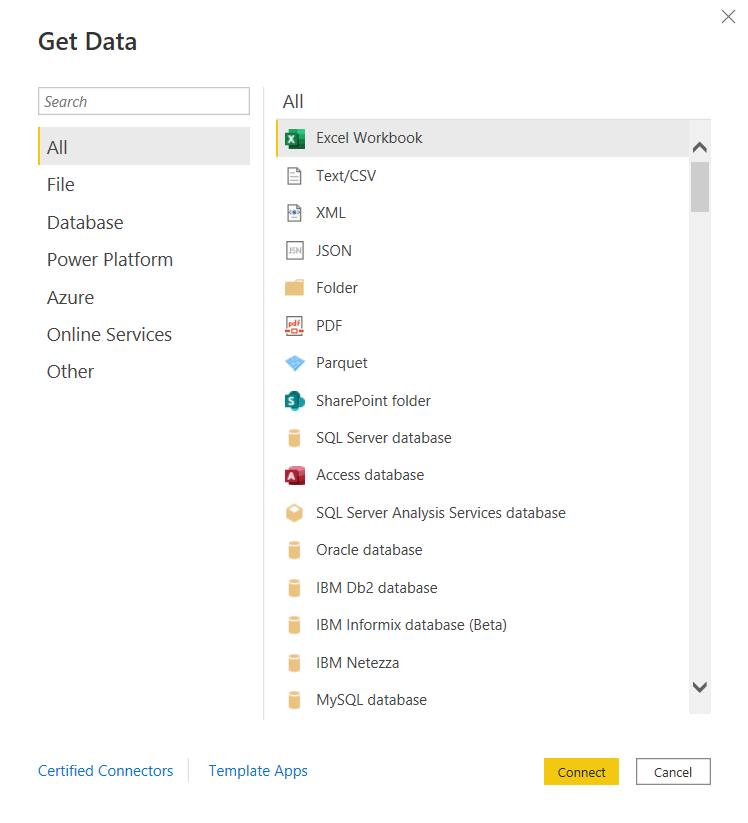
  • You can connect to just about any data source. The list is long. It seems the only source missing is an alien database on Mars. 🙂 I am kidding, but I did not find a native connector for Informix – the most uncommon database that we currently have as a source, but of course, ODBC and JDBC are available for those scenarios. Take a look.

and there are many more!

Some notable connectors are SQL Server Analysis Services, PostgreSQL, Amazon Redshift, Google BigQuery, Snowflake, various Azure data sources, Salesforce, Spark, GitHub, Databricks, and many more.

  • There are many awesome features for handling Excel data. And although we try to avoid Excel data as a source, it’s just not possible at times, and sometimes it makes sense to use those sources. However, the Power Query functionality allows users to perform ETL tasks on any data from any source.
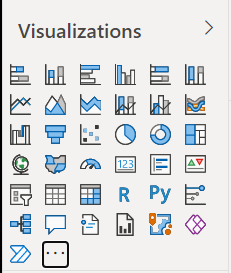
  • Power BI has many built-in visualization options.

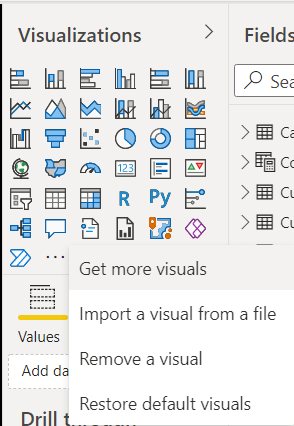
And you have the ability to “get more” from the marketplace.

  • Data modeling in Power BI is based on a methodology that our team is very familiar with: Dimensional Modeling, also known as, Star-Schema Modeling. And this is a proven method that works for efficient analytic solutions. In Power BI, it is also easy to create relationships between tables, change data types, and build hierarchies.
  • Within the data models, you can also use a versatile language called DAX (Data Analysis Expressions) to manipulate data, filter data, build measures, and more. I find that what’s possible with DAX brings Power BI into a whole other tier of flexibility compared to other tools. There is a bit of a learning curve for DAX, but you can start by focusing on a few key functions, and then expand your knowledge over time.
  • As you would expect in any modern BI platform, the security features in Power BI provide for object-level and data-level security. We have set up some simple security scenarios so far and it was straightforward. We will be digging more into setting up some more complex security scenarios soon and will report on that experience.
  • Data profiling features are built into Power BI, which may save you some time from having to jump into another query tool to profile your data.
  • Along with some standard analytic features, such as TopN, conditional formatting, and aggregate functions, Power BI also offers AI visuals, R and Python visuals, and advanced algorithms (such as key influencers and outliers) are available. I can foresee us using these features in the future.
  • Integration options with Office 365, SharePoint, and Teams.
  • Power BI is a great platform for one of the most significant trends in analytics – that is, users clamoring for Self-Service Analytics. With the ability to easily secure and share Power BI datasets, and users able to easily connect and use that data with an intuitive, optional code, tool that they may already have exposure to, it will be easier to implement self-service solutions. There are also some cool features for report consumers, such as personalization of visuals and mobile view.
  • A company called P3Adaptive delivered an awesome training for us, but there are tons of free resources available for learning. A good place to start is the Power BI lessons on Microsoft Learn – Power BI. And then, sign up for Dashboard in a Day (DIAD), a free one-day instructor-led training. You can find and register for DIAD classes here: Microsoft Events – DIAD
  • There are reasons why the Power BI platform has been at the top of the “Gartner Magic Quadrant for Business Intelligence and Analytics Platforms” for the last 3 years. It has a lot going for it and the company seems to be aggressive about continuous improvement.

I look forward to the Power BI journey and the ongoing quest to make our data as valuable as possible for our company.