Tag: Data Modeling

How to turn off “Autodetect New Relationships” in Power BI (and why you may consider doing it)

Power BI includes a feature called Autodetect new relationships that automatically creates relationships between tables when new data is loaded into a model. While convenient for simple datasets, this setting can cause unexpected behavior in more advanced data models.

How to Turn Off Autodetect New Relationships

You can disable this feature directly from Power BI Desktop:

  1. Open Power BI Desktop
  2. Go to FileOptions and settingsOptions
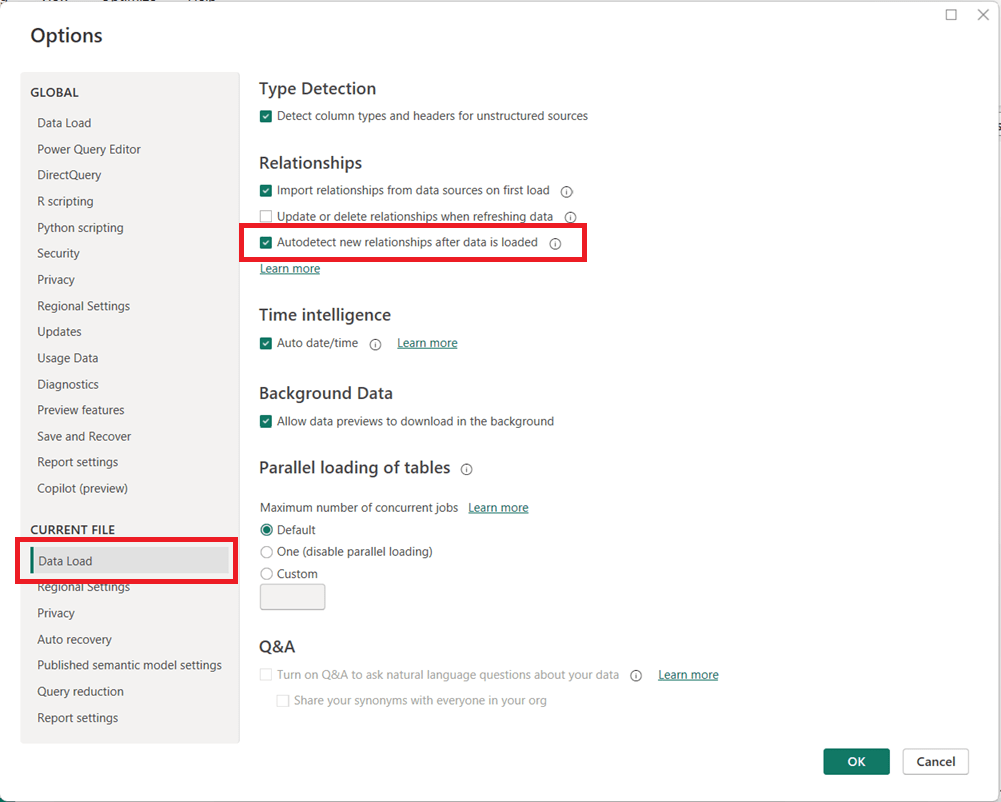
  3. In the left pane, under CURRENT FILE, select Data Load
  4. Then in the page’s main area, under the Relationships section, uncheck:
    • Autodetect new relationships after data is loaded
  5. Click OK

Note that you may need to refresh your model for the change to fully take effect on newly loaded data.

Why You May Want to Disable This Feature

Turning off automatic relationship detection is considered a best practice for many professional Power BI models, especially as complexity increases.

Key reasons to disable it include:

  • Prevent unintended relationships
    This is the main reason. Power BI may create relationships you did not intend, based solely on matching column names or data types. Automatically generated relationships can introduce ambiguity and inactive relationships, leading to incorrect DAX results or performance issues.
  • Maintain full control of the data model, especially when the model needs to be carefully designed because of complexity or other reasons
    Manually creating relationships ensures they follow your star schema design and business logic. Complex models with role-playing dimensions, bridge tables, or composite models benefit from intentional, not automatic, relationships.
  • Improve model reliability and maintainability
    Explicit relationships make your model easier to understand, document, and troubleshoot.

When Autodetect Can Still Be Useful

Autodetect is a useful feature in some cases. For quick prototypes, small datasets, or ad-hoc analysis, automatic relationship detection can save time. However, once a model moves toward production or supports business-critical reporting, manual control is strongly recommended.

Thanks for reading!
How to turn off Auto date/time in Power BI and why you might want to

Power BI includes a feature called Auto date/time that automatically creates hidden date tables for date columns in your model. While this can be helpful for quick analyses, it can also introduce performance issues and modeling complexity in more advanced or production-grade reports.

What Is Auto Date/Time?

When Auto date/time is enabled, Power BI automatically generates a hidden date table for every column of type Date or Date/Time. These tables allow you to use built-in time intelligence features (like Year, Quarter, and Month) without explicitly creating a calendar table.

Why Turn Off Auto Date/Time?

Disabling Auto date/time is often considered a best practice for the following reasons:

  • Better Performance
    Each date column gets its own hidden date table, which increases model size and can slow down report performance.
  • Cleaner Data Models
    Hidden tables can clutter the model and make debugging DAX calculations more difficult.
  • Consistent Time Intelligence
    Using a single, well-designed Date (Calendar) table ensures consistent logic across all measures and visuals.
  • More Control
    Custom calendar tables allow you to define fiscal years, custom week logic, holidays, and other business-specific requirements.

How to Turn Off Auto Date/Time in Power BI

You can disable Auto date/time in both Power BI Desktop and at the report level:

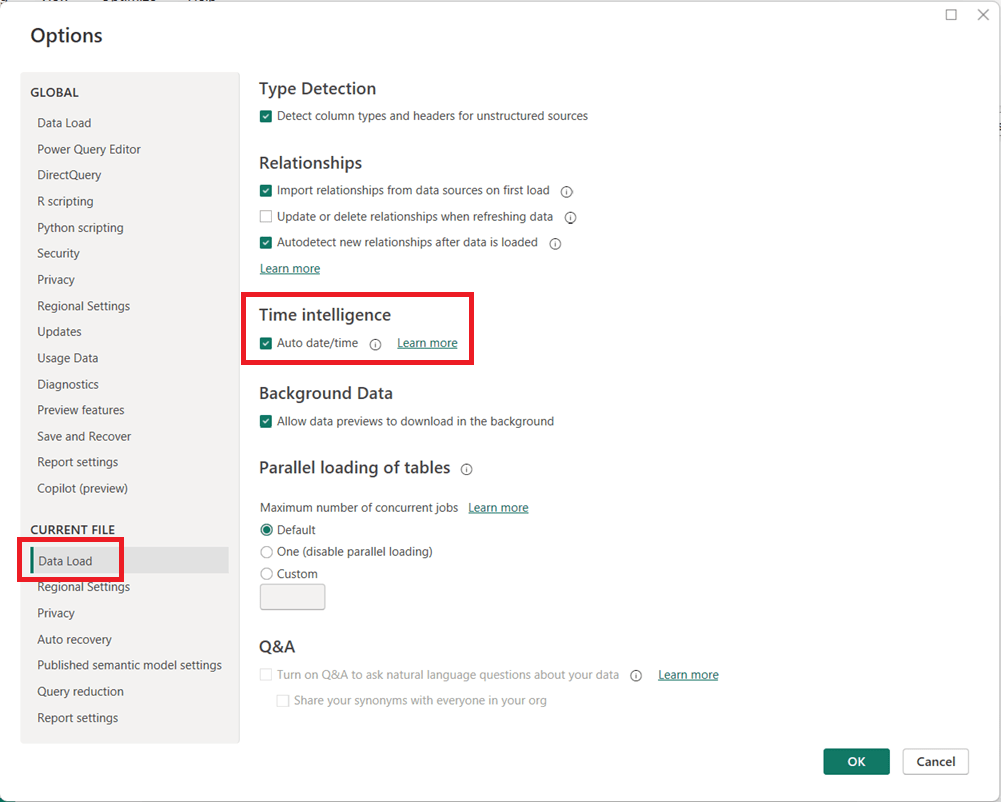
  1. In Power BI Desktop, go to FileOptions and settingsOptions.
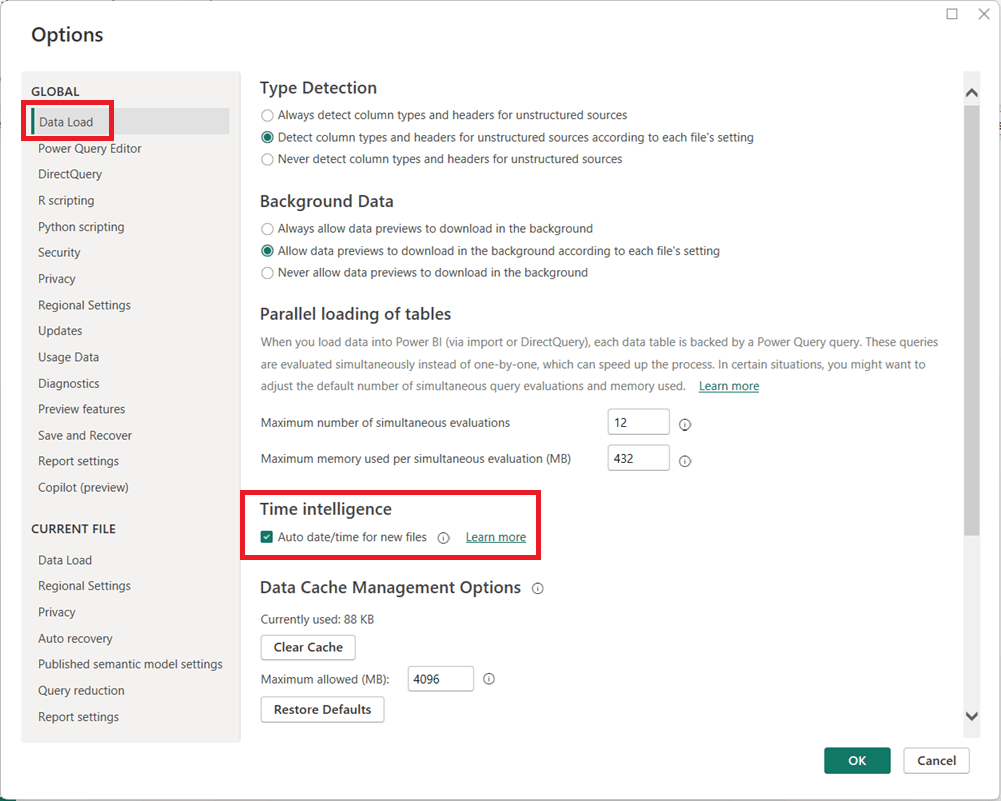
  2. Under Global, select Data Load.
  3. Uncheck Auto date/time for new files.
  1. (Optional but recommended) Under Current File, select Data Load and uncheck Auto date/time to disable it for the current report.
  1. Click OK and refresh your model if necessary.

When Should You Leave It On?

Auto date/time can still be useful for:

  • Quick prototypes or ad-hoc analysis
  • Simple models with only one or two date fields
  • Users new to Power BI who are not yet working with custom DAX time intelligence

Final Thoughts

For enterprise, reusable, or performance-sensitive Power BI models, turning off Auto date/time and using a dedicated Date table is usually the better approach. It leads to cleaner models, more reliable calculations, and greater long-term flexibility as your reports grow in complexity.

Thanks for reading!