Tag: cloud

AI in Cybersecurity: From Reactive Defense to Adaptive, Autonomous Protection

“AI in …” series

Cybersecurity has always been a race between attackers and defenders. What’s changed is the speed, scale, and sophistication of threats. Cloud computing, remote work, IoT, and AI-generated attacks have dramatically expanded the attack surface—far beyond what human analysts alone can manage.

AI has become a foundational capability in cybersecurity, enabling organizations to detect threats faster, respond automatically, and continuously adapt to new attack patterns.


How AI Is Being Used in Cybersecurity Today

AI is now embedded across nearly every cybersecurity function:

Threat Detection & Anomaly Detection

  • Darktrace uses self-learning AI to model “normal” behavior across networks and detect anomalies in real time.
  • Vectra AI applies machine learning to identify hidden attacker behaviors in network and identity data.

Endpoint Protection & Malware Detection

  • CrowdStrike Falcon uses AI and behavioral analytics to detect malware and fileless attacks on endpoints.
  • Microsoft Defender for Endpoint applies ML models trained on trillions of signals to identify emerging threats.

Security Operations (SOC) Automation

  • Palo Alto Networks Cortex XSIAM uses AI to correlate alerts, reduce noise, and automate incident response.
  • Splunk AI Assistant helps analysts investigate incidents faster using natural language queries.

Phishing & Social Engineering Defense

  • Proofpoint and Abnormal Security use AI to analyze email content, sender behavior, and context to stop phishing and business email compromise (BEC).

Identity & Access Security

  • Okta and Microsoft Entra ID use AI to detect anomalous login behavior and enforce adaptive authentication.
  • AI flags compromised credentials and impossible travel scenarios.

Vulnerability Management

  • Tenable and Qualys use AI to prioritize vulnerabilities based on exploit likelihood and business impact rather than raw CVSS scores.

Tools, Technologies, and Forms of AI in Use

Cybersecurity AI blends multiple techniques into layered defenses:

  • Machine Learning (Supervised & Unsupervised)
    Used for classification (malware vs. benign) and anomaly detection.
  • Behavioral Analytics
    AI models baseline normal user, device, and network behavior to detect deviations.
  • Natural Language Processing (NLP)
    Used to analyze phishing emails, threat intelligence reports, and security logs.
  • Generative AI & Large Language Models (LLMs)
    • Used defensively as SOC copilots, investigation assistants, and policy generators
    • Examples: Microsoft Security Copilot, Google Chronicle AI, Palo Alto Cortex Copilot
  • Graph AI
    Maps relationships between users, devices, identities, and events to identify attack paths.
  • Security AI Platforms
    • Microsoft Security Copilot
    • IBM QRadar Advisor with Watson
    • Google Chronicle
    • AWS GuardDuty

Benefits Organizations Are Realizing

Companies using AI-driven cybersecurity report major advantages:

  • Faster Threat Detection (minutes instead of days or weeks)
  • Reduced Alert Fatigue through intelligent correlation
  • Lower Mean Time to Respond (MTTR)
  • Improved Detection of Zero-Day and Unknown Threats
  • More Efficient SOC Operations with fewer analysts
  • Scalability across hybrid and multi-cloud environments

In a world where attackers automate their attacks, AI is often the only way defenders can keep pace.


Pitfalls and Challenges

Despite its power, AI in cybersecurity comes with real risks:

False Positives and False Confidence

  • Poorly trained models can overwhelm teams or miss subtle attacks.

Bias and Blind Spots

  • AI trained on incomplete or biased data may fail to detect novel attack patterns or underrepresent certain environments.

Explainability Issues

  • Security teams and auditors need to understand why an alert fired—black-box models can erode trust.

AI Used by Attackers

  • Generative AI is being used to create more convincing phishing emails, deepfake voice attacks, and automated malware.

Over-Automation Risks

  • Fully automated response without human oversight can unintentionally disrupt business operations.

Where AI Is Headed in Cybersecurity

The future of AI in cybersecurity is increasingly autonomous and proactive:

  • Autonomous SOCs
    AI systems that investigate, triage, and respond to incidents with minimal human intervention.
  • Predictive Security
    Models that anticipate attacks before they occur by analyzing attacker behavior trends.
  • AI vs. AI Security Battles
    Defensive AI systems dynamically adapting to attacker AI in real time.
  • Deeper Identity-Centric Security
    AI focusing more on identity, access patterns, and behavioral trust rather than perimeter defense.
  • Generative AI as a Security Teammate
    Natural language interfaces for investigations, playbooks, compliance, and training.

How Organizations Can Gain an Advantage

To succeed in this fast-changing environment, organizations should:

  1. Treat AI as a Force Multiplier, Not a Replacement
    Human expertise remains essential for context and judgment.
  2. Invest in High-Quality Telemetry
    Better data leads to better detection—logs, identity signals, and endpoint visibility matter.
  3. Focus on Explainable and Governed AI
    Transparency builds trust with analysts, leadership, and regulators.
  4. Prepare for AI-Powered Attacks
    Assume attackers are already using AI—and design defenses accordingly.
  5. Upskill Security Teams
    Analysts who understand AI can tune models and use copilots more effectively.
  6. Adopt a Platform Strategy
    Integrated AI platforms reduce complexity and improve signal correlation.

Final Thoughts

AI has shifted cybersecurity from a reactive, alert-driven discipline into an adaptive, intelligence-led function. As attackers scale their operations with automation and generative AI, defenders have little choice but to do the same—responsibly and strategically.

In cybersecurity, AI isn’t just improving defense—it’s redefining what defense looks like in the first place.
The State of Data for the Year 2025

As we close out 2025, it’s clear that the global data landscape has continued its unprecedented expansion — touching every part of life, business, and technology. From raw bytes generated every second to the ways that AI reshapes how we search, communicate, and innovate, this year has marked another seismic leap forward for data. Below is a comprehensive look at where we stand — and where things appear to be headed as we approach 2026.


🌐 Global Data Generation: A Tidal Wave

Amount of Data Generated

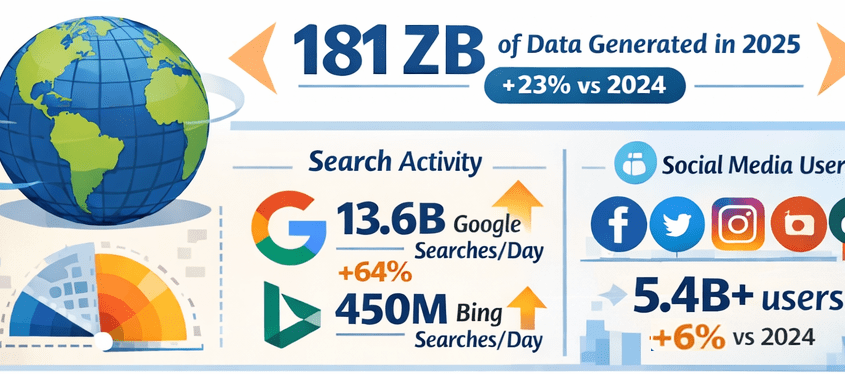
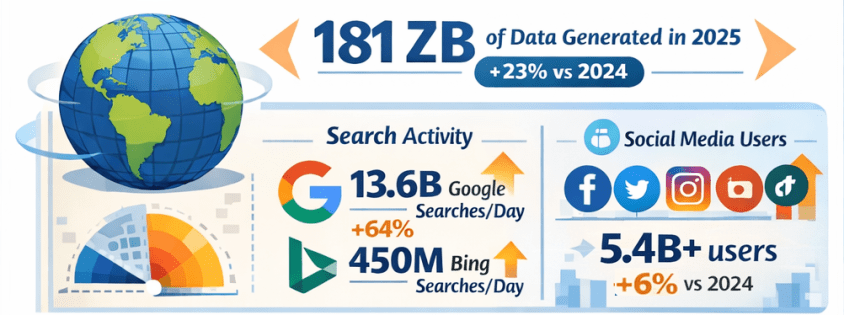
  • In 2025, the total volume of data created, captured, copied, and consumed globally is forecast to reach approximately 181 zettabytes (ZB) — up from about 147 ZB in 2024, representing roughly 23% year-over-year growth. Gitnux+1
  • That equates to an astonishing ~402 million terabytes of data generated daily. Exploding Topics

Growth Comparison: 2024 vs 2025

  • Data is growing at a compound rate: from roughly 120 ZB in 2023 to 147 ZB in 2024, then to about 181 ZB in 2025 — illustrating an ongoing surge of data creation driven by digital adoption and connected devices. Exploding Topics+1

🔍 Internet Users & Search Behavior

Number of People Online

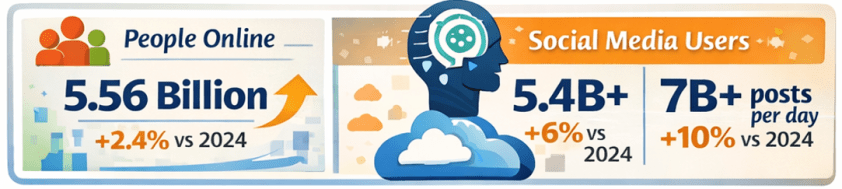
  • As of early 2025, around 5.56 billion people are active internet users, accounting for nearly 68% of the global population — up from approximately 5.43 billion in 2024. DemandSage

Search Engine Activity

  • Google alone handles roughly 13.6 billion searches per day in 2025, totaling almost 5 trillion searches annually — a significant increase from the estimated 8.3 billion daily searches in 2024. Exploding Topics
  • Bing, while much smaller in scale, processes around 450+ million searches per day (~13–14 billion per month). Nerdynav

Market Share Snapshot

  • Google continues to dominate search with approximately 90% global market share, while Bing remains one of the top alternatives. StatCounter Global Stats

📱 Social Media Usage & Content Creation

User Numbers

  • There are roughly 5.4–5.45 billion social media users worldwide in 2025 — up from prior years and covering about 65–67% of the global population. XtendedView+1

Time Spent & Trends

  • Users spend on average about 2 hours and 20+ minutes per day on social platforms. SQ Magazine
  • AI plays a central role in content recommendations and creation, with 80%+ of social feeds relying on algorithms, and an increasing share of generated images and posts assisted by AI tools. SQ Magazine

📊 The Explosion of AI: LLMs & Tools

LLM Adoption

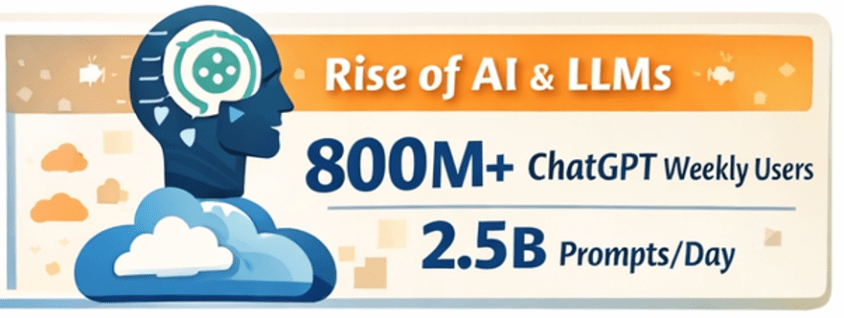
  • Large language models and AI assistants like ChatGPT have become globally pervasive:
    • ChatGPT alone has around 800 million weekly active users as of late 2025. First Page Sage
    • Daily usage figures exceed 2.5 billion user prompts globally, highlighting a massive shift toward direct AI interaction. Exploding Topics
  • Studies have shown that LLM-assisted writing and content creation are now embedded across formal and informal communication channels, indicating broad adoption beyond curiosity use cases. arXiv

AI Tools Everywhere

  • Generative AI is now a staple across industries — from content creation to customer service, data analytics to software development. Investments and usage in AI-powered analytics and automation tools continue to rise rapidly. layerai.org

💡 Trends in Data Collection & Analytics

Real-Time & Edge Processing

  • In 2025, more than half of corporate data processing is happening at the edge, closer to the source of data generation, enabling real-time insights. Pennsylvania Institute of Technology

Data Democratization

  • Data access and analytics tools have become more user-friendly, with low-code/no-code platforms enabling broader organizational participation in data insight generation. postlo.com

☁️ Cloud & Data Infrastructure

Cloud Data Growth

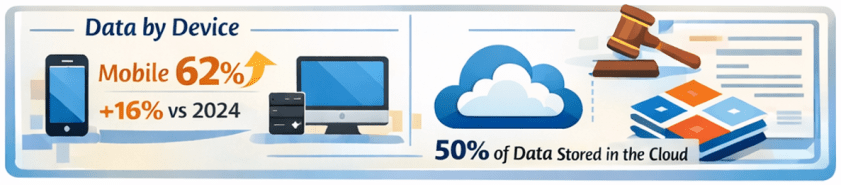
  • An ever-increasing portion of global data is stored in the cloud, with estimates suggesting around half of all data resides in cloud environments by 2025. Axis Intelligence

Data Centers & Energy

  • Data centers, particularly those supporting AI workloads, are expanding rapidly. This infrastructure surge is driving both innovation and concerns — including power consumption and sustainability challenges. TIME

📜 Data Laws & Regulation

New Legal Frameworks

  • In the UK, the Data (Use and Access) Act of 2025 was enacted, updating data protection and access rules related to UK-specific GDPR implementations. Wikipedia
  • Elsewhere, data regulation remains a focal point globally, with ongoing debates around privacy, governance, AI accountability, and cross–border data flows.

🛠️ Top Data Tools/Platforms of 2025

While specific rankings vary by industry and use case, 2025’s data ecosystem centers around:

  • Cloud data platforms: Snowflake, BigQuery, Redshift, Databricks
  • BI & visualization: Tableau, Power BI
  • AI/ML frameworks: TensorFlow, PyTorch, scalable LLM platforms
  • Automation & low-code analytics: dbt, Airflow, no-code toolchains
  • Real-time streaming: Kafka, ksqlDB

Ongoing trends emphasize integration between AI tooling and traditional analytics pipelines — blurring the lines between data engineering, analytics, and automation.

Note: specific tool adoption percentages vary by firm size and sector, but cloud-native and AI-augmented tools dominate enterprise workflows. Reddit


🌟 Novel Uses of Data in 2025

2025 saw innovative applications such as:

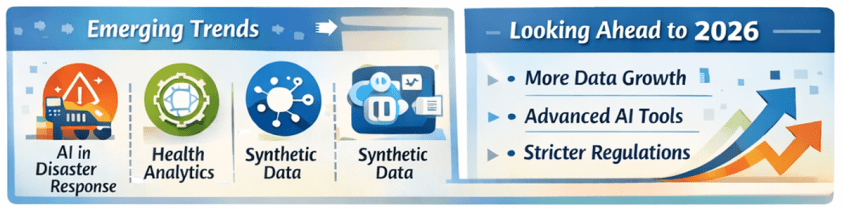
  • AI-powered disaster response using real-time social data streams.
  • Conversational assistants embedded into everyday workflows (search, writing, decision support).
  • Predictive analytics in health, finance, logistics, accelerated by real-time IoT feeds.
  • Synthetic datasets for simulation, security research, and model training. arXiv

🔮 What’s Expected in 2026

Continued Growth

  • Data volumes are projected to keep rising — potentially doubling every few years with the proliferation of AI, IoT, and immersive technologies.
  • LLM adoption will likely hit deeper integration into enterprise processes, customer experience workflows, and consumer tech.
  • AI governance and data privacy regulation will intensify globally, balancing innovation with accountability.

Emerging Frontiers

  • Multimodal AI blending text, vision, and real-time sensor data.
  • Federated learning and privacy-preserving analytics gaining traction.
  • Data meshes and decentralized data infrastructures challenging traditional monolithic systems.
  • Unified data platforms with AI-focused features and AI-focused business-ready data models are becoming common place.

📌 Final Thoughts

2025 has been another banner year for data — not just in sheer scale, but in how data powers decision-making, AI capabilities, and digital interactions across society. From trillions of searches to billions of social interactions, from zettabytes of oceans of data to democratized analytics tools, the data world continues to evolve at breakneck speed. And for data professionals and leaders, the next year promises even more opportunities to harness data for insight, innovation, and impact. Exciting stuff!

Thanks for reading!

Understanding Microsoft Fabric Shortcuts

Microsoft Fabric is a central platform for data and analytics, and one of its powerful features that supports it being an all-in-one platform is Shortcuts. Shortcuts provide a simple way to unify data across multiple locations without duplicating or moving it. This is a big deal because it saves a LOT of time and effort that is usually involved in moving data around.

What Are Shortcuts?

Shortcuts are references (or “pointers”) to data that resides in another storage location. Instead of copying the data into Fabric, a shortcut lets you access and query it as if it were stored locally.

This is especially valuable in today’s data landscape, where data often spans OneLake, Azure Data Lake Storage (ADLS), Amazon S3, or other environments.

Types of Shortcuts

There are 2 types of shortcuts: table shortcuts and file shortcuts

  1. Table Shortcuts
    • Point to existing tables in other Fabric workspaces or external sources.
    • Allow you to query and analyze the table without physically moving it.
  2. File Shortcuts
    • Point to files (e.g., Parquet, CSV, Delta Lake) stored in OneLake or other supported storage systems.
    • Useful for scenarios where files are your system of record, but you want to use them in Fabric experiences like Power BI, Data Engineering, or Data Science.

Benefits of Shortcuts

Shortcuts is a really useful feature, and here are some of its benefits:

  • No Data Duplication: Saves storage costs and avoids data sprawl.
  • Single Source of Truth: Data stays in its original location while being usable across Fabric.
  • Speed and Efficiency: Query and analyze external data in place, without lengthy ETL processes.
  • Flexibility: Works across different storage platforms and Fabric workspaces.

How and Where Shortcuts Can Be Created

  • In OneLake: You can create shortcuts directly in OneLake to link to data from ADLS Gen2, Amazon S3, or other OneLake workspaces.
  • In Fabric Experiences: Whether working in Data Engineering, Data Science, Real-Time Analytics, or Power BI, shortcuts can be created in lakehouses or KQL (Kusto Query Language) databases, and you can use them directly as data in OneLake. Any Fabric service will be able to use them without copying data from the data source.
  • In Workspaces: Shortcuts make it possible to connect across lakehouses stored in different workspaces, breaking down silos within an organization. The shortcuts can be generated from a lakehouse, warehouse, or KQL database.
  • Note that warehouses do not support the creation of shortcuts. However, you can query data stored within other warehouses and lakehouses.

How Shortcuts Can Be Used

  • Cross-Workspace Data Access: Analysts can query data in another team’s workspace without requesting a copy.
  • Data Virtualization: Data scientists can work with files stored in ADLS without having to move them into Fabric.
  • BI and Reporting: Power BI models can use shortcuts to reference external files or tables, enabling consistent reporting without duplication.
  • ETL Simplification: Instead of moving raw files into Fabric, engineers can create shortcuts and build transformations directly on the source.

Common Scenarios

  • A finance team wants to build Power BI reports on data stored by the operations team without moving the data.
  • A data scientist needs access to parquet files in Amazon S3 but prefers to analyze them within Fabric.
  • A company with multiple Fabric workspaces wants to centralize access to shared reference data (like customer or product master data) without replication.

In summary: Microsoft Fabric Shortcuts simplify data access across locations and workspaces. Whether table-based or file-based, they allow organizations to unify data without duplication, streamline analytics, and improve collaboration.

Here is a link to the Microsoft Learn OneLake documentation about Shortcuts. From there you will be able to explore all the Shortcut topics shown in the image below:

Thanks for reading! I hope you found this information useful.