AI in Agriculture: From Precision Farming to Autonomous Food Systems

“AI in …” series

Agriculture has always been a data-driven business—weather patterns, soil conditions, crop cycles, and market prices have guided decisions for centuries. What’s changed is scale and speed. With sensors, satellites, drones, and connected machinery generating massive volumes of data, AI has become the engine that turns modern farming into a precision, predictive, and increasingly autonomous operation.

From global agribusinesses to small specialty farms, AI is reshaping how food is grown, harvested, and distributed.


How AI Is Being Used in Agriculture Today

Precision Farming & Crop Optimization

  • John Deere uses AI and computer vision in its See & Spray™ technology to identify weeds and apply herbicide only where needed, reducing chemical use by up to 90% in some cases.
  • Corteva Agriscience applies AI models to optimize seed selection and planting strategies based on soil and climate data.

Crop Health Monitoring

  • Climate FieldView (by Bayer) uses machine learning to analyze satellite imagery, yield data, and field conditions to identify crop stress early.
  • AI-powered drones monitor crop health, detect disease, and identify nutrient deficiencies.

Autonomous and Smart Equipment

  • John Deere Autonomous Tractor uses AI, GPS, and computer vision to operate with minimal human intervention.
  • CNH Industrial (Case IH, New Holland) integrates AI into precision guidance and automated harvesting systems.

Yield Prediction & Forecasting

  • IBM Watson Decision Platform for Agriculture uses AI and weather analytics to forecast yields and optimize field operations.
  • Agribusinesses use AI to predict harvest volumes and plan logistics more accurately.

Livestock Monitoring

  • Zoetis and Cainthus use computer vision and AI to monitor animal health, detect lameness, track feeding behavior, and identify illness earlier.
  • AI-powered sensors help optimize breeding and nutrition.

Supply Chain & Commodity Forecasting

  • AI models predict crop yields and market prices, helping traders, cooperatives, and food companies manage risk and plan procurement.

Tools, Technologies, and Forms of AI in Use

Agriculture AI blends physical-world sensing with advanced analytics:

  • Machine Learning & Deep Learning
    Used for yield prediction, disease detection, and optimization models.
  • Computer Vision
    Enables weed detection, crop inspection, fruit grading, and livestock monitoring.
  • Remote Sensing & Satellite Analytics
    AI analyzes satellite imagery to assess soil moisture, crop growth, and drought conditions.
  • IoT & Sensor Data
    Soil sensors, weather stations, and machinery telemetry feed AI models in near real time.
  • Edge AI
    AI models run directly on tractors, drones, and field devices where connectivity is limited.
  • AI Platforms for Agriculture
    • Climate FieldView (Bayer)
    • IBM Watson for Agriculture
    • Microsoft Azure FarmBeats
    • Trimble Ag Software

Benefits Agriculture Companies Are Realizing

Organizations adopting AI in agriculture are seeing tangible gains:

  • Higher Yields with fewer inputs
  • Reduced Chemical and Water Usage
  • Lower Operating Costs through automation
  • Improved Crop Quality and Consistency
  • Early Detection of Disease and Pests
  • Better Risk Management for weather and market volatility

In an industry with thin margins and increasing climate pressure, these improvements are often the difference between profit and loss.


Pitfalls and Challenges

Despite its promise, AI adoption in agriculture faces real constraints:

Data Gaps and Variability

  • Farms differ widely in size, crops, and technology maturity, making standardization difficult.

Connectivity Limitations

  • Rural areas often lack reliable broadband, limiting cloud-based AI solutions.

High Upfront Costs

  • Autonomous equipment, sensors, and drones require capital investment that smaller farms may struggle to afford.

Model Generalization Issues

  • AI models trained in one region may not perform well in different climates or soil conditions.

Trust and Adoption Barriers

  • Farmers may be skeptical of “black-box” recommendations without clear explanations.

Where AI Is Headed in Agriculture

The future of AI in agriculture points toward greater autonomy and resilience:

  • Fully Autonomous Farming Systems
    End-to-end automation of planting, spraying, harvesting, and monitoring.
  • AI-Driven Climate Adaptation
    Models that help farmers adapt crop strategies to changing climate conditions.
  • Generative AI for Agronomy Advice
    AI copilots providing real-time recommendations to farmers in plain language.
  • Hyper-Localized Decision Models
    Field-level, plant-level optimization rather than farm-level averages.
  • AI-Enabled Sustainability & ESG Reporting
    Automated tracking of emissions, water use, and soil health.

How Agriculture Companies Can Gain an Advantage

To stay competitive in a rapidly evolving environment, agriculture organizations should:

  1. Start with High-ROI Use Cases
    Precision spraying, yield forecasting, and crop monitoring often deliver fast payback.
  2. Invest in Data Foundations
    Clean, consistent field data is more valuable than advanced algorithms alone.
  3. Adopt Hybrid Cloud + Edge Strategies
    Balance real-time field intelligence with centralized analytics.
  4. Focus on Explainability and Trust
    Farmers need clear, actionable insights—not just predictions.
  5. Partner Across the Ecosystem
    Collaborate with equipment manufacturers, agritech startups, and AI providers.
  6. Plan for Climate Resilience
    Use AI to support long-term sustainability, not just short-term yield gains.

Final Thoughts

AI is transforming agriculture from an experience-driven practice into a precision, intelligence-led system. As global food demand rises and environmental pressures intensify, AI will play a central role in producing more food with fewer resources.

In agriculture, AI isn’t replacing farmers—it’s giving them better tools to feed the world.

How to Perform a Safe DIVIDE in Power BI (DAX and Power Query)

Division is a common operation in Power BI, but it can cause errors when the divisor is zero. Both DAX and Power Query provide built-in ways to handle these scenarios safely.

Safe DIVIDE in DAX

In DAX, the DIVIDE function is the recommended approach. Its syntax is:

DIVIDE(numerator, divisor [, alternateResult])

If the divisor is zero (or BLANK), the function returns the optional alternateResult; otherwise, it performs the division normally.

Examples:

  • DIVIDE(10, 2) → 5
  • DIVIDE(10, 0) → BLANK
  • DIVIDE(10, 0, 0) → 0

This makes DIVIDE safer and cleaner than using conditional logic.

Safe DIVIDE in Power Query

In Power Query (M language), you can use the try … otherwise expression to handle divide-by-zero errors gracefully. The syntax is:

try [expression] otherwise [alternateValue]

Example:

try [Sales] / [Quantity] otherwise 0

If the division fails (such as when Quantity is zero), Power Query returns 0 instead of an error.

Using DIVIDE in DAX and try … otherwise in Power Query ensures your division calculations remain error-free.

AI in Marketing: From Campaign Automation to Intelligent Growth Engines

“AI in …” series

Marketing has always been about understanding people—what they want, when they want it, and how best to reach them. What’s changed is the scale and complexity of that challenge. Customers interact across dozens of channels, generate massive amounts of data, and expect personalization as the default.

AI has become the connective tissue that allows marketing teams to turn fragmented data into insight, automation, and growth—often in real time.


How AI Is Being Used in Marketing Today

AI now touches nearly every part of the marketing function:

Personalization & Customer Segmentation

  • Netflix uses AI to personalize thumbnails, recommendations, and messaging—driving engagement and retention.
  • Amazon applies machine learning to personalize product recommendations and promotions across its marketing channels.

Content Creation & Optimization

  • Coca-Cola has used generative AI tools to co-create marketing content and creative assets.
  • Marketing teams use OpenAI models (via ChatGPT and APIs), Adobe Firefly, and Jasper AI to generate copy, images, and ad variations at scale.

Marketing Automation & Campaign Optimization

  • Salesforce Einstein optimizes email send times, predicts customer engagement, and recommends next-best actions.
  • HubSpot AI assists with content generation, lead scoring, and campaign optimization.

Paid Media & Ad Targeting

  • Meta Advantage+ and Google Performance Max use AI to automate bidding, targeting, and creative optimization across ad networks.

Customer Journey Analytics

  • Adobe Sensei analyzes cross-channel customer journeys to identify drop-off points and optimization opportunities.

Voice, Chat, and Conversational Marketing

  • Brands use AI chatbots and virtual assistants for lead capture, product discovery, and customer support.

Tools, Technologies, and Forms of AI in Use

Modern marketing AI stacks typically include:

  • Machine Learning & Predictive Analytics
    Used for churn prediction, propensity scoring, and lifetime value modeling.
  • Natural Language Processing (NLP)
    Powers content generation, sentiment analysis, and conversational interfaces.
  • Generative AI & Large Language Models (LLMs)
    Used to generate ad copy, emails, landing pages, social posts, and campaign ideas.
    • Examples: ChatGPT, Claude, Gemini, Jasper, Copy.ai
  • Computer Vision
    Applied to image recognition, brand safety, and visual content optimization.
  • Marketing AI Platforms
    • Salesforce Einstein
    • Adobe Sensei
    • HubSpot AI
    • Marketo Engage
    • Google Marketing Platform

Benefits Marketers Are Realizing

Organizations that adopt AI effectively see significant advantages:

  • Higher Conversion Rates through personalization
  • Faster Campaign Execution with automated content creation
  • Lower Cost per Acquisition (CPA) via optimized targeting
  • Improved Customer Insights and segmentation
  • Better ROI Measurement and attribution
  • Scalability without proportional increases in headcount

In many cases, AI allows small teams to operate at enterprise scale.


Pitfalls and Challenges

Despite its power, AI in marketing has real risks:

Over-Automation and Brand Dilution

  • Excessive reliance on generative AI can lead to generic or off-brand content.

Data Privacy and Consent Issues

  • AI-driven personalization must comply with GDPR, CCPA, and evolving privacy laws.

Bias in Targeting and Messaging

  • AI models can unintentionally reinforce stereotypes or exclude certain audiences.

Measurement Complexity

  • AI-driven multi-touch journeys can make attribution harder, not easier.

Tool Sprawl

  • Marketers may adopt too many AI tools without clear integration or strategy.

Where AI Is Headed in Marketing

The next wave of AI in marketing will be even more integrated and autonomous:

  • Hyper-Personalization in Real Time
    Content, offers, and experiences adapted instantly based on context and behavior.
  • Generative AI as a Creative Partner
    AI co-creating—not replacing—human creativity.
  • Predictive and Prescriptive Marketing
    AI recommending not just what will happen, but what to do next.
  • AI-Driven Brand Guardianship
    Models trained on brand voice, compliance, and tone to ensure consistency.
  • End-to-End Journey Orchestration
    AI managing entire customer journeys across channels automatically.

How Marketing Teams Can Gain an Advantage

To thrive in this fast-changing environment, marketing organizations should:

  1. Anchor AI to Clear Business Outcomes
    Start with revenue, retention, or efficiency goals—not tools.
  2. Invest in Clean, Unified Customer Data
    AI effectiveness depends on strong data foundations.
  3. Establish Human-in-the-Loop Workflows
    Maintain creative oversight and brand governance.
  4. Upskill Marketers in AI Literacy
    The best results come from marketers who know how to prompt, test, and refine AI outputs.
  5. Balance Personalization with Privacy
    Trust is a long-term competitive advantage.
  6. Rationalize the AI Stack
    Fewer, well-integrated tools outperform disconnected point solutions.

Final Thoughts

AI is transforming marketing from a campaign-driven function into an intelligent growth engine. The organizations that win won’t be those that simply automate more—they’ll be the ones that use AI to understand customers more deeply, move faster with confidence, and blend human creativity with machine intelligence.

In marketing, AI isn’t replacing storytellers—it’s giving them superpowers.

How to replace a NULL value in Power BI Power Query

In Power BI, handling NULL values is a common data-preparation step to get your data ready for analysis, and Power Query makes this easy using the Replace Values feature.

This option is available from both the Home menu …

… and the Transform menu in the Power Query Editor.

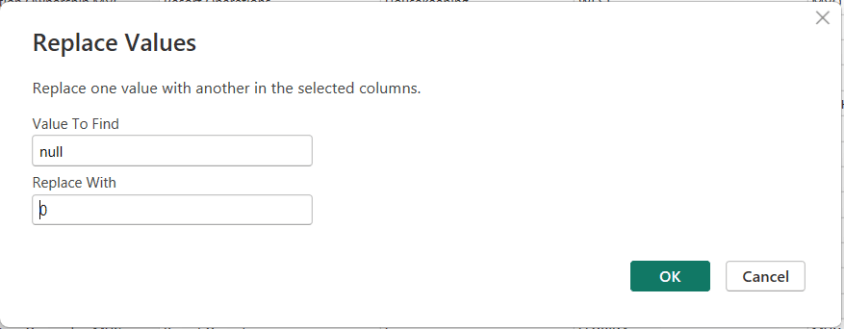
To replace NULLs, first select the column where the NULL values exist. Then choose Replace Values. When the dialog box appears, enter null as the value to find and replace, and specify the value you want to use instead—such as 0 for numeric columns or “Unknown” for text columns.

After confirming, Power Query automatically updates the column and records the step.

Thanks for reading!

The State of Data for the Year 2025

As we close out 2025, it’s clear that the global data landscape has continued its unprecedented expansion — touching every part of life, business, and technology. From raw bytes generated every second to the ways that AI reshapes how we search, communicate, and innovate, this year has marked another seismic leap forward for data. Below is a comprehensive look at where we stand — and where things appear to be headed as we approach 2026.


🌐 Global Data Generation: A Tidal Wave

Amount of Data Generated

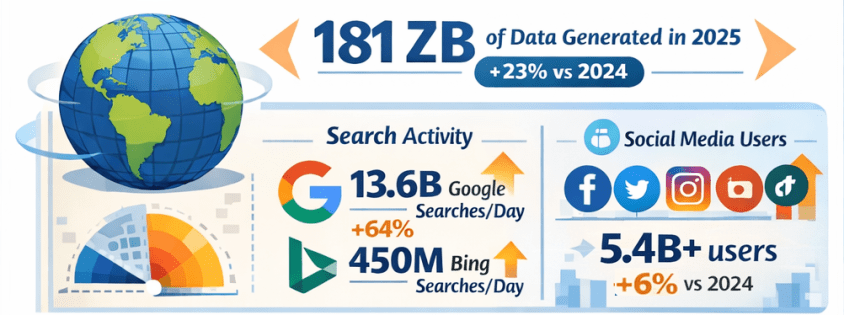
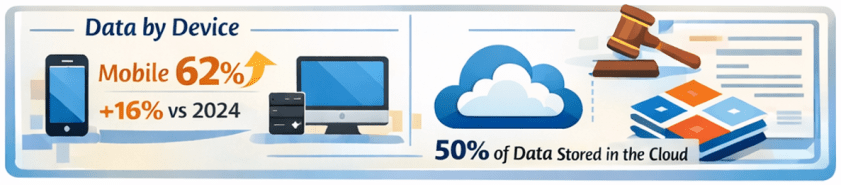
  • In 2025, the total volume of data created, captured, copied, and consumed globally is forecast to reach approximately 181 zettabytes (ZB) — up from about 147 ZB in 2024, representing roughly 23% year-over-year growth. Gitnux+1
  • That equates to an astonishing ~402 million terabytes of data generated daily. Exploding Topics

Growth Comparison: 2024 vs 2025

  • Data is growing at a compound rate: from roughly 120 ZB in 2023 to 147 ZB in 2024, then to about 181 ZB in 2025 — illustrating an ongoing surge of data creation driven by digital adoption and connected devices. Exploding Topics+1

🔍 Internet Users & Search Behavior

Number of People Online

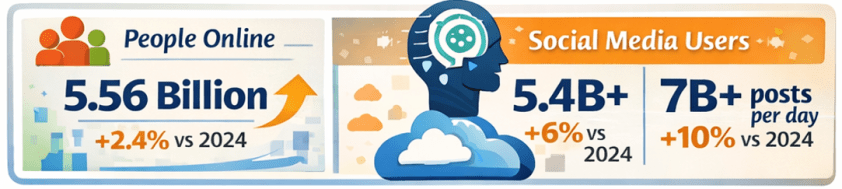
  • As of early 2025, around 5.56 billion people are active internet users, accounting for nearly 68% of the global population — up from approximately 5.43 billion in 2024. DemandSage

Search Engine Activity

  • Google alone handles roughly 13.6 billion searches per day in 2025, totaling almost 5 trillion searches annually — a significant increase from the estimated 8.3 billion daily searches in 2024. Exploding Topics
  • Bing, while much smaller in scale, processes around 450+ million searches per day (~13–14 billion per month). Nerdynav

Market Share Snapshot

  • Google continues to dominate search with approximately 90% global market share, while Bing remains one of the top alternatives. StatCounter Global Stats

📱 Social Media Usage & Content Creation

User Numbers

  • There are roughly 5.4–5.45 billion social media users worldwide in 2025 — up from prior years and covering about 65–67% of the global population. XtendedView+1

Time Spent & Trends

  • Users spend on average about 2 hours and 20+ minutes per day on social platforms. SQ Magazine
  • AI plays a central role in content recommendations and creation, with 80%+ of social feeds relying on algorithms, and an increasing share of generated images and posts assisted by AI tools. SQ Magazine

📊 The Explosion of AI: LLMs & Tools

LLM Adoption

  • Large language models and AI assistants like ChatGPT have become globally pervasive:
    • ChatGPT alone has around 800 million weekly active users as of late 2025. First Page Sage
    • Daily usage figures exceed 2.5 billion user prompts globally, highlighting a massive shift toward direct AI interaction. Exploding Topics
  • Studies have shown that LLM-assisted writing and content creation are now embedded across formal and informal communication channels, indicating broad adoption beyond curiosity use cases. arXiv

AI Tools Everywhere

  • Generative AI is now a staple across industries — from content creation to customer service, data analytics to software development. Investments and usage in AI-powered analytics and automation tools continue to rise rapidly. layerai.org

💡 Trends in Data Collection & Analytics

Real-Time & Edge Processing

  • In 2025, more than half of corporate data processing is happening at the edge, closer to the source of data generation, enabling real-time insights. Pennsylvania Institute of Technology

Data Democratization

  • Data access and analytics tools have become more user-friendly, with low-code/no-code platforms enabling broader organizational participation in data insight generation. postlo.com

☁️ Cloud & Data Infrastructure

Cloud Data Growth

  • An ever-increasing portion of global data is stored in the cloud, with estimates suggesting around half of all data resides in cloud environments by 2025. Axis Intelligence

Data Centers & Energy

  • Data centers, particularly those supporting AI workloads, are expanding rapidly. This infrastructure surge is driving both innovation and concerns — including power consumption and sustainability challenges. TIME

📜 Data Laws & Regulation

New Legal Frameworks

  • In the UK, the Data (Use and Access) Act of 2025 was enacted, updating data protection and access rules related to UK-specific GDPR implementations. Wikipedia
  • Elsewhere, data regulation remains a focal point globally, with ongoing debates around privacy, governance, AI accountability, and cross–border data flows.

🛠️ Top Data Tools/Platforms of 2025

While specific rankings vary by industry and use case, 2025’s data ecosystem centers around:

  • Cloud data platforms: Snowflake, BigQuery, Redshift, Databricks
  • BI & visualization: Tableau, Power BI
  • AI/ML frameworks: TensorFlow, PyTorch, scalable LLM platforms
  • Automation & low-code analytics: dbt, Airflow, no-code toolchains
  • Real-time streaming: Kafka, ksqlDB

Ongoing trends emphasize integration between AI tooling and traditional analytics pipelines — blurring the lines between data engineering, analytics, and automation.

Note: specific tool adoption percentages vary by firm size and sector, but cloud-native and AI-augmented tools dominate enterprise workflows. Reddit


🌟 Novel Uses of Data in 2025

2025 saw innovative applications such as:

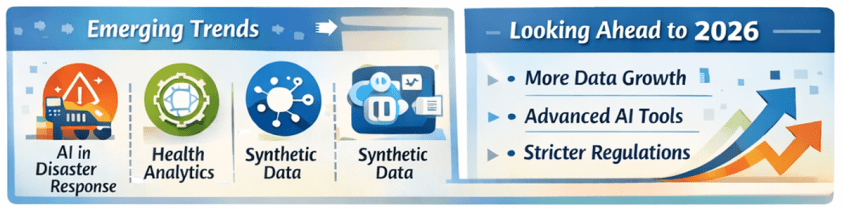
  • AI-powered disaster response using real-time social data streams.
  • Conversational assistants embedded into everyday workflows (search, writing, decision support).
  • Predictive analytics in health, finance, logistics, accelerated by real-time IoT feeds.
  • Synthetic datasets for simulation, security research, and model training. arXiv

🔮 What’s Expected in 2026

Continued Growth

  • Data volumes are projected to keep rising — potentially doubling every few years with the proliferation of AI, IoT, and immersive technologies.
  • LLM adoption will likely hit deeper integration into enterprise processes, customer experience workflows, and consumer tech.
  • AI governance and data privacy regulation will intensify globally, balancing innovation with accountability.

Emerging Frontiers

  • Multimodal AI blending text, vision, and real-time sensor data.
  • Federated learning and privacy-preserving analytics gaining traction.
  • Data meshes and decentralized data infrastructures challenging traditional monolithic systems.
  • Unified data platforms with AI-focused features and AI-focused business-ready data models are becoming common place.

📌 Final Thoughts

2025 has been another banner year for data — not just in sheer scale, but in how data powers decision-making, AI capabilities, and digital interactions across society. From trillions of searches to billions of social interactions, from zettabytes of oceans of data to democratized analytics tools, the data world continues to evolve at breakneck speed. And for data professionals and leaders, the next year promises even more opportunities to harness data for insight, innovation, and impact. Exciting stuff!

Thanks for reading!

The Use of AI by Students: Opportunity, Responsibility, and the Future of Learning

Introduction: The Rapid Rise of AI in Education

Over the past few years, artificial intelligence (AI) tools have exploded in popularity, and students have been among the fastest adopters. Tools that can answer questions, summarize content, write essays, generate code, and explain complex topics are now available instantly, often for free or at very low cost.

The reason for this rapid adoption is simple: AI tools are accessible, fast, and powerful. They remove friction from learning and problem-solving, offering immediate assistance in a world where students are already juggling heavy workloads, deadlines, and external pressures. As AI becomes embedded in everyday technology, its presence in education is no longer optional—it is inevitable.


How AI Tools Can Be Helpful to Students

When used correctly, AI tools can significantly enhance the student learning experience. Some of the most valuable benefits include:

  • Personalized explanations: AI can explain concepts in multiple ways, adapting explanations to a student’s level of understanding.
  • Study assistance: Tools can summarize textbooks, generate practice questions, and help students review key ideas before exams.
  • Writing support: AI can help students brainstorm ideas, improve clarity, fix grammar, and structure essays.
  • Technical learning support: For subjects like programming, math, and data analysis, AI can help debug code, walk through formulas, and explain logic step by step.
  • Time efficiency: By reducing time spent stuck on a problem, students can focus more on understanding and applying concepts.

Used as a tutor or study partner, AI can level the playing field and provide support that many students might not otherwise have access to.


The Challenges AI Tools Bring for Students

Despite their benefits, AI tools also introduce serious challenges:

  • Overreliance: Students may rely on AI to produce answers rather than learning how to think through problems themselves.
  • Shallow learning: Copying AI-generated responses can result in surface-level understanding without true comprehension.
  • Academic integrity risks: Improper use of AI can violate school policies and lead to disciplinary action.
  • Reduced critical thinking: Constantly deferring to AI can weaken problem-solving, creativity, and independent reasoning skills.

The biggest risk is not the technology itself, but how it is used.


AI Is Here to Stay

One thing is clear: AI tools are not going away. They will continue to evolve and become part of the new educational and professional landscape. Just as calculators, search engines, and spell checkers became accepted tools over time, AI will become another standard component of how people learn and work.

The key question is no longer whether students will use AI, but how responsibly and effectively they will use it.


Are AI Tools Making Students Less Resourceful—or Better Learners?

This debate is ongoing, and the truth lies somewhere in the middle.

  • When misused, AI can make students passive, dependent, and less capable of independent thought.
  • When used properly, AI can accelerate learning, deepen understanding, and encourage curiosity.

AI is neither inherently good nor bad for learning. It is an amplifier. It amplifies good study habits when used intentionally, and poor habits when used carelessly.


Recommendations for Students Using AI Tools

To get the most benefit while avoiding the pitfalls, students should follow these guidelines:

When and How to Use AI

  • Use AI to clarify concepts, not replace learning.
  • Ask AI to explain why, not just provide answers.
  • Use AI to review, summarize, or practice after attempting the work yourself.
  • Treat AI as a study assistant or tutor, not a shortcut.

When and How Not to Use AI

  • Do not submit AI-generated work as your own unless explicitly allowed.
  • Avoid using AI to complete assignments you have not attempted yourself.
  • Do not rely on AI to think critically or creatively on your behalf.

Assignments and Learning

  • Try the assignment first without AI.
  • Use AI to check understanding or explore alternative approaches.
  • Make sure you can explain the solution in your own words.

Understand the Subject Matter

Getting help from AI does not replace the need to understand the topic. Exams, interviews, and real-world situations will require your knowledge—not AI’s output.

Think Before Using AI

Ask yourself:

  • What am I trying to learn here?
  • Is AI helping me understand, or just helping me finish faster?

AI as an Enhancer, Not a Do-It-All Tool

The most successful students will use AI to enhance their abilities, not outsource them.


A Critical Reminder: AI Will Not Take Your Exams

No matter how advanced AI becomes, it will not sit in your exam room, take your test, or answer oral questions for you. Your understanding, preparation, and effort will always matter. Relying too heavily on AI during coursework can leave students unprepared when it counts most.


Know Your School’s AI Policy

Students must take responsibility for understanding their institution’s policies on AI use. Rules vary widely across schools and instructors, and ignorance is not a defense. Knowing what is allowed—and what is not—is essential for protecting academic integrity and personal credibility.


Where Things Might Go Next

In the future, we are likely to see:

  • Clearer guidelines and standardized AI policies in education.
  • AI tools designed specifically for ethical learning support.
  • Greater emphasis on critical thinking, problem-solving, and applied knowledge.
  • Assessments that focus more on reasoning and understanding than memorization.

Education will adapt, and students who learn to use AI wisely will be better prepared for the modern workforce.


Summary

AI tools are powerful, accessible, and here to stay. For students, they offer enormous potential to support learning—but also real risks if misused. The difference lies in intent and discipline.

Used thoughtfully, AI can deepen understanding and improve learning outcomes. Used carelessly, it can weaken essential skills and undermine education. The responsibility ultimately rests with students to use AI as a supplement, not a substitute, for learning.

The future belongs to learners who can think, adapt, and use tools—AI included—wisely.

Share this article with students you know so that they can ponder this important topic and the views shared.

Thanks for reading!

AI in Human Resources: From Administrative Support to Strategic Workforce Intelligence

“AI in …” series

Human Resources has always been about people—but it’s also about data: skills, performance, engagement, compensation, and workforce planning. As organizations grow more complex and talent markets tighten, HR teams are being asked to move faster, be more predictive, and deliver better employee experiences at scale.

AI is increasingly the engine enabling that shift. From recruiting and onboarding to learning, engagement, and workforce planning, AI is transforming how HR operates and how employees experience work.


How AI Is Being Used in Human Resources Today

AI is now embedded across the end-to-end employee lifecycle:

Talent Acquisition & Recruiting

  • LinkedIn Talent Solutions uses AI to match candidates to roles based on skills, experience, and career intent.
  • Workday Recruiting and SAP SuccessFactors apply machine learning to rank candidates and surface best-fit applicants.
  • Paradox (Olivia) uses conversational AI to automate candidate screening, scheduling, and frontline hiring at scale.

Resume Screening & Skills Matching

  • Eightfold AI and HiredScore use deep learning to infer skills, reduce bias, and match candidates to open roles and future opportunities.
  • AI shifts recruiting from keyword matching to skills-based hiring.

Employee Onboarding & HR Service Delivery

  • ServiceNow HR Service Delivery uses AI chatbots to answer employee questions, guide onboarding, and route HR cases.
  • Microsoft Copilot for HR scenarios help managers draft job descriptions, onboarding plans, and performance feedback.

Learning & Development

  • Degreed and Cornerstone AI recommend personalized learning paths based on role, skills gaps, and career goals.
  • AI-driven content curation adapts as employee skills evolve.

Performance Management & Engagement

  • Betterworks and Lattice use AI to analyze feedback, goal progress, and engagement signals.
  • Sentiment analysis helps HR identify burnout risks or morale issues early.

Workforce Planning & Attrition Prediction

  • Visier applies AI to predict attrition risk, model workforce scenarios, and support strategic planning.
  • HR leaders use AI insights to proactively retain key talent.

Those are just a few examples of AI tools and scenarios in use. There are a lot more AI solutions for HR out there!


Tools, Technologies, and Forms of AI in Use

HR AI platforms combine people data with advanced analytics:

  • Machine Learning & Predictive Analytics
    Used for attrition prediction, candidate ranking, and workforce forecasting.
  • Natural Language Processing (NLP)
    Powers resume parsing, sentiment analysis, chatbots, and document generation.
  • Generative AI & Large Language Models (LLMs)
    Used to generate job descriptions, interview questions, learning content, and policy summaries.
    • Examples: Workday AI, Microsoft Copilot, Google Duet AI, ChatGPT for HR workflows
  • Skills Ontologies & Graph AI
    Used by platforms like Eightfold AI to map skills across roles and career paths.
  • HR AI Platforms
    • Workday AI
    • SAP SuccessFactors Joule
    • Oracle HCM AI
    • UKG Bryte AI

And there are AI tools being used across the entire employee lifecycle.


Benefits Organizations Are Realizing

Companies using AI effectively in HR are seeing meaningful benefits:

  • Faster Time-to-Hire and reduced recruiting costs
  • Improved Candidate and Employee Experience
  • More Objective, Skills-Based Decisions
  • Higher Retention through proactive interventions
  • Scalable HR Operations without proportional headcount growth
  • Better Strategic Workforce Planning

AI allows HR teams to spend less time on manual tasks and more time on high-impact, people-centered work.


Pitfalls and Challenges

AI in HR also carries significant risks if not implemented carefully:

Bias and Fairness Concerns

  • Poorly designed models can reinforce historical bias in hiring, promotion, or pay decisions.

Transparency and Explainability

  • Employees and regulators increasingly demand clarity on how AI-driven decisions are made.

Data Privacy and Trust

  • HR data is deeply personal; misuse or breaches can erode employee trust quickly.

Over-Automation

  • Excessive reliance on AI can make HR feel impersonal, especially in sensitive situations.

Failed AI Projects

  • Some initiatives fail because they focus on automation without aligning to HR strategy or culture.

Where AI Is Headed in Human Resources

The future of AI in HR is more strategic, personalized, and collaborative:

  • AI as an HR Copilot
    Assisting HR partners and managers with decisions, documentation, and insights in real time.
  • Skills-Centric Organizations
    AI continuously mapping skills supply and demand across the enterprise.
  • Personalized Employee Journeys
    Tailored learning, career paths, and engagement strategies.
  • Predictive Workforce Strategy
    AI modeling future talent needs based on business scenarios.
  • Responsible and Governed AI
    Stronger emphasis on ethics, explainability, and compliance.

How Companies Can Gain an Advantage with AI in HR

To use AI as a competitive advantage, organizations should:

  1. Start with High-Trust Use Cases
    Recruiting efficiency, learning recommendations, and HR service automation often deliver fast wins.
  2. Invest in Clean, Integrated People Data
    AI effectiveness depends on accurate and well-governed HR data.
  3. Design for Fairness and Transparency
    Bias testing and explainability should be built in from day one.
  4. Keep Humans in the Loop
    AI should inform decisions—not make them in isolation.
  5. Upskill HR Teams
    AI-literate HR professionals can better interpret insights and guide leaders.
  6. Align AI with Culture and Values
    Technology should reinforce—not undermine—the employee experience.

Final Thoughts

AI is reshaping Human Resources from a transactional function into a strategic engine for talent, culture, and growth. The organizations that succeed won’t be those that automate HR the most—but those that use AI to make work more human, more fair, and more aligned with business outcomes.

In HR, AI isn’t about replacing people—it’s about improving efficiency, elevating the candidate and employee experiences, and helping employees thrive.

Understanding the Power BI Error: “A circular dependency was detected …”

One of the more confusing Power BI errors—especially for intermediate users—is:

“A circular dependency was detected”

This error typically appears when working with DAX measures, calculated columns, calculated tables, relationships, or Power Query transformations. While the message is short, the underlying causes can vary, and resolving it requires understanding how Power BI evaluates dependencies.

This article explains what the error means, common scenarios that cause it, and how to resolve each case.


What Does “Circular Dependency” Mean?

A circular dependency occurs when Power BI cannot determine the correct calculation order because:

  • Object A depends on B
  • Object B depends on A (directly or indirectly)

In other words, Power BI is stuck in a loop and cannot decide which calculation should be evaluated first.

Power BI uses a dependency graph behind the scenes to determine evaluation order. When that graph forms a cycle, this error is triggered.


Example of the Error Message

Below is what the error typically looks like in Power BI Desktop:

A circular dependency was detected:
Table[Calculated Column] → Measure[Total Sales] → Table[Calculated Column]

Power BI may list:

  • Calculated columns
  • Measures
  • Tables
  • Relationships involved in the loop

⚠️ The exact wording varies depending on whether the issue is in DAX, relationships, or Power Query.


Common Scenarios That Cause Circular Dependency Errors

1. Calculated Column Referencing a Measure That Uses the Same Column

Scenario

  • A calculated column references a measure
  • That measure aggregates or filters the same table containing the calculated column

Example

-- Calculated Column
Flag =
IF ( [Total Sales] > 1000, "High", "Low" )

-- Measure
Total Sales =
SUM ( Sales[SalesAmount] )

Why This Fails

  • Calculated columns are evaluated row by row during data refresh
  • Measures are evaluated at query time
  • The measure depends on the column, and the column depends on the measure → loop

How to Fix

✅ Replace the measure with row-level logic

Flag =
IF ( Sales[SalesAmount] > 1000, "High", "Low" )

✅ Or convert the calculated column into a measure if aggregation is needed


2. Measures That Indirectly Reference Each Other

Scenario

Two or more measures reference each other through intermediate measures.

Example

Measure A = [Measure B] + 10
Measure B = [Measure A] * 2

Why This Fails

  • Power BI cannot determine which measure to evaluate first

How to Fix

✅ Redesign logic so one measure is foundational

  • Base calculations on columns or constants
  • Avoid bi-directional measure dependencies

Best Practice

  • Create base measures (e.g., Total Sales, Total Cost)
  • Build higher-level measures on top of them

3. Calculated Tables Referencing Themselves (Directly or Indirectly)

Scenario

A calculated table references:

  • Another calculated table
  • Or a measure that references the original table

Example

SummaryTable =
SUMMARIZE (
    SummaryTable,
    Sales[Category],
    "Total", SUM ( Sales[SalesAmount] )
)

Why This Fails

  • The table depends on itself for creation

How to Fix

✅ Ensure calculated tables reference:

  • Physical tables only
  • Or previously created calculated tables that do not depend back on them

4. Bi-Directional Relationships Creating Dependency Loops

Scenario

  • Multiple tables connected with Both (bi-directional) relationships
  • Measures or columns rely on ambiguous filter paths

Why This Fails

  • Power BI cannot determine a single filter direction
  • Creates an implicit circular dependency

How to Fix

✅ Use single-direction relationships whenever possible
✅ Replace bi-directional filtering with:

  • USERELATIONSHIP
  • TREATAS
  • Explicit DAX logic

Rule of Thumb

Bi-directional relationships should be the exception, not the default.


5. Calculated Columns Using LOOKUPVALUE or RELATED Incorrectly

Scenario

Calculated columns use LOOKUPVALUE or RELATED across tables that already depend on each other.

Why This Fails

  • Cross-table column dependencies form a loop

How to Fix

✅ Move logic to:

  • Power Query (preferred)
  • Measures instead of columns
  • A dimension table instead of a fact table

6. Power Query (M) Queries That Reference Each Other

Scenario

In Power Query:

  • Query A references Query B
  • Query B references Query A (or via another query)

Why This Fails

  • Power Query evaluates queries in dependency order
  • Circular references are not allowed

How to Fix

✅ Create a staging query

  • Reference the source once
  • Build transformations in layers

Best Practice

  • Disable load for intermediate queries
  • Keep a clear, one-direction flow of dependencies

7. Sorting a column by another column that derives its value from the column

Scenario

In DAX:

  • Column A is being sorted by Column B
  • Column B derives from Column A

Why This Fails

  • Power BI cannot determine which one to evaluate first

How to Fix: you have two options for resolving this scenario …

✅ Create the calculated columns in reverse order

✅Rewrite at least one of the calculated columns to be derived in a different way that does not reference the other column.

Best Practice

  • Keep a clear, one-direction flow of dependencies

How to Diagnose Circular Dependency Issues Faster

Use These Tools

  • Model view → inspect relationships and directions
  • Manage dependencies (in Power Query)
  • DAX formula bar → hover over column and measure references
  • Tabular Editor (if available) for dependency visualization

Best Practices to Avoid Circular Dependencies

  • Prefer measures over calculated columns
  • Keep calculated columns row-level only
  • Avoid referencing measures inside calculated columns
  • Use single-direction relationships
  • Create base measures and build upward
  • Push complex transformations to Power Query

Final Thoughts

The “A circular dependency was detected” error is not a bug—it’s Power BI protecting the model from ambiguous or impossible calculation paths.

Once you understand how Power BI evaluates columns, measures, relationships, and queries, this error becomes much easier to diagnose and prevent.

If you treat your model like a clean dependency graph—with clear direction and layering—you’ll rarely see this message again.

A Deep Dive into the Power BI DAX CALCULATE Function

The CALCULATE function is often described as the most important function in DAX. It is also one of the most misunderstood. While many DAX functions return values, CALCULATE fundamentally changes how a calculation is evaluated by modifying the filter context.

If you understand CALCULATE, you unlock the ability to write powerful, flexible, and business-ready measures in Power BI.

This article explores when to use CALCULATE, how it works, and real-world use cases with varying levels of complexity.


What Is CALCULATE?

At its core, CALCULATE:

Evaluates an expression under a modified filter context

Basic Syntax

CALCULATE (
    <expression>,
    <filter1>,
    <filter2>,
    ...
)

  • <expression>
    A measure or aggregation (e.g., SUM, COUNT, another measure)
  • <filter> arguments
    Conditions that add, remove, or override filters for the calculation

Why CALCULATE Is So Important

CALCULATE is unique in DAX because it:

  1. Changes filter context
  2. Performs context transition (row context → filter context)
  3. Enables time intelligence
  4. Enables conditional logic across dimensions
  5. Allows comparisons like YTD, LY, rolling periods, ratios, and exceptions

Many advanced DAX patterns cannot exist without CALCULATE.


When Should You Use CALCULATE?

You should use CALCULATE when:

  • You need to modify filters dynamically
  • You want to ignore, replace, or add filters
  • You are performing time-based analysis
  • You need a measure to behave differently depending on context
  • You need row context to behave like filter context

If your measure requires business logic, not just aggregation, CALCULATE is almost always involved.


How CALCULATE Works (Conceptually)

Evaluation Steps (Simplified)

  1. Existing filter context is identified
  2. Filters inside CALCULATE are applied:
    • Existing filters may be overridden
    • New filters may be added
  3. The expression is evaluated under the new context

Important: Filters inside CALCULATE are not additive by default — they replace filters on the same column unless otherwise specified.


Basic Example: Filtering a Measure

Total Sales

Total Sales :=
SUM ( Sales[SalesAmount] )

Sales for a Specific Category

Sales – Bikes :=
CALCULATE (
    [Total Sales],
    Product[Category] = "Bikes"
)

This measure:

  • Ignores any existing filter on Product[Category]
  • Forces the calculation to only include Bikes

Using CALCULATE with Multiple Filters

Sales – Bikes – 2024 :=
CALCULATE (
    [Total Sales],
    Product[Category] = "Bikes",
    'Date'[Year] = 2024
)

Each filter argument refines the evaluation context.


Overriding vs Preserving Filters

Replacing Filters (Default Behavior)

CALCULATE (
    [Total Sales],
    'Date'[Year] = 2024
)

Any existing year filter is replaced.


Preserving Filters with KEEPFILTERS

CALCULATE (
    [Total Sales],
    KEEPFILTERS ( 'Date'[Year] = 2024 )
)

This intersects the existing filter context instead of replacing it.


Removing Filters with CALCULATE

Remove All Filters from a Table

CALCULATE (
    [Total Sales],
    ALL ( Product )
)

Used for:

  • Percent of total
  • Market share
  • Benchmarks

Remove Filters from a Single Column

CALCULATE (
    [Total Sales],
    ALL ( Product[Category] )
)

Other product filters (e.g., brand) still apply.


Common Business Pattern: Percent of Total

Sales % of Total :=
DIVIDE (
    [Total Sales],
    CALCULATE ( [Total Sales], ALL ( Product ) )
)

This works because CALCULATE removes product filters only for the denominator.


Context Transition: CALCULATE in Row Context

One of the most critical (and confusing) aspects of CALCULATE is context transition.

Example: Calculated Column Scenario

Customer Sales :=
CALCULATE (
    [Total Sales]
)

When used in a row context (e.g., inside a calculated column or iterator), CALCULATE:

  • Converts the current row into filter context
  • Allows measures to work correctly per row

Without CALCULATE, many row-level calculations would fail or return incorrect results.


Time Intelligence with CALCULATE

Most time intelligence functions must be wrapped in CALCULATE.

Year-to-Date Sales

Sales YTD :=
CALCULATE (
    [Total Sales],
    DATESYTD ( 'Date'[Date] )
)

Previous Year Sales

Sales LY :=
CALCULATE (
    [Total Sales],
    SAMEPERIODLASTYEAR ( 'Date'[Date] )
)

Rolling 12 Months

Sales Rolling 12 :=
CALCULATE (
    [Total Sales],
    DATESINPERIOD (
        'Date'[Date],
        MAX ( 'Date'[Date] ),
        -12,
        MONTH
    )
)

Using Boolean Filters vs Table Filters

Boolean Filter (Simple, Fast)

CALCULATE (
    [Total Sales],
    Sales[Region] = "West"
)

Table Filter (More Flexible)

CALCULATE (
    [Total Sales],
    FILTER (
        Sales,
        Sales[Quantity] > 10
    )
)

Use FILTER when:

  • The condition involves measures
  • Multiple columns are involved
  • Logic cannot be expressed as a simple Boolean

Advanced Pattern: Conditional Calculations

High Value Sales :=
CALCULATE (
    [Total Sales],
    FILTER (
        Sales,
        Sales[SalesAmount] > 1000
    )
)

This pattern is common for:

  • Exception reporting
  • Threshold-based KPIs
  • Business rules

Performance Considerations

  • Prefer Boolean filters over FILTER when possible
  • Avoid unnecessary CALCULATE nesting
  • Be cautious with ALL ( Table ) on large tables
  • Use measures, not calculated columns, when possible

Common Mistakes with CALCULATE

  1. Using it when it’s not needed
  2. Expecting filters to be additive (they usually replace)
  3. Overusing FILTER instead of Boolean filters
  4. Misunderstanding row context vs filter context
  5. Nesting CALCULATE unnecessarily

Where to Learn More About CALCULATE

If you want to go deeper (and you should), these are excellent resources:

Official Documentation

  • Microsoft Learn – CALCULATE
  • DAX Reference on Microsoft Learn

Books

  • The Definitive Guide to DAX — Marco Russo & Alberto Ferrari
  • Analyzing Data with Power BI and Power Pivot for Excel

Websites & Blogs

  • SQLBI.com (arguably the best DAX resource available)
  • Microsoft Power BI Blog

Video Content

  • SQLBI YouTube Channel
  • Microsoft Learn video modules
  • Power BI community sessions

Final Thoughts

CALCULATE is not just a function — it is the engine of DAX.
Once you understand how it manipulates filter context, DAX stops feeling mysterious and starts feeling predictable.

Mastering CALCULATE is one of the biggest steps you can take toward writing clear, efficient, and business-ready Power BI measures.

Thanks for reading!

AI in Manufacturing: From Smart Factories to Self-Optimizing Operations

“AI in …” series

Manufacturing has always been about efficiency, quality, and scale. What’s changed is the speed and intelligence with which manufacturers can now operate. AI is moving factories beyond basic automation into adaptive, data-driven systems that can predict problems, optimize production, and continuously improve outcomes.

Across discrete manufacturing, process manufacturing, automotive, electronics, and industrial equipment, AI is becoming a core pillar of digital transformation.


How AI Is Being Used in Manufacturing Today

AI is embedded across the manufacturing value chain:

Predictive Maintenance

  • Siemens uses AI models within its MindSphere platform to predict equipment failures before they happen, reducing unplanned downtime.
  • GE Aerospace applies machine learning to sensor data from jet engines to predict maintenance needs and extend asset life.

Quality Inspection & Defect Detection

  • BMW uses computer vision and deep learning to inspect welds, paint finishes, and component alignment on production lines.
  • Foxconn applies AI-powered visual inspection to detect microscopic defects in electronics manufacturing.

Production Planning & Scheduling

  • AI optimizes production schedules based on demand forecasts, machine availability, and supply constraints.
  • Bosch uses AI-driven planning systems to dynamically adjust production based on real-time conditions.

Robotics & Intelligent Automation

  • Collaborative robots (“cobots”) powered by AI adapt to human movements and changing tasks.
  • ABB integrates AI into robotics for flexible assembly and material handling.

Supply Chain & Inventory Optimization

  • Procter & Gamble uses AI to predict demand shifts and optimize global supply chains.
  • Manufacturers apply AI to identify supplier risks, logistics bottlenecks, and inventory imbalances.

Energy Management & Sustainability

  • AI systems optimize energy consumption across plants, helping manufacturers reduce costs and carbon emissions.

Tools, Technologies, and Forms of AI in Use

Manufacturing AI typically blends operational technology (OT) with advanced analytics:

  • Machine Learning & Deep Learning
    Used for predictive maintenance, forecasting, quality control, and anomaly detection.
  • Computer Vision
    Core to automated inspection, safety monitoring, and process verification.
  • Industrial IoT (IIoT) + AI
    Sensor data from machines feeds AI models in near real time.
  • Digital Twins
    Virtual models of factories, production lines, or equipment simulate scenarios and optimize performance.
    • Siemens Digital Twin and Dassault Systèmes 3DEXPERIENCE are widely used platforms.
  • AI Platforms & Manufacturing Suites
    • Siemens MindSphere
    • PTC ThingWorx
    • Rockwell Automation FactoryTalk Analytics
    • Azure AI and AWS IoT Greengrass for scalable AI deployment
  • Edge AI
    AI models run directly on machines or local devices to reduce latency and improve reliability.

Benefits Manufacturers Are Realizing

Manufacturers that deploy AI effectively are seeing clear advantages:

  • Reduced Downtime through predictive maintenance
  • Higher Product Quality and fewer defects
  • Lower Operating Costs via optimized processes
  • Improved Throughput and Yield
  • Greater Flexibility in responding to demand changes
  • Enhanced Worker Safety through AI-based monitoring

In capital-intensive environments, even small efficiency gains can translate into significant financial impact.


Pitfalls and Challenges

AI adoption in manufacturing is not without obstacles:

Data Readiness Issues

  • Legacy equipment often lacks sensors or produces inconsistent data, limiting AI effectiveness.

Integration Complexity

  • Bridging IT systems with OT environments is technically and organizationally challenging.

Skills Gaps

  • Manufacturers often struggle to find talent that understands both AI and industrial processes.

High Upfront Costs

  • Computer vision systems, sensors, and edge devices require capital investment.

Over-Ambitious Projects

  • Some AI initiatives fail because they attempt full “smart factory” transformations instead of targeted improvements.

Where AI Is Headed in Manufacturing

The next phase of AI in manufacturing is focused on autonomy and adaptability:

  • Self-Optimizing Factories
    AI systems that automatically adjust production parameters without human intervention.
  • Generative AI for Engineering and Operations
    Used to generate process documentation, maintenance instructions, and design alternatives.
  • More Advanced Digital Twins
    Real-time, continuously updated simulations of entire plants and supply networks.
  • Human–AI Collaboration on the Shop Floor
    AI copilots assisting operators, engineers, and maintenance teams.
  • AI-Driven Sustainability
    Optimization of materials, energy use, and waste reduction to meet ESG goals.

How Manufacturers Can Gain an Advantage

To compete effectively in this rapidly evolving landscape, manufacturers should:

  1. Start with High-Value, Operational Use Cases
    Predictive maintenance and quality inspection often deliver fast ROI.
  2. Invest in Data Infrastructure and IIoT
    Reliable, high-quality sensor data is foundational.
  3. Adopt a Phased Approach
    Scale proven pilots rather than pursuing all-encompassing transformations.
  4. Bridge IT and OT Teams
    Cross-functional collaboration is critical for success.
  5. Upskill the Workforce
    Engineers and operators who understand AI amplify its impact.
  6. Design for Explainability and Trust
    Especially important in safety-critical and regulated environments.

Final Thoughts

AI is reshaping manufacturing from the factory floor to the global supply chain. The most successful manufacturers aren’t chasing AI for its own sake—they’re using it to solve concrete operational problems, empower workers, and build more resilient, intelligent operations.

In manufacturing, AI isn’t just about automation—it’s about continuous learning at industrial scale.