OBIEE Tuning Whitepaper from Oracle (has been updated)

Oracle has released an updated version of their OBIEE Tuning Whitepaper.

You can find the document here …

https://blogs.oracle.com/pa/entry/test

… or here …

https://support.oracle.com/epmos/faces/ui/km/DocumentDisplay.jspx?_afrLoop=212370301476321&id=1333049.1&_afrWindowMode=0&_adf.ctrl-state=w65avp7pa_30

You will need to have an Oracle ID to access it (which is a free sign up).

In addition to all the great information that was in the original document, the updates to the document include:

  • New improved HTTP Server Caching algorithm
  • Oracle iPlanet Web Server tuning parameters
  • New tuning parameters settings / values for OPIS/OBIS components

The topics included in the document are:

1.0 Performance Overview

1.1 Introduction to Oracle Business Intelligence EE Performance
1.2 Performance Terminology
1.3 Understanding Key Performance Drivers

2.0 Top Tuning Recommendations for OBIEE

2.1 Tune Operating Systems parameters.
2.2 Tune Oracle WebLogic Server (WLS) Parameters
2.3 Tune 64bit Java Virtual Machines (JVM)
2.4 Tune 32bit Java Virtual Machines (JVM)
2.5 Tune HTTP Server Parameters
2.6 Tune HTTP Server Compression / Caching
2.7 Tune Oracle Database Parameters

3.0 Performance Monitoring OBIEE

3.1  Built-in BI Metrics for Performance Monitoring
3.2  Performance Monitoring In Windows Environment
3.3. Performance Monitoring In Unix Environment

4.0 Tuning OBIEE Components

4.1 Oracle BI Presentation Services Component
4.2 Oracle BI Server Component

5.0 Tuning Essbase

5.1 Essbase ASO Tuning

Report-Based Total Pivot table calculation option in OBIEE

If you have a scenario where your pivot totals are not matching your pivot numbers (in other words, the total is not correct) in an OBIEE pivot table, this post may help.

There might be times when your pivot table shows a set of numbers that do not add up to the Grand Total calculated by OBIEE. This could be due to the grain of the data returned from your SQL, possibly from performing different calculations on multiple columns.

If already checked (default), then uncheck or deselect the “Report-Based Total” option as shown below to see if this solves your problem. (And if unchecked, then check it to see if that helps you).
From within your pivot view, select the button on your measure value, then select “Aggregation Rule”, then uncheck “Report-Based Total”.

Report-Based-Total

According to the OBIEE documentation … “If the option Report-Based Total is not selected, the Oracle BI Server will calculate the total based on the entire result set, before applying any filters to the measures.”

Basically the difference is … instead of the BI Server generating SQL that will calculate the total based on the grain of your rows (how the data rows look in the table view), it will calculate the total based on the how the data is partitioned over the rows and columns (the pivot table values). 

This is an often overlooked option that can, but rarely, affect your results. Based on your scenario, you may need the selection checked or unchecked.  Try it and see if helps your situation.

OBIEE data source types and data retrieval methods

OBIEE is capable of connecting to and retrieving data from a variety of data sources.  The type of data sources that OBIEE can connect to are OLTP, OLAP, Data Warehouses (ROLAP), and Files.

  • OLTP databases – these include the normalized-design databases including ERP, CRM and other LOB systems.
    – The relational databases supported are: Oracle databases, Microsoft SQL Server, IBM DB2, and Teradata Warehouse.
    – And the ERP/CRM sources supported are: Oracle E-Business Suite, Oracle Peoplesoft, Oracle Siebel CRM, Oracle JD Edwards, and SAP.  Note: any ERP/CRM system running on one the databases mentioned above can be supported, but those mentioned here are special ERP/CRM sources.
  • OLAP databases – these include dimensional-databases including applications based on dimensional databses.
    – The OLAP datases supported are: Oracle Essbase, Oracle OLAP, Microsoft Analysis Services, and SAP Netweaver BI.
    – And the OLAP applications sources supported are: Oracle Hyperion Planning and Oracle Hyperion Financial Management.
  • Dimensionally-modeled data warehouses – these are relational databases designed with a star-schema / dimensional model, on one of the 4 supported relational databases mentioned above.
  • Files – Microsoft Excel, XML files, Flat files.

The data retrieval methods used to connect to these sources are:

  • OLTP – SQL
  • OLAP – MDX
  • Data Warehouse – SQL
  • Files – ODBC

OBIEE has the ability to connect to multiple of these data sources at the same time, and the data sources can be of the same or different types.  So, for example, an OBIEE Server can source data from an Oracle 11g Data Warehouse, and from an Oracle Essbase 11g OLAP cube at the same time, and join the data together for user consumption.
Similarly, file datasources can also be added to provide additional information, for example from an external source, and joined to data from the other sources mentioned above.  This “joining” of data is handled by the OBIEE BI Repository and BI Server.

To the end user accessing the data from a front-end tool (Analysis Editor / Answers), it seems like a single data source. That is one of the features that makes OBIEE such a great tool particularly for heterogeneous database environments.

“Create” button Inactive in the Application Roles page in OBIEE 11g

There is a bug in OBIEE 11g that makes the “Create” button Inactive in the Application Roles page in OBIEE 11g. The good news is the solution is very simple.

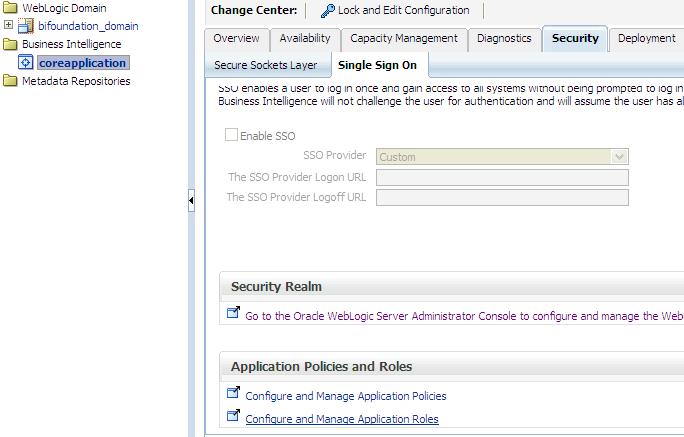
In case you have not yet seen this issue, but would like to know what this is referring to, then … login to the Enterprise Manager – http://yourserver:7001/em and expand Business Intelligence and click on coreapplication.  Then navigate to the Application Roles page using one of the methods below …

Either from:
(1)   the ‘Security’ -> ‘Single Sign On’ tab, select “Configure and Manage Application Roles”

Security-SingleSignOn-ApplicationRoles

(2) or from the coreapplication drop down menu, select Security -> Application Roles

coreapplication_dropdown-Security-ApplicationRoles

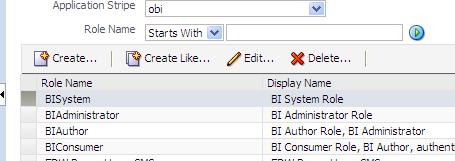
When you get to the Application Roles page, you will notice that the Create button is INACTIVE.

InactiveCreateButton

To activate the button, simply select the drop down for Application Stripe and select <No application stripe selected>, then reselect the appropriate Application Stripe such as obi.

The Create button will now be ACTIVE.  Of course, click the play button to generate the list of Application Roles if necessary.

CreateButtonActive

Oracle positioned as a leader in the Gartner Magic Quadrant for Business Intelligence & Analytics platforms

Gartner released its 2012 “Magic Quadrant for Business Intelligence and Analytics Platforms” report.  As you may expect, Oracle is in the leaders bracket, along with Microsoft, IBM, Tableau Software, SAS, QlikTech, MicroStrategy, Tibco Spotfire, Information Builders and SAP.

GartnerMagicQuadrant_for_BI_and_Analytics

Source: Gartner (February 2013)

Not surprisingly, the report mentions that, in 2012, Data Discovery became a mainstream BI feature, and that Real-time, Content and Predictive Analytics saw increased activity.

You can read all the details here in the … Gartner Magic Quadrant for Business Intelligence and Analytics Platforms report.

Setting up Putty to display screens on your desktop for installing or upgrading OBIEE 11g on Linux

When you attempt to run the RCU (Repository Creation Utility) or UA (Upgrade Assistant) scripts from your desktop/laptop using Putty for an OBIEE install or upgrade on a Linux server, you may get the following error …

UPGAST-00107: The DISPLAY environment variable is not set. The graphical user interface (GUI) requires that this environment variable be set on UNIX.

If you get this error, this post may help you to solve it.  You need to do some configuration in Putty.

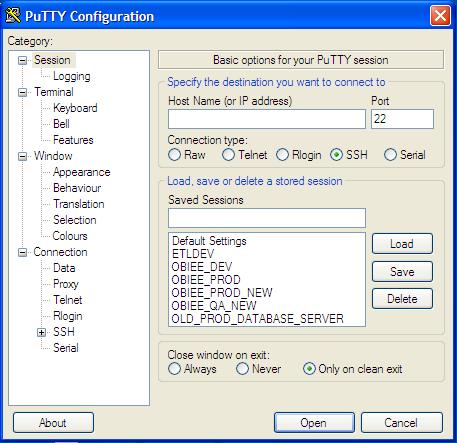
Open Putty.

Displaying_Images_Using_Putty_and_Xming1

Select the server that you want to configure from your list of servers. You will notice that the values get populated into the fields.

Displaying_Images_Using_Putty_and_Xming2

Expand SSH, the select X11.   Then Check “Enable X11 forwarding” checkbox, and enter “localhost:0.0” in the X display location box.

Displaying_Images_Using_Putty_and_Xming4

Do not click open at this point.

Go back up and click on Session in the left menu.

And then Save.

However, before you connect using Putty, you should run Xming.

Start -> All Programs -> Xming -> Xming

[If you do not have Xming, you can download it for free, then install it.]

Displaying_Images_Using_Putty_and_Xming7

Now when you open Putty and connect to your server, you should be able to run the install or upgrade processes and see the wizard screens for each step, for example …

>  ./ua   (run the UA script, then the wizard screen will appear)

SampleScreen_UA_Wizard

Developing requirements for an OBIEE project

Eliciting and creating requirements for an OBIEE project is a very important step in creating a successful, pervasive OBIEE system in an organization.

Throughout the requirements elicitation and creation process, you need to keep in mind that all requirements must be testable.  The only way to verify if a requirement has been met is to successfully test it, and therefore, all requirements must be specific and detailed enough to allow for a QA person to verify it.

A huge and essential component of OBIEE projects is the reports being delivered in one form or another – and therefore, another set of characteristics to keep in mind are that the reports and their form of delivery need to be: accurate, relevant, timely, and actionable.

Typically an OBIEE project involves significant effort, and can take several months to complete, but visible progress can be made in a shorter time.  Requirements may need to be prioritized to handle the most critical ones first (a phase 1 for example), and postpone some for later in the project – a phase 2 for example.  However, it should not take months to see some results, because OBIEE is a great platform for an agile methodology – allowing the project to show some results early and ongoing, as the project becomes more and more completed.

To elicit requirements, there are a number of methods that can be used.  You will need to choose the most appropriate method based on the particular scenario – who is the user, what area does the requirements cover, etc.  Some of the methods used can include: interviews, observation, reviewing existing reports (from a previous system for example); soliciting information from colleagues in other companies; and developing/showing report concepts and getting feedback; brainstorming – from strategic goals and reporting needs to tactical/operational.  However, you should try to learn as much as possible about the business, processes and people beforehand; and always try to be a good listener.

Requirements for an OBIEE project can be grouped into the following groups of questions:

What information does the business users need to see? 

This is often driven by the company’s strategic goals. The data needs to be in aid of answering business questions that users will need to aid their decision making in order to realize operational and tactical goals that support the strategic goals.

The information could be enterprise wide, departmental, or specific subject matter.

The reporting requirements could also be classified as strategic, tactical, or operational.  The strategic requirements are usually enterprise wide, while the tactical and operational requirements are usually relevant to a departmental, group or individual role.  Strategic requirements can at times be monitored and tracked via Key Performance Indicators (KPIs) which can be developed and presented in OBIEE.  Operational requirements at times will need Agents or iBots that trigger some action based on an event.  And tactical requirements are usually satisfied using reports that display valuable metrics about the business operations.

What are your business objectives and what metrics will help you to monitor progress toward those objectives?  What information do you wish you had to do your job better?

Where will the data be sourced from?  In other words, what are the source systems?

The answer to this question could include Data warehouses or data marts, ERP systems, Line of Business systems (LOBs), Flat files, External sources, OLTP, OLAP, etc.

The data sources need to be defined in the OBIEE BI Repository (RPD) via Connection Pools, and the metadata for the relevant tables imported.  OBIEE data sources can be relational (OLTP), multi-dimensional (OLAP) or files (Excel, XML, ADF).  The OLAP data sources supported by OBIEE are Oracle Essbase, Oracle OLAP, Microsoft SQL Server Analysis Services, and SAP BW.

However, for better performance, it is best if the data sources are multi-dimensional – either star-schema relational or OLAP.

What data is required from those systems?  And what data needs to be calculated or derived?

Analysis needs to be done to determine what subset of data (if not all) is needed from each of the source systems. What measures, dimensions, hierarchies, and attributes are required? What lookup tables are required?

And it’s always a good idea to ask “Why?”  Why is this data needed?  How will it be used?

This involves reports, and it is important to keep in mind that all report/reporting data need to be accurate, relevant, timely, and actionable.

What data that is not in the source system but can be derived? Calculations, Associations, mappings, etc – these derived items can be created in the OBIEE repository BMM layer, and exposed to users as necessary.

What granularity of data is needed?  Summary, Detail, both

What time range (including the time granularity) of data is needed?  Historical, Current, Real-time, Day, Month, Quarter, Year

What KPI’s are required to track the state of the business?

What data needs to be filtered out/in from each data source tables in the various scenarios?

What are some of the frequently used filter criteria?  à this could drive some of the repository variables created in OBIEE

What are some frequently used values for analysis?  à this could drive dashboard prompts in OBIEE

Will the business users need to perform data mining or need the results of data mining?

How frequently does the data need to be updated?

If the data is not directly connected to the source, then how often should the data be updated – real-time, hourly, daily, weekly, monthly, on-demand, etc?

Who needs to see what data?  And who needs access to what functionality?

This is in essence a security question.  What are the various groups/roles that need access to data, and what data should each group/role have access to?

Can the reporting system be integrated with the company’s existing LDAP? This is typically the case for most modern reporting systems including OBIEE which integrates with popular LDAP systems including Active Directory.

Does row-level security need to be implemented?  OBIEE allows for row-level security.

Can all users use all features of the reporting platform?  Or will only specific users be granted access to specific functionality?

What dashboards and reports will each group of users be able to see?

How will the information be shared with business users?  What modes of information delivery need to be used?

Will reports be shared?  email, saved to a directory, web dashboard, file (pdf, word, excel, html)?

Do users need to be proactively notified of events? – for example, a user or group needs to be notified if stock levels fall below a threshold.

The answers to this question will drive the Agents/iBots that need to be created.

Will the reports be run on a predefined schedule or based on some predefined condition?  Or will they be run on-demand?  This will also drive Agents/iBots and Conditions.

Do users need to download information?  This will drive the ‘report links’ that are placed on the dashboard pages.

Do report results need to be preserved or can/should they be overwritten?

Will users be allowed to create their own analyses or perform adhoc analysis? And if yes, how will that activity be monitored and supported?

What visualization features are required for each report or set of data?  Dashboards, Scorecards, Charts, graphs, tables, pivots, gauges, icons, colors, fonts, etc.

Will the users need to be able to drill from summary to detail reports?  Rollup from detail to summary?

Will the users be able to interact with the data?  Prompts, View Selectors, Column Selectors, etc

What are some of the system level requirements?

What level of system performance is required?

Dashboard and report creation tools

Does the reporting system need to be able to access/connect to multiple data sources at a time?  OBIEE allows for multiple data sources connected at the same time.
Does the reporting system need to be able to access/connect to relational, multi-dimensional, and file data sources?

Does the reporting system need data mining capabilities?

Does the system need to support drill-down, rollup functionality?

What are the critical usage times for the system?  In other words, what are times when the system must be available? For example, during the month-end close process or during the holiday sales season.  This will drive when changes can be made to the system.

What are the highest usage times for the system?  What hardware do we need to support that usage?

How will changes be handled? In other words, what is the change control process?

It is very important that all the relevant players are included in the requirements process – business leaders and business users, SMEs, technical staff, database administrators, OBIEE Developers (report developers, rpd developers), OBIEE architect, ETL developers, ETL architect.  Before development officially starts, it is important to get all relevant sign-offs on the requirements.  This will ensure that everyone is on the same page, and that the business users are getting what they need.

This post will be a “living” document, as I will be coming back and updating this post from time to time to add more detail and more OBIEE specifics.

Oracle positioned as a leader in the Gartner Magic Quadrant for Data Integration tools

Oracle, along with Informatica, IBM, SAP and SAS, are positioned as leaders in the Gartner Magic Quadrant for Data Integration tools.

Other data integration vendors that made it into the Magic Quadrant, but not in the leaders category are Microsoft, Information Builders, Syncsort, Talend, Pervasive Software.

GartnerMagicQuadrant_for_DataIntegrationTools

Source: Gartner (October 2012)

When performing its analysis, Gartner considers these areas of data integration:

  • Data acquisition for business intelligence (BI) and data warehousing
  • Consolidation and delivery of master data in support of master data management (MDM)
  • Data migrations/conversions
  • Synchronization of data between operational applications
  • Interenterprise data sharing
  • Delivery of data services in an SOA context

And analyzes these features and functionality that the data integration tools should provide:

  • Connectivity/adapter capabilities (data source and target support)
  • Support for different modes of interaction with a range of data structure types
  • Data delivery capabilities
  • Support for the delivery of data across a range of latency requirements
  • Data transformation capabilities
  • Provide facilities for developing custom transformations and extending packaged transformations
  • Metadata and data modeling capabilities
  • Design and development environment capabilities
  • Data governance support capabilities (via interoperation with data quality, profiling and mining capabilities)
  • Deployment options and runtime platform capabilities
  • Operations and administration capabilities
  • Architecture and integration capabilities
  • Service enablement capabilities

Per Gartner, Oracle’s strengths are:

  • Breadth of functionality,
  • Usability of core functionality across use cases
  • Addressing data challenges across a range of application- and data-oriented customer bases

And their cautions are:

  • Enabling product migration,
  • Complexity of integrated deployment across products,
  • Pricing perception and availability of skills

As Oracle-centric developers and solution providers, we are most concerned with the capabilities and future of Oracle Data Integrator (ODI), Oracle Warehouse Builder (OWB), Golden Gate and, in some cases, Informatica (a part of most OBIA installations). These products are doing well in the market, but are a bit behind the install bases of Microsoft, SAP and IBM.  The largest install base is with Microsoft (12K customers), followed by SAP (10K) and IBM (9.4K).  Oracle has 3.5K and Informatica has 5K data integration customers.  With a major push now behind the ODI tool, you can expect to see growth in Oracle’s numbers in the coming years.

Apparently, Oracle also has plans for providing a migration path (a migration wizard) from Oracle Warehouse Builder (OWB) to ODI.  This will be a very welcomed tool for OWB users seeking to migrate to ODI.  And this will further solidify ODI as the data integration tool for Oracle-centric IT organizations, and start to create more availability of skilled ODI resources.

You can read all the details at Gartner Magic Quadrant for Data Integration Tools.

UPGAST-00014 error when upgrading OBIEE 10g RPD and Catalog to OBIEE 11g

If you get this error during Step 4 of the Upgrade Assistant for upgrading OBIEE 10g RPD and/or Catalog to 11g, then this post might be helpful.

UPGAST-00014: unable to connect to WebLogic Server at localhost:7001
t3://localhost:7001: Destination unreachable; nested exception is: java.net.ConnectException: Connection refused; No available router to destination

UPGAST-00014-error

Perform the following steps that may resolve your problem:

– Log in to Administration Console.  http://yourserver:7001/console
– Click the ‘Servers’ link.

UPGAST-00014-clickServers

Then in the Summary of Servers page / Configuration tab, click ‘AdminServer(admin)’.

UPGAST-00014-AdminServer

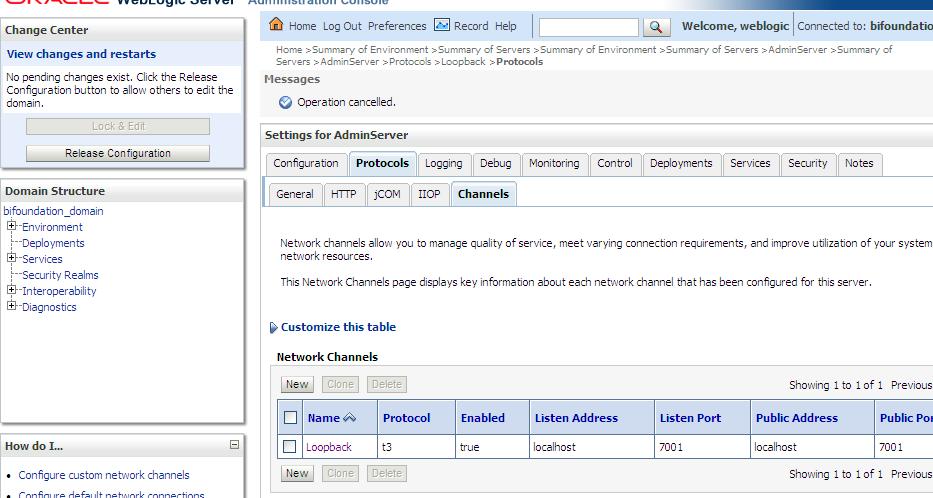
– From the Settings for AdminServer page, select the ‘Protocols’ tab, then the ‘Channels’ subtab.
– And then Click ‘Lock & Edit’ button in the upper left Change Center.

UPGAST-00014-ProtocolsChannels

– Click the New button to begin creating a new Network Channel.
– Enter the following information…
Name: Loopback (or whatever name you like)
Protocol: t3

– The click Next

UPGAST-00014-ChannelConfig1

– The enter …
Listen Address: localhost
Listen port: 7001
Click Finish

UPGAST-00014-ChannelConfig2

The new Network Channel (Loopback) is added.  Activate the changes by clicking on the “Activate Changes” button.

UPGAST-00014-ChannelCreated

Now, retry running the Upgrade Assistant. There is no need to restart any of the services.
You should now get past Step 4 (the point at which you were getting the error before).

Unable to see Administration link or dashboards with Administrator ID in OBIEE 11g

If you are unable to see Dashboards or the Administration link after logging in with the administrator ID in OBIEE 11g after upgrading from 10g, this post may help.

Log in to Analytics — http://yourserver:9704/analytics

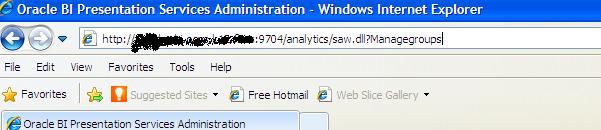
Manually change URL by attaching “saw.dll?Managegroups” to the end after analytics, so it looks like this … http://yourserver:9704/analytics/saw.dll?Managegroups

adminsecurity-managegroupsurl

Select the “Presentation Server Administrators” catalog group and Edit

edit-psa-catgrp

Add the “BI Administrator Role” Application Role by selecting it in the left and using the arrows to move it to the right.

edit-psa-catgrp2

Log out and log back in with the Administrator ID.

You should now be able to see the “Administration” link at the top right, and also be able to see the dashboards that you had access to by clicking or mousing-over the Dashboards link/dropdown.

administration_link_shows