How to collapse or minimize a dashboard section by default in OBIEE

In OBIEE, you can easily set a dashboard section to be “Collapsible” which allows a user to collapse or minimize that section when desired.  By default, when a dashboard page is opened, the sections are maximized or expanded (i.e., not collapsed).
MaximizedExpandedSection

But what if you have a requirement to have a section minimized or collapsed by default?  There is no flag or option to do that.   This post shows you how to make a section minimized / collapsed by default.

I found the solution for making a dashboard section collapse by default here… http://www.orakelite.com/2013/01/iii-javascriptcss-tips-to-obiee-ui.html
However, the author did not include some details which I will cover here.

First, you need to make the section collapsible, by simply editing the dashboard…
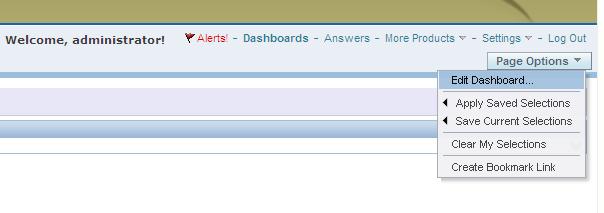
EditDashboard

… and then setting the “Collapsible” property of the relevant section.
CollapsibleProperty

You will need to add the following Java Script to the section you want to minimize by default.
The text highlighted in the Java Script is the Section ID of the section to be minimized by default. So first you will need to find this Section ID.
——–

var sectionId = “d:dashboard~p:ve9fga7bp3omltnr~s:9qfn1ms6bco9bsva“;
var sectionDiv = document.getElementById(“Embed”+sectionId);
var plusImg = document.getElementById(sectionId+”Max”);
var minusImg = document.getElementById(sectionId+”Min”);
var contentsTable = document.getElementById(sectionId+”Contents”);
minusImg.style.display = “none”;
contentsTable.style.display = “none”;
plusImg.style.display = “”;
sectionDiv.setAttribute(“minimized”, “true”);

——–
To determine the value of the Section ID, you need to go to the dashboard page and from the browser menu, select View –> Source.

Search for the section by name, or just search for the word “section”. This should help you to identify what Section ID is related to the section you are interested in. (In example below, the black arrow points to the SECTION ID, and the red arrow points to the user given section name that can be used to search. )

SectionName

Use your Section ID in the Java Script code above.

Place the Java Script code in a “Text” dashboard object inside the section you want to control.

MinimizeSectionJavaScript 

Save your dashboard page changes.

Now when you reopen the dashboard page, the section will be minimized / collapsed by default.

CollapsedSection

Direct Links to various OBIEE User and Administration Presentation functions

These are some direct links to various OBIEE User and Administration functions.  These can be useful to know for efficiency and at times can also be useful for debugging security.

To go directly to “Home Page”
http://servername:9704/analytics/saw.dll?bieehome

To go directly to “Dashboard”
http://servername:9704/analytics/saw.dll?Dashboard

To go directly to “Manage Privileges”
http://servername:9704/analytics/saw.dll?PrivilegeAdmin

To go directly to “Manage Catalog Groups”
http://servername:9704/analytics/saw.dll?ManageGroups

To go directly to “Manage Sessions”
http://servername:9704/analytics/saw.dll?Sessions

To go directly to “Manage Agent Sessions”
http://servername:9704/analytics/saw.dll?ManageIBotSessions

To go directly to “Issue SQL”
http://servername:9704/analytics/saw.dll?IssueRawSQL&Done=%2fanalytics%2fsaw.dll%3fAdmin

To go directly to “Manage Map Data”
http://servername:9704/analytics/saw.dll?ManageMapData

To go directly to “Manage BI Publisher”
http://servername:9704/analytics/saw.dll?bipublisherEntry&Done=%2fanalytics%2fsaw.dll%3fAdmin&Action=admin

How to run Catalog Manager in GUI mode from the Linux Server

OBIEE Catalog Manager can be accessed from a client tool on Windows or from a server side process.  There are times when it is required that you run the Catalog Manager in offline mode, and at those times you will be required to run it on the server.

Although there is a command line option for Catalog Manager, it is easier to work with it in a Graphical User Interface (GUI) mode and at times its necessary to use that mode.

Start Xming (or another X-Windows type tool) on your local PC or laptop. [This will allow the Linux screens to show up on your desktop when you run the shell script on the Linux server]

For more on Xming, visit http://en.wikipedia.org/wiki/Xming

Connect to your Linux server from your desktop/laptop using Putty (or other tool).   Then go to the catalog manager directory:

cd [$FMW_HOME]/instances/instance1/bifoundation/OracleBIPresentationServicesComponent/coreapplication_obips1/catalogmanager

runcat-start-catalogmanager

Start up Catalog Manager by running:    ./runcat.sh

This will start Catalog Manager, and it will be running on the Linux server, but the screens will be showing on your desktop/laptop.

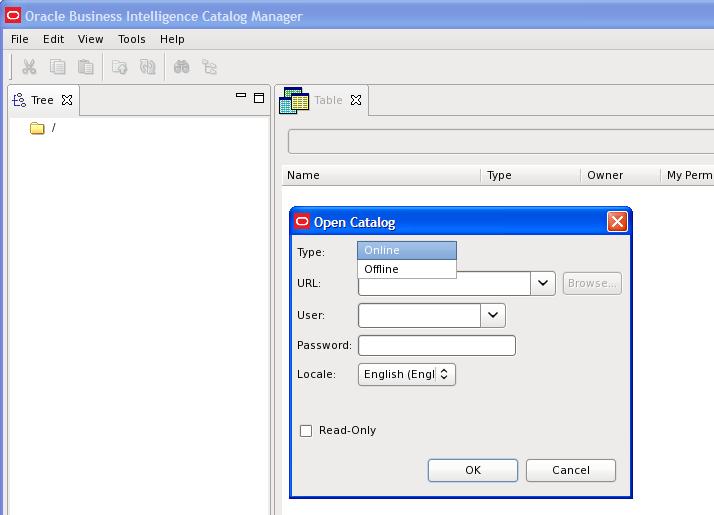
From the main Catalog Manager window, you can then click on File –>Open Catalog

catalogmanager_interface

And then select the Type based on how you want to connect – Online or Offline mode.  Accessing Catalog Manager in this way is most likely needed when you need to connect in Online mode.

And then of course, you need to enter the URL – which is the full path to the catalog, for example:[$FMW_HOME]/instances/instance1/bifoundation/OracleBIPresentationServicesComponent/coreapplication_obips1/catalog/default

And enter the User and Password.

catalogmanager_onlineoffline_login

Assuming everything was entered correctly, you will be connected to the catalog.  You can then use the interface to browse the catalog and perform other tasks on catalog objects.

catalogmanager_browsing

Good luck!

User having inconsistent login issues or user taking a long time to login or authenticate in OBIEE 11g

If you are using Active Directory for authentication for your OBIEE system, and are experiencing situations where some users are taking a long time to authenticate/login, then this post might be helpful.  This could also be useful for configuring LDAP systems other than Active Directory, but I cannot say for sure.

What could potentially be happening to users experiencing the problem is … they belong to Active Directory groups (or LDAP groups) with deep hierarchies, and the system has to traverse all those hierarchies to retrieve all their LDAP information which ends up taking quite a bit of time.  A possible solution is to limit the number of LDAP levels that will be searched/traversed to get the users Groups information.

Login to WebLogic Administration Console (aka WLS or Admin Console), then click on “Security Realms” on the left, and then click the name of the realm that you use for security (for example, “myrealm”).

WLS_SecurityRealm

Click the Providers tab.   And then click the name of your Active Directory provider.

WLS_SecurityProviders

Then select the Provider Specific tab.

ProviderSpecificSettings

Scroll down to the section titled “Groups”.

ProviderSpecific_Groups_parameters

Change the Group Membership Searching setting from unlimited to limited.

And then set Max Group Membership Search Level – change it from 0 (no limit) to 1 (or to the smallest number necessary for your environment).

This will prevent long searches for those users that are in many groups with deep hierarchies (such as groups within groups within groups and so on). This could cut the search time tremendously, thereby reducing the authentication time and preventing login timeouts.

Good luck!

Informatica Transformations Frequently used in OBIA

These are some of the Informatica transformations that are frequently used in Oracle Business Intelligence Applications (OBIA).  The OBIA SDE and SIL mappings used to load the Oracle Business Analytics Warehouse (OBAW) are built using these and other transformations.

1. Source Qualifier
The Source Qualifier transformation is used to bring data from one or more tables from the same source into the mapping.  If being used for more than one table, then a join condition needs to be defined between the tables.  The typical naming convention for a Source Qualifier transformation is SQ_* or sq_*.

2. Joiner
The Joiner transformation is used to join tables in different data sources.  The typical naming convention for a Joiner transformation is JNR_* or jnr_*.

3. Expression
The Expression transformation is used to perform simple row-based calculations or derivations.  The typical naming convention for an Expression transformation is EXP_* or exp_*.

4. Filter
The Filter transformation is similar to a where clause in SQL – it adds a conditional filter to the data passing through the mapping.  The typical naming convention for a Filter transformation is FIL_* or fil_*.

5. Aggregator
The Aggregator transformation is used to perform aggregate calculations on the data passing through the mapping, for example, performing a sum or max.  The typical naming convention for an Aggregator transformation is AGG_* or agg_*.

6. Lookup
The Lookup transformation is used to lookup values based on another known/submitted value, and pass the looked up value into the mapping.  There are 2 types of Lookups – connected and unconnected.  The typical naming convention for a Lookup transformation is LKP_* or lkp_*.

7. Update Strategy
The Update Strategy transformation is used to determine and perform the appropriate course of action for data in the mapping.  Based on the determined state of the data, the transformation is used to insert, update, delete or reject records.  The typical naming convention for an Update Strategy transformation is UPD_* or upd_*.

Components of Oracle Business Intelligence Applications (OBIA)

The Oracle Business Intelligence Applications (OBIA) is made up of a number of components that are brought together to create a great prebuilt BI solution.  The components can be categorized into 4 major components.

1. Prebuilt reports and dashboard content + Embedded dashboard/report building tool
This prebuilt content is contained in the Oracle BI Presentation Services Catalog, and some of the content is built on the Oracle BI Repository metadata.
The tools include Dashboard Editor and Answers.

2. Prebuilt metadata content (Oracle BI Server Repository) + Administration Tool      
This metadata content is contained in the Oracle Business Intelligence Applications repository file (EnterpriseBusinessAnalytics.rpd).
This content is built and administered using the BI Administration Tool, and is built from the metadata in the OBAW.

3. Oracle Business Analytics Warehouse
The prebuilt data warehouse that holds data extracted, transformed, and loaded from the transactional sources.  The OBAW contains best-practice star-schemas and conforming dimensions.

4. Prebuilt ETL processes and tools
Prebuilt Informatica content + Embedded Informatica ETL Tool
+ Prebuilt DAC metadata repository files + Embedded DAC Tool
Informatica is a third-party application that performs the extract, transform, and load operations for the Data Warehouse.  The Informatica content includes Extract-Transform-Load (ETL) repository objects, such as mappings, sessions, and workflows, and is contained in the Informatica repository file (Oracle_BI_DW_Base.rep).
The DAC is a tool that is used for setup, configuration, administration, and monitoring of data warehouse processes.  The DAC content includes repository objects such as tables, subject areas, execution plans, and tasks, and is contained in XML files.
These tools and processes together extract data from sources, such as Oracle EBS or PeopleSoft, and load the data into the OBAW.

Oracle releases PeopleSoft 9.2 – HR, Financials, and SCM

Oracle has released PeopleSoft 9.2 – including HR, Financials and Supply Chain Management. 

You can read the PeopleSoft 9.2 Press Release here, and check out the PeopleSoft 9.2 Data Sheet here.

The release includes over 1000 new features, functions and enhancements.

As for something specifically related to BI/Reporting, here is a clip from the press release:

“PeopleSoft applications take advantage of new real-time, multi-dimensional decision support analysis capabilities enabled by PeopleTools 8.53 with over 60 prebuilt self-service Pivot Grids delivered in release 9.2.”

This is a trend – more reporting/analysis functionality is being built into or integrated into the ERP systems (as opposed to having separate systems that users access separately to get their jobs done).

Enjoy reading.


OBIEE 11g config and log file locations

These are some key log files and config files in OBIEE 11g. These might be frequently accessed for debugging and checking current parameter settings.

bi_server1.log  &  bi_server1-diagnostic.log
(bi_server1.out  &  access.log are also captured in this directory)
[$FMW_HOME]/user_projects/domains/bifoundation_domain/servers/bi_server1/logs

nqserver.log    &    nqquery.log
[$FMW_HOME]/instances/instance1/diagnostics/logs/OracleBIServerComponent/coreapplication_obis1

sawlog.log
[$FMW_HOME]/instances/instance1/diagnostics/logs/OracleBIPresentationServicesComponent/coreapplication_obips1

NQSConfig.INI   &  DBFeatures.INI
[$FMW_HOME]/instances/instance1/config/OracleBIServerComponent/coreapplication_obis1

instanceconfig.xml      &     credentialstore.xml
[$FMW_HOME]/instances/instance1/config/OracleBIPresentationServicesComponent/coreapplication_obips1

config.xml
[$FMW_HOME]/user_projects/domains/bifoundation_domain/config

system-jazn-data.xml
[$FMW_HOME]/user_projects/domains/bifoundation_domain/config/fmwconfig

Oracle Peoplesoft Accounts Payable Data model and dataflow

This is a simplified Peoplesoft Accounts Payable data flow and data model. The purpose is to provide a basic understanding of the key tables and how data flows through the module.  Understanding the key tables and the data flow is helpful when creating metrics and reports in tools such as OBIEE or when working with OBIA Financial Analytics, and particularly, with the Accounts Payable dashboard, reports and metrics.

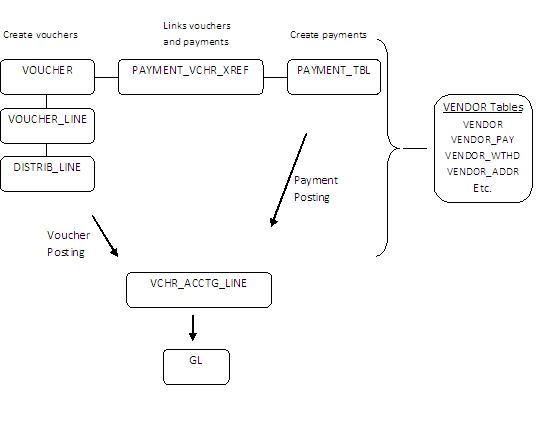
When a voucher is created, the information is recorded in the VOUCHER, VOUCHER_LINE and DISTRIB_LINE tables. 

When payments are created for the vouchers, the information is recorded in the PAYMENT_TBL and PYMNT_VCHR_XREF tables.  The PYMNT_VCHR_XREF table provides a bridge between voucher and payment tables.

When a voucher is posted and when a payment is posted, accounting entries are generated and recorded in VCHR_ACCTG_LINE.

Payments are of course made to vendors.  Vendor primary information is stored in the VENDOR table, but there are many more vendor related tables.

PeoplesoftAccountsPayableDataModelAndFlow

Accounts Payable key table descriptions

VOUCHER AP Voucher Header Table. This Table provides the Invoice Header Information and the Accounting Information as displayed on the Voucher. Budget Checking Exceptions can also be identified on this table.
VOUCHER_LINE AP Voucher Line Table. This Table provides the individual line information for each invoice including description, quantity, unit of measure, unit amount, and extended amount. You can have multiple VOUCHER_LINE to each VOUCHER.
DISTRIB_LINE AP Voucher Distribution Table. This Table provides the Invoice accounting line distribution detail. Budget Checking Exceptions can also be identified on this table. You can have multiple DISTRIB_LINE to each VOUCHER_LINE.
VCHR_ACCTG_LINE AP Accounting Entries. This Table contains all transactions that are journal generated.
PYMNT_VCHR_XREF Voucher Scheduled Payment Table. This Table is often used as a link between the Voucher and the Payment Tables.
PAYMENT_TBL AP Disbursements Table. The Primary Table that the Payments are recorded against at time of the PayCycle Manager.
PYMNT_XREF_VW AP Payment Voucher Information. The View is designed to link the Voucher ID with the Payment Reference.
   
VENDOR Vendor Header Table. This Table represents the high-level Header information related to a specific vendor.
VENDOR_ADDR Vendor Address Table
VNDR_ADDR_PHN Vendor Address Phone Table
VENDOR_LOC Vendor Location Table
VENDOR_CNTCT Vendor Contact Detail Table
VENDOR_PAY Vendor Payment Defaults
VENDOR_WTHD Vendor Withholding Table
VENDOR_WTHD_JUR Vendor Withholding Jurisdiction Table

Oracle PeopleSoft General Ledger data model and data flow

The PeopleSoft General Ledger is a module in the Oracle PeopleSoft Enterprise suite of applications. This post gives a brief overview of the data flow and data model of PeopleSoft General Ledger.  General Ledger applications are generally a central point for key financial reporting and this is also the case for PeopleSoft applications.

Oracle Business Intelligence Applications (OBIA) offers pre-built integration with Oracle Peoplesoft Enterprise, and the tables here are some of the source tables for Oracle Business Intelligence Application Financial Analytics.

PeopleSoftGeneralLedgerDataModelDataFlow

Data is brought into the GL Journal Header (JRNL_HEADER) and Journal Lines (JRNL_LN) tables via a number of methods – spreadsheet template import, flat-file import, or via a load process from other PeopleSoft modules.  There are multiple Journal Lines for each Journal Header.

The Journals are edited, and when valid, they can be Posted.  The Posting creates records in the Ledger table (LEDGER).  Ledger data is a common source for reporting – for example, P&L and Balance Sheet reporting will be done against Ledger data.

Some supporting tables for the GL module are:
GL_ACCOUNT_TBL:  contains the value and description of Account values
PRODUCT:   contains the value and description of Product values
DEPT_TBL: contains the value and description of Department values
BUS_UNIT_TBL_GL:  contains the value and description of Business Unit values
ACCT_TYPE_TBL:  contains the descriptions of Account Types – Asset, Liability, Equity, Expense, Revenue