Qlik Sense Error on startup – The service did not respond or could not process the request

If you start the desktop version of Qlik Sense and get the following error message, this post might be helpful in resolving.

QlikSense_ServiceDidNotRespond_Loopback
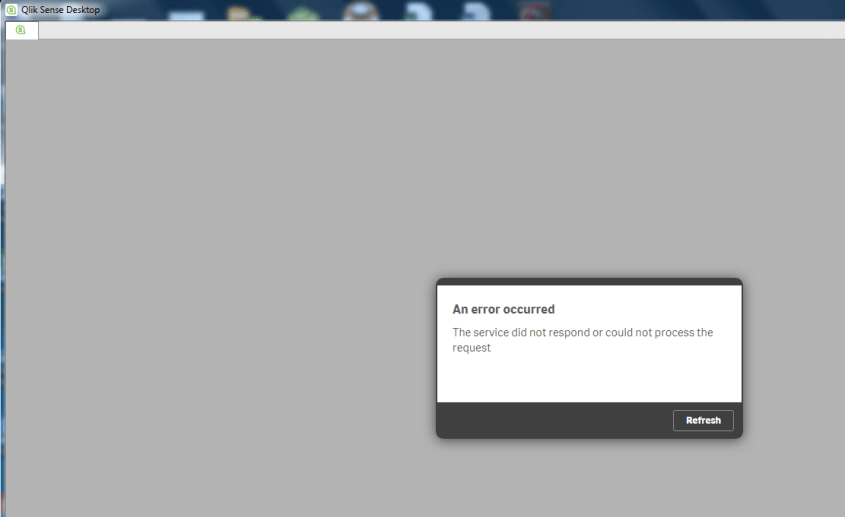
An error occurred.  The service did not respond or could not process the request.

I ran into this error.  After doing a few searches to try to find the reason for this error, it turns out that this was a result of not having internet connectivity, and Qlik Sense 3.0 requires network connectivity.

To resolve, you can try again once you are somewhere that you have an internet/network connection, or you can create a loopback adapter, which will make Qlik Sense always have a network to connect to.

The following steps through how to install the loopback adapter on Windows 7.

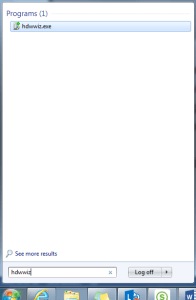
Click the Windows Start icon, and type hdwwiz into the Search box.
QlikSense_ServiceDidNotRespond_Loopback_RunAddHardware

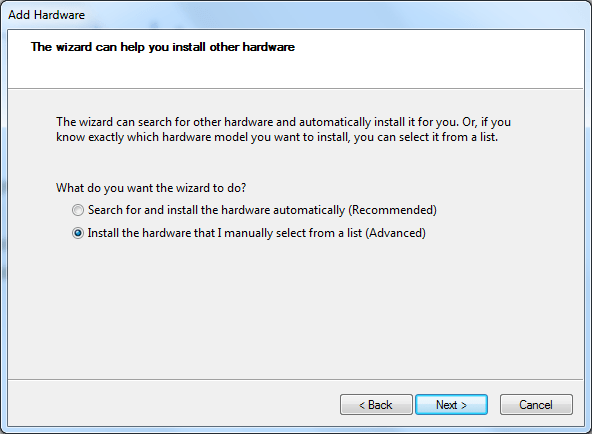
The wizard opens with the Add Hardware dialog …
QlikSense_ServiceDidNotRespond_Loopback_Welcome
Click Next.

QlikSense_ServiceDidNotRespond_Loopback_select
Select “Install the hardware …” option, and click Next

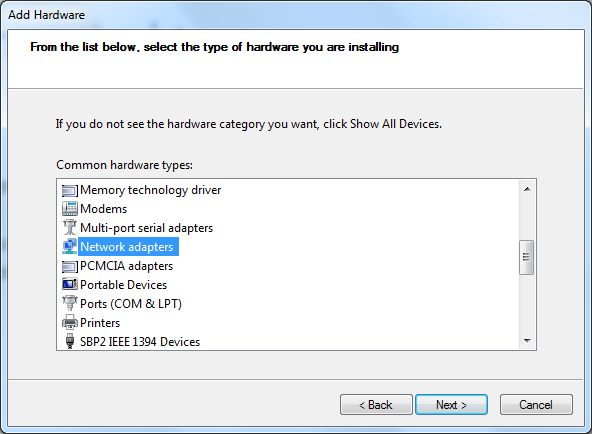
QlikSense_ServiceDidNotRespond_Loopback_networkadapters
Select “Network adapters” and click Next.

QlikSense_ServiceDidNotRespond_Loopback_msloopbackadapter
Select Microsoft (on the left), and then select Microsoft Loopback Adapter (on the right), and then click Next.

QlikSense_ServiceDidNotRespond_Loopback_install
Click Next

QlikSense_ServiceDidNotRespond_Loopback_install_complete
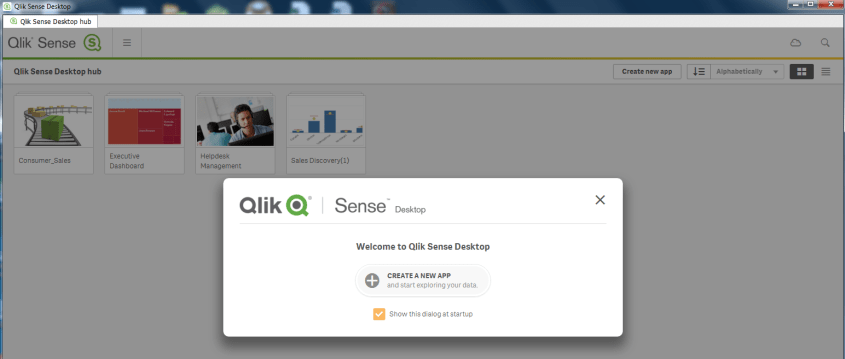
Click Finish.  After installing, Qlik Sense should launch without a problem.

QlikSense_ServiceDidNotRespond_Loopback_QSLaunch

QlikView vs. Qlik Sense

What is the difference between QlikView and Qlik Sense?  QlikView and Qlik Sense are both business intelligence platforms from the same company (Qlik), but are different products. Qlik Sense is not just a new version or release of QlikView.

The below table shows the differences and similarities between the 2 products:

QlikView Qlik Sense
First version released in 1996 First version released in 2014

Data Discovery

Same analysis/calculation engine – scripts and formulas will mostly work between the 2 platforms

Same green-gray-white (included-excluded) functionality

Both products/platforms will be enhanced and supported for the foreseeable future

Guided Analytics – drill-down and drill-through

Self-service data analytics and visualization

Dashboards and analytics/reports built by developers and pre-canned and configured for flexible user interaction Metadata for reporting developed by developers, and users create analytics
Users typically do not have the ability to create new analysis, but use the various features built to slice and dice the data. Users slice and dice the data in any creative manner that they see fit.
Open APIs allow for embedding Qlik Sense into website and other applications, and also for extending the application.
Cutting edge web interface – Responsive web interface – adapt to different screen sizes – from PC to tablet to phones – on any HTML5-compatible browser
Collaboration and story telling
Extensive Pixel-perfect formatting options

Which is better?  It depends.

If you have a user base and business needs that require answers to specific questions, without the need for user self-service BI, then QlikView is a good option.  Also, for very high control over all features of the visualizations you create, QlikView is the better choice.

However, if you have a sophisticated user base that desires to create their own analyses and business needs are more toward data discovery, then Qlik Sense is a good option.  Also, if you plan to or would like to make analytics available on all kinds of devices, then Qlik Sense is the way to go due to the responsive web design interface.

Of course, there will be other factors such as cost, and available resources and skills within the BI Team and supporting teams.  As with any software choice, a full analysis of the options and how they best meet the requirements is needed.

What is Qlik Sense?

Qlik Sense is a business intelligence platform with strengths in self-service usage, data discovery, and visualization.  Qlik Sense is from the same company that develops QlikView, but it is a totally different product. It is not an upgrade to QlikView or a new version of QlikView. However, it provides the core functionality that QlikView offers – such as in-memory storage and processing, the included-excluded/green-white-gray feature, and associative data model; with some additional features and benefits – such as usability, cloud readiness, responsive design, data storytelling, and open APIs.

Qlik Sense is available in 3 editions – desktop (for use on a personal computer for a single-user), enterprise (create and consume via a web interface for the entire enterprise), and cloud (create and consume via web interface on any device while hosted on the Qlik cloud).

You can learn more about Qlik Sense, QlikView, and Qlik (the company that creates these software) by visiting the company’s website at: http://www.qlik.com/.

What is QlikView?

QlikView is a business intelligence platform.  It allows for quick development and deployment of business intelligence and analytics applications, and for easy consumption of those applications through the web by those authorized.

QlikView has a unique associative data model feature that allows for all of the data to be used for analysis without pre-defined drill-down or drill-through relationships.

QlikView also has an included-excluded type display feature (sometimes referred to with the phrase … the power of green-white-gray) that allows users to not only see what data is included in the selected set, but also see what data is not included, thereby enabling data discovery.

QlikView holds data for its applications in memory, which allows it to deliver results quickly without the need for pre-calculated / pre-aggregated cubes.

These features help to differentiate QlikView from other BI platforms, and are some of the reasons for its growth and its leadership position in the BI space.

You can learn more about QlikView and the company that creates this software, Qlik, by visiting the company’s website at: http://www.qlik.com/.

QlikView Desktop Installation

In this post, I will go through the simple process of installing QlikView Desktop.

From the Qlik website (www.qlik.com), navigate or search for the download.  Download the Free Personal Edition of QlikView. You will need to register to download.


Click the FREE DOWNLOAD button to download the software.QlikView_Installation_Download

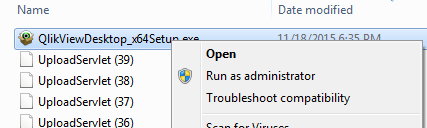
After the download is complete, navigate to where you downloaded the software.  Double-click on the executable to run the program and start the install wizard, or in some cases, you may need to Right-click and select Run as administrator.

QlikView_Installation_Run

Choose your language and click OK.

QlikView_Installation_Lang

The Install Wizard is prepared.

QlikView_Installation_Wizard

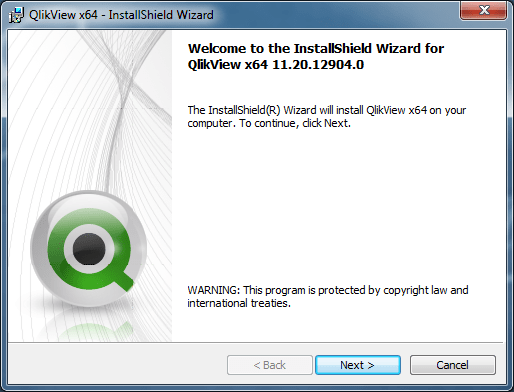
Click Next at the Welcome dialog.

QlikView_Installation_WizardWelcome

Accept the license agreement and click Next.

QlikView_Installation_license

Enter Name and Organization name.

QlikView_Installation_cust

Accept the default directory or choose / enter the directory to which QlikView should be installed. The example below shows a non-default directory selected.

QlikView_Installation_choosefolder

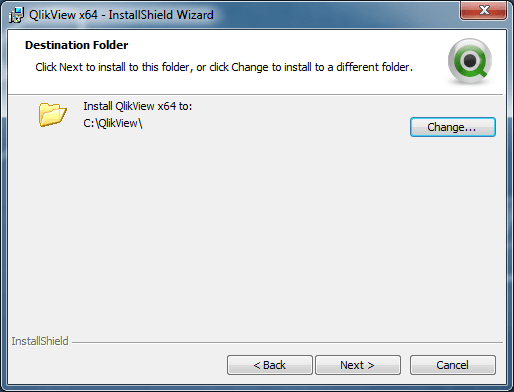
Click Next to confirm the destination folder.

QlikView_Installation_destinationfolder

Choose Complete installation type (makes sense in most cases).

QlikView_Installation_type

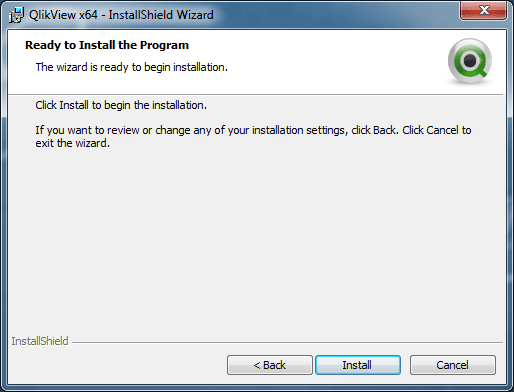
Click Install to start the installation

QlikView_Installation_ready

It’s Complete. Click Finish.

QlikView_Installation_complete

Go to the Windows Start menu and navigate to QlikView. Launch the program.

QlikView_Installation_windowsmenu

QlikView launches.

QlikView_Installation_launch

You have successfully installed QlikView and you are ready to get going. It’s that simple.


Oracle Business Intelligence (OBIEE) 12c Released

Oracle has released Oracle Business Intelligence (OBIEE) 12c.
The 12c release of OBIEE has some cool new features that will be beneficial for many enterprises.

obiee12c

Below is a listing of the key benefits and features of the new release from the release data sheet.
If the lists peak your interest, you can get more information at the links provided below.

KEY BENEFITS
• Stunningly visual and easy to use.
• Faster time to value, higher ROI.
• Radically simple install, upgrade, and management for lower TCO.
• Comprehensive platform, from self-service to advanced analytics to operational analysis at scale.
• Seamless analytics across Cloud and on-premises.
• Self-service agility in a central, secure platform.
• No modeling or specialized resources required for data mashup.
• Instant mobile, no extra work required.
• Voice-enabled—talk to your data.
• Analytics anywhere with full mobile authoring.
• Easy to extend advanced analytics.
• Direct access to Big Data sources.
• Faster in-memory processing.

KEY FEATURES
Visual Analytics
• Stunning data visualization.
• Secure sharing and collaboration.
• Intelligent highlighting automatically connects related data.
• Seamless user experience allows intuitive transition from discovery to dashboard.
Self-Service
• Self-service data loading, no modeling required.
• Self-service blending of personal and corporate data.
• Automatically inferred connection between data sets.
Mobile
• Touch and voice enabled, literally talk to your data.
• Full mobile authoring.
• Adaptive design for any device.
• Native sharing with other applications for both Android and Apple.
• Notifications on Android wear and Apple watch.
Advanced Analytics
• Integration with hundreds of free functions.
• Free R distribution for custom analytics, no RPD changes required.
Performance
• More in-memory processing
• In-memory Essbase on Exalytics
New Data Sources
• Direct access to Oracle Hyperion application data.
• Personal self-service data.
• Direct access to Cloudera Impala.
Easy Upgrade
• One file (BAR) for upgrade, backup, restore, recovery.
• Free Baseline Validation Tool

To learn more, you can visit the Oracle Business Intelligence website here …
https://www.oracle.com/solutions/business-analytics/business-intelligence/index.html

Or go directly to the data sheet for the new release that has more details about the new features and benefits …

Click to access bi12c-data-sheet-2745977.pdf

OBIEE Performance Tuning

This post describes a few tips and things to keep in mind for OBIEE Performance Tuning.

Be Proactive when possible
The need to performance tune can be proactive (tune before a major issue arises) or reactive (tune after a problem is reported by users for example).  It is best to be proactive – so performance tuning should be built into your OBIEE maintenance schedule. For example, OBIEE’s Usage Tracking functionality should be used regularly to identify reports whose performance can be improved and then performance steps should be carried out on the worst performers.

Iterative Process – change one thing or set of things at a time
One of the first things to keep in mind is that performance tuning is an iterative process.  And there is typically no one silver bullet that will resolve all your performance problems.  You may need to analyze and make changes to multiple parts of the system, but you want to make the changes methodically.  It is best to change one parameter or setting at the same time (or one related set of parameters).  Adjust and test the settings for that one parameter/setting (or set of parameters) before moving on to another.  If you change too much at one time, you may have a difficulty determining what is helping from what is hurting your efforts.

Fix user complaints first, worst performers next, and then the next bad performers down the list
Another thing to keep in mind, tune what users are reporting first, then tune the worst problems second, then move on to the next.

Team Effort – problem could be anywhere along the technology stack
Performance problems could be anywhere along the technology stack:
• OBIEE
• Database
• Server
• Network
Due to that span of technology, performance tuning is a team effort.  OBIEE Admins and Developers, DBAs, and ETL Developers can all be key to solving performance issues.
Logs from all components may need to be reviewed depending on the scenario.

Try to isolate or narrow-down the source of the problem
For example, run the report SQL directly on the database and see if you have the same problem. If there is no issue when run directly on that the database, then you have eliminated the database as the problem.
Determine if other applications have been also been experiencing slowness which could indicate the possibility of a network problem.

If your users have reported an issue, then you need to get as much details as possible about the performance problems they are experiencing.  When did this start happening?  Is it just one report or many?  Is it localized to one business area or multiple?  Is it all the time or sometimes?  Knowing this will help you to know where to focus.

Other questions to ask as you try to identify the source of the problem include but not limited to:
Has anything changed?  If reports were running fine, but are now slow, the first thing to ask is …
When the issue start?  Determining exactly when it started might be helpful when correlating with other system or company activity)
What has changed recently?  Has there been any system changes, data changes, database updates, network changes, etc. (even if they seem unrelated)?  For example, rolling into a new calendar year will cause new “Year” value(s) to be included in the data and can impact performance if statistics are not gathered.
Is there a possibility that an index was dropped and not recreated as expected?

Use OBIEE’s Usage Tracking information to analyze specific reports, analyze long running reports, or frequently run reports.  You will want to capture and analyze the SQL from these reports to determine what can be done to improve their performance.

Database
DBAs can monitor the system in real-time, use various tools, or review logs for information that can be helpful in the tuning effort.  Tools such as Oracle Enterprise Manager (EM) or SQL Tuning Advisor can be used to identify, analyze and tune high-load SQL.
OBIEE Usage Tracking can also be used to identify high-load SQL.
Without getting into much detail, these are some database features that could be used to help improve performance:
• Gather Statistics
• Results Cache database feature
• Partitioning

Servers
The System Admins can monitor the server resources to determine if there is an issue there.
• Use fast disk for the OBIEE cache and/or temporary files.


OBIEE-specific performance tuning tips

• OBIEE Caching
Are the tables being used set to cacheable?
Is caching turned on at the application level?
You may consider seeding the cache daily.
CACHE Settings:
o MAX_ROWS_PER_CACHE_ENTRY
o MAX_CACHE_ENTRY_SIZE
o MAX_CACHE_ENTRIES
o ——————-
o USE_ADVANCED_HIT_DETECTION

• Use Aggregation: Aggregate data when applicable
o You can use Aggregate tables or materialized views to realize this benefit.
o Aggregate Fact tables and corresponding Aggregate Dimensions.
o Make sure aggregation rules are applied to Fact table measures.
o Don’t necessarily merge all measures into a single fact.

• Joins and Indexes
o Do not create unnecessary joins.
o Verify that the joins on the tables being investigated are appropriate.
o Performance Indexing could be helpful.  Again, this is an iterative process.

• Prompts and Filters
o Use LOV tables to drive prompt values when possible, instead of building prompts from large transactional data tables.
o Force filter selection / entry by making prompt values required.  Do not allow open ended run of reports.

• Filter out unneeded data.  If there is a significant amount of data that is not being used in one or more tables (especially if they are frequently used), then that data should be filtered out by the ETL before it gets joined in SQL, and then has to be filtered out in the RPD or at the report level.

• Enter the “Number of Elements at this level” value in the logical level in hierarchies.
• Also ensure that all logical level keys are unique.

• Avoid function in the where clause when possible.

• Be careful of sub-queries.

• Check out the features of the OBIEE Performance Monitor
http://server:port/analytics/saw.dll?Perfmon  (enter your OBI server and port)

• When possible, do comparison analysis to determine for example, why is this report running fine, but this other seemingly similar report is not.

• Use fast disk for the OBIEE cache and/or temporary files.

Sometimes a complete overhaul might be required
Review the users’ workflow and determine if new and improved queries can be written or if the number of queries can be reduced.
Present information from a summary level first, and then provide increasing levels of details as requested by users through drill down or navigation.  Basically, present detailed information only when necessary, and minimize the amount of detail provided at a time by filtering on user selections.

Oracle’s OBIEE Performance Tuning Guide
Apply recommendations from the “Best Practices Guide for Infrastructure Tuning Oracle® Business Intelligence Enterprise Edition 11g Release”.  I would recommend applying 1 – 3 changes or set of changes at a time; don’t apply everything at the same time because if there is a problem, it will be more difficult to determine which change caused it.
https://blogs.oracle.com/proactivesupportEPM/entry/wp_obiee_tuning_guide

“The connection has failed” Error when trying to Import Metadata into OBIEE

If you get the error “The connection has failed” when you try to Import Metadata into the RPD, this post may help you to resolve it.

The solution is to: Create an Environment Variable called TNS_ADMIN and set its value to the directory of your tnsnames.ora file.
The TNS_ADMIN variable tells Oracle Client where to find the tnsnames.ora file which contains your data source details.

In case you need the details:
Click the Windows Start menu –> Right-Click on Computer –> select Properties
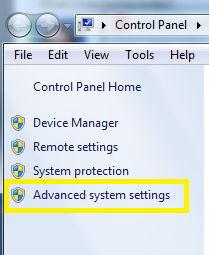
Then click on “Advanced system settings” on the left.
Advanced_System_Settings

Click the “Environment Variables” button.
Then in the Environment Variables window, click New.
Enter the details for the TNS_ADMIN variable.  The value needs to be the path to your tnsnames.ora file, typically located at [ORACLE_HOME]networkadmin. The path will look something like the value shown below (it depends on where Oracle is installed on your system).
TNS_ADMIN_Environment_Variable

 Hope this helps.

WebLogic startup failure – BackendRoot cannot cast to BackendStandard

My colleague from a previous company contacted me recently to help with a problem. OBIEE was not starting up.  They had a power failure the night before, and then OBIEE would not start up.  The system is OBIEE 11g on Linux.

This is the error that was generated when trying to start the WebLogic Admin Server…

——-

<Mar 28, 2014 9:11:35 AM EDT> <Critical> <WebLogicServer> <BEA-000362> <Server failed. Reason: There are 1 nested errors: java.lang.ClassCastException: com.octetstring.vde.backend.BackendRoot cannot be cast to com.octetstring.vde.backend.standard.BackendStandard         at weblogic.ldap.EmbeddedLDAP.start(EmbeddedLDAP.java:303)         at weblogic.t3.srvr.SubsystemRequest.run(SubsystemRequest.java:64)         at weblogic.work.ExecuteThread.execute(ExecuteThread.java:209)         at weblogic.work.ExecuteThread.run(ExecuteThread.java:178) > < Mar 28, 2014 9:11:35 AM EDT> <Notice> <WebLogicServer> <BEA-000365> <Server state changed to FAILED> < Mar 28, 2014 9:11:35 AM EDT> <Error> <WebLogicServer> <BEA-000383> <A critical service failed. The server will shut itself down> < Mar 28, 2014 9:11:35 AM EDT> <Notice> <WebLogicServer> <BEA-000365> <Server state changed to FORCE_SHUTTING_DOWN>

——– 

After trying a few things that did not resolve the issue, an online search helped with the solution. This post was very helpful: https://community.oracle.com/thread/2285489?tstart=0

After reading through the post, we went to the below directory on the OBIEE server (Linux) and examined its contents:

$MIDDLEWARE_HOME/user_projects/domains/bifoundation_domain/servers/AdminServer/data/ldap/ldapfiles

[oracle@[SERVERNAME]]$ cd /u01/product/middleware/user_projects/domains/bifoundation_domain/servers/AdminServer/data/ldap/ldapfiles [oracle@aeledwpbi ldapfiles]$ ls -l total 11308

-rw-r—– 1 oracle oinstall 10071624 Mar 27 08:40 changelog.data
-rw-r—– 1 oracle oinstall    56940 Mar 27 08:40 changelog.index
-rw-r—– 1 oracle oinstall   804359 Mar 27 08:40 EmbeddedLDAP.data
-rw-r—– 1 oracle oinstall     2028 Jun 25  2013 EmbeddedLDAP.delete
-rw-r—– 1 oracle oinstall     3576 Jun 25  2013 EmbeddedLDAP.index
-rw-r—– 1 oracle oinstall        0 Mar 28 12:36 EmbeddedLDAP.lok
-rw-r—– 1 root   root       615242 Mar 27 08:40 EmbeddedLDAP.tran
-rw-r—– 1 oracle oinstall        8 Mar 27 08:40 EmbeddedLDAP.trpos
-rw-r—– 1 oracle oinstall        8 Mar 27 08:40 EmbeddedLDAP.twpos

Note how one of the files (EmbeddedLDAP.tran) is owned by “root”. It seems the power outage caused something unusual to happen resulting in “root” being assigned ownership of the file.

After having the system administrator change the owner from “root” to “oracle” (the OBIEE admin user), we were able to start the OBIEE system back up.

New OBIEE Tuning Guide (Version 4) – released Jan 2014

A new version of the OBIEE Tuning Guide (Version 4) was released in January, 2014.  It is suitable for OBIEE 11.1.1.6 and 11.1.1.7 versions.

It can be found on Oracle Support under Document ID 1333049.1.   Or here is a direct link to the document (PDF).

—————————————-

New highlights from the previous document include:

  •     Optimized JVM switches for JRockit / Sun JVM / IBM JVM
  •     New tuning parameters settings / values for JavaHost / OPIS / OBIS components.
  •     Improved performance monitoring techniques.
  •     IBM WebSphere tuning parameters.
  •     More WebLogic Server tuning parameters.
  •     Windows Server 2012 tuning parameter.
  •     New optimized Linux / AIX tuning parameters.
  •     Additional Essbase ASO tuning parameters.
  •     libOVD authenticator search tuning

—————————————-

As always, this document provides us with recommended baselines or starting points, but the appropriate settings for each environment will vary.