What is HR / People / Workforce Analytics?

An organization’s most important resource is its staff. Understanding how to take the best care of your staff and help them to be highly engaged and productive is key to the success of the organization. HR Analytics / People Analytics / Workforce Analytics can help with this. But what is that exactly?

Analytics is a multi-disciplinary field that involves the collection and curation of data, and the analysis of that data using a variety of methods and tools, to discover, interpret and share information and insights, to help develop better business understanding and help guide decision making, usually toward achieving an organization’s goals. HR / People / Workforce Analytics is analytics around an organization’s candidates and staff, and HR actions and operations. The term most commonly used for this area of specialization by people in the field has shifted from HR Analytics to People Analytics over the years, and is now trending toward Workforce Analytics, so I will just use Workforce Analytics for the rest of the article.

The data used for Workforce Analytics will come from many sources inside and outside the organization including, but not limited to, Human Capital ERP systems, Workforce applications, Recruiting applications, Payroll applications, scheduling applications, employee and candidate surveys, social media, Glassdoor, and more. This data can be transformed, integrated and aggregated as appropriate, and then analyzed to provide information to help with operational and strategic decision making around areas such as staffing, recruiting, retention, turnover, absence, compensation and benefits, employee engagement, job satisfaction, performance and productivity, training and development, diversity, equity and inclusion, and operational efficiency, among others.

This analysis is usually performed across time periods (months, years) to allow for period-to-period comparisons and trend analysis to determine if the various metrics being measured and analyzed are improving or not. And the analysis is also usually done across all levels of the organization, so that information is available to support decision making for the entire organization or for a single department or for a specific segment of employees (such as all the clinical employees within a healthcare organization) or potentially for an individual employee.

The end goal usually includes helping with efforts such as:

  • Understanding the current workforce landscape and knowing any operational tasks that need to be performed
  • Hiring better candidates by predicting candidate success and reducing recruiting/hiring costs
  • Improve employee engagement through a better understanding of employee’s true needs, and what is working and what is not, and reducing absences as a result
  • Increase employee productivity through a better understanding of how employees work and things that slow them down
  • Reducing turnover by predicting employees at a high risk of turnover and implementing proactive retention measures
  • Forecast future staffing needs to better prepare for it with recruiting and training & development
  • Determining the business impact of HR initiatives

The diagram below summarizes the Workforce Analytics components to give you an overview of this article in a quick glance.

Of course, all organizations are different, and so the goals of an organization, the type of data available and the type of analyses of interest to an organization, will vary. But the importance and value of Workforce Analytics, which helps organizations make the most of their most important resource, is critical to just about all medium to large organizations, regardless of industry and prior success.

Good luck on your analytics journey!
The 5th type of analytics – cognitive analytics

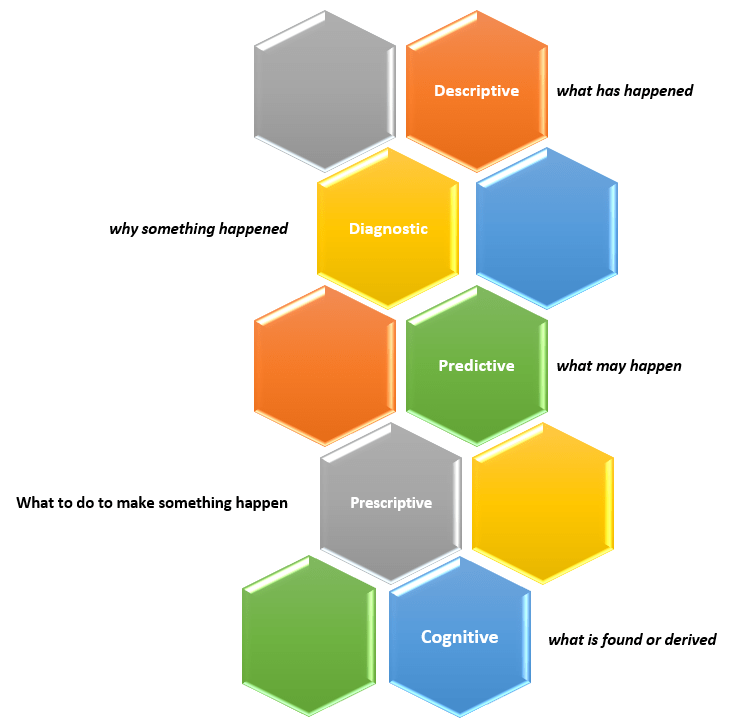
Sometime ago, I wrote an article titled “What is data analytics? And what are the different types of data analytics?”. In that post, I described four types of analytics:

  • Descriptive Analytics – what has happened?
  • Diagnostic Analytics – why something happened?
  • Predictive Analytics – what may happen (in the future)?
  • Prescriptive Analytics – what to do to make something happen?

You can read that full article here.

New capabilities and solutions have led to a new classification of analytics called Cognitive Analytics.

Cognitive Analytics involves bringing together technologies such as Artificial Intelligence (AI), Machine Learning (ML), and Deep Learning to apply human-like behavior to data tasks at unhuman scale, such as, searching through massive amounts of data and making sense of its contexts and be able to provide information from it, such as a likely answer or a sentiment score. This form of analytics provides new solutions that do not fit into any of the other four classifications and, in short, can be dubbed as “what is found or derived“.

There are many use cases that could benefit from this type of analytics, such as, personalization of services at scale, and improved customer service efficiency.

Thanks for reading and best wishes on your data journey!

Power BI Workspace roles

Power BI has 4 roles. Those roles, in order of increasing access/capabilities, are Viewer, Contributor, Member, and Admin. Before granting roles to users in your environment, it’s best to have a solid understanding of what each role has access to and is capable of doing.

The table below provides a list of capabilities of each role. As you will see, each roles “absorbs” or “inherits” the capabilities of all the roles below it in the hierarchy – for example, the Contributor can do everything the Viewer can do plus more, and the Member can do everything the Contributor can do plus more.


The Power BI Workspace roles

ViewerContributorMemberAdmin
View dashboards, reports, and workbooks in the workspaceEverything that the Viewer can doEverything that the Contributor can doEverything that the Member can do
Read data from dataflows in the workspaceAdd, edit, delete content workspacesAdd other users as members, contributors, or viewers to the workspaceUpdate and delete the workspace
Row-level security applies to viewersSchedule refreshes and use the on-premises gateway within workspaces Publish and update the workspace appAdd and remove other users of any role from the workspace
Feature dashboards and reports from workspacesShare and allow others to reshape items from the workspace
Have access to the lineage viewFeature the workspace app
Have full access to all datasets within a workspace

A few things to keep in mind regarding roles:

  • Only the Member and Admin roles can perform access related tasks and publish apps.
  • Both Member and Admin roles can update workspaces, but only the Admin role can delete.
  • By default, the Contributor role cannot update apps, but there is a workspace setting that allows Contributors to update apps.
  • Both the Member and Admin roles can add users, but only the Admin role can add other Admins. 
  • A Power BI Pro license is needed to be able to fully utilize the Admin role. 

This article was intended to be an easy read; more detailed information regarding Power BI roles can be found here on the Microsoft site.

Thanks for reading!

Why I am excited about using Microsoft Power BI

Our team at work recently started using the Power BI platform. We are just getting going but I am already loving this tool. Our current enterprise BI platforms are Qlik and OBI (Oracle Business Intelligence), however, Power BI has has gained significant traction in business teams over the last couple years where it used for departmental reporting and analysis.

I see why the business teams love this tool and am excited about bringing it into our portfolio of tools for delivering analytic solutions across the company. These are some of the reasons I like Power BI:

  • First and foremost, we have not yet come across anything that we currently do in Qlik or OBI that we will not be able to do in Power BI. This was very important.

Power BI has a very intuitive and well laid out interface. You can easily switch between the visualizations, the data, and the data model. And within each of those tabs, you easily navigate using the well-placed objects and menu items. I found the interface easy to get accustomed to.

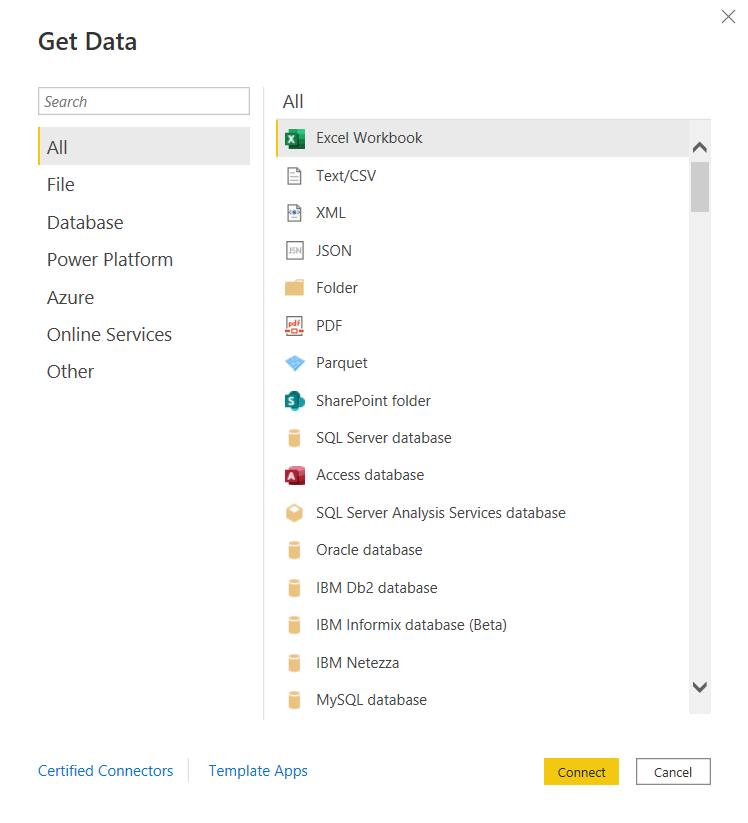
  • You can connect to just about any data source. The list is long. It seems the only source missing is an alien database on Mars. 🙂 I am kidding, but I did not find a native connector for Informix – the most uncommon database that we currently have as a source, but of course, ODBC and JDBC are available for those scenarios. Take a look.

and there are many more!

Some notable connectors are SQL Server Analysis Services, PostgreSQL, Amazon Redshift, Google BigQuery, Snowflake, various Azure data sources, Salesforce, Spark, GitHub, Databricks, and many more.

  • There are many awesome features for handling Excel data. And although we try to avoid Excel data as a source, it’s just not possible at times, and sometimes it makes sense to use those sources. However, the Power Query functionality allows users to perform ETL tasks on any data from any source.
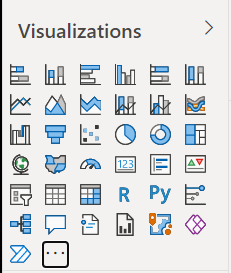
  • Power BI has many built-in visualization options.

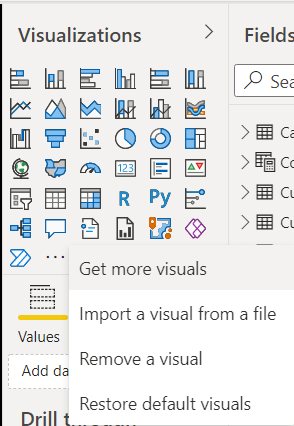
And you have the ability to “get more” from the marketplace.

  • Data modeling in Power BI is based on a methodology that our team is very familiar with: Dimensional Modeling, also known as, Star-Schema Modeling. And this is a proven method that works for efficient analytic solutions. In Power BI, it is also easy to create relationships between tables, change data types, and build hierarchies.
  • Within the data models, you can also use a versatile language called DAX (Data Analysis Expressions) to manipulate data, filter data, build measures, and more. I find that what’s possible with DAX brings Power BI into a whole other tier of flexibility compared to other tools. There is a bit of a learning curve for DAX, but you can start by focusing on a few key functions, and then expand your knowledge over time.
  • As you would expect in any modern BI platform, the security features in Power BI provide for object-level and data-level security. We have set up some simple security scenarios so far and it was straightforward. We will be digging more into setting up some more complex security scenarios soon and will report on that experience.
  • Data profiling features are built into Power BI, which may save you some time from having to jump into another query tool to profile your data.
  • Along with some standard analytic features, such as TopN, conditional formatting, and aggregate functions, Power BI also offers AI visuals, R and Python visuals, and advanced algorithms (such as key influencers and outliers) are available. I can foresee us using these features in the future.
  • Integration options with Office 365, SharePoint, and Teams.
  • Power BI is a great platform for one of the most significant trends in analytics – that is, users clamoring for Self-Service Analytics. With the ability to easily secure and share Power BI datasets, and users able to easily connect and use that data with an intuitive, optional code, tool that they may already have exposure to, it will be easier to implement self-service solutions. There are also some cool features for report consumers, such as personalization of visuals and mobile view.
  • A company called P3Adaptive delivered an awesome training for us, but there are tons of free resources available for learning. A good place to start is the Power BI lessons on Microsoft Learn – Power BI. And then, sign up for Dashboard in a Day (DIAD), a free one-day instructor-led training. You can find and register for DIAD classes here: Microsoft Events – DIAD
  • There are reasons why the Power BI platform has been at the top of the “Gartner Magic Quadrant for Business Intelligence and Analytics Platforms” for the last 3 years. It has a lot going for it and the company seems to be aggressive about continuous improvement.

I look forward to the Power BI journey and the ongoing quest to make our data as valuable as possible for our company.

External Embedded Content in OBIEE or OAS dashboard pages does not display in most web browsers

There is an “issue” or “security feature” (depending on how you look at it) that exists in OBIEE 12c (Oracle Business Intelligence) and in OAS (Oracle Analytics Server). The OBIEE or OAS dashboard pages do not display external embedded content in most browsers.

We use multiple BI platforms, but wanted to avoid sending users to one platform for some reporting and to another for other reporting. This can be confusing to users. To provide a good user experience by directing users to one place for all dashboards and self-service reporting, we have embedded most of the QlikView and Qlik Sense dashboards into OBI pages. With that, the users can be provided with one consistent training and have one place to go.

However, the Qlik embedded content only shows when using the IE (Internet Explorer) browser and the others give some “error” message.

  • The Chrome browser gives this error message:
    “Request to the server have been blocked by an extension.”
  • And the Edge browser gives this message:
    “This content is blocked. Contact the site owner to fix the issue.”

Or you may get other messages, such as (from Oracle Doc ID: 2273854.1):

  • Internet Explorer
    This content cannot be displayed in a frame
    To help protect the security of information you enter into this website, the publisher of this content does not allow it to be displayed in a frame.
  • Firefox
    No message is displayed on the page, but if you open the browser console (Ctrl+Shift+I) you see this message in it:
    Content Security Policy: The page’s settings blocked the loading of a resource at http://<server>/ (“default-src http://<server&gt;:<port>”).
  • Chrome
    No message is displayed on the page, but if you open the browser console (Ctrl+Shift+I) you see this message in it:
    Refused to frame ‘http://<server>/&#8217; because it violates the following Content Security Policy directive: “default-src ‘self'”. Note that ‘frame-src’ was not explicitly set, so ‘default-src’ is used as a fallback

This situation, although not ideal, has been fine since our company’s browser standard is IE and we provided a work-around for users that use other browsers to access the embedded content. But this will change soon since IE is going away.

There are 2 solutions to address the embedded content issue.

  1. Run Edge browser in IE mode for the BI applications sites/URLs.
    1. This would have been a good option for us, but it causes issues with the way we have SSO configured for a group of applications.
  2. Perform some configuration changes as outline below from Oracle Doc ID: 2273854.1.
    1. We ended up going forward with this solution and our team got it to work after some configurations trial and error.

(from Oracle Doc ID: 2273854.1):

For security reasons, you can no longer embed content from external domains in dashboards. To embed external content in dashboards, you must edit the instanceconfig.xml file. 

To allow the external content:

  1. Make a backup copy of <DOMAIN_HOME>/config/fmwconfig/biconfig/OBIPS/instanceconfig.xml
  2. Edit the <DOMAIN_HOME>/config/fmwconfig/biconfig/OBIPS/instanceconfig.xml file and add the ContentSecurityPolicy element inside the Security element:

<ServerInstance>

<Security>

  <InIFrameRenderingMode>allow</InIFrameRenderingMode>
  <ContentSecurityPolicy>
    <PolicyDirectives>
      <Directive>
        <Name>child-src</Name>
        <Value>’self’ http://www.xxx.com http://www.yyy.com</Value>
      </Directive>
      <Directive>
        <Name>img-src</Name>
        <Value>’self’ http://www.xxx.com http://www.yyy.com</Value>
      </Directive>
    </PolicyDirectives>
  </ContentSecurityPolicy>

</Security>

</ServerInstance>

  1. Restart the presentation server component (obips1)

Engage the teams responsible for enterprise browser settings or other appropriate teams at your company as necessary.

NULL values in prompts after upgrade from OBIEE to OAS

After upgrading from OBIEE to OAS (Oracle Business Intelligence to Oracle Analytics Server), the prompts started showing NULL values in the drop downs. This was not happening in OBI because we had the <ShowNullValueWhenColumnIsNullable> config parameter set to “never” for prompts.

This setting looked something like this in OBIEE (note the first line after the <Prompts> tag):

<ServerInstance>

<Prompts>
<ShowNullValueWhenColumnIsNullable>never</ShowNullValueWhenColumnIsNullable>
<MaxDropDownValues>256</MaxDropDownValues>
<ResultRowLimit>65000</ResultRowLimit>
<AutoApplyDashboardPromptValues>true</AutoApplyDashboardPromptValues>
<AutoSearchPromptDialogBox>true</AutoSearchPromptDialogBox>

</Prompts>

</ServerInstance>

In OAS, this parameter needs to be set in the new analytics/systemsettings page. Go to that page and set the option. Then restart by clicking on the Restart button on that page. After a restart, it resolved the issue for us.

We had a similar resolution to an issue we had with “not able to save analyses that contained HTML markup“.

Unable to save analysis with HTML markup in OAS after upgrade from OBIEE

We recently upgraded from OBIEE 12 to OAS 5.5. (Oracle Business Intelligence to Oracle Analytics Server). After the upgrade, we were not able to save analyses that contained HTML markup. We were able to do this before the upgrade.

Turns out, the configuration parameter for this now needs to be set in the new analytics/systemsettings page. Go to that page and enable the option “Allow HTML Content”. Then restart by clicking on the Restart button on that page.

After a restart, it resolved the issue for us.

If this doesn’t resolve it for you, you may need to remove the parameter from the instance config file and try again.

Back up your instanceconfig.xml file. Then edit it by removing the element “EnableSavingContentWithHTML” from the Security section and save the file. You will be removing a line that looks something like this:

“<EnableSavingContentWithHTML>true</EnableSavingContentWithHTML>”

Then go back to the analytics/systemsettings page, confirm “Allow HTML Content” is enabled, and restart again. This hopefully should resolve your issue.

New book release – Aggregation: The Unstoppable Force of Greatness

I am excited to announce: My first book, “Aggregation: The Unstoppable Force of Greatness”, is now available on Amazon!
Aggregation is the force behind the world’s greatest people, products, companies, and concepts. This book will help you to understand it, recognize it, and use it to create your greatness, as defined by you.

https://www.amazon.com/dp/1081687592

—————————————————————————————————————–

In our world, entities and actions are always coming together to form new entities and events. “Everything” is a combination or aggregation of multiple “things” brought together in some way, directly or indirectly, and possesses some degree of value. Like gravity, the force that makes objects fall and keeps them on the ground, aggregation is another invisible, ubiquitous force that constantly brings entities and actions together for various reasons and with varying outcomes. For outcomes that rise to some level of greatness, special aggregations that deliver significant value are required. Whether it be a person, product, company, or concept, how do you determine and influence the appropriate aggregations that will lead an endeavor to greatness? Who and what are the right entities that need to come together? What is the right way to bring them together? What is the right time and place? What is the right value that needs to be provided?

“Aggregation: The Unstoppable Force of Greatness” shines a bright light on aggregation, including its patterns and principles, and provides the insight, instruction, inspiration, and tools, including an original framework, to prepare you to understand, recognize, and use the force to achieve successes and create your greatness.

Python Libraries for Data Science

Python has grown quickly to become one of the most widely used programming languages. While it’s a powerful, multi-purpose language used for creating just about any type of application, it has become a go-to language for data science, rivaling even “R”, the longtime favorite language and platform for data science.

Python’s popularity for data-based solutions has grown because of the many powerful, opensource, data-centric libraries it has available. Some of these libraries include:

NumPy

A library used for creating and manipulating multi-dimensional data arrays and can be used for handling multi-dimensional data and difficult mathematical operations.

Pandas

Pandas is a library that provides easy-to-use but high-performance data structures, such as the DataFrame, and data analysis tools.

Matplotlib

Matplotlib is a library used for data visualization such as creating histograms, bar charts, scatter plots, and much more.

SciPy

SciPy is a library that provides integration, statistics, and linear algebra packages for numerical computations.

Scikit-learn

Scikit-learn is a library used for machine learning. It is built on top of some other libraries including NumPy, Matplotlib, and SciPy.

There are many other data-centric Python libraries and some will be introduced in future articles. More can be learned here: https://www.python.org/

What is data analytics? And what are the different types of data analytics?

Data analytics is the overall process of capturing and using data to produce meaningful information, including metrics and trends, that can be used to better understand events and help make better decisions. Usually the goal is to improve the efficiency and outcomes of an operation, such as a business, a political campaign, or even an individual (such as an athlete). There are four (4) prevalent types of data analytics – descriptive, predictive, diagnostic, and prescriptive.

  1. Descriptive analytics – provides information about “what has happened”. Examples of questions answered by descriptive analytics include: How much are our sales this month and what is over year-over-year sales increase? How many website visitors did we have and how many signups?
  2. Predictive analytics – provides insight into “what may happen” in the future based on the past. Examples of questions answered by predictive analytics include: Based on previous customer service call patterns and outcomes, what is the likelihood of a customer switching to another provider? Based on a customer’s profile, how much should we charge him for insurance?
  3. Diagnostic analytics – provides information to explain “why something happened”. In addition to the direct data, this may also involve more indirect or macro data sources, such as, weather data, local or national economic data, or competitor data. And it may also involve forming logical theories about the correlation of events. Examples of questions answered by diagnostic analytics include: How effective was the marketing blitz and which channel had the most impact? Did the weather affect sales or was it the price increase?
  4. Prescriptive analytics – provides insight into “what to do to make something happen”. Examples of questions answered by prescriptive analytics include: Based on the results of our test marketing blitz campaign, if we roll out the full campaign with adjustments to the channel spread, how many additional temporary customer service staff will we need to handle the increased volume without long wait times?
The four (4) types of data analytics

Descriptive analytics is the simplest and most common form of analytics used in organizations and is widely referred to as Business Intelligence (BI). There is widespread interest in predictive analytics but less than 50% of companies currently use it as it requires additional, more expensive skills. Diagnostic and prescriptive analytics have always been around because companies have always used information from descriptive analytics to hypothesize “why things happened” and make decisions on “what to do”. But it’s the automation of these types through new methods and the integration of more data inputs that is fairly new. The latter three forms are sometimes called Advanced Analytics or Data Science.

All the types of analytics will require some form of data integration and use some of the same data in an environment, but while descriptive analytics only needs data from the time periods being analyzed and usually from a narrower data set, the predictive, prescriptive and diagnostic analytics produce better results using as much data as is available from a wider timeframe and from a broader set of sources. There is overlap with the different types of analytics because the analysis of “what may happen” is driven by “what has happened” in the past and “why it happened”; and determining “what to do” will be driven by “what has happened”, “why it happened”, and “what may happen”. Companies on the forefront of data analytics will tend to use all four types.