AI in Cybersecurity: From Reactive Defense to Adaptive, Autonomous Protection

“AI in …” series

Cybersecurity has always been a race between attackers and defenders. What’s changed is the speed, scale, and sophistication of threats. Cloud computing, remote work, IoT, and AI-generated attacks have dramatically expanded the attack surface—far beyond what human analysts alone can manage.

AI has become a foundational capability in cybersecurity, enabling organizations to detect threats faster, respond automatically, and continuously adapt to new attack patterns.


How AI Is Being Used in Cybersecurity Today

AI is now embedded across nearly every cybersecurity function:

Threat Detection & Anomaly Detection

  • Darktrace uses self-learning AI to model “normal” behavior across networks and detect anomalies in real time.
  • Vectra AI applies machine learning to identify hidden attacker behaviors in network and identity data.

Endpoint Protection & Malware Detection

  • CrowdStrike Falcon uses AI and behavioral analytics to detect malware and fileless attacks on endpoints.
  • Microsoft Defender for Endpoint applies ML models trained on trillions of signals to identify emerging threats.

Security Operations (SOC) Automation

  • Palo Alto Networks Cortex XSIAM uses AI to correlate alerts, reduce noise, and automate incident response.
  • Splunk AI Assistant helps analysts investigate incidents faster using natural language queries.

Phishing & Social Engineering Defense

  • Proofpoint and Abnormal Security use AI to analyze email content, sender behavior, and context to stop phishing and business email compromise (BEC).

Identity & Access Security

  • Okta and Microsoft Entra ID use AI to detect anomalous login behavior and enforce adaptive authentication.
  • AI flags compromised credentials and impossible travel scenarios.

Vulnerability Management

  • Tenable and Qualys use AI to prioritize vulnerabilities based on exploit likelihood and business impact rather than raw CVSS scores.

Tools, Technologies, and Forms of AI in Use

Cybersecurity AI blends multiple techniques into layered defenses:

  • Machine Learning (Supervised & Unsupervised)
    Used for classification (malware vs. benign) and anomaly detection.
  • Behavioral Analytics
    AI models baseline normal user, device, and network behavior to detect deviations.
  • Natural Language Processing (NLP)
    Used to analyze phishing emails, threat intelligence reports, and security logs.
  • Generative AI & Large Language Models (LLMs)
    • Used defensively as SOC copilots, investigation assistants, and policy generators
    • Examples: Microsoft Security Copilot, Google Chronicle AI, Palo Alto Cortex Copilot
  • Graph AI
    Maps relationships between users, devices, identities, and events to identify attack paths.
  • Security AI Platforms
    • Microsoft Security Copilot
    • IBM QRadar Advisor with Watson
    • Google Chronicle
    • AWS GuardDuty

Benefits Organizations Are Realizing

Companies using AI-driven cybersecurity report major advantages:

  • Faster Threat Detection (minutes instead of days or weeks)
  • Reduced Alert Fatigue through intelligent correlation
  • Lower Mean Time to Respond (MTTR)
  • Improved Detection of Zero-Day and Unknown Threats
  • More Efficient SOC Operations with fewer analysts
  • Scalability across hybrid and multi-cloud environments

In a world where attackers automate their attacks, AI is often the only way defenders can keep pace.


Pitfalls and Challenges

Despite its power, AI in cybersecurity comes with real risks:

False Positives and False Confidence

  • Poorly trained models can overwhelm teams or miss subtle attacks.

Bias and Blind Spots

  • AI trained on incomplete or biased data may fail to detect novel attack patterns or underrepresent certain environments.

Explainability Issues

  • Security teams and auditors need to understand why an alert fired—black-box models can erode trust.

AI Used by Attackers

  • Generative AI is being used to create more convincing phishing emails, deepfake voice attacks, and automated malware.

Over-Automation Risks

  • Fully automated response without human oversight can unintentionally disrupt business operations.

Where AI Is Headed in Cybersecurity

The future of AI in cybersecurity is increasingly autonomous and proactive:

  • Autonomous SOCs
    AI systems that investigate, triage, and respond to incidents with minimal human intervention.
  • Predictive Security
    Models that anticipate attacks before they occur by analyzing attacker behavior trends.
  • AI vs. AI Security Battles
    Defensive AI systems dynamically adapting to attacker AI in real time.
  • Deeper Identity-Centric Security
    AI focusing more on identity, access patterns, and behavioral trust rather than perimeter defense.
  • Generative AI as a Security Teammate
    Natural language interfaces for investigations, playbooks, compliance, and training.

How Organizations Can Gain an Advantage

To succeed in this fast-changing environment, organizations should:

  1. Treat AI as a Force Multiplier, Not a Replacement
    Human expertise remains essential for context and judgment.
  2. Invest in High-Quality Telemetry
    Better data leads to better detection—logs, identity signals, and endpoint visibility matter.
  3. Focus on Explainable and Governed AI
    Transparency builds trust with analysts, leadership, and regulators.
  4. Prepare for AI-Powered Attacks
    Assume attackers are already using AI—and design defenses accordingly.
  5. Upskill Security Teams
    Analysts who understand AI can tune models and use copilots more effectively.
  6. Adopt a Platform Strategy
    Integrated AI platforms reduce complexity and improve signal correlation.

Final Thoughts

AI has shifted cybersecurity from a reactive, alert-driven discipline into an adaptive, intelligence-led function. As attackers scale their operations with automation and generative AI, defenders have little choice but to do the same—responsibly and strategically.

In cybersecurity, AI isn’t just improving defense—it’s redefining what defense looks like in the first place.
AI in the Energy Industry: Powering Reliability, Efficiency, and the Energy Transition

“AI in …” series

The energy industry sits at the crossroads of reliability, cost pressure, regulation, and decarbonization. Whether it’s oil and gas, utilities, renewables, or grid operators, energy companies manage massive physical assets and generate oceans of operational data. AI has become a critical tool for turning that data into faster decisions, safer operations, and more resilient energy systems.

From predicting equipment failures to balancing renewable power on the grid, AI is increasingly embedded in how energy is produced, distributed, and consumed.


How AI Is Being Used in the Energy Industry Today

Predictive Maintenance & Asset Reliability

  • Shell uses machine learning to predict failures in rotating equipment across refineries and offshore platforms, reducing downtime and safety incidents.
  • BP applies AI to monitor pumps, compressors, and drilling equipment in real time.

Grid Optimization & Demand Forecasting

  • National Grid uses AI-driven forecasting to balance electricity supply and demand, especially as renewable energy introduces more variability.
  • Utilities apply AI to predict peak demand and optimize load balancing.

Renewable Energy Forecasting

  • Google DeepMind has worked with wind energy operators to improve wind power forecasts, increasing the value of wind energy sold to the grid.
  • Solar operators use AI to forecast generation based on weather patterns and historical output.

Exploration & Production (Oil and Gas)

  • ExxonMobil uses AI and advanced analytics to interpret seismic data, improving subsurface modeling and drilling accuracy.
  • AI helps optimize well placement and drilling parameters.

Energy Trading & Price Forecasting

  • AI models analyze market data, weather, and geopolitical signals to optimize trading strategies in electricity, gas, and commodities markets.

Customer Engagement & Smart Metering

  • Utilities use AI to analyze smart meter data, detect outages, identify energy theft, and personalize energy efficiency recommendations for customers.

Tools, Technologies, and Forms of AI in Use

Energy companies typically rely on a hybrid of industrial, analytical, and cloud technologies:

  • Machine Learning & Deep Learning
    Used for forecasting, anomaly detection, predictive maintenance, and optimization.
  • Time-Series Analytics
    Critical for analyzing sensor data from turbines, pipelines, substations, and meters.
  • Computer Vision
    Used for inspecting pipelines, wind turbines, and transmission lines via drones.
    • GE Vernova applies AI-powered inspection for turbines and grid assets.
  • Digital Twins
    Virtual replicas of power plants, grids, or wells used to simulate scenarios and optimize performance.
    • Siemens Energy and GE Digital offer digital twin platforms widely used in the industry.
  • AI & Energy Platforms
    • GE Digital APM (Asset Performance Management)
    • Siemens Energy Omnivise
    • Schneider Electric EcoStruxure
    • Cloud platforms such as Azure Energy, AWS for Energy, and Google Cloud for scalable AI workloads
  • Edge AI & IIoT
    AI models deployed close to physical assets for low-latency decision-making in remote environments.

Benefits Energy Companies Are Realizing

Energy companies using AI effectively report significant gains:

  • Reduced Unplanned Downtime and maintenance costs
  • Improved Safety through early detection of hazardous conditions
  • Higher Asset Utilization and longer equipment life
  • More Accurate Forecasts for demand, generation, and pricing
  • Better Integration of Renewables into existing grids
  • Lower Emissions and Energy Waste

In an industry where assets can cost billions, small improvements in uptime or efficiency have outsized impact.


Pitfalls and Challenges

Despite its promise, AI adoption in energy comes with challenges:

Data Quality and Legacy Infrastructure

  • Older assets often lack sensors or produce inconsistent data, limiting AI effectiveness.

Integration Across IT and OT

  • Connecting enterprise systems with operational technology remains complex and risky.

Model Trust and Explainability

  • Operators must trust AI recommendations—especially when safety or grid stability is involved.

Cybersecurity Risks

  • Increased connectivity and AI-driven automation expand the attack surface.

Overambitious Digital Programs

  • Some AI initiatives fail because they aim for full digital transformation without clear, phased business value.

Where AI Is Headed in the Energy Industry

The next phase of AI in energy is tightly linked to the energy transition:

  • AI-Driven Grid Autonomy
    Self-healing grids that detect faults and reroute power automatically.
  • Advanced Renewable Optimization
    AI coordinating wind, solar, storage, and demand response in real time.
  • AI for Decarbonization & ESG
    Optimization of emissions tracking, carbon capture systems, and energy efficiency.
  • Generative AI for Engineering and Operations
    AI copilots generating maintenance procedures, engineering documentation, and regulatory reports.
  • End-to-End Energy System Digital Twins
    Modeling entire grids or energy ecosystems rather than individual assets.

How Energy Companies Can Gain an Advantage

To compete and innovate effectively, energy companies should:

  1. Prioritize High-Impact Operational Use Cases
    Predictive maintenance, grid optimization, and forecasting often deliver the fastest ROI.
  2. Modernize Data and Sensor Infrastructure
    AI is only as good as the data feeding it.
  3. Design for Reliability and Explainability
    Especially critical for safety- and mission-critical systems.
  4. Adopt a Phased, Asset-by-Asset Approach
    Scale proven solutions rather than pursuing sweeping transformations.
  5. Invest in Workforce Upskilling
    Engineers and operators who understand AI amplify its value.
  6. Embed AI into Sustainability Strategy
    Use AI not just for efficiency, but for measurable decarbonization outcomes.

Final Thoughts

AI is rapidly becoming foundational to the future of energy. As the industry balances reliability, affordability, and sustainability, AI provides the intelligence needed to operate increasingly complex systems at scale.

In energy, AI isn’t just optimizing machines—it’s helping power the transition to a smarter, cleaner, and more resilient energy future.

Practice Questions: Implement Performance Improvements in Queries and Report Visuals (DP-600 Exam Prep)

This post is a part of the DP-600: Implementing Analytics Solutions Using Microsoft Fabric Exam Prep Hub; and this topic falls under these sections: 
Implement and manage semantic models (25-30%)
--> Optimize enterprise-scale semantic models
--> Implement performance improvements in queries and report visuals


Practice Questions:

Here are 10 questions to test and help solidify your learning and knowledge. As you review these and other questions in your preparation, make sure to …

  • Identifying and understand why an option is correct (or incorrect) — not just which one
  • Look for and understand the usage scenario of keywords in exam questions to guide you
  • Expect scenario-based questions rather than direct definitions

1. A Power BI report built on a large semantic model is slow to respond. Performance Analyzer shows long DAX query times but minimal visual rendering time. Where should you focus first?

A. Reducing the number of visuals
B. Optimizing DAX measures and model design
C. Changing visual types
D. Disabling report interactions

Correct Answer: B

Explanation:
If DAX query time is the bottleneck, the issue lies in measure logic, relationships, or model design, not visuals.


2. Which storage mode typically provides the best interactive performance for large Delta tables stored in OneLake?

A. Import
B. DirectQuery
C. Direct Lake
D. Live connection

Correct Answer: C

Explanation:
Direct Lake queries Delta tables directly in OneLake, offering better performance than DirectQuery while avoiding full data import.


3. Which modeling change most directly improves query performance in enterprise-scale semantic models?

A. Using many-to-many relationships
B. Converting snowflake schemas to star schemas
C. Increasing column cardinality
D. Enabling bidirectional filtering

Correct Answer: B

Explanation:
A star schema simplifies joins and filter propagation, improving both storage engine efficiency and DAX performance.


4. A measure uses multiple nested SUMX and FILTER functions over a large fact table. Which change is most likely to improve performance?

A. Replace the measure with a calculated column
B. Introduce DAX variables to reuse intermediate results
C. Add more visuals to cache results
D. Convert the table to DirectQuery

Correct Answer: B

Explanation:
Using DAX variables (VAR) prevents repeated evaluation of expressions, significantly improving formula engine performance.


5. Which practice helps reduce memory usage and improve performance in Import mode models?

A. Keeping all columns for future use
B. Increasing the number of calculated columns
C. Removing unused columns and tables
D. Enabling Auto Date/Time for all tables

Correct Answer: C

Explanation:
Removing unused columns reduces model size, memory consumption, and scan time, improving overall performance.


6. What is the primary benefit of using aggregation tables in composite models?

A. They eliminate the need for relationships
B. They allow queries to be answered without scanning detailed fact tables
C. They automatically optimize visuals
D. They replace Direct Lake storage

Correct Answer: B

Explanation:
Aggregation tables allow Power BI to satisfy queries using pre-summarized Import data, avoiding expensive scans of large fact tables.


7. Which visual design choice is most likely to degrade report performance?

A. Using explicit measures
B. Limiting visuals per page
C. Using high-cardinality fields in slicers
D. Using report-level filters

Correct Answer: C

Explanation:
Slicers on high-cardinality columns generate expensive queries and increase interaction overhead.


8. When optimizing report interactions, which action can improve performance without changing the data model?

A. Enabling all cross-highlighting
B. Disabling unnecessary visual interactions
C. Adding calculated tables
D. Switching to DirectQuery

Correct Answer: B

Explanation:
Disabling unnecessary visual interactions reduces the number of queries triggered by user actions.


9. Which DAX practice is recommended for improving performance in enterprise semantic models?

A. Use implicit measures whenever possible
B. Prefer calculated columns over measures
C. Minimize row context and iterators on large tables
D. Use ALL() in every calculation

Correct Answer: C

Explanation:
Iterators and row context are expensive on large tables. Minimizing their use improves formula engine efficiency.


10. Performance Analyzer shows fast query execution but slow visual rendering. What is the most likely cause?

A. Inefficient DAX measures
B. Poor relationship design
C. Too many or overly complex visuals
D. Incorrect storage mode

Correct Answer: C

Explanation:
When rendering time is high but queries are fast, the issue is usually visual complexity, not the model or DAX.


How to turn off Auto date/time in Power BI and why you might want to

Power BI includes a feature called Auto date/time that automatically creates hidden date tables for date columns in your model. While this can be helpful for quick analyses, it can also introduce performance issues and modeling complexity in more advanced or production-grade reports.

What Is Auto Date/Time?

When Auto date/time is enabled, Power BI automatically generates a hidden date table for every column of type Date or Date/Time. These tables allow you to use built-in time intelligence features (like Year, Quarter, and Month) without explicitly creating a calendar table.

Why Turn Off Auto Date/Time?

Disabling Auto date/time is often considered a best practice for the following reasons:

  • Better Performance
    Each date column gets its own hidden date table, which increases model size and can slow down report performance.
  • Cleaner Data Models
    Hidden tables can clutter the model and make debugging DAX calculations more difficult.
  • Consistent Time Intelligence
    Using a single, well-designed Date (Calendar) table ensures consistent logic across all measures and visuals.
  • More Control
    Custom calendar tables allow you to define fiscal years, custom week logic, holidays, and other business-specific requirements.

How to Turn Off Auto Date/Time in Power BI

You can disable Auto date/time in both Power BI Desktop and at the report level:

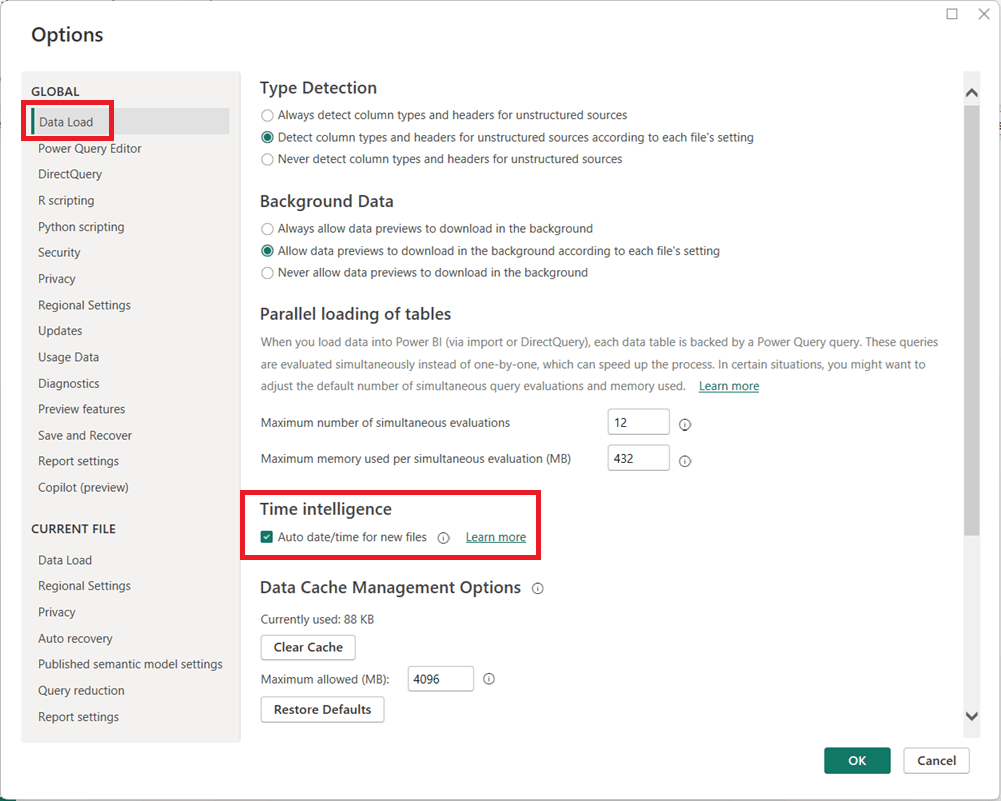
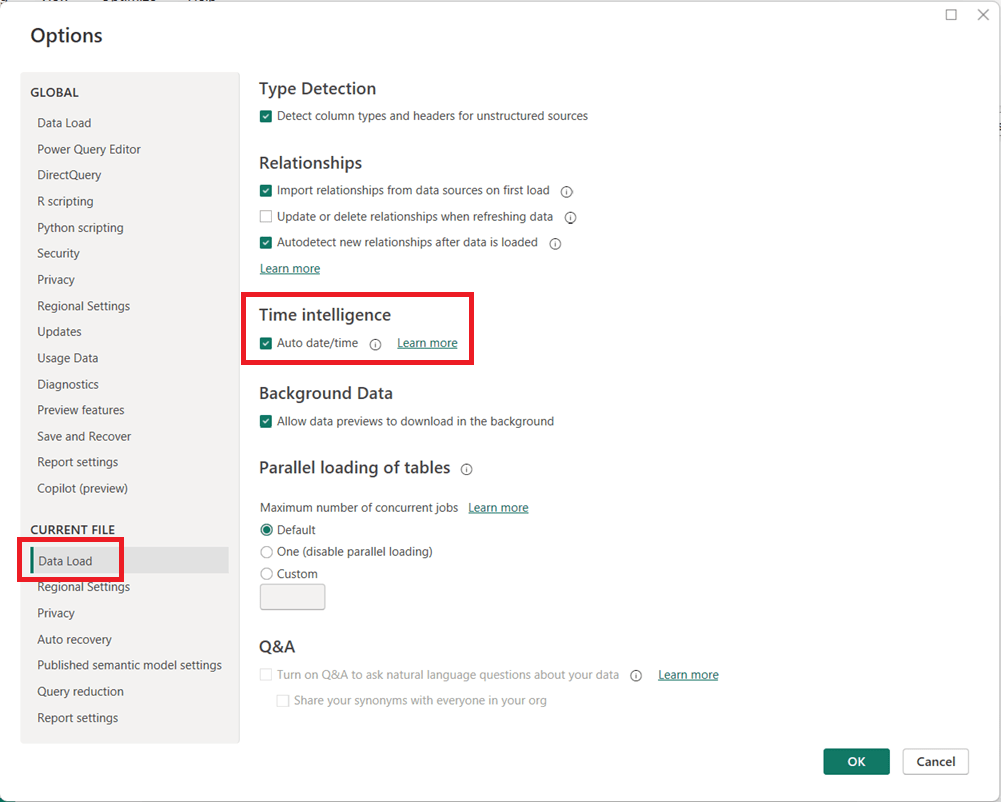
  1. In Power BI Desktop, go to FileOptions and settingsOptions.
  2. Under Global, select Data Load.
  3. Uncheck Auto date/time for new files.
  1. (Optional but recommended) Under Current File, select Data Load and uncheck Auto date/time to disable it for the current report.
  1. Click OK and refresh your model if necessary.

When Should You Leave It On?

Auto date/time can still be useful for:

  • Quick prototypes or ad-hoc analysis
  • Simple models with only one or two date fields
  • Users new to Power BI who are not yet working with custom DAX time intelligence

Final Thoughts

For enterprise, reusable, or performance-sensitive Power BI models, turning off Auto date/time and using a dedicated Date table is usually the better approach. It leads to cleaner models, more reliable calculations, and greater long-term flexibility as your reports grow in complexity.

Thanks for reading!

AI in Agriculture: From Precision Farming to Autonomous Food Systems

“AI in …” series

Agriculture has always been a data-driven business—weather patterns, soil conditions, crop cycles, and market prices have guided decisions for centuries. What’s changed is scale and speed. With sensors, satellites, drones, and connected machinery generating massive volumes of data, AI has become the engine that turns modern farming into a precision, predictive, and increasingly autonomous operation.

From global agribusinesses to small specialty farms, AI is reshaping how food is grown, harvested, and distributed.


How AI Is Being Used in Agriculture Today

Precision Farming & Crop Optimization

  • John Deere uses AI and computer vision in its See & Spray™ technology to identify weeds and apply herbicide only where needed, reducing chemical use by up to 90% in some cases.
  • Corteva Agriscience applies AI models to optimize seed selection and planting strategies based on soil and climate data.

Crop Health Monitoring

  • Climate FieldView (by Bayer) uses machine learning to analyze satellite imagery, yield data, and field conditions to identify crop stress early.
  • AI-powered drones monitor crop health, detect disease, and identify nutrient deficiencies.

Autonomous and Smart Equipment

  • John Deere Autonomous Tractor uses AI, GPS, and computer vision to operate with minimal human intervention.
  • CNH Industrial (Case IH, New Holland) integrates AI into precision guidance and automated harvesting systems.

Yield Prediction & Forecasting

  • IBM Watson Decision Platform for Agriculture uses AI and weather analytics to forecast yields and optimize field operations.
  • Agribusinesses use AI to predict harvest volumes and plan logistics more accurately.

Livestock Monitoring

  • Zoetis and Cainthus use computer vision and AI to monitor animal health, detect lameness, track feeding behavior, and identify illness earlier.
  • AI-powered sensors help optimize breeding and nutrition.

Supply Chain & Commodity Forecasting

  • AI models predict crop yields and market prices, helping traders, cooperatives, and food companies manage risk and plan procurement.

Tools, Technologies, and Forms of AI in Use

Agriculture AI blends physical-world sensing with advanced analytics:

  • Machine Learning & Deep Learning
    Used for yield prediction, disease detection, and optimization models.
  • Computer Vision
    Enables weed detection, crop inspection, fruit grading, and livestock monitoring.
  • Remote Sensing & Satellite Analytics
    AI analyzes satellite imagery to assess soil moisture, crop growth, and drought conditions.
  • IoT & Sensor Data
    Soil sensors, weather stations, and machinery telemetry feed AI models in near real time.
  • Edge AI
    AI models run directly on tractors, drones, and field devices where connectivity is limited.
  • AI Platforms for Agriculture
    • Climate FieldView (Bayer)
    • IBM Watson for Agriculture
    • Microsoft Azure FarmBeats
    • Trimble Ag Software

Benefits Agriculture Companies Are Realizing

Organizations adopting AI in agriculture are seeing tangible gains:

  • Higher Yields with fewer inputs
  • Reduced Chemical and Water Usage
  • Lower Operating Costs through automation
  • Improved Crop Quality and Consistency
  • Early Detection of Disease and Pests
  • Better Risk Management for weather and market volatility

In an industry with thin margins and increasing climate pressure, these improvements are often the difference between profit and loss.


Pitfalls and Challenges

Despite its promise, AI adoption in agriculture faces real constraints:

Data Gaps and Variability

  • Farms differ widely in size, crops, and technology maturity, making standardization difficult.

Connectivity Limitations

  • Rural areas often lack reliable broadband, limiting cloud-based AI solutions.

High Upfront Costs

  • Autonomous equipment, sensors, and drones require capital investment that smaller farms may struggle to afford.

Model Generalization Issues

  • AI models trained in one region may not perform well in different climates or soil conditions.

Trust and Adoption Barriers

  • Farmers may be skeptical of “black-box” recommendations without clear explanations.

Where AI Is Headed in Agriculture

The future of AI in agriculture points toward greater autonomy and resilience:

  • Fully Autonomous Farming Systems
    End-to-end automation of planting, spraying, harvesting, and monitoring.
  • AI-Driven Climate Adaptation
    Models that help farmers adapt crop strategies to changing climate conditions.
  • Generative AI for Agronomy Advice
    AI copilots providing real-time recommendations to farmers in plain language.
  • Hyper-Localized Decision Models
    Field-level, plant-level optimization rather than farm-level averages.
  • AI-Enabled Sustainability & ESG Reporting
    Automated tracking of emissions, water use, and soil health.

How Agriculture Companies Can Gain an Advantage

To stay competitive in a rapidly evolving environment, agriculture organizations should:

  1. Start with High-ROI Use Cases
    Precision spraying, yield forecasting, and crop monitoring often deliver fast payback.
  2. Invest in Data Foundations
    Clean, consistent field data is more valuable than advanced algorithms alone.
  3. Adopt Hybrid Cloud + Edge Strategies
    Balance real-time field intelligence with centralized analytics.
  4. Focus on Explainability and Trust
    Farmers need clear, actionable insights—not just predictions.
  5. Partner Across the Ecosystem
    Collaborate with equipment manufacturers, agritech startups, and AI providers.
  6. Plan for Climate Resilience
    Use AI to support long-term sustainability, not just short-term yield gains.

Final Thoughts

AI is transforming agriculture from an experience-driven practice into a precision, intelligence-led system. As global food demand rises and environmental pressures intensify, AI will play a central role in producing more food with fewer resources.

In agriculture, AI isn’t replacing farmers—it’s giving them better tools to feed the world.

How to Perform a Safe DIVIDE in Power BI (DAX and Power Query)

Division is a common operation in Power BI, but it can cause errors when the divisor is zero. Both DAX and Power Query provide built-in ways to handle these scenarios safely.

Safe DIVIDE in DAX

In DAX, the DIVIDE function is the recommended approach. Its syntax is:

DIVIDE(numerator, divisor [, alternateResult])

If the divisor is zero (or BLANK), the function returns the optional alternateResult; otherwise, it performs the division normally.

Examples:

  • DIVIDE(10, 2)5
  • DIVIDE(10, 0)BLANK
  • DIVIDE(10, 0, 0)0

This makes DIVIDE safer and cleaner than using conditional logic.

Safe DIVIDE in Power Query

In Power Query (M language), you can use the try … otherwise expression to handle divide-by-zero errors gracefully. The syntax is:

try [expression] otherwise [alternateValue]

Example:

try [Sales] / [Quantity] otherwise 0

If the division fails (such as when Quantity is zero), Power Query returns 0 instead of an error.

Using DIVIDE in DAX and try … otherwise in Power Query ensures your division calculations remain error-free.

AI in Marketing: From Campaign Automation to Intelligent Growth Engines

“AI in …” series

Marketing has always been about understanding people—what they want, when they want it, and how best to reach them. What’s changed is the scale and complexity of that challenge. Customers interact across dozens of channels, generate massive amounts of data, and expect personalization as the default.

AI has become the connective tissue that allows marketing teams to turn fragmented data into insight, automation, and growth—often in real time.


How AI Is Being Used in Marketing Today

AI now touches nearly every part of the marketing function:

Personalization & Customer Segmentation

  • Netflix uses AI to personalize thumbnails, recommendations, and messaging—driving engagement and retention.
  • Amazon applies machine learning to personalize product recommendations and promotions across its marketing channels.

Content Creation & Optimization

  • Coca-Cola has used generative AI tools to co-create marketing content and creative assets.
  • Marketing teams use OpenAI models (via ChatGPT and APIs), Adobe Firefly, and Jasper AI to generate copy, images, and ad variations at scale.

Marketing Automation & Campaign Optimization

  • Salesforce Einstein optimizes email send times, predicts customer engagement, and recommends next-best actions.
  • HubSpot AI assists with content generation, lead scoring, and campaign optimization.

Paid Media & Ad Targeting

  • Meta Advantage+ and Google Performance Max use AI to automate bidding, targeting, and creative optimization across ad networks.

Customer Journey Analytics

  • Adobe Sensei analyzes cross-channel customer journeys to identify drop-off points and optimization opportunities.

Voice, Chat, and Conversational Marketing

  • Brands use AI chatbots and virtual assistants for lead capture, product discovery, and customer support.

Tools, Technologies, and Forms of AI in Use

Modern marketing AI stacks typically include:

  • Machine Learning & Predictive Analytics
    Used for churn prediction, propensity scoring, and lifetime value modeling.
  • Natural Language Processing (NLP)
    Powers content generation, sentiment analysis, and conversational interfaces.
  • Generative AI & Large Language Models (LLMs)
    Used to generate ad copy, emails, landing pages, social posts, and campaign ideas.
    • Examples: ChatGPT, Claude, Gemini, Jasper, Copy.ai
  • Computer Vision
    Applied to image recognition, brand safety, and visual content optimization.
  • Marketing AI Platforms
    • Salesforce Einstein
    • Adobe Sensei
    • HubSpot AI
    • Marketo Engage
    • Google Marketing Platform

Benefits Marketers Are Realizing

Organizations that adopt AI effectively see significant advantages:

  • Higher Conversion Rates through personalization
  • Faster Campaign Execution with automated content creation
  • Lower Cost per Acquisition (CPA) via optimized targeting
  • Improved Customer Insights and segmentation
  • Better ROI Measurement and attribution
  • Scalability without proportional increases in headcount

In many cases, AI allows small teams to operate at enterprise scale.


Pitfalls and Challenges

Despite its power, AI in marketing has real risks:

Over-Automation and Brand Dilution

  • Excessive reliance on generative AI can lead to generic or off-brand content.

Data Privacy and Consent Issues

  • AI-driven personalization must comply with GDPR, CCPA, and evolving privacy laws.

Bias in Targeting and Messaging

  • AI models can unintentionally reinforce stereotypes or exclude certain audiences.

Measurement Complexity

  • AI-driven multi-touch journeys can make attribution harder, not easier.

Tool Sprawl

  • Marketers may adopt too many AI tools without clear integration or strategy.

Where AI Is Headed in Marketing

The next wave of AI in marketing will be even more integrated and autonomous:

  • Hyper-Personalization in Real Time
    Content, offers, and experiences adapted instantly based on context and behavior.
  • Generative AI as a Creative Partner
    AI co-creating—not replacing—human creativity.
  • Predictive and Prescriptive Marketing
    AI recommending not just what will happen, but what to do next.
  • AI-Driven Brand Guardianship
    Models trained on brand voice, compliance, and tone to ensure consistency.
  • End-to-End Journey Orchestration
    AI managing entire customer journeys across channels automatically.

How Marketing Teams Can Gain an Advantage

To thrive in this fast-changing environment, marketing organizations should:

  1. Anchor AI to Clear Business Outcomes
    Start with revenue, retention, or efficiency goals—not tools.
  2. Invest in Clean, Unified Customer Data
    AI effectiveness depends on strong data foundations.
  3. Establish Human-in-the-Loop Workflows
    Maintain creative oversight and brand governance.
  4. Upskill Marketers in AI Literacy
    The best results come from marketers who know how to prompt, test, and refine AI outputs.
  5. Balance Personalization with Privacy
    Trust is a long-term competitive advantage.
  6. Rationalize the AI Stack
    Fewer, well-integrated tools outperform disconnected point solutions.

Final Thoughts

AI is transforming marketing from a campaign-driven function into an intelligent growth engine. The organizations that win won’t be those that simply automate more—they’ll be the ones that use AI to understand customers more deeply, move faster with confidence, and blend human creativity with machine intelligence.

In marketing, AI isn’t replacing storytellers—it’s giving them superpowers.

How to replace a NULL value in Power BI Power Query

In Power BI, handling NULL values is a common data-preparation step to get your data ready for analysis, and Power Query makes this easy using the Replace Values feature.

This option is available from both the Home menu …

… and the Transform menu in the Power Query Editor.

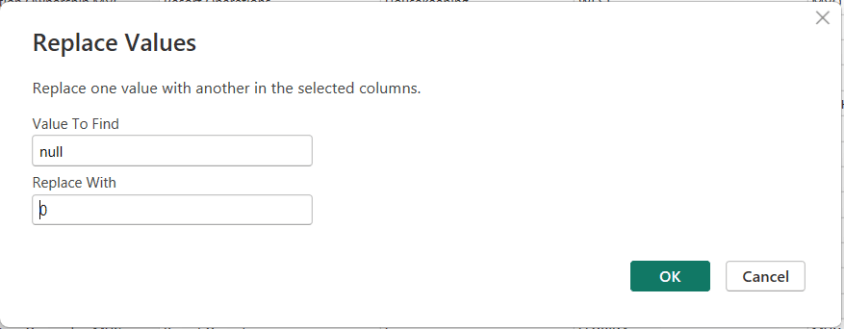
To replace NULLs, first select the column where the NULL values exist. Then choose Replace Values. When the dialog box appears, enter null as the value to find and replace, and specify the value you want to use instead—such as 0 for numeric columns or “Unknown” for text columns.

After confirming, Power Query automatically updates the column and records the step.

Thanks for reading!

The State of Data for the Year 2025

As we close out 2025, it’s clear that the global data landscape has continued its unprecedented expansion — touching every part of life, business, and technology. From raw bytes generated every second to the ways that AI reshapes how we search, communicate, and innovate, this year has marked another seismic leap forward for data. Below is a comprehensive look at where we stand — and where things appear to be headed as we approach 2026.


🌐 Global Data Generation: A Tidal Wave

Amount of Data Generated

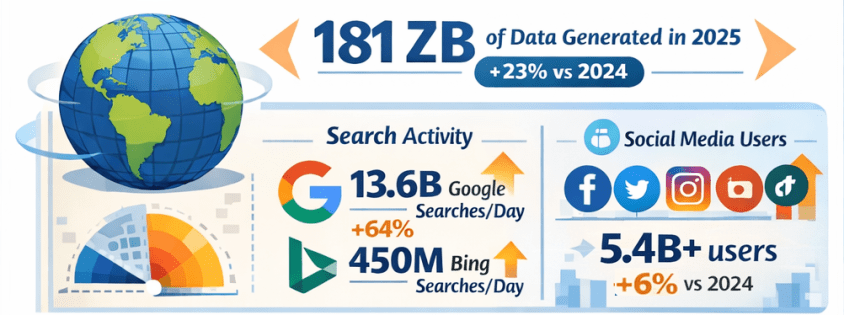
  • In 2025, the total volume of data created, captured, copied, and consumed globally is forecast to reach approximately 181 zettabytes (ZB) — up from about 147 ZB in 2024, representing roughly 23% year-over-year growth. Gitnux+1
  • That equates to an astonishing ~402 million terabytes of data generated daily. Exploding Topics

Growth Comparison: 2024 vs 2025

  • Data is growing at a compound rate: from roughly 120 ZB in 2023 to 147 ZB in 2024, then to about 181 ZB in 2025 — illustrating an ongoing surge of data creation driven by digital adoption and connected devices. Exploding Topics+1

🔍 Internet Users & Search Behavior

Number of People Online

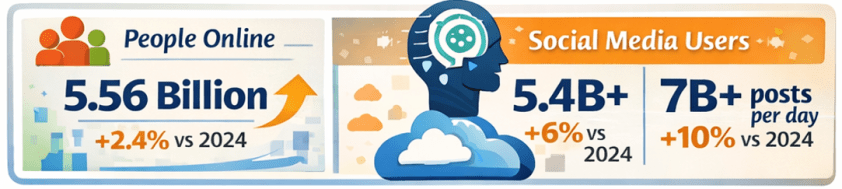
  • As of early 2025, around 5.56 billion people are active internet users, accounting for nearly 68% of the global population — up from approximately 5.43 billion in 2024. DemandSage

Search Engine Activity

  • Google alone handles roughly 13.6 billion searches per day in 2025, totaling almost 5 trillion searches annually — a significant increase from the estimated 8.3 billion daily searches in 2024. Exploding Topics
  • Bing, while much smaller in scale, processes around 450+ million searches per day (~13–14 billion per month). Nerdynav

Market Share Snapshot

  • Google continues to dominate search with approximately 90% global market share, while Bing remains one of the top alternatives. StatCounter Global Stats

📱 Social Media Usage & Content Creation

User Numbers

  • There are roughly 5.4–5.45 billion social media users worldwide in 2025 — up from prior years and covering about 65–67% of the global population. XtendedView+1

Time Spent & Trends

  • Users spend on average about 2 hours and 20+ minutes per day on social platforms. SQ Magazine
  • AI plays a central role in content recommendations and creation, with 80%+ of social feeds relying on algorithms, and an increasing share of generated images and posts assisted by AI tools. SQ Magazine

📊 The Explosion of AI: LLMs & Tools

LLM Adoption

  • Large language models and AI assistants like ChatGPT have become globally pervasive:
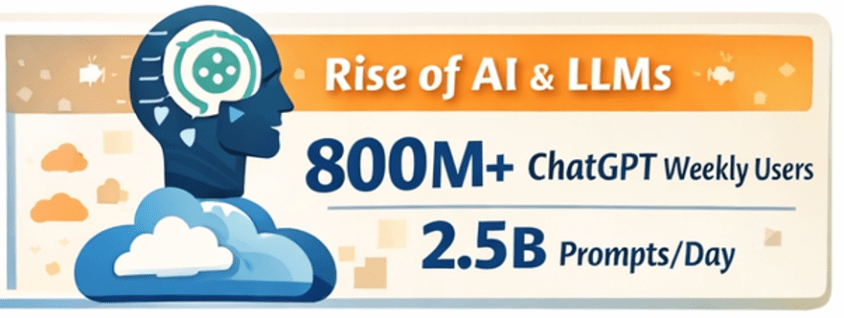
    • ChatGPT alone has around 800 million weekly active users as of late 2025. First Page Sage
    • Daily usage figures exceed 2.5 billion user prompts globally, highlighting a massive shift toward direct AI interaction. Exploding Topics
  • Studies have shown that LLM-assisted writing and content creation are now embedded across formal and informal communication channels, indicating broad adoption beyond curiosity use cases. arXiv

AI Tools Everywhere

  • Generative AI is now a staple across industries — from content creation to customer service, data analytics to software development. Investments and usage in AI-powered analytics and automation tools continue to rise rapidly. layerai.org

💡 Trends in Data Collection & Analytics

Real-Time & Edge Processing

  • In 2025, more than half of corporate data processing is happening at the edge, closer to the source of data generation, enabling real-time insights. Pennsylvania Institute of Technology

Data Democratization

  • Data access and analytics tools have become more user-friendly, with low-code/no-code platforms enabling broader organizational participation in data insight generation. postlo.com

☁️ Cloud & Data Infrastructure

Cloud Data Growth

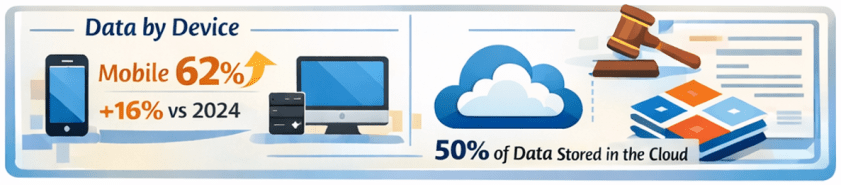
  • An ever-increasing portion of global data is stored in the cloud, with estimates suggesting around half of all data resides in cloud environments by 2025. Axis Intelligence

Data Centers & Energy

  • Data centers, particularly those supporting AI workloads, are expanding rapidly. This infrastructure surge is driving both innovation and concerns — including power consumption and sustainability challenges. TIME

📜 Data Laws & Regulation

New Legal Frameworks

  • In the UK, the Data (Use and Access) Act of 2025 was enacted, updating data protection and access rules related to UK-specific GDPR implementations. Wikipedia
  • Elsewhere, data regulation remains a focal point globally, with ongoing debates around privacy, governance, AI accountability, and cross–border data flows.

🛠️ Top Data Tools/Platforms of 2025

While specific rankings vary by industry and use case, 2025’s data ecosystem centers around:

  • Cloud data platforms: Snowflake, BigQuery, Redshift, Databricks
  • BI & visualization: Tableau, Power BI
  • AI/ML frameworks: TensorFlow, PyTorch, scalable LLM platforms
  • Automation & low-code analytics: dbt, Airflow, no-code toolchains
  • Real-time streaming: Kafka, ksqlDB

Ongoing trends emphasize integration between AI tooling and traditional analytics pipelines — blurring the lines between data engineering, analytics, and automation.

Note: specific tool adoption percentages vary by firm size and sector, but cloud-native and AI-augmented tools dominate enterprise workflows. Reddit


🌟 Novel Uses of Data in 2025

2025 saw innovative applications such as:

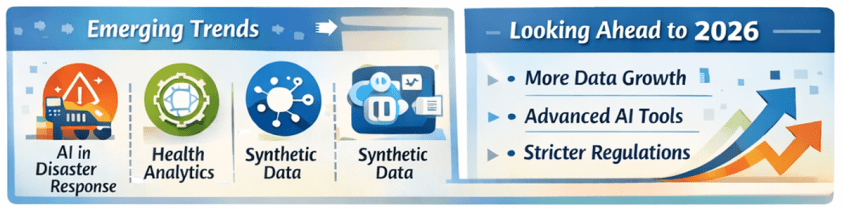
  • AI-powered disaster response using real-time social data streams.
  • Conversational assistants embedded into everyday workflows (search, writing, decision support).
  • Predictive analytics in health, finance, logistics, accelerated by real-time IoT feeds.
  • Synthetic datasets for simulation, security research, and model training. arXiv

🔮 What’s Expected in 2026

Continued Growth

  • Data volumes are projected to keep rising — potentially doubling every few years with the proliferation of AI, IoT, and immersive technologies.
  • LLM adoption will likely hit deeper integration into enterprise processes, customer experience workflows, and consumer tech.
  • AI governance and data privacy regulation will intensify globally, balancing innovation with accountability.

Emerging Frontiers

  • Multimodal AI blending text, vision, and real-time sensor data.
  • Federated learning and privacy-preserving analytics gaining traction.
  • Data meshes and decentralized data infrastructures challenging traditional monolithic systems.
  • Unified data platforms with AI-focused features and AI-focused business-ready data models are becoming common place.

📌 Final Thoughts

2025 has been another banner year for data — not just in sheer scale, but in how data powers decision-making, AI capabilities, and digital interactions across society. From trillions of searches to billions of social interactions, from zettabytes of oceans of data to democratized analytics tools, the data world continues to evolve at breakneck speed. And for data professionals and leaders, the next year promises even more opportunities to harness data for insight, innovation, and impact. Exciting stuff!

Thanks for reading!

The Use of AI by Students: Opportunity, Responsibility, and the Future of Learning

Introduction: The Rapid Rise of AI in Education

Over the past few years, artificial intelligence (AI) tools have exploded in popularity, and students have been among the fastest adopters. Tools that can answer questions, summarize content, write essays, generate code, and explain complex topics are now available instantly, often for free or at very low cost.

The reason for this rapid adoption is simple: AI tools are accessible, fast, and powerful. They remove friction from learning and problem-solving, offering immediate assistance in a world where students are already juggling heavy workloads, deadlines, and external pressures. As AI becomes embedded in everyday technology, its presence in education is no longer optional—it is inevitable.


How AI Tools Can Be Helpful to Students

When used correctly, AI tools can significantly enhance the student learning experience. Some of the most valuable benefits include:

  • Personalized explanations: AI can explain concepts in multiple ways, adapting explanations to a student’s level of understanding.
  • Study assistance: Tools can summarize textbooks, generate practice questions, and help students review key ideas before exams.
  • Writing support: AI can help students brainstorm ideas, improve clarity, fix grammar, and structure essays.
  • Technical learning support: For subjects like programming, math, and data analysis, AI can help debug code, walk through formulas, and explain logic step by step.
  • Time efficiency: By reducing time spent stuck on a problem, students can focus more on understanding and applying concepts.

Used as a tutor or study partner, AI can level the playing field and provide support that many students might not otherwise have access to.


The Challenges AI Tools Bring for Students

Despite their benefits, AI tools also introduce serious challenges:

  • Overreliance: Students may rely on AI to produce answers rather than learning how to think through problems themselves.
  • Shallow learning: Copying AI-generated responses can result in surface-level understanding without true comprehension.
  • Academic integrity risks: Improper use of AI can violate school policies and lead to disciplinary action.
  • Reduced critical thinking: Constantly deferring to AI can weaken problem-solving, creativity, and independent reasoning skills.

The biggest risk is not the technology itself, but how it is used.


AI Is Here to Stay

One thing is clear: AI tools are not going away. They will continue to evolve and become part of the new educational and professional landscape. Just as calculators, search engines, and spell checkers became accepted tools over time, AI will become another standard component of how people learn and work.

The key question is no longer whether students will use AI, but how responsibly and effectively they will use it.


Are AI Tools Making Students Less Resourceful—or Better Learners?

This debate is ongoing, and the truth lies somewhere in the middle.

  • When misused, AI can make students passive, dependent, and less capable of independent thought.
  • When used properly, AI can accelerate learning, deepen understanding, and encourage curiosity.

AI is neither inherently good nor bad for learning. It is an amplifier. It amplifies good study habits when used intentionally, and poor habits when used carelessly.


Recommendations for Students Using AI Tools

To get the most benefit while avoiding the pitfalls, students should follow these guidelines:

When and How to Use AI

  • Use AI to clarify concepts, not replace learning.
  • Ask AI to explain why, not just provide answers.
  • Use AI to review, summarize, or practice after attempting the work yourself.
  • Treat AI as a study assistant or tutor, not a shortcut.

When and How Not to Use AI

  • Do not submit AI-generated work as your own unless explicitly allowed.
  • Avoid using AI to complete assignments you have not attempted yourself.
  • Do not rely on AI to think critically or creatively on your behalf.

Assignments and Learning

  • Try the assignment first without AI.
  • Use AI to check understanding or explore alternative approaches.
  • Make sure you can explain the solution in your own words.

Understand the Subject Matter

Getting help from AI does not replace the need to understand the topic. Exams, interviews, and real-world situations will require your knowledge—not AI’s output.

Think Before Using AI

Ask yourself:

  • What am I trying to learn here?
  • Is AI helping me understand, or just helping me finish faster?

AI as an Enhancer, Not a Do-It-All Tool

The most successful students will use AI to enhance their abilities, not outsource them.


A Critical Reminder: AI Will Not Take Your Exams

No matter how advanced AI becomes, it will not sit in your exam room, take your test, or answer oral questions for you. Your understanding, preparation, and effort will always matter. Relying too heavily on AI during coursework can leave students unprepared when it counts most.


Know Your School’s AI Policy

Students must take responsibility for understanding their institution’s policies on AI use. Rules vary widely across schools and instructors, and ignorance is not a defense. Knowing what is allowed—and what is not—is essential for protecting academic integrity and personal credibility.


Where Things Might Go Next

In the future, we are likely to see:

  • Clearer guidelines and standardized AI policies in education.
  • AI tools designed specifically for ethical learning support.
  • Greater emphasis on critical thinking, problem-solving, and applied knowledge.
  • Assessments that focus more on reasoning and understanding than memorization.

Education will adapt, and students who learn to use AI wisely will be better prepared for the modern workforce.


Summary

AI tools are powerful, accessible, and here to stay. For students, they offer enormous potential to support learning—but also real risks if misused. The difference lies in intent and discipline.

Used thoughtfully, AI can deepen understanding and improve learning outcomes. Used carelessly, it can weaken essential skills and undermine education. The responsibility ultimately rests with students to use AI as a supplement, not a substitute, for learning.

The future belongs to learners who can think, adapt, and use tools—AI included—wisely.

Share this article with students you know so that they can ponder this important topic and the views shared.

Thanks for reading!