Category: Power BI

Practice Questions: Assign workspace roles (PL-300 Exam Prep)

This post is a part of the PL-300: Microsoft Power BI Data Analyst Exam Prep Hub; and this topic falls under these sections:
Manage and secure Power BI (15–20%)
--> Secure and govern Power BI items
--> Assign workspace roles


Below are 10 practice questions (with answers and explanations) for this topic of the exam.
There are also 2 practice tests for the PL-300 exam with 60 questions each (with answers) available on the hub.

Practice Questions


Question 1

You need to allow a user to add and remove workspace users and change workspace settings.
Which workspace role should you assign?

A. Viewer
B. Contributor
C. Member
D. Admin

Correct Answer: D. Admin

Explanation:
Only the Admin role can manage workspace access and modify workspace settings. Members can manage content but cannot manage users.


Question 2

A business user needs to view reports and dashboards but should not be able to modify or publish any content.
Which role is most appropriate?

A. Viewer
B. Contributor
C. Member
D. Admin

Correct Answer: A. Viewer

Explanation:
The Viewer role provides read-only access, allowing users to consume and interact with content without making changes.


Question 3

Which workspace role allows a user to create and edit reports but not publish or update a workspace app?

A. Viewer
B. Contributor
C. Member
D. Admin

Correct Answer: B. Contributor

Explanation:
Contributors can create and modify content but cannot publish apps or manage workspace access.


Question 4

A Power BI developer must publish a workspace app but should not be able to add or remove users from the workspace.
Which role should be assigned?

A. Viewer
B. Contributor
C. Member
D. Admin

Correct Answer: C. Member

Explanation:
Members can publish and update workspace apps but cannot manage workspace access, which is restricted to Admins.


Question 5

Which role is required to delete a workspace?

A. Viewer
B. Contributor
C. Member
D. Admin

Correct Answer: D. Admin

Explanation:
Only workspace Admins have permission to delete a workspace.


Question 6

You want to follow best practices for access management by minimizing ongoing maintenance when employees change roles.
What should you use when assigning workspace access?

A. Individual user accounts
B. Distribution lists
C. Azure AD security groups
D. Shareable links

Correct Answer: C. Azure AD security groups

Explanation:
Using Azure AD security groups simplifies governance by allowing access changes to be managed centrally.


Question 7

A user needs to configure scheduled refresh for a semantic model but should not manage workspace access.
Which role is the minimum required?

A. Viewer
B. Contributor
C. Member
D. Admin

Correct Answer: C. Member

Explanation:
Configuring scheduled refresh requires Member or Admin permissions. Contributors cannot manage refresh settings.


Question 8

Which workspace role requires a Power BI Pro license when the workspace is not in Premium capacity?

A. Admin only
B. Contributor only
C. Viewer only
D. All workspace roles

Correct Answer: D. All workspace roles

Explanation:
When a workspace is not in Premium capacity, all users, including Viewers, require a Power BI Pro license to access content.


Question 9

Which statement correctly describes the difference between workspace roles and row-level security (RLS)?

A. Workspace roles control data visibility, RLS controls actions
B. Workspace roles control actions, RLS controls data visibility
C. Both control user actions only
D. Both control data visibility only

Correct Answer: B. Workspace roles control actions, RLS controls data visibility

Explanation:
Workspace roles define what users can do, while RLS defines what data users can see within reports.


Question 10

You are designing a production workspace and want report consumers to have the least privilege possible.
Which role should they be assigned?

A. Viewer
B. Contributor
C. Member
D. Admin

Correct Answer: A. Viewer

Explanation:
The Viewer role follows the principle of least privilege, granting read-only access appropriate for production consumers.


Exam Readiness Checklist

✔ Know all four workspace roles
✔ Understand capabilities vs limitations
✔ Apply least privilege principles
✔ Recognize Admin-only actions
✔ Distinguish workspace roles from RLS


Go back to the PL-300 Exam Prep Hub main page
Practice Questions: Configure item-level access in Power BI (PL-300 Exam Prep)

This post is a part of the PL-300: Microsoft Power BI Data Analyst Exam Prep Hub; and this topic falls under these sections:
Manage and secure Power BI (15–20%)
--> Secure and govern Power BI items
--> Configure item-level access


Below are 10 practice questions (with answers and explanations) for this topic of the exam.
There are also 2 practice tests for the PL-300 exam with 60 questions each (with answers) available on the hub.

Practice Questions


Question 1

You want business users to create their own reports using an existing semantic model, but you do not want them to edit the model. What should you grant them?

A. Workspace Viewer role
B. Workspace Contributor role
C. Build permission on the semantic model
D. Read permission on the report

Correct Answer: C

Explanation:
The Build permission allows users to create new reports using a semantic model without modifying it. Viewer access alone does not allow report creation, and Contributor access is broader than required.


Question 2

A user can view a dashboard but sees broken tiles that fail to load data. What is the most likely cause?

A. The dataset refresh failed
B. The user lacks Build permission
C. The user does not have access to the underlying report
D. The dashboard was shared incorrectly

Correct Answer: C

Explanation:
Dashboard tiles link back to underlying reports. If the user does not have access to those reports, the tiles will not display correctly—even if the dashboard itself is shared.


Question 3

Which permission allows a user to create a new report in Power BI Desktop using a published semantic model?

A. Read
B. Viewer
C. Contributor
D. Build

Correct Answer: D

Explanation:
Only the Build permission enables users to create new reports from an existing semantic model, including using Power BI Desktop or Analyze in Excel.


Question 4

You need to limit who can see specific reports within a Power BI app without creating multiple apps. What should you use?

A. Row-level security (RLS)
B. Workspace roles
C. App audiences
D. Dataset permissions

Correct Answer: C

Explanation:
App audiences provide item-level visibility within an app, allowing different user groups to see different reports or dashboards.


Question 5

Which statement best describes item-level access?

A. It controls what data rows users can see
B. It controls access to entire workspaces
C. It controls access to individual Power BI items
D. It replaces workspace roles

Correct Answer: C

Explanation:
Item-level access applies to individual items such as reports, dashboards, and datasets. It does not control row-level data access and does not replace workspace roles.


Question 6

A user has access to a report but cannot export data from it. What is the most likely explanation?

A. The dataset is using DirectQuery
B. The report is in a Premium workspace
C. Export permissions are restricted at the report or tenant level
D. The user lacks RLS permissions

Correct Answer: C

Explanation:
Export behavior is governed by item-level settings and tenant-level policies, not RLS or workspace type alone.


Question 7

When sharing a report, which permission must be explicitly granted if the user needs to reshare it with others?

A. Build
B. Viewer
C. Contributor
D. Reshare

Correct Answer: D

Explanation:
The Reshare permission must be explicitly enabled when sharing an item. Without it, users can view the report but cannot share it further.


Question 8

Which scenario requires item-level access instead of workspace roles?

A. Granting full control of all assets
B. Managing dataset refresh schedules
C. Allowing users to view only specific reports in a workspace
D. Enabling paginated report creation

Correct Answer: C

Explanation:
Item-level access allows fine-grained control over individual assets, making it ideal when users should only see specific reports.


Question 9

How does item-level access differ from row-level security (RLS)?

A. Item-level access controls data rows
B. RLS controls report visibility
C. Item-level access controls content access; RLS controls data visibility
D. They serve the same purpose

Correct Answer: C

Explanation:
Item-level access determines whether a user can open or interact with content, while RLS limits the data shown within that content.


Question 10

What is the recommended best practice when assigning item-level access at scale?

A. Assign permissions to individual users
B. Use workspace roles only
C. Use Azure AD security groups
D. Share reports anonymously

Correct Answer: C

Explanation:
Using Azure AD security groups improves scalability, simplifies maintenance, and aligns with enterprise governance best practices.


Exam Readiness Tip

If you can confidently answer questions about:

  • Build vs Read vs Reshare
  • Dashboards vs reports vs datasets
  • Item-level access vs workspace roles vs RLS

…you are in excellent shape for PL-300 questions in this domain.


Go back to the PL-300 Exam Prep Hub main page
Practice Questions: Configure Access to Semantic Models (PL-300 Exam Prep)

This post is a part of the PL-300: Microsoft Power BI Data Analyst Exam Prep Hub; and this topic falls under these sections:
Manage and secure Power BI (15–20%)
--> Secure and govern Power BI items
--> Configure access to semantic models


Below are 10 practice questions (with answers and explanations) for this topic of the exam.
There are also 2 practice tests for the PL-300 exam with 60 questions each (with answers) available on the hub.

Practice Questions


Question 1

A user can view reports in a workspace but cannot create a new report using the existing semantic model. What is the most likely reason?

A. The user does not have Read permission on the semantic model
B. The user does not have Build permission on the semantic model
C. The user is not assigned a Row-Level Security role
D. The semantic model is not endorsed

Correct Answer: B

Explanation:
Creating new reports from a semantic model requires Build permission. A user can still view reports without Build permission, which makes this a common exam scenario.


Question 2

Which workspace role allows a user to edit semantic models and manage permissions?

A. Viewer
B. Contributor
C. Member
D. App user

Correct Answer: C

Explanation:
Members can publish, update, and manage semantic models, including assigning permissions. Contributors can edit content but cannot manage access.


Question 3

You want business users to create their own reports while preventing them from modifying the semantic model. What is the best approach?

A. Assign users the Viewer role and grant Build permission on the semantic model
B. Assign users the Contributor role
C. Assign users the Admin role
D. Publish the reports through a Power BI App only

Correct Answer: A

Explanation:
Granting Viewer role + Build permission enables self-service report creation without allowing model changes—this is a best practice and frequently tested.


Question 4

Where is Row-Level Security (RLS) enforced?

A. At the report level
B. At the dashboard level
C. At the semantic model level
D. At the workspace level

Correct Answer: C

Explanation:
RLS is defined in Power BI Desktop and enforced at the semantic model level, applying to all reports that use the model.


Question 5

Which DAX function is commonly used to implement dynamic Row-Level Security?

A. SELECTEDVALUE()
B. USERELATIONSHIP()
C. USERPRINCIPALNAME()
D. LOOKUPVALUE()

Correct Answer: C

Explanation:
USERPRINCIPALNAME() returns the logged-in user’s email or UPN and is commonly used in dynamic RLS filters.


Question 6

A user with Viewer access can see a report but receives an error when using Analyze in Excel. What is the most likely issue?

A. The user is not licensed for Power BI
B. The semantic model is not certified
C. The user does not have Build permission
D. RLS is incorrectly configured

Correct Answer: C

Explanation:
Analyze in Excel requires Build permission on the semantic model. Viewer role alone is insufficient.


Question 7

Which permission allows a user to share a semantic model with others?

A. Read
B. Build
C. Reshare
D. Admin

Correct Answer: C

Explanation:
The Reshare permission explicitly allows users to share the semantic model with other users or groups.


Question 8

What is the primary purpose of certifying a semantic model?

A. To apply Row-Level Security automatically
B. To improve query performance
C. To indicate the model is an approved and trusted data source
D. To allow external tool access

Correct Answer: C

Explanation:
Certification signals that a semantic model is officially approved and governed, helping users identify trusted data sources.


Question 9

Which approach is recommended for managing access to semantic models at scale?

A. Assign permissions to individual users
B. Use Microsoft Entra ID (Azure AD) security groups
C. Share semantic models directly from Power BI Desktop
D. Grant Admin role to all analysts

Correct Answer: B

Explanation:
Using security groups simplifies access management, supports scalability, and aligns with governance best practices.


Question 10

A report is published using a semantic model that has RLS enabled. A user accesses the report through a Power BI App. What happens?

A. RLS is ignored when using apps
B. RLS must be reconfigured for the app
C. RLS is enforced automatically
D. Only static RLS is applied

Correct Answer: C

Explanation:
Row-Level Security is always enforced at the semantic model level, regardless of whether content is accessed via a workspace, report, or app.


Final Exam Tips

  • Build permission is the most frequently tested concept
  • Viewer + Build is a common least-privilege design pattern
  • RLS always applies at the semantic model level
  • Certification is about trust and governance, not security
  • Apps do not bypass semantic model security

Go back to the PL-300 Exam Prep Hub main page

Practice Questions: Implement Row-Level Security Roles (PL-300 Exam Prep)

This post is a part of the PL-300: Microsoft Power BI Data Analyst Exam Prep Hub; and this topic falls under these sections:
Manage and secure Power BI (15–20%)
--> Secure and govern Power BI items
--> Implement row-level security roles


Below are 10 practice questions (with answers and explanations) for this topic of the exam.
There are also 2 practice tests for the PL-300 exam with 60 questions each (with answers) available on the hub.

Practice Questions


Question 1

Where are Row-Level Security roles and filters created?

A. In the Power BI Service
B. In Power BI Desktop
C. In Microsoft Entra ID
D. In Power BI Apps

Correct Answer: B

Explanation:
RLS roles and DAX filters are created in Power BI Desktop. Users and groups are assigned to those roles later in the Power BI Service.


Question 2

Which DAX function is most commonly used to implement dynamic RLS?

A. USERELATIONSHIP()
B. USERNAME()
C. USERPRINCIPALNAME()
D. SELECTEDVALUE()

Correct Answer: C

Explanation:
USERPRINCIPALNAME() returns the logged-in user’s email/UPN and is the most commonly used function for dynamic RLS scenarios.


Question 3

A single semantic model must filter sales data so that users only see rows matching their email address. What is the best approach?

A. Create one role per user
B. Create static RLS roles by region
C. Use dynamic RLS with a user-mapping table
D. Use Object-Level Security

Correct Answer: C

Explanation:
Dynamic RLS with a user-to-dimension mapping table scales efficiently and avoids creating many static roles.


Question 4

What happens if a user belongs to multiple RLS roles?

A. Access is denied
B. Only the most restrictive role is applied
C. The union of all role filters is applied
D. The first role alphabetically is applied

Correct Answer: C

Explanation:
Power BI applies the union of RLS role filters, meaning users see data allowed by any role they belong to.


Question 5

Which statement about Row-Level Security behavior is correct?

A. RLS is applied at the report level
B. RLS applies only to dashboards
C. RLS is enforced at the semantic model level
D. RLS must be reconfigured for each report

Correct Answer: C

Explanation:
RLS is enforced at the semantic model level and automatically applies to all reports and apps using that model.


Question 6

You test RLS using View as role in Power BI Desktop. What does this feature do?

A. Permanently applies RLS to the model
B. Bypasses RLS for the model author
C. Simulates how the report appears for a role
D. Assigns users to roles automatically

Correct Answer: C

Explanation:
View as allows you to simulate role behavior to validate RLS logic before publishing.


Question 7

Which type of RLS is least scalable in enterprise environments?

A. Dynamic RLS
B. RLS using USERPRINCIPALNAME()
C. Static RLS with hard-coded values
D. Group-based RLS

Correct Answer: C

Explanation:
Static RLS requires separate roles for each data segment, making it difficult to maintain at scale.


Question 8

A user accesses a report through a Power BI App. How does RLS behave?

A. RLS is ignored
B. RLS must be redefined in the app
C. RLS is enforced automatically
D. Only static RLS is enforced

Correct Answer: C

Explanation:
RLS is always enforced at the semantic model level, including when content is accessed through apps.


Question 9

Which security feature should be used if you need to hide entire columns or tables from certain users?

A. Row-Level Security
B. Workspace roles
C. Object-Level Security
D. Build permission

Correct Answer: C

Explanation:
RLS controls rows only. Object-Level Security (OLS) is used to hide tables or columns.


Question 10

Which best practice is recommended when assigning users to RLS roles?

A. Assign individual users directly
B. Assign workspace Admins only
C. Assign Microsoft Entra ID security groups
D. Assign report-level permissions

Correct Answer: C

Explanation:
Using security groups improves scalability, governance, and ease of maintenance.


Final PL-300 Exam Reminders

  • RLS controls data visibility, not report access
  • Dynamic RLS is heavily tested
  • RLS applies everywhere the semantic model is used
  • Users see the union of multiple roles
  • RLS is defined in Desktop, enforced in the Service

Go back to the PL-300 Exam Prep Hub main page

Practice Questions: Configure Row-Level Security Group Membership (PL-300 Exam Prep)

This post is a part of the PL-300: Microsoft Power BI Data Analyst Exam Prep Hub; and this topic falls under these sections: 
Manage and secure Power BI (15–20%)
--> Secure and govern Power BI items
--> Configure row-level security group membership


Below are 10 practice questions (with answers and explanations) for this topic of the exam.
There are also 2 practice tests for the PL-300 exam with 60 questions each (with answers) available on the hub.

Practice Questions


Question 1

Where are security groups assigned to RLS roles?

A. Power BI Desktop
B. Power BI Service
C. Microsoft Entra ID only
D. Power BI App settings

Correct Answer: B

Explanation:
RLS roles and filters are created in Power BI Desktop, but users and security groups are assigned to roles in the Power BI Service after the model is published.


Question 2

Which approach is considered a best practice for managing RLS membership at scale?

A. Assign individual users to each role
B. Create one role per user
C. Assign Microsoft Entra ID security groups to roles
D. Use workspace Admin access

Correct Answer: C

Explanation:
Using Entra ID security groups simplifies administration, supports scalability, and aligns with enterprise security standards.


Question 3

What happens when a user is added to an Entra ID security group that is already assigned to an RLS role?

A. The semantic model must be republished
B. The role must be recreated
C. The user automatically inherits the RLS permissions
D. The user must be manually added in Power BI

Correct Answer: C

Explanation:
Group-based RLS automatically applies to all members of the group without changes to the model or Power BI configuration.


Question 4

Which type of group is recommended for RLS role membership?

A. Distribution list
B. Microsoft 365 group
C. Entra ID security group
D. Power BI workspace group

Correct Answer: C

Explanation:
Entra ID security groups are designed for access control and are the preferred option for RLS scenarios.


Question 5

A user belongs to two security groups, each assigned to a different RLS role. How is access determined?

A. The most restrictive role applies
B. The first role applied alphabetically applies
C. Access is denied
D. The union of both roles applies

Correct Answer: D

Explanation:
Power BI applies the union of all RLS roles a user belongs to, allowing access to any data permitted by either role.


Question 6

Which action requires updating Microsoft Entra ID, not Power BI?

A. Modifying a DAX RLS filter
B. Creating a new RLS role
C. Adding a user to an RLS role via group membership
D. Testing RLS with View as

Correct Answer: C

Explanation:
User membership in security groups is managed in Entra ID, not in Power BI.


Question 7

Which statement about testing group-based RLS is correct?

A. Group membership can be fully tested in Power BI Desktop
B. Group membership is evaluated only in the Power BI Service
C. RLS does not apply to groups
D. Groups bypass dynamic RLS

Correct Answer: B

Explanation:
Power BI Desktop can test role logic, but actual group membership is evaluated only in the Power BI Service.


Question 8

Why is group-based RLS preferred over assigning individual users?

A. It improves report performance
B. It hides tables and columns
C. It reduces the need to update Power BI when users change roles
D. It removes the need for DAX filters

Correct Answer: C

Explanation:
Group-based RLS allows access changes to be managed centrally without modifying Power BI roles or republishing models.


Question 9

Which security concept is often confused with RLS group membership but serves a different purpose?

A. Build permission
B. Workspace roles
C. Object-Level Security
D. All of the above

Correct Answer: D

Explanation:
All listed options are different security mechanisms that control content access or structure, not row-level data visibility.


Question 10

What is the primary role of Power BI in a group-based RLS solution?

A. Managing group membership
B. Authenticating users
C. Enforcing data filters defined in RLS roles
D. Creating security groups

Correct Answer: C

Explanation:
Power BI enforces RLS filters at query time, while identity and group membership are managed externally in Entra ID.


Final PL-300 Exam Reminders

  • Use Entra ID security groups for RLS membership
  • Assign groups in the Power BI Service
  • RLS role logic lives in Power BI Desktop
  • Users see the union of all assigned roles
  • Group membership changes do not require republishing

Go back to the PL-300 Exam Prep Hub main page
Practice Questions: Implement Performance Improvements in Queries and Report Visuals (DP-600 Exam Prep)

This post is a part of the DP-600: Implementing Analytics Solutions Using Microsoft Fabric Exam Prep Hub; and this topic falls under these sections: 
Implement and manage semantic models (25-30%)
--> Optimize enterprise-scale semantic models
--> Implement performance improvements in queries and report visuals


Practice Questions:

Here are 10 questions to test and help solidify your learning and knowledge. As you review these and other questions in your preparation, make sure to …

  • Identifying and understand why an option is correct (or incorrect) — not just which one
  • Look for and understand the usage scenario of keywords in exam questions to guide you
  • Expect scenario-based questions rather than direct definitions

1. A Power BI report built on a large semantic model is slow to respond. Performance Analyzer shows long DAX query times but minimal visual rendering time. Where should you focus first?

A. Reducing the number of visuals
B. Optimizing DAX measures and model design
C. Changing visual types
D. Disabling report interactions

Correct Answer: B

Explanation:
If DAX query time is the bottleneck, the issue lies in measure logic, relationships, or model design, not visuals.


2. Which storage mode typically provides the best interactive performance for large Delta tables stored in OneLake?

A. Import
B. DirectQuery
C. Direct Lake
D. Live connection

Correct Answer: C

Explanation:
Direct Lake queries Delta tables directly in OneLake, offering better performance than DirectQuery while avoiding full data import.


3. Which modeling change most directly improves query performance in enterprise-scale semantic models?

A. Using many-to-many relationships
B. Converting snowflake schemas to star schemas
C. Increasing column cardinality
D. Enabling bidirectional filtering

Correct Answer: B

Explanation:
A star schema simplifies joins and filter propagation, improving both storage engine efficiency and DAX performance.


4. A measure uses multiple nested SUMX and FILTER functions over a large fact table. Which change is most likely to improve performance?

A. Replace the measure with a calculated column
B. Introduce DAX variables to reuse intermediate results
C. Add more visuals to cache results
D. Convert the table to DirectQuery

Correct Answer: B

Explanation:
Using DAX variables (VAR) prevents repeated evaluation of expressions, significantly improving formula engine performance.


5. Which practice helps reduce memory usage and improve performance in Import mode models?

A. Keeping all columns for future use
B. Increasing the number of calculated columns
C. Removing unused columns and tables
D. Enabling Auto Date/Time for all tables

Correct Answer: C

Explanation:
Removing unused columns reduces model size, memory consumption, and scan time, improving overall performance.


6. What is the primary benefit of using aggregation tables in composite models?

A. They eliminate the need for relationships
B. They allow queries to be answered without scanning detailed fact tables
C. They automatically optimize visuals
D. They replace Direct Lake storage

Correct Answer: B

Explanation:
Aggregation tables allow Power BI to satisfy queries using pre-summarized Import data, avoiding expensive scans of large fact tables.


7. Which visual design choice is most likely to degrade report performance?

A. Using explicit measures
B. Limiting visuals per page
C. Using high-cardinality fields in slicers
D. Using report-level filters

Correct Answer: C

Explanation:
Slicers on high-cardinality columns generate expensive queries and increase interaction overhead.


8. When optimizing report interactions, which action can improve performance without changing the data model?

A. Enabling all cross-highlighting
B. Disabling unnecessary visual interactions
C. Adding calculated tables
D. Switching to DirectQuery

Correct Answer: B

Explanation:
Disabling unnecessary visual interactions reduces the number of queries triggered by user actions.


9. Which DAX practice is recommended for improving performance in enterprise semantic models?

A. Use implicit measures whenever possible
B. Prefer calculated columns over measures
C. Minimize row context and iterators on large tables
D. Use ALL() in every calculation

Correct Answer: C

Explanation:
Iterators and row context are expensive on large tables. Minimizing their use improves formula engine efficiency.


10. Performance Analyzer shows fast query execution but slow visual rendering. What is the most likely cause?

A. Inefficient DAX measures
B. Poor relationship design
C. Too many or overly complex visuals
D. Incorrect storage mode

Correct Answer: C

Explanation:
When rendering time is high but queries are fast, the issue is usually visual complexity, not the model or DAX.


How to turn off Auto date/time in Power BI and why you might want to

Power BI includes a feature called Auto date/time that automatically creates hidden date tables for date columns in your model. While this can be helpful for quick analyses, it can also introduce performance issues and modeling complexity in more advanced or production-grade reports.

What Is Auto Date/Time?

When Auto date/time is enabled, Power BI automatically generates a hidden date table for every column of type Date or Date/Time. These tables allow you to use built-in time intelligence features (like Year, Quarter, and Month) without explicitly creating a calendar table.

Why Turn Off Auto Date/Time?

Disabling Auto date/time is often considered a best practice for the following reasons:

  • Better Performance
    Each date column gets its own hidden date table, which increases model size and can slow down report performance.
  • Cleaner Data Models
    Hidden tables can clutter the model and make debugging DAX calculations more difficult.
  • Consistent Time Intelligence
    Using a single, well-designed Date (Calendar) table ensures consistent logic across all measures and visuals.
  • More Control
    Custom calendar tables allow you to define fiscal years, custom week logic, holidays, and other business-specific requirements.

How to Turn Off Auto Date/Time in Power BI

You can disable Auto date/time in both Power BI Desktop and at the report level:

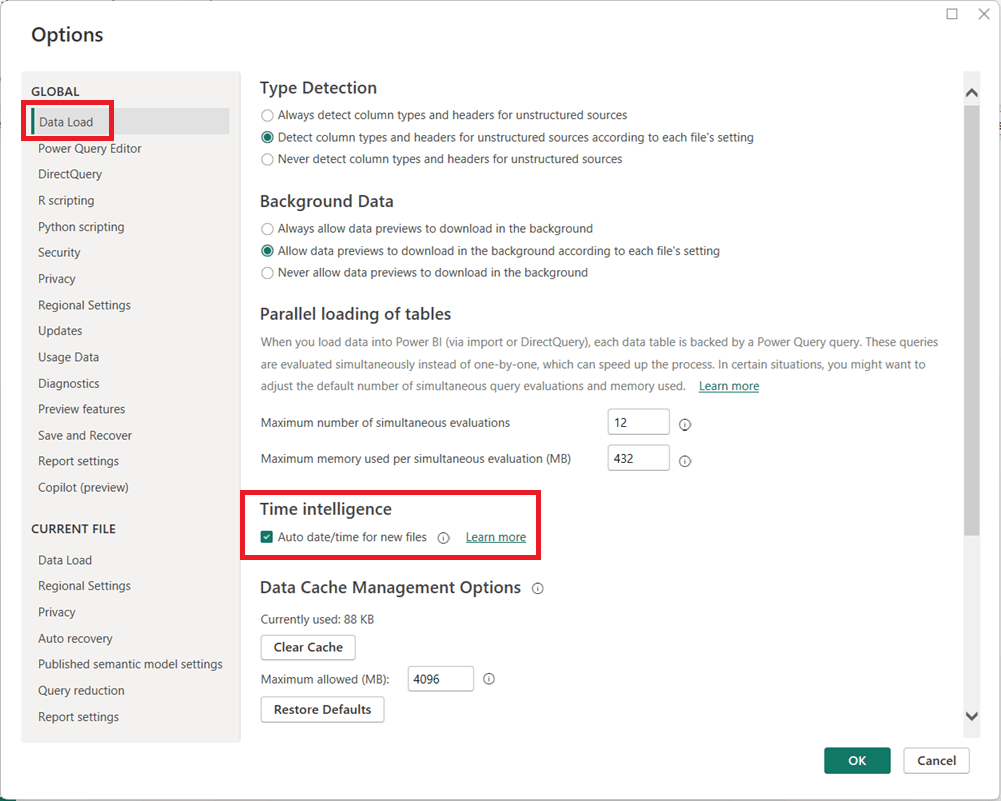
  1. In Power BI Desktop, go to FileOptions and settingsOptions.
  2. Under Global, select Data Load.
  3. Uncheck Auto date/time for new files.
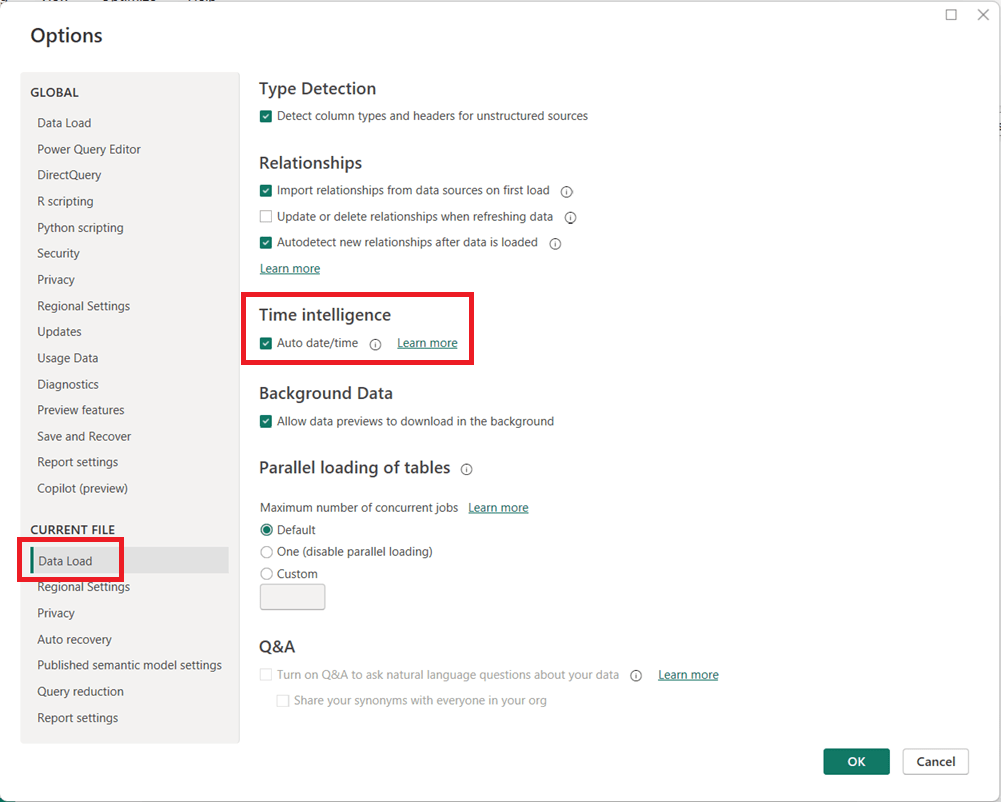
  1. (Optional but recommended) Under Current File, select Data Load and uncheck Auto date/time to disable it for the current report.
  1. Click OK and refresh your model if necessary.

When Should You Leave It On?

Auto date/time can still be useful for:

  • Quick prototypes or ad-hoc analysis
  • Simple models with only one or two date fields
  • Users new to Power BI who are not yet working with custom DAX time intelligence

Final Thoughts

For enterprise, reusable, or performance-sensitive Power BI models, turning off Auto date/time and using a dedicated Date table is usually the better approach. It leads to cleaner models, more reliable calculations, and greater long-term flexibility as your reports grow in complexity.

Thanks for reading!

How to Perform a Safe DIVIDE in Power BI (DAX and Power Query)

Division is a common operation in Power BI, but it can cause errors when the divisor is zero. Both DAX and Power Query provide built-in ways to handle these scenarios safely.

Safe DIVIDE in DAX

In DAX, the DIVIDE function is the recommended approach. Its syntax is:

DIVIDE(numerator, divisor [, alternateResult])

If the divisor is zero (or BLANK), the function returns the optional alternateResult; otherwise, it performs the division normally.

Examples:

  • DIVIDE(10, 2)5
  • DIVIDE(10, 0)BLANK
  • DIVIDE(10, 0, 0)0

This makes DIVIDE safer and cleaner than using conditional logic.

Safe DIVIDE in Power Query

In Power Query (M language), you can use the try … otherwise expression to handle divide-by-zero errors gracefully. The syntax is:

try [expression] otherwise [alternateValue]

Example:

try [Sales] / [Quantity] otherwise 0

If the division fails (such as when Quantity is zero), Power Query returns 0 instead of an error.

Using DIVIDE in DAX and try … otherwise in Power Query ensures your division calculations remain error-free.

How to replace a NULL value in Power BI Power Query

In Power BI, handling NULL values is a common data-preparation step to get your data ready for analysis, and Power Query makes this easy using the Replace Values feature.

This option is available from both the Home menu …

… and the Transform menu in the Power Query Editor.

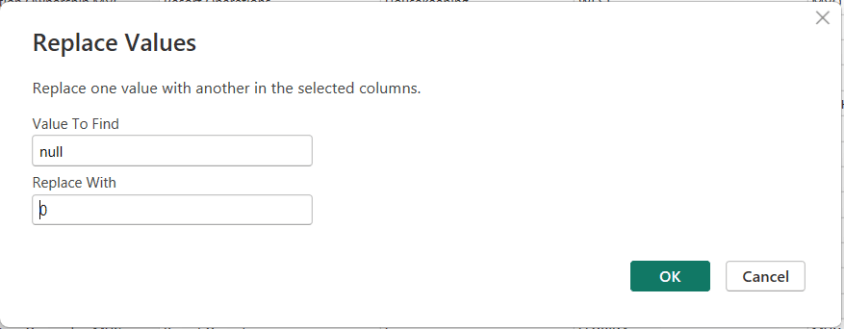
To replace NULLs, first select the column where the NULL values exist. Then choose Replace Values. When the dialog box appears, enter null as the value to find and replace, and specify the value you want to use instead—such as 0 for numeric columns or “Unknown” for text columns.

After confirming, Power Query automatically updates the column and records the step.

Thanks for reading!

Understanding the Power BI Error: “A circular dependency was detected …”

One of the more confusing Power BI errors—especially for intermediate users—is:

“A circular dependency was detected”

This error typically appears when working with DAX measures, calculated columns, calculated tables, relationships, or Power Query transformations. While the message is short, the underlying causes can vary, and resolving it requires understanding how Power BI evaluates dependencies.

This article explains what the error means, common scenarios that cause it, and how to resolve each case.


What Does “Circular Dependency” Mean?

A circular dependency occurs when Power BI cannot determine the correct calculation order because:

  • Object A depends on B
  • Object B depends on A (directly or indirectly)

In other words, Power BI is stuck in a loop and cannot decide which calculation should be evaluated first.

Power BI uses a dependency graph behind the scenes to determine evaluation order. When that graph forms a cycle, this error is triggered.


Example of the Error Message

Below is what the error typically looks like in Power BI Desktop:

A circular dependency was detected:
Table[Calculated Column] → Measure[Total Sales] → Table[Calculated Column]

Power BI may list:

  • Calculated columns
  • Measures
  • Tables
  • Relationships involved in the loop

⚠️ The exact wording varies depending on whether the issue is in DAX, relationships, or Power Query.


Common Scenarios That Cause Circular Dependency Errors

1. Calculated Column Referencing a Measure That Uses the Same Column

Scenario

  • A calculated column references a measure
  • That measure aggregates or filters the same table containing the calculated column

Example

-- Calculated Column
Flag =
IF ( [Total Sales] > 1000, "High", "Low" )

-- Measure
Total Sales =
SUM ( Sales[SalesAmount] )

Why This Fails

  • Calculated columns are evaluated row by row during data refresh
  • Measures are evaluated at query time
  • The measure depends on the column, and the column depends on the measure → loop

How to Fix

✅ Replace the measure with row-level logic

Flag =
IF ( Sales[SalesAmount] > 1000, "High", "Low" )

✅ Or convert the calculated column into a measure if aggregation is needed


2. Measures That Indirectly Reference Each Other

Scenario

Two or more measures reference each other through intermediate measures.

Example

Measure A = [Measure B] + 10
Measure B = [Measure A] * 2

Why This Fails

  • Power BI cannot determine which measure to evaluate first

How to Fix

✅ Redesign logic so one measure is foundational

  • Base calculations on columns or constants
  • Avoid bi-directional measure dependencies

Best Practice

  • Create base measures (e.g., Total Sales, Total Cost)
  • Build higher-level measures on top of them

3. Calculated Tables Referencing Themselves (Directly or Indirectly)

Scenario

A calculated table references:

  • Another calculated table
  • Or a measure that references the original table

Example

SummaryTable =
SUMMARIZE (
    SummaryTable,
    Sales[Category],
    "Total", SUM ( Sales[SalesAmount] )
)

Why This Fails

  • The table depends on itself for creation

How to Fix

✅ Ensure calculated tables reference:

  • Physical tables only
  • Or previously created calculated tables that do not depend back on them

4. Bi-Directional Relationships Creating Dependency Loops

Scenario

  • Multiple tables connected with Both (bi-directional) relationships
  • Measures or columns rely on ambiguous filter paths

Why This Fails

  • Power BI cannot determine a single filter direction
  • Creates an implicit circular dependency

How to Fix

✅ Use single-direction relationships whenever possible
✅ Replace bi-directional filtering with:

  • USERELATIONSHIP
  • TREATAS
  • Explicit DAX logic

Rule of Thumb

Bi-directional relationships should be the exception, not the default.


5. Calculated Columns Using LOOKUPVALUE or RELATED Incorrectly

Scenario

Calculated columns use LOOKUPVALUE or RELATED across tables that already depend on each other.

Why This Fails

  • Cross-table column dependencies form a loop

How to Fix

✅ Move logic to:

  • Power Query (preferred)
  • Measures instead of columns
  • A dimension table instead of a fact table

6. Power Query (M) Queries That Reference Each Other

Scenario

In Power Query:

  • Query A references Query B
  • Query B references Query A (or via another query)

Why This Fails

  • Power Query evaluates queries in dependency order
  • Circular references are not allowed

How to Fix

✅ Create a staging query

  • Reference the source once
  • Build transformations in layers

Best Practice

  • Disable load for intermediate queries
  • Keep a clear, one-direction flow of dependencies

7. Sorting a column by another column that derives its value from the column

Scenario

In DAX:

  • Column A is being sorted by Column B
  • Column B derives from Column A

Why This Fails

  • Power BI cannot determine which one to evaluate first

How to Fix: you have two options for resolving this scenario …

✅ Create the calculated columns in reverse order

✅Rewrite at least one of the calculated columns to be derived in a different way that does not reference the other column.

Best Practice

  • Keep a clear, one-direction flow of dependencies

How to Diagnose Circular Dependency Issues Faster

Use These Tools

  • Model view → inspect relationships and directions
  • Manage dependencies (in Power Query)
  • DAX formula bar → hover over column and measure references
  • Tabular Editor (if available) for dependency visualization

Best Practices to Avoid Circular Dependencies

  • Prefer measures over calculated columns
  • Keep calculated columns row-level only
  • Avoid referencing measures inside calculated columns
  • Use single-direction relationships
  • Create base measures and build upward
  • Push complex transformations to Power Query

Final Thoughts

The “A circular dependency was detected” error is not a bug—it’s Power BI protecting the model from ambiguous or impossible calculation paths.

Once you understand how Power BI evaluates columns, measures, relationships, and queries, this error becomes much easier to diagnose and prevent.

If you treat your model like a clean dependency graph—with clear direction and layering—you’ll rarely see this message again.