Category: Data Strategy

AI in Marketing: From Campaign Automation to Intelligent Growth Engines

“AI in …” series

Marketing has always been about understanding people—what they want, when they want it, and how best to reach them. What’s changed is the scale and complexity of that challenge. Customers interact across dozens of channels, generate massive amounts of data, and expect personalization as the default.

AI has become the connective tissue that allows marketing teams to turn fragmented data into insight, automation, and growth—often in real time.


How AI Is Being Used in Marketing Today

AI now touches nearly every part of the marketing function:

Personalization & Customer Segmentation

  • Netflix uses AI to personalize thumbnails, recommendations, and messaging—driving engagement and retention.
  • Amazon applies machine learning to personalize product recommendations and promotions across its marketing channels.

Content Creation & Optimization

  • Coca-Cola has used generative AI tools to co-create marketing content and creative assets.
  • Marketing teams use OpenAI models (via ChatGPT and APIs), Adobe Firefly, and Jasper AI to generate copy, images, and ad variations at scale.

Marketing Automation & Campaign Optimization

  • Salesforce Einstein optimizes email send times, predicts customer engagement, and recommends next-best actions.
  • HubSpot AI assists with content generation, lead scoring, and campaign optimization.

Paid Media & Ad Targeting

  • Meta Advantage+ and Google Performance Max use AI to automate bidding, targeting, and creative optimization across ad networks.

Customer Journey Analytics

  • Adobe Sensei analyzes cross-channel customer journeys to identify drop-off points and optimization opportunities.

Voice, Chat, and Conversational Marketing

  • Brands use AI chatbots and virtual assistants for lead capture, product discovery, and customer support.

Tools, Technologies, and Forms of AI in Use

Modern marketing AI stacks typically include:

  • Machine Learning & Predictive Analytics
    Used for churn prediction, propensity scoring, and lifetime value modeling.
  • Natural Language Processing (NLP)
    Powers content generation, sentiment analysis, and conversational interfaces.
  • Generative AI & Large Language Models (LLMs)
    Used to generate ad copy, emails, landing pages, social posts, and campaign ideas.
    • Examples: ChatGPT, Claude, Gemini, Jasper, Copy.ai
  • Computer Vision
    Applied to image recognition, brand safety, and visual content optimization.
  • Marketing AI Platforms
    • Salesforce Einstein
    • Adobe Sensei
    • HubSpot AI
    • Marketo Engage
    • Google Marketing Platform

Benefits Marketers Are Realizing

Organizations that adopt AI effectively see significant advantages:

  • Higher Conversion Rates through personalization
  • Faster Campaign Execution with automated content creation
  • Lower Cost per Acquisition (CPA) via optimized targeting
  • Improved Customer Insights and segmentation
  • Better ROI Measurement and attribution
  • Scalability without proportional increases in headcount

In many cases, AI allows small teams to operate at enterprise scale.


Pitfalls and Challenges

Despite its power, AI in marketing has real risks:

Over-Automation and Brand Dilution

  • Excessive reliance on generative AI can lead to generic or off-brand content.

Data Privacy and Consent Issues

  • AI-driven personalization must comply with GDPR, CCPA, and evolving privacy laws.

Bias in Targeting and Messaging

  • AI models can unintentionally reinforce stereotypes or exclude certain audiences.

Measurement Complexity

  • AI-driven multi-touch journeys can make attribution harder, not easier.

Tool Sprawl

  • Marketers may adopt too many AI tools without clear integration or strategy.

Where AI Is Headed in Marketing

The next wave of AI in marketing will be even more integrated and autonomous:

  • Hyper-Personalization in Real Time
    Content, offers, and experiences adapted instantly based on context and behavior.
  • Generative AI as a Creative Partner
    AI co-creating—not replacing—human creativity.
  • Predictive and Prescriptive Marketing
    AI recommending not just what will happen, but what to do next.
  • AI-Driven Brand Guardianship
    Models trained on brand voice, compliance, and tone to ensure consistency.
  • End-to-End Journey Orchestration
    AI managing entire customer journeys across channels automatically.

How Marketing Teams Can Gain an Advantage

To thrive in this fast-changing environment, marketing organizations should:

  1. Anchor AI to Clear Business Outcomes
    Start with revenue, retention, or efficiency goals—not tools.
  2. Invest in Clean, Unified Customer Data
    AI effectiveness depends on strong data foundations.
  3. Establish Human-in-the-Loop Workflows
    Maintain creative oversight and brand governance.
  4. Upskill Marketers in AI Literacy
    The best results come from marketers who know how to prompt, test, and refine AI outputs.
  5. Balance Personalization with Privacy
    Trust is a long-term competitive advantage.
  6. Rationalize the AI Stack
    Fewer, well-integrated tools outperform disconnected point solutions.

Final Thoughts

AI is transforming marketing from a campaign-driven function into an intelligent growth engine. The organizations that win won’t be those that simply automate more—they’ll be the ones that use AI to understand customers more deeply, move faster with confidence, and blend human creativity with machine intelligence.

In marketing, AI isn’t replacing storytellers—it’s giving them superpowers.

The State of Data for the Year 2025

As we close out 2025, it’s clear that the global data landscape has continued its unprecedented expansion — touching every part of life, business, and technology. From raw bytes generated every second to the ways that AI reshapes how we search, communicate, and innovate, this year has marked another seismic leap forward for data. Below is a comprehensive look at where we stand — and where things appear to be headed as we approach 2026.


🌐 Global Data Generation: A Tidal Wave

Amount of Data Generated

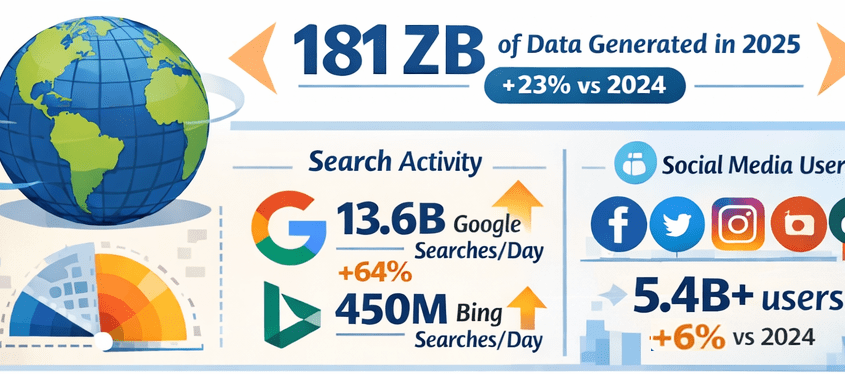
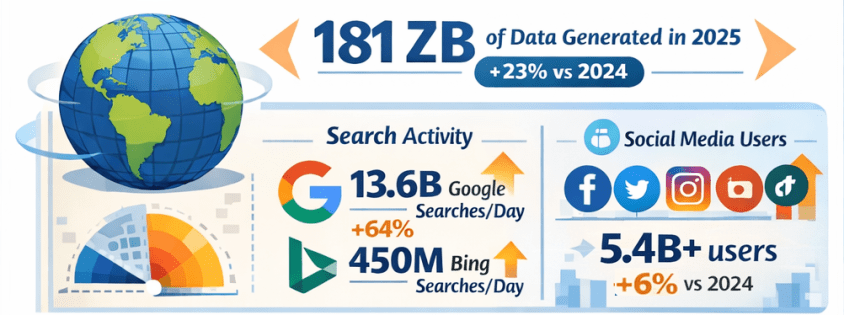
  • In 2025, the total volume of data created, captured, copied, and consumed globally is forecast to reach approximately 181 zettabytes (ZB) — up from about 147 ZB in 2024, representing roughly 23% year-over-year growth. Gitnux+1
  • That equates to an astonishing ~402 million terabytes of data generated daily. Exploding Topics

Growth Comparison: 2024 vs 2025

  • Data is growing at a compound rate: from roughly 120 ZB in 2023 to 147 ZB in 2024, then to about 181 ZB in 2025 — illustrating an ongoing surge of data creation driven by digital adoption and connected devices. Exploding Topics+1

🔍 Internet Users & Search Behavior

Number of People Online

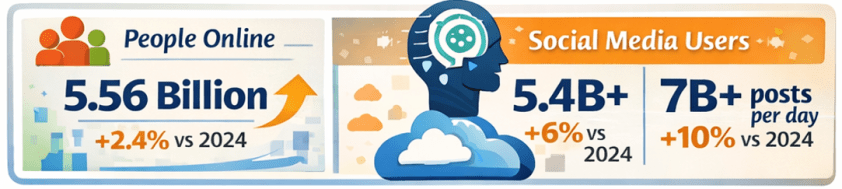
  • As of early 2025, around 5.56 billion people are active internet users, accounting for nearly 68% of the global population — up from approximately 5.43 billion in 2024. DemandSage

Search Engine Activity

  • Google alone handles roughly 13.6 billion searches per day in 2025, totaling almost 5 trillion searches annually — a significant increase from the estimated 8.3 billion daily searches in 2024. Exploding Topics
  • Bing, while much smaller in scale, processes around 450+ million searches per day (~13–14 billion per month). Nerdynav

Market Share Snapshot

  • Google continues to dominate search with approximately 90% global market share, while Bing remains one of the top alternatives. StatCounter Global Stats

📱 Social Media Usage & Content Creation

User Numbers

  • There are roughly 5.4–5.45 billion social media users worldwide in 2025 — up from prior years and covering about 65–67% of the global population. XtendedView+1

Time Spent & Trends

  • Users spend on average about 2 hours and 20+ minutes per day on social platforms. SQ Magazine
  • AI plays a central role in content recommendations and creation, with 80%+ of social feeds relying on algorithms, and an increasing share of generated images and posts assisted by AI tools. SQ Magazine

📊 The Explosion of AI: LLMs & Tools

LLM Adoption

  • Large language models and AI assistants like ChatGPT have become globally pervasive:
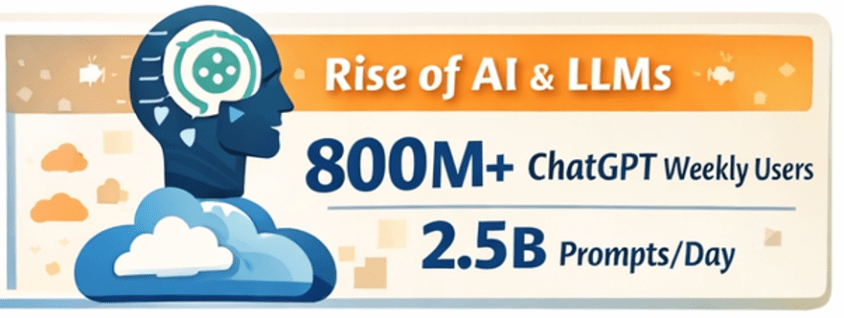
    • ChatGPT alone has around 800 million weekly active users as of late 2025. First Page Sage
    • Daily usage figures exceed 2.5 billion user prompts globally, highlighting a massive shift toward direct AI interaction. Exploding Topics
  • Studies have shown that LLM-assisted writing and content creation are now embedded across formal and informal communication channels, indicating broad adoption beyond curiosity use cases. arXiv

AI Tools Everywhere

  • Generative AI is now a staple across industries — from content creation to customer service, data analytics to software development. Investments and usage in AI-powered analytics and automation tools continue to rise rapidly. layerai.org

💡 Trends in Data Collection & Analytics

Real-Time & Edge Processing

  • In 2025, more than half of corporate data processing is happening at the edge, closer to the source of data generation, enabling real-time insights. Pennsylvania Institute of Technology

Data Democratization

  • Data access and analytics tools have become more user-friendly, with low-code/no-code platforms enabling broader organizational participation in data insight generation. postlo.com

☁️ Cloud & Data Infrastructure

Cloud Data Growth

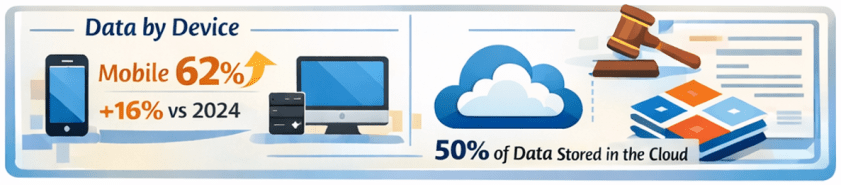
  • An ever-increasing portion of global data is stored in the cloud, with estimates suggesting around half of all data resides in cloud environments by 2025. Axis Intelligence

Data Centers & Energy

  • Data centers, particularly those supporting AI workloads, are expanding rapidly. This infrastructure surge is driving both innovation and concerns — including power consumption and sustainability challenges. TIME

📜 Data Laws & Regulation

New Legal Frameworks

  • In the UK, the Data (Use and Access) Act of 2025 was enacted, updating data protection and access rules related to UK-specific GDPR implementations. Wikipedia
  • Elsewhere, data regulation remains a focal point globally, with ongoing debates around privacy, governance, AI accountability, and cross–border data flows.

🛠️ Top Data Tools/Platforms of 2025

While specific rankings vary by industry and use case, 2025’s data ecosystem centers around:

  • Cloud data platforms: Snowflake, BigQuery, Redshift, Databricks
  • BI & visualization: Tableau, Power BI
  • AI/ML frameworks: TensorFlow, PyTorch, scalable LLM platforms
  • Automation & low-code analytics: dbt, Airflow, no-code toolchains
  • Real-time streaming: Kafka, ksqlDB

Ongoing trends emphasize integration between AI tooling and traditional analytics pipelines — blurring the lines between data engineering, analytics, and automation.

Note: specific tool adoption percentages vary by firm size and sector, but cloud-native and AI-augmented tools dominate enterprise workflows. Reddit


🌟 Novel Uses of Data in 2025

2025 saw innovative applications such as:

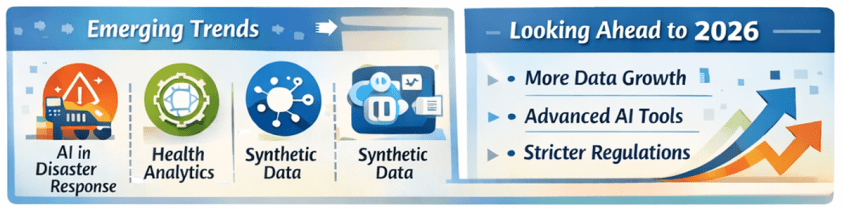
  • AI-powered disaster response using real-time social data streams.
  • Conversational assistants embedded into everyday workflows (search, writing, decision support).
  • Predictive analytics in health, finance, logistics, accelerated by real-time IoT feeds.
  • Synthetic datasets for simulation, security research, and model training. arXiv

🔮 What’s Expected in 2026

Continued Growth

  • Data volumes are projected to keep rising — potentially doubling every few years with the proliferation of AI, IoT, and immersive technologies.
  • LLM adoption will likely hit deeper integration into enterprise processes, customer experience workflows, and consumer tech.
  • AI governance and data privacy regulation will intensify globally, balancing innovation with accountability.

Emerging Frontiers

  • Multimodal AI blending text, vision, and real-time sensor data.
  • Federated learning and privacy-preserving analytics gaining traction.
  • Data meshes and decentralized data infrastructures challenging traditional monolithic systems.
  • Unified data platforms with AI-focused features and AI-focused business-ready data models are becoming common place.

📌 Final Thoughts

2025 has been another banner year for data — not just in sheer scale, but in how data powers decision-making, AI capabilities, and digital interactions across society. From trillions of searches to billions of social interactions, from zettabytes of oceans of data to democratized analytics tools, the data world continues to evolve at breakneck speed. And for data professionals and leaders, the next year promises even more opportunities to harness data for insight, innovation, and impact. Exciting stuff!

Thanks for reading!

AI in Human Resources: From Administrative Support to Strategic Workforce Intelligence

“AI in …” series

Human Resources has always been about people—but it’s also about data: skills, performance, engagement, compensation, and workforce planning. As organizations grow more complex and talent markets tighten, HR teams are being asked to move faster, be more predictive, and deliver better employee experiences at scale.

AI is increasingly the engine enabling that shift. From recruiting and onboarding to learning, engagement, and workforce planning, AI is transforming how HR operates and how employees experience work.


How AI Is Being Used in Human Resources Today

AI is now embedded across the end-to-end employee lifecycle:

Talent Acquisition & Recruiting

  • LinkedIn Talent Solutions uses AI to match candidates to roles based on skills, experience, and career intent.
  • Workday Recruiting and SAP SuccessFactors apply machine learning to rank candidates and surface best-fit applicants.
  • Paradox (Olivia) uses conversational AI to automate candidate screening, scheduling, and frontline hiring at scale.

Resume Screening & Skills Matching

  • Eightfold AI and HiredScore use deep learning to infer skills, reduce bias, and match candidates to open roles and future opportunities.
  • AI shifts recruiting from keyword matching to skills-based hiring.

Employee Onboarding & HR Service Delivery

  • ServiceNow HR Service Delivery uses AI chatbots to answer employee questions, guide onboarding, and route HR cases.
  • Microsoft Copilot for HR scenarios help managers draft job descriptions, onboarding plans, and performance feedback.

Learning & Development

  • Degreed and Cornerstone AI recommend personalized learning paths based on role, skills gaps, and career goals.
  • AI-driven content curation adapts as employee skills evolve.

Performance Management & Engagement

  • Betterworks and Lattice use AI to analyze feedback, goal progress, and engagement signals.
  • Sentiment analysis helps HR identify burnout risks or morale issues early.

Workforce Planning & Attrition Prediction

  • Visier applies AI to predict attrition risk, model workforce scenarios, and support strategic planning.
  • HR leaders use AI insights to proactively retain key talent.

Those are just a few examples of AI tools and scenarios in use. There are a lot more AI solutions for HR out there!


Tools, Technologies, and Forms of AI in Use

HR AI platforms combine people data with advanced analytics:

  • Machine Learning & Predictive Analytics
    Used for attrition prediction, candidate ranking, and workforce forecasting.
  • Natural Language Processing (NLP)
    Powers resume parsing, sentiment analysis, chatbots, and document generation.
  • Generative AI & Large Language Models (LLMs)
    Used to generate job descriptions, interview questions, learning content, and policy summaries.
    • Examples: Workday AI, Microsoft Copilot, Google Duet AI, ChatGPT for HR workflows
  • Skills Ontologies & Graph AI
    Used by platforms like Eightfold AI to map skills across roles and career paths.
  • HR AI Platforms
    • Workday AI
    • SAP SuccessFactors Joule
    • Oracle HCM AI
    • UKG Bryte AI

And there are AI tools being used across the entire employee lifecycle.


Benefits Organizations Are Realizing

Companies using AI effectively in HR are seeing meaningful benefits:

  • Faster Time-to-Hire and reduced recruiting costs
  • Improved Candidate and Employee Experience
  • More Objective, Skills-Based Decisions
  • Higher Retention through proactive interventions
  • Scalable HR Operations without proportional headcount growth
  • Better Strategic Workforce Planning

AI allows HR teams to spend less time on manual tasks and more time on high-impact, people-centered work.


Pitfalls and Challenges

AI in HR also carries significant risks if not implemented carefully:

Bias and Fairness Concerns

  • Poorly designed models can reinforce historical bias in hiring, promotion, or pay decisions.

Transparency and Explainability

  • Employees and regulators increasingly demand clarity on how AI-driven decisions are made.

Data Privacy and Trust

  • HR data is deeply personal; misuse or breaches can erode employee trust quickly.

Over-Automation

  • Excessive reliance on AI can make HR feel impersonal, especially in sensitive situations.

Failed AI Projects

  • Some initiatives fail because they focus on automation without aligning to HR strategy or culture.

Where AI Is Headed in Human Resources

The future of AI in HR is more strategic, personalized, and collaborative:

  • AI as an HR Copilot
    Assisting HR partners and managers with decisions, documentation, and insights in real time.
  • Skills-Centric Organizations
    AI continuously mapping skills supply and demand across the enterprise.
  • Personalized Employee Journeys
    Tailored learning, career paths, and engagement strategies.
  • Predictive Workforce Strategy
    AI modeling future talent needs based on business scenarios.
  • Responsible and Governed AI
    Stronger emphasis on ethics, explainability, and compliance.

How Companies Can Gain an Advantage with AI in HR

To use AI as a competitive advantage, organizations should:

  1. Start with High-Trust Use Cases
    Recruiting efficiency, learning recommendations, and HR service automation often deliver fast wins.
  2. Invest in Clean, Integrated People Data
    AI effectiveness depends on accurate and well-governed HR data.
  3. Design for Fairness and Transparency
    Bias testing and explainability should be built in from day one.
  4. Keep Humans in the Loop
    AI should inform decisions—not make them in isolation.
  5. Upskill HR Teams
    AI-literate HR professionals can better interpret insights and guide leaders.
  6. Align AI with Culture and Values
    Technology should reinforce—not undermine—the employee experience.

Final Thoughts

AI is reshaping Human Resources from a transactional function into a strategic engine for talent, culture, and growth. The organizations that succeed won’t be those that automate HR the most—but those that use AI to make work more human, more fair, and more aligned with business outcomes.

In HR, AI isn’t about replacing people—it’s about improving efficiency, elevating the candidate and employee experiences, and helping employees thrive.

AI in Manufacturing: From Smart Factories to Self-Optimizing Operations

“AI in …” series

Manufacturing has always been about efficiency, quality, and scale. What’s changed is the speed and intelligence with which manufacturers can now operate. AI is moving factories beyond basic automation into adaptive, data-driven systems that can predict problems, optimize production, and continuously improve outcomes.

Across discrete manufacturing, process manufacturing, automotive, electronics, and industrial equipment, AI is becoming a core pillar of digital transformation.


How AI Is Being Used in Manufacturing Today

AI is embedded across the manufacturing value chain:

Predictive Maintenance

  • Siemens uses AI models within its MindSphere platform to predict equipment failures before they happen, reducing unplanned downtime.
  • GE Aerospace applies machine learning to sensor data from jet engines to predict maintenance needs and extend asset life.

Quality Inspection & Defect Detection

  • BMW uses computer vision and deep learning to inspect welds, paint finishes, and component alignment on production lines.
  • Foxconn applies AI-powered visual inspection to detect microscopic defects in electronics manufacturing.

Production Planning & Scheduling

  • AI optimizes production schedules based on demand forecasts, machine availability, and supply constraints.
  • Bosch uses AI-driven planning systems to dynamically adjust production based on real-time conditions.

Robotics & Intelligent Automation

  • Collaborative robots (“cobots”) powered by AI adapt to human movements and changing tasks.
  • ABB integrates AI into robotics for flexible assembly and material handling.

Supply Chain & Inventory Optimization

  • Procter & Gamble uses AI to predict demand shifts and optimize global supply chains.
  • Manufacturers apply AI to identify supplier risks, logistics bottlenecks, and inventory imbalances.

Energy Management & Sustainability

  • AI systems optimize energy consumption across plants, helping manufacturers reduce costs and carbon emissions.

Tools, Technologies, and Forms of AI in Use

Manufacturing AI typically blends operational technology (OT) with advanced analytics:

  • Machine Learning & Deep Learning
    Used for predictive maintenance, forecasting, quality control, and anomaly detection.
  • Computer Vision
    Core to automated inspection, safety monitoring, and process verification.
  • Industrial IoT (IIoT) + AI
    Sensor data from machines feeds AI models in near real time.
  • Digital Twins
    Virtual models of factories, production lines, or equipment simulate scenarios and optimize performance.
    • Siemens Digital Twin and Dassault Systèmes 3DEXPERIENCE are widely used platforms.
  • AI Platforms & Manufacturing Suites
    • Siemens MindSphere
    • PTC ThingWorx
    • Rockwell Automation FactoryTalk Analytics
    • Azure AI and AWS IoT Greengrass for scalable AI deployment
  • Edge AI
    AI models run directly on machines or local devices to reduce latency and improve reliability.

Benefits Manufacturers Are Realizing

Manufacturers that deploy AI effectively are seeing clear advantages:

  • Reduced Downtime through predictive maintenance
  • Higher Product Quality and fewer defects
  • Lower Operating Costs via optimized processes
  • Improved Throughput and Yield
  • Greater Flexibility in responding to demand changes
  • Enhanced Worker Safety through AI-based monitoring

In capital-intensive environments, even small efficiency gains can translate into significant financial impact.


Pitfalls and Challenges

AI adoption in manufacturing is not without obstacles:

Data Readiness Issues

  • Legacy equipment often lacks sensors or produces inconsistent data, limiting AI effectiveness.

Integration Complexity

  • Bridging IT systems with OT environments is technically and organizationally challenging.

Skills Gaps

  • Manufacturers often struggle to find talent that understands both AI and industrial processes.

High Upfront Costs

  • Computer vision systems, sensors, and edge devices require capital investment.

Over-Ambitious Projects

  • Some AI initiatives fail because they attempt full “smart factory” transformations instead of targeted improvements.

Where AI Is Headed in Manufacturing

The next phase of AI in manufacturing is focused on autonomy and adaptability:

  • Self-Optimizing Factories
    AI systems that automatically adjust production parameters without human intervention.
  • Generative AI for Engineering and Operations
    Used to generate process documentation, maintenance instructions, and design alternatives.
  • More Advanced Digital Twins
    Real-time, continuously updated simulations of entire plants and supply networks.
  • Human–AI Collaboration on the Shop Floor
    AI copilots assisting operators, engineers, and maintenance teams.
  • AI-Driven Sustainability
    Optimization of materials, energy use, and waste reduction to meet ESG goals.

How Manufacturers Can Gain an Advantage

To compete effectively in this rapidly evolving landscape, manufacturers should:

  1. Start with High-Value, Operational Use Cases
    Predictive maintenance and quality inspection often deliver fast ROI.
  2. Invest in Data Infrastructure and IIoT
    Reliable, high-quality sensor data is foundational.
  3. Adopt a Phased Approach
    Scale proven pilots rather than pursuing all-encompassing transformations.
  4. Bridge IT and OT Teams
    Cross-functional collaboration is critical for success.
  5. Upskill the Workforce
    Engineers and operators who understand AI amplify its impact.
  6. Design for Explainability and Trust
    Especially important in safety-critical and regulated environments.

Final Thoughts

AI is reshaping manufacturing from the factory floor to the global supply chain. The most successful manufacturers aren’t chasing AI for its own sake—they’re using it to solve concrete operational problems, empower workers, and build more resilient, intelligent operations.

In manufacturing, AI isn’t just about automation—it’s about continuous learning at industrial scale.

AI Career Options for Early-Career Professionals and New Graduates

Artificial Intelligence is shaping nearly every industry, but breaking into AI right out of college can feel overwhelming. The good news is that you don’t need a PhD or years of experience to start a successful AI-related career. Many AI roles are designed specifically for early-career talent, blending technical skills with problem-solving, communication, and business understanding.

This article outlines excellent AI career options for people just entering the workforce, explaining what each role involves, why it’s a strong choice, and how to prepare with the right skills, tools, and learning resources.


1. AI / Machine Learning Engineer (Junior)

What It Is & What It Involves

Machine Learning Engineers build, train, test, and deploy machine learning models. Junior roles typically focus on:

  • Implementing existing models
  • Cleaning and preparing data
  • Running experiments
  • Supporting senior engineers

Why It’s a Good Option

  • High demand and strong salary growth
  • Clear career progression
  • Central role in AI development

Skills & Preparation Needed

Technical Skills

  • Python
  • SQL
  • Basic statistics & linear algebra
  • Machine learning fundamentals
  • Libraries: scikit-learn, TensorFlow, PyTorch

Where to Learn

  • Coursera (Andrew Ng ML specialization)
  • Fast.ai
  • Kaggle projects
  • University CS or data science coursework

Difficulty Level: ⭐⭐⭐⭐ (Moderate–High)


2. Data Analyst (AI-Enabled)

What It Is & What It Involves

Data Analysts use AI tools to analyze data, generate insights, and support decision-making. Tasks often include:

  • Data cleaning and visualization
  • Dashboard creation
  • Using AI tools to speed up analysis
  • Communicating insights to stakeholders

Why It’s a Good Option

  • Very accessible for new graduates
  • Excellent entry point into AI
  • Builds strong business and technical foundations

Skills & Preparation Needed

Technical Skills

  • SQL
  • Excel
  • Python (optional but helpful)
  • Power BI / Tableau
  • AI tools (ChatGPT, Copilot, AutoML)

Where to Learn

  • Microsoft Learn
  • Google Data Analytics Certificate
  • Kaggle datasets
  • Internships and entry-level analyst roles

Difficulty Level: ⭐⭐ (Low–Moderate)


3. Prompt Engineer / AI Specialist (Entry Level)

What It Is & What It Involves

Prompt Engineers design, test, and optimize instructions for AI systems to get reliable and accurate outputs. Entry-level roles focus on:

  • Writing prompts
  • Testing AI behavior
  • Improving outputs for business use cases
  • Supporting AI adoption across teams

Why It’s a Good Option

  • Low technical barrier
  • High demand across industries
  • Great for strong communicators and problem-solvers

Skills & Preparation Needed

Key Skills

  • Clear writing and communication
  • Understanding how LLMs work
  • Logical thinking
  • Domain knowledge (marketing, analytics, HR, etc.)

Where to Learn

  • OpenAI documentation
  • Prompt engineering guides
  • Hands-on practice with ChatGPT, Claude, Gemini
  • Real-world experimentation

Difficulty Level: ⭐⭐ (Low–Moderate)


4. AI Product Analyst / Associate Product Manager

What It Is & What It Involves

This role sits between business, engineering, and AI teams. Responsibilities include:

  • Defining AI features
  • Translating business needs into AI solutions
  • Analyzing product performance
  • Working with data and AI engineers

Why It’s a Good Option

  • Strong career growth
  • Less coding than engineering roles
  • Excellent mix of strategy and technology

Skills & Preparation Needed

Key Skills

  • Basic AI/ML concepts
  • Data analysis
  • Product thinking
  • Communication and stakeholder management

Where to Learn

  • Product management bootcamps
  • AI fundamentals courses
  • Internships or associate PM roles
  • Case studies and product simulations

Difficulty Level: ⭐⭐⭐ (Moderate)


5. AI Research Assistant / Junior Data Scientist

What It Is & What It Involves

These roles support AI research and experimentation, often in academic, healthcare, or enterprise environments. Tasks include:

  • Running experiments
  • Analyzing model performance
  • Data exploration
  • Writing reports and documentation

Why It’s a Good Option

  • Strong foundation for advanced AI careers
  • Exposure to real-world research
  • Great for analytical thinkers

Skills & Preparation Needed

Technical Skills

  • Python or R
  • Statistics and probability
  • Data visualization
  • ML basics

Where to Learn

  • University coursework
  • Research internships
  • Kaggle competitions
  • Online ML/statistics courses

Difficulty Level: ⭐⭐⭐⭐ (Moderate–High)


6. AI Operations (AIOps) / ML Operations (MLOps) Associate

What It Is & What It Involves

AIOps/MLOps professionals help deploy, monitor, and maintain AI systems. Entry-level work includes:

  • Model monitoring
  • Data pipeline support
  • Automation
  • Documentation

Why It’s a Good Option

  • Growing demand as AI systems scale
  • Strong alignment with data engineering
  • Less math-heavy than research roles

Skills & Preparation Needed

Technical Skills

  • Python
  • SQL
  • Cloud basics (Azure, AWS, GCP)
  • CI/CD concepts
  • ML lifecycle understanding

Where to Learn

  • Cloud provider learning paths
  • MLOps tutorials
  • GitHub projects
  • Entry-level data engineering roles

Difficulty Level: ⭐⭐⭐ (Moderate)


7. AI Consultant / AI Business Analyst (Entry Level)

What It Is & What It Involves

AI consultants help organizations understand and implement AI solutions. Entry-level roles focus on:

  • Use-case analysis
  • AI tool evaluation
  • Process improvement
  • Client communication

Why It’s a Good Option

  • Exposure to multiple industries
  • Strong soft-skill development
  • Fast career progression

Skills & Preparation Needed

Key Skills

  • Business analysis
  • AI fundamentals
  • Presentation and communication
  • Problem-solving

Where to Learn

  • Business analytics programs
  • AI fundamentals courses
  • Consulting internships
  • Case study practice

Difficulty Level: ⭐⭐⭐ (Moderate)


8. AI Content & Automation Specialist

What It Is & What It Involves

This role focuses on using AI to automate content, workflows, and internal processes. Tasks include:

  • Building automations
  • Creating AI-generated content
  • Managing tools like Zapier, Notion AI, Copilot

Why It’s a Good Option

  • Very accessible for non-technical graduates
  • High demand in marketing and operations
  • Rapid skill acquisition

Skills & Preparation Needed

Key Skills

  • Workflow automation
  • AI tools usage
  • Creativity and organization
  • Basic scripting (optional)

Where to Learn

  • Zapier and Make tutorials
  • Hands-on projects
  • YouTube and online courses
  • Real business use cases

Difficulty Level: ⭐⭐ (Low–Moderate)


How New Graduates Should Prepare for AI Careers

1. Build Foundations

  • Python or SQL
  • Data literacy
  • AI concepts (not just tools)

2. Practice with Real Projects

  • Personal projects
  • Internships
  • Freelance or volunteer work
  • Kaggle or GitHub portfolios

3. Learn AI Tools Early

  • ChatGPT, Copilot, Gemini
  • AutoML platforms
  • Visualization and automation tools

4. Focus on Communication

AI careers, and careers in general, reward those who can explain complex ideas simply.


Final Thoughts

AI careers are no longer limited to researchers or elite engineers. For early-career professionals, the best path is often a hybrid role that combines AI tools, data, and business understanding. Starting in these roles builds confidence, experience, and optionality—allowing you to grow into more specialized AI positions over time.
And the advice that many professionals give for gaining knowledge and breaking into the space is to “get your hands dirty”.

Good luck on your data journey!

The 20 Best AI Tools to Learn for 2026

Artificial intelligence is no longer a niche skill reserved for researchers and engineers—it has become a core capability across nearly every industry. From data analytics and software development to marketing, design, and everyday productivity, AI tools are reshaping how work gets done. As we move into 2026, the pace of innovation continues to accelerate, making it essential to understand not just what AI can do, but which tools are worth learning and why.

This article highlights 20 of the most important AI tools to learn for 2026, spanning general-purpose AI assistants, developer frameworks, creative platforms, automation tools, and autonomous agents. For each tool, you’ll find a clear description, common use cases, reasons it matters, cost considerations, learning paths, and an estimated difficulty level—helping you decide where to invest your time and energy in the rapidly evolving AI landscape. However, even if you don’t learn any of these tools, you should spend the time to learn one or more other AI tool(s) this year.


1. ChatGPT (OpenAI)

Description: A versatile large language model (LLM) that can write, research, code, summarize, and more. Often used for general assistance, content creation, dialogue systems, and prototypes.
Why It Matters: It’s the Swiss Army knife of AI — foundational in productivity, automation, and AI literacy.
Cost: Free tier; Plus/Pro tiers ~$20+/month with faster models and priority access.
How to Learn: Start by using the official tutorials, prompt engineering guides, and building integrations via the OpenAI API.
Difficulty: Beginner


2. Google Gemini / Gemini 3

Description: A multimodal AI from Google that handles text, image, and audio queries, and integrates deeply with Google Workspace. Latest versions push stronger reasoning and creative capabilities. Android Central
Why It Matters: Multimodal capabilities are becoming standard; integration across tools makes it essential for workflows.
Cost: Free tier with paid Pro/Ultra levels for advanced models.
How to Learn: Use Google AI Studio, experiment with prompts, and explore the API.
Difficulty: Beginner–Intermediate


3. Claude (Anthropic)

Description: A conversational AI with long-context handling and enhanced safety features. Excellent for deep reasoning, document analysis, and coding. DataNorth AI
Why It Matters: It’s optimized for enterprise and technical tasks where accuracy over verbosity is critical.
Cost: Free and subscription tiers (varies by use case).
How to Learn: Tutorials via Anthropic’s docs, hands-on in Claude UI/API, real projects like contract analysis.
Difficulty: Intermediate


4. Microsoft Copilot (365 + Dev)

Description: AI assistant built into Microsoft 365 apps and developer tools, helping automate reports, summaries, and code generation.
Why It Matters: It brings AI directly into everyday productivity tools at enterprise scale.
Cost: Included with M365 and GitHub subscriptions; Copilot versions vary by plan.
How to Learn: Microsoft Learn modules and real workflows inside Office apps.
Difficulty: Beginner


5. Adobe Firefly

Description: A generative AI suite focused on creative tasks, from text-to-image/video to editing workflows across Adobe products. Wikipedia
Why It Matters: Creative AI is now essential for design and branding work at scale.
Cost: Included in Adobe Creative Cloud subscriptions (varies).
How to Learn: Adobe tutorials + hands-on in Firefly Web and apps.
Difficulty: Beginner–Intermediate


6. TensorFlow

Description: Open-source deep learning framework from Google used to build and deploy neural networks. Wikipedia
Why It Matters: Core tool for anyone building machine learning models and production systems.
Cost: Free/open source.
How to Learn: TensorFlow courses, hands-on projects, and official tutorials.
Difficulty: Intermediate


7. PyTorch

Description: Another dominant open-source deep learning framework, favored for research and flexibility.
Why It Matters: Central for prototyping new models and customizing architectures.
Cost: Free.
How to Learn: Official tutorials, MOOCs, and community notebooks (e.g., Fast.ai).
Difficulty: Intermediate


8. Hugging Face Transformers

Description: A library of pre-trained models for language and multimodal tasks.
Why It Matters: Makes state-of-the-art models accessible with minimal coding.
Cost: Free; paid tiers for hosted inference.
How to Learn: Hugging Face courses, hands-on fine-tuning tasks.
Difficulty: Intermediate


9. LangChain

Description: Framework to build chain-based, context-aware LLM applications and agents.
Why It Matters: Foundation for building smart workflows and agent applications.
Cost: Free (open-source).
How to Learn: LangChain docs and project tutorials.
Difficulty: Intermediate–Advanced


10. Google Antigravity IDE

Description: AI-first coding environment where AI agents assist development workflows. Wikipedia
Why It Matters: Represents the next step in how developers interact with code — AI as partner.
Cost: Free preview; may move to paid models.
How to Learn: Experiment with projects, follow Google documentation.
Difficulty: Intermediate


11. Perplexity AI

Description: AI research assistant combining conversational AI with real-time web citations.
Why It Matters: Trusted research tool that avoids hallucinations by providing sources. The Case HQ
Cost: Free; Pro versions exist.
How to Learn: Use for query tasks, explore research workflows.
Difficulty: Beginner


12. Notion AI

Description: AI features embedded inside the Notion workspace for notes, automation, and content.
Why It Matters: Enhances organization and productivity in individual and team contexts.
Cost: Notion plans with AI add-ons.
How to Learn: In-app experimentation and productivity courses.
Difficulty: Beginner


13. Runway ML

Description: AI video and image creation/editing platform.
Why It Matters: Brings generative visuals to creators without deep technical skills.
Cost: Free tier with paid access to advanced models.
How to Learn: Runway tutorials and creative projects.
Difficulty: Beginner–Intermediate


14. Synthesia

Description: AI video generation with realistic avatars and multi-language support.
Why It Matters: Revolutionizes training and marketing video creation with low cost. The Case HQ
Cost: Subscription.
How to Learn: Platform tutorials, storytelling use cases.
Difficulty: Beginner


15. Otter.ai

Description: AI meeting transcription, summarization, and collaborative notes.
Why It Matters: Boosts productivity and meeting intelligence in remote/hybrid work. The Case HQ
Cost: Free + Pro tiers.
How to Learn: Use in real meetings; explore integrations.
Difficulty: Beginner


16. ElevenLabs

Description: High-quality voice synthesis and cloning for narration and media.
Why It Matters: Audio content creation is growing — podcasts, games, accessibility, and voice UX require this skill. TechRadar
Cost: Free + paid credits.
How to Learn: Experiment with voice models and APIs.
Difficulty: Beginner


17. Zapier / Make (Automation)

Description: Tools to connect apps and automate workflows with AI triggers.
Why It Matters: Saves time by automating repetitive tasks without code.
Cost: Free + paid plans.
How to Learn: Zapier/Make learning paths and real automation projects.
Difficulty: Beginner


18. MLflow

Description: Open-source ML lifecycle tool for tracking experiments and deploying models. Whizzbridge
Why It Matters: Essential for managing AI workflows in real projects.
Cost: Free.
How to Learn: Hands-on with ML projects and tutorials.
Difficulty: Intermediate


19. NotebookLM

Description: Research assistant for long-form documents and knowledge work.
Why It Matters: Ideal for digesting research papers, books, and technical documents. Reddit
Cost: Varies.
How to Learn: Use cases in academic and professional workflows.
Difficulty: Beginner


20. Manus (Autonomous Agent)

Description: A next-gen autonomous AI agent designed to reason, plan, and execute complex tasks independently. Wikipedia
Why It Matters: Represents the frontier of agentic AI — where models act with autonomy rather than just respond.
Cost: Web-based plans.
How to Learn: Experiment with agent workflows and task design.
Difficulty: Advanced


🧠 How to Get Started With Learning

1. Foundational Concepts:
Begin with basics: prompt engineering, AI ethics, and data fundamentals.

2. Hands-On Practice:
Explore tool documentation, build mini projects, and integrate APIs.

3. Structured Courses:
Platforms like Coursera, Udemy, and official provider academies offer guided paths.

4. Community & Projects:
Join GitHub projects, forums, and Discord groups focused on AI toolchains.


📊 Difficulty Levels (General)

LevelWhat It Means
BeginnerNo coding needed; great for general productivity/creators
IntermediateSome programming or technical concepts required
AdvancedDeep technical skills — frameworks, models, agents

Summary:
2026 will see AI tools become even more integrated into creativity, productivity, research, and automated workflows. Mastery over a mix of general-purpose assistants, developer frameworks, automation platforms, and creative AI gives you both breadth and depth in the evolving AI landscape. It’s going to be another exciting year.
Good luck on your data journey in 2026!

AI in Retail and eCommerce: Personalization at Scale Meets Operational Intelligence

“AI in …” series

Retail and eCommerce sit at the intersection of massive data volume, thin margins, and constantly shifting customer expectations. From predicting what customers want to buy next to optimizing global supply chains, AI has become a core capability—not a nice-to-have—for modern retailers.

What makes retail especially interesting is that AI touches both the customer-facing experience and the operational backbone of the business, often at the same time.


How AI Is Being Used in Retail and eCommerce Today

AI adoption in retail spans the full value chain:

Personalized Recommendations & Search

  • Amazon uses machine learning models to power its recommendation engine, driving a significant portion of total sales through “customers also bought” and personalized homepages.
  • Netflix-style personalization, but for shopping: retailers tailor product listings, pricing, and promotions in real time.

Demand Forecasting & Inventory Optimization

  • Walmart applies AI to forecast demand at the store and SKU level, accounting for seasonality, local events, and weather.
  • Target uses AI-driven forecasting to reduce stockouts and overstocks, improving both customer satisfaction and margins.

Dynamic Pricing & Promotions

  • Retailers use AI to adjust prices based on demand, competitor pricing, inventory levels, and customer behavior.
  • Amazon is the most visible example, adjusting prices frequently using algorithmic pricing models.

Customer Service & Virtual Assistants

  • Shopify merchants use AI-powered chatbots for order tracking, returns, and product questions.
  • H&M and Sephora deploy conversational AI for styling advice and customer support.

Fraud Detection & Payments

  • AI models detect fraudulent transactions in real time, especially important for eCommerce and buy-now-pay-later (BNPL) models.

Computer Vision in Physical Retail

  • Amazon Go stores use computer vision, sensors, and deep learning to enable cashierless checkout.
  • Zara (Inditex) uses computer vision to analyze in-store traffic patterns and product engagement.

Tools, Technologies, and Forms of AI in Use

Retailers typically rely on a mix of foundational and specialized AI technologies:

  • Machine Learning & Deep Learning
    Used for forecasting, recommendations, pricing, and fraud detection.
  • Natural Language Processing (NLP)
    Powers chatbots, sentiment analysis of reviews, and voice-based shopping.
  • Computer Vision
    Enables cashierless checkout, shelf monitoring, loss prevention, and in-store analytics.
  • Generative AI & Large Language Models (LLMs)
    Used for product description generation, marketing copy, personalized emails, and internal copilots.
  • Retail AI Platforms
    • Salesforce Einstein for personalization and customer insights
    • Adobe Sensei for content, commerce, and marketing optimization
    • Shopify Magic for product descriptions, FAQs, and merchant assistance
    • AWS, Azure, and Google Cloud AI for scalable ML infrastructure

Benefits Retailers Are Realizing

Retailers that have successfully adopted AI report measurable benefits:

  • Higher Conversion Rates through personalization
  • Improved Inventory Turns and reduced waste
  • Lower Customer Service Costs via automation
  • Faster Time to Market for campaigns and promotions
  • Better Customer Loyalty through more relevant, consistent experiences

In many cases, AI directly links customer experience improvements to revenue growth.


Pitfalls and Challenges

Despite widespread adoption, AI in retail is not without risk:

Bias and Fairness Issues

  • Recommendation and pricing algorithms can unintentionally disadvantage certain customer groups or reinforce biased purchasing patterns.

Data Quality and Fragmentation

  • Poor product data, inconsistent customer profiles, or siloed systems limit AI effectiveness.

Over-Automation

  • Some retailers have over-relied on AI-driven customer service, frustrating customers when human support is hard to reach.

Cost vs. ROI Concerns

  • Advanced AI systems (especially computer vision) can be expensive to deploy and maintain, making ROI unclear for smaller retailers.

Failed or Stalled Pilots

  • AI initiatives sometimes fail because they focus on experimentation rather than operational integration.

Where AI Is Headed in Retail and eCommerce

Several trends are shaping the next phase of AI in retail:

  • Hyper-Personalization
    Experiences tailored not just to the customer, but to the moment—context, intent, and channel.
  • Generative AI at Scale
    Automated creation of product content, marketing campaigns, and even storefront layouts.
  • AI-Driven Merchandising
    Algorithms suggesting what products to carry, where to place them, and how to price them.
  • Blended Physical + Digital Intelligence
    More retailers combining in-store computer vision with online behavioral data.
  • AI as a Copilot for Merchants and Marketers
    Helping teams plan assortments, campaigns, and promotions faster and with more confidence.

How Retailers Can Gain an Advantage

To compete effectively in this fast-moving environment, retailers should:

  1. Focus on Data Foundations First
    Clean product data, unified customer profiles, and reliable inventory systems are essential.
  2. Start with Customer-Critical Use Cases
    Personalization, availability, and service quality usually deliver the fastest ROI.
  3. Balance Automation with Human Oversight
    AI should augment merchandisers, marketers, and store associates—not replace them outright.
  4. Invest in Responsible AI Practices
    Transparency, fairness, and explainability build trust with customers and regulators.
  5. Upskill Retail Teams
    Merchants and marketers who understand AI can use it more creatively and effectively.

Final Thoughts

AI is rapidly becoming the invisible engine behind modern retail and eCommerce. The winners won’t necessarily be the companies with the most advanced algorithms—but those that combine strong data foundations, thoughtful AI governance, and a relentless focus on customer experience.

In retail, AI isn’t just about selling more—it’s about selling smarter, at scale.

Exam Prep Hub for DP-600: Implementing Analytics Solutions Using Microsoft Fabric

This is your one-stop hub with information for preparing for the DP-600: Implementing Analytics Solutions Using Microsoft Fabric certification exam. Upon successful completion of the exam, you earn the Fabric Analytics Engineer Associate certification.

This hub provides information directly here, links to a number of external resources, tips for preparing for the exam, practice tests, and section questions to help you prepare. Bookmark this page and use it as a guide to ensure that you are fully covering all relevant topics for the exam and using as many of the resources available as possible. We hope you find it convenient and helpful.

Why do the DP-600: Implementing Analytics Solutions Using Microsoft Fabric exam to gain the Fabric Analytics Engineer Associate certification?

Most likely, you already know why you want to earn this certification, but in case you are seeking information on its benefits, here are a few:
(1) there is a possibility for career advancement because Microsoft Fabric is a leading data platform used by companies of all sizes, all over the world, and is likely to become even more popular
(2) greater job opportunities due to the edge provided by the certification
(3) higher earnings potential,
(4) you will expand your knowledge about the Fabric platform by going beyond what you would normally do on the job and
(5) it will provide immediate credibility about your knowledge, and
(6) it may, and it should, provide you with greater confidence about your knowledge and skills.


Important DP-600 resources:


DP-600: Skills measured as of October 31, 2025:

Here you can learn in a structured manner by going through the topics of the exam one-by-one to ensure full coverage; click on each hyperlinked topic below to go to more information about it:

Skills at a glance

  • Maintain a data analytics solution (25%-30%)
  • Prepare data (45%-50%)
  • Implement and manage semantic models (25%-30%)

Maintain a data analytics solution (25%-30%)

Implement security and governance

Maintain the analytics development lifecycle

Prepare data (45%-50%)

Get Data

Transform Data

Query and analyze data

Implement and manage semantic models (25%-30%)

Design and build semantic models

Optimize enterprise-scale semantic models


Practice Exams:

We have provided 2 practice exams with answers to help you prepare.

DP-600 Practice Exam 1 (60 questions with answer key)

DP-600 Practice Exam 2 (60 questions with answer key)


Good luck to you passing the DP-600: Implementing Analytics Solutions Using Microsoft Fabric certification exam and earning the Fabric Analytics Engineer Associate certification!

Implement Performance Improvements in Queries and Report Visuals (DP-600 Exam Prep)

This post is a part of the DP-600: Implementing Analytics Solutions Using Microsoft Fabric Exam Prep Hub; and this topic falls under these sections: 
Implement and manage semantic models (25-30%)
--> Optimize enterprise-scale semantic models
--> Implement performance improvements in queries and report visuals

Performance optimization is a critical skill for the Fabric Analytics Engineer. In enterprise-scale semantic models, poor query design, inefficient DAX, or overly complex visuals can significantly degrade report responsiveness and user experience. This exam section focuses on identifying performance bottlenecks and applying best practices to improve query execution, model efficiency, and report rendering.


1. Understand Where Performance Issues Occur

Performance problems typically fall into three layers:

a. Data & Storage Layer

  • Storage mode (Import, DirectQuery, Direct Lake, Composite)
  • Data source latency
  • Table size and cardinality
  • Partitioning and refresh strategies

b. Semantic Model & Query Layer

  • DAX calculation complexity
  • Relationships and filter propagation
  • Aggregation design
  • Use of calculation groups and measures

c. Report & Visual Layer

  • Number and type of visuals
  • Cross-filtering behavior
  • Visual-level queries
  • Use of slicers and filters

DP-600 questions often test your ability to identify the correct layer where optimization is needed.


2. Optimize Queries and Semantic Model Performance

a. Choose the Appropriate Storage Mode

  • Use Import for small-to-medium datasets requiring fast interactivity
  • Use Direct Lake for large OneLake Delta tables with high concurrency
  • Use Composite models to balance performance and real-time access
  • Avoid unnecessary DirectQuery when Import or Direct Lake is feasible

b. Reduce Data Volume

  • Remove unused columns and tables
  • Reduce column cardinality (e.g., avoid high-cardinality text columns)
  • Prefer surrogate keys over natural keys
  • Disable Auto Date/Time when not needed

c. Optimize Relationships

  • Use single-direction relationships by default
  • Avoid unnecessary bidirectional filters
  • Ensure relationships follow a star schema
  • Avoid many-to-many relationships unless required

d. Use Aggregations

  • Create aggregation tables to pre-summarize large fact tables
  • Enable query hits against aggregation tables before scanning detailed data
  • Especially valuable in composite models

3. Improve DAX Query Performance

a. Write Efficient DAX

  • Prefer measures over calculated columns
  • Use variables (VAR) to avoid repeated calculations
  • Minimize row context where possible
  • Avoid excessive iterators (SUMX, FILTER) over large tables

b. Use Filter Context Efficiently

  • Prefer CALCULATE with simple filters
  • Avoid complex nested FILTER expressions
  • Use KEEPFILTERS and REMOVEFILTERS intentionally

c. Avoid Expensive Patterns

  • Avoid EARLIER in favor of variables
  • Avoid dynamic table generation inside visuals
  • Minimize use of ALL when ALLSELECTED or scoped filters suffice

4. Optimize Report Visual Performance

a. Reduce Visual Complexity

  • Limit the number of visuals per page
  • Avoid visuals that generate multiple queries (e.g., complex custom visuals)
  • Use summary visuals instead of detailed tables where possible

b. Control Interactions

  • Disable unnecessary visual interactions
  • Avoid excessive cross-highlighting
  • Use report-level filters instead of visual-level filters when possible

c. Optimize Slicers

  • Avoid slicers on high-cardinality columns
  • Use dropdown slicers instead of list slicers
  • Limit the number of slicers on a page

d. Prefer Measures Over Visual Calculations

  • Avoid implicit measures created by dragging numeric columns
  • Define explicit measures in the semantic model
  • Reuse measures across visuals to improve cache efficiency

5. Use Performance Analysis Tools

a. Performance Analyzer

  • Identify slow visuals
  • Measure DAX query duration
  • Distinguish between query time and visual rendering time

b. Query Diagnostics (Power BI Desktop)

  • Analyze backend query behavior
  • Identify expensive DirectQuery or Direct Lake operations

c. DAX Studio (Advanced)

  • Analyze query plans
  • Measure storage engine vs formula engine time
  • Identify inefficient DAX patterns

(You won’t be tested on tool UI details, but knowing when and why to use them is exam-relevant.)


6. Common DP-600 Exam Scenarios

You may be asked to:

  • Identify why a report is slow and choose the best optimization
  • Identify the bottleneck layer (model, query, or visual)
  • Select the most appropriate storage mode for performance
  • Choose the least disruptive, most effective optimization
  • Improve a slow DAX measure
  • Reduce visual rendering time without changing the data source
  • Optimize performance for enterprise-scale models
  • Apply enterprise-scale best practices, not just quick fixes

Key Exam Takeaways

  • Always optimize the model first, visuals second
  • Star schema + clean relationships = better performance
  • Efficient DAX matters more than clever DAX
  • Fewer visuals and interactions = faster reports
  • Aggregations and Direct Lake are key enterprise-scale tools

Practice Questions:

Go to the Practice Exam Questions for this topic.

Design and Build Composite Models (DP-600 Exam Prep)

This post is a part of the DP-600: Implementing Analytics Solutions Using Microsoft Fabric Exam Prep Hub; and this topic falls under these sections: 
Implement and manage semantic models (25-30%)
--> Design and build semantic models
--> Design and Build Composite Models

What Is a Composite Model?

A composite model in Power BI and Microsoft Fabric combines data from multiple data sources and multiple storage modes in a single semantic model. Rather than importing all data into the model’s in-memory cache, composite models let you mix different query/storage patterns such as:

  • Import
  • DirectQuery
  • Direct Lake
  • Live connections

Composite models enable flexible design and optimized performance across diverse scenarios.


Why Composite Models Matter

Semantic models often need to support:

  • Large datasets that cannot be imported fully
  • Real-time or near-real-time requirements
  • Federation across disparate sources
  • Mix of highly dynamic and relatively static data

Composite models let you combine the benefits of in-memory performance with direct source access.


Core Concepts

Storage Modes in Composite Models

Storage ModeDescriptionTypical Use
ImportData is cached in the semantic model memoryFast performance for static or moderately sized data
DirectQueryQueries are pushed to the source at runtimeReal-time or large relational sources
Direct LakeQueries Delta tables in OneLakeLarge OneLake data with faster interactive access
Live ConnectionDelegates all query processing to an external modelShared enterprise semantic models

A composite model may include tables using different modes — for example, imported dimension tables and DirectQuery/Direct Lake fact tables.


Key Features of Composite Models

1. Table-Level Storage Modes

Every table in a composite model may use a different storage mode:

  • Dimensions may be imported
  • Fact tables may use DirectQuery or Direct Lake
  • Bridge or helper tables may be imported

This flexibility enables performance and freshness trade-offs.


2. Relationships Across Storage Modes

Relationships can span tables even if they use different storage modes, enabling:

  • Filtering between imported and DirectQuery tables
  • Cross-mode joins (handled intelligently by the engine)

Underlying engines push queries to the appropriate source (SQL, OneLake, Semantic layer), depending on where the data resides.


3. Aggregations and Hierarchies

You can define:

  • Aggregated tables (pre-summarized import tables)
  • Detail tables (DirectQuery or Direct Lake)

Power BI automatically uses aggregations when a visual’s query can be satisfied with summary data, enhancing performance.


4. Calculation Groups and Measures

Composite models work with complex semantic logic:

  • Calculation groups (standardized transformations)
  • DAX measures that span imported and DirectQuery tables

These models require careful modeling to ensure that context transitions behave predictably.


When to Use Composite Models

Composite models are ideal when:

A. Data Is Too Large to Import

  • Large fact tables (> hundreds of millions of rows)
  • Delta/OneLake data too big for full in-memory import
  • Use Direct Lake for these, while importing dimensions

B. Real-Time Data Is Required

  • Operational reporting
  • Systems with high update frequency
  • Use DirectQuery to relational sources

C. Multiple Data Sources Must Be Combined

  • Relational databases
  • OneLake & Delta
  • Cloud services (e.g., Synapse, SQL DB, Spark)
  • On-prem gateways

Composite models let you combine these seamlessly.

D. Different Performance vs Freshness Needs

  • Import for static master data
  • DirectQuery or Direct Lake for dynamic fact data

Composite vs Pure Models

AspectImport OnlyComposite
PerformanceVery fastDepends on source/query pattern
FreshnessScheduled refreshReal-time/near-real-time possible
Source diversityLimitedMultiple heterogeneous sources
Model complexitySimplerHigher

Query Execution and Optimization

Query Folding

  • DirectQuery and Power Query transformations rely on query folding to push logic back to the source
  • Query folding is essential for performance in composite models

Storage Mode Selection

Good modeling practices for composite models include:

  • Import small dimension tables
  • Direct Lake for large storage in OneLake
  • DirectQuery for real-time relational sources
  • Use aggregations to optimize performance

Modeling Considerations

1. Relationship Direction

  • Prefer single-direction relationships
  • Use bidirectional filtering only when required (careful with ambiguity)

2. Data Type Consistency

  • Ensure fields used in joins have matching data types
  • In composite models, mismatches can cause query fallbacks

3. Cardinality

  • High cardinality DirectQuery columns can slow queries
  • Use star schema patterns

4. Security

  • Row-level security crosses modes but must be carefully tested
  • Security logic must consider where filters are applied

Common Exam Scenarios

Exam questions may ask you to:

  • Choose between Import, DirectQuery, Direct Lake and composite
  • Assess performance vs freshness requirements
  • Determine query folding feasibility
  • Identify correct relationship patterns across modes

Example prompt:

“Your model combines a large OneLake dataset and a small dimension table. Users need current data daily but also fast filtering. Which storage and modeling approach is best?”

Correct exam choices often point to composite models using Direct Lake + imported dimensions.


Best Practices

  • Define a clear star schema even in composite models
  • Import dimension tables where reasonable
  • Use aggregations to improve performance for heavy visuals
  • Limit direct many-to-many relationships
  • Use calculation groups to apply analytics consistently
  • Test query performance across storage modes

Exam-Ready Summary/Tips

Composite models enable flexible and scalable semantic models by mixing storage modes:

  • Import – best performance for static or moderate data
  • DirectQuery – real-time access to source systems
  • Direct Lake – scalable querying of OneLake Delta data
  • Live Connection – federated or shared datasets

Design composite models to balance performance, freshness, and data volume, using strong schema design and query optimization.

For DP-600, always evaluate:

  • Data volume
  • Freshness requirements
  • Performance expectations
  • Source location (OneLake vs relational)

Composite models are frequently the correct answer when these requirements conflict.


Practice Questions:

Here are 10 questions to test and help solidify your learning and knowledge. As you review these and other questions in your preparation, make sure to …

  • Identifying and understand why an option is correct (or incorrect) — not just which one
  • Look for and understand the usage scenario of keywords in exam questions to guide you
  • Expect scenario-based questions rather than direct definitions

1. What is the primary purpose of using a composite model in Microsoft Fabric?

A. To enable row-level security across workspaces
B. To combine multiple storage modes and data sources in one semantic model
C. To replace DirectQuery with Import mode
D. To enforce star schema design automatically

Correct Answer: B

Explanation:
Composite models allow you to mix Import, DirectQuery, Direct Lake, and Live connections within a single semantic model, enabling flexible performance and data-freshness tradeoffs.


2. You are designing a semantic model with a very large fact table stored in OneLake and small dimension tables. Which storage mode combination is most appropriate?

A. Import all tables
B. DirectQuery for all tables
C. Direct Lake for the fact table and Import for dimension tables
D. Live connection for the fact table and Import for dimensions

Correct Answer: C

Explanation:
Direct Lake is optimized for querying large Delta tables in OneLake, while importing small dimension tables improves performance for filtering and joins.


3. Which storage mode allows querying OneLake Delta tables without importing data into memory?

A. Import
B. DirectQuery
C. Direct Lake
D. Live Connection

Correct Answer: C

Explanation:
Direct Lake queries Delta tables directly in OneLake, combining scalability with better interactive performance than traditional DirectQuery.


4. What happens when a DAX query in a composite model references both imported and DirectQuery tables?

A. The query fails
B. The data must be fully imported
C. The engine generates a hybrid query plan
D. All tables are treated as DirectQuery

Correct Answer: C

Explanation:
Power BI’s engine generates a hybrid query plan, pushing operations to the source where possible and combining results with in-memory data.


5. Which scenario most strongly justifies using a composite model instead of Import mode only?

A. All data fits in memory and refreshes nightly
B. The dataset is static and small
C. Users require near-real-time data from a large relational source
D. The model contains only calculated tables

Correct Answer: C

Explanation:
Composite models are ideal when real-time or near-real-time access is needed, especially for large datasets that are impractical to import.


6. In a composite model, which table type is typically best suited for Import mode?

A. High-volume transactional fact tables
B. Streaming event tables
C. Dimension tables with low cardinality
D. Tables requiring second-by-second freshness

Correct Answer: C

Explanation:
Importing dimension tables improves query performance and reduces load on source systems due to their relatively small size and low volatility.


7. How do aggregation tables improve performance in composite models?

A. By replacing DirectQuery with Import
B. By pre-summarizing data to satisfy queries without scanning detail tables
C. By eliminating the need for relationships
D. By enabling bidirectional filtering automatically

Correct Answer: B

Explanation:
Aggregations allow Power BI to answer queries using pre-summarized Import tables, avoiding expensive queries against large DirectQuery or Direct Lake fact tables.


8. Which modeling pattern is strongly recommended when designing composite models?

A. Snowflake schema
B. Flat tables
C. Star schema
D. Many-to-many relationships

Correct Answer: C

Explanation:
A star schema simplifies relationships, improves performance, and reduces ambiguity—especially important in composite and cross-storage-mode models.


9. What is a potential risk of excessive bidirectional relationships in composite models?

A. Reduced data freshness
B. Increased memory consumption
C. Ambiguous filter paths and unpredictable query behavior
D. Loss of row-level security

Correct Answer: C

Explanation:
Bidirectional relationships can introduce ambiguity, cause unexpected filtering, and negatively affect query performance—risks that are amplified in composite models.


10. Which feature allows a composite model to reuse an enterprise semantic model while extending it with additional data?

A. Direct Lake
B. Import mode
C. Live connection with local tables
D. Calculation groups

Correct Answer: C

Explanation:
A live connection with local tables enables extending a shared enterprise semantic model by adding new tables and measures, forming a composite model.