Category: Data Security

Creating a Business Intelligence (BI) & Analytics Strategy and Roadmap

This post provides some of my thoughts on how to go about creating a Business Intelligence (BI) & Analytics Strategy and Roadmap for your client or company.  Please comment with your suggestions from your experience for improving this information.


When creating or updating the BI & Analytics Strategy and Roadmap for a company, one of the first things to understand is:

Who are all the critical stakeholders that need to be involved?

Understanding who needs and uses the BI & Analytics systems is critical for starting the process of understanding and documenting the “who needs what, why, and when”.

These are some of the roles that are typically important stakeholders:

  • High-level business executives that are paying for the projects
  • Business directors involved in the usage of the systems
  • IT directors involved in the developing and support of the systems
  • Business Subject Matter Experts (SME’s) & Business Analysts
  • BI/Analytics/Data/System Architects
  • BI/Analytics/Data/System Developers and Administrators


Then, you need to ask all these stakeholders, especially those from the business:

What are the drivers for BI & Analytics? And what is the level of importance for each of these drivers?

This will help you to understand and document what business needs are creating the need for new or modified BI & Analytics solutions. You should then go deeper to understand … what are the business objectives and goals that are driving these business needs.  This will help you to understand and document the bigger picture so that a more comprehensive strategy and roadmap can be created.

The questions and discussions surrounding the above will require deep and broad business involvement. Getting the perspective of a wide range of users from all business areas that are using the BI & Analytics Systems is critical.  The business should be involved throughout the process of creating the strategy and roadmap, and all decisions should tie back to support for business objectives and goals. And the trail leading to all these decisions must be documented.

Some examples of business drivers include:

  • Gain more insight into who our best customers are and how best to acquire them.
  • Understand how weather affects our sales/revenue.
  • Determine how we can sell more to our existing customers.
  • Understand what causes employee turnover.
  • Gain insight into how we can improve staffing schedules.


And examples of business objectives and goals may include things like:

  • Increase corporate revenues by 10%
  • Grow our base of recurring customers
  • Stabilize corporate revenues over all seasons
  • Create an environment where employees love to work
  • Reduce payroll costs without a reduction in staff, for example, reduce turnover.


Then, turn to understanding and documenting the current scenario (if not already known). Identify what systems (including data sources) are in place, who are using them (and why and how), what capabilities do they offer, what are the must-haves, and what are the pain points and positive highlights.

Also, you will need to determine the current workload (and future workload if it can be determined) of the primary team members involved in developing, testing, and implementing BI & Analytics solutions.

This will help you understand a few things:

  • Some of the highest priority needs of the users
  • Gaps in capabilities and data between what is needed and what is currently in place (including an understanding of what is liked and disliked about the current systems)
  • Current user base knowledge and engagement
  • IT knowledge and skills
  • Resource availability – when are people available to work on new initiatives


What are the options and limitations?

  • Can existing systems be customized to meet the requirements?
  • Can they be upgraded to a new version that has the needed functionality?
  • Do we need to consider adding a new platform or replacing one or more of the existing systems with a new platform?
  • Can we migrate from/integrate one system to/with another system that we already have up and running?
  • Are any of our current systems losing vendor support or require an upgrade for other reasons? Has the pricing changed for any of our software applications?
  • What options does our budget permit us to explore?
  • What options do our knowledge and skills permit us to explore?


Once you have identified these items …

  • Identify and engage stakeholders, and document these roles and the people
  • Identify and document business drivers, objectives and goals
  • Understand and document the current landscape – needs (including must-haves), technology, gaps, users, IT staff, resource availability, and more
  • Identify and document options – based on current landscape, technology, budget, staff resources, etc.

… you can develop a “living” Strategy and Roadmap for BI & Analytics. And when I say “living”, I mean it will not be a static document, but will be fine-tuned over time as new information emerge and as changes arise in business needs, technology, and staff resources.


Your Strategy and Roadmap for BI & Analytics should include, but is not limited to:

  • BI & Analytics that will be used to satisfy business drivers, objectives and goals
  • Data acquisition and storage plan for meeting the analytics needs
  • Technology platforms that will be used to process and store data, and deliver the analytics
  • Information about any new technologies that needs to be acquired or implemented, and schedules
  • Roles and Responsibilities for all stakeholders involved in BI & Analytics projects
  • Planned staffing allocations and schedules
  • Planned staffing changes and schedules
  • User training (business users) and Delivery team training (technical implementers & developers for example)
  • List dependencies for each item or set of items

Implementing Reports-To data-level security in Oracle BI (OBIEE)

In a previous post, Implementing data-level security in Oracle BI (OBIEE), I described data-level security and how to implement it in Oracle Business Intelligence (OBIEE).  In this post I will describe a special type of data-level security, called Reports-To security, and how to implement it in OBI.

For Reports-To data-level security, we want to secure data in such a way that we allow a user access only to data for his/her direct and indirect reports. In other words, each user will be able to see data only for people that are below him/her in the organization hierarchical chain.

Take a look at this example diagram:

ReportsTo_Security_Org_Position_Hier

If Reports-To security is applied to this example, Position# 303 would only be able to see information for Position# 409; and Position# 305 would only be able to see information for Position#’s 410, 411, 412; and a final example, Position# 201 would be able to see the information for Position#’s 303, 304, 305, 306, and 409, 410, 411, 412.

I use “Position” as the driving entity in the hierarchy instead of “Employee” because there are times when a position is vacant (no employee) and so it’s better to use the position which will always have a value.  However, you can use Employee if that works better in your scenario or if that’s what your data supports.

Let’s move on to how to implement this type of security.  The steps are similar to the steps in a previous post, Implementing data-level security in Oracle BI (OBIEE), but with some key differences. (Refer to that post for some of the more detailed steps not reiterated in this post.)

First, build a Reports-To data table and create the necessary ETL to ensure that it remains correct and up-to-date.  This table will contain each position (employee/user) and what position (employee) they report to. The data for this table will likely come from your HR system (such as PeopleSoft, Oracle EBS, SAP, Workday, home-grown system, etc.) that contains all the position and employee data.  Using the Organization Position Hierarchy diagram example, the table (REPORTS_TO_DATA) may look something like this:

REPORTS_TO_DATA

Next, create a Session Initialization Block (Init Block) with row-wise Initialization that will be used to get the list of all positions that report to the position of the current user and store them in a defined Target Variable.  If you log in, the Init Block will generate the list with all the positions (or employees) that report to you; and when Jane logs in, the Init Block will generate the list of all the positions (or employees) that report to her.

An important component of the SQL in the Init Block is that it needs to be recursive, because for each person, it needs to retrieve their direct reports, and then retrieve the people reporting to their direct reports, and so on down the line.  Using the above Organization Position Hierarchy diagram example, when the user in Position 202 logs in, the SQL needs to retrieve the positions reporting to 202 (which are 307 & 308), and then recursively retrieve the positions reporting to 307 and 308, and so on. The Target Variable used for storing the values in this example is: REPORTS_TO_POSITIONS

The Init Block, its SQL, and variable definition may look something like this:

Reports_To_Position_InitBlock2


Then finally, we need to create the data filters on the appropriate data sets (that need to be secured) using the variable containing the “list of positions” reporting to the current user (REPORT_TO_POSITIONS variable).  The needs to be done for each role that will access the reports that need to be secured by Reports-To security.

REPORTS_TO_Data_Filter

After this is all set, then Reports-To Security will be in effect for the filtered data sets and the reports that use them.

If you need to make it such that each user can only see data for his or her direct reports, the SQL can be modified to remove the recursion, and just return the direct report positions.

One final point … as you would with all changes, but particularly with solutions involving sensitive data, test your solution thoroughly – including making sure to perform both positive and negative testing.

Thanks for reading!


Implementing data-level security in Oracle BI (OBIEE)

Data Level Security involves securing the data available in an application in such a way that each user will see only the data that he/she is authorized to see, resulting in each user possibly seeing different results on the same report.   In this post I will describe how to implement data-level security in Oracle Business Intelligence (OBIEE).

Let’s use an example to describe data-level security.  Each user of the BI system works in or is assigned to a particular Business Unit.  Each user is allowed to see only the data for his or her assigned Business Unit.

In our example, the below table lists the 4 users and the Business Unit that each of them works in or is assigned to, and therefore, should have access to.  We will call this the USER_TO_BUSINESSUNIT table.
DataLevelSecurity_UsersBUs

Jane and Xing should only be able to see data for Business Unit BU2000, Bill should be able to access data for both BU3000 and BU4000, and Venkat should be able to access data for BU4000.

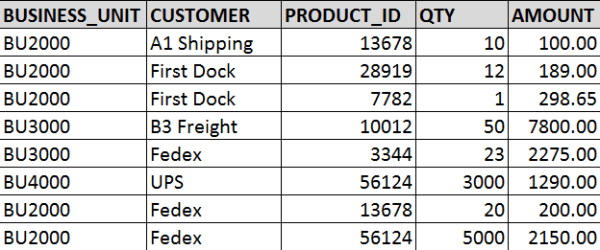
Now, we will use the below table as the example data set that we need to secure with the Business Unit data-level security.  We will call this table TRANSACTION_DATA.
DataLevelSecurity_AllData

When data-level security is applied …

Jane and Xing will be able to access/see the following data:
DataLevelSecurity_BU2000

Bill will able to access/see the following data:
DataLevelSecurity_BU3000_and_BU4000

And Venkat will be able to access/see the following data:
DataLevelSecurity_BU4000

So, now let’s move on to how to implement data-level security in OBI to achieve what was described above.

First, ensure that the USER_TO_BUSINESSUNIT table data is correct and up-to-date, and that there is an ETL in place or some other method of keeping that data updated. You want to ensure that if and when a user’s Business Unit changes, it is reflected in this table so that the user will have access to the appropriate data.

Next, create a Session Initialization Block with row-wise Initialization that will be used to get the list of Business Units that a user has access to.

Open the RPD -> Manage -> Variables
ManageVariables

In the Variable Manager -> Action -> New -> Session -> Initialization Block

This needs to be a “Session” Init block so that it will run each time a user logs in, and gets that user’s list of Business Units; and it needs to be row-wise because some users will have more than 1 value returned.

New_Session_InitBlock

In the Session Variable Initialization Block Dialog, enter a Name for the Init Block.

Then click Edit Data Source
InitBlockDialog

In the Data Source dialog, enter the SQL to get the Business Units for the current logged in user.  Click OK when done which closes this window and brings you back to the Session Variable Initialization Block Dialog.

InitBlockSQL

Click Edit Data Target in the Session Variable Initialization Block Dialog.

Enter your Variable name and check “Row-wise initialization”. As mentioned above, we need to select row-wise because our Init Block SQL may return more than 1 value for some users.   For example, when Bill in our example above data logs in, the Initialization Block will return values BU3000 and BU4000, and store them in the Target Variable, “BUSINESS_UNIT”.

You may also check “Use caching” to store the values in cache. Click OK when done.

SessionInitBlock_RowWiseTargetVariable
Then click OK to save the Init Block.

InitBlock_SetupComplete

Next, apply data filter(s) to the appropriate data set(s) for the appropriate role(s) using the Target Variable above.  You may have role(s) specifically used for data-level security and will need to apply it there, but if not, you will need to apply the filters in each role that has access to the datasets/dashboards/reports that you want to apply data-level security to.

Manage -> Identity
ManageIdentity

Go to the Application Roles tab, and select the Application Role to which you would like to apply the data-level security.  In the APplication Role dialog, click Permissions.
IdentityManager_ApplicationRole

In the Permissions dialog, select the layer and data table that you want to apply the data security to, and then enter the appropriate filter.  In this example, you are filtering by BUSINESS_UNIT.  This will cause the data to be filtered to only include each users’ Business Units.
DataFilter

Save your changes.  You have now applied data-level security.  This is what will happen now:

User logs in -> Init Block runs and selects the Business Units associated with the user’s User ID -> Init Block assigns value(s) to the variable BUSINESS_UNIT -> if the user is a member of a role that has data security applied to -and- the user visits the report -> the data filter will be triggered/run -> User only sees data for the Business Units the user is allowed to see.

Look out for my upcoming post on implementing a special type of data-level security: Reports-To Data Level Security.

Thanks for reading!

Oracle Advanced Security Summary

With the expansion of Self-Service BI, BI Teams need to be more vigilant about protecting sensitive data.
This is a summary of options available for protecting data in Oracle databases.
The information in this post was found here and summarized for a quick read: https://docs.oracle.com/database/121/ASOAG/toc.htm

The 3 features available are (1) Transparent Data Encryption, (2) Data Redaction, and (3) Data Masking and Subsetting Pack.
Here is a quick summary.

(1) Transparent Data Encryption (TDE)

  • Encrypt data so only authorized people can see it
  • Use it to protect sensitive data that maybe in an unprotected environment, such backup data sent to a storage facility
  • You can encrypt an individual column or an entire tablespace
  • Applications using encrypted data can function just the same

(2) Data Redaction

  • Enable the redaction (masking) of column data in tables
  • Redaction can be full, partial, based on regular expressions, or random
    • Full redaction: replaces strings with a single blank space ‘ ‘; numbers with zero (0); dates with 01-JAN-01
    • Partial redaction: replaces a portion of the column data; for example SSN: ***-**-1234
    • Regular expressions: can be used to perform partial or full redactions
    • Random: generates random values for display when accessed
  • The redaction takes place at runtime; not in the permanent data stored

(3) Oracle Enterprise Manager Data Masking and Subsetting Pack

  • enables you to create a “safe” development or test copy of the production database


Let’s look into some more details …

(1) Transparent Data Encryption (TDE)

  • TDE uses a two-tiered key-based architecture
  • TDE column encryption uses the two-tiered key-based architecture to transparently encrypt and decrypt sensitive table columns. The TDE master encryption key is stored in an external security module, which can be an Oracle software keystore or hardware keystore. This TDE master encryption key encrypts and decrypts the TDE table key, which in turn encrypts and decrypts data in the table column.
  • A Key Management Framework is used for TDE to store and manage keys and credentials.
    • Includes the keystore to store the TDE master encryption keys and the management framework to manage keystore and key operations
    • The Oracle keystore stores a history of retired TDE master encryption keys, which enables you to change them and still be able to decrypt data that was encrypted under an earlier TDE master encryption key.
  • Types of Keystores
    • Software keystores
    • Hardware, or HSM-based, keystores
  • Types of Software Keystores:
    • auto-login software keystores that are local to the computer on which they are created.
    • cannot be opened on any computer other than the one on which they are created.
    • typically used for scenarios where additional security is required while supporting an unattended operation
    • Password-based software keystores
      • protected by using a password that you create. You must open this type of keystore before the keys can be retrieved or used.
    • Auto-login software keystores
      • protected by a system-generated password, and do not need to be explicitly opened; automatically opened when accessed.
      • can be used across different systems; ideal for unattended scenarios.
    • Local auto-login software keystores
  • Steps for configuring a Software Keystore
    • Step 1: Set the Software Keystore Location in the sqlnet.ora File
    • Step 2: Create the Software Keystore
    • Step 3: Open the Software Keystore
    • Step 4: Set the Software TDE Master Encryption Key
    • Step 5: Encrypt Your Data
  • Oracle Database checks the sqlnet.ora file for the directory location of the keystore, whether it is a software keystore or a hardware module security (HSM) keystore.
  • You cannot change an existing tablespace to make it encrypted
  • You can create or modify columns to be encrypted


(2) Data Redaction

  • Define data redaction policies to specify what data needs to be redacted
  • Use policy expressions to set whether a user sees the redacted data or the full data
  • Policy Procedures
    • DBMS_REDACT.ADD_POLICY
    • DBMS_REDACT.ALTER_POLICY
    • DBMS_REDACT.ENABLE_POLICY
    • DBMS_REDACT.DISABLE_POLICY
    • DBMS_REDACT.DROP_POLICY
  • Sample scrip
    • BEGIN
      DBMS_REDACT.ADD_POLICY(
      object_schema => ‘hr’,
      object_name => ’employees’,
      column_name => ‘commission_pct’,
      policy_name => ‘redact_com_pct’,
      function_type => DBMS_REDACT.PARTIAL, –partial;  use DBMS_REDACT.FULL for full
      function_parameters => DBMS_REDACT.REDACT_US_SSN_F5,  — many standard params, but it can also be custom
      expression =>  ‘SYS_CONTEXT(”SYS_SESSION_ROLES”,”MGR”) = ”FALSE”’); –allows MGR role to see data
      policy_description => ‘Partially redacts 1st 5 digits in SS numbers’,
      column_description => ‘ssn contains Social Security numbers’);
      END;
      /
  • Use DBMS_REDACT.ALTER_POLICY and action => DBMS_REDACT.ADD_COLUMN to redact multiple columns
  • Redaction takes place on select lists and not on where clauses
  • Be aware of the scenarios when using redacted tables to build other tables or views


(3) Oracle Enterprise Manager Data Masking and Subsetting Pack (DMSP)

  • DMSP enables you to create a development or test copy of the production database, by taking the data in the production database, masking this data in bulk, and/or creating a subset of the data, and then putting the resulting masked data and/or subset of data in the development or test copy.
  • You can still apply Data Redaction policies to the non-production database, in order to redact columns
  • Used to mask data sets when you want to move the data to development and test environments.
  • Data Redaction is mainly designed for redacting at runtime for production applications

——–

I hope you found this helpful to get you started on taking the steps to protect your data internally and externally.
You can visit the link I provided above to find more details.

How to generate detailed Oracle BI (OBIEE) Repository Documentation

In this post, I will show the steps for using the OBIEE “Repository Documentation” utility to generate repository (RPD) lineage information.  I will also provide a couple example of how this documentation (output file) can be used.

To access and run the Repository Documentation utility,  from the BI Admin Tool menu, select Tools -> Utilities.

biadmintool_menu_tools_utilities

From the Utilities dialog, select “Repository Documentation”, and click “Execute…”

utilitiesdialog

In the “Save As” dialog, select the destination and enter the name you would like for the output file.

saverepositorydocumentationdialog

When it finishes, it will generate the output csv file.  Note  – this will likely be a large file.  It will contain all your repository objects.

obieerepositoryoutputfile

The RPD documentation file will contain the following columns:
Subject Area, Presentation Table, Presentation Column, Description – Presentation Column, Business Model, Derived logical table, Derived logical column, Description – Derived Logical Column, Expression, Logical Table, Logical Column, Description – Logical Column, Logical Table Source, Expression, Initialization Block, Variable, Database, Physical Catalog, Physical Schema, Physical Table, Alias, Physical Column, Description – Physical Column

You can use this file to quickly track lineage from physical sources to the logical columns to the presentation columns and identify all the logic and variables in between.
You can also use it to identify where and how much a specified table, column, variable, etc. is used which will help you to identify dependencies and know the effect of making changes or deleting elements.

Development, Data Governance, and Quality Assurance teams may find this information useful in this format.

It’s all about the users – Identifying Users for your BI applications / dashboards

One of the first things you will need to do before developing your Business Intelligence (BI) applications or dashboards is … identify who will use it.  You need to identify who will be using the application – what business areas they belong to, what groups they belong to, what are the various functions or roles within those groups, and eventually, who are the actual people.  After identifying the various roles (groups of users typically associated with a business process or function), then you can identify their needs.  Starting any development before knowing who will be using the system could result in a lot of wasted time and effort or a sub-optimal system.  The grouping of information on dashboards, the available functionality and security will be driven by these roles and their respective needs.

After identifying the various functions or roles that users posses, then it is important to understand how each role performs their job functions.  You need to understand what information they need and in what order, how it’s used, and the level of detail required at various stages. With this information, you will determine the dashboards, dashboard pages and their order, the information on each dashboard page and its precedence and level of detail, and what detailed information is needed via drill down. Basically, you will be creating the analytic workflows for the identified roles and the various processes, functions and tasks that they perform.

When performing the above exercise, please be as discrete as possible.  For example, even if someone doubles as an AP/AR Analyst, you should still analyze and plan for 2 separate roles – AP Analyst and AR Analyst – because those are 2 separate functions.  Later, the individual or group can be granted permissions to both roles.  From a security standpoint in general, you will create the necessary BI application roles to support your business roles.  And then assign security based on these roles.

In general, always keep the focus on the users, what they need to accomplish, and the most efficient ways to help them perform their jobs.  When you build the BI security and dashboards to meet those needs and usage scenarios, it will result in higher and faster user adoption.  This will take time, so do not rush the process.  Get detailed information about all the steps in their workflow upfront, document it, and then build around it.  However, on the other hand, you do not have to document to perfection upfront, you can take a more agile approach of developing based on fairly good user profiles to give users working prototypes, and then adjusting as new information and feedback is received from the users.

Good luck identifying your users and their needs as you get your BI project rolling.  And remember, it’s all about the users!

Creating a new Security Realm in OBIEE 11g

When setting up security in OBIEE 11g, you may modify the default security realm (myrealm) that installs with OBIEE.   But even better, you may create a new security realm and leave the default realm untouched.

My preference is to leave the default realm untouched and create a new realm – this is a best practice in my opinion.  I think it is helpful to always be able to go back and look at the features and settings of the default security realm.  And you can name your new security realm more appropriately, such as, ABCIncSecurityRealm.

The link below (Paul Cannon’s Blog) brings you to a blog post about configuring OBIEE to use LDAP authentication, and the first part of the post covers creating the new security realm.  It is very detailed. I used it the first time I created a new security realm.

http://paulcannon-bi.blogspot.com/2012/07/configuring-ldap-authentication-for.html

Good luck creating your new security realm.

Oracle E-Business Suite (EBS) Foundation Tables

This post is simply a list of Oracle E-Business Suite (EBS) Foundation tables. The Foundation tables contain data that relate to the entire suite of applications – they are not specific to any one module.

Some foundation tables are used in Oracle BI Applications (OBIA), for example, the FND_USER, FND_USER_RESP_GROUPS, and FND_RESPONSIBILITY_VL tables are used in security-related Initialization Blocks.

In general, it’s good to be familiar with these tables when working on OBIEE projects or any BI platform with EBS as a source system.

Foundation Table Purpose
FND_APPLICATION Stores applications registered with Oracle Application Object Library.
FND_APPLICATION_TL Stores translated information about all the applications registered with Oracle Application Object Library.
FND_APP_SERVERS This table will track the servers used by the E-Business Suite system.
FND_ATTACHED_DOCUMENTS Stores information relating a document to an application entity.
FND_CONCURRENT_PROCESSES Stores information about concurrent managers.
FND_CONCURRENT_PROCESSORS Stores information about immediate (subroutine) concurrent program libraries.
FND_CONCURRENT_PROGRAMS Stores information about concurrent programs. Each row includes a name and description of the concurrent program.
FND_CONCURRENT_PROGRAMS_TL Stores translated information about concurrent programs in each of the installed languages.
FND_CONCURRENT_QUEUES Stores information about concurrent managers.
FND_CONCURRENT_QUEUE_SIZE Stores information about the number of requests a concurrent manager can process at once, according to its work shift.
FND_CONCURRENT_REQUESTS Stores information about individual concurrent requests.
FND_CONCURRENT_REQUEST_CLASS Stores information about concurrent request types.
FND_CONC_REQ_OUTPUTS This table stores output files created by Concurrent Request.
FND_CURRENCIES Stores information about currencies.
FND_DATABASES It tracks the databases employed by the eBusiness suite. This table stores information about the database that is not instance specific.
FND_DATABASE_INSTANCES Stores instance specific information. Every database has one or more instance.
FND_DESCRIPTIVE_FLEXS Stores setup information about descriptive flexfields.
FND_DESCRIPTIVE_FLEXS_TL Stores translated setup information about descriptive flexfields.
FND_DOCUMENTS Stores language-independent information about a document.
FND_EXECUTABLES Stores information about concurrent program executables.
FND_FLEX_VALUES Stores valid values for key and descriptive flexfield segments.
FND_FLEX_VALUE_SETS Stores information about the value sets used by both key and descriptive flexfields.
FND_LANGUAGES Stores information regarding languages and dialects.
FND_MENUS It lists the menus that appear in the Navigate Window, as determined by the System Administrator when defining responsibilities for function security.
FND_MENUS_TL Stores translated information about the menus in FND_MENUS.
FND_MENU_ENTRIES Stores information about individual entries in the menus in FND_MENUS.
FND_PROFILE_OPTIONS Stores information about user profile options.
FND_REQUEST_GROUPS Stores information about report security groups.
FND_REQUEST_SETS Stores information about report sets.
FND_RESPONSIBILITY Stores information about responsibilities. Each row includes the name and description of the responsibility, the application it belongs to, and values that identify the main menu, and the first form that it uses.
FND_RESPONSIBILITY_TL Stores translated information about responsibilities.
FND_RESP_FUNCTIONS Stores security exclusion rules for function security menus. Security exclusion rules are lists of functions and menus inaccessible to a particular responsibility.
FND_SECURITY_GROUPS Stores information about security groups used to partition data in a Service Bureau architecture.
FND_SEQUENCES Stores information about the registered sequences in your applications.
FND_TABLES Stores information about the registered tables in your applications.
FND_TERRITORIES Stores information for countries, alternatively known as territories.
FND_USER Stores information about application users.
FND_VIEWS Stores information about the registered views in your applications.
FND_USER_RESPONSIBILITY
FND_RESPONSIBILITY_VL
FND_ORACLE_USERID
FND_DATA_GROUP_UNITS

“Create” button Inactive in the Application Roles page in OBIEE 11g

There is a bug in OBIEE 11g that makes the “Create” button Inactive in the Application Roles page in OBIEE 11g. The good news is the solution is very simple.

In case you have not yet seen this issue, but would like to know what this is referring to, then … login to the Enterprise Manager – http://yourserver:7001/em and expand Business Intelligence and click on coreapplication.  Then navigate to the Application Roles page using one of the methods below …

Either from:
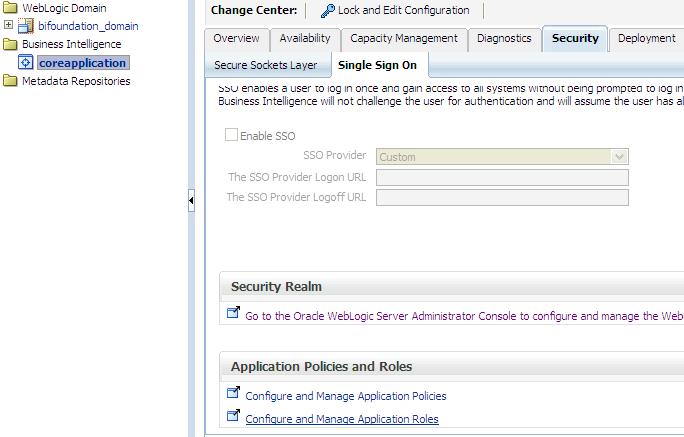
(1)   the ‘Security’ -> ‘Single Sign On’ tab, select “Configure and Manage Application Roles”

Security-SingleSignOn-ApplicationRoles

(2) or from the coreapplication drop down menu, select Security -> Application Roles

coreapplication_dropdown-Security-ApplicationRoles

When you get to the Application Roles page, you will notice that the Create button is INACTIVE.

InactiveCreateButton

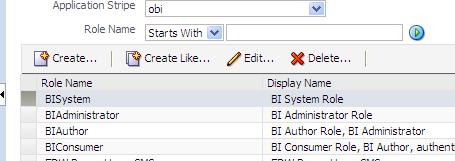
To activate the button, simply select the drop down for Application Stripe and select <No application stripe selected>, then reselect the appropriate Application Stripe such as obi.

The Create button will now be ACTIVE.  Of course, click the play button to generate the list of Application Roles if necessary.

CreateButtonActive

Configuring OBIEE 11g to use LDAP (Active Directory) Authentication with External Groups table

I have been working on configuring OBIEE 11g to use Active Directory for authentication and an external table for Groups.  It has been a bit of a challenge primarily because I was not familiar with the Active Directory terminology and parameters, and so I was initially doing some guess work – about what the various parameters should be set to, and it was not very easy to determine what was and what was not correct.

Anyway, thanks to a few Oracle documents and a few blog articles I have made significant progress and I think I have it working properly now, and testing it thoroughly.

Below are some of the documents and articles that I used…

Here you will find some Oracle documentation:

http://docs.oracle.com/cd/E14571_01/bi.1111/e10543/toc.htm

http://docs.oracle.com/cd/E23943_01/bi.1111/e10543/privileges.htm#BIESC6054

A great intro article:

http://www.rittmanmead.com/2012/03/obiee-11g-security-week-understanding-obiee-11g-security-application-roles-and-application-policies/

An article directly related to the topic:

http://www.rittmanmead.com/2012/03/obiee-11g-security-week-connecting-to-active-directory-and-obtaining-group-membership-from-database-tables/

These provided some more details that helped me to understand the parameters better and be in a better position to work with the Active Directory administrator:

http://bimetrics.wordpress.com/2011/08/12/integrating-ms-active-directory-with-obiee-11g-in-weblogic-server/

http://obieeelegant.blogspot.com/2012/01/obiee-11g-integration-with-ldap.html

http://paulcannon-bi.blogspot.com/2012/07/configuring-ldap-authentication-for.html

http://www.biztech.com/blog/2011/09/integrating-active-directory-with-obiee-11g/

Good luck!