Category: Data Security

Oracle Advanced Security Summary

With the expansion of Self-Service BI, BI Teams need to be more vigilant about protecting sensitive data.
This is a summary of options available for protecting data in Oracle databases.
The information in this post was found here and summarized for a quick read: https://docs.oracle.com/database/121/ASOAG/toc.htm

The 3 features available are (1) Transparent Data Encryption, (2) Data Redaction, and (3) Data Masking and Subsetting Pack.
Here is a quick summary.

(1) Transparent Data Encryption (TDE)

  • Encrypt data so only authorized people can see it
  • Use it to protect sensitive data that maybe in an unprotected environment, such backup data sent to a storage facility
  • You can encrypt an individual column or an entire tablespace
  • Applications using encrypted data can function just the same

(2) Data Redaction

  • Enable the redaction (masking) of column data in tables
  • Redaction can be full, partial, based on regular expressions, or random
    • Full redaction: replaces strings with a single blank space ‘ ‘; numbers with zero (0); dates with 01-JAN-01
    • Partial redaction: replaces a portion of the column data; for example SSN: ***-**-1234
    • Regular expressions: can be used to perform partial or full redactions
    • Random: generates random values for display when accessed
  • The redaction takes place at runtime; not in the permanent data stored

(3) Oracle Enterprise Manager Data Masking and Subsetting Pack

  • enables you to create a “safe” development or test copy of the production database


Let’s look into some more details …

(1) Transparent Data Encryption (TDE)

  • TDE uses a two-tiered key-based architecture
  • TDE column encryption uses the two-tiered key-based architecture to transparently encrypt and decrypt sensitive table columns. The TDE master encryption key is stored in an external security module, which can be an Oracle software keystore or hardware keystore. This TDE master encryption key encrypts and decrypts the TDE table key, which in turn encrypts and decrypts data in the table column.
  • A Key Management Framework is used for TDE to store and manage keys and credentials.
    • Includes the keystore to store the TDE master encryption keys and the management framework to manage keystore and key operations
    • The Oracle keystore stores a history of retired TDE master encryption keys, which enables you to change them and still be able to decrypt data that was encrypted under an earlier TDE master encryption key.
  • Types of Keystores
    • Software keystores
    • Hardware, or HSM-based, keystores
  • Types of Software Keystores:
    • auto-login software keystores that are local to the computer on which they are created.
    • cannot be opened on any computer other than the one on which they are created.
    • typically used for scenarios where additional security is required while supporting an unattended operation
    • Password-based software keystores
      • protected by using a password that you create. You must open this type of keystore before the keys can be retrieved or used.
    • Auto-login software keystores
      • protected by a system-generated password, and do not need to be explicitly opened; automatically opened when accessed.
      • can be used across different systems; ideal for unattended scenarios.
    • Local auto-login software keystores
  • Steps for configuring a Software Keystore
    • Step 1: Set the Software Keystore Location in the sqlnet.ora File
    • Step 2: Create the Software Keystore
    • Step 3: Open the Software Keystore
    • Step 4: Set the Software TDE Master Encryption Key
    • Step 5: Encrypt Your Data
  • Oracle Database checks the sqlnet.ora file for the directory location of the keystore, whether it is a software keystore or a hardware module security (HSM) keystore.
  • You cannot change an existing tablespace to make it encrypted
  • You can create or modify columns to be encrypted


(2) Data Redaction

  • Define data redaction policies to specify what data needs to be redacted
  • Use policy expressions to set whether a user sees the redacted data or the full data
  • Policy Procedures
    • DBMS_REDACT.ADD_POLICY
    • DBMS_REDACT.ALTER_POLICY
    • DBMS_REDACT.ENABLE_POLICY
    • DBMS_REDACT.DISABLE_POLICY
    • DBMS_REDACT.DROP_POLICY
  • Sample scrip
    • BEGIN
      DBMS_REDACT.ADD_POLICY(
      object_schema => ‘hr’,
      object_name => ’employees’,
      column_name => ‘commission_pct’,
      policy_name => ‘redact_com_pct’,
      function_type => DBMS_REDACT.PARTIAL, –partial;  use DBMS_REDACT.FULL for full
      function_parameters => DBMS_REDACT.REDACT_US_SSN_F5,  — many standard params, but it can also be custom
      expression =>  ‘SYS_CONTEXT(”SYS_SESSION_ROLES”,”MGR”) = ”FALSE”’); –allows MGR role to see data
      policy_description => ‘Partially redacts 1st 5 digits in SS numbers’,
      column_description => ‘ssn contains Social Security numbers’);
      END;
      /
  • Use DBMS_REDACT.ALTER_POLICY and action => DBMS_REDACT.ADD_COLUMN to redact multiple columns
  • Redaction takes place on select lists and not on where clauses
  • Be aware of the scenarios when using redacted tables to build other tables or views


(3) Oracle Enterprise Manager Data Masking and Subsetting Pack (DMSP)

  • DMSP enables you to create a development or test copy of the production database, by taking the data in the production database, masking this data in bulk, and/or creating a subset of the data, and then putting the resulting masked data and/or subset of data in the development or test copy.
  • You can still apply Data Redaction policies to the non-production database, in order to redact columns
  • Used to mask data sets when you want to move the data to development and test environments.
  • Data Redaction is mainly designed for redacting at runtime for production applications

——–

I hope you found this helpful to get you started on taking the steps to protect your data internally and externally.
You can visit the link I provided above to find more details.

How to generate detailed Oracle BI (OBIEE) Repository Documentation

In this post, I will show the steps for using the OBIEE “Repository Documentation” utility to generate repository (RPD) lineage information.  I will also provide a couple example of how this documentation (output file) can be used.

To access and run the Repository Documentation utility,  from the BI Admin Tool menu, select Tools -> Utilities.

biadmintool_menu_tools_utilities

From the Utilities dialog, select “Repository Documentation”, and click “Execute…”

utilitiesdialog

In the “Save As” dialog, select the destination and enter the name you would like for the output file.

saverepositorydocumentationdialog

When it finishes, it will generate the output csv file.  Note  – this will likely be a large file.  It will contain all your repository objects.

obieerepositoryoutputfile

The RPD documentation file will contain the following columns:
Subject Area, Presentation Table, Presentation Column, Description – Presentation Column, Business Model, Derived logical table, Derived logical column, Description – Derived Logical Column, Expression, Logical Table, Logical Column, Description – Logical Column, Logical Table Source, Expression, Initialization Block, Variable, Database, Physical Catalog, Physical Schema, Physical Table, Alias, Physical Column, Description – Physical Column

You can use this file to quickly track lineage from physical sources to the logical columns to the presentation columns and identify all the logic and variables in between.
You can also use it to identify where and how much a specified table, column, variable, etc. is used which will help you to identify dependencies and know the effect of making changes or deleting elements.

Development, Data Governance, and Quality Assurance teams may find this information useful in this format.

It’s all about the users – Identifying Users for your BI applications / dashboards

One of the first things you will need to do before developing your Business Intelligence (BI) applications or dashboards is … identify who will use it.  You need to identify who will be using the application – what business areas they belong to, what groups they belong to, what are the various functions or roles within those groups, and eventually, who are the actual people.  After identifying the various roles (groups of users typically associated with a business process or function), then you can identify their needs.  Starting any development before knowing who will be using the system could result in a lot of wasted time and effort or a sub-optimal system.  The grouping of information on dashboards, the available functionality and security will be driven by these roles and their respective needs.

After identifying the various functions or roles that users posses, then it is important to understand how each role performs their job functions.  You need to understand what information they need and in what order, how it’s used, and the level of detail required at various stages. With this information, you will determine the dashboards, dashboard pages and their order, the information on each dashboard page and its precedence and level of detail, and what detailed information is needed via drill down. Basically, you will be creating the analytic workflows for the identified roles and the various processes, functions and tasks that they perform.

When performing the above exercise, please be as discrete as possible.  For example, even if someone doubles as an AP/AR Analyst, you should still analyze and plan for 2 separate roles – AP Analyst and AR Analyst – because those are 2 separate functions.  Later, the individual or group can be granted permissions to both roles.  From a security standpoint in general, you will create the necessary BI application roles to support your business roles.  And then assign security based on these roles.

In general, always keep the focus on the users, what they need to accomplish, and the most efficient ways to help them perform their jobs.  When you build the BI security and dashboards to meet those needs and usage scenarios, it will result in higher and faster user adoption.  This will take time, so do not rush the process.  Get detailed information about all the steps in their workflow upfront, document it, and then build around it.  However, on the other hand, you do not have to document to perfection upfront, you can take a more agile approach of developing based on fairly good user profiles to give users working prototypes, and then adjusting as new information and feedback is received from the users.

Good luck identifying your users and their needs as you get your BI project rolling.  And remember, it’s all about the users!

Creating a new Security Realm in OBIEE 11g

When setting up security in OBIEE 11g, you may modify the default security realm (myrealm) that installs with OBIEE.   But even better, you may create a new security realm and leave the default realm untouched.

My preference is to leave the default realm untouched and create a new realm – this is a best practice in my opinion.  I think it is helpful to always be able to go back and look at the features and settings of the default security realm.  And you can name your new security realm more appropriately, such as, ABCIncSecurityRealm.

The link below (Paul Cannon’s Blog) brings you to a blog post about configuring OBIEE to use LDAP authentication, and the first part of the post covers creating the new security realm.  It is very detailed. I used it the first time I created a new security realm.

http://paulcannon-bi.blogspot.com/2012/07/configuring-ldap-authentication-for.html

Good luck creating your new security realm.

Oracle E-Business Suite (EBS) Foundation Tables

This post is simply a list of Oracle E-Business Suite (EBS) Foundation tables. The Foundation tables contain data that relate to the entire suite of applications – they are not specific to any one module.

Some foundation tables are used in Oracle BI Applications (OBIA), for example, the FND_USER, FND_USER_RESP_GROUPS, and FND_RESPONSIBILITY_VL tables are used in security-related Initialization Blocks.

In general, it’s good to be familiar with these tables when working on OBIEE projects or any BI platform with EBS as a source system.

Foundation Table Purpose
FND_APPLICATION Stores applications registered with Oracle Application Object Library.
FND_APPLICATION_TL Stores translated information about all the applications registered with Oracle Application Object Library.
FND_APP_SERVERS This table will track the servers used by the E-Business Suite system.
FND_ATTACHED_DOCUMENTS Stores information relating a document to an application entity.
FND_CONCURRENT_PROCESSES Stores information about concurrent managers.
FND_CONCURRENT_PROCESSORS Stores information about immediate (subroutine) concurrent program libraries.
FND_CONCURRENT_PROGRAMS Stores information about concurrent programs. Each row includes a name and description of the concurrent program.
FND_CONCURRENT_PROGRAMS_TL Stores translated information about concurrent programs in each of the installed languages.
FND_CONCURRENT_QUEUES Stores information about concurrent managers.
FND_CONCURRENT_QUEUE_SIZE Stores information about the number of requests a concurrent manager can process at once, according to its work shift.
FND_CONCURRENT_REQUESTS Stores information about individual concurrent requests.
FND_CONCURRENT_REQUEST_CLASS Stores information about concurrent request types.
FND_CONC_REQ_OUTPUTS This table stores output files created by Concurrent Request.
FND_CURRENCIES Stores information about currencies.
FND_DATABASES It tracks the databases employed by the eBusiness suite. This table stores information about the database that is not instance specific.
FND_DATABASE_INSTANCES Stores instance specific information. Every database has one or more instance.
FND_DESCRIPTIVE_FLEXS Stores setup information about descriptive flexfields.
FND_DESCRIPTIVE_FLEXS_TL Stores translated setup information about descriptive flexfields.
FND_DOCUMENTS Stores language-independent information about a document.
FND_EXECUTABLES Stores information about concurrent program executables.
FND_FLEX_VALUES Stores valid values for key and descriptive flexfield segments.
FND_FLEX_VALUE_SETS Stores information about the value sets used by both key and descriptive flexfields.
FND_LANGUAGES Stores information regarding languages and dialects.
FND_MENUS It lists the menus that appear in the Navigate Window, as determined by the System Administrator when defining responsibilities for function security.
FND_MENUS_TL Stores translated information about the menus in FND_MENUS.
FND_MENU_ENTRIES Stores information about individual entries in the menus in FND_MENUS.
FND_PROFILE_OPTIONS Stores information about user profile options.
FND_REQUEST_GROUPS Stores information about report security groups.
FND_REQUEST_SETS Stores information about report sets.
FND_RESPONSIBILITY Stores information about responsibilities. Each row includes the name and description of the responsibility, the application it belongs to, and values that identify the main menu, and the first form that it uses.
FND_RESPONSIBILITY_TL Stores translated information about responsibilities.
FND_RESP_FUNCTIONS Stores security exclusion rules for function security menus. Security exclusion rules are lists of functions and menus inaccessible to a particular responsibility.
FND_SECURITY_GROUPS Stores information about security groups used to partition data in a Service Bureau architecture.
FND_SEQUENCES Stores information about the registered sequences in your applications.
FND_TABLES Stores information about the registered tables in your applications.
FND_TERRITORIES Stores information for countries, alternatively known as territories.
FND_USER Stores information about application users.
FND_VIEWS Stores information about the registered views in your applications.
FND_USER_RESPONSIBILITY
FND_RESPONSIBILITY_VL
FND_ORACLE_USERID
FND_DATA_GROUP_UNITS

“Create” button Inactive in the Application Roles page in OBIEE 11g

There is a bug in OBIEE 11g that makes the “Create” button Inactive in the Application Roles page in OBIEE 11g. The good news is the solution is very simple.

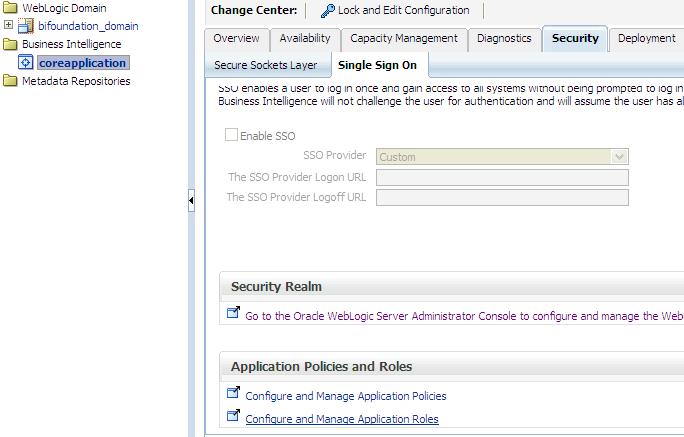
In case you have not yet seen this issue, but would like to know what this is referring to, then … login to the Enterprise Manager – http://yourserver:7001/em and expand Business Intelligence and click on coreapplication.  Then navigate to the Application Roles page using one of the methods below …

Either from:
(1)   the ‘Security’ -> ‘Single Sign On’ tab, select “Configure and Manage Application Roles”

Security-SingleSignOn-ApplicationRoles

(2) or from the coreapplication drop down menu, select Security -> Application Roles

coreapplication_dropdown-Security-ApplicationRoles

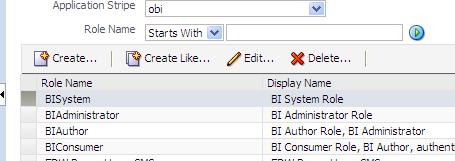
When you get to the Application Roles page, you will notice that the Create button is INACTIVE.

InactiveCreateButton

To activate the button, simply select the drop down for Application Stripe and select <No application stripe selected>, then reselect the appropriate Application Stripe such as obi.

The Create button will now be ACTIVE.  Of course, click the play button to generate the list of Application Roles if necessary.

CreateButtonActive

Configuring OBIEE 11g to use LDAP (Active Directory) Authentication with External Groups table

I have been working on configuring OBIEE 11g to use Active Directory for authentication and an external table for Groups.  It has been a bit of a challenge primarily because I was not familiar with the Active Directory terminology and parameters, and so I was initially doing some guess work – about what the various parameters should be set to, and it was not very easy to determine what was and what was not correct.

Anyway, thanks to a few Oracle documents and a few blog articles I have made significant progress and I think I have it working properly now, and testing it thoroughly.

Below are some of the documents and articles that I used…

Here you will find some Oracle documentation:

http://docs.oracle.com/cd/E14571_01/bi.1111/e10543/toc.htm

http://docs.oracle.com/cd/E23943_01/bi.1111/e10543/privileges.htm#BIESC6054

A great intro article:

http://www.rittmanmead.com/2012/03/obiee-11g-security-week-understanding-obiee-11g-security-application-roles-and-application-policies/

An article directly related to the topic:

http://www.rittmanmead.com/2012/03/obiee-11g-security-week-connecting-to-active-directory-and-obtaining-group-membership-from-database-tables/

These provided some more details that helped me to understand the parameters better and be in a better position to work with the Active Directory administrator:

http://bimetrics.wordpress.com/2011/08/12/integrating-ms-active-directory-with-obiee-11g-in-weblogic-server/

http://obieeelegant.blogspot.com/2012/01/obiee-11g-integration-with-ldap.html

http://paulcannon-bi.blogspot.com/2012/07/configuring-ldap-authentication-for.html

http://www.biztech.com/blog/2011/09/integrating-active-directory-with-obiee-11g/

Good luck!