Category: Data Security

Apply sensitivity labels to items in Microsoft Fabric

This post is a part of the DP-600: Implementing Analytics Solutions Using Microsoft Fabric Exam Prep Hub; and this topic falls under these sections: 
Maintain a data analytics solution
--> Implement security and governance
--> Apply sensitivity labels to items

To Do:
Complete the related module for this topic in the Microsoft Learn course: Secure data access in Microsoft Fabric

Sensitivity labels are a data protection and governance feature in Microsoft Fabric that help organizations classify, protect, and control the handling of sensitive data. They integrate with Microsoft Purview Information Protection and extend data protection consistently across Fabric, Power BI, and Microsoft 365.

For the DP-600 exam, you should understand what sensitivity labels are, how they are applied, what they affect, and how they differ from access controls.

What Are Sensitivity Labels?

Sensitivity labels:

  • Classify data based on confidentiality and business impact
  • Travel with the data across supported services
  • Can trigger protection behaviors, such as encryption or usage restrictions

Common label examples include:

  • Public
  • Internal
  • Confidential
  • Highly Confidential

Labels are organizationally defined and managed centrally.

Where Sensitivity Labels Come From

Sensitivity labels in Fabric are:

  • Created and managed in Microsoft Purview
  • Defined at the tenant level by security or compliance administrators
  • Made available to Fabric and Power BI through tenant settings

Fabric users apply labels, but typically do not define them.

Items That Can Be Labeled in Microsoft Fabric

Sensitivity labels can be applied to many Fabric items, including:

  • Semantic models (datasets)
  • Reports
  • Dashboards
  • Dataflows
  • Lakehouses and Warehouses (where supported)
  • Exported artifacts (Excel, PowerPoint, PDF)

This makes labeling a cross-workload governance mechanism.

How Sensitivity Labels Are Applied

Labels can be applied:

  • Manually by item owners or authorized users
  • Automatically through inherited labeling
  • Programmatically via APIs (advanced scenarios)

Label Inheritance

In many cases:

  • Reports inherit the label from their underlying semantic model
  • Dashboards inherit labels from pinned tiles
  • Exported files inherit the label of the source item

This inheritance model is frequently tested in exam scenarios.

What Sensitivity Labels Do (and Do Not Do)

What they do:

  • Classify data for compliance and governance
  • Enable protection such as:
    • Encryption
    • Watermarking
    • Usage restrictions (e.g., block external sharing)
  • Travel with data when exported or shared

What they do NOT do:

  • Grant or restrict user access
  • Replace workspace, item-level, or data-level security
  • Filter rows or columns

Key exam distinction:
Sensitivity labels protect data after access is granted.

Sensitivity Labels vs Endorsements

These two concepts are often confused on exams.

FeatureSensitivity LabelsEndorsements
PurposeData protectionTrust and quality
EnforcedYesNo
Affects behaviorYes (encryption, sharing rules)No
Security-relatedYesGovernance guidance

Governance and Compliance Benefits

Sensitivity labels support:

  • Regulatory compliance (e.g., GDPR, HIPAA)
  • Data loss prevention (DLP)
  • Auditing and reporting
  • Consistent handling of sensitive data across platforms

They are especially important in environments with:

  • Self-service analytics
  • Data exports to Excel or PowerPoint
  • External sharing scenarios

Common Exam Scenarios

You may see questions such as:

  • A report exported to Excel must remain encrypted → sensitivity label
  • Data should be classified as confidential but still shared internally → labeling, not access restriction
  • Users can view data but cannot share externally → label-driven protection
  • A report automatically inherits its dataset’s classification → label inheritance

Best Practices to Remember

  • Apply labels at the semantic model level to ensure inheritance
  • Use sensitivity labels alongside:
    • Workspace and item-level access controls
    • RLS and CLS
    • Endorsements
  • Review labeling regularly to ensure accuracy
  • Educate users on selecting the correct label

Key Exam Takeaways

  • Sensitivity labels classify and protect data
  • They are defined in Microsoft Purview
  • Labels can enforce encryption and sharing restrictions
  • Labels do not control access
  • Inheritance behavior is important for DP-600 questions

Exam Tips

  • If a question focuses on classifying, protecting, or controlling how data is shared after access, think sensitivity labels.
  • If it focuses on who can see the data, think security roles or permissions.
  • Expect scenario questions involving:
    • PII, financial data, or confidential data
    • Export restrictions
    • Label inheritance
  • Know the difference between:
    • Security (RLS, OLS, item access)
    • Governance & compliance (sensitivity labels)
  • Always associate sensitivity labels with Microsoft Purview

Practice Questions

Question 1 (Single choice)

What is the PRIMARY purpose of applying sensitivity labels to items in Microsoft Fabric?

A. Improve query performance
B. Control row-level data access
C. Classify and protect data based on sensitivity
D. Grant workspace permissions

Correct Answer: C

Explanation:
Sensitivity labels are used for data classification, protection, and governance, not for performance or access control.


Question 2 (Scenario-based)

Your organization requires that all reports containing customer PII automatically display a watermark and restrict external sharing. What feature enables this?

A. Row-level security
B. Sensitivity labels with protection settings
C. Item-level access controls
D. Conditional access policies

Correct Answer: B

Explanation:
Sensitivity labels can apply visual markings, encryption, and sharing restrictions when integrated with Microsoft Purview.


Question 3 (Multi-select)

Which Fabric items can have sensitivity labels applied? (Select all that apply.)

A. Power BI reports
B. Semantic models
C. Lakehouses and warehouses
D. Notebooks

Correct Answers: A, B, C, D

Explanation:
Sensitivity labels can be applied to most Fabric artifacts, enabling consistent governance across analytics assets.


Question 4 (Scenario-based)

A semantic model inherits a sensitivity label from its underlying data source. What does this behavior represent?

A. Manual labeling
B. Label inheritance
C. Workspace-level labeling
D. Object-level security

Correct Answer: B

Explanation:
Label inheritance ensures that downstream artifacts maintain appropriate sensitivity classifications automatically.


Question 5 (Single choice)

Which service must be configured to define and manage sensitivity labels used in Microsoft Fabric?

A. Azure Active Directory
B. Microsoft Defender
C. Microsoft Purview
D. Power BI Admin portal

Correct Answer: C

Explanation:
Sensitivity labels are defined and managed in Microsoft Purview, then applied across Microsoft Fabric and Power BI.


Question 6 (Scenario-based)

A report is labeled Highly Confidential, but a user attempts to export its data to Excel. What is the expected behavior?

A. Export always succeeds
B. Export is blocked or encrypted based on label policy
C. Export ignores sensitivity labels
D. Only row-level security applies

Correct Answer: B

Explanation:
Sensitivity labels can restrict exports, apply encryption, or enforce protection based on policy.


Question 7 (Multi-select)

Which actions can sensitivity labels enforce? (Select all that apply.)

A. Data encryption
B. Watermarks and headers
C. External sharing restrictions
D. Row-level filtering

Correct Answers: A, B, C

Explanation:
Sensitivity labels control protection and compliance, not data filtering.


Question 8 (Scenario-based)

You apply a sensitivity label to a lakehouse. Which downstream artifact is MOST likely to automatically inherit the label?

A. A Power BI report built on the semantic model
B. A notebook in a different workspace
C. An external CSV export
D. An Azure SQL Database

Correct Answer: A

Explanation:
Label inheritance flows through Fabric analytics artifacts, especially semantic models and reports.


Question 9 (Single choice)

Who is typically allowed to apply or change sensitivity labels on Fabric items?

A. Any workspace Viewer
B. Only Microsoft admins
C. Users with sufficient item permissions
D. External users

Correct Answer: C

Explanation:
Users must have appropriate permissions (Contributor/Owner or item-level rights) to apply labels.


Question 10 (Scenario-based)

Your compliance team wants visibility into how sensitive data is used across Fabric. Which feature supports this requirement?

A. Query caching
B. Audit logs
C. Sensitivity labels with Purview reporting
D. Direct Lake mode

Correct Answer: C

Explanation:
Sensitivity labels integrate with Microsoft Purview reporting and auditing for compliance and governance tracking.


Endorse items in Microsoft Fabric

This post is a part of the DP-600: Implementing Analytics Solutions Using Microsoft Fabric Exam Prep Hub; and this topic falls under these sections: 
Maintain a data analytics solution
--> Implement security and governance
--> Endorse items

To Do:
Complete the related module for this topic in the Microsoft Learn course: Secure data access in Microsoft Fabric

Item endorsement is a governance feature in Microsoft Fabric that helps organizations identify trusted, high-quality, and officially supported analytics assets. Endorsements guide users toward the right data and reports, reduce duplication, and promote consistent decision-making.

For the DP-600 exam, you should understand what endorsement is, the types of endorsements available, who can apply them, and how endorsements affect user behavior (not security).

What Does It Mean to Endorse an Item?

Endorsing an item signals to users that the content is:

  • Reliable
  • Well-maintained
  • Appropriate for reuse and decision-making

Endorsement is not a security mechanism. It does not grant or restrict access—it provides trust and visibility cues within the Fabric experience.

Endorsements can be applied to:

  • Semantic models (datasets)
  • Reports
  • Dashboards
  • Other supported Fabric items

Types of Endorsements

Microsoft Fabric supports three endorsement states:

1. None

There is no endorsement on the content.

2. Promoted

Promoted items are considered:

  • Useful
  • Reviewed
  • Suitable for reuse

Key characteristics:

  • Any item owner can promote their own content
  • Indicates quality, but not official certification
  • Common for team-approved or department-level assets

Typical use cases

  • A curated dataset used by multiple analysts
  • A well-designed report shared across a department

3. Certified

Certified items represent the highest level of trust.

Key characteristics:

  • Only authorized users (often admins or designated certifiers) can certify
  • Indicates the item meets organizational standards for:
    • Data quality
    • Governance
    • Security
  • Intended for enterprise-wide consumption

Typical use cases

  • Official financial reporting datasets
  • Executive dashboards
  • Enterprise semantic models

Who Can Endorse Items?

  • Promoted: Item owners
  • Certified: Users authorized by Fabric or Power BI tenant settings (often admins or data stewards)

This distinction is important for the exam: not everyone can certify content, even if they own it.

Where Endorsements Appear

Endorsements are visible across the Fabric and Power BI experiences:

  • In search results
  • In lineage view
  • In the data hub
  • When users select data sources for report creation

Certified items are typically:

  • Ranked higher
  • More visible
  • Preferred in self-service analytics workflows

Endorsements vs Security Controls

A common exam trap is confusing endorsements with access control.

FeatureEndorsementAccess Control
PurposeTrust and qualitySecurity and restriction
Limits access?NoYes
Affects visibilityYesYes
Enforced by systemNo (informational)Yes (mandatory)

The “Make discoverable” setting

Within the selection settings dialog for Endorsement, there is also a selection option for “Make discoverable“. This option, when selected, allows users to discover the content even if they do not have access to it, and they can then request access.

Summary table

Endorsement and Discovery stateWhat it isWho can do itTypical Use Cases
NoneThere is no endorsement on the content
PromotedThe content is endorsed/flagged as Promoted

Promoted items are considered:
– Useful
– Reviewed
– Suitable for reuse

Key characteristics:
– Any item owner can promote their own content
– Indicates quality, but not official certification
– Common for team-approved or department-level assets
– Users can assign “Promoted” without any specific admin settings.
– Users can “Promote” as long as they have write permissions on a semantic model.
– A curated dataset used by multiple analysts
– A well-designed report shared across a department
CertifiedThe content is endorsed/flagged as Certified.

Certified items represent the highest level of trust.

Key characteristics:
– Only authorized users (often admins or designated certifiers) can certify
– Indicates the item meets organizational standards for: Data quality, Governance, and Security
– Intended for enterprise-wide consumption
Certification” requires admin approval to be able to set it.– Official financial reporting datasets
– Executive dashboards
– Enterprise semantic models
Make discoverableThe content is endorsed/flagged as Findable. And the discoverability can be set for selected users, the entire company, or all except selected users.Make content discoverable even to those that do not currently have access, so that they become aware it’s available and can request access to it.

Key takeaway:
A user must still have workspace or item-level access to use an endorsed item.

Role of Endorsements in Governance

Endorsements support governance by:

  • Encouraging reuse of approved assets
  • Reducing “shadow BI”
  • Helping users choose the right data source
  • Aligning self-service analytics with enterprise standards

They are especially important in large Fabric environments with:

  • Many workspaces
  • Multiple datasets covering similar subject areas
  • Mixed technical and business users

Common Exam Scenarios

Expect questions such as:

  • When to use Promoted vs Certified
  • Who is allowed to certify an item
  • Whether certification affects access permissions (it does not)
  • How endorsements support discoverability and trust

Example scenario:

Business users are building reports from multiple datasets and need guidance on which one is authoritative.
Correct concept: Certified semantic models.

Best Practices to Remember

  • Promote items early to guide reuse
  • Reserve certification for high-value, governed assets
  • Combine endorsements with:
    • Clear workspace organization
    • Descriptions and documentation
    • Proper access controls
  • Review certifications periodically to ensure relevance

Key Exam Takeaways

  • Endorsements indicate trust, not permission
  • Two endorsement levels: Promoted and Certified
  • Certification requires special authorization
  • Endorsements improve discoverability and governance in Fabric

Final Exam Tips

  • If a question is about helping users identify trusted or official data, think endorsements.
  • If it’s about restricting access, think workspace, item-level, or data-level security.
  • Know the difference between Promoted and Certified
  • Expect scenario questions about:
    • Data trust
    • Self-service vs governed BI
    • Discoverability in Data hub
  • Remember:
    • Endorsements ≠ security
    • Endorsements ≠ performance tuning
  • Certification permissions are centrally controlled

Link to documentation on this topic: Endorse your content


Practice Questions


Question 1 (Single choice)

What is the PRIMARY purpose of endorsing items in Microsoft Fabric?

A. Improve dataset refresh performance
B. Control data access permissions
C. Identify trusted and authoritative content
D. Apply compliance policies

Correct Answer: C

Explanation:
Endorsements help users quickly identify reliable, trusted content such as official semantic models and reports.


Question 2 (Multi-select)

Which endorsement types are available in Microsoft Fabric? (Select all that apply.)

A. Certified
B. Promoted
C. Verified
D. Approved

Correct Answers: A, B

Explanation:
Fabric supports Promoted and Certified endorsements. “Verified” and “Approved” are not valid endorsement types.


Question 3 (Scenario-based)

A business analyst creates a report that is useful but not officially validated. What endorsement is MOST appropriate?

A. Certified
B. Promoted
C. Deprecated
D. Restricted

Correct Answer: B

Explanation:
Promoted indicates content that is useful and recommended, but not formally governed or validated.


Question 4 (Scenario-based)

Your organization wants only centrally governed semantic models to be marked as official sources of truth. Which endorsement should be used?

A. Promoted
B. Shared
C. Certified
D. Published

Correct Answer: C

Explanation:
Certified content represents authoritative, validated data assets approved by data owners or governance teams.


Question 5 (Single choice)

Who can typically certify an item in Microsoft Fabric?

A. Any workspace Member
B. Only the item creator
C. Users authorized by tenant or workspace settings
D. External users

Correct Answer: C

Explanation:
Certification is restricted and controlled by tenant-level or workspace-level governance policies.


Question 6 (Multi-select)

Which Fabric items can be endorsed? (Select all that apply.)

A. Semantic models
B. Reports
C. Dashboards
D. Dataflows Gen2

Correct Answers: A, B, D

Explanation:
Semantic models, reports, and dataflows can be endorsed. Dashboards are less commonly emphasized in Fabric exam contexts.


Question 7 (Scenario-based)

A user searches for datasets in the Data hub. How do endorsements help in this scenario?

A. They hide non-endorsed items
B. They improve query performance
C. They help users identify trusted content
D. They automatically grant access

Correct Answer: C

Explanation:
Endorsements improve discoverability and trust, not access or performance.


Question 8 (Single choice)

What is the relationship between endorsements and security?

A. Endorsements enforce access controls
B. Endorsements replace RLS
C. Endorsements are independent of security
D. Endorsements automatically grant read access

Correct Answer: C

Explanation:
Endorsements do not control access. Security must be handled separately via permissions and access controls.


Question 9 (Scenario-based)

Your organization wants users to prefer centrally curated datasets without blocking self-service models. What approach BEST supports this?

A. Apply row-level security
B. Disable dataset creation
C. Certify governed datasets
D. Use Direct Lake mode

Correct Answer: C

Explanation:
Certifying official datasets encourages reuse while still allowing self-service analytics.


Question 10 (Fill in the blank)

In Microsoft Fabric, ________ items represent fully validated and authoritative content, while ________ items indicate recommended but not formally governed content.

Correct Answer:
Certified, Promoted

Explanation:
Certified = authoritative source of truth
Promoted = useful and recommended, but not governed


Configure version control for a workspace in Microsoft Fabric

This post is a part of the DP-600: Implementing Analytics Solutions Using Microsoft Fabric Exam Prep Hub; and this topic falls under these sections: 
Maintain a data analytics solution
--> Maintain the analytics development lifecycle
--> Configure version control for a workspace

Version control in Microsoft Fabric enables teams to track changes, collaborate safely, and manage the lifecycle of analytics assets using source control practices. Fabric integrates workspace items with Git repositories, bringing DevOps discipline to analytics development.

For the DP-600 exam, you should understand how Git integration works in Fabric, what items are supported, how changes flow, and common governance scenarios.

What Is Workspace Version Control in Fabric?

Workspace version control allows you to:

  • Connect a Fabric workspace to a Git repository
  • Store item definitions as code artifacts
  • Track changes through commits, branches, and pull requests
  • Support collaborative and auditable development

This capability is often referred to as Git integration for Fabric workspaces.

Supported Source Control Platform

Microsoft Fabric supports:

  • Azure DevOps (ADO) Git repositories

Key points:

  • GitHub support is limited or evolving (exam questions typically reference Azure DevOps)
  • Repositories must already exist
  • Authentication is handled via Microsoft Entra ID

Exam note: Expect Azure DevOps to be the default answer unless stated otherwise.

What Items Can Be Version Controlled?

Common Fabric items that support version control include:

  • Semantic models
  • Reports
  • Lakehouses
  • Warehouses
  • Notebooks
  • Data pipelines
  • Dataflows Gen2

Items are serialized into files and folders in the Git repo, allowing:

  • Diffing
  • History tracking
  • Rollbacks

How to Configure Version Control for a Workspace

At a high level, the process is:

  1. Open the Fabric workspace settings
  2. Enable Git integration
  3. Select:
    • Azure DevOps organization
    • Project
    • Repository
    • Branch
  4. Choose a workspace folder structure
  5. Initialize synchronization

Once configured:

  • Workspace changes can be committed to Git
  • Repo changes can be synced back into the workspace

How Changes Flow Between Workspace and Git

From Workspace to Git

  • Users make changes in Fabric (e.g., update a report)
  • Changes are committed to the connected branch
  • Commit history tracks who changed what and when

From Git to Workspace

  • Changes merged into the branch can be pulled into Fabric
  • Enables controlled deployment across environments

Important exam concept:
Synchronization is not automatic—users must explicitly commit and sync.

Branching and Environment Strategy

A common lifecycle pattern:

  • Development workspace → linked to a dev branch
  • Test workspace → linked to a test branch
  • Production workspace → linked to a main branch

This supports:

  • Code reviews
  • Pull requests
  • Controlled promotion of changes

Permissions and Governance Considerations

To configure and use version control:

  • Users need sufficient workspace permissions (typically Admin or Member)
  • Users also need Git repository access
  • Git permissions are managed outside Fabric

Version control complements—but does not replace:

  • Workspace-level access controls
  • Item-level permissions
  • Endorsements and sensitivity labels

Benefits of Version Control in Fabric

Version control enables:

  • Collaboration among multiple developers
  • Change traceability and auditability
  • Rollback of problematic changes
  • CI/CD-style deployment patterns
  • Alignment with enterprise DevOps practices

These benefits are a frequent theme in DP-600 scenario questions.

Common Exam Scenarios

You may be asked to:

  • Identify when Git integration is appropriate
  • Choose the correct platform for source control
  • Understand how changes move between Git and Fabric
  • Design a dev/test/prod workspace strategy
  • Troubleshoot why changes are not reflected (sync not performed)

Example:

Multiple developers need to work on the same semantic model with change tracking.
Correct concept: Configure workspace version control with Git.

Key Exam Takeaways

  • Fabric supports Git-based version control at the workspace level
  • Azure DevOps is the primary supported platform
  • Changes require explicit commit and sync
  • Version control supports structured development and deployment
  • It is a core part of the analytics development lifecycle

Exam Tips

  • If a question mentions tracking changes, collaboration, rollback, or DevOps practices, think workspace version control with Git.
  • If it mentions moving changes between environments, think branches and multiple workspaces.
  • Know who can configure it → Workspace Admins
  • Understand Git integration flow
  • Expect scenario questions comparing:
    • Git vs deployment pipelines
    • Collaboration vs governance
  • Remember:
    • JSON-based artifacts
    • Not all items are supported
    • No automatic commits

Practice Questions

Question 1 (Single choice)

What is the PRIMARY purpose of configuring version control for a Fabric workspace?

A. Improve query execution performance
B. Enable collaboration, change tracking, and rollback
C. Enforce row-level security
D. Automatically deploy content to production

Correct Answer: B

Explanation:
Version control enables source control integration, allowing teams to track changes, collaborate safely, and roll back when needed.


Question 2 (Multi-select)

Which version control systems can be integrated with Microsoft Fabric workspaces? (Select all that apply.)

A. Azure DevOps Git repositories
B. GitHub repositories
C. OneDrive for Business
D. SharePoint document libraries

Correct Answers: A, B

Explanation:
Fabric supports Git integration using Azure DevOps and GitHub. OneDrive and SharePoint are not supported for workspace version control.


Question 3 (Scenario-based)

A team wants to manage Power BI reports, semantic models, and dataflows using pull requests and branching. What should they configure?

A. Deployment pipelines
B. Sensitivity labels
C. Workspace version control with Git
D. Incremental refresh

Correct Answer: C

Explanation:
Git-based workspace version control enables branching, pull requests, and code reviews.


Question 4 (Single choice)

Which workspace role is REQUIRED to configure version control for a workspace?

A. Viewer
B. Contributor
C. Member
D. Admin

Correct Answer: D

Explanation:
Only workspace Admins can connect a workspace to a Git repository.


Question 5 (Scenario-based)

After connecting a workspace to a Git repository, where are Fabric items stored?

A. As binary files
B. As JSON-based artifact definitions
C. As SQL scripts
D. As Excel files

Correct Answer: B

Explanation:
Fabric artifacts are stored as JSON files, making them suitable for source control and comparison.


Question 6 (Multi-select)

Which items can be included in workspace version control? (Select all that apply.)

A. Reports
B. Semantic models
C. Dataflows Gen2
D. Dashboards

Correct Answers: A, B, C

Explanation:
Reports, semantic models, and dataflows are supported. Dashboards are typically excluded from version control scenarios.


Question 7 (Scenario-based)

A developer modifies a semantic model directly in the Fabric workspace while Git integration is enabled. What happens NEXT?

A. The change is automatically committed
B. The change is rejected
C. The workspace shows uncommitted changes
D. The change is immediately deployed to production

Correct Answer: C

Explanation:
Changes made in the workspace appear as pending/uncommitted changes until explicitly committed to the repository.


Question 8 (Single choice)

What is the relationship between workspace version control and deployment pipelines?

A. They are the same feature
B. Version control replaces deployment pipelines
C. They complement each other
D. Deployment pipelines require version control

Correct Answer: C

Explanation:
Version control handles source management, while deployment pipelines manage promotion across environments.


Question 9 (Scenario-based)

Your organization wants to prevent accidental overwrites when multiple developers edit the same item. Which feature BEST helps?

A. Row-level security
B. Sensitivity labels
C. Git branching and pull requests
D. Incremental refresh

Correct Answer: C

Explanation:
Git workflows enable controlled collaboration through branches, reviews, and merges.


Question 10 (Fill in the blank)

When version control is enabled, Fabric workspace changes must be ________ to the repository and ________ to update the workspace from Git.

Correct Answer:
Committed, synced (or pulled)

Explanation:
Changes flow both ways:

  • Commit workspace → Git
  • Sync Git → workspace

Deploy and Manage Semantic Models Using the XMLA Endpoint

This post is a part of the DP-600: Implementing Analytics Solutions Using Microsoft Fabric Exam Prep Hub; and this topic falls under these sections: 
Maintain a data analytics solution
--> Implement security and governance
--> Deploy and manage semantic models by using the XMLA endpoint

The XMLA endpoint enables advanced, enterprise-grade management of Power BI semantic models in Microsoft Fabric. It allows analytics engineers to deploy, modify, automate, and govern semantic models using external tools and scripts—bringing full ALM (Application Lifecycle Management) capabilities to analytics solutions.

For the DP-600 exam, you should understand what the XMLA endpoint is, when to use it, what it enables, and how it fits into the analytics development lifecycle.

What Is the XMLA Endpoint?

The XMLA (XML for Analysis) endpoint is a programmatic interface that exposes semantic models in Fabric as Analysis Services-compatible models.

Through the XMLA endpoint, you can:

  • Deploy semantic models
  • Modify model metadata
  • Manage partitions and refreshes
  • Automate changes across environments
  • Integrate with DevOps workflows

Exam note:
The XMLA endpoint is enabled by default in Fabric workspaces backed by appropriate capacity.

When to Use the XMLA Endpoint

The XMLA endpoint is used when you need:

  • Advanced model editing beyond Power BI Desktop
  • Automated deployments
  • Bulk changes across models
  • Integration with CI/CD pipelines
  • Scripted refresh and partition management

It is commonly used in enterprise and large-scale deployments.

Tools That Use the XMLA Endpoint

Several tools connect to Fabric semantic models through XMLA:

  • Tabular Editor
  • SQL Server Management Studio (SSMS)
  • PowerShell scripts
  • Azure DevOps pipelines
  • Custom automation tools

These tools operate directly on the semantic model metadata.

Common XMLA-Based Management Tasks

Deploying Semantic Models

  • Push model definitions from source control
  • Promote models across Dev, Test, and Prod
  • Align models with environment-specific settings

Managing Model Metadata

  • Create or modify:
    • Measures
    • Calculated columns
    • Relationships
    • Perspectives
  • Apply bulk changes efficiently

Managing Refresh and Partitions

  • Configure incremental refresh
  • Trigger or monitor refresh operations
  • Manage large models efficiently

XMLA Endpoint and the Development Lifecycle

XMLA plays a key role in:

  • CI/CD pipelines for analytics
  • Automated model validation
  • Environment promotion
  • Controlled production updates

It complements:

  • PBIP projects
  • Git integration
  • Development pipelines

Permissions and Requirements

To use the XMLA endpoint:

  • The workspace must be on supported capacity
  • The user must have sufficient permissions:
    • Workspace Admin or Member
  • Access is governed by Fabric and Entra ID

Exam insight:
Viewers cannot use XMLA to modify models.

XMLA Endpoint vs Power BI Desktop

FeaturePower BI DesktopXMLA Endpoint
Visual modelingYesNo
Scripted changesNoYes
AutomationLimitedStrong
Bulk editsNoYes
CI/CD integrationLimitedYes

Key takeaway:
Power BI Desktop is for design; XMLA is for enterprise management and automation.

Common Exam Scenarios

Expect questions such as:

  • Automating semantic model deployment → XMLA
  • Making bulk changes to measures → XMLA
  • Managing partitions for large models → XMLA
  • Integrating Power BI models into DevOps → XMLA
  • Editing a production model without Desktop → XMLA

Example:

A company needs to automate semantic model deployments across environments.
Correct concept: Use the XMLA endpoint.

Best Practices to Remember

  • Use XMLA for production changes and automation
  • Combine XMLA with:
    • Git repositories
    • Tabular Editor
    • Deployment pipelines
  • Limit XMLA access to trusted roles
  • Avoid manual production edits when automation is available

Key Exam Takeaways

  • XMLA enables advanced semantic model management
  • Supports automation, scripting, and CI/CD
  • Used with tools like Tabular Editor and SSMS
  • Requires appropriate permissions and capacity
  • A core ALM feature for DP-600

Exam Tips

  • If a question mentions automation, scripting, bulk model changes, or CI/CD, the answer is almost always the XMLA endpoint.
  • If it mentions visual report design, the answer is Power BI Desktop.
  • Expect questions that test:
    • When to use XMLA vs Power BI Desktop
    • Tool selection (Tabular Editor vs pipelines)
    • Security and permissions
    • Enterprise deployment scenarios
  • High-value keywords to remember:
    • XMLA • TMSL • External tools • CI/CD • Metadata management

Practice Questions

Question 1 (Single choice)

What is the PRIMARY purpose of the XMLA endpoint in Microsoft Fabric?

A. Enable SQL querying of lakehouses
B. Provide programmatic management of semantic models
C. Secure data using row-level security
D. Schedule data refreshes

Correct Answer: B

Explanation:
The XMLA endpoint enables advanced management and deployment of semantic models using tools such as:

  • Tabular Editor
  • SQL Server Management Studio (SSMS)
  • Power BI REST APIs

Question 2 (Multi-select)

Which tools can connect to a Fabric semantic model via the XMLA endpoint? (Select all that apply.)

A. Tabular Editor
B. SQL Server Management Studio (SSMS)
C. Power BI Desktop
D. Azure Data Studio

Correct Answers: A, B

Explanation:

  • Tabular Editor and SSMS use XMLA to manage models.
  • ❌ Power BI Desktop uses a local model, not XMLA.
  • ❌ Azure Data Studio does not manage semantic models via XMLA.

Question 3 (Scenario-based)

You want to deploy a semantic model from Development to Production while preserving model metadata. What is the BEST approach?

A. Export and re-import a PBIX file
B. Use deployment pipelines only
C. Use XMLA with model scripting
D. Rebuild the model manually

Correct Answer: C

Explanation:
XMLA enables:

  • Model scripting (TMSL)
  • Metadata-preserving deployments
  • Controlled promotion across environments

Question 4 (Single choice)

Which capability requires the XMLA endpoint to be enabled?

A. Creating reports
B. Editing DAX measures outside Power BI Desktop
C. Viewing model lineage
D. Applying sensitivity labels

Correct Answer: B

Explanation:
Editing measures, calculation groups, and partitions using external tools requires XMLA connectivity.


Question 5 (Scenario-based)

An enterprise team wants to automate semantic model deployment through CI/CD pipelines. Which XMLA-based artifact is MOST commonly used?

A. PBIP project file
B. TMSL scripts
C. DAX Studio queries
D. SQL views

Correct Answer: B

Explanation:
Tabular Model Scripting Language (TMSL) is the standard XMLA-based format for:

  • Creating
  • Updating
  • Deploying semantic models programmatically

Question 6 (Multi-select)

Which operations can be performed through the XMLA endpoint? (Select all that apply.)

A. Create and modify measures
B. Configure partitions and refresh policies
C. Apply row-level security
D. Build report visuals

Correct Answers: A, B, C

Explanation:
XMLA supports model-level operations. Report visuals are created in Power BI reports, not via XMLA.


Question 7 (Scenario-based)

You attempt to connect to a semantic model via XMLA but the connection fails. What is the MOST likely cause?

A. XMLA endpoint is disabled for the workspace
B. Dataset refresh is in progress
C. Data source credentials are missing
D. The report is unpublished

Correct Answer: A

Explanation:
XMLA must be:

  • Enabled at the capacity or workspace level
  • Supported by the Fabric SKU

Question 8 (Single choice)

Which security requirement applies when using the XMLA endpoint?

A. Viewer permissions are sufficient
B. Read permission only
C. Contributor or higher workspace role
D. Report Builder permissions

Correct Answer: C

Explanation:
Managing semantic models via XMLA requires Contributor, Member, or Admin roles.


Question 9 (Scenario-based)

A developer edits calculation groups using Tabular Editor via XMLA. What happens after saving changes?

A. Changes remain local only
B. Changes are immediately published to the semantic model
C. Changes require a dataset refresh to apply
D. Changes are stored in the PBIX file

Correct Answer: B

Explanation:
Edits made via XMLA tools apply directly to the deployed semantic model in Fabric.


Question 10 (Multi-select)

Which are BEST practices when managing semantic models using XMLA? (Select all that apply.)

A. Use source control for TMSL scripts
B. Limit XMLA access to production workspaces
C. Make direct changes in production without testing
D. Combine XMLA with deployment pipelines

Correct Answers: A, B, D

Explanation:
Best practices include:

  • Version control
  • Controlled access
  • Structured deployments

❌ Direct production changes without testing increase risk.


Power BI Workspace roles

Power BI has 4 roles. Those roles, in order of increasing access/capabilities, are Viewer, Contributor, Member, and Admin. Before granting roles to users in your environment, it’s best to have a solid understanding of what each role has access to and is capable of doing.

The table below provides a list of capabilities of each role. As you will see, each roles “absorbs” or “inherits” the capabilities of all the roles below it in the hierarchy – for example, the Contributor can do everything the Viewer can do plus more, and the Member can do everything the Contributor can do plus more.


The Power BI Workspace roles

ViewerContributorMemberAdmin
View dashboards, reports, and workbooks in the workspaceEverything that the Viewer can doEverything that the Contributor can doEverything that the Member can do
Read data from dataflows in the workspaceAdd, edit, delete content workspacesAdd other users as members, contributors, or viewers to the workspaceUpdate and delete the workspace
Row-level security applies to viewersSchedule refreshes and use the on-premises gateway within workspaces Publish and update the workspace appAdd and remove other users of any role from the workspace
Feature dashboards and reports from workspacesShare and allow others to reshape items from the workspace
Have access to the lineage viewFeature the workspace app
Have full access to all datasets within a workspace

A few things to keep in mind regarding roles:

  • Only the Member and Admin roles can perform access related tasks and publish apps.
  • Both Member and Admin roles can update workspaces, but only the Admin role can delete.
  • By default, the Contributor role cannot update apps, but there is a workspace setting that allows Contributors to update apps.
  • Both the Member and Admin roles can add users, but only the Admin role can add other Admins. 
  • A Power BI Pro license is needed to be able to fully utilize the Admin role. 

This article was intended to be an easy read; more detailed information regarding Power BI roles can be found here on the Microsoft site.

Thanks for reading!

Quality Assurance (QA) for Data Projects or Data Applications

This post discusses Quality Assurance (QA) activities for data projects.

What is Quality Assurance (QA)?  Simply put, Quality Assurance, also called QA, Testing or Validation, is about testing an application or solution to ensure that all the stated/promised/expected requirements are met. It is a critically important activity for all software application development or implementations. Data applications are no different. They need to be tested to ensure they work as intended.

QA stands between development and deployment. And QA makes the difference between a delivered product and a high quality delivered product.

There are a number of things to keep in mind when you plan your Quality Assurance activities for data solutions. I present some of them in this post as suggestions, considerations, or prompting questions. The things mentioned here will not apply to all data applications but can be used as a guide or a check.

People / Teams

The number of people and teams involved in a project will vary depending on the size, scope and complexity of the project.

The technical team building the application needs to perform an initial level of validation of the solution.

If there is a Quality Assurance team that performs the validation tasks, then that team will need to perform the “official” validation.

The business analysts and end-users of the application also need to validate. Where possible, work with as many end users as efficiently possible. The more real users you have testing the application, the better the chances of finding issues early.

Where it makes sense, Test IDs that simulate various types of users or groups should be used to help test various usage and security scenarios. This is particularly useful in automated testing.

On large projects where there is a lot to be tested, it is best to break up the testing across multiple people or teams. This will help to prevent testing fatigue and sloppy testing and result in higher quality testing.

Plan ahead to ensure that access for all the relevant users is set up in the testing environments.

Communication

With all the teams and people involved, it is important to have a plan for how they will communicate. Things to consider and have a plan for include:

  • How will teams communicate within? Email, Microsoft Teams, SharePoint, Shared Files, are some options.
  • How will the various teams involved communicate with each other? In other words, how will cross-team communication be handled? As above, Email, Microsoft Teams, SharePoint, Shared Files, are some options.
  • How will issues and status be communicated? Weekly meetings, Status emails or documents, Shared files available on shared spaces are options.
  • How will changes and resolutions be tracked? Files, SDLC applications, Change Management applications are options.
  • How will teams and individuals be notified when they need to perform a task? Manual communication or automated notifications from tools are options.

Data

The most important thing to ensure in data projects is that the data is high quality, particularly the “base” data set. If the base data is incorrect, everything built on top of it will be bad. Of course, the correctness of intermediate and user-facing data is also just as important, but the validation of the base data is critical to achieving the correct data all over.

  • Ensure that table counts, field counts and row counts of key data are correct.
  • Does the data warehouse data match the source data?
  • Test detailed, low level records with small samples of data
  • Test to ensure that the data and the values conform to what is expected. For example, ensuring that there is no data older than 3 years old, or ensuring that there are no account values outside a certain range. The Data Governance Team may become involved in these activities across all projects.

Next in line is the “intermediate” data such as derived metrics, aggregates, specialized subsets, and more. These will also need to be verified.

  • Are the calculated values correct?
  • Are the aggregates correct? Test aggregate data with small, medium and large sets of data
  • Verify metric calculations

Then the user-facing data or data prepared for self-service usage needs to be validated.

  • Does the data on the dashboard match the data in the database?
  • Are the KPIs correctly reflecting the status?

Test the full flow of the data. The validity of the data should be verified at each stage of the data flow – from the source, to the staging, to the final tables in the data warehouse, to aggregates or subsets, to the dashboard.

Take snapshots of key datasets or reports so you can compare results post data migration.

Some additional data prep might be needed in some cases.

  • These include making sure that you have sourced adequate data for testing. For example, if you need to test an annual trend, then it might be best to have at least a year’s worth of data, preferably two.
  • You may need to scramble or redact some data for testing. Often Test data is taken from the Production environment and then scrambled and/or redacted in order to not expose sensitive information.
  • You may need to temporarily load in data for testing. For various reasons, you may need to load some Production data into the QA environment just to test the solution or a particular feature and then remove the data after the testing is complete. While this can be time consuming, sometimes it’s necessary, and it’s good to be aware of the need early and make plans accordingly.

Aesthetics & Representation of Data

Presentation matters. Although the most critical thing is data correctness, how the data is presented is also very important. Good presentation helps with understanding, usability, and adoption. A few things to consider include:

  • Does the application, such as dashboard, look good?  Does it look right? 
  • Are the components laid out properly so that there is no overcrowding?
  • Are the logos, colors and fonts in line with company expectations?
  • Are proper chart options used to display the various types of data and metrics?
  • Is the information provided in a way that users can digest?

Usage

The data application or solution should be user friendly, preferably intuitive or at least have good documentation. The data must be useful to the intended audience, in that, it should help them to understand the information and make good decisions or take sensible actions based on it.

The application should present data in a manner that is effective – easy to access, and easy to understand.

The presentation should satisfy the analytic workflows of the various users. Users should be able to logically step through the application to find information at the appropriate level of detail that they need based on their role.

A few things that affect usability include:

  • Prompts – ensure that all the proper prompts or selections are available to users to slice and filter the data as necessary. And of course, verify that they work.
  • Drill downs and drill throughs – validate that users can drill-down and across data to find the information they need in a simple, logical manner.
  • Easy interrogation of the data – if the application is ad-hoc in nature, validate that users can navigate it or at least verify that the documentation is comprehensive enough for users to follow.

Security

Securing the application and its data so that only authorized users have access to it is critical.

Application security comprises of “authentication”– access to the application, and “authorization” – what a user is authorized to do when he or she accesses the application.

Authorization (what a user is authorized to do within the application) can be broken into “object security” – what objects or features a user has access to, and “data security” – what data elements a user has access to within the various objects or features.

For example, a user has access to an application (authenticated / can log in), and within the application the user has access to (authorized to see and use) 3 of 10 reports (object-level security). The user is not authorized to see the other 7 reports (object-level security) and, therefore, will not have access to them. Now, within the 3 reports that the user has access to, he or she can only see data related to 1 of 5 departments (data-level security).

All object-level and data-level security needs to be validated. This includes negative testing. Not only test to make sure that users have the access they need, but testing should also ensure that users do not have access that they should not have.

  • Data for testing should be scrambled or redacted as appropriate to protect it.
  • Some extremely sensitive data may need to be filtered out entirely.
  • Can all the appropriate users access the application?
  • Are non-authorized users blocked from accessing the application?
  • Can user see the data they should be able to see to perform their jobs?

Performance

Performance of the data solution is important to user efficiency and user adoption. If users cannot get the results they need in a timely manner, they will look elsewhere to get what they need. Even if they have no choice, a poorly performing application will result in wasted time and dollars.

A few things to consider for ensuring quality around performance:

  • Application usage – is the performance acceptable? Do the results get returned in an acceptable time?
  • Data Integration – is the load performance acceptable?
  • Data processing – can the application perform all the processing it needs to do in a reasonable amount of time?
  • Stress Testing – how is performance with many users? How is it with a lot data?
  • How is performance with various selections or with no selections at all?
  • Is ad-hoc usage setup to be flexible but avoid rogue analyses that may cripple the system?
  • Is real-time analysis needed and is the application quick enough?

These items need to be validated and any issues need to be reported to the appropriate teams for performance tuning before the application is released for general usage.

Methodology

Each organization, and even each team within an organization, will have a preferred methodology for application development and change management, including how they perform QA activities.

Some things to consider include:

  • Get QA resources involved in projects early so that they gain an early understanding of the requirements and the solutions to assess and plan how best to test.
  • When appropriate, do not wait until all testing is complete before notifying development teams of issue discovered. By notifying them early, this could make the difference between your project being on-time or late.
  • Create a test plan and test scripts – even if they are high-level.
  • Where possible, execute tasks in an agile, iterative manner.
  • Each environment will have unique rules and guidelines that need to be validated. For example, your application may have a special naming convention, color & font guidelines, special metadata items, and more. You need to validate that these rules and guidelines are followed.
  • Use a checklist to ensure that you validate with consistency from deliverable to deliverable
  • When the solution being developed is replacing an existing system or dataset, use the new and old solutions in parallel to validate the new against the old.
  • Document test results. All testing participants should document what has been tested and the results. This may be as simple as a checkmark or a “Done” status, but may also include things like data entered, screenshots, results, errors, and more.
  • Update the appropriate tracking tools (such as your SDLC or Change Management tools) to document changes and validation. These tools will vary from company to company, but it is best to have a trail of the development, testing, and release to production.
  • For each company and application, there will a specific, unique set of things that will need to be done. It is best if you have a standard test plan or test checklist to help you confirm that you have tested all important aspects and scenarios of the application.

This is not an all-encompassing coverage of Quality Assurance for data solutions, but I hope the article gives you enough information to get started or tips for improving what you currently have in place. You can share your questions, thoughts and input via comments to this post. Thanks for reading!

Creating a Business Intelligence (BI) & Analytics Strategy and Roadmap

This post provides some of my thoughts on how to go about creating a Business Intelligence (BI) & Analytics Strategy and Roadmap for your client or company.  Please comment with your suggestions from your experience for improving this information.


When creating or updating the BI & Analytics Strategy and Roadmap for a company, one of the first things to understand is:

Who are all the critical stakeholders that need to be involved?

Understanding who needs and uses the BI & Analytics systems is critical for starting the process of understanding and documenting the “who needs what, why, and when”.

These are some of the roles that are typically important stakeholders:

  • High-level business executives that are paying for the projects
  • Business directors involved in the usage of the systems
  • IT directors involved in the developing and support of the systems
  • Business Subject Matter Experts (SME’s) & Business Analysts
  • BI/Analytics/Data/System Architects
  • BI/Analytics/Data/System Developers and Administrators


Then, you need to ask all these stakeholders, especially those from the business:

What are the drivers for BI & Analytics? And what is the level of importance for each of these drivers?

This will help you to understand and document what business needs are creating the need for new or modified BI & Analytics solutions. You should then go deeper to understand … what are the business objectives and goals that are driving these business needs.  This will help you to understand and document the bigger picture so that a more comprehensive strategy and roadmap can be created.

The questions and discussions surrounding the above will require deep and broad business involvement. Getting the perspective of a wide range of users from all business areas that are using the BI & Analytics Systems is critical.  The business should be involved throughout the process of creating the strategy and roadmap, and all decisions should tie back to support for business objectives and goals. And the trail leading to all these decisions must be documented.

Some examples of business drivers include:

  • Gain more insight into who our best customers are and how best to acquire them.
  • Understand how weather affects our sales/revenue.
  • Determine how we can sell more to our existing customers.
  • Understand what causes employee turnover.
  • Gain insight into how we can improve staffing schedules.


And examples of business objectives and goals may include things like:

  • Increase corporate revenues by 10%
  • Grow our base of recurring customers
  • Stabilize corporate revenues over all seasons
  • Create an environment where employees love to work
  • Reduce payroll costs without a reduction in staff, for example, reduce turnover.


Then, turn to understanding and documenting the current scenario (if not already known). Identify what systems (including data sources) are in place, who are using them (and why and how), what capabilities do they offer, what are the must-haves, and what are the pain points and positive highlights.

Also, you will need to determine the current workload (and future workload if it can be determined) of the primary team members involved in developing, testing, and implementing BI & Analytics solutions.

This will help you understand a few things:

  • Some of the highest priority needs of the users
  • Gaps in capabilities and data between what is needed and what is currently in place (including an understanding of what is liked and disliked about the current systems)
  • Current user base knowledge and engagement
  • IT knowledge and skills
  • Resource availability – when are people available to work on new initiatives


What are the options and limitations?

  • Can existing systems be customized to meet the requirements?
  • Can they be upgraded to a new version that has the needed functionality?
  • Do we need to consider adding a new platform or replacing one or more of the existing systems with a new platform?
  • Can we migrate from/integrate one system to/with another system that we already have up and running?
  • Are any of our current systems losing vendor support or require an upgrade for other reasons? Has the pricing changed for any of our software applications?
  • What options does our budget permit us to explore?
  • What options do our knowledge and skills permit us to explore?


Once you have identified these items …

  • Identify and engage stakeholders, and document these roles and the people
  • Identify and document business drivers, objectives and goals
  • Understand and document the current landscape – needs (including must-haves), technology, gaps, users, IT staff, resource availability, and more
  • Identify and document options – based on current landscape, technology, budget, staff resources, etc.

… you can develop a “living” Strategy and Roadmap for BI & Analytics. And when I say “living”, I mean it will not be a static document, but will be fine-tuned over time as new information emerge and as changes arise in business needs, technology, and staff resources.


Your Strategy and Roadmap for BI & Analytics should include, but is not limited to:

  • BI & Analytics that will be used to satisfy business drivers, objectives and goals
  • Data acquisition and storage plan for meeting the analytics needs
  • Technology platforms that will be used to process and store data, and deliver the analytics
  • Information about any new technologies that needs to be acquired or implemented, and schedules
  • Roles and Responsibilities for all stakeholders involved in BI & Analytics projects
  • Planned staffing allocations and schedules
  • Planned staffing changes and schedules
  • User training (business users) and Delivery team training (technical implementers & developers for example)
  • List dependencies for each item or set of items

Implementing Reports-To data-level security in Oracle BI (OBIEE)

In a previous post, Implementing data-level security in Oracle BI (OBIEE), I described data-level security and how to implement it in Oracle Business Intelligence (OBIEE).  In this post I will describe a special type of data-level security, called Reports-To security, and how to implement it in OBI.

For Reports-To data-level security, we want to secure data in such a way that we allow a user access only to data for his/her direct and indirect reports. In other words, each user will be able to see data only for people that are below him/her in the organization hierarchical chain.

Take a look at this example diagram:

ReportsTo_Security_Org_Position_Hier

If Reports-To security is applied to this example, Position# 303 would only be able to see information for Position# 409; and Position# 305 would only be able to see information for Position#’s 410, 411, 412; and a final example, Position# 201 would be able to see the information for Position#’s 303, 304, 305, 306, and 409, 410, 411, 412.

I use “Position” as the driving entity in the hierarchy instead of “Employee” because there are times when a position is vacant (no employee) and so it’s better to use the position which will always have a value.  However, you can use Employee if that works better in your scenario or if that’s what your data supports.

Let’s move on to how to implement this type of security.  The steps are similar to the steps in a previous post, Implementing data-level security in Oracle BI (OBIEE), but with some key differences. (Refer to that post for some of the more detailed steps not reiterated in this post.)

First, build a Reports-To data table and create the necessary ETL to ensure that it remains correct and up-to-date.  This table will contain each position (employee/user) and what position (employee) they report to. The data for this table will likely come from your HR system (such as PeopleSoft, Oracle EBS, SAP, Workday, home-grown system, etc.) that contains all the position and employee data.  Using the Organization Position Hierarchy diagram example, the table (REPORTS_TO_DATA) may look something like this:

REPORTS_TO_DATA

Next, create a Session Initialization Block (Init Block) with row-wise Initialization that will be used to get the list of all positions that report to the position of the current user and store them in a defined Target Variable.  If you log in, the Init Block will generate the list with all the positions (or employees) that report to you; and when Jane logs in, the Init Block will generate the list of all the positions (or employees) that report to her.

An important component of the SQL in the Init Block is that it needs to be recursive, because for each person, it needs to retrieve their direct reports, and then retrieve the people reporting to their direct reports, and so on down the line.  Using the above Organization Position Hierarchy diagram example, when the user in Position 202 logs in, the SQL needs to retrieve the positions reporting to 202 (which are 307 & 308), and then recursively retrieve the positions reporting to 307 and 308, and so on. The Target Variable used for storing the values in this example is: REPORTS_TO_POSITIONS

The Init Block, its SQL, and variable definition may look something like this:

Reports_To_Position_InitBlock2


Then finally, we need to create the data filters on the appropriate data sets (that need to be secured) using the variable containing the “list of positions” reporting to the current user (REPORT_TO_POSITIONS variable).  The needs to be done for each role that will access the reports that need to be secured by Reports-To security.

REPORTS_TO_Data_Filter

After this is all set, then Reports-To Security will be in effect for the filtered data sets and the reports that use them.

If you need to make it such that each user can only see data for his or her direct reports, the SQL can be modified to remove the recursion, and just return the direct report positions.

One final point … as you would with all changes, but particularly with solutions involving sensitive data, test your solution thoroughly – including making sure to perform both positive and negative testing.

Thanks for reading!


Implementing data-level security in Oracle BI (OBIEE)

Data Level Security involves securing the data available in an application in such a way that each user will see only the data that he/she is authorized to see, resulting in each user possibly seeing different results on the same report.   In this post I will describe how to implement data-level security in Oracle Business Intelligence (OBIEE).

Let’s use an example to describe data-level security.  Each user of the BI system works in or is assigned to a particular Business Unit.  Each user is allowed to see only the data for his or her assigned Business Unit.

In our example, the below table lists the 4 users and the Business Unit that each of them works in or is assigned to, and therefore, should have access to.  We will call this the USER_TO_BUSINESSUNIT table.
DataLevelSecurity_UsersBUs

Jane and Xing should only be able to see data for Business Unit BU2000, Bill should be able to access data for both BU3000 and BU4000, and Venkat should be able to access data for BU4000.

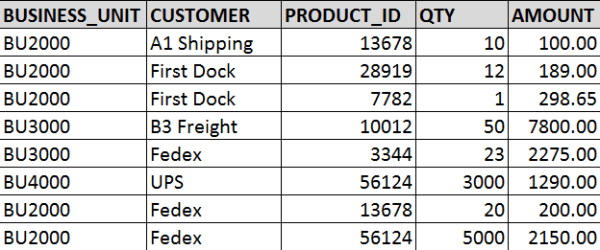
Now, we will use the below table as the example data set that we need to secure with the Business Unit data-level security.  We will call this table TRANSACTION_DATA.
DataLevelSecurity_AllData

When data-level security is applied …

Jane and Xing will be able to access/see the following data:
DataLevelSecurity_BU2000

Bill will able to access/see the following data:
DataLevelSecurity_BU3000_and_BU4000

And Venkat will be able to access/see the following data:
DataLevelSecurity_BU4000

So, now let’s move on to how to implement data-level security in OBI to achieve what was described above.

First, ensure that the USER_TO_BUSINESSUNIT table data is correct and up-to-date, and that there is an ETL in place or some other method of keeping that data updated. You want to ensure that if and when a user’s Business Unit changes, it is reflected in this table so that the user will have access to the appropriate data.

Next, create a Session Initialization Block with row-wise Initialization that will be used to get the list of Business Units that a user has access to.

Open the RPD -> Manage -> Variables
ManageVariables

In the Variable Manager -> Action -> New -> Session -> Initialization Block

This needs to be a “Session” Init block so that it will run each time a user logs in, and gets that user’s list of Business Units; and it needs to be row-wise because some users will have more than 1 value returned.

New_Session_InitBlock

In the Session Variable Initialization Block Dialog, enter a Name for the Init Block.

Then click Edit Data Source
InitBlockDialog

In the Data Source dialog, enter the SQL to get the Business Units for the current logged in user.  Click OK when done which closes this window and brings you back to the Session Variable Initialization Block Dialog.

InitBlockSQL

Click Edit Data Target in the Session Variable Initialization Block Dialog.

Enter your Variable name and check “Row-wise initialization”. As mentioned above, we need to select row-wise because our Init Block SQL may return more than 1 value for some users.   For example, when Bill in our example above data logs in, the Initialization Block will return values BU3000 and BU4000, and store them in the Target Variable, “BUSINESS_UNIT”.

You may also check “Use caching” to store the values in cache. Click OK when done.

SessionInitBlock_RowWiseTargetVariable
Then click OK to save the Init Block.

InitBlock_SetupComplete

Next, apply data filter(s) to the appropriate data set(s) for the appropriate role(s) using the Target Variable above.  You may have role(s) specifically used for data-level security and will need to apply it there, but if not, you will need to apply the filters in each role that has access to the datasets/dashboards/reports that you want to apply data-level security to.

Manage -> Identity
ManageIdentity

Go to the Application Roles tab, and select the Application Role to which you would like to apply the data-level security.  In the APplication Role dialog, click Permissions.
IdentityManager_ApplicationRole

In the Permissions dialog, select the layer and data table that you want to apply the data security to, and then enter the appropriate filter.  In this example, you are filtering by BUSINESS_UNIT.  This will cause the data to be filtered to only include each users’ Business Units.
DataFilter

Save your changes.  You have now applied data-level security.  This is what will happen now:

User logs in -> Init Block runs and selects the Business Units associated with the user’s User ID -> Init Block assigns value(s) to the variable BUSINESS_UNIT -> if the user is a member of a role that has data security applied to -and- the user visits the report -> the data filter will be triggered/run -> User only sees data for the Business Units the user is allowed to see.

Look out for my upcoming post on implementing a special type of data-level security: Reports-To Data Level Security.

Thanks for reading!

Oracle Advanced Security Summary

With the expansion of Self-Service BI, BI Teams need to be more vigilant about protecting sensitive data.
This is a summary of options available for protecting data in Oracle databases.
The information in this post was found here and summarized for a quick read: https://docs.oracle.com/database/121/ASOAG/toc.htm

The 3 features available are (1) Transparent Data Encryption, (2) Data Redaction, and (3) Data Masking and Subsetting Pack.
Here is a quick summary.

(1) Transparent Data Encryption (TDE)

  • Encrypt data so only authorized people can see it
  • Use it to protect sensitive data that maybe in an unprotected environment, such backup data sent to a storage facility
  • You can encrypt an individual column or an entire tablespace
  • Applications using encrypted data can function just the same

(2) Data Redaction

  • Enable the redaction (masking) of column data in tables
  • Redaction can be full, partial, based on regular expressions, or random
    • Full redaction: replaces strings with a single blank space ‘ ‘; numbers with zero (0); dates with 01-JAN-01
    • Partial redaction: replaces a portion of the column data; for example SSN: ***-**-1234
    • Regular expressions: can be used to perform partial or full redactions
    • Random: generates random values for display when accessed
  • The redaction takes place at runtime; not in the permanent data stored

(3) Oracle Enterprise Manager Data Masking and Subsetting Pack

  • enables you to create a “safe” development or test copy of the production database


Let’s look into some more details …

(1) Transparent Data Encryption (TDE)

  • TDE uses a two-tiered key-based architecture
  • TDE column encryption uses the two-tiered key-based architecture to transparently encrypt and decrypt sensitive table columns. The TDE master encryption key is stored in an external security module, which can be an Oracle software keystore or hardware keystore. This TDE master encryption key encrypts and decrypts the TDE table key, which in turn encrypts and decrypts data in the table column.
  • A Key Management Framework is used for TDE to store and manage keys and credentials.
    • Includes the keystore to store the TDE master encryption keys and the management framework to manage keystore and key operations
    • The Oracle keystore stores a history of retired TDE master encryption keys, which enables you to change them and still be able to decrypt data that was encrypted under an earlier TDE master encryption key.
  • Types of Keystores
    • Software keystores
    • Hardware, or HSM-based, keystores
  • Types of Software Keystores:
    • auto-login software keystores that are local to the computer on which they are created.
    • cannot be opened on any computer other than the one on which they are created.
    • typically used for scenarios where additional security is required while supporting an unattended operation
    • Password-based software keystores
      • protected by using a password that you create. You must open this type of keystore before the keys can be retrieved or used.
    • Auto-login software keystores
      • protected by a system-generated password, and do not need to be explicitly opened; automatically opened when accessed.
      • can be used across different systems; ideal for unattended scenarios.
    • Local auto-login software keystores
  • Steps for configuring a Software Keystore
    • Step 1: Set the Software Keystore Location in the sqlnet.ora File
    • Step 2: Create the Software Keystore
    • Step 3: Open the Software Keystore
    • Step 4: Set the Software TDE Master Encryption Key
    • Step 5: Encrypt Your Data
  • Oracle Database checks the sqlnet.ora file for the directory location of the keystore, whether it is a software keystore or a hardware module security (HSM) keystore.
  • You cannot change an existing tablespace to make it encrypted
  • You can create or modify columns to be encrypted


(2) Data Redaction

  • Define data redaction policies to specify what data needs to be redacted
  • Use policy expressions to set whether a user sees the redacted data or the full data
  • Policy Procedures
    • DBMS_REDACT.ADD_POLICY
    • DBMS_REDACT.ALTER_POLICY
    • DBMS_REDACT.ENABLE_POLICY
    • DBMS_REDACT.DISABLE_POLICY
    • DBMS_REDACT.DROP_POLICY
  • Sample scrip
    • BEGIN
      DBMS_REDACT.ADD_POLICY(
      object_schema => ‘hr’,
      object_name => ’employees’,
      column_name => ‘commission_pct’,
      policy_name => ‘redact_com_pct’,
      function_type => DBMS_REDACT.PARTIAL, –partial;  use DBMS_REDACT.FULL for full
      function_parameters => DBMS_REDACT.REDACT_US_SSN_F5,  — many standard params, but it can also be custom
      expression =>  ‘SYS_CONTEXT(”SYS_SESSION_ROLES”,”MGR”) = ”FALSE”’); –allows MGR role to see data
      policy_description => ‘Partially redacts 1st 5 digits in SS numbers’,
      column_description => ‘ssn contains Social Security numbers’);
      END;
      /
  • Use DBMS_REDACT.ALTER_POLICY and action => DBMS_REDACT.ADD_COLUMN to redact multiple columns
  • Redaction takes place on select lists and not on where clauses
  • Be aware of the scenarios when using redacted tables to build other tables or views


(3) Oracle Enterprise Manager Data Masking and Subsetting Pack (DMSP)

  • DMSP enables you to create a development or test copy of the production database, by taking the data in the production database, masking this data in bulk, and/or creating a subset of the data, and then putting the resulting masked data and/or subset of data in the development or test copy.
  • You can still apply Data Redaction policies to the non-production database, in order to redact columns
  • Used to mask data sets when you want to move the data to development and test environments.
  • Data Redaction is mainly designed for redacting at runtime for production applications

——–

I hope you found this helpful to get you started on taking the steps to protect your data internally and externally.
You can visit the link I provided above to find more details.