Category: Data Integration

Convert Semi-Structured Data to a Table (PL-300 Exam Prep)

This post is a part of the PL-300: Microsoft Power BI Data Analyst Exam Prep Hub; and this topic falls under these sections:
Prepare the data (25–30%)
--> Transform and load the data
--> Convert Semi-Structured Data to a Table


Note that there are 10 practice questions (with answers and explanations) for each section to help you solidify your knowledge of the material. Also, there are 2 practice tests with 60 questions each available on the hub below the exam topics section.

In real-world analytics, data rarely arrives in a perfectly tabular format. Instead, analysts often work with semi-structured data, such as JSON files, XML documents, nested records, lists, or poorly formatted spreadsheets.

For the PL-300: Microsoft Power BI Data Analyst exam, Microsoft expects you to understand how to convert semi-structured data into a clean, tabular format using Power Query so it can be modeled, related, and analyzed effectively.


What Is Semi-Structured Data?

Semi-structured data does not follow a strict row-and-column structure but still contains identifiable elements and hierarchy.

Common examples include:

  • JSON files (nested objects and arrays)
  • XML files
  • API responses
  • Excel sheets with nested headers or inconsistent layouts
  • Columns containing records or lists in Power Query

Exam insight: The exam does not focus on file formats alone — it focuses on recognizing non-tabular structures and flattening them correctly.


Where This Happens in Power BI

All semi-structured data transformations are performed in Power Query Editor, typically using:

  • Convert to Table
  • Expand (↔ icon) for records and lists
  • Split Column
  • Transpose
  • Fill Down / Fill Up
  • Promote Headers
  • Remove Blank Rows / Columns

Common Semi-Structured Scenarios (Exam Favorites)

1. JSON and API Data

When loading JSON or API data, Power Query often creates columns containing:

  • Records (objects)
  • Lists (arrays)

These must be expanded to expose fields and values.

Example:

  • Column contains a Record → Expand to columns
  • Column contains a List → Convert to Table, then expand

2. Columns Containing Lists

A column may contain multiple values per row stored as a list.

Solution path:

  • Convert list to table
  • Expand values into rows
  • Rename columns

Exam tip: Lists usually become rows, while records usually become columns.


3. Nested Records

Nested records appear as a single column with structured fields inside.

Solution:

  • Expand the record
  • Select required fields
  • Remove unnecessary nested columns

4. Poorly Formatted Excel Sheets

Common examples:

  • Headers spread across multiple rows
  • Values grouped by section
  • Blank rows separating logical blocks

Typical transformation sequence:

  1. Remove blank rows
  2. Fill down headers
  3. Transpose if needed
  4. Promote headers
  5. Rename columns

Key Power Query Actions for This Topic

Convert to Table

Used when:

  • Data is stored as a list
  • JSON arrays need flattening
  • You need row-level structure

Expand Columns

Used when:

  • Columns contain records or nested tables
  • You want to expose attributes as individual columns

You can:

  • Expand all fields
  • Select specific fields
  • Avoid prefixing column names (important for clean models)

Promote Headers

Often used after:

  • Transposing
  • Importing CSV or Excel files with headers in the first row

Fill Down

Used when:

  • Headers or categories appear once but apply to multiple rows
  • Semi-structured data uses grouping instead of repetition

Impact on the Data Model

Converting semi-structured data properly:

  • Enables relationships to be created
  • Allows DAX measures to work correctly
  • Prevents ambiguous or unusable columns
  • Improves model usability and performance

Improper conversion can lead to:

  • Duplicate values
  • Inconsistent grain
  • Broken relationships
  • Confusing field names

Exam insight: Microsoft expects you to shape data before loading it into the model.


Common Mistakes (Often Tested)

❌ Expanding Too Early

Expanding before cleaning can introduce nulls, errors, or duplicated values.


❌ Keeping Nested Structures

Leaving lists or records unexpanded results in columns that cannot be analyzed.


❌ Forgetting to Promote Headers

Failing to promote headers leads to generic column names (Column1, Column2), which affects clarity and modeling.


❌ Mixing Granularity

Expanding nested data without understanding grain can create duplicated facts.


Best Practices for PL-300 Candidates

  • Inspect column types (Record vs List) before expanding
  • Expand only required fields
  • Rename columns immediately after expansion
  • Normalize data before modeling
  • Know when NOT to expand (e.g., reference tables or metadata)
  • Validate row counts after conversion

How This Appears on the PL-300 Exam

Expect scenario-based questions like:

  • A JSON file contains nested arrays — what transformation is required to analyze it?
  • An API response loads as a list — how do you convert it to rows?
  • A column contains records — how do you expose the attributes for reporting?
  • What step is required before creating relationships?

Correct answers focus on Power Query transformations, not DAX.


Quick Decision Guide

Data ShapeRecommended Action
JSON listConvert to Table
Record columnExpand
Nested list inside recordConvert → Expand
Headers in rowsTranspose + Promote Headers
Grouped labelsFill Down

Final Exam Takeaways

  • Semi-structured data must be flattened before modeling
  • Power Query is the correct place to perform these transformations
  • Understand the difference between lists, records, and tables
  • The exam tests recognition and decision-making, not syntax memorization

Practice Questions

Go to the Practice Exam Questions for this topic.

Resolve Data Import Errors (PL-300 Exam Prep)

This post is a part of the PL-300: Microsoft Power BI Data Analyst Exam Prep Hub; and this topic falls under these sections: 
Prepare the data (25–30%)
--> Profile and clean the data
--> Resolve data import errors


Note that there are 10 practice questions (with answers and explanations) at the end of each section to help you solidify your knowledge of the material. Also, there are 2 practice tests with 60 questions each available on the hub's main page.

Data import errors are a common issue when bringing data into Power BI. These errors typically arise during the Power Query stage and must be resolved before data can be successfully loaded into the data model. The PL-300 exam tests your ability to identify, interpret, and fix these errors using Power Query’s built-in tools and transformations.


What Are Data Import Errors?

Import errors occur when Power BI cannot process or convert incoming data as expected. These errors can arise from:

  • Invalid data formats
  • Incompatible data types
  • Data corruption
  • Unexpected null or missing values
  • Transformation steps that fail

Identifying and resolving these errors early ensures that your dataset is clean, consistent, and ready for modeling and reporting.


Where Import Errors Occur

Import errors are most commonly encountered:

🧩 During Data Type Conversion

When the source value cannot be converted to the target type
(e.g., text "N/A" converted to number)

🧩 In Applied Steps

If a transformation step references a column that doesn’t exist
or expects a format that isn’t present

🧩 While Combining Queries

When merging or appending tables with mismatched structures

🧩 When Parsing Complex Formats

Such as dates in nonstandard formats or malformed JSON


How Power BI Signals Import Errors

In Power Query Editor, import errors are typically shown as:

  • Error icons in the preview cells
  • A warning message in the query results (“Error” link)
  • Red dotted underlines or warnings in applied steps
  • The “Load failed” message when refreshing

The first step in resolving errors is to examine the error details.


Viewing Error Details

When an error appears in Power Query:

  1. Click the Error indicator in the cell or
  2. Use View → Column quality / Column profile

You can also filter the column to show only error values by filtering on Errors.

Exam tip:
Power BI often shows technical error messages, so part of the task is interpreting what the underlying issue is (e.g., type mismatch, invalid format, null where not expected).


Common Import Errors & How to Fix Them

1. Type Conversion Errors

Scenario: A column expected to be numeric contains text such as "Unknown".

Fix Options:

  • Use Replace Errors to substitute a default value
  • Use Replace Values to convert specific text to numeric (e.g., "Unknown"0)
  • Adjust data type after cleaning

Key Idea: Always fix the root cause before changing the data type.


2. Unexpected Null Values

Scenario: A key column has nulls where values are required, causing subsequent transformations to fail.

Fix Options:

  • Replace nulls with default values via Replace Values
  • Remove rows where the column is null
  • Use conditional logic (Add Column → Conditional Column) to handle nulls appropriately

Key Idea: Nulls can break transformations (like merges) if not handled first.


3. Transformation Step Errors

Scenario: A transformation step refers to a column removed or renamed earlier in the applied steps.

Fix Options:

  • Review and reorder steps in the APPLIED STEPS pane
  • Rename the column consistently before referencing it
  • Delete the problematic step and reapply it correctly

Key Idea: Power BI applies steps sequentially. A downstream step can fail if an upstream change invalidates assumptions.


4. Merge/Append Structure Errors

Scenario: You merge or append tables that don’t share compatible column structures (e.g., mismatched data types).

Fix Options:

  • Ensure columns used for merger/join have identical data types
  • Rename or reorder columns to match structures
  • Preclean individual tables before combining

Key Idea: Always validate structure and types before merging or appending tables.


5. Parsing & Date Format Errors

Scenario: Date values import as text due to regional format differences (MM/DD/YYYY vs DD/MM/YYYY).

Fix Options:

  • Change the column data type to Date after validating format
  • Use Transform → Using Locale to define the correct regional format
  • Use Custom Columns to parse dates manually with Date.FromText

Key Idea: Locale-aware parsing helps resolve ambiguous date formats.


Tools to Help Diagnose Import Errors

Power BI provides several tools to help you locate and fix import errors:

🔍 Error Filtering

Filter columns to show only error rows.

📊 Column Quality / Distribution / Profile

Use profiling tools to identify patterns, nulls, and anomalies.

🧠 Step Validation

Hover over each Applied Step to see whether it is valid or failing.

📝 Advanced Editor

Review M code for logic errors or incorrect references.


Best Practices for Fixing Import Errors

1. Clean Before Converting Types
Always fix textual anomalies and nulls before assigning data types.

2. Avoid Hard-Coding Values
Replace problematic values using conditional logic or parameters for maintenance.

3. Inspect Impact of Each Step
Use the Applied Steps pane to ensure each transformation is valid.

4. Test Incrementally
Fix errors one at a time and refresh often to confirm success.

5. Document Assumptions
Add comments or descriptive step names to make logic clearer.


How This Appears on the PL-300 Exam

The exam commonly tests your ability to:

✔ Identify why a query fails (type mismatch, nulls, missing column)
✔ Choose the correct sequence to fix the issue
✔ Understand the difference between Replace Errors and Remove Errors
✔ Apply transformations in the correct order (clean → convert → transform)

Most questions are scenario-based, asking what action you would take next to successfully import data.


Key Exam Takeaways

  • Import errors can be caused by data type mismatches, unexpected nulls, invalid formats, and broken transformation steps.
  • Use Power Query tools to diagnose and resolve errors before loading data into the model.
  • Always understand the root cause before applying a fix.
  • Knowing how to use Replace Errors, Replace Values, Conditional Columns, and Data Type changes is essential.

Practice Questions

Go to the Practice Exam Questions for this topic.

Evaluate Data including Data Statistics & Column Properties (PL-300 Exam Prep)

This post is a part of the PL-300: Microsoft Power BI Data Analyst Exam Prep Hub; and this topic falls under these sections: 
Prepare the data (25–30%)
--> Profile and clean the data
--> Evaluate data, including data statistics and column properties


Note that there are 10 practice questions (with answers and explanations) at the end of each section to help you solidify your knowledge of the material. Also, there are 2 practice tests with 60 questions each available on the hub below the exam topics section.

Before cleaning, transforming, or modeling data, a Power BI Data Analyst must first evaluate the quality and structure of the data. The PL-300 exam tests your ability to profile data, interpret data statistics, and understand column properties to identify issues such as missing values, incorrect data types, outliers, and inconsistent formats.

This topic lives under Profile and clean the data because effective data preparation starts with understanding what the data looks like and how it behaves.


What Does “Evaluate Data” Mean in Power BI?

Evaluating data means using Power BI (specifically Power Query) to:

  • Understand data distribution and completeness
  • Identify data quality issues
  • Verify correct data types and formats
  • Decide what cleaning or transformation steps are required

Rather than guessing, Power BI provides built-in profiling tools that summarize data characteristics automatically.


Data Profiling Tools in Power Query

Power BI includes several profiling features that appear in the Power Query Editor, primarily within the View tab.

Key Data Profiling Options

  • Column quality
  • Column distribution
  • Column profile

These tools help you quickly assess whether a column is usable, trustworthy, and correctly defined.


Column Quality

Column quality provides a high-level overview of data completeness and validity.

It visually displays:

  • Valid values
  • Error values
  • Empty (null) values

Why Column Quality Matters

  • Quickly highlights missing or broken data
  • Helps determine whether rows should be filtered, fixed, or removed
  • Useful for early detection of refresh or ingestion issues

📌 Exam insight:
Questions often test whether you can identify which tool reveals missing or invalid values—column quality is the answer.


Column Distribution

Column distribution shows how values are spread across a column.

It provides:

  • Frequency of values
  • Distinct vs unique counts
  • A histogram-style visualization (for numeric fields)

Common Uses

  • Spotting unexpected duplicates
  • Identifying skewed data
  • Detecting outliers
  • Validating categorical values

📌 Exam insight:
Column distribution is used to understand value frequency, not just nulls or errors.


Column Profile

Column profile gives the most detailed statistical view of a column.

Depending on the data type, it may include:

  • Minimum and maximum values
  • Average
  • Standard deviation
  • Count and distinct count
  • Null count

Typical Use Cases

  • Verifying numeric ranges (e.g., negative values where none should exist)
  • Checking date ranges
  • Understanding overall data shape before modeling

📌 Exam insight:
Column profile helps validate statistical characteristics, not formatting or naming.


Understanding Column Properties

Beyond statistics, Power BI also evaluates column properties, which affect how data behaves in the model and visuals.

Key Column Properties to Evaluate

Data Type

Examples:

  • Whole number
  • Decimal number
  • Text
  • Date / DateTime
  • Boolean

Incorrect data types can:

  • Break visuals
  • Prevent aggregations
  • Cause relationship issues

📌 Exam tip:
Always verify data types before applying transformations or creating measures.


Format

Controls how values appear (e.g., currency, percentage, date format).

  • Affects display, not calculation logic
  • Often adjusted after validating data type

Default Summarization

Determines how numeric columns aggregate in visuals:

  • Sum
  • Average
  • Count
  • Do not summarize

📌 Exam insight:
Default summarization is evaluated when deciding how columns behave in visuals—not during Power Query transformations.


Column Name & Description

  • Clear names improve usability
  • Descriptions help report consumers understand the data

While not deeply technical, the exam may include best-practice questions around data clarity and usability.


Evaluating Data at the Right Stage

Most evaluation tasks occur in Power Query, before data is loaded into the model.

Why?

  • Faster detection of issues
  • Prevents poor-quality data from entering the model
  • Reduces downstream modeling complexity

📌 Key distinction for the exam:

  • Power Query → data evaluation & cleaning
  • Model view → relationships & behavior
  • Report view → visualization

Common Exam Scenarios

You may encounter questions like:

Scenario 1

You need to quickly identify columns with missing or invalid values.

Correct concept: Column quality


Scenario 2

You want to understand how frequently values appear in a categorical column.

Correct concept: Column distribution


Scenario 3

You need to verify numeric ranges and detect outliers.

Correct concept: Column profile


Scenario 4

A numeric column is being treated as text and cannot be aggregated.

Correct concept: Incorrect data type (column property)


Best Practices to Remember

  • Enable profiling tools early in data preparation
  • Validate data types before transformations
  • Use statistics to guide cleaning decisions
  • Don’t rely on visuals alone to detect data quality issues

Key Exam Takeaways

For the PL-300 exam, remember:

  • Column quality → valid, error, and null values
  • Column distribution → frequency and distinct values
  • Column profile → statistical insights
  • Column properties affect aggregation, relationships, and visuals
  • Data evaluation happens primarily in Power Query

Understanding how to interpret what Power BI is telling you about your data is just as important as knowing how to clean it.


Practice Questions

Go to the Practice Exam Questions for this topic.
Glossary – 100 “Data Engineering” Terms

Below is a glossary that includes 100 common “Data Engineering” terms and phrases in alphabetical order. Enjoy!

TermDefinition & Example
Access ControlManaging who can access data. Example: Role-based permissions.
At-Least-Once ProcessingData may be processed more than once. Example: Duplicate-safe pipelines.
At-Most-Once ProcessingData processed zero or one time. Example: No retries on failure.
BackfillProcessing historical data. Example: Reloading last year’s data.
Batch ProcessingProcessing data in scheduled chunks. Example: Daily sales aggregation.
Blue-Green DeploymentDeployment strategy minimizing downtime. Example: Switching pipeline versions.
Canary ReleaseGradual rollout to detect issues. Example: New pipeline tested on 5% of data.
Change Data Capture (CDC)Capturing database changes. Example: Streaming updates from OLTP DB.
CheckpointingSaving progress during processing. Example: Spark streaming checkpoints.
Cloud StorageScalable remote data storage. Example: Azure Data Lake Storage.
Cold StorageLow-cost storage for infrequent access. Example: Archived logs.
Columnar StorageData stored by column instead of row. Example: Parquet files.
CompressionReducing data size. Example: Gzip-compressed files.
Compute EngineSystem performing data processing. Example: Spark cluster.
Consumption LayerData prepared for analytics. Example: Gold layer.
Cost OptimizationReducing infrastructure costs. Example: Query optimization.
Curated LayerCleaned and transformed data. Example: Silver layer.
DAG (Directed Acyclic Graph)Workflow structure with dependencies. Example: Airflow pipeline.
Data CatalogSearchable inventory of data assets. Example: Azure Purview.
Data ContractAgreement defining data structure and expectations. Example: Producer guarantees column names and types.
Data EngineeringThe practice of designing, building, and maintaining data systems. Example: Creating pipelines that feed analytics dashboards.
Data GovernancePolicies for data management and usage. Example: Access control rules.
Data IngestionCollecting data from source systems. Example: Ingesting API data hourly.
Data LakeCentralized storage for raw data. Example: S3-based data lake.
Data LatencyTime delay in data availability. Example: 5-minute pipeline delay.
Data LineageTracking data flow from source to output. Example: Source-to-dashboard trace.
Data MartSubset of warehouse for specific use. Example: Finance data mart.
Data MaskingObscuring sensitive data. Example: Masked credit card numbers.
Data MeshDomain-oriented decentralized data ownership. Example: Teams own their data products.
Data ModelingDesigning data structures for usage. Example: Star schema design.
Data ObservabilityMonitoring data health and pipelines. Example: Freshness alerts.
Data Partition PruningSkipping irrelevant partitions. Example: Querying one date only.
Data PipelineAn automated process that moves and transforms data. Example: Nightly ETL job from CRM to warehouse.
Data PlatformIntegrated set of data tools. Example: End-to-end analytics stack.
Data ProductA dataset treated as a product. Example: Curated customer table.
Data ProfilingAnalyzing data characteristics. Example: Value distributions.
Data QualityAccuracy, completeness, and reliability of data. Example: No duplicate records.
Data ReplayReprocessing historical events. Example: Rebuilding aggregates from logs.
Data RetentionRules for data lifespan. Example: Delete logs after 1 year.
Data SecurityProtecting data from unauthorized access. Example: Encryption at rest.
Data SerializationConverting data for storage or transport. Example: Avro encoding.
Data SinkThe destination where data is stored. Example: Data warehouse.
Data SourceThe origin of data. Example: ERP system, SaaS application.
Data ValidationEnsuring data meets expectations. Example: Null checks.
Data VersioningTracking dataset changes. Example: Snapshot tables.
Data WarehouseOptimized storage for analytics queries. Example: Azure Synapse Analytics.
Dead Letter Queue (DLQ)Storage for failed records. Example: Invalid messages routed for review.
Dimension TableTable storing descriptive attributes. Example: Customer details.
ELTExtract, Load, Transform approach. Example: Transforming data inside Snowflake.
ETLExtract, Transform, Load process. Example: Cleaning data before loading into a database.
Event TimeTimestamp when event occurred. Example: User click time.
Event-Driven ArchitectureSystems reacting to events in real time. Example: Trigger pipeline on file arrival.
Exactly-Once ProcessingEnsuring data is processed only once. Example: Preventing duplicate events.
Fact TableTable storing quantitative measures. Example: Order transactions.
Fault ToleranceSystem resilience to failures. Example: Node failure recovery.
File FormatHow data is stored on disk. Example: Parquet, CSV.
Foreign KeyField linking tables together. Example: CustomerID in orders table.
Full LoadReloading all data. Example: Initial table population.
High AvailabilitySystem uptime and reliability. Example: Multi-zone deployment.
Hot StorageHigh-performance storage for frequent access. Example: Real-time tables.
IdempotencyAbility to rerun pipelines safely. Example: Reprocessing without duplicates.
Incremental LoadLoading only new or changed data. Example: CDC-based ingestion.
IndexingCreating structures to speed queries. Example: Index on order date.
Infrastructure as Code (IaC)Managing infrastructure via code. Example: Terraform scripts.
LakehouseHybrid of data lake and warehouse. Example: Databricks Lakehouse.
Late-Arriving DataData that arrives after expected time. Example: Delayed event logs.
LoggingRecording system events. Example: Job execution logs.
Message QueueBuffer for asynchronous data transfer. Example: Kafka topic for events.
MetadataData about data. Example: Table definitions and lineage.
MetricsQuantitative indicators of performance. Example: Rows processed per run.
OrchestrationCoordinating pipeline execution. Example: DAG scheduling.
PartitioningDividing data for performance. Example: Partitioning by date.
Personally Identifiable Information (PII)Data identifying individuals. Example: Email addresses.
Pipeline MonitoringTracking pipeline execution status. Example: Failure notifications.
Primary KeyUnique identifier for a record. Example: CustomerID.
Processing TimeTimestamp when data is processed. Example: Ingestion time.
Query OptimizationImproving query efficiency. Example: Predicate pushdown.
Raw LayerStorage of unprocessed data. Example: Bronze layer.
Real-Time DataData available with minimal latency. Example: Live dashboard updates.
Retry LogicAutomatic reruns on failure. Example: Retry failed ingestion job.
ScalabilityAbility to handle growing workloads. Example: Auto-scaling clusters.
SchedulerTool managing execution timing. Example: Cron, Airflow.
SchemaThe structure of a dataset. Example: Table columns and data types.
Schema EvolutionHandling schema changes over time. Example: Adding new columns safely.
Secrets ManagementSecure handling of credentials. Example: Key Vault for passwords.
Semi-Structured DataData with flexible schema. Example: JSON, Parquet.
ServerlessInfrastructure managed by provider. Example: Serverless SQL pools.
Serving LayerLayer optimized for consumption. Example: BI-ready tables.
ShardingDistributing data across nodes. Example: User data split across servers.
Snowflake SchemaNormalized version of star schema. Example: Product broken into sub-dimensions.
Star SchemaFact table surrounded by dimensions. Example: Sales fact with date dimension.
Stream ProcessingProcessing data in real time. Example: Clickstream event processing.
Structured DataData with a fixed schema. Example: SQL tables.
Technical DebtLong-term cost of quick fixes. Example: Hardcoded transformations.
ThroughputAmount of data processed per unit time. Example: Records per second.
Transformation LayerLayer where business logic is applied. Example: dbt models.
Unstructured DataData without a predefined structure. Example: Images, PDFs.
WatermarkMarker for processed data. Example: Last processed timestamp.
WindowingGrouping stream data by time windows. Example: 5-minute aggregations.
Workload IsolationSeparating workloads to avoid contention. Example: Dedicated compute pools.

Please share your suggestions for any terms that should be added.

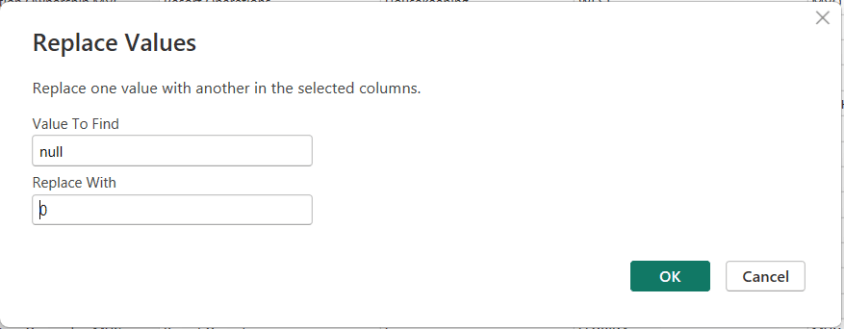
How to replace a NULL value in Power BI Power Query

In Power BI, handling NULL values is a common data-preparation step to get your data ready for analysis, and Power Query makes this easy using the Replace Values feature.

This option is available from both the Home menu …

… and the Transform menu in the Power Query Editor.

To replace NULLs, first select the column where the NULL values exist. Then choose Replace Values. When the dialog box appears, enter null as the value to find and replace, and specify the value you want to use instead—such as 0 for numeric columns or “Unknown” for text columns.

After confirming, Power Query automatically updates the column and records the step.

Thanks for reading!

AI in Human Resources: From Administrative Support to Strategic Workforce Intelligence

“AI in …” series

Human Resources has always been about people—but it’s also about data: skills, performance, engagement, compensation, and workforce planning. As organizations grow more complex and talent markets tighten, HR teams are being asked to move faster, be more predictive, and deliver better employee experiences at scale.

AI is increasingly the engine enabling that shift. From recruiting and onboarding to learning, engagement, and workforce planning, AI is transforming how HR operates and how employees experience work.


How AI Is Being Used in Human Resources Today

AI is now embedded across the end-to-end employee lifecycle:

Talent Acquisition & Recruiting

  • LinkedIn Talent Solutions uses AI to match candidates to roles based on skills, experience, and career intent.
  • Workday Recruiting and SAP SuccessFactors apply machine learning to rank candidates and surface best-fit applicants.
  • Paradox (Olivia) uses conversational AI to automate candidate screening, scheduling, and frontline hiring at scale.

Resume Screening & Skills Matching

  • Eightfold AI and HiredScore use deep learning to infer skills, reduce bias, and match candidates to open roles and future opportunities.
  • AI shifts recruiting from keyword matching to skills-based hiring.

Employee Onboarding & HR Service Delivery

  • ServiceNow HR Service Delivery uses AI chatbots to answer employee questions, guide onboarding, and route HR cases.
  • Microsoft Copilot for HR scenarios help managers draft job descriptions, onboarding plans, and performance feedback.

Learning & Development

  • Degreed and Cornerstone AI recommend personalized learning paths based on role, skills gaps, and career goals.
  • AI-driven content curation adapts as employee skills evolve.

Performance Management & Engagement

  • Betterworks and Lattice use AI to analyze feedback, goal progress, and engagement signals.
  • Sentiment analysis helps HR identify burnout risks or morale issues early.

Workforce Planning & Attrition Prediction

  • Visier applies AI to predict attrition risk, model workforce scenarios, and support strategic planning.
  • HR leaders use AI insights to proactively retain key talent.

Those are just a few examples of AI tools and scenarios in use. There are a lot more AI solutions for HR out there!


Tools, Technologies, and Forms of AI in Use

HR AI platforms combine people data with advanced analytics:

  • Machine Learning & Predictive Analytics
    Used for attrition prediction, candidate ranking, and workforce forecasting.
  • Natural Language Processing (NLP)
    Powers resume parsing, sentiment analysis, chatbots, and document generation.
  • Generative AI & Large Language Models (LLMs)
    Used to generate job descriptions, interview questions, learning content, and policy summaries.
    • Examples: Workday AI, Microsoft Copilot, Google Duet AI, ChatGPT for HR workflows
  • Skills Ontologies & Graph AI
    Used by platforms like Eightfold AI to map skills across roles and career paths.
  • HR AI Platforms
    • Workday AI
    • SAP SuccessFactors Joule
    • Oracle HCM AI
    • UKG Bryte AI

And there are AI tools being used across the entire employee lifecycle.


Benefits Organizations Are Realizing

Companies using AI effectively in HR are seeing meaningful benefits:

  • Faster Time-to-Hire and reduced recruiting costs
  • Improved Candidate and Employee Experience
  • More Objective, Skills-Based Decisions
  • Higher Retention through proactive interventions
  • Scalable HR Operations without proportional headcount growth
  • Better Strategic Workforce Planning

AI allows HR teams to spend less time on manual tasks and more time on high-impact, people-centered work.


Pitfalls and Challenges

AI in HR also carries significant risks if not implemented carefully:

Bias and Fairness Concerns

  • Poorly designed models can reinforce historical bias in hiring, promotion, or pay decisions.

Transparency and Explainability

  • Employees and regulators increasingly demand clarity on how AI-driven decisions are made.

Data Privacy and Trust

  • HR data is deeply personal; misuse or breaches can erode employee trust quickly.

Over-Automation

  • Excessive reliance on AI can make HR feel impersonal, especially in sensitive situations.

Failed AI Projects

  • Some initiatives fail because they focus on automation without aligning to HR strategy or culture.

Where AI Is Headed in Human Resources

The future of AI in HR is more strategic, personalized, and collaborative:

  • AI as an HR Copilot
    Assisting HR partners and managers with decisions, documentation, and insights in real time.
  • Skills-Centric Organizations
    AI continuously mapping skills supply and demand across the enterprise.
  • Personalized Employee Journeys
    Tailored learning, career paths, and engagement strategies.
  • Predictive Workforce Strategy
    AI modeling future talent needs based on business scenarios.
  • Responsible and Governed AI
    Stronger emphasis on ethics, explainability, and compliance.

How Companies Can Gain an Advantage with AI in HR

To use AI as a competitive advantage, organizations should:

  1. Start with High-Trust Use Cases
    Recruiting efficiency, learning recommendations, and HR service automation often deliver fast wins.
  2. Invest in Clean, Integrated People Data
    AI effectiveness depends on accurate and well-governed HR data.
  3. Design for Fairness and Transparency
    Bias testing and explainability should be built in from day one.
  4. Keep Humans in the Loop
    AI should inform decisions—not make them in isolation.
  5. Upskill HR Teams
    AI-literate HR professionals can better interpret insights and guide leaders.
  6. Align AI with Culture and Values
    Technology should reinforce—not undermine—the employee experience.

Final Thoughts

AI is reshaping Human Resources from a transactional function into a strategic engine for talent, culture, and growth. The organizations that succeed won’t be those that automate HR the most—but those that use AI to make work more human, more fair, and more aligned with business outcomes.

In HR, AI isn’t about replacing people—it’s about improving efficiency, elevating the candidate and employee experiences, and helping employees thrive.

AI in Retail and eCommerce: Personalization at Scale Meets Operational Intelligence

“AI in …” series

Retail and eCommerce sit at the intersection of massive data volume, thin margins, and constantly shifting customer expectations. From predicting what customers want to buy next to optimizing global supply chains, AI has become a core capability—not a nice-to-have—for modern retailers.

What makes retail especially interesting is that AI touches both the customer-facing experience and the operational backbone of the business, often at the same time.


How AI Is Being Used in Retail and eCommerce Today

AI adoption in retail spans the full value chain:

Personalized Recommendations & Search

  • Amazon uses machine learning models to power its recommendation engine, driving a significant portion of total sales through “customers also bought” and personalized homepages.
  • Netflix-style personalization, but for shopping: retailers tailor product listings, pricing, and promotions in real time.

Demand Forecasting & Inventory Optimization

  • Walmart applies AI to forecast demand at the store and SKU level, accounting for seasonality, local events, and weather.
  • Target uses AI-driven forecasting to reduce stockouts and overstocks, improving both customer satisfaction and margins.

Dynamic Pricing & Promotions

  • Retailers use AI to adjust prices based on demand, competitor pricing, inventory levels, and customer behavior.
  • Amazon is the most visible example, adjusting prices frequently using algorithmic pricing models.

Customer Service & Virtual Assistants

  • Shopify merchants use AI-powered chatbots for order tracking, returns, and product questions.
  • H&M and Sephora deploy conversational AI for styling advice and customer support.

Fraud Detection & Payments

  • AI models detect fraudulent transactions in real time, especially important for eCommerce and buy-now-pay-later (BNPL) models.

Computer Vision in Physical Retail

  • Amazon Go stores use computer vision, sensors, and deep learning to enable cashierless checkout.
  • Zara (Inditex) uses computer vision to analyze in-store traffic patterns and product engagement.

Tools, Technologies, and Forms of AI in Use

Retailers typically rely on a mix of foundational and specialized AI technologies:

  • Machine Learning & Deep Learning
    Used for forecasting, recommendations, pricing, and fraud detection.
  • Natural Language Processing (NLP)
    Powers chatbots, sentiment analysis of reviews, and voice-based shopping.
  • Computer Vision
    Enables cashierless checkout, shelf monitoring, loss prevention, and in-store analytics.
  • Generative AI & Large Language Models (LLMs)
    Used for product description generation, marketing copy, personalized emails, and internal copilots.
  • Retail AI Platforms
    • Salesforce Einstein for personalization and customer insights
    • Adobe Sensei for content, commerce, and marketing optimization
    • Shopify Magic for product descriptions, FAQs, and merchant assistance
    • AWS, Azure, and Google Cloud AI for scalable ML infrastructure

Benefits Retailers Are Realizing

Retailers that have successfully adopted AI report measurable benefits:

  • Higher Conversion Rates through personalization
  • Improved Inventory Turns and reduced waste
  • Lower Customer Service Costs via automation
  • Faster Time to Market for campaigns and promotions
  • Better Customer Loyalty through more relevant, consistent experiences

In many cases, AI directly links customer experience improvements to revenue growth.


Pitfalls and Challenges

Despite widespread adoption, AI in retail is not without risk:

Bias and Fairness Issues

  • Recommendation and pricing algorithms can unintentionally disadvantage certain customer groups or reinforce biased purchasing patterns.

Data Quality and Fragmentation

  • Poor product data, inconsistent customer profiles, or siloed systems limit AI effectiveness.

Over-Automation

  • Some retailers have over-relied on AI-driven customer service, frustrating customers when human support is hard to reach.

Cost vs. ROI Concerns

  • Advanced AI systems (especially computer vision) can be expensive to deploy and maintain, making ROI unclear for smaller retailers.

Failed or Stalled Pilots

  • AI initiatives sometimes fail because they focus on experimentation rather than operational integration.

Where AI Is Headed in Retail and eCommerce

Several trends are shaping the next phase of AI in retail:

  • Hyper-Personalization
    Experiences tailored not just to the customer, but to the moment—context, intent, and channel.
  • Generative AI at Scale
    Automated creation of product content, marketing campaigns, and even storefront layouts.
  • AI-Driven Merchandising
    Algorithms suggesting what products to carry, where to place them, and how to price them.
  • Blended Physical + Digital Intelligence
    More retailers combining in-store computer vision with online behavioral data.
  • AI as a Copilot for Merchants and Marketers
    Helping teams plan assortments, campaigns, and promotions faster and with more confidence.

How Retailers Can Gain an Advantage

To compete effectively in this fast-moving environment, retailers should:

  1. Focus on Data Foundations First
    Clean product data, unified customer profiles, and reliable inventory systems are essential.
  2. Start with Customer-Critical Use Cases
    Personalization, availability, and service quality usually deliver the fastest ROI.
  3. Balance Automation with Human Oversight
    AI should augment merchandisers, marketers, and store associates—not replace them outright.
  4. Invest in Responsible AI Practices
    Transparency, fairness, and explainability build trust with customers and regulators.
  5. Upskill Retail Teams
    Merchants and marketers who understand AI can use it more creatively and effectively.

Final Thoughts

AI is rapidly becoming the invisible engine behind modern retail and eCommerce. The winners won’t necessarily be the companies with the most advanced algorithms—but those that combine strong data foundations, thoughtful AI governance, and a relentless focus on customer experience.

In retail, AI isn’t just about selling more—it’s about selling smarter, at scale.

Exam Prep Hub for DP-600: Implementing Analytics Solutions Using Microsoft Fabric

This is your one-stop hub with information for preparing for the DP-600: Implementing Analytics Solutions Using Microsoft Fabric certification exam. Upon successful completion of the exam, you earn the Fabric Analytics Engineer Associate certification.

This hub provides information directly here, links to a number of external resources, tips for preparing for the exam, practice tests, and section questions to help you prepare. Bookmark this page and use it as a guide to ensure that you are fully covering all relevant topics for the exam and using as many of the resources available as possible. We hope you find it convenient and helpful.

Why do the DP-600: Implementing Analytics Solutions Using Microsoft Fabric exam to gain the Fabric Analytics Engineer Associate certification?

Most likely, you already know why you want to earn this certification, but in case you are seeking information on its benefits, here are a few:
(1) there is a possibility for career advancement because Microsoft Fabric is a leading data platform used by companies of all sizes, all over the world, and is likely to become even more popular
(2) greater job opportunities due to the edge provided by the certification
(3) higher earnings potential,
(4) you will expand your knowledge about the Fabric platform by going beyond what you would normally do on the job and
(5) it will provide immediate credibility about your knowledge, and
(6) it may, and it should, provide you with greater confidence about your knowledge and skills.


Important DP-600 resources:


DP-600: Skills measured as of October 31, 2025:

Here you can learn in a structured manner by going through the topics of the exam one-by-one to ensure full coverage; click on each hyperlinked topic below to go to more information about it:

Skills at a glance

  • Maintain a data analytics solution (25%-30%)
  • Prepare data (45%-50%)
  • Implement and manage semantic models (25%-30%)

Maintain a data analytics solution (25%-30%)

Implement security and governance

Maintain the analytics development lifecycle

Prepare data (45%-50%)

Get Data

Transform Data

Query and analyze data

Implement and manage semantic models (25%-30%)

Design and build semantic models

Optimize enterprise-scale semantic models


Practice Exams:

We have provided 2 practice exams with answers to help you prepare.

DP-600 Practice Exam 1 (60 questions with answer key)

DP-600 Practice Exam 2 (60 questions with answer key)


Good luck to you passing the DP-600: Implementing Analytics Solutions Using Microsoft Fabric certification exam and earning the Fabric Analytics Engineer Associate certification!

Implement Performance Improvements in Queries and Report Visuals (DP-600 Exam Prep)

This post is a part of the DP-600: Implementing Analytics Solutions Using Microsoft Fabric Exam Prep Hub; and this topic falls under these sections: 
Implement and manage semantic models (25-30%)
--> Optimize enterprise-scale semantic models
--> Implement performance improvements in queries and report visuals

Performance optimization is a critical skill for the Fabric Analytics Engineer. In enterprise-scale semantic models, poor query design, inefficient DAX, or overly complex visuals can significantly degrade report responsiveness and user experience. This exam section focuses on identifying performance bottlenecks and applying best practices to improve query execution, model efficiency, and report rendering.


1. Understand Where Performance Issues Occur

Performance problems typically fall into three layers:

a. Data & Storage Layer

  • Storage mode (Import, DirectQuery, Direct Lake, Composite)
  • Data source latency
  • Table size and cardinality
  • Partitioning and refresh strategies

b. Semantic Model & Query Layer

  • DAX calculation complexity
  • Relationships and filter propagation
  • Aggregation design
  • Use of calculation groups and measures

c. Report & Visual Layer

  • Number and type of visuals
  • Cross-filtering behavior
  • Visual-level queries
  • Use of slicers and filters

DP-600 questions often test your ability to identify the correct layer where optimization is needed.


2. Optimize Queries and Semantic Model Performance

a. Choose the Appropriate Storage Mode

  • Use Import for small-to-medium datasets requiring fast interactivity
  • Use Direct Lake for large OneLake Delta tables with high concurrency
  • Use Composite models to balance performance and real-time access
  • Avoid unnecessary DirectQuery when Import or Direct Lake is feasible

b. Reduce Data Volume

  • Remove unused columns and tables
  • Reduce column cardinality (e.g., avoid high-cardinality text columns)
  • Prefer surrogate keys over natural keys
  • Disable Auto Date/Time when not needed

c. Optimize Relationships

  • Use single-direction relationships by default
  • Avoid unnecessary bidirectional filters
  • Ensure relationships follow a star schema
  • Avoid many-to-many relationships unless required

d. Use Aggregations

  • Create aggregation tables to pre-summarize large fact tables
  • Enable query hits against aggregation tables before scanning detailed data
  • Especially valuable in composite models

3. Improve DAX Query Performance

a. Write Efficient DAX

  • Prefer measures over calculated columns
  • Use variables (VAR) to avoid repeated calculations
  • Minimize row context where possible
  • Avoid excessive iterators (SUMX, FILTER) over large tables

b. Use Filter Context Efficiently

  • Prefer CALCULATE with simple filters
  • Avoid complex nested FILTER expressions
  • Use KEEPFILTERS and REMOVEFILTERS intentionally

c. Avoid Expensive Patterns

  • Avoid EARLIER in favor of variables
  • Avoid dynamic table generation inside visuals
  • Minimize use of ALL when ALLSELECTED or scoped filters suffice

4. Optimize Report Visual Performance

a. Reduce Visual Complexity

  • Limit the number of visuals per page
  • Avoid visuals that generate multiple queries (e.g., complex custom visuals)
  • Use summary visuals instead of detailed tables where possible

b. Control Interactions

  • Disable unnecessary visual interactions
  • Avoid excessive cross-highlighting
  • Use report-level filters instead of visual-level filters when possible

c. Optimize Slicers

  • Avoid slicers on high-cardinality columns
  • Use dropdown slicers instead of list slicers
  • Limit the number of slicers on a page

d. Prefer Measures Over Visual Calculations

  • Avoid implicit measures created by dragging numeric columns
  • Define explicit measures in the semantic model
  • Reuse measures across visuals to improve cache efficiency

5. Use Performance Analysis Tools

a. Performance Analyzer

  • Identify slow visuals
  • Measure DAX query duration
  • Distinguish between query time and visual rendering time

b. Query Diagnostics (Power BI Desktop)

  • Analyze backend query behavior
  • Identify expensive DirectQuery or Direct Lake operations

c. DAX Studio (Advanced)

  • Analyze query plans
  • Measure storage engine vs formula engine time
  • Identify inefficient DAX patterns

(You won’t be tested on tool UI details, but knowing when and why to use them is exam-relevant.)


6. Common DP-600 Exam Scenarios

You may be asked to:

  • Identify why a report is slow and choose the best optimization
  • Identify the bottleneck layer (model, query, or visual)
  • Select the most appropriate storage mode for performance
  • Choose the least disruptive, most effective optimization
  • Improve a slow DAX measure
  • Reduce visual rendering time without changing the data source
  • Optimize performance for enterprise-scale models
  • Apply enterprise-scale best practices, not just quick fixes

Key Exam Takeaways

  • Always optimize the model first, visuals second
  • Star schema + clean relationships = better performance
  • Efficient DAX matters more than clever DAX
  • Fewer visuals and interactions = faster reports
  • Aggregations and Direct Lake are key enterprise-scale tools

Practice Questions:

Go to the Practice Exam Questions for this topic.

Design and Build Composite Models (DP-600 Exam Prep)

This post is a part of the DP-600: Implementing Analytics Solutions Using Microsoft Fabric Exam Prep Hub; and this topic falls under these sections: 
Implement and manage semantic models (25-30%)
--> Design and build semantic models
--> Design and Build Composite Models

What Is a Composite Model?

A composite model in Power BI and Microsoft Fabric combines data from multiple data sources and multiple storage modes in a single semantic model. Rather than importing all data into the model’s in-memory cache, composite models let you mix different query/storage patterns such as:

  • Import
  • DirectQuery
  • Direct Lake
  • Live connections

Composite models enable flexible design and optimized performance across diverse scenarios.


Why Composite Models Matter

Semantic models often need to support:

  • Large datasets that cannot be imported fully
  • Real-time or near-real-time requirements
  • Federation across disparate sources
  • Mix of highly dynamic and relatively static data

Composite models let you combine the benefits of in-memory performance with direct source access.


Core Concepts

Storage Modes in Composite Models

Storage ModeDescriptionTypical Use
ImportData is cached in the semantic model memoryFast performance for static or moderately sized data
DirectQueryQueries are pushed to the source at runtimeReal-time or large relational sources
Direct LakeQueries Delta tables in OneLakeLarge OneLake data with faster interactive access
Live ConnectionDelegates all query processing to an external modelShared enterprise semantic models

A composite model may include tables using different modes — for example, imported dimension tables and DirectQuery/Direct Lake fact tables.


Key Features of Composite Models

1. Table-Level Storage Modes

Every table in a composite model may use a different storage mode:

  • Dimensions may be imported
  • Fact tables may use DirectQuery or Direct Lake
  • Bridge or helper tables may be imported

This flexibility enables performance and freshness trade-offs.


2. Relationships Across Storage Modes

Relationships can span tables even if they use different storage modes, enabling:

  • Filtering between imported and DirectQuery tables
  • Cross-mode joins (handled intelligently by the engine)

Underlying engines push queries to the appropriate source (SQL, OneLake, Semantic layer), depending on where the data resides.


3. Aggregations and Hierarchies

You can define:

  • Aggregated tables (pre-summarized import tables)
  • Detail tables (DirectQuery or Direct Lake)

Power BI automatically uses aggregations when a visual’s query can be satisfied with summary data, enhancing performance.


4. Calculation Groups and Measures

Composite models work with complex semantic logic:

  • Calculation groups (standardized transformations)
  • DAX measures that span imported and DirectQuery tables

These models require careful modeling to ensure that context transitions behave predictably.


When to Use Composite Models

Composite models are ideal when:

A. Data Is Too Large to Import

  • Large fact tables (> hundreds of millions of rows)
  • Delta/OneLake data too big for full in-memory import
  • Use Direct Lake for these, while importing dimensions

B. Real-Time Data Is Required

  • Operational reporting
  • Systems with high update frequency
  • Use DirectQuery to relational sources

C. Multiple Data Sources Must Be Combined

  • Relational databases
  • OneLake & Delta
  • Cloud services (e.g., Synapse, SQL DB, Spark)
  • On-prem gateways

Composite models let you combine these seamlessly.

D. Different Performance vs Freshness Needs

  • Import for static master data
  • DirectQuery or Direct Lake for dynamic fact data

Composite vs Pure Models

AspectImport OnlyComposite
PerformanceVery fastDepends on source/query pattern
FreshnessScheduled refreshReal-time/near-real-time possible
Source diversityLimitedMultiple heterogeneous sources
Model complexitySimplerHigher

Query Execution and Optimization

Query Folding

  • DirectQuery and Power Query transformations rely on query folding to push logic back to the source
  • Query folding is essential for performance in composite models

Storage Mode Selection

Good modeling practices for composite models include:

  • Import small dimension tables
  • Direct Lake for large storage in OneLake
  • DirectQuery for real-time relational sources
  • Use aggregations to optimize performance

Modeling Considerations

1. Relationship Direction

  • Prefer single-direction relationships
  • Use bidirectional filtering only when required (careful with ambiguity)

2. Data Type Consistency

  • Ensure fields used in joins have matching data types
  • In composite models, mismatches can cause query fallbacks

3. Cardinality

  • High cardinality DirectQuery columns can slow queries
  • Use star schema patterns

4. Security

  • Row-level security crosses modes but must be carefully tested
  • Security logic must consider where filters are applied

Common Exam Scenarios

Exam questions may ask you to:

  • Choose between Import, DirectQuery, Direct Lake and composite
  • Assess performance vs freshness requirements
  • Determine query folding feasibility
  • Identify correct relationship patterns across modes

Example prompt:

“Your model combines a large OneLake dataset and a small dimension table. Users need current data daily but also fast filtering. Which storage and modeling approach is best?”

Correct exam choices often point to composite models using Direct Lake + imported dimensions.


Best Practices

  • Define a clear star schema even in composite models
  • Import dimension tables where reasonable
  • Use aggregations to improve performance for heavy visuals
  • Limit direct many-to-many relationships
  • Use calculation groups to apply analytics consistently
  • Test query performance across storage modes

Exam-Ready Summary/Tips

Composite models enable flexible and scalable semantic models by mixing storage modes:

  • Import – best performance for static or moderate data
  • DirectQuery – real-time access to source systems
  • Direct Lake – scalable querying of OneLake Delta data
  • Live Connection – federated or shared datasets

Design composite models to balance performance, freshness, and data volume, using strong schema design and query optimization.

For DP-600, always evaluate:

  • Data volume
  • Freshness requirements
  • Performance expectations
  • Source location (OneLake vs relational)

Composite models are frequently the correct answer when these requirements conflict.


Practice Questions:

Here are 10 questions to test and help solidify your learning and knowledge. As you review these and other questions in your preparation, make sure to …

  • Identifying and understand why an option is correct (or incorrect) — not just which one
  • Look for and understand the usage scenario of keywords in exam questions to guide you
  • Expect scenario-based questions rather than direct definitions

1. What is the primary purpose of using a composite model in Microsoft Fabric?

A. To enable row-level security across workspaces
B. To combine multiple storage modes and data sources in one semantic model
C. To replace DirectQuery with Import mode
D. To enforce star schema design automatically

Correct Answer: B

Explanation:
Composite models allow you to mix Import, DirectQuery, Direct Lake, and Live connections within a single semantic model, enabling flexible performance and data-freshness tradeoffs.


2. You are designing a semantic model with a very large fact table stored in OneLake and small dimension tables. Which storage mode combination is most appropriate?

A. Import all tables
B. DirectQuery for all tables
C. Direct Lake for the fact table and Import for dimension tables
D. Live connection for the fact table and Import for dimensions

Correct Answer: C

Explanation:
Direct Lake is optimized for querying large Delta tables in OneLake, while importing small dimension tables improves performance for filtering and joins.


3. Which storage mode allows querying OneLake Delta tables without importing data into memory?

A. Import
B. DirectQuery
C. Direct Lake
D. Live Connection

Correct Answer: C

Explanation:
Direct Lake queries Delta tables directly in OneLake, combining scalability with better interactive performance than traditional DirectQuery.


4. What happens when a DAX query in a composite model references both imported and DirectQuery tables?

A. The query fails
B. The data must be fully imported
C. The engine generates a hybrid query plan
D. All tables are treated as DirectQuery

Correct Answer: C

Explanation:
Power BI’s engine generates a hybrid query plan, pushing operations to the source where possible and combining results with in-memory data.


5. Which scenario most strongly justifies using a composite model instead of Import mode only?

A. All data fits in memory and refreshes nightly
B. The dataset is static and small
C. Users require near-real-time data from a large relational source
D. The model contains only calculated tables

Correct Answer: C

Explanation:
Composite models are ideal when real-time or near-real-time access is needed, especially for large datasets that are impractical to import.


6. In a composite model, which table type is typically best suited for Import mode?

A. High-volume transactional fact tables
B. Streaming event tables
C. Dimension tables with low cardinality
D. Tables requiring second-by-second freshness

Correct Answer: C

Explanation:
Importing dimension tables improves query performance and reduces load on source systems due to their relatively small size and low volatility.


7. How do aggregation tables improve performance in composite models?

A. By replacing DirectQuery with Import
B. By pre-summarizing data to satisfy queries without scanning detail tables
C. By eliminating the need for relationships
D. By enabling bidirectional filtering automatically

Correct Answer: B

Explanation:
Aggregations allow Power BI to answer queries using pre-summarized Import tables, avoiding expensive queries against large DirectQuery or Direct Lake fact tables.


8. Which modeling pattern is strongly recommended when designing composite models?

A. Snowflake schema
B. Flat tables
C. Star schema
D. Many-to-many relationships

Correct Answer: C

Explanation:
A star schema simplifies relationships, improves performance, and reduces ambiguity—especially important in composite and cross-storage-mode models.


9. What is a potential risk of excessive bidirectional relationships in composite models?

A. Reduced data freshness
B. Increased memory consumption
C. Ambiguous filter paths and unpredictable query behavior
D. Loss of row-level security

Correct Answer: C

Explanation:
Bidirectional relationships can introduce ambiguity, cause unexpected filtering, and negatively affect query performance—risks that are amplified in composite models.


10. Which feature allows a composite model to reuse an enterprise semantic model while extending it with additional data?

A. Direct Lake
B. Import mode
C. Live connection with local tables
D. Calculation groups

Correct Answer: C

Explanation:
A live connection with local tables enables extending a shared enterprise semantic model by adding new tables and measures, forming a composite model.