Category: Data Cleaning

Glossary – 100 “Data Quality & Data Validation” terms

Below is a glossary that includes 100 common “Data Quality & Data Validation” terms and phrases in alphabetical order. Enjoy!

TermDefinition & Example
 Business RuleBusiness-defined constraint on data. Example: Credit limit approval rules.
 Check ConstraintSQL rule enforcing condition. Example: Age > 0.
 ConstraintRule enforced at database level. Example: NOT NULL constraint.
 Continuous ValidationOngoing automated validation. Example: Streaming pipelines.
 Corrective ControlFixes identified errors. Example: Data reload.
 Data AccuracyDegree to which data correctly represents reality. Example: Correct customer addresses.
 Data Accuracy RatePercentage of correct values. Example: 99.5% accurate.
 Data AnomalyUnexpected or suspicious data value. Example: Sudden traffic spike.
 Data BiasSystematic data distortion. Example: Sampling bias.
 Data CertificationMarking trusted datasets. Example: Certified gold tables.
 Data CleansingCorrecting or removing invalid data. Example: Fixing malformed phone numbers.
 Data CompletenessPresence of all required data elements. Example: No missing customer IDs.
 Data Completeness RatePercentage of populated fields. Example: 97% filled.
 Data ConfidenceTrust users have in data. Example: Executive reporting trust.
 Data ConformanceAdherence to standards or schemas. Example: ISO country codes.
 Data ConsistencyUniformity of data across systems. Example: Same currency code everywhere.
 Data DeduplicationRemoving duplicate records. Example: Merge customer profiles.
 Data DefectSpecific instance of poor quality. Example: Invalid customer record.
 Data DriftGradual change in data patterns. Example: Customer behavior shifts.
 Data EnrichmentEnhancing data with additional attributes. Example: Adding demographic data.
 Data ErrorIncorrect or invalid data value. Example: Misspelled city name.
 Data ExceptionApproved rule deviation. Example: Legacy records.
 Data Exception HandlingProcess for managing violations. Example: Manual review.
 Data FreshnessHow current the data is. Example: Last updated timestamp.
 Data GovernanceFramework overseeing data quality. Example: Stewardship model.
 Data ImputationFilling missing values. Example: Replacing null with average.
 Data IntegrityAccuracy and consistency over the lifecycle. Example: Foreign key relationships enforced.
 Data IssueIdentified quality problem. Example: Missing values.
 Data LatencyDelay between event and availability. Example: 2-hour ingestion lag.
 Data LineageTracking data flow and transformations. Example: Source to dashboard.
 Data MatchingIdentifying records referring to same entity. Example: Customer record linkage.
 Data NoiseIrrelevant or misleading data. Example: Test records in prod.
 Data ObservabilityVisibility into data health and behavior. Example: Pipeline monitoring.
 Data OwnershipAccountability for data quality. Example: Business owner.
 Data PrecisionLevel of detail in data. Example: Decimal places.
 Data ProfilingAnalyzing data to understand structure and quality. Example: Null percentage analysis.
 Data QualityMeasure of how fit data is for its intended use. Example: Accurate sales totals in reports.
 Data Quality AlertNotification of quality issue. Example: Slack alert.
 Data Quality AuditFormal assessment of data quality. Example: Quarterly review.
 Data Quality AutomationAutomated quality processes. Example: CI/CD checks.
 Data Quality BacklogTracked list of quality issues. Example: Jira tickets.
 Data Quality BenchmarkComparison standard. Example: Industry averages.
 Data Quality DashboardVisual view of quality metrics. Example: Completeness trends.
 Data Quality DimensionCategory used to measure quality. Example: Accuracy, completeness.
 Data Quality FrameworkStructured quality approach. Example: DAMA dimensions.
 Data Quality IncidentMajor quality failure. Example: Incorrect financial report.
 Data Quality KPIMetric tracking quality performance. Example: Duplicate rate.
 Data Quality MaturityLevel of quality capability. Example: Reactive vs proactive.
 Data Quality MonitoringOngoing quality measurement. Example: Daily freshness checks.
 Data Quality Ownership MatrixMapping quality responsibility. Example: RACI chart.
 Data Quality ProgramOrganization-wide quality initiative. Example: Enterprise DQ strategy.
 Data Quality RegressionReintroduced quality issue. Example: After schema change.
 Data Quality Rule EngineSystem executing validation rules. Example: Automated checks.
 Data Quality Rule ViolationFailure to meet a rule. Example: Negative balance.
 Data Quality ScoreNumeric representation of data quality. Example: 98% completeness.
 Data Quality SLAQuality expectations agreement. Example: 99% accuracy target.
 Data Quality SLA BreachFailure to meet quality targets. Example: Accuracy below SLA.
 Data Quality TrendQuality performance over time. Example: Monthly improvement.
 Data ReconciliationComparing datasets for consistency. Example: Finance system vs warehouse.
 Data ReliabilityConsistent data performance over time. Example: Stable metrics.
 Data RemediationFixing data quality issues. Example: Reprocessing failed loads.
 Data SamplingChecking subset of data. Example: Random record review.
 Data StandardizationTransforming data into a common format. Example: Converting dates to ISO format.
 Data StewardRole responsible for data quality. Example: Customer data steward.
 Data ThresholdAcceptable quality limit. Example: ≤ 1% nulls.
 Data TimelinessData availability within required timeframes. Example: Daily data refresh by 6 AM.
 Data Trust ScoreComposite measure of reliability. Example: Internal trust index.
 Data UniquenessNo unintended duplicates exist. Example: One row per customer.
 Data ValidationProcess of checking data against rules. Example: Rejecting invalid dates.
 Data Validation PipelineAutomated validation process. Example: Ingestion checks.
 Data ValidityData conforms to defined formats and rules. Example: Email follows standard pattern.
 Data VerificationConfirming data accuracy. Example: Source system comparison.
 Detective ControlFinds errors after entry. Example: Quality audits.
 Domain ValidationRestricting values to a set. Example: Status = Active/Inactive.
 Downstream ValidationValidating analytical outputs. Example: Dashboard totals.
 Duplicate DetectionIdentifying duplicate records. Example: Same email address twice.
 Error RateProportion of invalid records. Example: 2% failures.
 Foreign KeyReference to another table. Example: Order → Customer.
 Format ValidationEnsuring correct data format. Example: YYYY-MM-DD dates.
 Golden DatasetHighest-quality dataset version. Example: Curated finance data.
 Hard ValidationBlocking invalid data. Example: Reject invalid IDs.
 Null CheckEnsuring required fields are populated. Example: Order ID not null.
 Outlier DetectionIdentifying abnormal values. Example: Negative revenue amounts.
 Pattern MatchingValidating via regex patterns. Example: Postal code validation.
 Post-Load ValidationChecks after data load. Example: Row count comparisons.
 Pre-Load ValidationChecks before data ingestion. Example: File schema validation.
 Preventive ControlStops errors before entry. Example: Input validation.
 Primary KeyUnique record identifier. Example: CustomerID.
 Quality GateMandatory validation checkpoint. Example: Before publishing data.
 Range ValidationChecking values fall within limits. Example: Age between 0 and 120.
 Referential IntegrityValid relationships between tables. Example: Orders reference valid customers.
 Root Cause AnalysisIdentifying source of data issues. Example: ETL failure investigation.
 Schema ValidationChecking data structure against schema. Example: Column data types.
 Soft ValidationWarning without rejecting data. Example: Flag unusual values.
 Source System ValidationChecking upstream data. Example: CRM record checks.
 Statistical ValidationUsing statistics to validate data. Example: Distribution checks.
 Trusted DatasetData approved for consumption. Example: Executive KPIs.
 Validation CoverageProportion of data checked. Example: 100% of critical fields.
 Validation RuleCondition data must satisfy. Example: Quantity must be ≥ 0.
 Validation ThresholdLimit triggering failure. Example: >5% nulls.

Self-Service Analytics: Empowering Users While Maintaining Trust and Control

Self-service analytics has become a cornerstone of modern data strategies. As organizations generate more data and business users demand faster insights, relying solely on centralized analytics teams creates bottlenecks. Self-service analytics shifts part of the analytical workload closer to the business—while still requiring strong foundations in data quality, governance, and enablement.

This article is based on a detailed presentation I did at a HIUG conference a few years ago.


What Is Self-Service Analytics?

Self-service analytics refers to the ability for business users—such as analysts, managers, and operational teams—to access, explore, analyze, and visualize data on their own, without requiring constant involvement from IT or centralized data teams.

Instead of submitting requests and waiting days or weeks for reports, users can:

  • Explore curated datasets
  • Build their own dashboards and reports
  • Answer ad-hoc questions in real time
  • Make data-driven decisions within their daily workflows

Self-service does not mean unmanaged or uncontrolled analytics. Successful self-service environments combine user autonomy with governed, trusted data and clear usage standards.


Why Implement or Provide Self-Service Analytics?

Organizations adopt self-service analytics to address speed, scalability, and empowerment challenges.

Key Benefits

  • Faster Decision-Making
    Users can answer questions immediately instead of waiting in a reporting queue.
  • Reduced Bottlenecks for Data Teams
    Central teams spend less time producing basic reports and more time on high-value work such as modeling, optimization, and advanced analytics.
  • Greater Business Engagement with Data
    When users interact directly with data, data literacy improves and analytics becomes part of everyday decision-making.
  • Scalability
    A small analytics team cannot serve hundreds or thousands of users manually. Self-service scales insight generation across the organization.
  • Better Alignment with Business Context
    Business users understand their domain best and can explore data with that context in mind, uncovering insights that might otherwise be missed.

Why Not Implement Self-Service Analytics? (Challenges & Risks)

While powerful, self-service analytics introduces real risks if implemented poorly.

Common Challenges

  • Data Inconsistency & Conflicting Metrics
    Without shared definitions, different users may calculate the same KPI differently, eroding trust.
  • “Spreadsheet Chaos” at Scale
    Self-service without governance can recreate the same problems seen with uncontrolled Excel usage—just in dashboards.
  • Overloaded or Misleading Visuals
    Users may build reports that look impressive but lead to incorrect conclusions due to poor data modeling or statistical misunderstandings.
  • Security & Privacy Risks
    Improper access controls can expose sensitive or regulated data.
  • Low Adoption or Misuse
    Without training and support, users may feel overwhelmed or misuse tools, resulting in poor outcomes.
  • Shadow IT
    If official self-service tools are too restrictive or confusing, users may turn to unsanctioned tools and data sources.

What an Environment Looks Like Without Self-Service Analytics

In organizations without self-service analytics, patterns tend to repeat:

  • Business users submit report requests via tickets or emails
  • Long backlogs form for even simple questions
  • Analytics teams become report factories
  • Insights arrive too late to influence decisions
  • Users create their own disconnected spreadsheets and extracts
  • Trust in data erodes due to multiple versions of the truth

Decision-making becomes reactive, slow, and often based on partial or outdated information.


How Things Change With Self-Service Analytics

When implemented well, self-service analytics fundamentally changes how an organization works with data.

  • Users explore trusted datasets independently
  • Analytics teams focus on enablement, modeling, and governance
  • Insights are discovered earlier in the decision cycle
  • Collaboration improves through shared dashboards and metrics
  • Data becomes part of daily conversations, not just monthly reports

The organization shifts from report consumption to insight exploration. Well, that’s the goal.


How to Implement Self-Service Analytics Successfully

Self-service analytics is as much an operating model as it is a technology choice. The list below outlines important aspects that must be considered, decided on, and implemented when planning the implementation of self-service analytics.

1. Data Foundation

  • Curated, well-modeled datasets (often star schemas or semantic models)
  • Clear metric definitions and business logic
  • Certified or “gold” datasets for common use cases
  • Data freshness aligned with business needs

A strong semantic layer is critical—users should not have to interpret raw tables.


2. Processes

  • Defined workflows for dataset creation and certification
  • Clear ownership for data products and metrics
  • Feedback loops for users to request improvements or flag issues
  • Change management processes for metric updates

3. Security

  • Role-based access control (RBAC)
  • Row-level and column-level security where needed
  • Separation between sensitive and general-purpose datasets
  • Audit logging and monitoring of usage

Security must be embedded, not bolted on.


4. Users & Roles

Successful self-service environments recognize different user personas:

  • Consumers: View and interact with dashboards
  • Explorers: Build their own reports from curated data
  • Power Users: Create shared datasets and advanced models
  • Data Teams: Govern, enable, and support the ecosystem

Not everyone needs the same level of access or capability.


5. Training & Enablement

  • Tool-specific training (e.g., how to build reports correctly)
  • Data literacy education (interpreting metrics, avoiding bias)
  • Best practices for visualization and storytelling
  • Office hours, communities of practice, and internal champions

Training is ongoing—not a one-time event.


6. Documentation

  • Metric definitions and business glossaries
  • Dataset descriptions and usage guidelines
  • Known limitations and caveats
  • Examples of certified reports and dashboards

Good documentation builds trust and reduces rework.


7. Data Governance

Self-service requires guardrails, not gates.

Key governance elements include:

  • Data ownership and stewardship
  • Certification and endorsement processes
  • Naming conventions and standards
  • Quality checks and validation
  • Policies for personal vs shared content

Governance should enable speed while protecting consistency and trust.


8. Technology & Tools

Modern self-service analytics typically includes:

Data Platforms

  • Cloud data warehouses or lakehouses
  • Centralized semantic models

Data Visualization & BI Tools

  • Interactive dashboards and ad-hoc analysis
  • Low-code or no-code report creation
  • Sharing and collaboration features

Supporting Capabilities

  • Metadata management
  • Cataloging and discovery
  • Usage monitoring and adoption analytics

The key is selecting tools that balance ease of use with enterprise-grade governance.


Conclusion

Self-service analytics is not about giving everyone raw data and hoping for the best. It is about empowering users with trusted, governed, and well-designed data experiences.

Organizations that succeed treat self-service analytics as a partnership between data teams and the business—combining strong foundations, thoughtful governance, and continuous enablement. When done right, self-service analytics accelerates decision-making, scales insight creation, and embeds data into the fabric of everyday work.

Thanks for reading!

Data Conversions: Steps, Best Practices, and Considerations for Success

Introduction

Data conversions are critical undertakings in the world of IT and business, often required during system upgrades, migrations, mergers, or to meet new regulatory requirements. I have been involved in many data conversions over the years, and in this article, I am sharing information from that experience. This article provides a comprehensive guide to the stages, steps, and best practices for executing successful data conversions. This article was created from a detailed presentation I did some time back at a SQL Saturday event.


What Is Data Conversion and Why Is It Needed?

Data conversion involves transforming data from one format, system, or structure to another. Common scenarios include application upgrades, migrating to new systems, adapting to new business or regulatory requirements, and integrating data after mergers or acquisitions. For example, merging two customer databases into a new structure is a typical conversion challenge.


Stages of a Data Conversion Project

Let’s take a look at the stages of a data conversion project.

Stage 1: Big Picture, Analysis, and Feasibility

The first stage is about understanding the overall impact and feasibility of the conversion:

  • Understand the Big Picture: Identify what the conversion is about, which systems are involved, the reasons for conversion, and its importance. Assess the size, complexity, and impact on business and system processes, users, and external parties. Determine dependencies and whether the conversion can be done in phases.
  • Know Your Sources and Destinations: Profile the source data, understand its use, and identify key measurements for success. Compare source and destination systems, noting differences and existing data in the destination.
  • Feasibility – Proof of Concept: Test with the most critical or complex data to ensure the conversion will meet the new system’s needs before proceeding further.
  • Project Planning: Draft a high-level project plan and requirements document, estimate complexity and resources, assemble the team, and officially launch the project.

Stage 2: Impact, Mappings, and QA Planning

Once the conversion is likely, the focus shifts to detailed impact analysis and mapping:

  • Impact Analysis: Assess how business and system processes, reports, and users will be affected. Consider equipment and resource needs, and make a go/no-go decision.
  • Source/Destination Mapping & Data Gap Analysis: Profile the data, create detailed mappings, list included and excluded data, and address gaps where source or destination fields don’t align. Maintain legacy keys for backward compatibility.
  • QA/Verification Planning: Plan for thorough testing, comparing aggregates and detailed records between source and destination, and involve both IT and business teams in verification.

Stage 3: Project Execution, Development, and QA

With the project moving forward, detailed planning, development and validation, and user involvement become the priority:

  • Detailed Project Planning: Refine requirements, assign tasks, and ensure all parties are aligned. Communication is key.
  • Development: Set up environments, develop conversion scripts and programs, determine order of processing, build in logging, and ensure processes can be restarted if interrupted. Optimize for performance and parallel processing where possible.
  • Testing and Verification: Test repeatedly, verify data integrity and functionality, and involve all relevant teams. Business users should provide final sign-off.
  • Other Considerations: Train users, run old and new systems in parallel, set a firm cut-off for source updates, consider archiving, determine if any SLAs needed to be adjusted, and ensure compliance with regulations.

Stage 4: Execution and Post-Conversion Tasks

The final stage is about production execution and transition:

  • Schedule and Execute: Stick to the schedule, monitor progress, keep stakeholders informed, lock out users where necessary, and back up data before running conversion processes.
  • Post-Conversion: Run post-conversion scripts, allow limited access for verification, and where applicable, provide close monitoring and support as the new system goes live.

Best Practices and Lessons Learned

  • Involve All Stakeholders Early: Early engagement ensures smoother execution and better outcomes.
  • Analyze and Plan Thoroughly: A well-thought-out plan is the foundation of a successful conversion.
  • Develop Smartly and Test Vigorously: Build robust, traceable processes and test extensively.
  • Communicate Throughout: Keep all team members and stakeholders informed at every stage.
  • Pay Attention to Details: Watch out for tricky data types like DATETIME and time zones, and never underestimate the effort required.

Conclusion

Data conversions are complex, multi-stage projects that require careful planning, execution, and communication. By following the structured approach and best practices outlined above, organizations can minimize risks and ensure successful outcomes.

Thanks for reading!

Resolve inconsistencies, unexpected or null values, and data quality issues (PL-300 Exam Prep)

This post is a part of the PL-300: Microsoft Power BI Data Analyst Exam Prep Hub; and this topic falls under these sections: 
Prepare the data (25–30%)
--> Profile and clean the data
--> Resolve inconsistencies, unexpected or null values, and data quality issues


Note that there are 10 practice questions (with answers and explanations) at the end of each section to help you solidify your knowledge of the material. Also, there are 2 practice tests with 60 questions each available on the hub's main page.

High-quality data is essential for accurate analysis and trustworthy reports. In the PL-300 exam, Microsoft expects candidates to understand how to identify and resolve common data quality problems using Power Query before data is loaded into the model.

This section focuses on handling inconsistencies, unexpected values, nulls, and errors—all of which can negatively impact calculations, relationships, and visuals if left unresolved.


Why This Topic Matters for the Exam

From an exam perspective, this topic tests your ability to:

  • Diagnose data quality problems using profiling tools
  • Choose the correct transformation to fix an issue
  • Understand when to remove, replace, or transform data
  • Prevent downstream modeling and reporting issues

Most questions are scenario-based, asking what action you should take to fix a specific data issue.


Common Data Quality Issues You Must Recognize

1. Null (Blank) Values

Nulls represent missing or unknown data and can cause:

  • Incorrect aggregations
  • Broken relationships
  • Visuals that behave unexpectedly

Common causes:

  • Incomplete source data
  • Left joins with no matching rows
  • Data entry gaps

2. Unexpected or Invalid Values

These include:

  • Negative values where only positives make sense
  • Text values in numeric columns
  • Dates outside expected ranges
  • Misspelled or inconsistent category names

3. Inconsistent Data

Inconsistencies often appear as:

  • Mixed casing (USA vs usa)
  • Trailing or leading spaces
  • Multiple spellings for the same value
  • Different date or number formats

4. Error Values

Errors usually occur when:

  • Converting data types
  • Performing calculations
  • Parsing malformed data

Examples include:

  • Conversion failed
  • Divide by zero
  • Invalid date format

Identifying Data Quality Issues in Power Query

Power Query provides built-in data profiling tools to quickly detect problems:

Column Quality

  • Shows percentages of Valid, Error, and Empty values
  • Ideal for spotting nulls and errors

Column Distribution

  • Displays value frequency and distinct counts
  • Helps identify unexpected or inconsistent values

Column Profile

  • Provides min, max, average, and other statistics
  • Useful for detecting outliers and invalid ranges

Exam Tip: Profiling tools only analyze a sample by default. You may need to enable “Column profiling based on entire dataset” for accuracy.


Techniques to Resolve Null Values

Remove Rows

  • Used when nulls make a record unusable
  • Common for missing primary keys or required fields

Replace Values

  • Replace nulls with:
    • 0 (for numeric measures)
    • “Unknown” or “Not Provided” (for text)
    • A default date

Fill Down / Fill Up

  • Used for hierarchical or grouped data
  • Common in spreadsheets with merged cells

Exam Insight: Replacing nulls should be a business-justified decision, not automatic.


Resolving Inconsistencies

Standardizing Text

  • Use Transform → Format:
    • Uppercase
    • Lowercase
    • Capitalize Each Word

Trimming and Cleaning

  • Trim removes leading/trailing spaces
  • Clean removes non-printable characters

Replacing Values

  • Normalize spelling differences (e.g., “US”, “USA”, “United States”)

Handling Unexpected or Invalid Values

Filtering

  • Remove values outside acceptable ranges
  • Exclude invalid categories

Conditional Columns

  • Create logic to flag or correct invalid data
  • Example: Replace negative sales with null or zero

Data Type Corrections

  • Ensure columns use appropriate data types
  • Prevents aggregation and calculation errors later

Fixing Error Values

Replace Errors

  • Replace with null or a default value

Remove Errors

  • Used when rows are unreliable

Fix the Root Cause

  • Change transformation order
  • Adjust data type conversion
  • Clean data before applying calculations

Exam Tip: Microsoft often tests whether you know why an error occurs, not just how to remove it.


Best Practices for PL-300 Candidates

  • Always profile before transforming
  • Fix issues in Power Query, not DAX, when possible
  • Understand the impact of removing vs replacing data
  • Keep transformations repeatable and documented
  • Prefer clean data models over complex report logic

Key Takeaways for the Exam

You should be able to:

  • Identify different types of data quality issues
  • Choose the correct Power Query tool to resolve them
  • Understand the downstream impact on models and visuals
  • Interpret profiling results correctly

Mastering this topic ensures cleaner datasets, better models, and fewer surprises during analysis—exactly what the PL-300 exam is designed to validate.


Practice Questions

Go to the Practice Exam Questions for this topic.

Evaluate Data including Data Statistics & Column Properties (PL-300 Exam Prep)

This post is a part of the PL-300: Microsoft Power BI Data Analyst Exam Prep Hub; and this topic falls under these sections: 
Prepare the data (25–30%)
--> Profile and clean the data
--> Evaluate data, including data statistics and column properties


Note that there are 10 practice questions (with answers and explanations) at the end of each section to help you solidify your knowledge of the material. Also, there are 2 practice tests with 60 questions each available on the hub below the exam topics section.

Before cleaning, transforming, or modeling data, a Power BI Data Analyst must first evaluate the quality and structure of the data. The PL-300 exam tests your ability to profile data, interpret data statistics, and understand column properties to identify issues such as missing values, incorrect data types, outliers, and inconsistent formats.

This topic lives under Profile and clean the data because effective data preparation starts with understanding what the data looks like and how it behaves.


What Does “Evaluate Data” Mean in Power BI?

Evaluating data means using Power BI (specifically Power Query) to:

  • Understand data distribution and completeness
  • Identify data quality issues
  • Verify correct data types and formats
  • Decide what cleaning or transformation steps are required

Rather than guessing, Power BI provides built-in profiling tools that summarize data characteristics automatically.


Data Profiling Tools in Power Query

Power BI includes several profiling features that appear in the Power Query Editor, primarily within the View tab.

Key Data Profiling Options

  • Column quality
  • Column distribution
  • Column profile

These tools help you quickly assess whether a column is usable, trustworthy, and correctly defined.


Column Quality

Column quality provides a high-level overview of data completeness and validity.

It visually displays:

  • Valid values
  • Error values
  • Empty (null) values

Why Column Quality Matters

  • Quickly highlights missing or broken data
  • Helps determine whether rows should be filtered, fixed, or removed
  • Useful for early detection of refresh or ingestion issues

📌 Exam insight:
Questions often test whether you can identify which tool reveals missing or invalid values—column quality is the answer.


Column Distribution

Column distribution shows how values are spread across a column.

It provides:

  • Frequency of values
  • Distinct vs unique counts
  • A histogram-style visualization (for numeric fields)

Common Uses

  • Spotting unexpected duplicates
  • Identifying skewed data
  • Detecting outliers
  • Validating categorical values

📌 Exam insight:
Column distribution is used to understand value frequency, not just nulls or errors.


Column Profile

Column profile gives the most detailed statistical view of a column.

Depending on the data type, it may include:

  • Minimum and maximum values
  • Average
  • Standard deviation
  • Count and distinct count
  • Null count

Typical Use Cases

  • Verifying numeric ranges (e.g., negative values where none should exist)
  • Checking date ranges
  • Understanding overall data shape before modeling

📌 Exam insight:
Column profile helps validate statistical characteristics, not formatting or naming.


Understanding Column Properties

Beyond statistics, Power BI also evaluates column properties, which affect how data behaves in the model and visuals.

Key Column Properties to Evaluate

Data Type

Examples:

  • Whole number
  • Decimal number
  • Text
  • Date / DateTime
  • Boolean

Incorrect data types can:

  • Break visuals
  • Prevent aggregations
  • Cause relationship issues

📌 Exam tip:
Always verify data types before applying transformations or creating measures.


Format

Controls how values appear (e.g., currency, percentage, date format).

  • Affects display, not calculation logic
  • Often adjusted after validating data type

Default Summarization

Determines how numeric columns aggregate in visuals:

  • Sum
  • Average
  • Count
  • Do not summarize

📌 Exam insight:
Default summarization is evaluated when deciding how columns behave in visuals—not during Power Query transformations.


Column Name & Description

  • Clear names improve usability
  • Descriptions help report consumers understand the data

While not deeply technical, the exam may include best-practice questions around data clarity and usability.


Evaluating Data at the Right Stage

Most evaluation tasks occur in Power Query, before data is loaded into the model.

Why?

  • Faster detection of issues
  • Prevents poor-quality data from entering the model
  • Reduces downstream modeling complexity

📌 Key distinction for the exam:

  • Power Query → data evaluation & cleaning
  • Model view → relationships & behavior
  • Report view → visualization

Common Exam Scenarios

You may encounter questions like:

Scenario 1

You need to quickly identify columns with missing or invalid values.

Correct concept: Column quality


Scenario 2

You want to understand how frequently values appear in a categorical column.

Correct concept: Column distribution


Scenario 3

You need to verify numeric ranges and detect outliers.

Correct concept: Column profile


Scenario 4

A numeric column is being treated as text and cannot be aggregated.

Correct concept: Incorrect data type (column property)


Best Practices to Remember

  • Enable profiling tools early in data preparation
  • Validate data types before transformations
  • Use statistics to guide cleaning decisions
  • Don’t rely on visuals alone to detect data quality issues

Key Exam Takeaways

For the PL-300 exam, remember:

  • Column quality → valid, error, and null values
  • Column distribution → frequency and distinct values
  • Column profile → statistical insights
  • Column properties affect aggregation, relationships, and visuals
  • Data evaluation happens primarily in Power Query

Understanding how to interpret what Power BI is telling you about your data is just as important as knowing how to clean it.


Practice Questions

Go to the Practice Exam Questions for this topic.

Glossary – 100 “Data Engineering” Terms

Below is a glossary that includes 100 common “Data Engineering” terms and phrases in alphabetical order. Enjoy!

TermDefinition & Example
Access ControlManaging who can access data. Example: Role-based permissions.
At-Least-Once ProcessingData may be processed more than once. Example: Duplicate-safe pipelines.
At-Most-Once ProcessingData processed zero or one time. Example: No retries on failure.
BackfillProcessing historical data. Example: Reloading last year’s data.
Batch ProcessingProcessing data in scheduled chunks. Example: Daily sales aggregation.
Blue-Green DeploymentDeployment strategy minimizing downtime. Example: Switching pipeline versions.
Canary ReleaseGradual rollout to detect issues. Example: New pipeline tested on 5% of data.
Change Data Capture (CDC)Capturing database changes. Example: Streaming updates from OLTP DB.
CheckpointingSaving progress during processing. Example: Spark streaming checkpoints.
Cloud StorageScalable remote data storage. Example: Azure Data Lake Storage.
Cold StorageLow-cost storage for infrequent access. Example: Archived logs.
Columnar StorageData stored by column instead of row. Example: Parquet files.
CompressionReducing data size. Example: Gzip-compressed files.
Compute EngineSystem performing data processing. Example: Spark cluster.
Consumption LayerData prepared for analytics. Example: Gold layer.
Cost OptimizationReducing infrastructure costs. Example: Query optimization.
Curated LayerCleaned and transformed data. Example: Silver layer.
DAG (Directed Acyclic Graph)Workflow structure with dependencies. Example: Airflow pipeline.
Data CatalogSearchable inventory of data assets. Example: Azure Purview.
Data ContractAgreement defining data structure and expectations. Example: Producer guarantees column names and types.
Data EngineeringThe practice of designing, building, and maintaining data systems. Example: Creating pipelines that feed analytics dashboards.
Data GovernancePolicies for data management and usage. Example: Access control rules.
Data IngestionCollecting data from source systems. Example: Ingesting API data hourly.
Data LakeCentralized storage for raw data. Example: S3-based data lake.
Data LatencyTime delay in data availability. Example: 5-minute pipeline delay.
Data LineageTracking data flow from source to output. Example: Source-to-dashboard trace.
Data MartSubset of warehouse for specific use. Example: Finance data mart.
Data MaskingObscuring sensitive data. Example: Masked credit card numbers.
Data MeshDomain-oriented decentralized data ownership. Example: Teams own their data products.
Data ModelingDesigning data structures for usage. Example: Star schema design.
Data ObservabilityMonitoring data health and pipelines. Example: Freshness alerts.
Data Partition PruningSkipping irrelevant partitions. Example: Querying one date only.
Data PipelineAn automated process that moves and transforms data. Example: Nightly ETL job from CRM to warehouse.
Data PlatformIntegrated set of data tools. Example: End-to-end analytics stack.
Data ProductA dataset treated as a product. Example: Curated customer table.
Data ProfilingAnalyzing data characteristics. Example: Value distributions.
Data QualityAccuracy, completeness, and reliability of data. Example: No duplicate records.
Data ReplayReprocessing historical events. Example: Rebuilding aggregates from logs.
Data RetentionRules for data lifespan. Example: Delete logs after 1 year.
Data SecurityProtecting data from unauthorized access. Example: Encryption at rest.
Data SerializationConverting data for storage or transport. Example: Avro encoding.
Data SinkThe destination where data is stored. Example: Data warehouse.
Data SourceThe origin of data. Example: ERP system, SaaS application.
Data ValidationEnsuring data meets expectations. Example: Null checks.
Data VersioningTracking dataset changes. Example: Snapshot tables.
Data WarehouseOptimized storage for analytics queries. Example: Azure Synapse Analytics.
Dead Letter Queue (DLQ)Storage for failed records. Example: Invalid messages routed for review.
Dimension TableTable storing descriptive attributes. Example: Customer details.
ELTExtract, Load, Transform approach. Example: Transforming data inside Snowflake.
ETLExtract, Transform, Load process. Example: Cleaning data before loading into a database.
Event TimeTimestamp when event occurred. Example: User click time.
Event-Driven ArchitectureSystems reacting to events in real time. Example: Trigger pipeline on file arrival.
Exactly-Once ProcessingEnsuring data is processed only once. Example: Preventing duplicate events.
Fact TableTable storing quantitative measures. Example: Order transactions.
Fault ToleranceSystem resilience to failures. Example: Node failure recovery.
File FormatHow data is stored on disk. Example: Parquet, CSV.
Foreign KeyField linking tables together. Example: CustomerID in orders table.
Full LoadReloading all data. Example: Initial table population.
High AvailabilitySystem uptime and reliability. Example: Multi-zone deployment.
Hot StorageHigh-performance storage for frequent access. Example: Real-time tables.
IdempotencyAbility to rerun pipelines safely. Example: Reprocessing without duplicates.
Incremental LoadLoading only new or changed data. Example: CDC-based ingestion.
IndexingCreating structures to speed queries. Example: Index on order date.
Infrastructure as Code (IaC)Managing infrastructure via code. Example: Terraform scripts.
LakehouseHybrid of data lake and warehouse. Example: Databricks Lakehouse.
Late-Arriving DataData that arrives after expected time. Example: Delayed event logs.
LoggingRecording system events. Example: Job execution logs.
Message QueueBuffer for asynchronous data transfer. Example: Kafka topic for events.
MetadataData about data. Example: Table definitions and lineage.
MetricsQuantitative indicators of performance. Example: Rows processed per run.
OrchestrationCoordinating pipeline execution. Example: DAG scheduling.
PartitioningDividing data for performance. Example: Partitioning by date.
Personally Identifiable Information (PII)Data identifying individuals. Example: Email addresses.
Pipeline MonitoringTracking pipeline execution status. Example: Failure notifications.
Primary KeyUnique identifier for a record. Example: CustomerID.
Processing TimeTimestamp when data is processed. Example: Ingestion time.
Query OptimizationImproving query efficiency. Example: Predicate pushdown.
Raw LayerStorage of unprocessed data. Example: Bronze layer.
Real-Time DataData available with minimal latency. Example: Live dashboard updates.
Retry LogicAutomatic reruns on failure. Example: Retry failed ingestion job.
ScalabilityAbility to handle growing workloads. Example: Auto-scaling clusters.
SchedulerTool managing execution timing. Example: Cron, Airflow.
SchemaThe structure of a dataset. Example: Table columns and data types.
Schema EvolutionHandling schema changes over time. Example: Adding new columns safely.
Secrets ManagementSecure handling of credentials. Example: Key Vault for passwords.
Semi-Structured DataData with flexible schema. Example: JSON, Parquet.
ServerlessInfrastructure managed by provider. Example: Serverless SQL pools.
Serving LayerLayer optimized for consumption. Example: BI-ready tables.
ShardingDistributing data across nodes. Example: User data split across servers.
Snowflake SchemaNormalized version of star schema. Example: Product broken into sub-dimensions.
Star SchemaFact table surrounded by dimensions. Example: Sales fact with date dimension.
Stream ProcessingProcessing data in real time. Example: Clickstream event processing.
Structured DataData with a fixed schema. Example: SQL tables.
Technical DebtLong-term cost of quick fixes. Example: Hardcoded transformations.
ThroughputAmount of data processed per unit time. Example: Records per second.
Transformation LayerLayer where business logic is applied. Example: dbt models.
Unstructured DataData without a predefined structure. Example: Images, PDFs.
WatermarkMarker for processed data. Example: Last processed timestamp.
WindowingGrouping stream data by time windows. Example: 5-minute aggregations.
Workload IsolationSeparating workloads to avoid contention. Example: Dedicated compute pools.

Please share your suggestions for any terms that should be added.

How to Perform a Safe DIVIDE in Power BI (DAX and Power Query)

Division is a common operation in Power BI, but it can cause errors when the divisor is zero. Both DAX and Power Query provide built-in ways to handle these scenarios safely.

Safe DIVIDE in DAX

In DAX, the DIVIDE function is the recommended approach. Its syntax is:

DIVIDE(numerator, divisor [, alternateResult])

If the divisor is zero (or BLANK), the function returns the optional alternateResult; otherwise, it performs the division normally.

Examples:

  • DIVIDE(10, 2)5
  • DIVIDE(10, 0)BLANK
  • DIVIDE(10, 0, 0)0

This makes DIVIDE safer and cleaner than using conditional logic.

Safe DIVIDE in Power Query

In Power Query (M language), you can use the try … otherwise expression to handle divide-by-zero errors gracefully. The syntax is:

try [expression] otherwise [alternateValue]

Example:

try [Sales] / [Quantity] otherwise 0

If the division fails (such as when Quantity is zero), Power Query returns 0 instead of an error.

Using DIVIDE in DAX and try … otherwise in Power Query ensures your division calculations remain error-free.

How to replace a NULL value in Power BI Power Query

In Power BI, handling NULL values is a common data-preparation step to get your data ready for analysis, and Power Query makes this easy using the Replace Values feature.

This option is available from both the Home menu …

… and the Transform menu in the Power Query Editor.

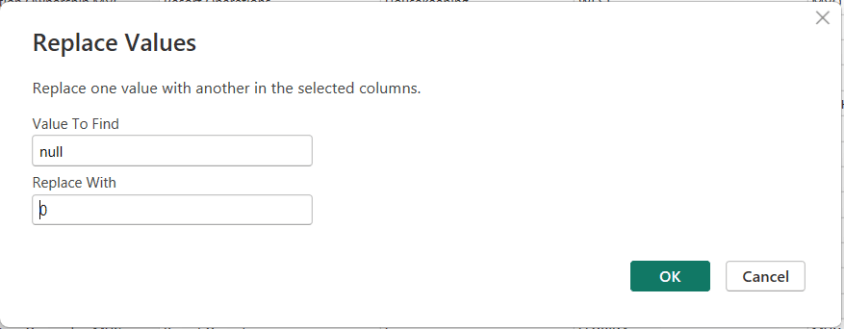
To replace NULLs, first select the column where the NULL values exist. Then choose Replace Values. When the dialog box appears, enter null as the value to find and replace, and specify the value you want to use instead—such as 0 for numeric columns or “Unknown” for text columns.

After confirming, Power Query automatically updates the column and records the step.

Thanks for reading!

Exam Prep Hub for DP-600: Implementing Analytics Solutions Using Microsoft Fabric

This is your one-stop hub with information for preparing for the DP-600: Implementing Analytics Solutions Using Microsoft Fabric certification exam. Upon successful completion of the exam, you earn the Fabric Analytics Engineer Associate certification.

This hub provides information directly here, links to a number of external resources, tips for preparing for the exam, practice tests, and section questions to help you prepare. Bookmark this page and use it as a guide to ensure that you are fully covering all relevant topics for the exam and using as many of the resources available as possible. We hope you find it convenient and helpful.

Why do the DP-600: Implementing Analytics Solutions Using Microsoft Fabric exam to gain the Fabric Analytics Engineer Associate certification?

Most likely, you already know why you want to earn this certification, but in case you are seeking information on its benefits, here are a few:
(1) there is a possibility for career advancement because Microsoft Fabric is a leading data platform used by companies of all sizes, all over the world, and is likely to become even more popular
(2) greater job opportunities due to the edge provided by the certification
(3) higher earnings potential,
(4) you will expand your knowledge about the Fabric platform by going beyond what you would normally do on the job and
(5) it will provide immediate credibility about your knowledge, and
(6) it may, and it should, provide you with greater confidence about your knowledge and skills.


Important DP-600 resources:


DP-600: Skills measured as of October 31, 2025:

Here you can learn in a structured manner by going through the topics of the exam one-by-one to ensure full coverage; click on each hyperlinked topic below to go to more information about it:

Skills at a glance

  • Maintain a data analytics solution (25%-30%)
  • Prepare data (45%-50%)
  • Implement and manage semantic models (25%-30%)

Maintain a data analytics solution (25%-30%)

Implement security and governance

Maintain the analytics development lifecycle

Prepare data (45%-50%)

Get Data

Transform Data

Query and analyze data

Implement and manage semantic models (25%-30%)

Design and build semantic models

Optimize enterprise-scale semantic models


Practice Exams:

We have provided 2 practice exams with answers to help you prepare.

DP-600 Practice Exam 1 (60 questions with answer key)

DP-600 Practice Exam 2 (60 questions with answer key)


Good luck to you passing the DP-600: Implementing Analytics Solutions Using Microsoft Fabric certification exam and earning the Fabric Analytics Engineer Associate certification!

Select, Filter, and Aggregate Data Using DAX

This post is a part of the DP-600: Implementing Analytics Solutions Using Microsoft Fabric Exam Prep Hub; and this topic falls under these sections: 
Prepare data
--> Query and analyze data
--> Select, Filter, and Aggregate Data Using DAX

Data Analysis Expressions (DAX) is a formula language used to create dynamic calculations in Power BI semantic models. Unlike SQL or KQL, DAX works within the analytical model and is designed for filter context–aware calculations, interactive reporting, and business logic. For DP-600, you should understand how to use DAX to select, filter, and aggregate data within a semantic model for analytics and reporting.


What Is DAX?

DAX is similar to Excel formulas but optimized for relational, in-memory analytics. It is used in:

  • Measures (dynamic calculations)
  • Calculated columns (row-level derived values)
  • Calculated tables (additional, reusable query results)

In a semantic model, DAX queries run in response to visuals and can produce results based on current filters and slicers.


Selecting Data in DAX

DAX itself doesn’t use a traditional SELECT statement like SQL. Instead:

  • Data is selected implicitly by filter context
  • DAX measures operate over table columns referenced in expressions

Example of a simple DAX measure selecting and displaying sales:

Total Sales = SUM(Sales[SalesAmount])

Here:

  • Sales[SalesAmount] references the column in the Sales table
  • The measure returns the sum of all values in that column

Filtering Data in DAX

Filtering in DAX is context-driven and can be applied in multiple ways:

1. Implicit Filters

Visual-level filters and slicers automatically apply filters to DAX measures.

Example:
A card visual showing Total Sales will reflect only the filtered subset by product or date.

2. FILTER Function

Used within measures or calculated tables to narrow down rows:

HighValueSales = CALCULATE(
    SUM(Sales[SalesAmount]),
    FILTER(Sales, Sales[SalesAmount] > 1000)
)

Here:

  • FILTER returns a table with rows meeting the condition
  • CALCULATE modifies the filter context

3. CALCULATE as Filter Modifier

CALCULATE changes the context under which a measure evaluates:

SalesLastYear = CALCULATE(
    [Total Sales],
    SAMEPERIODLASTYEAR(Date[Date])
)

This measure selects data for the previous year based on current filters.


Aggregating Data in DAX

Aggregation in DAX is done using built-in functions and is influenced by filter context.

Common Aggregation Functions

  • SUM() — totals a numeric column
  • AVERAGE() — computes the mean
  • COUNT() / COUNTA() — row counts
  • MAX() / MIN() — extreme values
  • SUMX() — row-by-row iteration and sum

Example of row-by-row aggregation:

Total Profit = SUMX(
    Sales,
    Sales[SalesAmount] - Sales[Cost]
)

This computes the difference per row and then sums it.


Filter Context and Row Context

Understanding how DAX handles filter context and row context is essential:

  • Filter context: Set by the report (slicers, column filters) or modified by CALCULATE
  • Row context: Used in calculated columns and iteration functions (SUMX, FILTER)

DAX measures always respect the current filter context unless explicitly modified.


Grouping and Summarization

While DAX doesn’t use GROUP BY in the same way SQL does, measures inherently aggregate over groups determined by filter context or visual grouping.

Example:
In a table visual grouped by Product Category, the measure Total Sales returns aggregated values per category automatically.


Time Intelligence Functions

DAX includes built-in functions for time-based aggregation:

  • TOTALYTD(), TOTALQTD(), TOTALMTD() — year-to-date, quarter-to-date, month-to-date
  • SAMEPERIODLASTYEAR() — compare values year-over-year
  • DATESINPERIOD() — custom period

Example:

SalesYTD = TOTALYTD(
    [Total Sales],
    Date[Date]
)


Best Practices

  • Use measures, not calculated columns, for dynamic, filter-sensitive aggregations.
  • Let visuals control filter context via slicers, rows, and columns.
  • Avoid unnecessary row-by-row calculations when simple aggregation functions suffice.
  • Explicitly use CALCULATE to modify filter context for advanced scenarios.

When to Use DAX vs SQL/KQL

ScenarioBest Tool
Static relational queryingSQL
Streaming/event analyticsKQL
Report-level dynamic calculationsDAX
Interactive dashboards with slicersDAX

Example Use Cases

1. Total Sales Measure

Total Sales = SUM(Sales[SalesAmount])

2. Filtered Sales for Big Orders

Big Orders Sales = CALCULATE(
    [Total Sales],
    Sales[SalesAmount] > 1000
)

3. Year-over-Year Sales

Sales YOY = CALCULATE(
    [Total Sales],
    SAMEPERIODLASTYEAR(Date[Date])
)


Key Takeaways for the Exam

  • DAX operates based on filter context and evaluates measures dynamically.
  • There is no explicit SELECT statement — rather, measures compute values based on current context.
  • Use CALCULATE to change filter context.
  • Aggregation functions (e.g., SUM, COUNT, AVERAGE) are fundamental to summarizing data.
  • Filtering functions like FILTER and time intelligence functions enhance analytical flexibility.

Final Exam Tips

  • If a question mentions interactive reports, dynamic filters, slicers, or time-based comparisons, DAX is likely the right language to use for the solution.
  • Measures + CALCULATE + filter context appear frequently.
  • If the question mentions slicers, visuals, or dynamic results, think DAX measure.
  • Time intelligence functions are high-value topics.

Practice Questions:

Here are 10 questions to test and help solidify your learning and knowledge. As you review these and other questions in your preparation, make sure to …

  • Identifying and understand why an option is correct (or incorrect) — not just which one
  • Look for and understand the usage scenario of keywords in exam questions to guide you
  • Expect scenario-based questions rather than direct definitions

1. Which DAX function is primarily used to modify the filter context of a calculation?

A. FILTER
B. SUMX
C. CALCULATE
D. ALL

Correct answer: ✅ C
Explanation: CALCULATE changes the filter context under which an expression is evaluated.


2. A Power BI report contains slicers for Year and Product. A measure returns different results as slicers change. What concept explains this behavior?

A. Row context
B. Filter context
C. Evaluation context
D. Query context

Correct answer: ✅ B
Explanation: Filter context is affected by slicers, filters, and visual interactions.


3. Which DAX function iterates row by row over a table to perform a calculation?

A. SUM
B. COUNT
C. AVERAGE
D. SUMX

Correct answer: ✅ D
Explanation: SUMX evaluates an expression for each row and then aggregates the results.


4. You want to calculate total sales only for transactions greater than $1,000. Which approach is correct?

A.

SUM(Sales[SalesAmount] > 1000)

B.

FILTER(Sales, Sales[SalesAmount] > 1000)

C.

CALCULATE(
    SUM(Sales[SalesAmount]),
    Sales[SalesAmount] > 1000
)

D.

SUMX(Sales, Sales[SalesAmount] > 1000)

Correct answer: ✅ C
Explanation: CALCULATE applies a filter condition while aggregating.


5. Which DAX object is evaluated dynamically based on report filters and slicers?

A. Calculated column
B. Calculated table
C. Measure
D. Relationship

Correct answer: ✅ C
Explanation: Measures respond dynamically to filter context; calculated columns do not.


6. Which function is commonly used to calculate year-to-date (YTD) values in DAX?

A. DATESINPERIOD
B. SAMEPERIODLASTYEAR
C. TOTALYTD
D. CALCULATE

Correct answer: ✅ C
Explanation: TOTALYTD is designed for year-to-date aggregations.


7. A DAX measure returns different totals when placed in a table visual grouped by Category. Why does this happen?

A. The measure contains row context
B. The table visual creates filter context
C. The measure is recalculated per row
D. Relationships are ignored

Correct answer: ✅ B
Explanation: Visual grouping applies filter context automatically.


8. Which DAX function returns a table instead of a scalar value?

A. SUM
B. AVERAGE
C. FILTER
D. COUNT

Correct answer: ✅ C
Explanation: FILTER returns a table that can be consumed by other functions like CALCULATE.


9. Which scenario is the best use case for DAX instead of SQL or KQL?

A. Cleaning raw data before ingestion
B. Transforming streaming event data
C. Creating interactive report-level calculations
D. Querying flat files in a lakehouse

Correct answer: ✅ C
Explanation: DAX excels at dynamic, interactive calculations in semantic models.


10. What is the primary purpose of the SAMEPERIODLASTYEAR function?

A. Aggregate values by fiscal year
B. Remove filters from a date column
C. Compare values to the previous year
D. Calculate rolling averages

Correct answer: ✅ C
Explanation: It shifts the date context back one year for year-over-year analysis.