Category: Data Analysis

Learning Hadoop: The key features and benefits of Hadoop

What are the key features and benefits of Hadoop? Why is Hadoop such a successful platform?

Apache Hadoop, mostly called just Hadoop, is a software framework and platform for reading, processing, storing and analyzing very large amounts of data. There are several features of Hadoop that make it a very powerful solution for data analytics.

Hadoop is Distributed

With Hadoop, from a few to hundreds or thousands of commodity servers (called nodes) can be connected (forming a cluster) to work together to achieve whatever processing power and storage capability is needed. The software platform enables the nodes to work together, passing work and data between them. Data and processing is distributed across nodes which spreads the load and significantly reduces the impact of failure.

Hadoop is Scalable

In the past, to achieve extremely powerful computing, a company would have to buy very expensive, large, monolithic computers. As data growth exploded, eventually even those super computers would become insufficient. With Hadoop, from a few to hundreds or thousands or even millions of commodity servers can be relatively easily connected to work together to achieve whatever processing power and storage capability is needed. This allows a company or project to start out small and then grow as needed inexpensively, without any concern about hitting a limitation.

Hadoop is Fault Tolerant

Hadoop was designed and built around the fact that there will be frequent failures on the commodity hardware servers that make up the Hadoop cluster. When a failure occurs, the software handles the automatic reassignment of work and replication of data to other nodes in the cluster, and the system continues to function properly without manual intervention. When a node recovers, from a reboot for example, it will rejoin the cluster automatically and become available for work.

Hadoop is backed by the power of Open Source

Hadoop is open source software, which means that it can be downloaded, installed, used and even modified for free. It is managed by the renown non-profit group, Apache Software Foundation (ASF), hence the name Apache Hadoop. The group is made up of many brilliant people from all over the world, many of whom work at some of the top technology companies, who commit their time to managing the software. In addition, there are also many developers that contribute code to enhance or add new features and functionality to Hadoop or to add new tools that work with Hadoop. The various tools that have been built over the years to complement core Hadoop make up what is called the Hadoop ecosystem. With a large community of people from all over the world continuously adding to the growth of the Hadoop ecosystem in a well-managed way, it will only get better and become more useful to many more use-cases.

These are the reasons Hadoop has become such a force within the data world. Although there is some hype around the big data phenomenon, the benefits and solutions based on the Hadoop ecosystem are real.

You can learn more at https://hadoop.apache.org

Connecting to Microsoft SQL Server database from Oracle SQL Developer

If you work primarily with Oracle databases, you may use SQL Developer. But you may also need to connect to Microsoft SQL Server databases and not necessarily want to install a new front-end database tool, such as Microsoft SQL Server Management Studio (SSMS).  You can connect to SQL Server from SQL Developer.

First, download the appropriate JDBC Driver for the version of SQL Server that you need to connect to. Then follow the steps in the video at the link below on the Oracle website.

https://www.oracle.com/technetwork/developer-tools/sql-developer/sql-server-connection-viewlet-swf-089886.html

Good luck.


Creating a Business Intelligence (BI) & Analytics Strategy and Roadmap

This post provides some of my thoughts on how to go about creating a Business Intelligence (BI) & Analytics Strategy and Roadmap for your client or company.  Please comment with your suggestions from your experience for improving this information.


When creating or updating the BI & Analytics Strategy and Roadmap for a company, one of the first things to understand is:

Who are all the critical stakeholders that need to be involved?

Understanding who needs and uses the BI & Analytics systems is critical for starting the process of understanding and documenting the “who needs what, why, and when”.

These are some of the roles that are typically important stakeholders:

  • High-level business executives that are paying for the projects
  • Business directors involved in the usage of the systems
  • IT directors involved in the developing and support of the systems
  • Business Subject Matter Experts (SME’s) & Business Analysts
  • BI/Analytics/Data/System Architects
  • BI/Analytics/Data/System Developers and Administrators


Then, you need to ask all these stakeholders, especially those from the business:

What are the drivers for BI & Analytics? And what is the level of importance for each of these drivers?

This will help you to understand and document what business needs are creating the need for new or modified BI & Analytics solutions. You should then go deeper to understand … what are the business objectives and goals that are driving these business needs.  This will help you to understand and document the bigger picture so that a more comprehensive strategy and roadmap can be created.

The questions and discussions surrounding the above will require deep and broad business involvement. Getting the perspective of a wide range of users from all business areas that are using the BI & Analytics Systems is critical.  The business should be involved throughout the process of creating the strategy and roadmap, and all decisions should tie back to support for business objectives and goals. And the trail leading to all these decisions must be documented.

Some examples of business drivers include:

  • Gain more insight into who our best customers are and how best to acquire them.
  • Understand how weather affects our sales/revenue.
  • Determine how we can sell more to our existing customers.
  • Understand what causes employee turnover.
  • Gain insight into how we can improve staffing schedules.


And examples of business objectives and goals may include things like:

  • Increase corporate revenues by 10%
  • Grow our base of recurring customers
  • Stabilize corporate revenues over all seasons
  • Create an environment where employees love to work
  • Reduce payroll costs without a reduction in staff, for example, reduce turnover.


Then, turn to understanding and documenting the current scenario (if not already known). Identify what systems (including data sources) are in place, who are using them (and why and how), what capabilities do they offer, what are the must-haves, and what are the pain points and positive highlights.

Also, you will need to determine the current workload (and future workload if it can be determined) of the primary team members involved in developing, testing, and implementing BI & Analytics solutions.

This will help you understand a few things:

  • Some of the highest priority needs of the users
  • Gaps in capabilities and data between what is needed and what is currently in place (including an understanding of what is liked and disliked about the current systems)
  • Current user base knowledge and engagement
  • IT knowledge and skills
  • Resource availability – when are people available to work on new initiatives


What are the options and limitations?

  • Can existing systems be customized to meet the requirements?
  • Can they be upgraded to a new version that has the needed functionality?
  • Do we need to consider adding a new platform or replacing one or more of the existing systems with a new platform?
  • Can we migrate from/integrate one system to/with another system that we already have up and running?
  • Are any of our current systems losing vendor support or require an upgrade for other reasons? Has the pricing changed for any of our software applications?
  • What options does our budget permit us to explore?
  • What options do our knowledge and skills permit us to explore?


Once you have identified these items …

  • Identify and engage stakeholders, and document these roles and the people
  • Identify and document business drivers, objectives and goals
  • Understand and document the current landscape – needs (including must-haves), technology, gaps, users, IT staff, resource availability, and more
  • Identify and document options – based on current landscape, technology, budget, staff resources, etc.

… you can develop a “living” Strategy and Roadmap for BI & Analytics. And when I say “living”, I mean it will not be a static document, but will be fine-tuned over time as new information emerge and as changes arise in business needs, technology, and staff resources.


Your Strategy and Roadmap for BI & Analytics should include, but is not limited to:

  • BI & Analytics that will be used to satisfy business drivers, objectives and goals
  • Data acquisition and storage plan for meeting the analytics needs
  • Technology platforms that will be used to process and store data, and deliver the analytics
  • Information about any new technologies that needs to be acquired or implemented, and schedules
  • Roles and Responsibilities for all stakeholders involved in BI & Analytics projects
  • Planned staffing allocations and schedules
  • Planned staffing changes and schedules
  • User training (business users) and Delivery team training (technical implementers & developers for example)
  • List dependencies for each item or set of items

Your career in 2018 (referencing 2017 Gartner Magic Quadrant for Business Intelligence and Analytics)

How will you grow your career in 2018?

Each year Gartner publishes Magic Quadrants for several technologies, including one for Business Intelligence and Analytics. Let’s take a look at this year’s.

The “2017 Gartner Magic Quadrant for Business Intelligence and Analytics” document was published earlier in the year, but as we are at the end of the year, it is a good time to take stock of the industry and your career in this field.

Below is an image of the results published by Gartner for 2017.  As you can see, from their perspective, Tableau and Microsoft lead the way, with Qlik also in the leader quadrant.

Source: Gartner

Since the same 3 players were also in the leader quadrant in 2016 and 2015 (along with others), we know they are solid.

So, based on this, if you are primarily an Oracle BI (OBI), IBM Cognos, or SAP Business Objects (BO) person (for example), you may consider learning or at least getting exposure to one or more of the 3 platforms in the Leaders quadrant.  There is still plenty of work out there for OBI, Cognos, BO and other platforms, but having additional technical/platform skills in leading platforms never hurts.

And this is just a broad suggestion, because you may find that developing skills in Salesforce (for example) is a better strategic move for you based on your situation.  The bottom-line is, assess your career/skills/goals/etc., and plan on learning something new in 2018.  Don’t stop learning!

Happy New Year to you, and best wishes for 2018!


Working with built-in datasets in R

This is a quick cheat sheet of commands for working with built-in datasets in R.

R has a number of base datasets that come with the install, and there are many packages that also include additional datasets.  These are very useful and easy to work with.


> ?datasets                                  # to get help info on the datasets package

> library(help=”datasets”)     # provides detailed information on the datasets package, including listing and description of the datasets in the package

> data()                                       # lists all the datasets currently available by package

data(package = .packages(all.available = TRUE))  # lists all the available datasets by package even if not installed

> data(EuStockMarkets)            # loads  the dataset EuStockMarkets into the workspace

> summary(AirPassengers)      # provides a summary of the dataset AirPassengers

> ?airquality                                    # outputs in the Help window, information about the dataset “airquality”

> str(airmiles)                                 # shows the structure of the dataset “airmiles”

> View(airmiles)             # shows the data of the dataset “airmiles” in spreadsheet format


Updating R packages

In this post, I cover updating R packages in RStudio.  You have a few options for updating your R packages in RStudio.

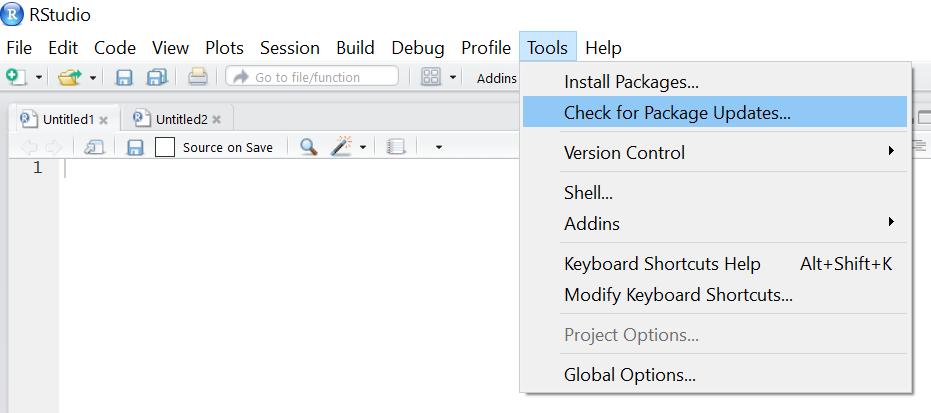
(Option 1) From the menu, select Tools -> “Check for Package Updates”RStudio_Menu_Tools_CheckforPackageUpdates

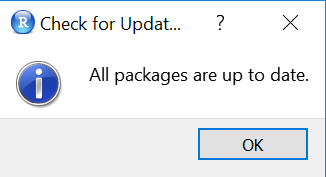
You will get this message if all packages are up-to-date:

RStudio_AllPackagesUpToDate

(Option 2) From the Packages tab in the bottom-right pane, click on “Update”RStudio_PackagesTab_Update

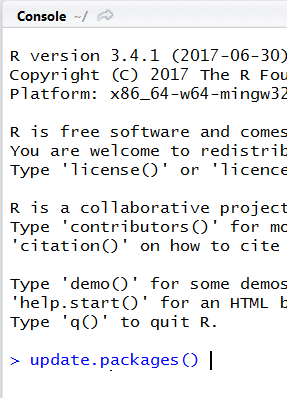
(Option 3) Execute the command update.packages()

RStudio_Script_UpdatePackages

You may see output like this …

RStudio_Script_UpdatePackages2

Enter “y” to update, “N” to not update, and “c” to cancel.

Thanks for reading!

Oracle EBS Receivables Data Flow and Data Model

The Accounts Receivable function is responsible for managing outgoing invoices to customers who purchased goods or services, and the collection and application of all payments, including payments for invoices.  The Oracle Receivables module (a part of the Oracle EBS Financials Suite) helps the Accounts Receivable departments to manage this function effectively and efficiently.

This post describes a summary of the Oracle Receivables data model and data flow.  Some of these tables are source tables for the Oracle Business Intelligence Applications – Financial Analytics module, specifically providing information for the Payabales dashboard.

OracleReceivablesDataflowDataModel

To be in the position where you need to handle and process a payment in Receivables, you need to have a buyer/payer (most times this is a customer but there are exceptions). Customer records are stored in the HZ_CUST_ACCOUNTS and HZ_PARTIES tables.  Each customer needs to have a site (a location/address of business) for which information is stored in HZ_CUST_ACCT_SITES_ALL and HZ_PARTY_SITES_ALL.

When a customer purchases goods or services from your company, an invoice is generated for the customer.  These invoice transactions are recorded in RA_CUSTOMER_TRX_ALL (invoice headers) and RA_CUSTOMER_TRX_LINES_ALL (invoice lines).

When the customer makes a payment, this generates new transactions.  These are recorded in AR_CASH_RECEIPTS_ALL and AR_CASH_RECEIPT_HISTORY.  If there is adjustment to an invoice, this is recorded in AR_ADJUSTMENTS.

Sometimes payments are received in batches, where a single payment is for multiple invoices.  These batch payments have records in AR_BATCHES.

The AR_PAYMENT_SCHEDULE table holds one record per payment.  Therefore, for payments that pay an invoice in full, there will only be one record related to that invoice.  However, if payments for an invoice are broken up into a payment plan, or if a partial payment is received for an invoice, additional records will be generated in this table for each payment.

I mentioned above that “most times payments are from customers, but there are exceptions”. An example of an exception is “payment from a bank for interest earned”.  The payment is not from a customer and it’s not for goods/services provided.  These types of payments are recorded in AR_MISC_CASH_DISTRIBUTIONS.

These transactions affect accounting which will eventually make their way to the GL (when the Receivables Transfer to GL program is run). The accounting transactions are generated in RA_CUST_TRX_LINE_GL_DIST and AR_RECEIVABLE_APPLICATIONS.