Category: Data Analysis

AI in Gaming: How Artificial Intelligence is Powering Game Production and Player Experience

The gaming industry isn’t just about fun and entertainment – it’s one of the largest and fastest-growing industries in the world. Valued at over $250 billion in 2024, it’s expected to surge past $300 billion by 2030. And at the center of this explosive growth? Artificial Intelligence (AI). From streamlining game development to building creative assets faster to shaping immersive and personalized player experiences, AI is transforming how games are built and how they are played. Let’s explore how.

1. AI in Gaming Today

AI is showing up both behind the scenes (in development studios and in technology devices) and inside the games themselves.

  • AI Agents & Workflow Tools: A recent survey found that 87% of game developers already incorporate AI agents into development workflows, using them for tasks such as playtesting, balancing, localization, and code generation PC GamerReuters. For bug detection, Ubisoft developed Commit Assistant, an AI tool that analyzes millions of lines of past code and bug fixes to predict where new errors are likely to appear. This has cut down debugging time and improved code quality, helping teams focus more on creative development rather than repetitive QA.
  • Content & Narrative: Over one-third of developers utilize AI for creative tasks like dynamic level design, animation, dialogue writing, and experimenting with gameplay or story concepts PC Gamer. Games like Minecraft and No Man’s Sky use AI to dynamically create worlds, keeping the player experience fresh.
  • Rapid Concept Ideation: Concept artists use AI to generate dozens of initial style options—then pick a few to polish with humans. Way faster than hand-sketching everything Reddit.
  • AI-Powered Game Creation: Roblox recently announced generative AI tools that let creators use natural language prompts to generate code and 3D assets for their games. This lowers the barrier for new developers and speeds up content creation for the platform’s massive creator community.
  • Generative AI in Games: On Steam, roughly 20% of games released in 2025 use generative AI—up 681% year-on-year—and 7% of the entire library now discloses usage of GenAI assets like art, audio, and text Tom’s Hardware.
  • Immersive NPCs: Studios like Jam & Tea, Ubisoft, and Nvidia are deploying AI for more dynamic, responsive NPCs that adapt in real time—creating more immersive interactions AP News. These smarter, more adaptive NPCs react more realistically to player actions.
  • AI-Driven Tools from Tech Giants: Microsoft’s Muse model generates gameplay based on player interaction; Activision sim titles in Call of Duty reportedly use AI-generated content The Verge.
  • Playtesting Reinvented: Brands like Razer now embed AI into playtesting: gamers can test pre-alpha builds, and AI tools analyze gameplay to help QA teams—claiming up to 80% reduction in playtesting cost Tom’s Guide. EA has been investing heavily in AI-driven automated game testing, where bots simulate thousands of gameplay scenarios. This reduces reliance on human testers for repetitive tasks and helps identify balance issues and bugs much faster.
  • Personalized Player Engagement: Platforms like Tencent, the largest gaming company in the world, and Zynga leverage AI to predict player behavior and keep them engaged with tailored quests, events, offers, and challenges. This increases retention while also driving monetization.
  • AI Upscaling and Realism
    While not a game producer, NVIDIA’s DLSS (Deep Learning Super Sampling) has transformed how games are rendered. By using AI to upscale graphics in real time, it delivers high-quality visuals at faster frame rates—giving players a smoother, more immersive experience.
  • Responsible AI for Fair Play and Safety: Microsoft is using AI to detect toxic behavior and cheating across Xbox Live. Its AI models can flag harassment or unfair play patterns, keeping the gaming ecosystem healthier for both casual and competitive gamers.

2. Tools, Technologies, and Platforms

Let’s take a look at things from the technology type standpoint. As you may expect, the gaming industry uses several AI technologies:

  • AI Algorithms: AI algorithms dynamically produce game content—levels, dialogue, music—based on developer input, on the fly. This boosts replayability and reduces production time Wikipedia. And tools like DeepMotion’s animation generator and IBM Watson integrations are already helping studios prototype faster and more creatively Market.us
  • Asset Generation Tools: Indie studios like Krafton are exploring AI to convert 2D images into 3D models, powering character and world creation with minimal manual sculptingReddit.
  • AI Agents: AI agents run thousands of tests, spot glitches, analyze frame drops, and flag issues—helping devs ship cleaner builds fasterReelmindVerified Market Reports. This type of AI-powered testing reduces bug detection time by up to 50%, accelerates quality assurance, and simulates gameplay scenarios on a massive scale Gitnux+1.
  • Machine Learning Models: AI tools, typically ML models, analyze player behavior to optimize monetization, reduce churn, tailor offers, balance economies, anticipate player engagement and even adjust difficulty dynamically – figures range from 56% of studios using analytics, to 77% for player engagement, and 63% using AI for economy and balance modeling Gitnux+1.
  • Natural Language Processing (NLP): NLPs are used to power conversational NPCs or AI-driven storytelling. Platforms like Roblox’s Cube 3D and Ubisoft’s experimenting with AI to generate dialogue and 3D assets—making NPCs more believable and story elements more dynamic Wikipedia.
  • Generative AI: Platforms like Roblox are enabling creators to generate code and 3D assets from text prompts, lowering barriers to entry. AI tools now support voice synthesis, environmental effects, and music generation—boosting realism and reducing production costs GitnuxZipDoWifiTalents
  • Computer Vision: Used in quality assurance and automated gameplay testing, especially at studios like Electronic Arts (EA).
  • AI-Enhanced Graphics: NVIDIA’s DLSS uses AI upscaling to deliver realistic graphics without slowing down performance.
  • GitHub Copilot for Code: Devs increasingly rely on tools like Copilot to speed coding. AI helps write repetitive code, refactor, or even spark new logic ideas Reddit.
  • Project Scoping Tools: AI tools can forecast delays and resource bottlenecks. Platforms like Tara AI use machine learning to forecast engineering tasks, timelines, and resources—helping game teams plan smarter Wikipedia. Also, by analyzing code commits and communication patterns, AI can flag when teams are drifting off track. This “AI project manager” approach is still in its early days, but it’s showing promise.

3. Benefits and Advantages

Companies adopting AI are seeing significant advantages:

  • Efficiency Gains & Cost Savings: AI reduces development time significantly—some estimates include 30–50% faster content creation or bug testing WifiTalents+1Gitnux. Ubisoft’s Commit Assistant reduces debugging time by predicting where code errors may occur.
  • Rapid Concept Ideation: Concept artists use AI to generate dozens of initial style options—then pick a few to polish with humans. Way faster than hand-sketching everything Reddit.
  • Creative Enhancement: Developers can shift time from repetitive tasks to innovation—allowing deeper storytelling and workflows PC GamerReddit.
  • Faster Testing Cycles: Automated QA, asset generation, and playtesting can slash both time and costs (some developers report half the animation workload gone) PatentPCVerified Market Reports. For example, EA’s automated bots simulate thousands of gameplay scenarios, accelerating testing.
  • Increased Player Engagement & Retention: AI keeps things fresh and fun with AI-driven adaptive difficulty, procedural content, and responsive NPCs boost immersion and retention—users report enhanced realism and engagement by 35–45% Gitnux+2Gitnux+2. Zynga uses AI to identify at-risk players and intervene with tailored offers to reduce churn.
  • Immersive Experiences: DLSS and AI-driven NPC behavior make games look better and feel more alive.
  • Revenue & Monetization: AI analytics enhance monetization strategies, increase ad effectiveness, and optimize in-game economies—improvements around 15–25% are reported Gitnux+1.
  • Global Reach & Accessibility: Faster localization and AI chat support reduce response times and broaden global player reach ZipDoGitnux+1.

For studios, these benefits and advantages translate to lower costs, faster release cycles, and stronger player engagement metrics, resulting in less expenses and more revenues.

4. Pitfalls and Challenges

Of course, it’s not all smooth sailing. Some issues include:

  • Bias in AI Systems: Poorly trained AI can unintentionally discriminate—for example, failing to fairly moderate online communities.
  • Failed Investments: AI tools can be expensive to build and maintain, and some studios have abandoned experiments when returns weren’t immediate.
  • Creativity vs. Automation: Overreliance on AI-generated content risks creating bland, formulaic games. There’s worry about AI replacing human creators or flooding the market with generic, AI-crafted content Financial Times.
  • Legal Risks, Ethics & Originality: Issues around data ownership, creative rights, and transparency are raising developer anxiety ReutersFinancial Times. Is AI stealing from artists? Activision’s Black Ops 6 faced backlash over generative assets, and Fortnite’s Vader stirred labor concerns WikipediaBusiness Insider.
  • Technical Limitations: Not all AI tools hit the mark technically. Early versions of NVIDIA’s G-Assist (now patched) had performance problems – it froze and tanked frame rates – but is a reminder that AI isn’t magic yet and comes with risks, especially for early integrators of new tools/solutions. Windows Central.
  • Speed vs. Quality: Rushing AI-generated code without proper QA can result in outages or bugs—human oversight still matters TechRadar.
  • Cost & Content Quality Concerns: While 94% of developers expect long-term cost reductions, upfront costs and measuring ROI remain challenges—especially given concerns over originality in AI-generated content ReutersPC Gamer.

In general, balancing innovation with human creativity remains a challenge.

5. The Future of AI in Gaming

Looking ahead, we can expect:

  • More Personalized Gameplay: Games that adapt in real-time to individual player styles.
  • Generative Storytelling: Entire narratives that shift based on player choices, powered by large language models.
  • AI Co-Creators: Game development may become a hybrid of human creativity and AI-assisted asset generation.
  • Smarter Communities: AI will help moderate toxic behavior at scale, creating safer online environments.
  • Games Created from Prompts: Imagine generating a mini-game just by describing it. That future is teased in surveys, though IP and ethics may slow adoption PC Gamer.
  • Fully Dynamic Games: AI-generated experiences based on user prompts may become a reality, enabling personalized game creation—but IP concerns may limit certain uses PC Gamer.
  • NPCs That Remember and Grow: AI characters that adapt, remember player choices, and evolve—like living game companions WIREDFinancial Times.
  • Cloud & AR/VR Boost Growth: AI will optimize streaming, drive immersive data-driven VR/AR experiences, and power e-sports analytics Verified Market ReportsGrand View Research.
  • Advanced NPCs & Narrative Systems: Expect smarter, emotionally adaptive NPCs and branching narratives shaped by AI AP NewsGitnux.
  • Industry Expansion: The AI in gaming market is projected to swell—from ~$1.2 billion in 2022 to anywhere between $5–8 billion by 2028, and up to $25 billion by 2030 GitnuxWifiTalents+1ZipDo.
  • Innovation Across Studios: Smaller indie developers continue experimenting freely with AI, while larger studios take a cautious, more curated approach Financial TimesThe Verge.
  • Streaming, VR/AR & E-sports Integration: AI-driven features—matching, avatar behavior, and live content moderation—will grow more sophisticated in live and virtual formats Gitnux+2Gitnux+2Windows Central.

With over 80% of gaming companies already investing in AI in some form, it’s clear that AI adoption is accelerating and will continue to grow. Survival without it will become impossible.

6. How Companies Can Stay Ahead

To thrive in this fast-changing environment, gaming companies should:

  • Invest in R&D: Experiment with generative AI, NPC intelligence, and new personalization engines. Become proficient in the key tools and technologies.
  • Focus on Ethics: Build AI responsibly, with safeguards against bias and toxicity.
  • Upskill Teams: Developers and project managers need to understand and use AI tools, not just traditional game engines.
  • Adopt Incrementally: Start with AI in QA and testing (low-risk, high-reward) before moving into core gameplay mechanics.
  • Start with High-ROI Use Cases: Begin with AI applications like testing, balancing, localization, and analytics—where benefits are most evident.
  • Blend AI with Human Creativity: Use AI to augment—not replace—human designers and writers. Leverage it to iterate faster, then fine-tune for quality.
  • Ensure IP and Ethical Compliance: Clearly disclose AI use, respect IP boundaries, and integrate transparency and ethics into development pipelines.
  • Monitor Tools & Stay Agile: AI tools evolve fast—stay informed, and be ready to pivot as platforms and capabilities shift.
  • Train Dev Teams: Encourage developers to explore AI assistants, generative tools, and optimization models so they can use them responsibly and creatively.
  • Focus on Player Trust: Transparently communicating AI usage helps mitigate player concerns around authenticity and originality.
  • Scale Intelligently: Use AI-powered analytics to understand player behavior—then refine content, economy, and retention strategies based on real data.

There will be some trial and error as companies move into the new landscape and try/adopt new technologies, but companies must adopt AI and become good at using it to stay competitive.

Final Word

AI isn’t replacing creativity in gaming—it’s amplifying it. From Ubisoft’s AI bug detection to Roblox’s generative tools and NVIDIA’s AI-enhanced graphics, the industry is already seeing massive gains. As studios continue blending human ingenuity with machine intelligence, the games of the future will be more immersive, personalized, and dynamic than anything we’ve seen before. But it’s clear, AI will not be an option for game development, it is a must. Companies will need to become proficient with the AI tools they choose and how they integrate them into the overall production cycle. They will also need to carefully choose partners that help them with AI implementations that are not done with in-house personnel.

This article is a part of an “AI in …” series that shares information about AI in various industries and business functions. Be on the lookout for future (and past) articles in the series.

Thanks for reading and good luck on your data (AI) journey!

Other “AI in …” articles in the series:

AI in Hospitality

Choosing the Right Chart to display your data in Power BI or any other analytics tool

Data visualization is at the heart of analytics. Choosing the right chart or visual can make the difference between insights that are clear and actionable, and insights that remain hidden. There are many visualization types available for showcasing your data, and choosing the right ones for your use cases is important. Below, we’ll walk through some common scenarios and share information on the charts best suited for them, and will also touch on some Power BI–specific visuals you should know about.

1. Showing Trends Over Time

When to use: To track how a measure changes over days, months, or years.

Best charts:

  • Line Chart: The classic choice for time series data. Best when you want to show continuous change. In Power BI, the line chart visual can also be used for forecasting trends.
  • Area Chart: Like a line chart but emphasizes volume under the curve—great for cumulative values or when you want to highlight magnitude.
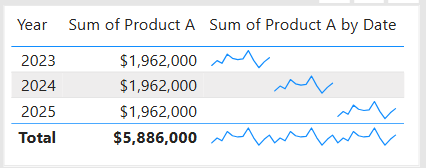
  • Sparklines (Power BI): Miniature line charts embedded in tables or matrices. Ideal for giving quick context without taking up space.

2. Comparing Categories

When to use: To compare values across distinct groups (e.g., sales by region, revenue by product).

Best charts:

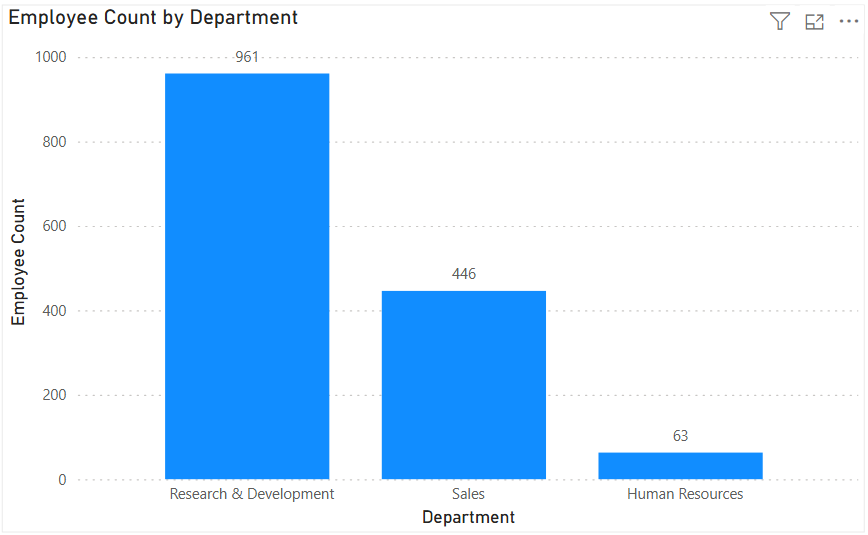
  • Column Chart: Vertical bars for category comparisons. Good when categories are on the horizontal axis.
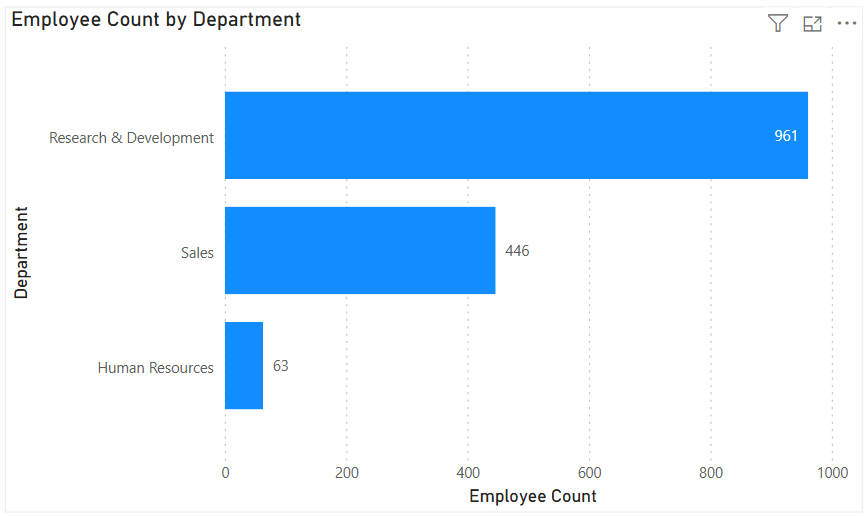
  • Bar Chart: Horizontal bars—useful when category names are long or when ranking items. Is usually a better choice than the column chart when there are many values.
  • Stacked Column/Bar Chart: Show category totals and subcategories in one view. Works for proportional breakdowns, but can get hard to compare across categories.

3. Understanding Relationships

When to use: To see whether two measures are related (e.g., advertising spend vs. sales revenue).

Best charts:

  • Scatter Chart: Plots data points across two axes. Useful for correlation analysis. Add a third variable with bubble size or color to generate more insights. This chart can also be useful for identifying anomalies/outliers in the data.
  • Line & Scatter Combination: Power BI lets you overlay a line for trend direction while keeping the scatter points.
  • Line & Bar/Column Chart Combination: Power BI offers some of these combination charts also to allow you to relate your comparison measures to your trend measures.

4. Highlighting Key Metrics

Sometimes you don’t need a chart—you just want a single number to stand out. These types of visuals are great for high-level executive dashboards, or for the summary page of dashboards in general.

Best visuals in Power BI:

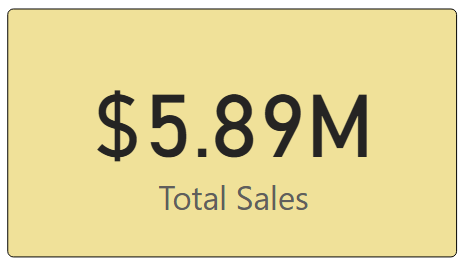
  • Card Visual: Displays one value clearly, like Total Sales.
  • KPI Visual: Adds target context and status indicator (e.g., actual vs. goal).
  • Gauge Visual: Circular representation of progress toward a goal—best for showing percentages or progress to target. For example, Performance Rating score shown on the scale of the goal.

5. Distribution Analysis

When to use: To see how data is spread across categories or ranges.

Best charts:

  • Column/Bar Chart with bins: Useful for creating histograms in Power BI.
  • Box-and-Whisker Chart (custom visual): Shows median, quartiles, and outliers.
  • Pie/Donut Charts: While often overused, they can be effective for showing composition when categories are few (ideally 3–5). For example, show the number and percentage of employees in each department.

6. Spotting Problem Areas

When to use: To identify anomalies or areas needing attention across a large dataset.

Best charts:

  • Heatmap: A table where color intensity represents value magnitude. Excellent for finding hot spots or gaps. This can be implemented in Power BI by using a Matrix visual with conditional formatting in Power BI.
  • Treemap: Breaks data into rectangles sized by value—helpful for hierarchical comparisons and for easily identifying the major components of the whole.

7. Detail-Level Exploration

When to use: To dive into raw data while keeping formatting and hierarchy.

Best visuals:

  • Table: Shows granular row-level data. Best for detail reporting.
  • Matrix: Adds pivot-table–like functionality with rows, columns, and drill-down. Often combined with conditional formatting and sparklines for added insight.

8. Part-to-Whole Analysis

When to use: To see how individual parts contribute to a total.

Best charts:

  • Stacked Charts: Show both totals and category breakdowns.
  • 100% Stacked Charts: Normalize totals so comparisons are by percentage share.
  • Treemap: Visualizes hierarchical data contributions in space-efficient blocks.

Quick Reference: Which Chart to Use?

ScenarioBest Visuals
Tracking trends, forecasting trendsLine, Area, Sparklines
Comparing categoriesColumn, Bar, Stacked
Showing relationshipsScatter, Line + Scatter, Line + Column/Bar
Highlighting metricsCard, KPI, Gauge
Analyzing distributionsHistogram (columns with bins), Box & Whisker, Pie/Donut (for few categories)
Identifying problem areasHeatmap (Matrix with colors), Treemap, Scatter
Exploring detail dataTable, Matrix
Showing part-to-wholeStacked Column/Bar, 100% Stacked, Treemap, Pie/Donut

The below graphic shows the visualization types available in Power BI. You can also import additional visuals by clicking the “3-dots” (get more visuals) at the bottom of the visualization icons.

Summary

Power BI, and other BI/analytics tools, offers a rich set of visuals, each designed to represent data in a way that suits a specific set of analytical needs. The key is to match the chart type with the story you want the data to tell. Whether you’re showing a simple KPI, uncovering trends, or surfacing problem areas, choosing the right chart ensures your insights are clear, actionable, and impactful. In addition, based on your scenario, it can also be beneficial to get feedback from the user population on what other visuals they might find useful or what other ways they would they like to see the data.

Thanks for reading! And good luck on your data journey!

Using MAXX in Power BI to find the Latest Event Date across several event date columns in each row

We were working with some HR data which included multiple date fields such as Hire Date, Transfer Date, Promotion Date, and Termination Date. We needed to determine the most recent event date before termination. We ended up using the MAXX function to do this.

Sample dataset to demonstrate the scenario:

Using the following dataset to demonstrate the example:

EmployeeHire DateTransfer DatePromotion DateTermination Date
Alice2020-01-152021-05-102022-03-202023-06-15
Bob2019-11-012020-07-152021-10-05(blank)
Carol2021-03-25(blank)2021-09-142022-02-28

The goal is to calculate the most recent event and event date (i.e., the latest event and its date) between Hire Date, Transfer Date, and Promotion Date for each row. Termination Date was excluded from the comparison because the goal was to find the latest event before Termination (if that had occurred).

Using MAXX for Row-by-Row Evaluation

MAXX is an iterator function in DAX, meaning it evaluates an expression for each row of a table, then returns the maximum value. Iterator functions such as MAXX and SUMX work row-by-row over a table, in contrast to aggregate functions like MAX and SUM which operate over an entire column at once.

  • Aggregate example (MAX): Finds the highest value in a column across all rows.
  • Iterator example (MAXX): Evaluates an expression for each row in a virtual table, then finds the highest value.

This makes MAXX ideal for scenarios like this where the various dates are in multiple columns of the same row, and we need to find the max of these dates on each row.

DAX Code Example: This is an example of the code that was used to derive the latest event date.

Latest Event Date =
MAXX(
{
[Hire Date],
[Transfer Date],
[Promotion Date]
},
[Value]
)

Code Explanation:

  1. Create a virtual table with one column and three rows—one for each date we want to consider.
  2. MAXX iterates through this virtual table, evaluates [Value] (the date), and returns the latest / maximum (max) date for each iteration.

Expected Output based on the sample dataset:

EmployeeHire DateTransfer DatePromotion DateTermination DateLatest Event Date
Alice2020-01-152021-05-102022-03-202023-06-152022-03-20
Bob2019-11-012020-07-152021-10-05(blank)2021-10-05
Carol2021-03-25(blank)2021-09-142022-02-282021-09-14

This is much cleaner than using nested IF checks to determine the latest date / latest event for each record. Of course, the MAXX function can be used in other scenarios where you want to find the max value across multiple columns on each row.

Thanks for reading and I hope you found this useful!

Calculated Columns vs. Measures in Power BI: Understanding the Differences

When working in Power BI, two common ways to add custom calculations to your data model are calculated columns and measures. While they both use DAX (Data Analysis Expressions), their purposes, storage, and performance implications differ significantly. Understanding these differences can help you design more efficient and maintainable Power BI reports.

1. What They Are

Calculated Column
A calculated column is a new column added to a table in your data model. It is calculated row-by-row based on the existing data and stored in the model like any other column.

Measure
A measure is a calculation that is evaluated on the fly, usually aggregated at the visual level. Measures don’t exist as stored data in your table—they are computed dynamically based on filter context.

To create a Calculated Column or a Measure, either from the Home menu …

… or from the Table Tools menu …

… select “New Column” (to create a Calculated Column) or “New Measure” (to create a new measure). Then enter the relevant DAX for the column or measure as shown in the next section below.

2. DAX Syntax Examples

Imagine a Sales table with columns: Product, Quantity, and Unit Price.

Calculated Column Example
Creating a calculated column:
Total Price = Sales[Quantity] * Sales[Unit Price]

This new column will appear in the table and will be stored for every row in the Sales table.

Measure Example
Creating a measure:
Total Sales = SUMX(Sales, Sales[Quantity] * Sales[Unit Price])

This measure calculates the total across all rows in the current filter context—without physically storing a column for every row.

3. When They Are Computed

FeatureCalculated ColumnMeasure
When computedDuring data model processing (data refresh).At query time (when a visual or query is run).
Where storedIn-memory within the data model (VertiPaq storage).Not stored—calculated on demand.
Performance impactIncreases model size (RAM & disk space).Consumes CPU at query time, minimal storage overhead.

4. Storage and Performance Implications

  • Calculated Columns
    • RAM & Disk Space: Stored in VertiPaq compression format. Large columns increase your .pbix file size and memory footprint.
    • CPU: Low impact at query time since results are precomputed, but refresh time increases.
    • Good for: Fields you need for filtering, sorting, or joining tables.
  • Measures
    • RAM & Disk Space: No significant impact on storage since they’re not persisted.
    • CPU: Can be CPU-intensive if the calculation is complex and used across large datasets.
    • Good for: Aggregations, KPIs, and calculations that change based on slicers or filters.

5. When to Use Each

When to Use a Calculated Column

  • You need a field for row-level filtering or grouping in visuals.
  • You need a column to create relationships between tables.
  • The calculation is row-specific and independent of report filters.

Example:

Sales Category = IF(Sales[Quantity] > 100, "High Volume", "Low Volume")

When to Use a Measure

  • You want calculations that respond dynamically to slicers and filters.
  • You want to avoid inflating your data model with unnecessary stored columns.
  • The calculation is aggregate-based.

Example:

Average Order Value = DIVIDE([Total Sales], DISTINCTCOUNT(Sales[Order ID]))

6. When They Cannot Be Used

SituationCalculated ColumnMeasure
Relationship creation✅ Can be used❌ Cannot be used
Row-level filtering in slicers✅ Can be used❌ Cannot be used
Dynamic response to slicers❌ Cannot recalculate✅ Fully dynamic
Reduce model size❌ Adds storage✅ No storage impact

7. Summary Table

FeatureCalculated ColumnMeasure
Stored in modelYesNo
Calculated atData refreshQuery time
Memory impactHigher (stored per row)Minimal
Disk size impactHigherMinimal
Dynamic filtersNoYes
Best forFiltering, relationships, sortingAggregations, KPIs, dynamic calcs

8. Best Practices

  • Default to measures when possible—they’re lighter and more flexible.
  • Use calculated columns sparingly, only when the calculation must exist at the row level in the data model.
  • If a calculated column is only used in visuals, try converting it to a measure to save memory.
  • Be mindful of CPU impact for very complex measures—optimize DAX to avoid performance bottlenecks.

I hope this was helpful in clarifying the differences between Calculated Columns and Measures, and will help you to determine which you need in various scenarios for your Power BI solutions.

Thanks for reading!

Understanding UNION, INTERSECT, and EXCEPT in Power BI DAX

When working with data in Power BI, it’s common to need to combine, compare, or filter tables based on their rows. DAX provides three powerful table / set functions for this: UNION, INTERSECT, and EXCEPT.

These functions are especially useful in advanced calculations, comparative analysis, and custom table creation in reports. If you have used these functions in SQL, the concepts here will be familiar.

Sample Dataset

We’ll use the following two tables throughout our examples:

Table: Sales_2024

The above table (Sales_2024) was created using the following DAX code utilizing the DATATABLE function (or you could enter the data directly using the Enter Data feature in Power BI):

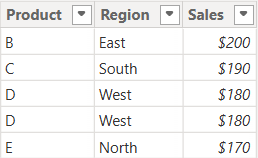
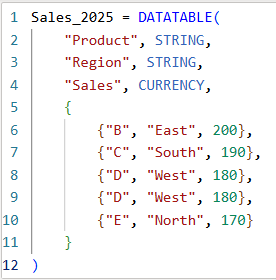
Table: Sales_2025

The above table (Sales_2025) was created using the following DAX code utilizing the DATATABLE function (or you could enter the data directly using the Enter Data feature in Power BI):

Now that we have our two test tables, we can now use them to explore the 3 table / set functions – Union, Intersect, and Except.

1. UNION – Combine Rows from Multiple Tables

The UNION function returns all rows from both tables, including duplicates. It requires the same number of columns and compatible data types in corresponding columns in the the tables being UNION’ed. The column names do not have to match, but the number of columns and datatypes need to match.

DAX Syntax:

UNION(<Table1>, <Table2>)

For our example, here is the syntax and resulting dataset:

UnionTable = UNION(Sales_2024, Sales_2025)

As you can see, the UNION returns all rows from both tables, including duplicates.

If you were to reverse the order of the tables (in the function call), the result remains the same (as shown below):

To remove duplicates, you can wrap the UNION inside a DISTINCT() function call, as shown below:

2. INTERSECT – Returns Rows Present in Both Tables

The INTERSECT function returns only the rows that appear in both tables (based on exact matches across all columns).

DAX Syntax:

INTERSECT(<Table1>, <Table2>)

For our example, here is the syntax and resulting dataset:

IntersectTable = INTERSECT(Sales_2024, Sales_2025)

Only the rows in Sales_2024 that are also found in Sales_2025 are returned.

If you were to reverse the order of the tables, you would get the following result:

IntersectTableReverse = INTERSECT(Sales_2025, Sales_2024)

In this case, it returns only the rows in Sales_2025 that are also found in Sales_2024. Since the record with “D – West – $180” exists twice in Sales_2025, and also exists in Sales_2024, then both records are returned. So, while it might not be relevant for all datasets, order does matter when using INTERSECT.

3. EXCEPT – Returns Rows in One Table but Not the Other

The EXCEPT function returns rows from the first table that do not exist in the second.

DAX Syntax:

EXCEPT(<Table1>, <Table2>)

For our example, here is the syntax and resulting dataset:

ExceptTable = EXCEPT(Sales_2024, Sales_2025)

Only the rows in Sales_2024 that are not in Sales_2025 are returned.

If you were to reverse the order of the tables, you would get the following result:

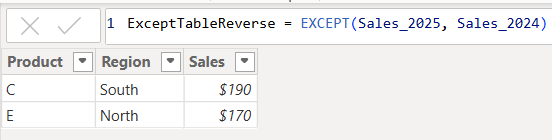
ExceptTableReverse = EXCEPT(Sales_2025, Sales_2024)

Only the rows in Sales_2025 that are not in Sales_2024 are returned. Therefore, as you have seen, since it pulls data from the first table that does not exist in the second, order does matter when using EXCEPT.

Comparison table summarizing the 3 functions:

FunctionUNIONINTERSECTEXCEPT
Purpose & OutputReturns all rows from both tablesReturns rows that appear in both tables (i.e., rows that match across all columns in both tables)Returns rows from the first table that do not exist in the second
Match CriteriaColumn position (number of columns) and datatypesColumn position (number of columns) and datatypes and valuesColumn position (number of columns) and datatypes must match and values must not match
Order Sensitivityorder does not matterorder matters if you want duplicates returned when they exist in the first tableorder matters
Duplicate HandlingKeeps duplicates. They can be removed by using DISTINCT()Returns duplicates only if they exist in the first tableReturns duplicates only if they exist in the first table

Additional Notes for your consideration:

  • Column Names: Only the column names from the first table are kept; the second table’s columns must match in count and data type.
  • Performance: On large datasets, these functions can be expensive, so you should consider filtering the data before using them.
  • Case Sensitivity: String comparisons are generally case-insensitive in DAX.
  • Real-World Use Cases:
    • UNION – Combining a historical dataset and a current dataset for analysis.
    • INTERSECT – Finding products sold in both years.
    • EXCEPT – Identifying products discontinued or newly introduced.

Thanks for reading!

Data Cleaning methods

Data cleaning is an essential step in the data preprocessing pipeline when preparing data for analytics or data science. It involves identifying and correcting or removing errors, inconsistencies, and inaccuracies in the dataset to improve its quality and reliability. It is essential that data is cleaned before being used in analyses, reporting, development or integration. Here are some common data cleaning methods:

Handling missing values:

  • Delete rows or columns with a high percentage of missing values if they don’t contribute significantly to the analysis.
  • Impute missing values by replacing them with a statistical measure such as mean, median, mode, or using more advanced techniques like regression imputation or k-nearest neighbors imputation.

Handling categorical variables:

  • Encode categorical variables into numerical representations using techniques like one-hot encoding, label encoding, or target encoding.

Removing duplicates:

  • Identify and remove duplicate records based on one or more key variables.
  • Be cautious when removing duplicates, as sometimes duplicated entries may be valid and intentional.

Handling outliers:

  • Identify outliers using statistical methods like z-scores, box plots, or domain knowledge.
  • Decide whether to remove outliers or transform them based on the nature of the data and the analysis goals.

Correcting inconsistent data:

  • Standardize data formats: Convert data into a consistent format (e.g., converting dates to a specific format).
  • Resolve inconsistencies: Identify and correct inconsistent values (e.g., correcting misspelled words, merging similar categories).

Dealing with irrelevant or redundant features:

  • Remove irrelevant features that do not contribute to the analysis or prediction task.
  • Identify and handle redundant features that provide similar information to avoid multicollinearity issues.

Data normalization or scaling:

  • Normalize numerical features to a common scale (e.g., min-max scaling or z-score normalization) to prevent certain features from dominating the analysis due to their larger magnitudes.

Data integrity issues:

Finally, you need to address data integrity issues.

  • Check for data integrity problems such as inconsistent data types, incorrect data ranges, or violations of business rules.
  • Resolve integrity issues by correcting or removing problematic data.

It’s important to note that the specific data cleaning methods that need to be applied to a dataset will vary depending on the nature of the dataset, the analysis goals, and domain knowledge. It’s recommended to thoroughly understand the data and consult with domain experts when preparing to perform data cleaning tasks.

What is HR / People / Workforce Analytics?

An organization’s most important resource is its staff. Understanding how to take the best care of your staff and help them to be highly engaged and productive is key to the success of the organization. HR Analytics / People Analytics / Workforce Analytics can help with this. But what is that exactly?

Analytics is a multi-disciplinary field that involves the collection and curation of data, and the analysis of that data using a variety of methods and tools, to discover, interpret and share information and insights, to help develop better business understanding and help guide decision making, usually toward achieving an organization’s goals. HR / People / Workforce Analytics is analytics around an organization’s candidates and staff, and HR actions and operations. The term most commonly used for this area of specialization by people in the field has shifted from HR Analytics to People Analytics over the years, and is now trending toward Workforce Analytics, so I will just use Workforce Analytics for the rest of the article.

The data used for Workforce Analytics will come from many sources inside and outside the organization including, but not limited to, Human Capital ERP systems, Workforce applications, Recruiting applications, Payroll applications, scheduling applications, employee and candidate surveys, social media, Glassdoor, and more. This data can be transformed, integrated and aggregated as appropriate, and then analyzed to provide information to help with operational and strategic decision making around areas such as staffing, recruiting, retention, turnover, absence, compensation and benefits, employee engagement, job satisfaction, performance and productivity, training and development, diversity, equity and inclusion, and operational efficiency, among others.

This analysis is usually performed across time periods (months, years) to allow for period-to-period comparisons and trend analysis to determine if the various metrics being measured and analyzed are improving or not. And the analysis is also usually done across all levels of the organization, so that information is available to support decision making for the entire organization or for a single department or for a specific segment of employees (such as all the clinical employees within a healthcare organization) or potentially for an individual employee.

The end goal usually includes helping with efforts such as:

  • Understanding the current workforce landscape and knowing any operational tasks that need to be performed
  • Hiring better candidates by predicting candidate success and reducing recruiting/hiring costs
  • Improve employee engagement through a better understanding of employee’s true needs, and what is working and what is not, and reducing absences as a result
  • Increase employee productivity through a better understanding of how employees work and things that slow them down
  • Reducing turnover by predicting employees at a high risk of turnover and implementing proactive retention measures
  • Forecast future staffing needs to better prepare for it with recruiting and training & development
  • Determining the business impact of HR initiatives

The diagram below summarizes the Workforce Analytics components to give you an overview of this article in a quick glance.

Of course, all organizations are different, and so the goals of an organization, the type of data available and the type of analyses of interest to an organization, will vary. But the importance and value of Workforce Analytics, which helps organizations make the most of their most important resource, is critical to just about all medium to large organizations, regardless of industry and prior success.

Good luck on your analytics journey!

Python Libraries for Data Science

Python has grown quickly to become one of the most widely used programming languages. While it’s a powerful, multi-purpose language used for creating just about any type of application, it has become a go-to language for data science, rivaling even “R”, the longtime favorite language and platform for data science.

Python’s popularity for data-based solutions has grown because of the many powerful, opensource, data-centric libraries it has available. Some of these libraries include:

NumPy

A library used for creating and manipulating multi-dimensional data arrays and can be used for handling multi-dimensional data and difficult mathematical operations.

Pandas

Pandas is a library that provides easy-to-use but high-performance data structures, such as the DataFrame, and data analysis tools.

Matplotlib

Matplotlib is a library used for data visualization such as creating histograms, bar charts, scatter plots, and much more.

SciPy

SciPy is a library that provides integration, statistics, and linear algebra packages for numerical computations.

Scikit-learn

Scikit-learn is a library used for machine learning. It is built on top of some other libraries including NumPy, Matplotlib, and SciPy.

There are many other data-centric Python libraries and some will be introduced in future articles. More can be learned here: https://www.python.org/

What is data analytics? And what are the different types of data analytics?

Data analytics is the overall process of capturing and using data to produce meaningful information, including metrics and trends, that can be used to better understand events and help make better decisions. Usually the goal is to improve the efficiency and outcomes of an operation, such as a business, a political campaign, or even an individual (such as an athlete). There are four (4) prevalent types of data analytics – descriptive, predictive, diagnostic, and prescriptive.

  1. Descriptive analytics – provides information about “what has happened”. Examples of questions answered by descriptive analytics include: How much are our sales this month and what is over year-over-year sales increase? How many website visitors did we have and how many signups?
  2. Predictive analytics – provides insight into “what may happen” in the future based on the past. Examples of questions answered by predictive analytics include: Based on previous customer service call patterns and outcomes, what is the likelihood of a customer switching to another provider? Based on a customer’s profile, how much should we charge him for insurance?
  3. Diagnostic analytics – provides information to explain “why something happened”. In addition to the direct data, this may also involve more indirect or macro data sources, such as, weather data, local or national economic data, or competitor data. And it may also involve forming logical theories about the correlation of events. Examples of questions answered by diagnostic analytics include: How effective was the marketing blitz and which channel had the most impact? Did the weather affect sales or was it the price increase?
  4. Prescriptive analytics – provides insight into “what to do to make something happen”. Examples of questions answered by prescriptive analytics include: Based on the results of our test marketing blitz campaign, if we roll out the full campaign with adjustments to the channel spread, how many additional temporary customer service staff will we need to handle the increased volume without long wait times?
The four (4) types of data analytics

Descriptive analytics is the simplest and most common form of analytics used in organizations and is widely referred to as Business Intelligence (BI). There is widespread interest in predictive analytics but less than 50% of companies currently use it as it requires additional, more expensive skills. Diagnostic and prescriptive analytics have always been around because companies have always used information from descriptive analytics to hypothesize “why things happened” and make decisions on “what to do”. But it’s the automation of these types through new methods and the integration of more data inputs that is fairly new. The latter three forms are sometimes called Advanced Analytics or Data Science.

All the types of analytics will require some form of data integration and use some of the same data in an environment, but while descriptive analytics only needs data from the time periods being analyzed and usually from a narrower data set, the predictive, prescriptive and diagnostic analytics produce better results using as much data as is available from a wider timeframe and from a broader set of sources. There is overlap with the different types of analytics because the analysis of “what may happen” is driven by “what has happened” in the past and “why it happened”; and determining “what to do” will be driven by “what has happened”, “why it happened”, and “what may happen”. Companies on the forefront of data analytics will tend to use all four types.

Quality Assurance (QA) for Data Projects or Data Applications

This post discusses Quality Assurance (QA) activities for data projects.

What is Quality Assurance (QA)?  Simply put, Quality Assurance, also called QA, Testing or Validation, is about testing an application or solution to ensure that all the stated/promised/expected requirements are met. It is a critically important activity for all software application development or implementations. Data applications are no different. They need to be tested to ensure they work as intended.

QA stands between development and deployment. And QA makes the difference between a delivered product and a high quality delivered product.

There are a number of things to keep in mind when you plan your Quality Assurance activities for data solutions. I present some of them in this post as suggestions, considerations, or prompting questions. The things mentioned here will not apply to all data applications but can be used as a guide or a check.

People / Teams

The number of people and teams involved in a project will vary depending on the size, scope and complexity of the project.

The technical team building the application needs to perform an initial level of validation of the solution.

If there is a Quality Assurance team that performs the validation tasks, then that team will need to perform the “official” validation.

The business analysts and end-users of the application also need to validate. Where possible, work with as many end users as efficiently possible. The more real users you have testing the application, the better the chances of finding issues early.

Where it makes sense, Test IDs that simulate various types of users or groups should be used to help test various usage and security scenarios. This is particularly useful in automated testing.

On large projects where there is a lot to be tested, it is best to break up the testing across multiple people or teams. This will help to prevent testing fatigue and sloppy testing and result in higher quality testing.

Plan ahead to ensure that access for all the relevant users is set up in the testing environments.

Communication

With all the teams and people involved, it is important to have a plan for how they will communicate. Things to consider and have a plan for include:

  • How will teams communicate within? Email, Microsoft Teams, SharePoint, Shared Files, are some options.
  • How will the various teams involved communicate with each other? In other words, how will cross-team communication be handled? As above, Email, Microsoft Teams, SharePoint, Shared Files, are some options.
  • How will issues and status be communicated? Weekly meetings, Status emails or documents, Shared files available on shared spaces are options.
  • How will changes and resolutions be tracked? Files, SDLC applications, Change Management applications are options.
  • How will teams and individuals be notified when they need to perform a task? Manual communication or automated notifications from tools are options.

Data

The most important thing to ensure in data projects is that the data is high quality, particularly the “base” data set. If the base data is incorrect, everything built on top of it will be bad. Of course, the correctness of intermediate and user-facing data is also just as important, but the validation of the base data is critical to achieving the correct data all over.

  • Ensure that table counts, field counts and row counts of key data are correct.
  • Does the data warehouse data match the source data?
  • Test detailed, low level records with small samples of data
  • Test to ensure that the data and the values conform to what is expected. For example, ensuring that there is no data older than 3 years old, or ensuring that there are no account values outside a certain range. The Data Governance Team may become involved in these activities across all projects.

Next in line is the “intermediate” data such as derived metrics, aggregates, specialized subsets, and more. These will also need to be verified.

  • Are the calculated values correct?
  • Are the aggregates correct? Test aggregate data with small, medium and large sets of data
  • Verify metric calculations

Then the user-facing data or data prepared for self-service usage needs to be validated.

  • Does the data on the dashboard match the data in the database?
  • Are the KPIs correctly reflecting the status?

Test the full flow of the data. The validity of the data should be verified at each stage of the data flow – from the source, to the staging, to the final tables in the data warehouse, to aggregates or subsets, to the dashboard.

Take snapshots of key datasets or reports so you can compare results post data migration.

Some additional data prep might be needed in some cases.

  • These include making sure that you have sourced adequate data for testing. For example, if you need to test an annual trend, then it might be best to have at least a year’s worth of data, preferably two.
  • You may need to scramble or redact some data for testing. Often Test data is taken from the Production environment and then scrambled and/or redacted in order to not expose sensitive information.
  • You may need to temporarily load in data for testing. For various reasons, you may need to load some Production data into the QA environment just to test the solution or a particular feature and then remove the data after the testing is complete. While this can be time consuming, sometimes it’s necessary, and it’s good to be aware of the need early and make plans accordingly.

Aesthetics & Representation of Data

Presentation matters. Although the most critical thing is data correctness, how the data is presented is also very important. Good presentation helps with understanding, usability, and adoption. A few things to consider include:

  • Does the application, such as dashboard, look good?  Does it look right? 
  • Are the components laid out properly so that there is no overcrowding?
  • Are the logos, colors and fonts in line with company expectations?
  • Are proper chart options used to display the various types of data and metrics?
  • Is the information provided in a way that users can digest?

Usage

The data application or solution should be user friendly, preferably intuitive or at least have good documentation. The data must be useful to the intended audience, in that, it should help them to understand the information and make good decisions or take sensible actions based on it.

The application should present data in a manner that is effective – easy to access, and easy to understand.

The presentation should satisfy the analytic workflows of the various users. Users should be able to logically step through the application to find information at the appropriate level of detail that they need based on their role.

A few things that affect usability include:

  • Prompts – ensure that all the proper prompts or selections are available to users to slice and filter the data as necessary. And of course, verify that they work.
  • Drill downs and drill throughs – validate that users can drill-down and across data to find the information they need in a simple, logical manner.
  • Easy interrogation of the data – if the application is ad-hoc in nature, validate that users can navigate it or at least verify that the documentation is comprehensive enough for users to follow.

Security

Securing the application and its data so that only authorized users have access to it is critical.

Application security comprises of “authentication”– access to the application, and “authorization” – what a user is authorized to do when he or she accesses the application.

Authorization (what a user is authorized to do within the application) can be broken into “object security” – what objects or features a user has access to, and “data security” – what data elements a user has access to within the various objects or features.

For example, a user has access to an application (authenticated / can log in), and within the application the user has access to (authorized to see and use) 3 of 10 reports (object-level security). The user is not authorized to see the other 7 reports (object-level security) and, therefore, will not have access to them. Now, within the 3 reports that the user has access to, he or she can only see data related to 1 of 5 departments (data-level security).

All object-level and data-level security needs to be validated. This includes negative testing. Not only test to make sure that users have the access they need, but testing should also ensure that users do not have access that they should not have.

  • Data for testing should be scrambled or redacted as appropriate to protect it.
  • Some extremely sensitive data may need to be filtered out entirely.
  • Can all the appropriate users access the application?
  • Are non-authorized users blocked from accessing the application?
  • Can user see the data they should be able to see to perform their jobs?

Performance

Performance of the data solution is important to user efficiency and user adoption. If users cannot get the results they need in a timely manner, they will look elsewhere to get what they need. Even if they have no choice, a poorly performing application will result in wasted time and dollars.

A few things to consider for ensuring quality around performance:

  • Application usage – is the performance acceptable? Do the results get returned in an acceptable time?
  • Data Integration – is the load performance acceptable?
  • Data processing – can the application perform all the processing it needs to do in a reasonable amount of time?
  • Stress Testing – how is performance with many users? How is it with a lot data?
  • How is performance with various selections or with no selections at all?
  • Is ad-hoc usage setup to be flexible but avoid rogue analyses that may cripple the system?
  • Is real-time analysis needed and is the application quick enough?

These items need to be validated and any issues need to be reported to the appropriate teams for performance tuning before the application is released for general usage.

Methodology

Each organization, and even each team within an organization, will have a preferred methodology for application development and change management, including how they perform QA activities.

Some things to consider include:

  • Get QA resources involved in projects early so that they gain an early understanding of the requirements and the solutions to assess and plan how best to test.
  • When appropriate, do not wait until all testing is complete before notifying development teams of issue discovered. By notifying them early, this could make the difference between your project being on-time or late.
  • Create a test plan and test scripts – even if they are high-level.
  • Where possible, execute tasks in an agile, iterative manner.
  • Each environment will have unique rules and guidelines that need to be validated. For example, your application may have a special naming convention, color & font guidelines, special metadata items, and more. You need to validate that these rules and guidelines are followed.
  • Use a checklist to ensure that you validate with consistency from deliverable to deliverable
  • When the solution being developed is replacing an existing system or dataset, use the new and old solutions in parallel to validate the new against the old.
  • Document test results. All testing participants should document what has been tested and the results. This may be as simple as a checkmark or a “Done” status, but may also include things like data entered, screenshots, results, errors, and more.
  • Update the appropriate tracking tools (such as your SDLC or Change Management tools) to document changes and validation. These tools will vary from company to company, but it is best to have a trail of the development, testing, and release to production.
  • For each company and application, there will a specific, unique set of things that will need to be done. It is best if you have a standard test plan or test checklist to help you confirm that you have tested all important aspects and scenarios of the application.

This is not an all-encompassing coverage of Quality Assurance for data solutions, but I hope the article gives you enough information to get started or tips for improving what you currently have in place. You can share your questions, thoughts and input via comments to this post. Thanks for reading!