Category: Business Intelligence

Using Custom Images in OBIEE 10g & 11g

In both OBIEE 10g and 11g, custom images need to be placed in 2 folders before use within reports/dashboards.

 In OBIEE 10g, images need to be placed in:

(1)     $BIHOMEoc4j_bij2eehomeapplicationsanalyticsanalyticsress_oracle10images

Windows directory path example:
C:OracleBIoc4j_bij2eehomeapplicationsanalyticsanalyticsress_oracle10images

Linux directory path example:
/usr/local/OracleBI/oc4j_bi/j2ee/home/applications/analytics/analytics/res/s_oracle10/images

-and-

(2)    $BI_HOMEwebappress_oracle10images

Windows directory path example:
C:OracleBIwebappress_oracle10images

Linux directory path example:
/usr/local/OracleBI/web/app/res/s_oracle10/images


In OBIEE 11g, images need to be placed in:

(1)    $OBIEE_FMW_HOMEuser_projectsdomainsbifoundation_domainserversbi_server1tmp_WL_useranalytics_11.1.17dezjlwarress_blafpimages

Windows directory path example:
C:obiee11guser_projectsdomainsbifoundation_domainserversAdminServertmp_WL_useranalytics_11.1.1silp1vwarress_blafpimages

Linux directory path example:
/u01/product/middleware/user_projects/domains/bifoundation_domain/servers/bi_server1/tmp/_WL_user/analytics_11.1.1/7dezjl/war/res/s_blafp/images

-and-

(2)    $OBIEE_FMW_HOMEOracle_BIbifoundationwebappress_blafpimages

Windows directory path example:
C:obiee11gOracle_BI1bifoundationwebappress_blafpimages

Linux directory path example:
/u01/product/middleware/Oracle_BI1/bifoundation/web/app/res/s_blafp/images

Note: you may also create or use directories at the same level or below the images directories under the s_oracle10 (in 10g) and s_blafp (in 11g) directories, for example, if you wanted to put all your custom images into a separate directory.

Then in Answers / Analysis, you would reference the image as shown below.

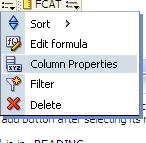
Edit the Column Properties:
ImagesDirectories-ColumnProperties

Then, in the Style tab, within the Cell area, click on the Image object…

ImagesDirectories-ClickImage

Then in the Graphics dialog, select “Custom Image” and enter  fmap:images/your_custom_image.jpg.

Note: If your images are in a directory other than the images directory, you need to supply that path, but still starting below s_oracle10 or s_blafp directories.

And set the Image Placement property. Images Left (shows the Image to the left of the column data), Images Right (displays the image to the right of the column data), Images Only (displays the image only – no column data)
ImagesDirectories-ImageNameAndPlacement

If new images were placed into the directories after the last BI Server / Presentation Server restart, you will need to restart the BI Server and Presentation Server for the images to be displayed.

How to remove the popup menu when navigating from one report to another via a navigation link

When you click on a navigation link value, by default a pop-up arises with the name of the possible report(s) that you can navigating to.  Even if it’s just one possible report, the pop-up still occurs (see example below). This happens after upgrading from OBIEE 10g to 11g, and there is no system wide setting to fix this.

Navigation-Popup

This can be annoying to users because its an extra unnecessary click. They want to be navigated to the next report after the single click on the navigation link.  Especially if they worked on OBIEE 10g before and did not have to do this. The good news is, removing this popup is easy.

Edit Dashboard

Edit the Analysis

Edit the Column Properties for the relevant column

EditColumnProperties

In the Column Properties dialog, go to the Interaction tab.
Check the box below the Action Links table for “Do not display in a popup if only one action link is available at runtime”

DoNotDisplayPopup

Once you check the box for one column in your analysis, it will become checked for all navigation link columns in that analysis  – so you do not need to check for others columns after you have done for any one column.

You will now be navigated directly to the next report without the popup showing. Unfortunately, this has to be done for each report because there is no system wide setting to change it for all.

EVALUATE_SUPPORT_LEVEL inside NQSConfig.INI is not set

If you use the Oracle EVALUATE function in OBIEE, then you will need to set a parameter in the NQSConfig.INI file in OBIEE 11g.

If you get this error below, then you are using the EVALUATE function somewhere inside OBIEE (in one of your analyses/requests) and the parameter needs to be set appropriately in the NQSConfig.INI file.

State: HY000. Code: 10058. [NQODBC] [SQL_STATE: HY000] [nQSError: 10058] A general error has occurred.
[nQSError: 43113] Message returned from OBIS.
EVALUATE_SUPPORT_LEVEL inside NQSConfig.INI is not set to support EVALUATE. (HY000)

This is what you need to do to correct the problem… 

Edit the NQSConfig.INI file, located at: OBIEE_INSTANCE/config/OracleBIServerComponent/coreapplication_obisn

This is what you will see by default in the config file…
————-
# EVALUATE_SUPPORT_LEVEL:
# 1: evaluate is supported for users with manageRepositories permssion
# 2: evaluate is supported for any user.
# other: evaluate is not supported if the value is anything else.
EVALUATE_SUPPORT_LEVEL = 0; 
————-

Change the parameter as follows: EVALUATE_SUPPORT_LEVEL = 2;

Save and restart the BI Server.  Your requests should work fine now.

OBIEE 10g: Unable to sort table although “Enable column sorting in dashboards” is checked

I discovered an interesting scenario recently. Although “Enable column sorting in dashboards” was checked (turned on), I was unable to sort on a particular table.  The mouse icon changed when I moused-over the column headings which gave the impression that it would sort, but it simply did not work.

Turns out there was an invalid “view” above the Table object in the Compound Layout. This happens when an object is removed from an analysis/request and its placeholder is not removed from the Compound Layout. See the screenshot below – notice the empty placeholder above the table with the message “The view that was in this position the the Compound Layout is no longer available. …”.

To fix the problem, simply remove/delete that invalid view from the compound layout and you will now be able to sort the table.

Configuring OBIEE 11g to use LDAP (Active Directory) Authentication with External Groups table

I have been working on configuring OBIEE 11g to use Active Directory for authentication and an external table for Groups.  It has been a bit of a challenge primarily because I was not familiar with the Active Directory terminology and parameters, and so I was initially doing some guess work – about what the various parameters should be set to, and it was not very easy to determine what was and what was not correct.

Anyway, thanks to a few Oracle documents and a few blog articles I have made significant progress and I think I have it working properly now, and testing it thoroughly.

Below are some of the documents and articles that I used…

Here you will find some Oracle documentation:

http://docs.oracle.com/cd/E14571_01/bi.1111/e10543/toc.htm

http://docs.oracle.com/cd/E23943_01/bi.1111/e10543/privileges.htm#BIESC6054

A great intro article:

http://www.rittmanmead.com/2012/03/obiee-11g-security-week-understanding-obiee-11g-security-application-roles-and-application-policies/

An article directly related to the topic:

http://www.rittmanmead.com/2012/03/obiee-11g-security-week-connecting-to-active-directory-and-obtaining-group-membership-from-database-tables/

These provided some more details that helped me to understand the parameters better and be in a better position to work with the Active Directory administrator:

http://bimetrics.wordpress.com/2011/08/12/integrating-ms-active-directory-with-obiee-11g-in-weblogic-server/

http://obieeelegant.blogspot.com/2012/01/obiee-11g-integration-with-ldap.html

http://paulcannon-bi.blogspot.com/2012/07/configuring-ldap-authentication-for.html

http://www.biztech.com/blog/2011/09/integrating-active-directory-with-obiee-11g/

Good luck!

Oracle BI 11g Architecture Diagram with Descriptions

Oracle BI 11g Architecture Diagram with Descriptions

Oracle BI 11g Fusion Middleware Architecture Diagram with Descriptions

The main reason for this post is to share the above Oracle BI 11g Architecture diagram that includes notes about each component, but I will also add a few other notes about the Oracle BI Architecture…

The above diagram, which can be considered as the Overall Oracle BI Domain, provides a brief description of each component (click it to enlarge) but I will mention a few other things here.

The WebLogic Admin Console running on the WebLogic Administration Server is used to start the WebLogic Managed Server. Once you start the WebLogic Managed Server, it will typically autostart the Java Components and the System Components. However, the components can be started/stopped individually via Fusion Middleware Control.

The WebLogic Server, which is a Java-based application server, manages all the Oracle BI Java components.  And OPMN (Oracle Process Management & Notification) process manages the non-Java components called Oracle BI System Components.  Both the Java and non-Java components (System Components) can be managed via the Fusion Middleware Control interface. 

Interact with the Java components in Fusion Middleware Control under bifoundation_domain -> bi_server1.  Interact with the System Components in Fusion Middleware Control under Business Intelligence -> coreapplication.

8 Reasons Oracle BI Apps is likely to have a Lower TCO than home-grown BI environments

Oracle Business Intelligence Applications, aka Oracle BI Apps or OBIA, is a set of pre-built BI solutions, that provide information to business stakeholders that they use to make more informed decisions and improve business outcomes.
Oracle provides BI Analytics Applications for ERP – which include Financials, HR, Procurement & Spend, Projects, Supply Chain management, Order management, Logistics; and for CRM functions – which include Sales, Marketing, Service, Call Center, Price, and Loyalty.
The pre-built solutions include Source adaptors, ETL, data warehouse data models, metadata repository, dashboards and reports – the entire BI/DW value chain.  The platform also allows for customizations.

This short article shares some reasons why implementing Oracle BI Apps will likely have a much lower TCO than traditional home-grown BI environments.

(1) Implementation of Oracle BI Apps is faster and requires a smaller implementation team. There will be much less design effort, far less redo’s, much less waiting between team members, and a lot less risk.

(2) After implementing one or more Oracle BI Apps, the platform can be extended to add additional Applications as needed by the business. And since all applications share conformed dimensions (including standardized codes), they will integrate easily for cross-functional area analysis.

(3) Maintenance of Oracle BI Apps is standardized and has a proven recommended methodology.  If the appropriate steps are followed, maintenance of the solution is smooth, and requires less team members when compared to a traditional BI platform.

(4) A great base of a solution on which your company can grow. Having such a solid starting point for the Apps that you implement will lead to quick user adoption and early generation of many more high-value ideas about the data that they would like to see, manipulate, analyze, etc. This is a much higher value activity than scrambling to come up with ALL the reporting requirements and definitions when starting a project from scratch.

(5) Since the Oracle BI Apps are performance and administration optimized, a BI team will spend less time working on performance and adminsitration tasks.

(6) The features of the DAC and the overall BI Apps design lead to faster ETL run times resulting in more effective batch windows.

(7) Although all companies are different and have different needs for business analytics, Oracle BI Apps are created from tremendous research and feedback from hundreds of companies.  What you get out-the-box will undoubtedly be of tremendous value, as your company will benefit from all those ideas and best practices developed from working with hundreds of customers over many years. You will be getting and benefitting from metrics that you would not have though about.

(8) Since OBIA is built on top of OBIEE, the applications are easily customizable.  With the existing framework built using best practices, an implementation team can follow that framework to add custom objects throughout the BI value chain – from the source through to the presentation layer.

Despite these benefits, each business is different and must be analyzed carefully to determine if the Oracle BI Apps is an appropriate solution.  Good luck with your BI/DW plans!

OBIEE 10g and OBIEE 11g directory structure comparisons

I got this chart from one of Oracle’s documents, and thought it would be handy to post for easy lookup and it might come in handy for someone searching for information on the directory parallels between OBIEE 10g and OBIEE 11g.

OBIEE 11g Key Directories and the corresponding 10g directories

Directory or Files 10g & 11g Locations
AdminTool.sh equalizerpds.sh/equalizerpds.exe JobManager.sh MigrateEUL.sh NQClient.sh nqcmd.sh/nqcmd.exe 10g: BI_ORACLE_HOME/server/Bin


11g: BI_ORACLE_HOME/bifoundation/server/bin

DBFeatures.INI NQSConfig.INI 10g: BI_ORACLE_HOME/server/Config


11g: ORACLE_INSTANCE/config/OracleBIServerComponent
/coreapplication_obisn

NQClusterConfig.INI 10g: BI_ORACLE_HOME/server/Config


11g: ORACLE_INSTANCE/config/OracleBIApplication
/coreapplication

NQQuery.log NQSAdminTool.log NQServer.log 10g: BI_ORACLE_HOME/server/Log


11g: ORACLE_INSTANCE/diagnostics/logs
/OracleBIServerComponent/coreapplication_obis1

Oracle BI Server repository directory:

  • SampleAppLite.rpd
  • paint.rpd
10g: BI_ORACLE_HOME/server/Repository


11g: ORACLE_INSTANCE/bifoundation
/OracleBIServerComponent/coreapplication_obisn/repository

Samples:

  • order.xml
  • Product.xml
  • samplesales.udml
10g: BI_ORACLE_HOME/server/Sample/samplesales


11g: ORACLE_INSTANCE/bifoundation/OracleBIServerComponent
/coreapplication_obisn/sample/SampleAppFiles

Usage Tracking:

  • SQL_Server_Time
  • UsageTracking.rpd
  • UsageTracking.zip
10g: BI_ORACLE_HOME/server/Sample/usagetracking


11g: ORACLE_INSTANCE/bifoundation/OracleBIServerComponent
/coreapplication_obisn/sample/usagetracking

Other Schemas (for example):

  • Oracle_alter_nq_acct.sql
  • SAACCT.DB2.sql
  • SAACCT.MSSQL.sql
  • SAACCT.Oracle.sql

Note: Use the Repository Creation Utility to install the Oracle BI Schema

10g: BI_ORACLE_HOME/server/Sample/Schema


11g: ORACLE_INSTANCE/bifoundation/OracleBIServerComponent
/coreapplication_obisn/schema

  • credentialstore.xml
  • instanceconfig.xml (for Presentation Services)
  • userpref_currencies.xml
10g: OracleBIData/web/config


11g: ORACLE_INSTANCE/config
/OracleBIPresentationServicesComponent/coreapplication_obipsn

  • JavaHost
  • sawlog0.log
10g: OracleBIData/web/log


11g: ORACLE_INSTANCE/diagnostics/logs
/OracleBIPresentationServicesComponent/coreapplication_obipsn

catalogmanager.exe 10g: BI_ORACLE_HOMEwebcatalogmanager


11g: ORACLE_INSTANCEbifoundation
OracleBIPresentationServicesComponentcoreapplication_obipsn

catalogmanagerruncat.cmd

instanceconfig.xml (for Oracle BI Scheduler) 10g: OracleBIDatawebconfig


11g: ORACLE_INSTANCEconfigOracleBISchedulerComponent
coreapplication_obischn

  • odbc.ini
  • user.sh
10g: BI_ORACLE_HOME/setup


11g: ORACLE_INSTANCE/bifoundation/OracleBIApplication
/coreapplication/setup

Troubleshooting OBIEE 11g

A couple tips on how to resolve some OBIEE 11g errors. When you receive an error such as …

“Supplementary information regarding operation: PROCESS:instance1:coreapplication_obisch1;FAILED_TO_START;
Operation Failed: start; OracleInstance: instance1; Component: coreapplication_obisch1; msg: 0 of 1 processes
started.”

or this …

“Error 500–Internal Server Error
From RFC 2068 Hypertext Transfer Protocol — HTTP/1.1:
10.5.1 500 Internal Server Error
The server encountered an unexpected condition which prevented it from fulfilling the request.”

1. First check to make sure your database instance and Listener are up and running.
You can do this through Enterprise Manager by connecting to the server/port.
https://hostname:1158/em/

If they are not running, then start them.
On Windows, you may need to make sure that the following Services are running:
. OracleServiceORCL
. OracleOraDb11g_home1ClrAgent
. OracleOraDb11g_home1TNSListener

2. Then check the status of other OBIEE components.
You can do this through the OBIEE Enterprise Manager.
http://hostname:7001/em/ then navigating to Business Intelligence -> coreapplication -> Availability tab.

or by running the opmnctl command as below
[Drive][FMW_HOME_DIR]instancesinstance1bin>opmnctl status
for example C:obiee11ginstancesinstance1bin> opmnctl status

In the example below, the BI Scheduler (coreapplication_obisch1) and the BI Presentation Server (coreapplication_obips1) are down.

Processes in Instance: instance1
———————————+——————–+———+———
ias-component | process-type | pid | status
———————————+——————–+———+———
coreapplication_obiccs1 | OracleBIClusterCo~ | 10136 | Alive
coreapplication_obisch1 | OracleBIScheduler~ | N/A | Down
coreapplication_obijh1 | OracleBIJavaHostC~ | 8396 | Alive
coreapplication_obips1 | OracleBIPresentat~ | N/A | Down
coreapplication_obis1 | OracleBIServerCom~ | 6736 | Alive

You can start the individual components using Enterprise Manager interface, or you may Stop BI Services and then Start BI Services from the Windows Start button
(Start -> All Programs -> Oracle Business Intelligence -> Stop/Start BI Services).

Error Message when try to perform actions in Oracle Enterprise Manager 11g on Windows XP

If you get the following error when attempting to perform database actions in Oracle 11g Enterprise Manager on Windows XP …

RemoteOperationException: ERROR: Invalid username and/or password

… then, assuming your Username/password combination is correct … and you can verify this by logging into SQLPLUS … follow these steps to resolve:

1. Open Control Panel
2. Administrative Tools -> Local Security Policy (Local Security Setting window opens)
3. Local Policies -> User Rights Assignment
4. Double click ‘Log on as a batch job’ (Properties window opens)
5. Click on ‘Add user or group’ (Select user/group window opens)
6. Add the username(s) including the domain name
7. Click ‘Check names’ to verify what you have added
8. Save (click OK, click OK)

Hope this helps.