Category: Big Data

AI in Cybersecurity: From Reactive Defense to Adaptive, Autonomous Protection

“AI in …” series

Cybersecurity has always been a race between attackers and defenders. What’s changed is the speed, scale, and sophistication of threats. Cloud computing, remote work, IoT, and AI-generated attacks have dramatically expanded the attack surface—far beyond what human analysts alone can manage.

AI has become a foundational capability in cybersecurity, enabling organizations to detect threats faster, respond automatically, and continuously adapt to new attack patterns.


How AI Is Being Used in Cybersecurity Today

AI is now embedded across nearly every cybersecurity function:

Threat Detection & Anomaly Detection

  • Darktrace uses self-learning AI to model “normal” behavior across networks and detect anomalies in real time.
  • Vectra AI applies machine learning to identify hidden attacker behaviors in network and identity data.

Endpoint Protection & Malware Detection

  • CrowdStrike Falcon uses AI and behavioral analytics to detect malware and fileless attacks on endpoints.
  • Microsoft Defender for Endpoint applies ML models trained on trillions of signals to identify emerging threats.

Security Operations (SOC) Automation

  • Palo Alto Networks Cortex XSIAM uses AI to correlate alerts, reduce noise, and automate incident response.
  • Splunk AI Assistant helps analysts investigate incidents faster using natural language queries.

Phishing & Social Engineering Defense

  • Proofpoint and Abnormal Security use AI to analyze email content, sender behavior, and context to stop phishing and business email compromise (BEC).

Identity & Access Security

  • Okta and Microsoft Entra ID use AI to detect anomalous login behavior and enforce adaptive authentication.
  • AI flags compromised credentials and impossible travel scenarios.

Vulnerability Management

  • Tenable and Qualys use AI to prioritize vulnerabilities based on exploit likelihood and business impact rather than raw CVSS scores.

Tools, Technologies, and Forms of AI in Use

Cybersecurity AI blends multiple techniques into layered defenses:

  • Machine Learning (Supervised & Unsupervised)
    Used for classification (malware vs. benign) and anomaly detection.
  • Behavioral Analytics
    AI models baseline normal user, device, and network behavior to detect deviations.
  • Natural Language Processing (NLP)
    Used to analyze phishing emails, threat intelligence reports, and security logs.
  • Generative AI & Large Language Models (LLMs)
    • Used defensively as SOC copilots, investigation assistants, and policy generators
    • Examples: Microsoft Security Copilot, Google Chronicle AI, Palo Alto Cortex Copilot
  • Graph AI
    Maps relationships between users, devices, identities, and events to identify attack paths.
  • Security AI Platforms
    • Microsoft Security Copilot
    • IBM QRadar Advisor with Watson
    • Google Chronicle
    • AWS GuardDuty

Benefits Organizations Are Realizing

Companies using AI-driven cybersecurity report major advantages:

  • Faster Threat Detection (minutes instead of days or weeks)
  • Reduced Alert Fatigue through intelligent correlation
  • Lower Mean Time to Respond (MTTR)
  • Improved Detection of Zero-Day and Unknown Threats
  • More Efficient SOC Operations with fewer analysts
  • Scalability across hybrid and multi-cloud environments

In a world where attackers automate their attacks, AI is often the only way defenders can keep pace.


Pitfalls and Challenges

Despite its power, AI in cybersecurity comes with real risks:

False Positives and False Confidence

  • Poorly trained models can overwhelm teams or miss subtle attacks.

Bias and Blind Spots

  • AI trained on incomplete or biased data may fail to detect novel attack patterns or underrepresent certain environments.

Explainability Issues

  • Security teams and auditors need to understand why an alert fired—black-box models can erode trust.

AI Used by Attackers

  • Generative AI is being used to create more convincing phishing emails, deepfake voice attacks, and automated malware.

Over-Automation Risks

  • Fully automated response without human oversight can unintentionally disrupt business operations.

Where AI Is Headed in Cybersecurity

The future of AI in cybersecurity is increasingly autonomous and proactive:

  • Autonomous SOCs
    AI systems that investigate, triage, and respond to incidents with minimal human intervention.
  • Predictive Security
    Models that anticipate attacks before they occur by analyzing attacker behavior trends.
  • AI vs. AI Security Battles
    Defensive AI systems dynamically adapting to attacker AI in real time.
  • Deeper Identity-Centric Security
    AI focusing more on identity, access patterns, and behavioral trust rather than perimeter defense.
  • Generative AI as a Security Teammate
    Natural language interfaces for investigations, playbooks, compliance, and training.

How Organizations Can Gain an Advantage

To succeed in this fast-changing environment, organizations should:

  1. Treat AI as a Force Multiplier, Not a Replacement
    Human expertise remains essential for context and judgment.
  2. Invest in High-Quality Telemetry
    Better data leads to better detection—logs, identity signals, and endpoint visibility matter.
  3. Focus on Explainable and Governed AI
    Transparency builds trust with analysts, leadership, and regulators.
  4. Prepare for AI-Powered Attacks
    Assume attackers are already using AI—and design defenses accordingly.
  5. Upskill Security Teams
    Analysts who understand AI can tune models and use copilots more effectively.
  6. Adopt a Platform Strategy
    Integrated AI platforms reduce complexity and improve signal correlation.

Final Thoughts

AI has shifted cybersecurity from a reactive, alert-driven discipline into an adaptive, intelligence-led function. As attackers scale their operations with automation and generative AI, defenders have little choice but to do the same—responsibly and strategically.

In cybersecurity, AI isn’t just improving defense—it’s redefining what defense looks like in the first place.

Best Data Certifications for 2026

A Quick Guide through some of the top data certifications for 2026

As data platforms continue to converge analytics, engineering, and AI, certifications in 2026 are less about isolated tools and more about end-to-end data value delivery. The certifications below stand out because they align with real-world enterprise needs, cloud adoption, and modern data architectures.

Each certification includes:

  • What it is
  • Why it’s important in 2026
  • How to achieve it
  • Difficulty level

1. DP-600: Microsoft Fabric Analytics Engineer Associate

What it is

DP-600 validates skills in designing, building, and deploying analytics solutions using Microsoft Fabric, including lakehouses, data warehouses, semantic models, and Power BI.

Why it’s important

Microsoft Fabric represents Microsoft’s unified analytics vision, merging data engineering, BI, and governance into a single SaaS platform. DP-600 is quickly becoming one of the most relevant certifications for analytics professionals working in Microsoft ecosystems.

It’s especially valuable because it:

  • Bridges data engineering and analytics
  • Emphasizes business-ready semantic models
  • Aligns directly with enterprise Power BI adoption

How to achieve it

Difficulty level

⭐⭐⭐☆☆ (Intermediate)
Best for analysts or engineers with Power BI or SQL experience.


2. Microsoft Certified: Data Analyst Associate (PL-300)

What it is

A Power BI–focused certification covering data modeling, DAX, visualization, and analytics delivery.

Why it’s important

Power BI remains one of the most widely used BI tools globally. PL-300 proves you can convert data into clear, decision-ready insights.

PL-300 pairs exceptionally well with DP-600 for professionals moving from reporting to full analytics engineering.

How to achieve it

  • Learn Power BI Desktop, DAX, and data modeling
  • Complete hands-on labs
  • Pass the PL-300 exam

Difficulty level

⭐⭐☆☆☆
Beginner to intermediate.


3. Google Data Analytics Professional Certificate

What it is

An entry-level certification covering analytics fundamentals: spreadsheets, SQL, data cleaning, and visualization.

Why it’s important

Ideal for newcomers, this certificate demonstrates foundational data literacy and structured analytical thinking.

How to achieve it

  • Complete the Coursera program
  • Finish hands-on case studies and a capstone

Difficulty level

⭐☆☆☆☆
Beginner-friendly.


4. IBM Data Analyst / IBM Data Science Professional Certificates

What they are

Two progressive certifications:

  • Data Analyst focuses on analytics and visualization
  • Data Science adds Python, ML basics, and modeling

Why they’re important

IBM’s certifications are respected for their hands-on, project-based approach, making them practical for job readiness.

How to achieve them

  • Complete Coursera coursework
  • Submit projects and capstones

Difficulty level

  • Data Analyst: ⭐☆☆☆☆
  • Data Science: ⭐⭐☆☆☆

5. Google Professional Data Engineer

What it is

A certification for building scalable, reliable data pipelines on Google Cloud.

Why it’s important

Frequently ranked among the most valuable data engineering certifications, it focuses on real-world system design rather than memorization.

How to achieve it

  • Learn BigQuery, Dataflow, Pub/Sub, and ML pipelines
  • Gain hands-on GCP experience
  • Pass the professional exam

Difficulty level

⭐⭐⭐⭐☆
Advanced.


6. AWS Certified Data Engineer – Associate

What it is

Validates data ingestion, transformation, orchestration, and storage skills on AWS.

Why it’s important

AWS remains dominant in cloud infrastructure. This certification proves you can build production-grade data pipelines using AWS-native services.

How to achieve it

  • Study Glue, Redshift, Kinesis, Lambda, S3
  • Practice SQL and Python
  • Pass the AWS exam

Difficulty level

⭐⭐⭐☆☆
Intermediate.


7. Microsoft Certified: Fabric Data Engineer Associate (DP-700)

What it is

Focused on data engineering workloads in Microsoft Fabric, including Spark, pipelines, and lakehouse architectures.

Why it’s important

DP-700 complements DP-600 by validating engineering depth within Fabric. Together, they form a powerful Microsoft analytics skill set.

How to achieve it

  • Learn Spark, pipelines, and Fabric lakehouses
  • Pass the DP-700 exam

Difficulty level

⭐⭐⭐☆☆
Intermediate.


8. Databricks Certified Data Engineer Associate

What it is

A certification covering Apache Spark, Delta Lake, and lakehouse architecture using Databricks.

Why it’s important

Databricks is central to modern analytics and AI workloads. This certification signals big data and performance expertise.

How to achieve it

  • Practice Spark SQL and Delta Lake
  • Study Databricks workflows
  • Pass the certification exam

Difficulty level

⭐⭐⭐☆☆
Intermediate.


9. Certified Analytics Professional (CAP)

What it is

A vendor-neutral certification emphasizing analytics lifecycle management, problem framing, and decision-making.

Why it’s important

CAP is ideal for analytics leaders and managers, demonstrating credibility beyond tools and platforms.

How to achieve it

  • Meet experience requirements
  • Pass the CAP exam
  • Maintain continuing education

Difficulty level

⭐⭐⭐⭐☆
Advanced.


10. SnowPro Advanced: Data Engineer

What it is

An advanced Snowflake certification focused on performance optimization, streams, tasks, and advanced architecture.

Why it’s important

Snowflake is deeply embedded in enterprise analytics. This cert signals high-value specialization.

How to achieve it

  • Earn SnowPro Core
  • Gain deep Snowflake experience
  • Pass the advanced exam

Difficulty level

⭐⭐⭐⭐☆
Advanced.


Summary Table

CertificationPrimary FocusDifficulty
DP-600 (Fabric Analytics Engineer)Analytics Engineering⭐⭐⭐☆☆
PL-300BI & Reporting⭐⭐☆☆☆
Google Data AnalyticsEntry Analytics⭐☆☆☆☆
IBM Data Analyst / ScientistAnalytics / DS⭐–⭐⭐
Google Pro Data EngineerCloud DE⭐⭐⭐⭐☆
AWS Data Engineer AssociateCloud DE⭐⭐⭐☆☆
DP-700 (Fabric DE)Data Engineering⭐⭐⭐☆☆
Databricks DE AssociateBig Data⭐⭐⭐☆☆
CAPAnalytics Leadership⭐⭐⭐⭐☆
SnowPro Advanced DESnowflake⭐⭐⭐⭐☆

Final Thoughts

For 2026, the standout trend is clear:

  • Unified platforms (like Microsoft Fabric)
  • Analytics engineering over isolated BI
  • Business-ready data models alongside pipelines

Two of the strongest certification combinations today:

  • DP-600 + PL-300 (analytics) or
  • DP-600 + DP-700 (engineering)

Good luck on your data journey in 2026!

Implement Performance Improvements in Queries and Report Visuals (DP-600 Exam Prep)

This post is a part of the DP-600: Implementing Analytics Solutions Using Microsoft Fabric Exam Prep Hub; and this topic falls under these sections: 
Implement and manage semantic models (25-30%)
--> Optimize enterprise-scale semantic models
--> Implement performance improvements in queries and report visuals

Performance optimization is a critical skill for the Fabric Analytics Engineer. In enterprise-scale semantic models, poor query design, inefficient DAX, or overly complex visuals can significantly degrade report responsiveness and user experience. This exam section focuses on identifying performance bottlenecks and applying best practices to improve query execution, model efficiency, and report rendering.


1. Understand Where Performance Issues Occur

Performance problems typically fall into three layers:

a. Data & Storage Layer

  • Storage mode (Import, DirectQuery, Direct Lake, Composite)
  • Data source latency
  • Table size and cardinality
  • Partitioning and refresh strategies

b. Semantic Model & Query Layer

  • DAX calculation complexity
  • Relationships and filter propagation
  • Aggregation design
  • Use of calculation groups and measures

c. Report & Visual Layer

  • Number and type of visuals
  • Cross-filtering behavior
  • Visual-level queries
  • Use of slicers and filters

DP-600 questions often test your ability to identify the correct layer where optimization is needed.


2. Optimize Queries and Semantic Model Performance

a. Choose the Appropriate Storage Mode

  • Use Import for small-to-medium datasets requiring fast interactivity
  • Use Direct Lake for large OneLake Delta tables with high concurrency
  • Use Composite models to balance performance and real-time access
  • Avoid unnecessary DirectQuery when Import or Direct Lake is feasible

b. Reduce Data Volume

  • Remove unused columns and tables
  • Reduce column cardinality (e.g., avoid high-cardinality text columns)
  • Prefer surrogate keys over natural keys
  • Disable Auto Date/Time when not needed

c. Optimize Relationships

  • Use single-direction relationships by default
  • Avoid unnecessary bidirectional filters
  • Ensure relationships follow a star schema
  • Avoid many-to-many relationships unless required

d. Use Aggregations

  • Create aggregation tables to pre-summarize large fact tables
  • Enable query hits against aggregation tables before scanning detailed data
  • Especially valuable in composite models

3. Improve DAX Query Performance

a. Write Efficient DAX

  • Prefer measures over calculated columns
  • Use variables (VAR) to avoid repeated calculations
  • Minimize row context where possible
  • Avoid excessive iterators (SUMX, FILTER) over large tables

b. Use Filter Context Efficiently

  • Prefer CALCULATE with simple filters
  • Avoid complex nested FILTER expressions
  • Use KEEPFILTERS and REMOVEFILTERS intentionally

c. Avoid Expensive Patterns

  • Avoid EARLIER in favor of variables
  • Avoid dynamic table generation inside visuals
  • Minimize use of ALL when ALLSELECTED or scoped filters suffice

4. Optimize Report Visual Performance

a. Reduce Visual Complexity

  • Limit the number of visuals per page
  • Avoid visuals that generate multiple queries (e.g., complex custom visuals)
  • Use summary visuals instead of detailed tables where possible

b. Control Interactions

  • Disable unnecessary visual interactions
  • Avoid excessive cross-highlighting
  • Use report-level filters instead of visual-level filters when possible

c. Optimize Slicers

  • Avoid slicers on high-cardinality columns
  • Use dropdown slicers instead of list slicers
  • Limit the number of slicers on a page

d. Prefer Measures Over Visual Calculations

  • Avoid implicit measures created by dragging numeric columns
  • Define explicit measures in the semantic model
  • Reuse measures across visuals to improve cache efficiency

5. Use Performance Analysis Tools

a. Performance Analyzer

  • Identify slow visuals
  • Measure DAX query duration
  • Distinguish between query time and visual rendering time

b. Query Diagnostics (Power BI Desktop)

  • Analyze backend query behavior
  • Identify expensive DirectQuery or Direct Lake operations

c. DAX Studio (Advanced)

  • Analyze query plans
  • Measure storage engine vs formula engine time
  • Identify inefficient DAX patterns

(You won’t be tested on tool UI details, but knowing when and why to use them is exam-relevant.)


6. Common DP-600 Exam Scenarios

You may be asked to:

  • Identify why a report is slow and choose the best optimization
  • Identify the bottleneck layer (model, query, or visual)
  • Select the most appropriate storage mode for performance
  • Choose the least disruptive, most effective optimization
  • Improve a slow DAX measure
  • Reduce visual rendering time without changing the data source
  • Optimize performance for enterprise-scale models
  • Apply enterprise-scale best practices, not just quick fixes

Key Exam Takeaways

  • Always optimize the model first, visuals second
  • Star schema + clean relationships = better performance
  • Efficient DAX matters more than clever DAX
  • Fewer visuals and interactions = faster reports
  • Aggregations and Direct Lake are key enterprise-scale tools

Practice Questions:

Go to the Practice Exam Questions for this topic.

Select, Filter, and Aggregate Data by Using KQL

This post is a part of the DP-600: Implementing Analytics Solutions Using Microsoft Fabric Exam Prep Hub; and this topic falls under these sections: 
Prepare data
--> Query and analyze data
--> Select, filter, and aggregate data by using KQL

The Kusto Query Language (KQL) is a read-only request language used for querying large, distributed, event-driven datasets — especially within Eventhouse and Azure Data Explorer–backed workloads in Microsoft Fabric. KQL enables you to select, filter, and aggregate data efficiently in scenarios involving high-velocity data like telemetry, logs, and streaming events.

For the DP-600 exam, you should understand KQL basics and how it supports data exploration and analytical summarization in a real-time analytics context.


KQL Basics

KQL is designed to be expressive and performant for time-series or log-like data. Queries are built as a pipeline of operations, where each operator transforms the data and passes it to the next.


Selecting Data

In KQL, the project operator performs the equivalent of selecting columns:

EventHouseTable
| project Timestamp, Country, EventType, Value

  • project lets you choose which fields to include
  • You can rename fields inline: | project Time=Timestamp, Sales=Value

Exam Tip:
Use project early to limit data to relevant columns and reduce processing downstream.


Filtering Data

Filtering in KQL is done using the where operator:

EventHouseTable
| where Country == "USA"

Multiple conditions can be combined with and/or:

| where Value > 100 and EventType == "Purchase"

Filtering early in the pipeline improves performance by reducing the dataset before subsequent transformations.


Aggregating Data

KQL uses the summarize operator to perform aggregations such as counts, sums, averages, min, max, etc.

Example – Aggregate Total Sales:

EventHouseTable
| where EventType == "Purchase"
| summarize TotalSales = sum(Value)

Example – Grouped Aggregation:

EventHouseTable
| where EventType == "Purchase"
| summarize CountEvents = count(), TotalSales = sum(Value) by Country

Time-Bucketed Aggregation

KQL supports time binning using bin():

EventHouseTable
| where EventType == "Purchase"
| summarize TotalSales = sum(Value) by Country, bin(Timestamp, 1h)

This groups results into hourly buckets, which is ideal for time-series analytics and dashboards.


Common KQL Aggregation Functions

FunctionDescription
count()Total number of records
sum(column)Sum of numeric values
avg(column)Average value
min(column) / max(column)Minimum / maximum value
percentile(column, p)Percentile calculation

Combining Operators

KQL queries are often a combination of select, filter, and aggregation:

EventHouseTable
| where EventType == "Purchase" and Timestamp >= ago(7d)
| project Country, Value, Timestamp
| summarize TotalSales = sum(Value), CountPurchases = count() by Country
| order by TotalSales desc

This pipeline:

  1. Filters for purchases in the last 7 days
  2. Projects relevant fields
  3. Aggregates totals and counts
  4. Orders the result by highest total sales

KQL vs SQL: What’s Different?

FeatureSQLKQL
SyntaxDeclarativePipeline-based
JoinsExtensive supportLimited pivot semantics
Use casesRelational dataTime-series, event, logs
AggregationGROUP BYsummarize

KQL shines when querying streaming or event data at scale — exactly the kinds of scenarios Eventhouse targets.


Performance Considerations in KQL

  • Apply where as early as possible.
  • Use project to keep only necessary fields.
  • Time-range filters (e.g., last 24h) drastically reduce scan size.
  • KQL runs distributed and is optimized for large event streams.

Practical Use Cases

Example – Top Countries by Event Count:

EventHouseTable
| summarize EventCount = count() by Country
| top 10 by EventCount

Example – Average Value of Events per Day:

EventHouseTable
| where EventType == "SensorReading"
| summarize AvgValue = avg(Value) by bin(Timestamp, 1d)


Exam Relevance

In DP-600 exam scenarios involving event or near-real-time analytics (such as with Eventhouse or KQL-backed lakehouse sources), you may be asked to:

  • Write or interpret KQL that:
    • projects specific fields
    • filters records based on conditions
    • aggregates and groups results
  • Choose the correct operator (where, project, summarize) for a task
  • Understand how KQL can be optimized with time-based filtering

Key Takeaways

  • project selects specific fields.
  • where filters rows based on conditions.
  • summarize performs aggregations.
  • Time-series queries often use bin() for bucketing.
  • The KQL pipeline enables modular, readable, and optimized queries for large datasets.

Final Exam Tips

If a question involves event streams, telemetry, metrics over time, or real-time analytics, and asks about summarizing values after filtering, think KQL with where, project, and summarize.

  • project → select columns
  • where → filter rows
  • summarize → aggregate and group
  • bin() → time-based grouping
  • KQL is pipeline-based, not declarative like SQL
  • Used heavily in Eventhouse / real-time analytics

Practice Questions:

Here are 10 questions to test and help solidify your learning and knowledge. As you review these and other questions in your preparation, make sure to …

  • Identifying and understand why an option is correct (or incorrect) — not just which one
  • Look for and understand the usage scenario of keywords in exam questions to guide you
  • Expect scenario-based questions rather than direct definitions

1. Which KQL operator is used to select specific columns from a dataset?

A. select
B. where
C. project
D. summarize

Correct Answer: C

Explanation:
project is the KQL operator used to select and optionally rename columns. KQL does not use SELECT like SQL.


2. Which operator is used to filter rows in a KQL query?

A. filter
B. where
C. having
D. restrict

Correct Answer: B

Explanation:
The where operator filters rows based on conditions and is typically placed early in the query pipeline for performance.


3. How do you count the number of records in a table using KQL?

A. count(*)
B. summarize count()
C. summarize count(*)
D. summarize count()

Correct Answer: D

Explanation:
In KQL, aggregation functions are used inside summarize. count() counts rows; count(*) is SQL syntax.


4. Which KQL operator performs aggregations similar to SQL’s GROUP BY?

A. group
B. aggregate
C. summarize
D. partition

Correct Answer: C

Explanation:
summarize is the KQL operator used for aggregation and grouping.


5. Which query returns total sales grouped by country?

A.

| group by Country sum(Value)

B.

| summarize sum(Value) Country

C.

| summarize TotalSales = sum(Value) by Country

D.

| aggregate Value by Country

Correct Answer: C

Explanation:
KQL requires explicit naming of aggregates and grouping using summarize … by.


6. What is the purpose of the bin() function in KQL?

A. To sort data
B. To group numeric values
C. To bucket values into time intervals
D. To remove null values

Correct Answer: C

Explanation:
bin() groups values—commonly timestamps—into fixed-size intervals (for example, hourly or daily buckets).


7. Which query correctly summarizes event counts per hour?

A.

| summarize count() by Timestamp

B.

| summarize count() by hour(Timestamp)

C.

| summarize count() by bin(Timestamp, 1h)

D.

| count() by Timestamp

Correct Answer: C

Explanation:
Time-based grouping in KQL requires bin() to define the interval size.


8. Which operator should be placed as early as possible in a KQL query for performance reasons?

A. summarize
B. project
C. order by
D. where

Correct Answer: D

Explanation:
Applying where early reduces the dataset size before further processing, improving performance.


9. Which KQL query returns the top 5 countries by event count?

A.

| top 5 Country by count()

B.

| summarize count() by Country | top 5 by count_

C.

| summarize EventCount = count() by Country | top 5 by EventCount

D.

| order by Country limit 5

Correct Answer: C

Explanation:
You must first aggregate using summarize, then use top based on the aggregated column.


10. In Microsoft Fabric, KQL is primarily used with which workload?

A. Warehouse
B. Lakehouse SQL endpoint
C. Eventhouse
D. Semantic model

Correct Answer: C

Explanation:
KQL is the primary query language for Eventhouse and real-time analytics scenarios in Microsoft Fabric.


Select, Filter, and Aggregate Data Using SQL

This post is a part of the DP-600: Implementing Analytics Solutions Using Microsoft Fabric Exam Prep Hub; and this topic falls under these sections: 
Prepare data
--> Query and analyze data
--> Select, Filter, and Aggregate Data Using SQL

Working with SQL to select, filter, and aggregate data is a core skill for analytics engineers using Microsoft Fabric. Whether querying data in a warehouse, lakehouse SQL analytics endpoint, or semantic model via DirectQuery, SQL enables precise data retrieval and summarization for reporting, dashboards, and analytics solutions.

For DP-600, you should understand how to construct SQL queries that perform:

  • Selecting specific data columns
  • Filtering rows based on conditions
  • Aggregating values with grouping and summary functions

SQL Data Selection

Selecting data refers to using the SELECT clause to choose which columns or expressions to return.

Example:

SELECT
    CustomerID,
    OrderDate,
    SalesAmount
FROM Sales;

  • Use * to return all columns:
    SELECT * FROM Sales;
  • Use expressions to compute derived values: SELECT OrderDate, SalesAmount, SalesAmount * 1.1 AS AdjustedRevenue FROM Sales;

Exam Tip: Be purposeful in selecting only needed columns to improve performance.


SQL Data Filtering

Filtering data determines which rows are returned based on conditions using the WHERE clause.

Basic Filtering:

SELECT *
FROM Sales
WHERE OrderDate >= '2025-01-01';

Combined Conditions:

  • AND: WHERE Country = 'USA' AND SalesAmount > 1000
  • OR: WHERE Region = 'East' OR Region = 'West'

Null and Missing Value Filters:

WHERE SalesAmount IS NOT NULL

Exam Tip: Understand how WHERE filters reduce dataset size before aggregation.


SQL Aggregation

Aggregation summarizes grouped rows using functions like SUM, COUNT, AVG, MIN, and MAX.

Basic Aggregation:

SELECT
    SUM(SalesAmount) AS TotalSales
FROM Sales;

Grouped Aggregation:

SELECT
    Country,
    SUM(SalesAmount) AS TotalSales,
    COUNT(*) AS OrderCount
FROM Sales
GROUP BY Country;

Filtering After Aggregation:

Use HAVING instead of WHERE to filter aggregated results:

SELECT
    Country,
    SUM(SalesAmount) AS TotalSales
FROM Sales
GROUP BY Country
HAVING SUM(SalesAmount) > 100000;

Exam Tip:

  • Use WHERE for row-level filters before grouping.
  • Use HAVING to filter group-level aggregates.

Combining Select, Filter, and Aggregate

A complete SQL query often blends all three:

SELECT
    ProductCategory,
    COUNT(*) AS Orders,
    SUM(SalesAmount) AS TotalSales,
    AVG(SalesAmount) AS AvgSale
FROM Sales
WHERE OrderDate BETWEEN '2025-01-01' AND '2025-12-31'
GROUP BY ProductCategory
ORDER BY TotalSales DESC;

This example:

  • Selects specific columns and expressions
  • Filters by date range
  • Aggregates by product category
  • Orders results by summary metric

SQL in Different Fabric Workloads

WorkloadSQL Usage
WarehouseStandard T-SQL for BI queries
Lakehouse SQL AnalyticsSQL against Delta tables
Semantic Models via DirectQuerySQL pushed to source where supported
Dataflows/Power QuerySQL-like operations through M (not direct SQL)

Performance and Pushdown

When using SQL in Fabric:

  • Engines push filters and aggregations down to the data source for performance.
  • Select only needed columns early to limit data movement.
  • Avoid SELECT * in production queries unless necessary.

Key SQL Concepts for the Exam

ConceptWhy It Matters
SELECTDefines what data to retrieve
WHEREFilters data before aggregation
GROUP BYOrganizes rows into groups
HAVINGFilters after aggregation
Aggregate functionsSummarize numeric data

Understanding how these work together is essential for creating analytics-ready datasets.


Common Exam Scenarios

You may be asked to:

  • Write SQL to filter data based on conditions
  • Summarize data across groups
  • Decide whether to use WHERE or HAVING
  • Identify the correct SQL pattern for a reporting requirement

Example exam prompt:

“Which SQL query correctly returns the total sales per region, only for regions with more than 1,000 orders?”

Understanding aggregate filters (HAVING) and groupings will be key.


Final Exam Tips

If a question mentions:

  • “Return summary metrics”
  • “Only include rows that meet conditions”
  • “Group results by category”

…you’re looking at combining SELECT, WHERE, and GROUP BY in SQL.

  • WHERE filters rows before aggregation
  • HAVING filters after aggregation
  • GROUP BY is required for per-group metrics
  • Use aggregate functions intentionally
  • Performance matters — avoid unnecessary columns

Practice Questions:

Here are 10 questions to test and help solidify your learning and knowledge. As you review these and other questions in your preparation, make sure to …

  • Identifying and understand why an option is correct (or incorrect) — not just which one
  • Look for and understand the usage scenario of keywords in exam questions to guide you
  • Expect scenario-based questions rather than direct definitions

1. Which SQL clause is used to filter rows before aggregation occurs?

A. HAVING
B. GROUP BY
C. WHERE
D. ORDER BY

Correct Answer: C

Explanation:
The WHERE clause filters individual rows before any aggregation or grouping takes place. HAVING filters results after aggregation.


2. You need to calculate total sales per product category. Which clause is required?

A. WHERE
B. GROUP BY
C. ORDER BY
D. HAVING

Correct Answer: B

Explanation:
GROUP BY groups rows so aggregate functions (such as SUM) can be calculated per category.


3. Which function returns the number of rows in each group?

A. SUM()
B. COUNT()
C. AVG()
D. MAX()

Correct Answer: B

Explanation:
COUNT() counts the number of rows in a group. It is commonly used to count records or transactions.


4. Which query correctly filters aggregated results?

A.

WHERE SUM(SalesAmount) > 10000

B.

HAVING SUM(SalesAmount) > 10000

C.

GROUP BY SUM(SalesAmount) > 10000

D.

ORDER BY SUM(SalesAmount) > 10000

Correct Answer: B

Explanation:
HAVING is used to filter aggregated values. WHERE cannot reference aggregate functions.


5. Which SQL statement returns the total number of orders?

A.

SELECT COUNT(*) FROM Orders;

B.

SELECT SUM(*) FROM Orders;

C.

SELECT TOTAL(Orders) FROM Orders;

D.

SELECT COUNT(Orders) FROM Orders;

Correct Answer: A

Explanation:
COUNT(*) counts all rows in a table, making it the correct way to return total order count.


6. Which clause is used to sort aggregated query results?

A. GROUP BY
B. WHERE
C. ORDER BY
D. HAVING

Correct Answer: C

Explanation:
ORDER BY sorts the final result set, including aggregated columns.


7. What happens if a column in the SELECT statement is not included in the GROUP BY clause or an aggregate function?

A. The query runs but returns incorrect results
B. SQL automatically groups it
C. The query fails
D. The column is ignored

Correct Answer: C

Explanation:
In SQL, any column in SELECT must either be aggregated or included in GROUP BY.


8. Which query returns average sales amount per country?

A.

SELECT Country, AVG(SalesAmount)
FROM Sales;

B.

SELECT Country, AVG(SalesAmount)
FROM Sales
GROUP BY Country;

C.

SELECT Country, SUM(SalesAmount)
GROUP BY Country;

D.

SELECT AVG(SalesAmount)
FROM Sales
GROUP BY Country;

Correct Answer: B

Explanation:
Grouping by Country allows AVG(SalesAmount) to be calculated per country.


9. Which filter removes rows with NULL values in a column?

A.

WHERE SalesAmount = NULL

B.

WHERE SalesAmount <> NULL

C.

WHERE SalesAmount IS NOT NULL

D.

WHERE NOT NULL SalesAmount

Correct Answer: C

Explanation:
SQL uses IS NULL and IS NOT NULL to check for null values.


10. Which SQL pattern is most efficient for analytics queries in Microsoft Fabric?

A. Selecting all columns and filtering later
B. Using SELECT * for simplicity
C. Filtering early and selecting only needed columns
D. Aggregating without grouping

Correct Answer: C

Explanation:
Filtering early and selecting only required columns improves performance by reducing data movement—an important Fabric best practice.


Denormalize Data

This post is a part of the DP-600: Implementing Analytics Solutions Using Microsoft Fabric Exam Prep Hub; and this topic falls under these sections: 
Prepare data
--> Transform data
--> Denormalize Data

Data denormalization is a transformation strategy that restructures data to improve query performance and simplify analytics—especially in analytical workloads such as reporting, dashboarding, and BI. In Microsoft Fabric, denormalization plays a key role when preparing data for efficient consumption in lakehouses, warehouses, and semantic models.

This article explains what denormalization means, why it’s important for analytics, how to implement it in Fabric, and when to use it versus normalized structures.

What Is Denormalization?

Denormalization is the process of combining data from multiple tables or sources into a single, flattened structure. The goal is to reduce the number of joins and simplify querying at the expense of some redundancy.

In contrast:

  • Normalized data avoids redundancy by splitting data into many related tables.
  • Denormalized data often duplicates data intentionally to speed up analytical queries.

Why Denormalize Data for Analytics?

Denormalization is widely used in analytics because it:

  • Improves query performance: Fewer joins mean faster queries—especially for BI tools like Power BI.
  • Simplifies report logic: Flattened tables make it easier for report authors to understand and use data.
  • Reduces semantic model complexity: Fewer relationships and tables can improve both model performance and maintainability.
  • Optimizes storage access: Pre-computed joins and aggregated structures reduce run-time computation.

Beneficial Scenarios for Denormalization

Denormalization is especially helpful when:

  • Building star schemas or analytical data marts.
  • Preparing data for semantic models that are consumed by BI tools.
  • Performance is critical for dashboards and reports.
  • Data rarely changes (or changes can be managed with refresh logic).
  • Users require self-service analytics with minimal SQL complexity.

Where to Denormalize in Microsoft Fabric

Denormalization can be implemented in different Fabric components depending on workload and transformation needs:

1. Dataflows Gen2

  • Use Power Query to merge tables and create flattened structures
  • Ideal for low-code scenarios targeting OneLake
  • Great for building reusable tables

2. Lakehouses

  • Use Spark SQL or T-SQL to perform joins and build denormalized tables
  • Useful for large-scale ELT transformations

3. Warehouse

  • Use SQL to create flattened analytic tables optimized for BI
  • Supports indexing and performance tuning

4. Notebooks

  • Use PySpark or Spark SQL for complex or iterative denormalization logic

How to Denormalize Data

Typical Techniques

  • Merge or Join tables: Combine fact and dimension tables into a single analytic table
  • Pre-compute derived values: Compute metrics or concatenated fields ahead of time
  • Flatten hierarchies: Add attributes from parent tables directly into child records
  • Pivot or unpivot: Adjust layout to match analytics needs

Example (Conceptual Join)

Instead of querying these tables:

SELECT

    s.SalesID,

    d.CustomerName,

    p.ProductName

FROM FactSales s

JOIN DimCustomer d ON s.CustomerID = d.CustomerID

JOIN DimProduct p ON s.ProductID = p.ProductID;

Create a denormalized “SalesAnalytics” table:

SELECT

    s.SalesID,

    s.SalesDate,

    d.CustomerName,

    p.ProductName,

    s.SalesAmount

INTO DenormSalesAnalytics

FROM FactSales s

JOIN DimCustomer d ON s.CustomerID = d.CustomerID

JOIN DimProduct p ON s.ProductID = p.ProductID;

This single table can then be queried directly by BI tools without joins.

Trade-Offs of Denormalization

While denormalization improves performance and simplicity, it also introduces trade-offs:

Pros

  • Faster, simpler queries
  • Better analytics experience
  • Easier semantic model design

Cons

  • Data redundancy
  • Larger storage footprint
  • More complex refresh and update logic
  • Higher maintenance if source schemas change

Integrating Denormalization with Semantic Models

Denormalized tables are often used as sources for Power BI semantic models to:

  • Reduce row-level relationships
  • Improve report refresh times
  • Simplify model structure
  • Support consistent business metrics

Because semantic models work best with wide tables and straightforward relationships, denormalized sources are ideal.

Best Practices for Denormalization

  • Denormalize only where it delivers clear performance or usability benefits
  • Document transformation logic for future maintainability
  • Use pipelines or Dataflows Gen2 for repeatable and auditable ELT flows
  • Monitor refresh performance and adjust partitions or indexes

When Not to Denormalize

Avoid denormalization when:

  • Data integrity rules are strict and must avoid redundancy
  • Source systems change frequently
  • You are performing OLTP-style operations (transactional systems)
  • Storage and refresh cost outweigh performance gains

What to Know for the DP-600 Exam

You should be comfortable with:

  • The definition and purpose of denormalization
  • Recognizing when it’s appropriate in analytics workloads
  • How to implement denormalization in Fabric components
  • The trade-offs involved in denormalizing data
  • How denormalized structures optimize semantic models and BI

Final Exam Tip
If a question emphasizes reducing joins, improving query performance, and simplifying reporting, you’re likely dealing with denormalization.
If it emphasizes transactional integrity and normalized structures, that’s not the scenario for denormalization.

Practice Questions:

Here are 10 questions to test and help solidify your learning and knowledge. As you review these and other questions in your preparation, make sure to …

  • Identifying and understand why an option is correct (or incorrect) — not just which one
  • Look for and understand the usage scenario of keywords in exam questions to guide you
  • Expect scenario-based questions rather than direct definitions

1. What is the primary purpose of denormalizing data for analytics workloads?

A. Reduce data duplication
B. Improve transactional integrity
C. Improve query performance and simplify analytics
D. Enforce strict normalization rules

Correct Answer: C

Explanation:
Denormalization intentionally introduces redundancy to reduce joins, simplify queries, and improve performance—key requirements for analytics and BI workloads.

2. Which type of workload benefits most from denormalized data?

A. OLTP transaction processing
B. Real-time device telemetry ingestion
C. BI reporting and dashboarding
D. Application logging

Correct Answer: C

Explanation:
BI reporting and analytics benefit from flattened, denormalized structures because they reduce query complexity and improve performance.

3. What is a common technique used to denormalize data?

A. Normalizing dimension tables
B. Splitting wide tables into smaller ones
C. Merging multiple related tables into one
D. Removing foreign keys

Correct Answer: C

Explanation:
Denormalization commonly involves merging fact and dimension data into a single table to reduce the need for joins during querying.

4. Which Microsoft Fabric component is best suited for low-code denormalization?

A. Notebooks
B. SQL analytics endpoint
C. Dataflows Gen2
D. Eventhouse

Correct Answer: C

Explanation:
Dataflows Gen2 use Power Query to perform low-code transformations such as merging tables and creating flattened datasets.

5. What is a key trade-off introduced by denormalization?

A. Reduced query performance
B. Increased data redundancy
C. Reduced storage reliability
D. Loss of query flexibility

Correct Answer: B

Explanation:
Denormalization duplicates data across rows or tables, which increases redundancy and can complicate updates and refresh processes.

6. Why is denormalized data often used as a source for Power BI semantic models?

A. Power BI cannot handle relationships
B. Denormalized tables simplify models and improve performance
C. Semantic models require flattened data only
D. Denormalized data reduces licensing costs

Correct Answer: B

Explanation:
Flattened tables reduce the number of relationships and joins, improving performance and making semantic models easier to design and maintain.

7. In which scenario should denormalization generally be avoided?

A. Preparing a reporting data mart
B. Building a self-service analytics dataset
C. Supporting frequent transactional updates
D. Optimizing dashboard query speed

Correct Answer: C

Explanation:
Denormalization is not ideal for transactional systems where frequent updates and strict data integrity are required.

8. Where is denormalization commonly implemented in Microsoft Fabric?

A. User interface settings
B. Workspace-level permissions
C. Lakehouses, warehouses, and Dataflows Gen2
D. Real-Time hub only

Correct Answer: C

Explanation:
Denormalization is a data transformation task typically implemented in Fabric lakehouses, warehouses, notebooks, or Dataflows Gen2.

9. What is a common benefit of denormalizing data earlier in the data pipeline?

A. Reduced need for data validation
B. Improved consistency across analytics assets
C. Automatic enforcement of row-level security
D. Lower data ingestion costs

Correct Answer: B

Explanation:
Denormalizing upstream ensures that all downstream analytics assets consume the same enriched and flattened datasets, improving consistency.

10. Which phrase best indicates that denormalization is an appropriate solution?

A. “Strict transactional consistency is required”
B. “Data must be updated in real time per record”
C. “Queries require many joins and are slow”
D. “Source systems change frequently”

Correct Answer: C

Explanation:
Denormalization is commonly applied when complex joins cause performance issues and simplified querying is required.

Create Views, Functions, and Stored Procedures

This post is a part of the DP-600: Implementing Analytics Solutions Using Microsoft Fabric Exam Prep Hub; and this topic falls under these sections: 
Prepare data
--> Transform data
--> Create views, functions, and stored procedures

Creating views, functions, and stored procedures is a core data transformation and modeling skill for analytics engineers working in Microsoft Fabric. These objects help abstract complexity, improve reusability, enforce business logic, and optimize downstream analytics and reporting.

This section of the DP-600 exam focuses on when, where, and how to use these objects effectively across Fabric components such as Lakehouses, Warehouses, and SQL analytics endpoints.

Views

What are Views?

A view is a virtual table defined by a SQL query. It does not store data itself but presents data dynamically from underlying tables.

Where Views Are Used in Fabric

  • Fabric Data Warehouse
  • Lakehouse SQL analytics endpoint
  • Exposed to Power BI semantic models and other consumers

Common Use Cases

  • Simplify complex joins and transformations
  • Present curated, analytics-ready datasets
  • Enforce column-level or row-level filtering logic
  • Provide a stable schema over evolving raw data

Key Characteristics

  • Always reflect the latest data
  • Can be used like tables in SELECT statements
  • Improve maintainability and readability
  • Can support security patterns when combined with permissions

Exam Tip

Know that views are ideal for logical transformations, not heavy compute or data persistence.

Functions

What are Functions?

Functions encapsulate reusable logic and return a value or a table. They help standardize calculations and transformations across queries.

Types of Functions (SQL)

  • Scalar functions: Return a single value (e.g., formatted date, calculated metric)
  • Table-valued functions (TVFs): Return a result set that behaves like a table

Where Functions Are Used in Fabric

  • Fabric Warehouses
  • SQL analytics endpoints for Lakehouses

Common Use Cases

  • Standardized business calculations
  • Reusable transformation logic
  • Parameterized filtering or calculations
  • Cleaner and more modular SQL code

Key Characteristics

  • Improve consistency across queries
  • Can be referenced in views and stored procedures
  • May impact performance if overused in large queries

Exam Tip

Functions promote reuse and consistency, but should be used thoughtfully to avoid performance overhead.

Stored Procedures

What are Stored Procedures?

Stored procedures are precompiled SQL code blocks that can accept parameters and perform multiple operations.

Where Stored Procedures Are Used in Fabric

  • Fabric Data Warehouses
  • SQL endpoints that support procedural logic

Common Use Cases

  • Complex transformation workflows
  • Batch processing logic
  • Conditional logic and control-of-flow (IF/ELSE, loops)
  • Data loading, validation, and orchestration steps

Key Characteristics

  • Can perform multiple SQL statements
  • Can accept input and output parameters
  • Improve performance by reducing repeated compilation
  • Support automation and operational workflows

Exam Tip

Stored procedures are best for procedural logic and orchestration, not ad-hoc analytics queries.

Choosing Between Views, Functions, and Stored Procedures

ObjectBest Used For
ViewsSimplifying data access and shaping datasets
FunctionsReusable calculations and logic
Stored ProceduresComplex, parameter-driven workflows

Understanding why you would choose one over another is frequently tested on the DP-600 exam.

Integration with Power BI and Analytics

  • Views are commonly consumed by Power BI semantic models
  • Functions help ensure consistent calculations across reports
  • Stored procedures are typically part of data preparation or orchestration, not directly consumed by reports

Governance and Best Practices

  • Use clear naming conventions (e.g., vw_, fn_, sp_)
  • Document business logic embedded in SQL objects
  • Minimize logic duplication across objects
  • Apply permissions carefully to control access
  • Balance reusability with performance considerations

What to Know for the DP-600 Exam

You should be comfortable with:

  • When to use views vs. functions vs. stored procedures
  • How these objects support data transformation
  • Their role in analytics-ready data preparation
  • How they integrate with Lakehouses, Warehouses, and Power BI
  • Performance and governance implications

Practice Questions:

Here are 10 questions to test and help solidify your learning and knowledge. As you review these and other questions in your preparation, make sure to …

  • Identifying and understand why an option is correct (or incorrect) — not just which one
  • Look for and understand the usage scenario of keywords in exam questions to guide you
  • Expect scenario-based questions rather than direct definitions

1. What is the primary purpose of creating a view in a Fabric lakehouse or warehouse?

A. To permanently store transformed data
B. To execute procedural logic with parameters
C. To provide a virtual, query-based representation of data
D. To orchestrate batch data loads

Correct Answer: C

Explanation:
A view is a virtual table defined by a SQL query. It does not store data but dynamically presents data from underlying tables, making it ideal for simplifying access and shaping analytics-ready datasets.

2. Which Fabric component commonly exposes views directly to Power BI semantic models?

A. Eventhouse
B. SQL analytics endpoint
C. Dataflow Gen2
D. Real-Time hub

Correct Answer: B

Explanation:
The SQL analytics endpoint (for lakehouses and warehouses) exposes tables and views that Power BI semantic models can consume using SQL-based connectivity.

3. When should you use a scalar function instead of a view?

A. When you need to return a dataset with multiple rows
B. When you need to encapsulate reusable calculation logic
C. When you need to perform batch updates
D. When you want to persist transformed data

Correct Answer: B

Explanation:
Scalar functions are designed to return a single value and are ideal for reusable calculations such as formatting, conditional logic, or standardized metrics.

4. Which object type can return a result set that behaves like a table?

A. Scalar function
B. Stored procedure
C. Table-valued function
D. View index

Correct Answer: C

Explanation:
A table-valued function (TVF) returns a table and can be used in FROM clauses, similar to a view but with parameterization support.

5. Which scenario is the best use case for a stored procedure?

A. Creating a simplified reporting dataset
B. Applying row-level filters for security
C. Running conditional logic with multiple SQL steps
D. Exposing data to Power BI reports

Correct Answer: C

Explanation:
Stored procedures are best suited for procedural logic, including conditional branching, looping, and executing multiple SQL statements as part of a workflow.

6. Why are views commonly preferred over duplicating transformation logic in reports?

A. Views improve report rendering speed automatically
B. Views centralize and standardize transformation logic
C. Views permanently store transformed data
D. Views replace semantic models

Correct Answer: B

Explanation:
Views allow transformation logic to be defined once and reused consistently across multiple reports and consumers, improving maintainability and governance.

7. What is a potential downside of overusing functions in large SQL queries?

A. Increased storage costs
B. Reduced data freshness
C. Potential performance degradation
D. Loss of security enforcement

Correct Answer: C

Explanation:
Functions, especially scalar functions, can negatively impact query performance when used extensively on large datasets due to repeated execution per row.

8. Which object is most appropriate for parameter-driven data preparation steps in a warehouse?

A. View
B. Scalar function
C. Table
D. Stored procedure

Correct Answer: D

Explanation:
Stored procedures support parameters, control-of-flow logic, and multiple statements, making them ideal for complex, repeatable data preparation tasks.

9. How do views support governance and security in Microsoft Fabric?

A. By encrypting data at rest
B. By defining workspace-level permissions
C. By exposing only selected columns or filtered rows
D. By controlling OneLake storage access

Correct Answer: C

Explanation:
Views can limit the columns and rows exposed to users, helping implement logical data access patterns when combined with permissions and security models.

10. Which statement best describes how these objects fit into Fabric’s analytics lifecycle?

A. They replace Power BI semantic models
B. They are primarily used for real-time streaming
C. They prepare and standardize data for downstream analytics
D. They manage infrastructure-level security

Correct Answer: C

Explanation:
Views, functions, and stored procedures play a key role in transforming, standardizing, and preparing data for consumption by semantic models, reports, and analytics tools.

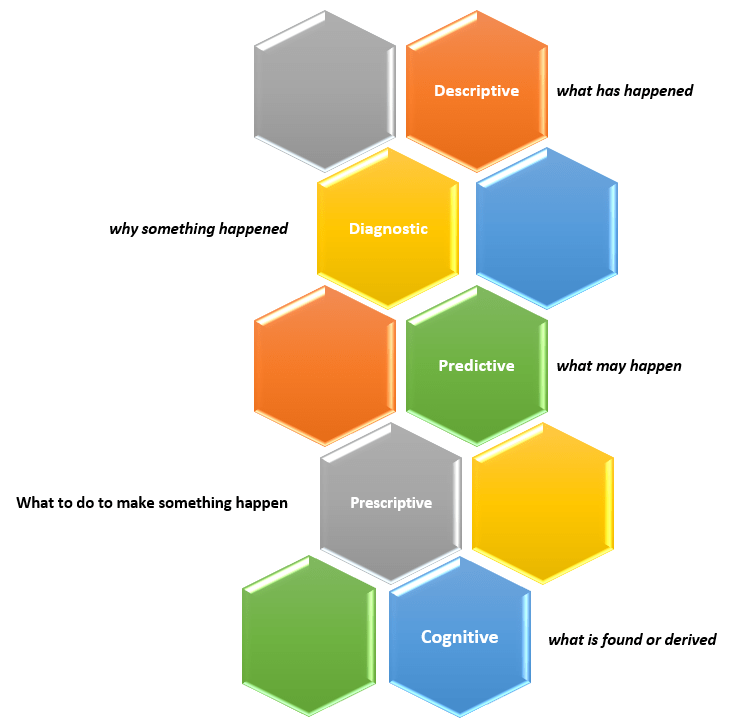
The 5th type of analytics – cognitive analytics

Sometime ago, I wrote an article titled “What is data analytics? And what are the different types of data analytics?”. In that post, I described four types of analytics:

  • Descriptive Analytics – what has happened?
  • Diagnostic Analytics – why something happened?
  • Predictive Analytics – what may happen (in the future)?
  • Prescriptive Analytics – what to do to make something happen?

You can read that full article here.

New capabilities and solutions have led to a new classification of analytics called Cognitive Analytics.

Cognitive Analytics involves bringing together technologies such as Artificial Intelligence (AI), Machine Learning (ML), and Deep Learning to apply human-like behavior to data tasks at unhuman scale, such as, searching through massive amounts of data and making sense of its contexts and be able to provide information from it, such as a likely answer or a sentiment score. This form of analytics provides new solutions that do not fit into any of the other four classifications and, in short, can be dubbed as “what is found or derived“.

There are many use cases that could benefit from this type of analytics, such as, personalization of services at scale, and improved customer service efficiency.

Thanks for reading and best wishes on your data journey!

Learning Hadoop: The benefits of Hadoop commercial distributions

What are the benefits of using a commercial distribution of Hadoop? And what are the popular commercial distributions of Hadoop?

Hadoop, the preeminent open-source platform for retrieving, processing, storing and analyzing very large amounts of data, has grown tremendously from its core components pioneered by Google into a powerful ecosystem of supporting tools. There are various tools for integrating, streaming, storing, searching, and retrieving data, and tools for security and resource management, among others. And new tools keep emerging at a rapid pace.

Keeping these tools in sync with the versions that are compatible with each other, and keeping patches up-to-date, and plugging in new tools as they become available, and making sure it all works well together, along with the normal management of the Hadoop cluster, can become overwhelming for a small team. Using a commercial distribution of Hadoop alleviates this problem.

Commercial Distributions of Hadoop bundle the various tools of the ecosystem using compatible versions, ensure that they all work together, apply patches, package things in a way that makes the distribution of the software easy to download and install, and provide tools for managing the platform. For production projects created to help meet important business goals, it’s best to use a commercial distribution instead of trying to handle it all on your own. This will allow your team more time to focus on building business solutions instead of solving pesky technology issues.

Some of the most popular commercial distributions of Hadoop (not in any specific order) are:

  • Cloudera Hadoop Distribution (CDH)
    • Some major technology vendors, such as Oracle and Dell, provide their flavors of CDH
  • Hortonworks Data Platform (HDP)
  • Amazon Elastic MapReduce
  • MapR Hadoop Distribution
  • IBM Open Platform
  • Microsoft Azure’s HDInsight
  • Pivotal Big Data Suite
  • Datameer Professional
  • Datastax Enterprise Analytics

I will provide details of the various distributions in future posts.

Learning Hadoop: The key features and benefits of Hadoop

What are the key features and benefits of Hadoop? Why is Hadoop such a successful platform?

Apache Hadoop, mostly called just Hadoop, is a software framework and platform for reading, processing, storing and analyzing very large amounts of data. There are several features of Hadoop that make it a very powerful solution for data analytics.

Hadoop is Distributed

With Hadoop, from a few to hundreds or thousands of commodity servers (called nodes) can be connected (forming a cluster) to work together to achieve whatever processing power and storage capability is needed. The software platform enables the nodes to work together, passing work and data between them. Data and processing is distributed across nodes which spreads the load and significantly reduces the impact of failure.

Hadoop is Scalable

In the past, to achieve extremely powerful computing, a company would have to buy very expensive, large, monolithic computers. As data growth exploded, eventually even those super computers would become insufficient. With Hadoop, from a few to hundreds or thousands or even millions of commodity servers can be relatively easily connected to work together to achieve whatever processing power and storage capability is needed. This allows a company or project to start out small and then grow as needed inexpensively, without any concern about hitting a limitation.

Hadoop is Fault Tolerant

Hadoop was designed and built around the fact that there will be frequent failures on the commodity hardware servers that make up the Hadoop cluster. When a failure occurs, the software handles the automatic reassignment of work and replication of data to other nodes in the cluster, and the system continues to function properly without manual intervention. When a node recovers, from a reboot for example, it will rejoin the cluster automatically and become available for work.

Hadoop is backed by the power of Open Source

Hadoop is open source software, which means that it can be downloaded, installed, used and even modified for free. It is managed by the renown non-profit group, Apache Software Foundation (ASF), hence the name Apache Hadoop. The group is made up of many brilliant people from all over the world, many of whom work at some of the top technology companies, who commit their time to managing the software. In addition, there are also many developers that contribute code to enhance or add new features and functionality to Hadoop or to add new tools that work with Hadoop. The various tools that have been built over the years to complement core Hadoop make up what is called the Hadoop ecosystem. With a large community of people from all over the world continuously adding to the growth of the Hadoop ecosystem in a well-managed way, it will only get better and become more useful to many more use-cases.

These are the reasons Hadoop has become such a force within the data world. Although there is some hype around the big data phenomenon, the benefits and solutions based on the Hadoop ecosystem are real.

You can learn more at https://hadoop.apache.org