Category: BI Administration

“Create” button Inactive in the Application Roles page in OBIEE 11g

There is a bug in OBIEE 11g that makes the “Create” button Inactive in the Application Roles page in OBIEE 11g. The good news is the solution is very simple.

In case you have not yet seen this issue, but would like to know what this is referring to, then … login to the Enterprise Manager – http://yourserver:7001/em and expand Business Intelligence and click on coreapplication.  Then navigate to the Application Roles page using one of the methods below …

Either from:
(1)   the ‘Security’ -> ‘Single Sign On’ tab, select “Configure and Manage Application Roles”
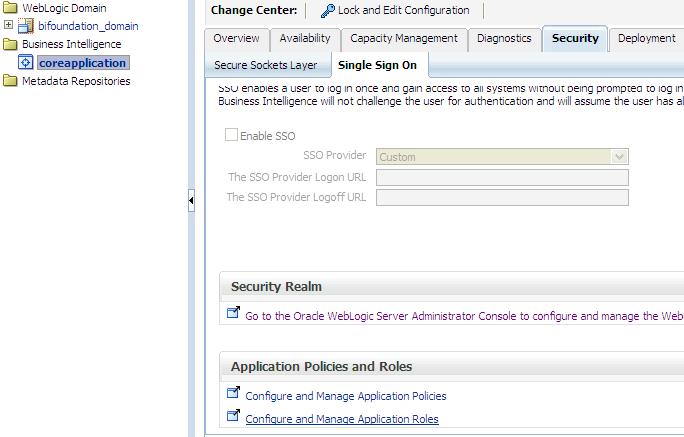
Security-SingleSignOn-ApplicationRoles

(2) or from the coreapplication drop down menu, select Security -> Application Roles

coreapplication_dropdown-Security-ApplicationRoles

When you get to the Application Roles page, you will notice that the Create button is INACTIVE.

InactiveCreateButton

To activate the button, simply select the drop down for Application Stripe and select <No application stripe selected>, then reselect the appropriate Application Stripe such as obi.

The Create button will now be ACTIVE.  Of course, click the play button to generate the list of Application Roles if necessary.
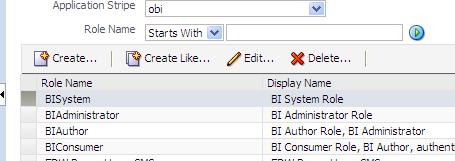
CreateButtonActive

Setting up Putty to display screens on your desktop for installing or upgrading OBIEE 11g on Linux

When you attempt to run the RCU (Repository Creation Utility) or UA (Upgrade Assistant) scripts from your desktop/laptop using Putty for an OBIEE install or upgrade on a Linux server, you may get the following error …

UPGAST-00107: The DISPLAY environment variable is not set. The graphical user interface (GUI) requires that this environment variable be set on UNIX.

If you get this error, this post may help you to solve it.  You need to do some configuration in Putty.

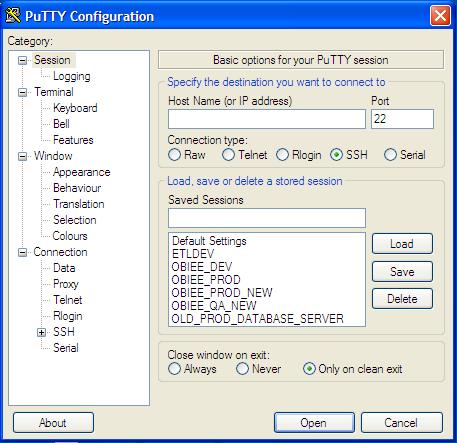
Open Putty.

Displaying_Images_Using_Putty_and_Xming1

Select the server that you want to configure from your list of servers. You will notice that the values get populated into the fields.

Displaying_Images_Using_Putty_and_Xming2

Expand SSH, the select X11.   Then Check “Enable X11 forwarding” checkbox, and enter “localhost:0.0” in the X display location box.

Displaying_Images_Using_Putty_and_Xming4

Do not click open at this point.

Go back up and click on Session in the left menu.

And then Save.

However, before you connect using Putty, you should run Xming.

Start -> All Programs -> Xming -> Xming

[If you do not have Xming, you can download it for free, then install it.]

Displaying_Images_Using_Putty_and_Xming7

Now when you open Putty and connect to your server, you should be able to run the install or upgrade processes and see the wizard screens for each step, for example …

>  ./ua   (run the UA script, then the wizard screen will appear)

SampleScreen_UA_Wizard

UPGAST-00014 error when upgrading OBIEE 10g RPD and Catalog to OBIEE 11g

If you get this error during Step 4 of the Upgrade Assistant for upgrading OBIEE 10g RPD and/or Catalog to 11g, then this post might be helpful.

UPGAST-00014: unable to connect to WebLogic Server at localhost:7001
t3://localhost:7001: Destination unreachable; nested exception is: java.net.ConnectException: Connection refused; No available router to destination

UPGAST-00014-error

Perform the following steps that may resolve your problem:

– Log in to Administration Console.  http://yourserver:7001/console
– Click the ‘Servers’ link.

UPGAST-00014-clickServers

Then in the Summary of Servers page / Configuration tab, click ‘AdminServer(admin)’.

UPGAST-00014-AdminServer

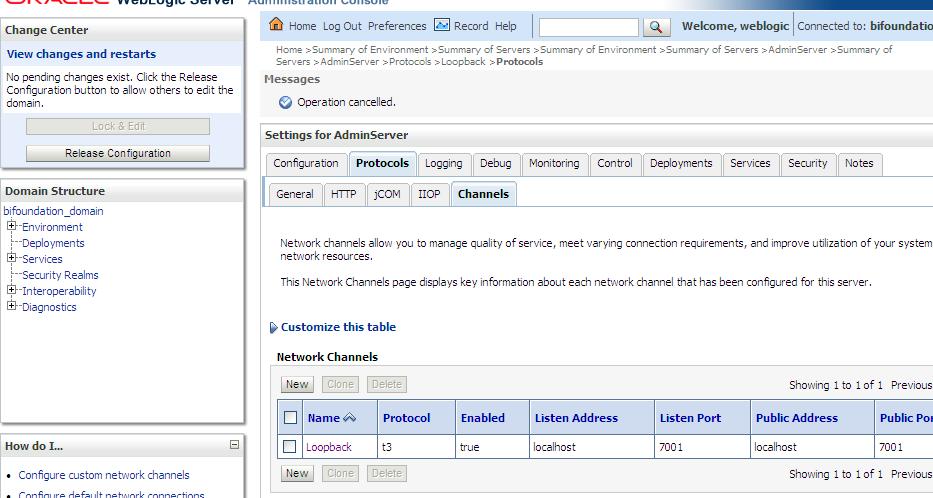
– From the Settings for AdminServer page, select the ‘Protocols’ tab, then the ‘Channels’ subtab.
– And then Click ‘Lock & Edit’ button in the upper left Change Center.

UPGAST-00014-ProtocolsChannels

– Click the New button to begin creating a new Network Channel.
– Enter the following information…
Name: Loopback (or whatever name you like)
Protocol: t3

– The click Next

UPGAST-00014-ChannelConfig1

– The enter …
Listen Address: localhost
Listen port: 7001
Click Finish

UPGAST-00014-ChannelConfig2

The new Network Channel (Loopback) is added.  Activate the changes by clicking on the “Activate Changes” button.

UPGAST-00014-ChannelCreated

Now, retry running the Upgrade Assistant. There is no need to restart any of the services.
You should now get past Step 4 (the point at which you were getting the error before).

Unable to see Administration link or dashboards with Administrator ID in OBIEE 11g

If you are unable to see Dashboards or the Administration link after logging in with the administrator ID in OBIEE 11g after upgrading from 10g, this post may help.

Log in to Analytics — http://yourserver:9704/analytics

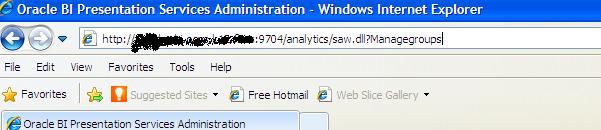
Manually change URL by attaching “saw.dll?Managegroups” to the end after analytics, so it looks like this … http://yourserver:9704/analytics/saw.dll?Managegroups

adminsecurity-managegroupsurl

Select the “Presentation Server Administrators” catalog group and Edit

edit-psa-catgrp

Add the “BI Administrator Role” Application Role by selecting it in the left and using the arrows to move it to the right.

edit-psa-catgrp2

Log out and log back in with the Administrator ID.

You should now be able to see the “Administration” link at the top right, and also be able to see the dashboards that you had access to by clicking or mousing-over the Dashboards link/dropdown.

administration_link_shows

OBIEE Recent Releases & Support Information

12/5/2012: Picked up this information from the Business Analytics newsletter from Oracle.  It’s good to see that a cumulative patch is now available for all the 11.1.1.6.x releases.  Also, note that it seems the support for OBIEE 10.1.3.x will expire in July 2013 – that time will be here before you know it.

—————————————————————————————

10.1.3.x

The Premier Support for Oracle Business Intelligence Enterprise Edition 10.1.3.x ended in July 2013. For additional information on the de-support status and for details for moving towards recent release refer to:

  • OBIEE 11g: Required and Recommended Patches and Patch Sets [Doc ID 1488475.1]
  • ALERT: Required and Recommended Patch Levels For OBIEE 10g (10.1.3.x) Versions (Doc ID 1082987.1)

11.1.1.5.4

Oracle Business Intelligence Enterprise Edition (OBIEE) 11.1.1.5.4 Bundle Patch was released Oct-12.

This is available for download from the My Oracle Support | Patches and Updates:

Additional information is available from:

Refer to “Retiring Product” section for important information pertaining to OBIEE 11.1.1.5.x

11.1.1.6.x – Patch Set Updates

The OBIEE Patch Set Update (PSU) that were recently released are as follows:

  • OBIEE 11.1.1.6.4 PSU  – Sept 2012
  • OBIEE 11.1.1.6.5 PSU  – Oct 2012
  • OBIEE 11.1.1.6.6 PSU  – Nov 2012

11.1.1.6.6

Oracle Business Intelligence Enterprise Edition (OBIEE) 11.1.1.6.6 Bundle Patch was released Nov-12.

Bundle patches are a collection of controlled, well tested critical bug fixes for a specific product which may include security contents and occasionally minor enhancements. These are cumulative in nature meaning the latest bundle patch in a particular series would include the contents of the previous bundle patches released. A suite bundle patch is an aggregation of multiple product bundle patches that are part of a product suite.

For OBIEE on 11.1.1.6.0, it is planned for monthly run of bundle patch cadence. For the 11.1.1.6.6 bundle patch:

  • is now for download from My Oracle Support | Patches & Updates
  • includes 67 bug fixes.
  • is cumulative, so it includes everything in 11.1.1.6.1, 11.1.1.6.2, 11.1.1.6.2BP1, 11.1.1.6.4 and 11.1.1.6.5

Bundled Patch Details

  • 1 of 7 – Oracle Business Intelligence Installer [Patch 15844023]
  • 2 of 7 – Oracle Real Time Decisions [Patch 15844066]
  • 3 of 7 – Oracle Business Intelligence Publisher [Patch 14800665]
  • 4 of 7 – Oracle Business Intelligence ADF Components [Patch 15843961]
  • 5 of 7 – Enterprise Performance Management Components Installed from BI Installer 11.1.1.6.x [Patch 15844096]
  • 6 of 7 – Oracle Business Intelligence [Patch 14791926]
  • 7 of 7 – Oracle Business Intelligence Platform Client Installers and MapViewer [Patch 15839347]

Additional information may be found in the following Knowledge Articles:

EVALUATE_SUPPORT_LEVEL inside NQSConfig.INI is not set

If you use the Oracle EVALUATE function in OBIEE, then you will need to set a parameter in the NQSConfig.INI file in OBIEE 11g.

If you get this error below, then you are using the EVALUATE function somewhere inside OBIEE (in one of your analyses/requests) and the parameter needs to be set appropriately in the NQSConfig.INI file.

State: HY000. Code: 10058. [NQODBC] [SQL_STATE: HY000] [nQSError: 10058] A general error has occurred.
[nQSError: 43113] Message returned from OBIS.
EVALUATE_SUPPORT_LEVEL inside NQSConfig.INI is not set to support EVALUATE. (HY000)

This is what you need to do to correct the problem… 

Edit the NQSConfig.INI file, located at: OBIEE_INSTANCE/config/OracleBIServerComponent/coreapplication_obisn

This is what you will see by default in the config file…
————-
# EVALUATE_SUPPORT_LEVEL:
# 1: evaluate is supported for users with manageRepositories permssion
# 2: evaluate is supported for any user.
# other: evaluate is not supported if the value is anything else.
EVALUATE_SUPPORT_LEVEL = 0; 
————-

Change the parameter as follows: EVALUATE_SUPPORT_LEVEL = 2;

Save and restart the BI Server.  Your requests should work fine now.

Configuring OBIEE 11g to use LDAP (Active Directory) Authentication with External Groups table

I have been working on configuring OBIEE 11g to use Active Directory for authentication and an external table for Groups.  It has been a bit of a challenge primarily because I was not familiar with the Active Directory terminology and parameters, and so I was initially doing some guess work – about what the various parameters should be set to, and it was not very easy to determine what was and what was not correct.

Anyway, thanks to a few Oracle documents and a few blog articles I have made significant progress and I think I have it working properly now, and testing it thoroughly.

Below are some of the documents and articles that I used…

Here you will find some Oracle documentation:

http://docs.oracle.com/cd/E14571_01/bi.1111/e10543/toc.htm

http://docs.oracle.com/cd/E23943_01/bi.1111/e10543/privileges.htm#BIESC6054

A great intro article:

http://www.rittmanmead.com/2012/03/obiee-11g-security-week-understanding-obiee-11g-security-application-roles-and-application-policies/

An article directly related to the topic:

http://www.rittmanmead.com/2012/03/obiee-11g-security-week-connecting-to-active-directory-and-obtaining-group-membership-from-database-tables/

These provided some more details that helped me to understand the parameters better and be in a better position to work with the Active Directory administrator:

http://bimetrics.wordpress.com/2011/08/12/integrating-ms-active-directory-with-obiee-11g-in-weblogic-server/

http://obieeelegant.blogspot.com/2012/01/obiee-11g-integration-with-ldap.html

http://paulcannon-bi.blogspot.com/2012/07/configuring-ldap-authentication-for.html

http://www.biztech.com/blog/2011/09/integrating-active-directory-with-obiee-11g/

Good luck!

OBIEE 10g and OBIEE 11g directory structure comparisons

I got this chart from one of Oracle’s documents, and thought it would be handy to post for easy lookup and it might come in handy for someone searching for information on the directory parallels between OBIEE 10g and OBIEE 11g.

OBIEE 11g Key Directories and the corresponding 10g directories

Directory or Files 10g & 11g Locations
AdminTool.sh equalizerpds.sh/equalizerpds.exe JobManager.sh MigrateEUL.sh NQClient.sh nqcmd.sh/nqcmd.exe 10g: BI_ORACLE_HOME/server/Bin


11g: BI_ORACLE_HOME/bifoundation/server/bin

DBFeatures.INI NQSConfig.INI 10g: BI_ORACLE_HOME/server/Config


11g: ORACLE_INSTANCE/config/OracleBIServerComponent
/coreapplication_obisn

NQClusterConfig.INI 10g: BI_ORACLE_HOME/server/Config


11g: ORACLE_INSTANCE/config/OracleBIApplication
/coreapplication

NQQuery.log NQSAdminTool.log NQServer.log 10g: BI_ORACLE_HOME/server/Log


11g: ORACLE_INSTANCE/diagnostics/logs
/OracleBIServerComponent/coreapplication_obis1

Oracle BI Server repository directory:

  • SampleAppLite.rpd
  • paint.rpd
10g: BI_ORACLE_HOME/server/Repository


11g: ORACLE_INSTANCE/bifoundation
/OracleBIServerComponent/coreapplication_obisn/repository

Samples:

  • order.xml
  • Product.xml
  • samplesales.udml
10g: BI_ORACLE_HOME/server/Sample/samplesales


11g: ORACLE_INSTANCE/bifoundation/OracleBIServerComponent
/coreapplication_obisn/sample/SampleAppFiles

Usage Tracking:

  • SQL_Server_Time
  • UsageTracking.rpd
  • UsageTracking.zip
10g: BI_ORACLE_HOME/server/Sample/usagetracking


11g: ORACLE_INSTANCE/bifoundation/OracleBIServerComponent
/coreapplication_obisn/sample/usagetracking

Other Schemas (for example):

  • Oracle_alter_nq_acct.sql
  • SAACCT.DB2.sql
  • SAACCT.MSSQL.sql
  • SAACCT.Oracle.sql

Note: Use the Repository Creation Utility to install the Oracle BI Schema

10g: BI_ORACLE_HOME/server/Sample/Schema


11g: ORACLE_INSTANCE/bifoundation/OracleBIServerComponent
/coreapplication_obisn/schema

  • credentialstore.xml
  • instanceconfig.xml (for Presentation Services)
  • userpref_currencies.xml
10g: OracleBIData/web/config


11g: ORACLE_INSTANCE/config
/OracleBIPresentationServicesComponent/coreapplication_obipsn

  • JavaHost
  • sawlog0.log
10g: OracleBIData/web/log


11g: ORACLE_INSTANCE/diagnostics/logs
/OracleBIPresentationServicesComponent/coreapplication_obipsn

catalogmanager.exe 10g: BI_ORACLE_HOMEwebcatalogmanager


11g: ORACLE_INSTANCEbifoundation
OracleBIPresentationServicesComponentcoreapplication_obipsn

catalogmanagerruncat.cmd

instanceconfig.xml (for Oracle BI Scheduler) 10g: OracleBIDatawebconfig


11g: ORACLE_INSTANCEconfigOracleBISchedulerComponent
coreapplication_obischn

  • odbc.ini
  • user.sh
10g: BI_ORACLE_HOME/setup


11g: ORACLE_INSTANCE/bifoundation/OracleBIApplication
/coreapplication/setup

Troubleshooting OBIEE 11g

A couple tips on how to resolve some OBIEE 11g errors. When you receive an error such as …

“Supplementary information regarding operation: PROCESS:instance1:coreapplication_obisch1;FAILED_TO_START;
Operation Failed: start; OracleInstance: instance1; Component: coreapplication_obisch1; msg: 0 of 1 processes
started.”

or this …

“Error 500–Internal Server Error
From RFC 2068 Hypertext Transfer Protocol — HTTP/1.1:
10.5.1 500 Internal Server Error
The server encountered an unexpected condition which prevented it from fulfilling the request.”

1. First check to make sure your database instance and Listener are up and running.
You can do this through Enterprise Manager by connecting to the server/port.
https://hostname:1158/em/

If they are not running, then start them.
On Windows, you may need to make sure that the following Services are running:
. OracleServiceORCL
. OracleOraDb11g_home1ClrAgent
. OracleOraDb11g_home1TNSListener

2. Then check the status of other OBIEE components.
You can do this through the OBIEE Enterprise Manager.
http://hostname:7001/em/ then navigating to Business Intelligence -> coreapplication -> Availability tab.

or by running the opmnctl command as below
[Drive][FMW_HOME_DIR]instancesinstance1bin>opmnctl status
for example C:obiee11ginstancesinstance1bin> opmnctl status

In the example below, the BI Scheduler (coreapplication_obisch1) and the BI Presentation Server (coreapplication_obips1) are down.

Processes in Instance: instance1
———————————+——————–+———+———
ias-component | process-type | pid | status
———————————+——————–+———+———
coreapplication_obiccs1 | OracleBIClusterCo~ | 10136 | Alive
coreapplication_obisch1 | OracleBIScheduler~ | N/A | Down
coreapplication_obijh1 | OracleBIJavaHostC~ | 8396 | Alive
coreapplication_obips1 | OracleBIPresentat~ | N/A | Down
coreapplication_obis1 | OracleBIServerCom~ | 6736 | Alive

You can start the individual components using Enterprise Manager interface, or you may Stop BI Services and then Start BI Services from the Windows Start button
(Start -> All Programs -> Oracle Business Intelligence -> Stop/Start BI Services).

Error Message when try to perform actions in Oracle Enterprise Manager 11g on Windows XP

If you get the following error when attempting to perform database actions in Oracle 11g Enterprise Manager on Windows XP …

RemoteOperationException: ERROR: Invalid username and/or password

… then, assuming your Username/password combination is correct … and you can verify this by logging into SQLPLUS … follow these steps to resolve:

1. Open Control Panel
2. Administrative Tools -> Local Security Policy (Local Security Setting window opens)
3. Local Policies -> User Rights Assignment
4. Double click ‘Log on as a batch job’ (Properties window opens)
5. Click on ‘Add user or group’ (Select user/group window opens)
6. Add the username(s) including the domain name
7. Click ‘Check names’ to verify what you have added
8. Save (click OK, click OK)

Hope this helps.