Author: thedatacommunity

Oracle positioned as a leader in the Gartner Magic Quadrant for Data Integration tools

Oracle, along with Informatica, IBM, SAP and SAS, are positioned as leaders in the Gartner Magic Quadrant for Data Integration tools.

Other data integration vendors that made it into the Magic Quadrant, but not in the leaders category are Microsoft, Information Builders, Syncsort, Talend, Pervasive Software.

GartnerMagicQuadrant_for_DataIntegrationTools

Source: Gartner (October 2012)

When performing its analysis, Gartner considers these areas of data integration:

  • Data acquisition for business intelligence (BI) and data warehousing
  • Consolidation and delivery of master data in support of master data management (MDM)
  • Data migrations/conversions
  • Synchronization of data between operational applications
  • Interenterprise data sharing
  • Delivery of data services in an SOA context

And analyzes these features and functionality that the data integration tools should provide:

  • Connectivity/adapter capabilities (data source and target support)
  • Support for different modes of interaction with a range of data structure types
  • Data delivery capabilities
  • Support for the delivery of data across a range of latency requirements
  • Data transformation capabilities
  • Provide facilities for developing custom transformations and extending packaged transformations
  • Metadata and data modeling capabilities
  • Design and development environment capabilities
  • Data governance support capabilities (via interoperation with data quality, profiling and mining capabilities)
  • Deployment options and runtime platform capabilities
  • Operations and administration capabilities
  • Architecture and integration capabilities
  • Service enablement capabilities

Per Gartner, Oracle’s strengths are:

  • Breadth of functionality,
  • Usability of core functionality across use cases
  • Addressing data challenges across a range of application- and data-oriented customer bases

And their cautions are:

  • Enabling product migration,
  • Complexity of integrated deployment across products,
  • Pricing perception and availability of skills

As Oracle-centric developers and solution providers, we are most concerned with the capabilities and future of Oracle Data Integrator (ODI), Oracle Warehouse Builder (OWB), Golden Gate and, in some cases, Informatica (a part of most OBIA installations). These products are doing well in the market, but are a bit behind the install bases of Microsoft, SAP and IBM.  The largest install base is with Microsoft (12K customers), followed by SAP (10K) and IBM (9.4K).  Oracle has 3.5K and Informatica has 5K data integration customers.  With a major push now behind the ODI tool, you can expect to see growth in Oracle’s numbers in the coming years.

Apparently, Oracle also has plans for providing a migration path (a migration wizard) from Oracle Warehouse Builder (OWB) to ODI.  This will be a very welcomed tool for OWB users seeking to migrate to ODI.  And this will further solidify ODI as the data integration tool for Oracle-centric IT organizations, and start to create more availability of skilled ODI resources.

You can read all the details at Gartner Magic Quadrant for Data Integration Tools.

UPGAST-00014 error when upgrading OBIEE 10g RPD and Catalog to OBIEE 11g

If you get this error during Step 4 of the Upgrade Assistant for upgrading OBIEE 10g RPD and/or Catalog to 11g, then this post might be helpful.

UPGAST-00014: unable to connect to WebLogic Server at localhost:7001
t3://localhost:7001: Destination unreachable; nested exception is: java.net.ConnectException: Connection refused; No available router to destination

UPGAST-00014-error

Perform the following steps that may resolve your problem:

– Log in to Administration Console.  http://yourserver:7001/console
– Click the ‘Servers’ link.

UPGAST-00014-clickServers

Then in the Summary of Servers page / Configuration tab, click ‘AdminServer(admin)’.

UPGAST-00014-AdminServer

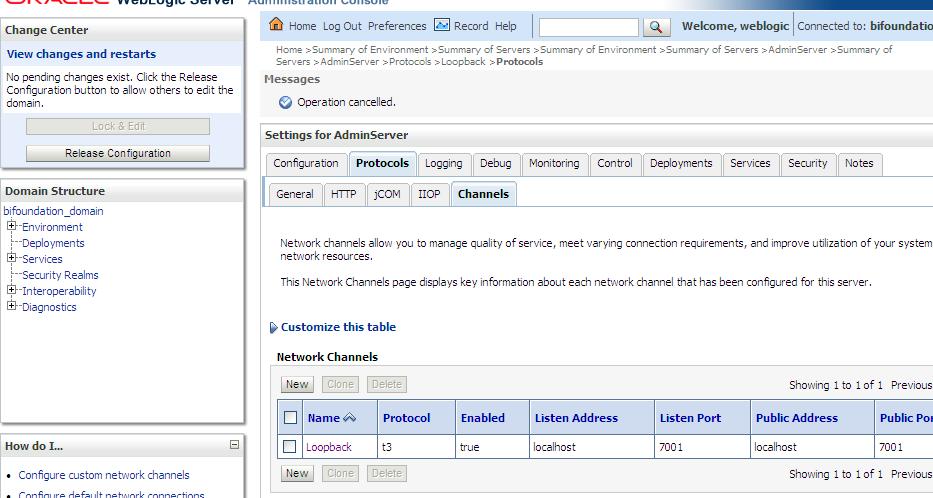
– From the Settings for AdminServer page, select the ‘Protocols’ tab, then the ‘Channels’ subtab.
– And then Click ‘Lock & Edit’ button in the upper left Change Center.

UPGAST-00014-ProtocolsChannels

– Click the New button to begin creating a new Network Channel.
– Enter the following information…
Name: Loopback (or whatever name you like)
Protocol: t3

– The click Next

UPGAST-00014-ChannelConfig1

– The enter …
Listen Address: localhost
Listen port: 7001
Click Finish

UPGAST-00014-ChannelConfig2

The new Network Channel (Loopback) is added.  Activate the changes by clicking on the “Activate Changes” button.

UPGAST-00014-ChannelCreated

Now, retry running the Upgrade Assistant. There is no need to restart any of the services.
You should now get past Step 4 (the point at which you were getting the error before).

Unable to see Administration link or dashboards with Administrator ID in OBIEE 11g

If you are unable to see Dashboards or the Administration link after logging in with the administrator ID in OBIEE 11g after upgrading from 10g, this post may help.

Log in to Analytics — http://yourserver:9704/analytics

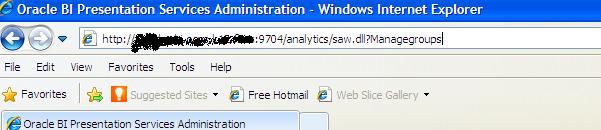
Manually change URL by attaching “saw.dll?Managegroups” to the end after analytics, so it looks like this … http://yourserver:9704/analytics/saw.dll?Managegroups

adminsecurity-managegroupsurl

Select the “Presentation Server Administrators” catalog group and Edit

edit-psa-catgrp

Add the “BI Administrator Role” Application Role by selecting it in the left and using the arrows to move it to the right.

edit-psa-catgrp2

Log out and log back in with the Administrator ID.

You should now be able to see the “Administration” link at the top right, and also be able to see the dashboards that you had access to by clicking or mousing-over the Dashboards link/dropdown.

administration_link_shows

OBIEE Repository (rpd) development tips

A few tips on BI Repository (RPD) Development …

Physical Layer

  • Import metadata when possible, instead of creating it manually
  • Only import objects that you need or forsee you may need in the near future
  • Import Tables, Keys, and Foreign Keys – which is the default option
  • Create Aliases of Physical Tables – to eliminate unwanted joins and to satisfy any naming conventions you may have chosen
  • Use the Physical diagram to configure joins
  • Create all relevant joins in a star-schema / dimensional model

BMM Layer

  • Use terminology that users are familiar with – words of the business instead of technical physical table and column names
  • Use the Rename Wizard to rename most of your logical objects when possible (this can save you a lot of time)
  • Delete unnecessary objects from your BMM layer
  • Create derived columns for calculations that you forsee using in multiple reports/presentation areas

Presentation Layer

  • Only move the columns you need users to see and work with to your Presentation Layer
  • Rename objects to match the language of the business and ensure that the meaning is very clear
  • Organize your presentation columns in a logical/meaningful order – for example, in a hierarchical order or alphabetic order such as Product Category, Product sub-category, Product -or- Region, Country, State, City, Zip

General

  • Check Global Consistency & resolve warnings and errors
  • Disable caching during development & testing
  • Verify your design by checking the SQL generated and sent to the database

Interested in learning more about Exadata?

The Oracle Exadata database machine is a packaged database system of pre-optimized and pre-configured software, servers, and storage (with massive memory), designed for extreme performance and high availability.  Exadata can handle both OLTP (transactional, high concurreny) systems and OLAP (analytical, high-scan) systems, and is a great option for supporting large-scale OBIEE/data warehousing projects.

If you are interested in learning more about Oracle’s Exadata database machine, the Independent Oracle Users Group (IOUG) has a series of webcasts to get you started.  You can check them out here …
http://www.ioug.org/p/cm/ld/fid=164

They also have sessions on other interesting Oracle topics that can be found here …
http://www.ioug.org/p/cm/ld/fid=153

Another great resource for Exadata learning content is the Oracle Learning Library, and the Exadata content can be found here …
http://apex.oracle.com/pls/apex/f?p=44785:2:0:FORCE_QUERY:NO:2,RIR,CIR:P2_TAGS:Exadata

Oracle Financial Analytics Overview

What is Oracle Financial Analytics?
Oracle Financial Analytics is a module of Oracle Business Intelligence Applications, and falls into the grouping of ERP analytics modules. Other Analytics modules under the ERP umbrella include Human Resources, Procurement & Spend, Supply Chain & Order Management, Projects, Asset Management, and Manufacturing. And Analytics modules under the CRM umbrella include Sales, Marketing, Loyalty, Service, Contact Center, and Price.

Oracle Financial Analytics provides companies with deep insight into all aspects of financial control and management.  It provides a multitude of summary and detail views, and many metrics, of information relating to revenues, expenses, assets, liabilities and shareholder equity.  A full spectrum of reports and metrics covers GL, AR, AP, and more, providing key information required to determine the financial state of the company and what actions/decisions may be required.

Why use Oracle Financial Analytics?
In additon to the above benefits, Financial Analytics integrates with Oracle E-Business Suite (EBS), Peoplesoft, JD Edwards, and SAP, which allows companies to implement the technology, filled with years of research and best practices, quickly and with a LOT less risk.

What is Oracle Financial Analytics comprised of?
By listing some of the content of the BI module, without going into too much detail, you will be able to get a sense for the type of information and see the vast amount of content included.

————————
6 Dashboards
————————

General Ledger: provides information about the key areas of required for financial management including balance sheet, cash flow, liquidity, expenses, working capital and liquidity.

Payables: provides information about how effectively and efficiently the company is meeting its payment obligations.

Receivables: provides information about effectively and efficiently the company is collecting payment from sales.

Projects: provides financial information about projects.

Profitability: provides imformation for the key areas for profitability including margins by customer and product, profit and loss statements, revenues, and the various “Return-On metrics” such as ROA, ROI, ROE.

US Federal Financial Performance: provides information about budgets and payments

————————
36 dashboard pages
– broken out by dashboard below:
————————
General Ledger: Overview, Balance Sheet, Cash Flow, Budget vs Actual, Asset Usage, Liquidity, Financial Structure, GL Balance, Trial Balance

Payables: Overview, AP Balance, Payments Due, Effectiveness, Payment Performance, Supplier Report, Invoice Details, All AP Transactions

Receivables: Overview, AR Balance, Payments Due, Effectiveness, Payment Performance, Customer Report, Invoice Details, All AR Transactions

Projects: Project Invoices

Profitability: Overview, P&L, Margins, Revenue, Products, Customers

US Federal Financial Performance: Budget Summary, Budget Details, Budget Spending, Payables

————————
255 Reports – A small sampling of the reports include:
————————
Cash Flow Summary
Monthly & Quarterly Cash Flow
Net Working Capital Summary
Operating Cycle and Cash Cycle
Monthly & Quarterly Balance Sheet
Budget vs Actual – Current & YTD Operating Expenses
Top 10 Categories by Expense Variance -and- Top 10 Cost Centers by Expense Variance
Payables Turnover -and- Receivables Turnover
Cash Ratio
Days Cash in Hand
Quick Ratio -and- Current Ratio
Debt Coverage
Debt to Asset -and- Debt to Equity
GL Account Balance -and- Trial Balance

————————
488 Metrics – A small sampling of the metrics include:
————————
Receivables
AR Balance: • DSO • Closing Group Amt • Credit Limit Used % • Total AR Overdue Amt
AR Aging: • AR Aging 1-30 Amt • AR Due 1-30 Amt • AR Overdue 1-30 Amt
Payment Performance: • AR Payment Days • AR Weighted Days • Times Paid Before Due
AR Transactions: • AR Avg Invoice Amt • AR Credit Memo Amt

Payables
AP Balance: • DPO • Closing Group Amt • Total AP Overdue Amt • Overdue Amt to Total %
AP Aging: • AP Aging 1-30 Amt • AP Due 1-30 Amt • AP Overdue 1-30 Amt
Payment Performance: • AP Payment Days • AP Weighted Days • Times Paid Before Due
AP Transactions: • AP Avg Invoice Amt • AP Avg Payment Amt

General Ledger
Balance Sheet: • Cash • Accounts Receivable • Debt to Equity Ratio • Current Ratio
Asset Turnover: • AR Turnover • AP Turnover • Inventory Turnover • Cash Cycle • Fixed Assets Turnover
Cash Flow: • Operating Cash Flow • Investing Cash Flow • Financing Cash Flow • Net Cash Flow

Profitability
Profitability Returns: • Return on Equity • Return on Assets • Return on Capital
Margins: • Gross Margin % • Operating Margin % • EBT Margin % • Net Income Margin %
Product Profitability: • Revenue • Product Gross Profit • Product Operating Profit
Customer Profitability: • Revenue • Customer Gross Margin

Who will use and benefit from Financial Analytics?
CFOs, Controllers, Accounting Managers, Finance Analysts, Department Heads, Payables and Receivables Managers, Payables & Receivables Analysts, Project Managers, Project Accountants, and much more.

Where can I find more information?
More information about Oracle Financial Analytics can be found here:
http://www.oracle.com/us/solutions/business-analytics/analytic-applications/business-role/financial-analytics/overview/index.html
And more information about Oracle Business Intelligence in general can be found here:
http://www.oracle.com/us/solutions/business-analytics/overview/index.html

Renaming the Views in an Analysis for use in a View Selector in OBIEE 10g & OBIEE 11g

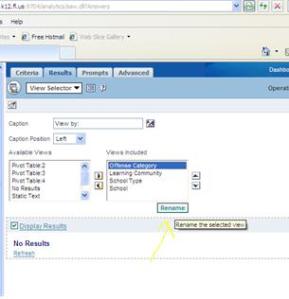
In OBIEE 10g, we renamed the Views directly inside the View Selector definition like here…

Rename-View-10g

In OBIEE 11g, we rename the View inside the View definition itself … like here …

Rename-View-11g-1

then rename …

Rename-View-11g-2

And then you will use/select the new name in the View Selector (instead of renaming it in the View Selector). 

This is much better because you know exactly what view is being used in the View Selector.  Whereas in 10g, at times it took more effort to determine what original view the renamed views related to.

Data Federation, Horizontal Federation and Vertical Federation in OBIEE

Data Federation is the process of and implementation of integrating metadata from multiple data sources into a single metadata database to allow for the integrated reporting of the data from those multiple sources. In OBIEE terms, Data Federation involves bringing in the metadata from multiple sources into the physical layer of the RPD (BI Repository) and integrating the metadata into a single business model and possibly a single subject area.  In OBIEE, the data sources can be relational (OLTP databases or star-schema data warehouses), multidimensional (OLAP), or files (such as Excel or flat files); and the data can be of varying levels of aggregation in these sources.  This is one of the most powerful features of OBIEE.

When an Analysis (report) is run from Answers that uses data from these sources, the BI Server creates the appropriate SQL (OLTP) or MDX (OLAP) statements to retrieve the data from the appropriate source and then integrates the data for display to the user.  The user does not need to know what the source of the data is, how many sources there are, or how the data is retrieved.

There are two common patterns of how data can be federated in OBIEE for reporting – these patterns/methods are termed Horizontal Federation and Vertical Federation. I will explain them here.

Horizontal Federation involves setting multiple data sources for a common single logical table object in the Business Model and Mapping (BMM) layer of the RPD, such that the granularity of the data from the various sources is at the same level, and some columns of the single logical table come from one source, and some from another source(s) – basically each source adding columns (not rows) to the logical dataset.  A typical scenario for this pattern is where there is related data in multiple sources for a particular subject, but no single source holds the entire body of data for that subject – and this helps to bring all the descriptive data for the subject together into one.

Vertical Federation involves setting multiple data sources for a common single logical table object in the BMM layer of the RPD, such that the data for each columns could be coming from multiple sources, but at varying granularity levels – basically each set adding rows (not columns) to the logical dataset.  A typical scenario for this pattern is where data at an aggregated granularity is sourced from an aggregated OLAP data source or an aggregated OLTP data source, while data at a detailed granularity is sourced from the transaction level (OLTP or detailed-level star-schema) data source.

Oracle Business Analytics Warehouse (OBAW) Table Types & Descriptions

Oracle Business Intelligence Applications are driven by a data warehouse (Oracle Business Analytics Warehouse – OBAW) the stores transformed and aggregated data from the many sources that the application supports.  This post describes the various types of tables that make up the OBAW – how they are used and how to identify them.

Table Type

Table   Prefix

Table Type Description
Aggregate Tables

_A

Contain summed data
Dimension tables

_D

Star analysis dimensions
Delete tables

_DEL

Tables that store the IDs of the   entities that were physically deleted from the source system and should be   flagged as deleted from the data warehouse.
Dimension Hierarchy tables

_DH

Tables that store the dimension’s   hierarchical structure
Dimension Helper tables

_DHL

Tables that store M:M relationships   between two joining dimension tables
Staging tables for Dimension Helper

_DHLS

Staging tables for storing M:M   relationships between two joining dimension tables
Staging for Dimension Hierarchy

_DHS

Staging tables for storing the   hierarchy structures of dimensions that have not been through the final ETL   transformations
Staging tables for Dimension

_DS

Tables used to   hold dimension information that have not been through the final ETL   transformations.
Fact tables

_F

Contain   the metrics being analyzed by dimensions.
Fact Staging tables

_FS

Staging tables   used to hold the metrics being analyzedby dimensions   that have not been through the final

ETL   transformations.

Internal tables

_G, _GS,   _S

Internal tables   are used primarily by ETL mappings for data transformation and controlling   ETL runs.
Helper tables

_H

Helper tables are   inserted between the fact and dimension tables to support a many-to-many   (M:M) relationship between fact and dimension records.
Map dimension tables

_M

Tables that store   cross-referencing mappings between the external data ID and the internal ID.
Mini dimension tables

_MD

Include   combinations of the most queried attributes of their parent dimensions. The   database joins these small tables to the fact tables.
Primary extract tables

_PE

Tables that are   used to support the soft delete feature.The table   includes all the primary key columns (integration ID column) from the source   system. When a delete event happens, the full extract from the source compares   the data previously extracted in the primary extract table to determine if a   physical deletion was done in the Siebel application. The soft delete feature   is disabled by default. Therefore, the primary extract tables are not populated   until you enable the soft delete feature.
Persisted staging tables

_PS

Tables that   source multiple data extracts from the same source table.These tables   perform some common transformations required by multiple target objects. They   also simplify the source object to a form that is consumable by the warehouse   needed for multiple target objects. These tables are never truncated during   the life of the data warehouse. These are truncated only during full load, and   therefore, persist the data throughout.
Pre-staging temporary tables

_TMP

Source-specific   tables used as part of the ETL processes to conform the data to fit the   universal staging tables (table types _DS and _FS). These tables contain intermediate   results that are created as part of the conforming process.
Unbounded dimension tables

_UD

Tables containing   information that is not bounded in transactional database data but should be   treated as bounded data in the Oracle Business Analytics Warehouse.
Staging tables for Usage Accelerator

_WS

Tables containing   the necessary columns for the ETL transformations.

Staging Tables
The primary Staging Tables are the Dimension Staging (_DS) and Fact Staging (_FS) tables.  Other Staging tables include Staging for Dimension Helper (_DHLS), Staging for Dimension Hierarchy (_DHS), Persisted Staging (_PS), and Staging for Usage Accelerator (_WS).

When data is extracted from Sources, it is first loaded into a staging area before being loaded into the OBAW.

The Staging Tables stage incremental data from the source system.  On each ETL run, the staging tables’ data is truncated and then re-populated with new or changed data from the source. So these Staging Tables will hold only incremental data except for the initial load when it holds all the data from the source for a predetermined period of time.

Staging tables’ structure is independent of source data structures and resembles the structure of data warehouse tables. This resemblance allows staging tables to be used also as interface tables between the transactional database sources and data warehouse target tables.

Fact Tables
The OBAW Fact tables are suffixed with _F.

Fact tables contain the metrics generated from transactions in the business captured by the source systems.

Fact tables in the Oracle Business Analytics Warehouse contain a surrogate key if the records in the fact table need to be updated or if the fact table has an aggregate table on top of it. Each fact table also contains one or more numeric foreign key columns to link it to various dimension tables.

Aggregate Tables
The OBAW Aggregate tables are suffixed with _A.

The Aggregate tables hold pre-aggregated Fact and Dimension table data. This is one of the major performance features of a data warehouse because the data does not have to be aggregated on-demand, and query results can be quickly returned.

Dimension Tables
The Dimension tables in OBAW are suffixed with _D.

The Dimension Tables provide context / meaning to the Fact tables measures data.

The unique numeric key (ROW_WID) for each dimension table is generated during the load process. This key is used to join each dimension table with its corresponding fact table or tables. It is also used to join the dimension with any associated hierarchy table or extension table. The ROW_WID columns in the Oracle Business Analytics Warehouse tables are numeric. In every dimension table, the ROW_WID value of zero is reserved for Unspecified. If one or more dimensions for a given record in a fact table is unspecified, the corresponding key fields in that record are set to zero.

Mini Dimension Tables
The Mini Dimension tables are suffixed with _MD.  Their purpose is for performance enhancement.

Mini-dimension tables include combinations of the most queried attributes of their parent dimensions. They improve query performance because the database does not need to join the fact tables to the big parent dimensions but can join these small tables to the fact tables instead.

Hierarchy Tables
Hierarchy tables in the OBAW are suffixed with _DH.

Some dimension tables have hierarchies into which each record rolls. This hierarchy information is stored in a separate table, with one record for each record in the corresponding dimension table. This information allows users to drill up and down through the hierarchy in reports.  There are two types of hierarchies in the Oracle Business Analytics Warehouse: a structured hierarchy in which there are fixed levels, and a hierarchy with parent-child relationships. Structured hierarchies are simple to model, since each child has a fixed number of parents and a child cannot be a parent. The second hierarchy, with unstructured parent-child relationships, is difficult to model because each child record can potentially be a parent and the number of levels of parent-child relationships is not fixed.

Helper Tables
Helper tables in OBAW are prefixed with _H (Helper) and _DHL (Dimension Helper).

Helper tables are used by the Oracle Business Analytics Warehouse to solve complex problems that cannot be resolved by simple dimensional schemas.  In a typical dimensional schema, fact records join to dimension records with a many-to-one relationship. To support a many-to-many relationship between fact and dimension records, a helper table is inserted between the fact and dimension tables.  The helper table can have multiple records for each fact and dimension key combination. This allows queries to retrieve facts for any given dimension value. It should be noted that any aggregation of fact records over a set of dimension values might contain overlaps (due to a many-to-many relationship) and can result in double counting.

At times there is a requirement to query facts related to the children of a given parent in the dimension by specifying only the parent value (example: manager’s sales fact that includes sales facts of the manager’s subordinates). In this situation, one helper table containing multiple records for each parent-child dimension key combination is inserted between the fact and the dimension. This allows queries to be run for all subordinates by specifying only the parent in the dimension.-

Internal Tables
Internal tables in the OBAW are suffixed with _G, _GS and _S.

Internal tables are used primarily by ETL (extract-transform-load) mappings for data transformation and for controlling ETL runs. These tables are not queried by end users and are not directly managed by the Oracle Data Warehouse Administration Console (DAC).

‘No fact table exists at the requested level’ error in OBIEE 11g

If you receive an error like this when you attempt to run a report, this post might help you.  This is an error that may occur after upgrading from OBIEE 10g to 11g.

State: HY000. Code: 10058. [NQODBC] [SQL_STATE: HY000] [nQSError: 10058] A general error has occurred. [nQSError: 43113] Message returned from OBIS. [nQSError: 43119] Query Failed: [nQSError: 14025] No fact table exists at the requested level of detail:

Check each column used in your report and each column used in the filter definition to ensure that they are referencing the correct table.

A likely cause of this error is that one or more of your select columns or filter columns is referencing a column in a different subject area that the one being used in your report (different from the one you intended).

OBIEE 10g was more forgiving than 11g – and maybe fortunately, so that errors like these do not go unnoticed/undetected.