Author: thedatacommunity

Oracle E-Business Suite (EBS) List of Flexfields

This post is simply a table listing of the Key Flexfields (KFFs) in Oracle E-Business Suite (EBS) (aka Oracle Applications). The table contains the flexfields, along with their Code, Owning Application and base table. 

Flexfields are commonly used in OBIEE reporting for EBS source systems. Flexfields are also an integral part of the Oracle Business Analytics Warehouse (OBAW) data model. It is worthwhile to be familiar with them.

  Name Code Owning Application Table Name
1 Account Aliases MDSP Oracle Inventory MTL_GENERIC_DISPOSITIONS
2 Accounting Flexfield GL# Oracle General Ledger GL_CODE_COMBINATIONS
3 Activity Flexfield FEAC Enterprise Performance Foundation  
4 AHL Route AHLR Complex Maintenance, Repair, and Overhaul  
5 Asset Key Flexfield KEY# Oracle Assets FA_ASSET_KEYWORDS
6 Bank Details KeyFlexField BANK Oracle Payroll PAY_EXTERNAL_ACCOUNTS
7 CAGR Flexfield CAGR Oracle Human Resources  
8 Category Flexfield CAT# Oracle Assets FA_CATEGORIES
9 Competence Flexfield CMP Oracle Human Resources  
10 Cost Allocation Flexfield COST Oracle Payroll PAY_COST_ALLOCATION_KEYFLEX
11 Grade Flexfield GRD Oracle Human Resources PER_GRADE_DEFINITIONS
12 Item Catalogs MICG Oracle Inventory MTL_ITEM_CATALOG_GROUPS
13 Item Categories MCAT Oracle Inventory MTL_CATEGORIES
14 Job Flexfield JOB Oracle Human Resources PER_JOB_DEFINITIONS
15 Location Flexfield LOC# Oracle Assets FA_LOCATIONS
16 Oracle Service Item Flexfield SERV Oracle Inventory MTL_SYSTEM_ITEMS
17 People Group Flexfield GRP Oracle Payroll PAY_PEOPLE_GROUPS
18 Personal Analysis Flexfield PEA Oracle Human Resources PER_ANALYSIS_CRITERIA
19 Position Flexfield POS Oracle Human Resources PER_POSITION_DEFINITIONS
20 Public Sector Budgeting BPS Oracle Public Sector Budgeting  
21 Sales Orders MKTS Oracle Inventory SALES_ORDER_ID
22 Sales Tax Location Flexfield RLOC Oracle Receivables AR_LOCATION_COMBINATIONS
23 Soft Coded KeyFlexfield SCL Oracle Human Resources HR_SOFT_CODING_KEYFLEX
24 Stock Locators MTLL Oracle Inventory MTL_ITEM_LOCATIONS
25 System Items MSTK Oracle Inventory MTL_SYSTEM_ITEMS
26 Territory Flexfield CT# Oracle Receivables RA_TERRITORIES
27 Training Resources RES Oracle Learning Management  

Forgot weblogic user password – How to reset the weblogic user

If you have forgotten your weblogic user password, and would like to reset the user, this post might help…

One of my colleagues could not remember the password for his weblogic user in his local OBIEE installation, and asked for my assistance.  I did not know how to go about resetting the password, and so I had to search for a solution. 

After trying the steps from a few different posts related to this issue, the steps in the post found here worked.

I made a few minor modifications and copied the steps here for your convenience.

—————–

Note: This process will remove all users created in WebLogic’s embedded LDAP server and there will only be one user (which will act as superuser) after doing below steps.

+++++++++++++++++++++++++++++++++++++++++++++++++++++

Steps to recreate weblogic superuser (when password of existing user is forgotten)

1.      Shutdown WebLogic Server (If Running) – Optional Step

2. Login to WebLogic Server and set environment variable

cd $DOMAIN_HOME/bin   (where DOMAIN_HOME is the directory in which your domain exists, default value is $MW_HOME/user_projects/domain/base_domain), and execute the following …

. ./setDomainEnv.sh (Linux/Unix)  -or- setDomainEnv.cmd (Windows)


3. Create an initialization file using the following command. (Note the DOT at end of this command)

java weblogic.security.utils.AdminAccount <weblogic_username> <weblogic_user_password> . 

For Example – (Note the DOT at end of this command):

java weblogic.security.utils.AdminAccount weblogic welcome1 .

This will create file  DefaultAuthenticatorInit.ldift in directory from which you executed this command .


4. Rename the original file DefaultAuthenticatormyrealmInit.ldift in the $DOMAIN_HOME/security/ (for example, rename to ORIG_DefaultAuthenticatormyrealmInit.ldift) and replace it with the new DefaultAuthenticatorInit.ldift generated in step 3


5. Rename the data directory under $DOMAIN_HOME/servers/<serverName>/data (for example, rename it to another directory like data.bak – the data directory contains files related to embedded LDAP and role mapping file).

Perform the above for the Admin Server, that is, where <serverName> is AdminServer; and then repeat the step for the managed server(s).

Repeat this step for all managed servers which are part of this domain.

Note: This step will remove all existing users/groups from WebLogic’s embedded LDAP server (recreate these users/groups in setp8)


6. Recreate the boot.properites file under $DOMAIN_HOME/servers/<serverName>/security with username and password created in step 3 above.  The contents of the file will be like this …
USERNAME=weblogic
PASSWORD=welcome1

As before, perform the above for the Admin Server, that is, where <serverName> is AdminServer; and then repeat the step for the managed server(s).

Repeat this step for all managed servers which are part of this domain.


7. Start (or restart) Admin Server and test if you can login to WebLogic Console using the new username and password. Access the WebLogic Console from a URL similar to this: http://<server>:7001/console


8. Recreate any users/groups (which were part of default authenticator prior to new super user creation) or import existing users (from WebLogic’s servers embedded LDAP server backup)

OBIEE 11.1.1.6.7 and 11.1.1.6.8 released

OBIEE 11.1.1.6.7 Bundle Patch and 11.1.1.6.8 Patch Set were released in December 2012 and February 2013 respectively. Check out the release summaries below.  You will need an Oracle ID to access the links (in case you do not have one, it’s a free sign up).

Happy Patching!

—————————————————–
OBIEE 11.1.1.6.8

The Business Intelligence Enterprise Edition 11.1.1.6.8 patch set was released in Feb-13 and available to download from  My Oracle Support.

Per the patch readme: 

  • This patch set is available for all customers who are using Oracle Business Intelligence Enterprise Edition 11.1.1.6.0, 11.1.1.6.1, 11.1.1.6.2, 11.1.1.6.2 BP1, 11.1.1.6.4, 11.1.1.6.5, 11.1.1.6.6 and 11.1.1.6.7. 
  • Oracle Exalytics customers must only install this Oracle Business Intelligence patch set if it is certified for the specific Oracle Exalytics patch or patch set update that they are applying. For more information see Oracle Fusion Middleware Installation and Administration Guide for Oracle Exalytics In-Memory Machine and the Oracle Exalytics certification information.

The Oracle Business Intelligence 11.1.1.6.8 patch set is comprised of the following patches:

  • 1 of 7 – Oracle Business Intelligence Installer [ Patch 16094198]
  • 2 of 7 – Oracle Real Time Decisions [Patch 16094192]
  • 3 of 7 – Oracle Business Intelligence Publisher [Patch 16080520]
  • 4 of 7 – Oracle Business Intelligence ADF Components [Patch 16094205]
  • 5 of 7 – Enterprise Performance Management Components Installed from BI Installer 11.1.1.6.x. [Patch 16094211]
  • 6 of 7 – Oracle Business Intelligence [Patch 16067995]
  • 7 of 7 – Oracle Business Intelligence Platform Client Installers and MapViewer [Patch 16097082]

Note:

  • The Readme files for the above patches describe the bugs fixed in each patch, and any known bugs with the patch.
  • This patch is cumulative, and therefore, contains all of the fixes included in the earlier 11.1.1.6.2, 11.1.1.6.4, 11.1.1.6.5, 11.1.1.6.6 and 11.1.1.6.7 patch sets.
  • However, lists of fixes from included patch sets need to be looked up in the respective patches’ readme files, and are not included in the above patches’ readme files.
  • The instructions to apply the above patches are identical, and are contained in the readme file for Patch 16094198.
  • The readme documentation states to apply Patch 13952743 for JDeveloper

OBIEE 11.1.1.6.7

Oracle Business Intelligence Enterprise Edition (OBIEE) 11.1.1.6.7 Bundle Patch was released Dec-12.

  • the bundle patch is now available for download from  My Oracle Support.
  • this bundle patch includes 63 bug fixes.
  • it is cumulative (includes everything in 11.1.1.6.1, 11.1.1.6.2, 11.1.1.6.2BP1, 11.1.1.6.4, 11.1.1.6.5 and 11.1.1.6.6).

The Oracle Business Intelligence 11.1.1.6.7 patch set is comprised of the following patches:

  • 1 of 7 – Oracle Business Intelligence Installer [Patch 15959887]
  • 2 of 7 – Oracle Real Time Decisions [Patch 15959877]
  • 3 of 7 – Oracle Business Intelligence Publisher [Patch 15929063]
  • 4 of 7 – Oracle Business Intelligence ADF Components [Patch 15959899]
  • 5 of 7 – Enterprise Performance Management Components Installed from BI Installer 11.1.1.6.x [Patch 15959861]
  • 6 of 7 – Oracle Business Intelligence [Patch 15894670]
  • 7 of 7 – Oracle Business Intelligence Platform Client Installers and MapViewer [Patch 15959917

Oracle Business Intelligence Applications (OBIA) 7.9.6.4 Released

Oracle has released OBIA 7.9.6.4, and it has some significant improvements.  Check out the summary below. You will need an Oracle ID to access the links (if you don’t have one, it’s a free sign up).

—————————————–

Oracle BI Applications 7.9.6.4, featuring further integration of two new BI Applications, is now available.

The products, which became first available in OBIA 7.9.6.3 Extension Pack release, now have significantly enhanced dashboards, reports and subject areas, and now have been completely integrated to the Oracle BI Applications including a unified data model and conformed RPD, DAC and INFA repositories.  In addition, they now also support an expanded BI Applications Certification Matrix.

Existing customers that have not yet deployed should consider 7.9.6.4 instead of the 7.9.6.3 Extension Pack Release.

  • Oracle Manufacturing Analytics, part of the Oracle BI Applications product family, helps discrete and process manufacturing organizations optimize their supply networks by integrating data from across the enterprise value chain, thereby enabling executives, operations managers, cost accountants and production supervisors to make informed and actionable decisions related to manufacturing execution.  The application includes 21 analytical subject areas that are leveraged to deliver 32 dashboard pages that consist of more than 200 pre-built reports.
  • Oracle Enterprise Asset Management Analytics, part of the Oracle BI Applications product family, offers complete and enhanced visibility to enterprise-wide maintenance information. Pre-built reports covering Maintenance History, Maintenance Cost Analysis and Maintenance Work Orders, provide Maintenance Managers information to maximize performance, identify potential issues much in advance, and address them before they escalate into serious problems. The application includes 11 analytical subject areas that are leveraged to deliver 26 dashboard pages that consist of more than 200 pre-built reports.

Highlights of the Oracle BI Applications 7.9.6.4 Release:

  • New Application – Oracle Manufacturing Analytics with pre-built adapters for EBS Process Manufacturing R12.x and EBS Discrete Manufacturing R12.x and 11.5.10
  • New Application – Oracle Enterprise Asset Management Analytics with pre-built adapters for EBS R12.x, EBS 11.5.10 and IBM Maximo 7.5
  • Universal Adapter to extend the capability to other source systems
  • Certified for OBIEE 11g
  • Certified for Exalytics
  • Certified for DAC 11g including support for Exalytics / Times Ten, Patching Framework, Dual ETL Support and many other performance enhancements
  • Native support for mobile and tablet devices
  • Localized in 28 languages
  • Supported on Oracle, SQL Server, DB2 and Teradata DB

Additional related information is available via:

  • Getting Started With Oracle Business Intelligence Applications 7.9.6.4 [Doc ID 1527634.1]
  • OBIA 7.9.6.4: Bugs Fixed in 7.9.6.4 (Doc ID 1528774.1)
  • Oracle Business Intelligence Applications ETL Data Lineage Guide Release 7.9.6.4 [Doc ID 1527475.1]

OBIEE Tuning Whitepaper from Oracle (has been updated)

Oracle has released an updated version of their OBIEE Tuning Whitepaper.

You can find the document here …

https://blogs.oracle.com/pa/entry/test

… or here …

https://support.oracle.com/epmos/faces/ui/km/DocumentDisplay.jspx?_afrLoop=212370301476321&id=1333049.1&_afrWindowMode=0&_adf.ctrl-state=w65avp7pa_30

You will need to have an Oracle ID to access it (which is a free sign up).

In addition to all the great information that was in the original document, the updates to the document include:

  • New improved HTTP Server Caching algorithm
  • Oracle iPlanet Web Server tuning parameters
  • New tuning parameters settings / values for OPIS/OBIS components

The topics included in the document are:

1.0 Performance Overview

1.1 Introduction to Oracle Business Intelligence EE Performance
1.2 Performance Terminology
1.3 Understanding Key Performance Drivers

2.0 Top Tuning Recommendations for OBIEE

2.1 Tune Operating Systems parameters.
2.2 Tune Oracle WebLogic Server (WLS) Parameters
2.3 Tune 64bit Java Virtual Machines (JVM)
2.4 Tune 32bit Java Virtual Machines (JVM)
2.5 Tune HTTP Server Parameters
2.6 Tune HTTP Server Compression / Caching
2.7 Tune Oracle Database Parameters

3.0 Performance Monitoring OBIEE

3.1  Built-in BI Metrics for Performance Monitoring
3.2  Performance Monitoring In Windows Environment
3.3. Performance Monitoring In Unix Environment

4.0 Tuning OBIEE Components

4.1 Oracle BI Presentation Services Component
4.2 Oracle BI Server Component

5.0 Tuning Essbase

5.1 Essbase ASO Tuning

Report-Based Total Pivot table calculation option in OBIEE

If you have a scenario where your pivot totals are not matching your pivot numbers (in other words, the total is not correct) in an OBIEE pivot table, this post may help.

There might be times when your pivot table shows a set of numbers that do not add up to the Grand Total calculated by OBIEE. This could be due to the grain of the data returned from your SQL, possibly from performing different calculations on multiple columns.

If already checked (default), then uncheck or deselect the “Report-Based Total” option as shown below to see if this solves your problem. (And if unchecked, then check it to see if that helps you).
From within your pivot view, select the button on your measure value, then select “Aggregation Rule”, then uncheck “Report-Based Total”.

Report-Based-Total

According to the OBIEE documentation … “If the option Report-Based Total is not selected, the Oracle BI Server will calculate the total based on the entire result set, before applying any filters to the measures.”

Basically the difference is … instead of the BI Server generating SQL that will calculate the total based on the grain of your rows (how the data rows look in the table view), it will calculate the total based on the how the data is partitioned over the rows and columns (the pivot table values). 

This is an often overlooked option that can, but rarely, affect your results. Based on your scenario, you may need the selection checked or unchecked.  Try it and see if helps your situation.

OBIEE data source types and data retrieval methods

OBIEE is capable of connecting to and retrieving data from a variety of data sources.  The type of data sources that OBIEE can connect to are OLTP, OLAP, Data Warehouses (ROLAP), and Files.

  • OLTP databases – these include the normalized-design databases including ERP, CRM and other LOB systems.
    – The relational databases supported are: Oracle databases, Microsoft SQL Server, IBM DB2, and Teradata Warehouse.
    – And the ERP/CRM sources supported are: Oracle E-Business Suite, Oracle Peoplesoft, Oracle Siebel CRM, Oracle JD Edwards, and SAP.  Note: any ERP/CRM system running on one the databases mentioned above can be supported, but those mentioned here are special ERP/CRM sources.
  • OLAP databases – these include dimensional-databases including applications based on dimensional databses.
    – The OLAP datases supported are: Oracle Essbase, Oracle OLAP, Microsoft Analysis Services, and SAP Netweaver BI.
    – And the OLAP applications sources supported are: Oracle Hyperion Planning and Oracle Hyperion Financial Management.
  • Dimensionally-modeled data warehouses – these are relational databases designed with a star-schema / dimensional model, on one of the 4 supported relational databases mentioned above.
  • Files – Microsoft Excel, XML files, Flat files.

The data retrieval methods used to connect to these sources are:

  • OLTP – SQL
  • OLAP – MDX
  • Data Warehouse – SQL
  • Files – ODBC

OBIEE has the ability to connect to multiple of these data sources at the same time, and the data sources can be of the same or different types.  So, for example, an OBIEE Server can source data from an Oracle 11g Data Warehouse, and from an Oracle Essbase 11g OLAP cube at the same time, and join the data together for user consumption.
Similarly, file datasources can also be added to provide additional information, for example from an external source, and joined to data from the other sources mentioned above.  This “joining” of data is handled by the OBIEE BI Repository and BI Server.

To the end user accessing the data from a front-end tool (Analysis Editor / Answers), it seems like a single data source. That is one of the features that makes OBIEE such a great tool particularly for heterogeneous database environments.

“Create” button Inactive in the Application Roles page in OBIEE 11g

There is a bug in OBIEE 11g that makes the “Create” button Inactive in the Application Roles page in OBIEE 11g. The good news is the solution is very simple.

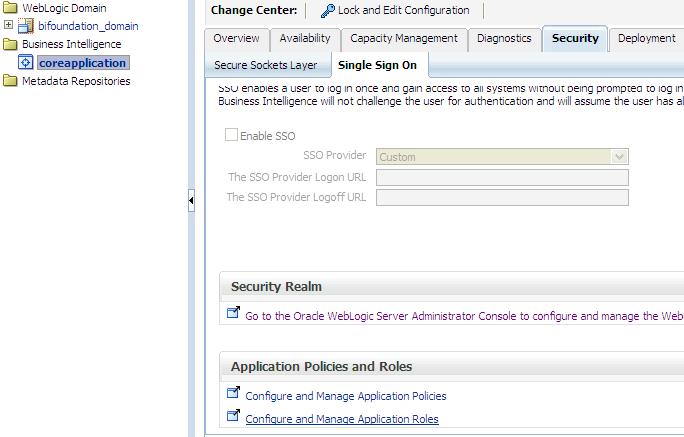
In case you have not yet seen this issue, but would like to know what this is referring to, then … login to the Enterprise Manager – http://yourserver:7001/em and expand Business Intelligence and click on coreapplication.  Then navigate to the Application Roles page using one of the methods below …

Either from:
(1)   the ‘Security’ -> ‘Single Sign On’ tab, select “Configure and Manage Application Roles”

Security-SingleSignOn-ApplicationRoles

(2) or from the coreapplication drop down menu, select Security -> Application Roles

coreapplication_dropdown-Security-ApplicationRoles

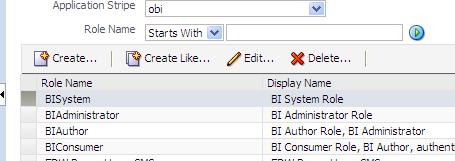
When you get to the Application Roles page, you will notice that the Create button is INACTIVE.

InactiveCreateButton

To activate the button, simply select the drop down for Application Stripe and select <No application stripe selected>, then reselect the appropriate Application Stripe such as obi.

The Create button will now be ACTIVE.  Of course, click the play button to generate the list of Application Roles if necessary.

CreateButtonActive

Oracle positioned as a leader in the Gartner Magic Quadrant for Business Intelligence & Analytics platforms

Gartner released its 2012 “Magic Quadrant for Business Intelligence and Analytics Platforms” report.  As you may expect, Oracle is in the leaders bracket, along with Microsoft, IBM, Tableau Software, SAS, QlikTech, MicroStrategy, Tibco Spotfire, Information Builders and SAP.

GartnerMagicQuadrant_for_BI_and_Analytics

Source: Gartner (February 2013)

Not surprisingly, the report mentions that, in 2012, Data Discovery became a mainstream BI feature, and that Real-time, Content and Predictive Analytics saw increased activity.

You can read all the details here in the … Gartner Magic Quadrant for Business Intelligence and Analytics Platforms report.

Setting up Putty to display screens on your desktop for installing or upgrading OBIEE 11g on Linux

When you attempt to run the RCU (Repository Creation Utility) or UA (Upgrade Assistant) scripts from your desktop/laptop using Putty for an OBIEE install or upgrade on a Linux server, you may get the following error …

UPGAST-00107: The DISPLAY environment variable is not set. The graphical user interface (GUI) requires that this environment variable be set on UNIX.

If you get this error, this post may help you to solve it.  You need to do some configuration in Putty.

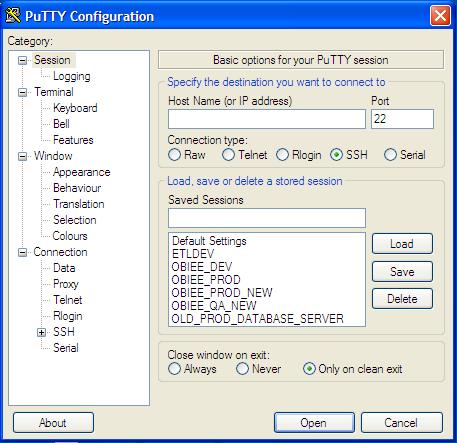
Open Putty.

Displaying_Images_Using_Putty_and_Xming1

Select the server that you want to configure from your list of servers. You will notice that the values get populated into the fields.

Displaying_Images_Using_Putty_and_Xming2

Expand SSH, the select X11.   Then Check “Enable X11 forwarding” checkbox, and enter “localhost:0.0” in the X display location box.

Displaying_Images_Using_Putty_and_Xming4

Do not click open at this point.

Go back up and click on Session in the left menu.

And then Save.

However, before you connect using Putty, you should run Xming.

Start -> All Programs -> Xming -> Xming

[If you do not have Xming, you can download it for free, then install it.]

Displaying_Images_Using_Putty_and_Xming7

Now when you open Putty and connect to your server, you should be able to run the install or upgrade processes and see the wizard screens for each step, for example …

>  ./ua   (run the UA script, then the wizard screen will appear)

SampleScreen_UA_Wizard