Division is a common operation in Power BI, but it can cause errors when the divisor is zero. Both DAX and Power Query provide built-in ways to handle these scenarios safely.
Safe DIVIDE in DAX
In DAX, the DIVIDE function is the recommended approach. Its syntax is:
DIVIDE(numerator, divisor [, alternateResult])
If the divisor is zero (or BLANK), the function returns the optional alternateResult; otherwise, it performs the division normally.
Examples:
DIVIDE(10, 2) → 5
DIVIDE(10, 0) → BLANK
DIVIDE(10, 0, 0) → 0
This makes DIVIDE safer and cleaner than using conditional logic.
Safe DIVIDE in Power Query
In Power Query (M language), you can use the try … otherwise expression to handle divide-by-zero errors gracefully. The syntax is:
try [expression] otherwise [alternateValue]
Example:
try [Sales] / [Quantity] otherwise 0
If the division fails (such as when Quantity is zero), Power Query returns 0 instead of an error.
Using DIVIDE in DAX and try … otherwise in Power Query ensures your division calculations remain error-free.
Marketing has always been about understanding people—what they want, when they want it, and how best to reach them. What’s changed is the scale and complexity of that challenge. Customers interact across dozens of channels, generate massive amounts of data, and expect personalization as the default.
AI has become the connective tissue that allows marketing teams to turn fragmented data into insight, automation, and growth—often in real time.
How AI Is Being Used in Marketing Today
AI now touches nearly every part of the marketing function:
Personalization & Customer Segmentation
Netflix uses AI to personalize thumbnails, recommendations, and messaging—driving engagement and retention.
Amazon applies machine learning to personalize product recommendations and promotions across its marketing channels.
Content Creation & Optimization
Coca-Cola has used generative AI tools to co-create marketing content and creative assets.
Marketing teams use OpenAI models (via ChatGPT and APIs), Adobe Firefly, and Jasper AI to generate copy, images, and ad variations at scale.
Marketing Automation & Campaign Optimization
Salesforce Einstein optimizes email send times, predicts customer engagement, and recommends next-best actions.
HubSpot AI assists with content generation, lead scoring, and campaign optimization.
Paid Media & Ad Targeting
Meta Advantage+ and Google Performance Max use AI to automate bidding, targeting, and creative optimization across ad networks.
Customer Journey Analytics
Adobe Sensei analyzes cross-channel customer journeys to identify drop-off points and optimization opportunities.
Voice, Chat, and Conversational Marketing
Brands use AI chatbots and virtual assistants for lead capture, product discovery, and customer support.
Tools, Technologies, and Forms of AI in Use
Modern marketing AI stacks typically include:
Machine Learning & Predictive Analytics Used for churn prediction, propensity scoring, and lifetime value modeling.
Natural Language Processing (NLP) Powers content generation, sentiment analysis, and conversational interfaces.
Generative AI & Large Language Models (LLMs) Used to generate ad copy, emails, landing pages, social posts, and campaign ideas.
Computer Vision Applied to image recognition, brand safety, and visual content optimization.
Marketing AI Platforms
Salesforce Einstein
Adobe Sensei
HubSpot AI
Marketo Engage
Google Marketing Platform
Benefits Marketers Are Realizing
Organizations that adopt AI effectively see significant advantages:
Higher Conversion Rates through personalization
Faster Campaign Execution with automated content creation
Lower Cost per Acquisition (CPA) via optimized targeting
Improved Customer Insights and segmentation
Better ROI Measurement and attribution
Scalability without proportional increases in headcount
In many cases, AI allows small teams to operate at enterprise scale.
Pitfalls and Challenges
Despite its power, AI in marketing has real risks:
Over-Automation and Brand Dilution
Excessive reliance on generative AI can lead to generic or off-brand content.
Data Privacy and Consent Issues
AI-driven personalization must comply with GDPR, CCPA, and evolving privacy laws.
Bias in Targeting and Messaging
AI models can unintentionally reinforce stereotypes or exclude certain audiences.
Measurement Complexity
AI-driven multi-touch journeys can make attribution harder, not easier.
Tool Sprawl
Marketers may adopt too many AI tools without clear integration or strategy.
Where AI Is Headed in Marketing
The next wave of AI in marketing will be even more integrated and autonomous:
Hyper-Personalization in Real Time Content, offers, and experiences adapted instantly based on context and behavior.
Generative AI as a Creative Partner AI co-creating—not replacing—human creativity.
Predictive and Prescriptive Marketing AI recommending not just what will happen, but what to do next.
AI-Driven Brand Guardianship Models trained on brand voice, compliance, and tone to ensure consistency.
End-to-End Journey Orchestration AI managing entire customer journeys across channels automatically.
How Marketing Teams Can Gain an Advantage
To thrive in this fast-changing environment, marketing organizations should:
Anchor AI to Clear Business Outcomes Start with revenue, retention, or efficiency goals—not tools.
Invest in Clean, Unified Customer Data AI effectiveness depends on strong data foundations.
Establish Human-in-the-Loop Workflows Maintain creative oversight and brand governance.
Upskill Marketers in AI Literacy The best results come from marketers who know how to prompt, test, and refine AI outputs.
Balance Personalization with Privacy Trust is a long-term competitive advantage.
Rationalize the AI Stack Fewer, well-integrated tools outperform disconnected point solutions.
Final Thoughts
AI is transforming marketing from a campaign-driven function into an intelligent growth engine. The organizations that win won’t be those that simply automate more—they’ll be the ones that use AI to understand customers more deeply, move faster with confidence, and blend human creativity with machine intelligence.
In marketing, AI isn’t replacing storytellers—it’s giving them superpowers.
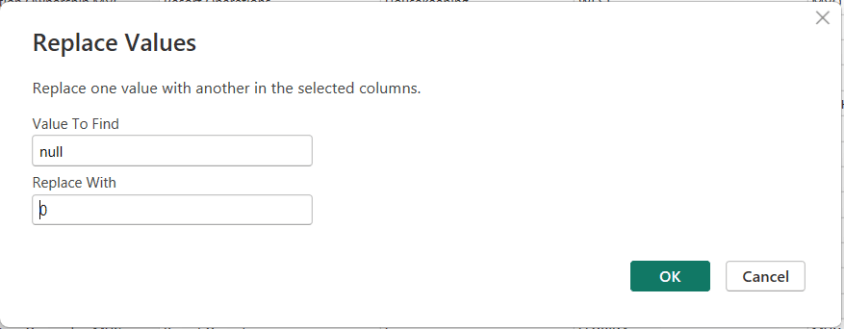
In Power BI, handling NULL values is a common data-preparation step to get your data ready for analysis, and Power Query makes this easy using the Replace Values feature.
This option is available from both the Home menu …
… and the Transform menu in the Power Query Editor.
To replace NULLs, first select the column where the NULL values exist. Then choose Replace Values. When the dialog box appears, enter null as the value to find and replace, and specify the value you want to use instead—such as 0 for numeric columns or “Unknown” for text columns.
After confirming, Power Query automatically updates the column and records the step.
Thanks for reading!
Information and resources for the data professionals' community




 The Data Community