Month: January 2026

Practice Questions: Implement Row-Level Security Roles (PL-300 Exam Prep)

This post is a part of the PL-300: Microsoft Power BI Data Analyst Exam Prep Hub; and this topic falls under these sections:
Manage and secure Power BI (15–20%)
--> Secure and govern Power BI items
--> Implement row-level security roles


Below are 10 practice questions (with answers and explanations) for this topic of the exam.
There are also 2 practice tests for the PL-300 exam with 60 questions each (with answers) available on the hub.

Practice Questions


Question 1

Where are Row-Level Security roles and filters created?

A. In the Power BI Service
B. In Power BI Desktop
C. In Microsoft Entra ID
D. In Power BI Apps

Correct Answer: B

Explanation:
RLS roles and DAX filters are created in Power BI Desktop. Users and groups are assigned to those roles later in the Power BI Service.


Question 2

Which DAX function is most commonly used to implement dynamic RLS?

A. USERELATIONSHIP()
B. USERNAME()
C. USERPRINCIPALNAME()
D. SELECTEDVALUE()

Correct Answer: C

Explanation:
USERPRINCIPALNAME() returns the logged-in user’s email/UPN and is the most commonly used function for dynamic RLS scenarios.


Question 3

A single semantic model must filter sales data so that users only see rows matching their email address. What is the best approach?

A. Create one role per user
B. Create static RLS roles by region
C. Use dynamic RLS with a user-mapping table
D. Use Object-Level Security

Correct Answer: C

Explanation:
Dynamic RLS with a user-to-dimension mapping table scales efficiently and avoids creating many static roles.


Question 4

What happens if a user belongs to multiple RLS roles?

A. Access is denied
B. Only the most restrictive role is applied
C. The union of all role filters is applied
D. The first role alphabetically is applied

Correct Answer: C

Explanation:
Power BI applies the union of RLS role filters, meaning users see data allowed by any role they belong to.


Question 5

Which statement about Row-Level Security behavior is correct?

A. RLS is applied at the report level
B. RLS applies only to dashboards
C. RLS is enforced at the semantic model level
D. RLS must be reconfigured for each report

Correct Answer: C

Explanation:
RLS is enforced at the semantic model level and automatically applies to all reports and apps using that model.


Question 6

You test RLS using View as role in Power BI Desktop. What does this feature do?

A. Permanently applies RLS to the model
B. Bypasses RLS for the model author
C. Simulates how the report appears for a role
D. Assigns users to roles automatically

Correct Answer: C

Explanation:
View as allows you to simulate role behavior to validate RLS logic before publishing.


Question 7

Which type of RLS is least scalable in enterprise environments?

A. Dynamic RLS
B. RLS using USERPRINCIPALNAME()
C. Static RLS with hard-coded values
D. Group-based RLS

Correct Answer: C

Explanation:
Static RLS requires separate roles for each data segment, making it difficult to maintain at scale.


Question 8

A user accesses a report through a Power BI App. How does RLS behave?

A. RLS is ignored
B. RLS must be redefined in the app
C. RLS is enforced automatically
D. Only static RLS is enforced

Correct Answer: C

Explanation:
RLS is always enforced at the semantic model level, including when content is accessed through apps.


Question 9

Which security feature should be used if you need to hide entire columns or tables from certain users?

A. Row-Level Security
B. Workspace roles
C. Object-Level Security
D. Build permission

Correct Answer: C

Explanation:
RLS controls rows only. Object-Level Security (OLS) is used to hide tables or columns.


Question 10

Which best practice is recommended when assigning users to RLS roles?

A. Assign individual users directly
B. Assign workspace Admins only
C. Assign Microsoft Entra ID security groups
D. Assign report-level permissions

Correct Answer: C

Explanation:
Using security groups improves scalability, governance, and ease of maintenance.


Final PL-300 Exam Reminders

  • RLS controls data visibility, not report access
  • Dynamic RLS is heavily tested
  • RLS applies everywhere the semantic model is used
  • Users see the union of multiple roles
  • RLS is defined in Desktop, enforced in the Service

Go back to the PL-300 Exam Prep Hub main page

Practice Questions: Configure Row-Level Security Group Membership (PL-300 Exam Prep)

This post is a part of the PL-300: Microsoft Power BI Data Analyst Exam Prep Hub; and this topic falls under these sections: 
Manage and secure Power BI (15–20%)
--> Secure and govern Power BI items
--> Configure row-level security group membership


Below are 10 practice questions (with answers and explanations) for this topic of the exam.
There are also 2 practice tests for the PL-300 exam with 60 questions each (with answers) available on the hub.

Practice Questions


Question 1

Where are security groups assigned to RLS roles?

A. Power BI Desktop
B. Power BI Service
C. Microsoft Entra ID only
D. Power BI App settings

Correct Answer: B

Explanation:
RLS roles and filters are created in Power BI Desktop, but users and security groups are assigned to roles in the Power BI Service after the model is published.


Question 2

Which approach is considered a best practice for managing RLS membership at scale?

A. Assign individual users to each role
B. Create one role per user
C. Assign Microsoft Entra ID security groups to roles
D. Use workspace Admin access

Correct Answer: C

Explanation:
Using Entra ID security groups simplifies administration, supports scalability, and aligns with enterprise security standards.


Question 3

What happens when a user is added to an Entra ID security group that is already assigned to an RLS role?

A. The semantic model must be republished
B. The role must be recreated
C. The user automatically inherits the RLS permissions
D. The user must be manually added in Power BI

Correct Answer: C

Explanation:
Group-based RLS automatically applies to all members of the group without changes to the model or Power BI configuration.


Question 4

Which type of group is recommended for RLS role membership?

A. Distribution list
B. Microsoft 365 group
C. Entra ID security group
D. Power BI workspace group

Correct Answer: C

Explanation:
Entra ID security groups are designed for access control and are the preferred option for RLS scenarios.


Question 5

A user belongs to two security groups, each assigned to a different RLS role. How is access determined?

A. The most restrictive role applies
B. The first role applied alphabetically applies
C. Access is denied
D. The union of both roles applies

Correct Answer: D

Explanation:
Power BI applies the union of all RLS roles a user belongs to, allowing access to any data permitted by either role.


Question 6

Which action requires updating Microsoft Entra ID, not Power BI?

A. Modifying a DAX RLS filter
B. Creating a new RLS role
C. Adding a user to an RLS role via group membership
D. Testing RLS with View as

Correct Answer: C

Explanation:
User membership in security groups is managed in Entra ID, not in Power BI.


Question 7

Which statement about testing group-based RLS is correct?

A. Group membership can be fully tested in Power BI Desktop
B. Group membership is evaluated only in the Power BI Service
C. RLS does not apply to groups
D. Groups bypass dynamic RLS

Correct Answer: B

Explanation:
Power BI Desktop can test role logic, but actual group membership is evaluated only in the Power BI Service.


Question 8

Why is group-based RLS preferred over assigning individual users?

A. It improves report performance
B. It hides tables and columns
C. It reduces the need to update Power BI when users change roles
D. It removes the need for DAX filters

Correct Answer: C

Explanation:
Group-based RLS allows access changes to be managed centrally without modifying Power BI roles or republishing models.


Question 9

Which security concept is often confused with RLS group membership but serves a different purpose?

A. Build permission
B. Workspace roles
C. Object-Level Security
D. All of the above

Correct Answer: D

Explanation:
All listed options are different security mechanisms that control content access or structure, not row-level data visibility.


Question 10

What is the primary role of Power BI in a group-based RLS solution?

A. Managing group membership
B. Authenticating users
C. Enforcing data filters defined in RLS roles
D. Creating security groups

Correct Answer: C

Explanation:
Power BI enforces RLS filters at query time, while identity and group membership are managed externally in Entra ID.


Final PL-300 Exam Reminders

  • Use Entra ID security groups for RLS membership
  • Assign groups in the Power BI Service
  • RLS role logic lives in Power BI Desktop
  • Users see the union of all assigned roles
  • Group membership changes do not require republishing

Go back to the PL-300 Exam Prep Hub main page

Glossary – 100 “AI” Terms

Below is a glossary that includes 100 common “AI (Artificial Intelligence)” terms and phrases in alphabetical order. Enjoy!

TermDefinition & Example
 AccuracyPercentage of correct predictions. Example: 92% accuracy.
 AgentAI entity performing tasks autonomously. Example: Task-planning agent.
 AI AlignmentEnsuring AI goals match human values. Example: Safe AI systems.
 AI BiasSystematic unfairness in AI outcomes. Example: Biased hiring models.
 AlgorithmA set of rules used to train models. Example: Decision tree algorithm.
 Artificial General Intelligence (AGI)Hypothetical AI with human-level intelligence. Example: Broad reasoning across tasks.
 Artificial Intelligence (AI)Systems that perform tasks requiring human-like intelligence. Example: Chatbots answering questions.
 Artificial Neural Network (ANN)A network of interconnected artificial neurons. Example: Credit scoring models.
 Attention MechanismFocuses model on relevant input parts. Example: Language translation.
 AUCArea under ROC curve. Example: Model comparison.
 AutoMLAutomated model selection and tuning. Example: Auto-generated models.
 Autonomous SystemAI operating with minimal human input. Example: Self-driving cars.
 BackpropagationMethod to update neural network weights. Example: Deep learning training.
 BatchSubset of data processed at once. Example: Batch size of 32.
 Batch InferencePredictions made in bulk. Example: Nightly scoring jobs.
 Bias (Model Bias)Error from oversimplified assumptions. Example: Linear model on non-linear data.
 Bias–Variance TradeoffBalance between bias and variance. Example: Choosing model complexity.
 Black Box ModelModel with opaque internal logic. Example: Deep neural networks.
 ClassificationPredicting categorical outcomes. Example: Email spam classification.
 ClusteringGrouping similar data points. Example: Customer segmentation.
 Computer VisionAI for interpreting images and video. Example: Facial recognition.
 Concept DriftChanges in underlying relationships. Example: Fraud patterns evolving.
 Confusion MatrixTable evaluating classification results. Example: True positives vs false positives.
 Data AugmentationExpanding data via transformations. Example: Image rotation.
 Data DriftChanges in input data distribution. Example: New user demographics.
 Data LeakageUsing future information in training. Example: Including test labels.
 Decision TreeTree-based decision model. Example: Loan approval logic.
 Deep LearningML using multi-layer neural networks. Example: Image recognition.
 Dimensionality ReductionReducing number of features. Example: PCA for visualization.
 Edge AIAI running on local devices. Example: Smart cameras.
 EmbeddingNumerical representation of data. Example: Word embeddings.
 Ensemble ModelCombining multiple models. Example: Random forest.
 EpochOne full pass through training data. Example: 50 training epochs.
 Ethics in AIMoral considerations in AI use. Example: Avoiding bias.
 Explainable AI (XAI)Making AI decisions understandable. Example: Feature importance charts.
 F1 ScoreBalance of precision and recall. Example: Imbalanced datasets.
 FairnessEquitable AI outcomes across groups. Example: Equal approval rates.
 FeatureAn input variable for a model. Example: Customer age.
 Feature EngineeringCreating or transforming features to improve models. Example: Calculating customer tenure.
 Federated LearningTraining models across decentralized data. Example: Mobile keyboard predictions.
 Few-Shot LearningLearning from few examples. Example: Custom classification with few samples.
 Fine-TuningFurther training a pre-trained model. Example: Custom chatbot training.
 GeneralizationModel’s ability to perform on new data. Example: Accurate predictions on unseen data.
 Generative AIAI that creates new content. Example: Text or image generation.
 Gradient BoostingSequentially improving weak models. Example: XGBoost.
 Gradient DescentOptimization technique adjusting weights iteratively. Example: Training neural networks.
 HallucinationModel generates incorrect information. Example: False factual claims.
 HyperparameterConfiguration set before training. Example: Learning rate.
 InferenceUsing a trained model to predict. Example: Real-time recommendations.
 K-MeansClustering algorithm. Example: Market segmentation.
 Knowledge GraphGraph-based representation of knowledge. Example: Search engines.
 LabelThe correct output for supervised learning. Example: “Fraud” or “Not Fraud”.
 Large Language Model (LLM)AI trained on massive text corpora. Example: ChatGPT.
 Loss FunctionMeasures model error during training. Example: Mean squared error.
 Machine Learning (ML)AI that learns patterns from data without explicit programming. Example: Spam email detection.
 MLOpsPractices for managing ML lifecycle. Example: CI/CD for models.
 ModelA trained mathematical representation of patterns. Example: Logistic regression model.
 Model DeploymentMaking a model available for use. Example: API-based predictions.
 Model DriftModel performance degradation over time. Example: Changing customer behavior.
 Model InterpretabilityAbility to understand model behavior. Example: Decision tree visualization.
 Model VersioningTracking model changes. Example: v1 vs v2 models.
 MonitoringTracking model performance in production. Example: Accuracy alerts.
 Multimodal AIAI handling multiple data types. Example: Text + image models.
 Naive BayesProbabilistic classification algorithm. Example: Spam filtering.
 Natural Language Processing (NLP)AI for understanding human language. Example: Sentiment analysis.
 Neural NetworkModel inspired by the human brain’s structure. Example: Handwritten digit recognition.
 OptimizationProcess of minimizing loss. Example: Gradient descent.
 OverfittingModel learns noise instead of patterns. Example: Perfect training accuracy, poor test accuracy.
 PipelineAutomated ML workflow. Example: Training-to-deployment flow.
 PrecisionCorrect positive predictions rate. Example: Fraud detection precision.
 Pretrained ModelModel trained on general data. Example: GPT models.
 Principal Component Analysis (PCA)Technique for dimensionality reduction. Example: Compressing high-dimensional data.
 PrivacyProtecting personal data. Example: Anonymizing training data.
 PromptInput instruction for generative models. Example: “Summarize this text.”
 Prompt EngineeringCrafting effective prompts. Example: Improving LLM responses.
 Random ForestEnsemble of decision trees. Example: Classification tasks.
 Real-Time InferenceImmediate predictions on live data. Example: Fraud detection.
 RecallAbility to find all positives. Example: Cancer detection.
 RegressionPredicting numeric values. Example: Sales forecasting.
 Reinforcement LearningLearning through rewards and penalties. Example: Game-playing AI.
 ReproducibilityAbility to recreate results. Example: Fixed random seeds.
 RoboticsAI applied to physical machines. Example: Warehouse robots.
 ROC CurvePerformance visualization for classifiers. Example: Threshold analysis.
 Semi-Supervised LearningMix of labeled and unlabeled data. Example: Image classification with limited labels.
 Speech RecognitionConverting speech to text. Example: Voice assistants.
 Supervised LearningLearning using labeled data. Example: Predicting house prices from known values.
 Support Vector Machine (SVM)Algorithm separating data with margins. Example: Text classification.
 Synthetic DataArtificially generated data. Example: Privacy-safe training.
 Test DataData used to evaluate model performance. Example: Held-out validation dataset.
 ThresholdCutoff for classification decisions. Example: Probability > 0.7.
 TokenSmallest unit of text processed by models. Example: Words or subwords.
 Training DataData used to teach a model. Example: Historical sales records.
 Transfer LearningReusing knowledge from another task. Example: Image model reused for medical scans.
 TransformerNeural architecture for sequence data. Example: Language translation models.
 UnderfittingModel too simple to capture patterns. Example: High error on all datasets.
 Unsupervised LearningLearning from unlabeled data. Example: Customer clustering.
 Validation DataData used to tune model parameters. Example: Hyperparameter selection.
 VarianceError from sensitivity to data fluctuations. Example: Highly complex model.
 XGBoostOptimized gradient boosting algorithm. Example: Kaggle competitions.
 Zero-Shot LearningPerforming tasks without examples. Example: Classifying unseen labels.

Please share your suggestions for any terms that should be added.

Glossary – 100 “Data Engineering” Terms

Below is a glossary that includes 100 common “Data Engineering” terms and phrases in alphabetical order. Enjoy!

TermDefinition & Example
Access ControlManaging who can access data. Example: Role-based permissions.
At-Least-Once ProcessingData may be processed more than once. Example: Duplicate-safe pipelines.
At-Most-Once ProcessingData processed zero or one time. Example: No retries on failure.
BackfillProcessing historical data. Example: Reloading last year’s data.
Batch ProcessingProcessing data in scheduled chunks. Example: Daily sales aggregation.
Blue-Green DeploymentDeployment strategy minimizing downtime. Example: Switching pipeline versions.
Canary ReleaseGradual rollout to detect issues. Example: New pipeline tested on 5% of data.
Change Data Capture (CDC)Capturing database changes. Example: Streaming updates from OLTP DB.
CheckpointingSaving progress during processing. Example: Spark streaming checkpoints.
Cloud StorageScalable remote data storage. Example: Azure Data Lake Storage.
Cold StorageLow-cost storage for infrequent access. Example: Archived logs.
Columnar StorageData stored by column instead of row. Example: Parquet files.
CompressionReducing data size. Example: Gzip-compressed files.
Compute EngineSystem performing data processing. Example: Spark cluster.
Consumption LayerData prepared for analytics. Example: Gold layer.
Cost OptimizationReducing infrastructure costs. Example: Query optimization.
Curated LayerCleaned and transformed data. Example: Silver layer.
DAG (Directed Acyclic Graph)Workflow structure with dependencies. Example: Airflow pipeline.
Data CatalogSearchable inventory of data assets. Example: Azure Purview.
Data ContractAgreement defining data structure and expectations. Example: Producer guarantees column names and types.
Data EngineeringThe practice of designing, building, and maintaining data systems. Example: Creating pipelines that feed analytics dashboards.
Data GovernancePolicies for data management and usage. Example: Access control rules.
Data IngestionCollecting data from source systems. Example: Ingesting API data hourly.
Data LakeCentralized storage for raw data. Example: S3-based data lake.
Data LatencyTime delay in data availability. Example: 5-minute pipeline delay.
Data LineageTracking data flow from source to output. Example: Source-to-dashboard trace.
Data MartSubset of warehouse for specific use. Example: Finance data mart.
Data MaskingObscuring sensitive data. Example: Masked credit card numbers.
Data MeshDomain-oriented decentralized data ownership. Example: Teams own their data products.
Data ModelingDesigning data structures for usage. Example: Star schema design.
Data ObservabilityMonitoring data health and pipelines. Example: Freshness alerts.
Data Partition PruningSkipping irrelevant partitions. Example: Querying one date only.
Data PipelineAn automated process that moves and transforms data. Example: Nightly ETL job from CRM to warehouse.
Data PlatformIntegrated set of data tools. Example: End-to-end analytics stack.
Data ProductA dataset treated as a product. Example: Curated customer table.
Data ProfilingAnalyzing data characteristics. Example: Value distributions.
Data QualityAccuracy, completeness, and reliability of data. Example: No duplicate records.
Data ReplayReprocessing historical events. Example: Rebuilding aggregates from logs.
Data RetentionRules for data lifespan. Example: Delete logs after 1 year.
Data SecurityProtecting data from unauthorized access. Example: Encryption at rest.
Data SerializationConverting data for storage or transport. Example: Avro encoding.
Data SinkThe destination where data is stored. Example: Data warehouse.
Data SourceThe origin of data. Example: ERP system, SaaS application.
Data ValidationEnsuring data meets expectations. Example: Null checks.
Data VersioningTracking dataset changes. Example: Snapshot tables.
Data WarehouseOptimized storage for analytics queries. Example: Azure Synapse Analytics.
Dead Letter Queue (DLQ)Storage for failed records. Example: Invalid messages routed for review.
Dimension TableTable storing descriptive attributes. Example: Customer details.
ELTExtract, Load, Transform approach. Example: Transforming data inside Snowflake.
ETLExtract, Transform, Load process. Example: Cleaning data before loading into a database.
Event TimeTimestamp when event occurred. Example: User click time.
Event-Driven ArchitectureSystems reacting to events in real time. Example: Trigger pipeline on file arrival.
Exactly-Once ProcessingEnsuring data is processed only once. Example: Preventing duplicate events.
Fact TableTable storing quantitative measures. Example: Order transactions.
Fault ToleranceSystem resilience to failures. Example: Node failure recovery.
File FormatHow data is stored on disk. Example: Parquet, CSV.
Foreign KeyField linking tables together. Example: CustomerID in orders table.
Full LoadReloading all data. Example: Initial table population.
High AvailabilitySystem uptime and reliability. Example: Multi-zone deployment.
Hot StorageHigh-performance storage for frequent access. Example: Real-time tables.
IdempotencyAbility to rerun pipelines safely. Example: Reprocessing without duplicates.
Incremental LoadLoading only new or changed data. Example: CDC-based ingestion.
IndexingCreating structures to speed queries. Example: Index on order date.
Infrastructure as Code (IaC)Managing infrastructure via code. Example: Terraform scripts.
LakehouseHybrid of data lake and warehouse. Example: Databricks Lakehouse.
Late-Arriving DataData that arrives after expected time. Example: Delayed event logs.
LoggingRecording system events. Example: Job execution logs.
Message QueueBuffer for asynchronous data transfer. Example: Kafka topic for events.
MetadataData about data. Example: Table definitions and lineage.
MetricsQuantitative indicators of performance. Example: Rows processed per run.
OrchestrationCoordinating pipeline execution. Example: DAG scheduling.
PartitioningDividing data for performance. Example: Partitioning by date.
Personally Identifiable Information (PII)Data identifying individuals. Example: Email addresses.
Pipeline MonitoringTracking pipeline execution status. Example: Failure notifications.
Primary KeyUnique identifier for a record. Example: CustomerID.
Processing TimeTimestamp when data is processed. Example: Ingestion time.
Query OptimizationImproving query efficiency. Example: Predicate pushdown.
Raw LayerStorage of unprocessed data. Example: Bronze layer.
Real-Time DataData available with minimal latency. Example: Live dashboard updates.
Retry LogicAutomatic reruns on failure. Example: Retry failed ingestion job.
ScalabilityAbility to handle growing workloads. Example: Auto-scaling clusters.
SchedulerTool managing execution timing. Example: Cron, Airflow.
SchemaThe structure of a dataset. Example: Table columns and data types.
Schema EvolutionHandling schema changes over time. Example: Adding new columns safely.
Secrets ManagementSecure handling of credentials. Example: Key Vault for passwords.
Semi-Structured DataData with flexible schema. Example: JSON, Parquet.
ServerlessInfrastructure managed by provider. Example: Serverless SQL pools.
Serving LayerLayer optimized for consumption. Example: BI-ready tables.
ShardingDistributing data across nodes. Example: User data split across servers.
Snowflake SchemaNormalized version of star schema. Example: Product broken into sub-dimensions.
Star SchemaFact table surrounded by dimensions. Example: Sales fact with date dimension.
Stream ProcessingProcessing data in real time. Example: Clickstream event processing.
Structured DataData with a fixed schema. Example: SQL tables.
Technical DebtLong-term cost of quick fixes. Example: Hardcoded transformations.
ThroughputAmount of data processed per unit time. Example: Records per second.
Transformation LayerLayer where business logic is applied. Example: dbt models.
Unstructured DataData without a predefined structure. Example: Images, PDFs.
WatermarkMarker for processed data. Example: Last processed timestamp.
WindowingGrouping stream data by time windows. Example: 5-minute aggregations.
Workload IsolationSeparating workloads to avoid contention. Example: Dedicated compute pools.

Please share your suggestions for any terms that should be added.

Glossary – 100 “Data Analysis” Terms

Below is a glossary that includes 100 common “Data Analysis” terms and phrases in alphabetical order. Enjoy!

TermDefinition & Example
A/B TestComparing two variations to measure impact. Example: Two webpage layouts.
Actionable InsightAn insight that leads to a clear decision. Example: Improve onboarding experience.
Ad Hoc AnalysisOne-off analysis for a specific question. Example: Investigating a sudden sales dip.
AggregationSummarizing data using functions like sum or average. Example: Total revenue by region.
Analytical MaturityOrganization’s capability to use data effectively. Example: Moving from descriptive to predictive analytics.
Bar ChartA chart comparing categories. Example: Sales by region.
BaselineA reference point for comparison. Example: Last year’s sales used as baseline.
BenchmarkA standard used to compare performance. Example: Industry average churn rate.
BiasSystematic error in data or analysis. Example: Surveying only active users.
Business QuestionA decision-focused question data aims to answer. Example: Which products drive profit?
CausationA relationship where one variable causes another. Example: Price cuts causing sales growth.
Confidence IntervalRange likely containing a true value. Example: 95% CI for average sales.
CorrelationA statistical relationship between variables. Example: Sales and marketing spend.
Cumulative TotalA running total over time. Example: Year-to-date revenue.
DashboardA visual collection of key metrics. Example: Executive sales dashboard.
DataRaw facts or measurements collected for analysis. Example: Sales transactions, sensor readings, survey responses.
Data AnomalyUnexpected or unusual data pattern. Example: Sudden spike in user signups.
Data CleaningCorrecting or removing inaccurate data. Example: Fixing misspelled country names.
Data ConsistencyUniform representation across datasets. Example: Same currency used everywhere.
Data GovernancePolicies ensuring data quality, security, and usage. Example: Defined data ownership roles.
Data ImputationReplacing missing values with estimated ones. Example: Filling null ages with the median.
Data LineageTracking data origin and transformations. Example: Tracing metrics back to source systems.
Data LiteracyAbility to read, understand, and use data. Example: Interpreting charts correctly.
Data ModelThe structure defining how data tables relate. Example: Star schema.
Data PipelineAutomated flow of data from source to destination. Example: Daily ingestion job.
Data ProfilingAnalyzing data characteristics. Example: Checking null percentages.
Data QualityThe accuracy, completeness, and reliability of data. Example: Valid dates and consistent formats.
Data RefreshUpdating data with the latest values. Example: Nightly refresh.
Data Refresh FrequencyHow often data is updated. Example: Hourly vs. daily refresh.
Data SkewnessDegree of asymmetry in data distribution. Example: Income data skewed to the right.
Data SourceThe origin of data. Example: SQL database, API.
Data StorytellingCommunicating insights using narrative and visuals. Example: Executive-ready presentation.
Data TransformationModifying data to improve usability or consistency. Example: Converting text dates to date data types.
Data ValidationEnsuring data meets rules and expectations. Example: No negative quantities.
Data WranglingTransforming raw data into a usable format. Example: Reshaping columns for analysis.
DatasetA structured collection of related data. Example: A table of customer orders with dates, amounts, and regions.
Derived MetricA metric calculated from other metrics. Example: Profit margin = Profit / Revenue.
Descriptive AnalyticsAnalysis that explains what happened. Example: Last quarter’s sales summary.
Diagnostic AnalyticsAnalysis that explains why something happened. Example: Revenue drop due to fewer customers.
DiceFiltering data by multiple dimensions. Example: Sales for 2025 in the West region.
DimensionA descriptive attribute used to slice data. Example: Date, region, product.
Dimension TableA table containing descriptive attributes. Example: Product details.
DimensionalityNumber of features or variables in data. Example: High-dimensional customer data.
DistributionHow values are spread across a range. Example: Income distribution.
Drill DownNavigating from summary to detail. Example: Yearly sales → monthly sales.
Drill ThroughJumping to a detailed view for a specific value. Example: Clicking a region to see store data.
ELTExtract, Load, Transform approach. Example: Transforming data inside a warehouse.
ETLExtract, Transform, Load process. Example: Loading CRM data into a warehouse.
Exploratory Data Analysis (EDA)Initial investigation to understand data. Example: Visualizing distributions.
Fact TableA table containing quantitative data. Example: Sales transactions.
FeatureAn individual measurable property used in analysis. Example: Customer age used in churn analysis.
Feature EngineeringCreating new features from existing data. Example: Calculating customer tenure from signup date.
FilteringLimiting data to a subset of interest. Example: Only orders from 2025.
GranularityThe level of detail in the data. Example: Daily sales vs. monthly sales.
GroupingOrganizing data into categories before aggregation. Example: Sales grouped by product category.
HistogramA chart showing data distribution. Example: Frequency of order sizes.
HypothesisA testable assumption. Example: Discounts increase sales.
Incremental LoadLoading only new or changed data. Example: Yesterday’s transactions.
InsightA meaningful finding that informs action. Example: High churn among new users.
KPI (Key Performance Indicator)A critical metric tied to business objectives. Example: Monthly churn rate.
KurtosisMeasure of how heavy the tails of a distribution are. Example: Detecting extreme outliers.
LatencyDelay between data generation and availability. Example: Real-time vs. daily data.
Line ChartA chart showing trends over time. Example: Monthly revenue trend.
MeanThe arithmetic average. Example: Average order value.
MeasureA calculated numeric value, often aggregated. Example: SUM(Sales).
MedianThe middle value in ordered data. Example: Median household income.
MetricA quantifiable measure used to track performance. Example: Total sales, average order value.
Missing ValuesData points that are absent or null. Example: Blank customer age values.
ModeThe most frequent value. Example: Most common product category.
Multivariate AnalysisAnalyzing multiple variables simultaneously. Example: Studying price, demand, and seasonality.
NormalizationScaling data to a common range. Example: Normalizing values between 0 and 1.
ObservationA single record or row in a dataset. Example: One customer’s purchase history.
OutlierA data point significantly different from others. Example: An unusually large transaction amount.
PercentileValue below which a percentage of data falls. Example: 90th percentile response time.
PopulationThe full set of interest. Example: All customers.
Predictive AnalyticsAnalysis that forecasts future outcomes. Example: Predicting next month’s demand.
Prescriptive AnalyticsAnalysis that suggests actions. Example: Recommending price changes.
QuartileValues dividing data into four parts. Example: Q1, Q2, Q3.
ReportA structured presentation of analysis results. Example: Monthly performance report.
ReproducibilityAbility to recreate analysis results consistently. Example: Using versioned datasets.
Rolling AverageAn average calculated over a moving window. Example: 7-day rolling average of sales.
Root Cause AnalysisIdentifying the underlying cause of an issue. Example: Revenue loss due to inventory shortages.
SampleA subset of a population. Example: Survey respondents.
Sampling BiasBias introduced by non-random samples. Example: Feedback collected only from power users.
Scatter PlotA chart showing relationships between two variables. Example: Ad spend vs. revenue.
SeasonalityRepeating patterns tied to time cycles. Example: Holiday sales spikes.
Semi-Structured DataData with flexible structure. Example: JSON files.
Sensitivity AnalysisEvaluating how outcomes change with inputs. Example: Impact of price changes on profit.
SliceFiltering data by a single dimension. Example: Sales for 2025 only.
SnapshotData captured at a specific point in time. Example: End-of-month balances.
Snowflake SchemaA normalized version of a star schema. Example: Product broken into sub-tables.
Standard DeviationAverage distance from the mean. Example: Consistency of sales performance.
StandardizationRescaling data to have mean 0 and standard deviation 1. Example: Preparing data for regression analysis.
Star SchemaA data model with facts surrounded by dimensions. Example: Sales fact with product and date dimensions.
Structured DataData with a fixed schema. Example: Relational tables.
Time SeriesData indexed by time. Example: Daily stock prices.
TrendA general direction in data over time. Example: Increasing monthly revenue.
Unstructured DataData without a predefined schema. Example: Emails, images.
VariableA characteristic or attribute that can take different values. Example: Age, revenue, product category.
VarianceMeasure of data spread. Example: Variance in delivery times.

Please share your suggestions for any terms that should be added.

AI in Cybersecurity: From Reactive Defense to Adaptive, Autonomous Protection

“AI in …” series

Cybersecurity has always been a race between attackers and defenders. What’s changed is the speed, scale, and sophistication of threats. Cloud computing, remote work, IoT, and AI-generated attacks have dramatically expanded the attack surface—far beyond what human analysts alone can manage.

AI has become a foundational capability in cybersecurity, enabling organizations to detect threats faster, respond automatically, and continuously adapt to new attack patterns.


How AI Is Being Used in Cybersecurity Today

AI is now embedded across nearly every cybersecurity function:

Threat Detection & Anomaly Detection

  • Darktrace uses self-learning AI to model “normal” behavior across networks and detect anomalies in real time.
  • Vectra AI applies machine learning to identify hidden attacker behaviors in network and identity data.

Endpoint Protection & Malware Detection

  • CrowdStrike Falcon uses AI and behavioral analytics to detect malware and fileless attacks on endpoints.
  • Microsoft Defender for Endpoint applies ML models trained on trillions of signals to identify emerging threats.

Security Operations (SOC) Automation

  • Palo Alto Networks Cortex XSIAM uses AI to correlate alerts, reduce noise, and automate incident response.
  • Splunk AI Assistant helps analysts investigate incidents faster using natural language queries.

Phishing & Social Engineering Defense

  • Proofpoint and Abnormal Security use AI to analyze email content, sender behavior, and context to stop phishing and business email compromise (BEC).

Identity & Access Security

  • Okta and Microsoft Entra ID use AI to detect anomalous login behavior and enforce adaptive authentication.
  • AI flags compromised credentials and impossible travel scenarios.

Vulnerability Management

  • Tenable and Qualys use AI to prioritize vulnerabilities based on exploit likelihood and business impact rather than raw CVSS scores.

Tools, Technologies, and Forms of AI in Use

Cybersecurity AI blends multiple techniques into layered defenses:

  • Machine Learning (Supervised & Unsupervised)
    Used for classification (malware vs. benign) and anomaly detection.
  • Behavioral Analytics
    AI models baseline normal user, device, and network behavior to detect deviations.
  • Natural Language Processing (NLP)
    Used to analyze phishing emails, threat intelligence reports, and security logs.
  • Generative AI & Large Language Models (LLMs)
    • Used defensively as SOC copilots, investigation assistants, and policy generators
    • Examples: Microsoft Security Copilot, Google Chronicle AI, Palo Alto Cortex Copilot
  • Graph AI
    Maps relationships between users, devices, identities, and events to identify attack paths.
  • Security AI Platforms
    • Microsoft Security Copilot
    • IBM QRadar Advisor with Watson
    • Google Chronicle
    • AWS GuardDuty

Benefits Organizations Are Realizing

Companies using AI-driven cybersecurity report major advantages:

  • Faster Threat Detection (minutes instead of days or weeks)
  • Reduced Alert Fatigue through intelligent correlation
  • Lower Mean Time to Respond (MTTR)
  • Improved Detection of Zero-Day and Unknown Threats
  • More Efficient SOC Operations with fewer analysts
  • Scalability across hybrid and multi-cloud environments

In a world where attackers automate their attacks, AI is often the only way defenders can keep pace.


Pitfalls and Challenges

Despite its power, AI in cybersecurity comes with real risks:

False Positives and False Confidence

  • Poorly trained models can overwhelm teams or miss subtle attacks.

Bias and Blind Spots

  • AI trained on incomplete or biased data may fail to detect novel attack patterns or underrepresent certain environments.

Explainability Issues

  • Security teams and auditors need to understand why an alert fired—black-box models can erode trust.

AI Used by Attackers

  • Generative AI is being used to create more convincing phishing emails, deepfake voice attacks, and automated malware.

Over-Automation Risks

  • Fully automated response without human oversight can unintentionally disrupt business operations.

Where AI Is Headed in Cybersecurity

The future of AI in cybersecurity is increasingly autonomous and proactive:

  • Autonomous SOCs
    AI systems that investigate, triage, and respond to incidents with minimal human intervention.
  • Predictive Security
    Models that anticipate attacks before they occur by analyzing attacker behavior trends.
  • AI vs. AI Security Battles
    Defensive AI systems dynamically adapting to attacker AI in real time.
  • Deeper Identity-Centric Security
    AI focusing more on identity, access patterns, and behavioral trust rather than perimeter defense.
  • Generative AI as a Security Teammate
    Natural language interfaces for investigations, playbooks, compliance, and training.

How Organizations Can Gain an Advantage

To succeed in this fast-changing environment, organizations should:

  1. Treat AI as a Force Multiplier, Not a Replacement
    Human expertise remains essential for context and judgment.
  2. Invest in High-Quality Telemetry
    Better data leads to better detection—logs, identity signals, and endpoint visibility matter.
  3. Focus on Explainable and Governed AI
    Transparency builds trust with analysts, leadership, and regulators.
  4. Prepare for AI-Powered Attacks
    Assume attackers are already using AI—and design defenses accordingly.
  5. Upskill Security Teams
    Analysts who understand AI can tune models and use copilots more effectively.
  6. Adopt a Platform Strategy
    Integrated AI platforms reduce complexity and improve signal correlation.

Final Thoughts

AI has shifted cybersecurity from a reactive, alert-driven discipline into an adaptive, intelligence-led function. As attackers scale their operations with automation and generative AI, defenders have little choice but to do the same—responsibly and strategically.

In cybersecurity, AI isn’t just improving defense—it’s redefining what defense looks like in the first place.

AI in the Energy Industry: Powering Reliability, Efficiency, and the Energy Transition

“AI in …” series

The energy industry sits at the crossroads of reliability, cost pressure, regulation, and decarbonization. Whether it’s oil and gas, utilities, renewables, or grid operators, energy companies manage massive physical assets and generate oceans of operational data. AI has become a critical tool for turning that data into faster decisions, safer operations, and more resilient energy systems.

From predicting equipment failures to balancing renewable power on the grid, AI is increasingly embedded in how energy is produced, distributed, and consumed.


How AI Is Being Used in the Energy Industry Today

Predictive Maintenance & Asset Reliability

  • Shell uses machine learning to predict failures in rotating equipment across refineries and offshore platforms, reducing downtime and safety incidents.
  • BP applies AI to monitor pumps, compressors, and drilling equipment in real time.

Grid Optimization & Demand Forecasting

  • National Grid uses AI-driven forecasting to balance electricity supply and demand, especially as renewable energy introduces more variability.
  • Utilities apply AI to predict peak demand and optimize load balancing.

Renewable Energy Forecasting

  • Google DeepMind has worked with wind energy operators to improve wind power forecasts, increasing the value of wind energy sold to the grid.
  • Solar operators use AI to forecast generation based on weather patterns and historical output.

Exploration & Production (Oil and Gas)

  • ExxonMobil uses AI and advanced analytics to interpret seismic data, improving subsurface modeling and drilling accuracy.
  • AI helps optimize well placement and drilling parameters.

Energy Trading & Price Forecasting

  • AI models analyze market data, weather, and geopolitical signals to optimize trading strategies in electricity, gas, and commodities markets.

Customer Engagement & Smart Metering

  • Utilities use AI to analyze smart meter data, detect outages, identify energy theft, and personalize energy efficiency recommendations for customers.

Tools, Technologies, and Forms of AI in Use

Energy companies typically rely on a hybrid of industrial, analytical, and cloud technologies:

  • Machine Learning & Deep Learning
    Used for forecasting, anomaly detection, predictive maintenance, and optimization.
  • Time-Series Analytics
    Critical for analyzing sensor data from turbines, pipelines, substations, and meters.
  • Computer Vision
    Used for inspecting pipelines, wind turbines, and transmission lines via drones.
    • GE Vernova applies AI-powered inspection for turbines and grid assets.
  • Digital Twins
    Virtual replicas of power plants, grids, or wells used to simulate scenarios and optimize performance.
    • Siemens Energy and GE Digital offer digital twin platforms widely used in the industry.
  • AI & Energy Platforms
    • GE Digital APM (Asset Performance Management)
    • Siemens Energy Omnivise
    • Schneider Electric EcoStruxure
    • Cloud platforms such as Azure Energy, AWS for Energy, and Google Cloud for scalable AI workloads
  • Edge AI & IIoT
    AI models deployed close to physical assets for low-latency decision-making in remote environments.

Benefits Energy Companies Are Realizing

Energy companies using AI effectively report significant gains:

  • Reduced Unplanned Downtime and maintenance costs
  • Improved Safety through early detection of hazardous conditions
  • Higher Asset Utilization and longer equipment life
  • More Accurate Forecasts for demand, generation, and pricing
  • Better Integration of Renewables into existing grids
  • Lower Emissions and Energy Waste

In an industry where assets can cost billions, small improvements in uptime or efficiency have outsized impact.


Pitfalls and Challenges

Despite its promise, AI adoption in energy comes with challenges:

Data Quality and Legacy Infrastructure

  • Older assets often lack sensors or produce inconsistent data, limiting AI effectiveness.

Integration Across IT and OT

  • Connecting enterprise systems with operational technology remains complex and risky.

Model Trust and Explainability

  • Operators must trust AI recommendations—especially when safety or grid stability is involved.

Cybersecurity Risks

  • Increased connectivity and AI-driven automation expand the attack surface.

Overambitious Digital Programs

  • Some AI initiatives fail because they aim for full digital transformation without clear, phased business value.

Where AI Is Headed in the Energy Industry

The next phase of AI in energy is tightly linked to the energy transition:

  • AI-Driven Grid Autonomy
    Self-healing grids that detect faults and reroute power automatically.
  • Advanced Renewable Optimization
    AI coordinating wind, solar, storage, and demand response in real time.
  • AI for Decarbonization & ESG
    Optimization of emissions tracking, carbon capture systems, and energy efficiency.
  • Generative AI for Engineering and Operations
    AI copilots generating maintenance procedures, engineering documentation, and regulatory reports.
  • End-to-End Energy System Digital Twins
    Modeling entire grids or energy ecosystems rather than individual assets.

How Energy Companies Can Gain an Advantage

To compete and innovate effectively, energy companies should:

  1. Prioritize High-Impact Operational Use Cases
    Predictive maintenance, grid optimization, and forecasting often deliver the fastest ROI.
  2. Modernize Data and Sensor Infrastructure
    AI is only as good as the data feeding it.
  3. Design for Reliability and Explainability
    Especially critical for safety- and mission-critical systems.
  4. Adopt a Phased, Asset-by-Asset Approach
    Scale proven solutions rather than pursuing sweeping transformations.
  5. Invest in Workforce Upskilling
    Engineers and operators who understand AI amplify its value.
  6. Embed AI into Sustainability Strategy
    Use AI not just for efficiency, but for measurable decarbonization outcomes.

Final Thoughts

AI is rapidly becoming foundational to the future of energy. As the industry balances reliability, affordability, and sustainability, AI provides the intelligence needed to operate increasingly complex systems at scale.

In energy, AI isn’t just optimizing machines—it’s helping power the transition to a smarter, cleaner, and more resilient energy future.

Practice Questions: Implement Performance Improvements in Queries and Report Visuals (DP-600 Exam Prep)

This post is a part of the DP-600: Implementing Analytics Solutions Using Microsoft Fabric Exam Prep Hub; and this topic falls under these sections: 
Implement and manage semantic models (25-30%)
--> Optimize enterprise-scale semantic models
--> Implement performance improvements in queries and report visuals


Practice Questions:

Here are 10 questions to test and help solidify your learning and knowledge. As you review these and other questions in your preparation, make sure to …

  • Identifying and understand why an option is correct (or incorrect) — not just which one
  • Look for and understand the usage scenario of keywords in exam questions to guide you
  • Expect scenario-based questions rather than direct definitions

1. A Power BI report built on a large semantic model is slow to respond. Performance Analyzer shows long DAX query times but minimal visual rendering time. Where should you focus first?

A. Reducing the number of visuals
B. Optimizing DAX measures and model design
C. Changing visual types
D. Disabling report interactions

Correct Answer: B

Explanation:
If DAX query time is the bottleneck, the issue lies in measure logic, relationships, or model design, not visuals.


2. Which storage mode typically provides the best interactive performance for large Delta tables stored in OneLake?

A. Import
B. DirectQuery
C. Direct Lake
D. Live connection

Correct Answer: C

Explanation:
Direct Lake queries Delta tables directly in OneLake, offering better performance than DirectQuery while avoiding full data import.


3. Which modeling change most directly improves query performance in enterprise-scale semantic models?

A. Using many-to-many relationships
B. Converting snowflake schemas to star schemas
C. Increasing column cardinality
D. Enabling bidirectional filtering

Correct Answer: B

Explanation:
A star schema simplifies joins and filter propagation, improving both storage engine efficiency and DAX performance.


4. A measure uses multiple nested SUMX and FILTER functions over a large fact table. Which change is most likely to improve performance?

A. Replace the measure with a calculated column
B. Introduce DAX variables to reuse intermediate results
C. Add more visuals to cache results
D. Convert the table to DirectQuery

Correct Answer: B

Explanation:
Using DAX variables (VAR) prevents repeated evaluation of expressions, significantly improving formula engine performance.


5. Which practice helps reduce memory usage and improve performance in Import mode models?

A. Keeping all columns for future use
B. Increasing the number of calculated columns
C. Removing unused columns and tables
D. Enabling Auto Date/Time for all tables

Correct Answer: C

Explanation:
Removing unused columns reduces model size, memory consumption, and scan time, improving overall performance.


6. What is the primary benefit of using aggregation tables in composite models?

A. They eliminate the need for relationships
B. They allow queries to be answered without scanning detailed fact tables
C. They automatically optimize visuals
D. They replace Direct Lake storage

Correct Answer: B

Explanation:
Aggregation tables allow Power BI to satisfy queries using pre-summarized Import data, avoiding expensive scans of large fact tables.


7. Which visual design choice is most likely to degrade report performance?

A. Using explicit measures
B. Limiting visuals per page
C. Using high-cardinality fields in slicers
D. Using report-level filters

Correct Answer: C

Explanation:
Slicers on high-cardinality columns generate expensive queries and increase interaction overhead.


8. When optimizing report interactions, which action can improve performance without changing the data model?

A. Enabling all cross-highlighting
B. Disabling unnecessary visual interactions
C. Adding calculated tables
D. Switching to DirectQuery

Correct Answer: B

Explanation:
Disabling unnecessary visual interactions reduces the number of queries triggered by user actions.


9. Which DAX practice is recommended for improving performance in enterprise semantic models?

A. Use implicit measures whenever possible
B. Prefer calculated columns over measures
C. Minimize row context and iterators on large tables
D. Use ALL() in every calculation

Correct Answer: C

Explanation:
Iterators and row context are expensive on large tables. Minimizing their use improves formula engine efficiency.


10. Performance Analyzer shows fast query execution but slow visual rendering. What is the most likely cause?

A. Inefficient DAX measures
B. Poor relationship design
C. Too many or overly complex visuals
D. Incorrect storage mode

Correct Answer: C

Explanation:
When rendering time is high but queries are fast, the issue is usually visual complexity, not the model or DAX.


How to turn off Auto date/time in Power BI and why you might want to

Power BI includes a feature called Auto date/time that automatically creates hidden date tables for date columns in your model. While this can be helpful for quick analyses, it can also introduce performance issues and modeling complexity in more advanced or production-grade reports.

What Is Auto Date/Time?

When Auto date/time is enabled, Power BI automatically generates a hidden date table for every column of type Date or Date/Time. These tables allow you to use built-in time intelligence features (like Year, Quarter, and Month) without explicitly creating a calendar table.

Why Turn Off Auto Date/Time?

Disabling Auto date/time is often considered a best practice for the following reasons:

  • Better Performance
    Each date column gets its own hidden date table, which increases model size and can slow down report performance.
  • Cleaner Data Models
    Hidden tables can clutter the model and make debugging DAX calculations more difficult.
  • Consistent Time Intelligence
    Using a single, well-designed Date (Calendar) table ensures consistent logic across all measures and visuals.
  • More Control
    Custom calendar tables allow you to define fiscal years, custom week logic, holidays, and other business-specific requirements.

How to Turn Off Auto Date/Time in Power BI

You can disable Auto date/time in both Power BI Desktop and at the report level:

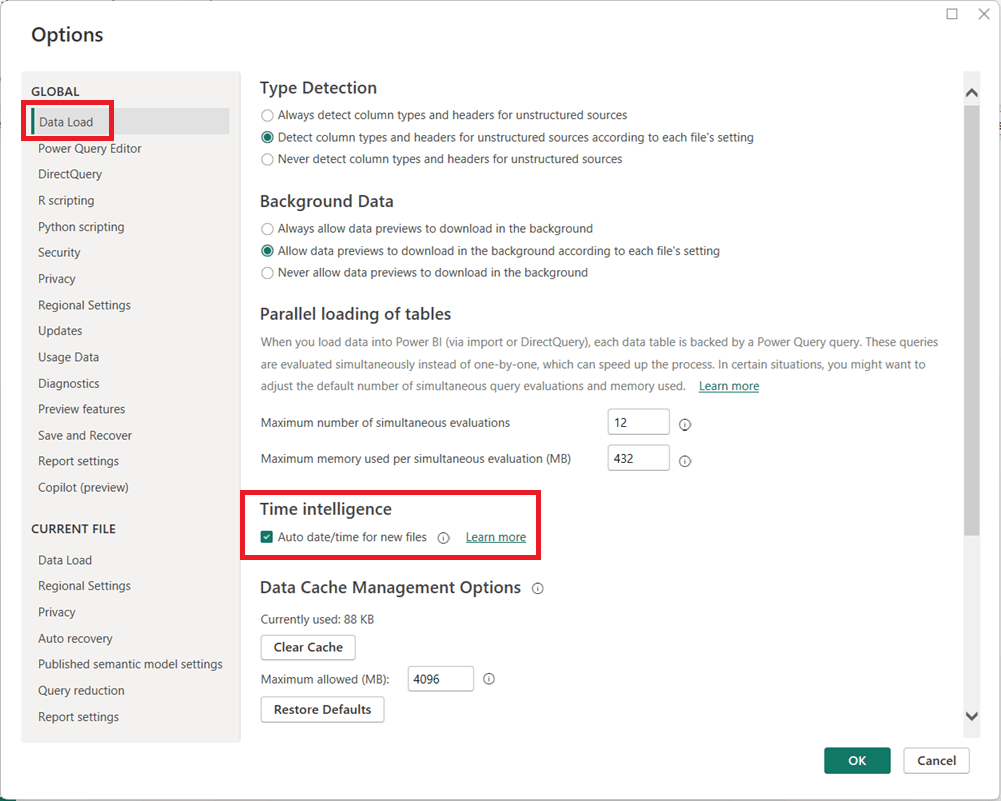
  1. In Power BI Desktop, go to FileOptions and settingsOptions.
  2. Under Global, select Data Load.
  3. Uncheck Auto date/time for new files.
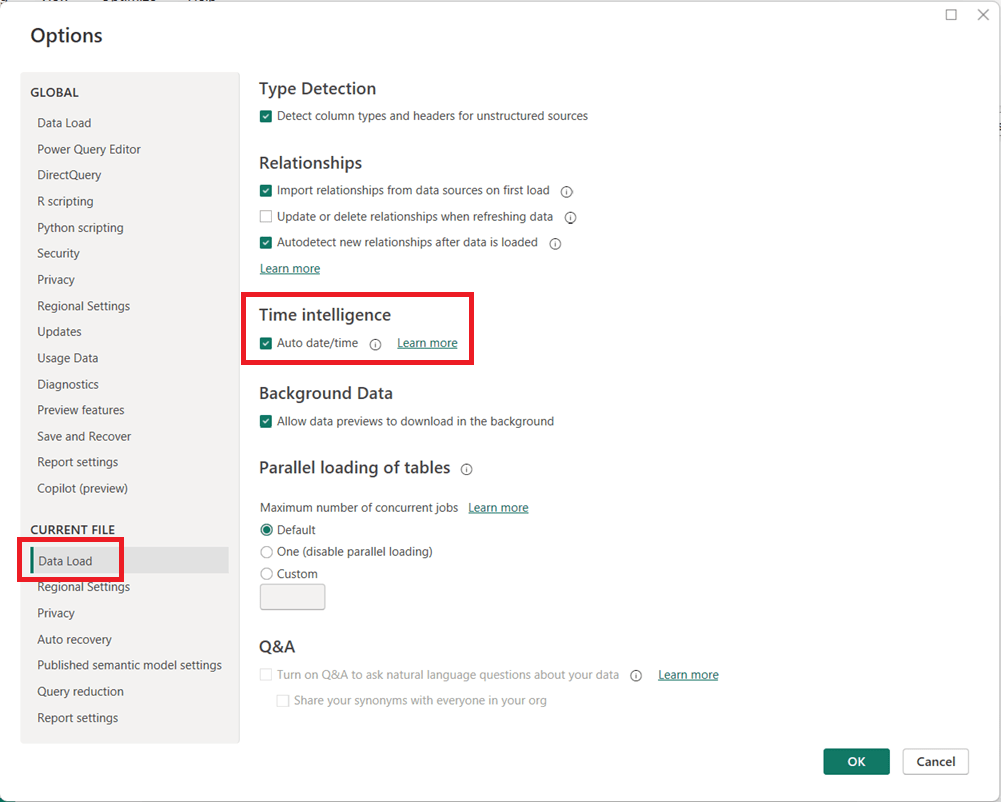
  1. (Optional but recommended) Under Current File, select Data Load and uncheck Auto date/time to disable it for the current report.
  1. Click OK and refresh your model if necessary.

When Should You Leave It On?

Auto date/time can still be useful for:

  • Quick prototypes or ad-hoc analysis
  • Simple models with only one or two date fields
  • Users new to Power BI who are not yet working with custom DAX time intelligence

Final Thoughts

For enterprise, reusable, or performance-sensitive Power BI models, turning off Auto date/time and using a dedicated Date table is usually the better approach. It leads to cleaner models, more reliable calculations, and greater long-term flexibility as your reports grow in complexity.

Thanks for reading!

AI in Agriculture: From Precision Farming to Autonomous Food Systems

“AI in …” series

Agriculture has always been a data-driven business—weather patterns, soil conditions, crop cycles, and market prices have guided decisions for centuries. What’s changed is scale and speed. With sensors, satellites, drones, and connected machinery generating massive volumes of data, AI has become the engine that turns modern farming into a precision, predictive, and increasingly autonomous operation.

From global agribusinesses to small specialty farms, AI is reshaping how food is grown, harvested, and distributed.


How AI Is Being Used in Agriculture Today

Precision Farming & Crop Optimization

  • John Deere uses AI and computer vision in its See & Spray™ technology to identify weeds and apply herbicide only where needed, reducing chemical use by up to 90% in some cases.
  • Corteva Agriscience applies AI models to optimize seed selection and planting strategies based on soil and climate data.

Crop Health Monitoring

  • Climate FieldView (by Bayer) uses machine learning to analyze satellite imagery, yield data, and field conditions to identify crop stress early.
  • AI-powered drones monitor crop health, detect disease, and identify nutrient deficiencies.

Autonomous and Smart Equipment

  • John Deere Autonomous Tractor uses AI, GPS, and computer vision to operate with minimal human intervention.
  • CNH Industrial (Case IH, New Holland) integrates AI into precision guidance and automated harvesting systems.

Yield Prediction & Forecasting

  • IBM Watson Decision Platform for Agriculture uses AI and weather analytics to forecast yields and optimize field operations.
  • Agribusinesses use AI to predict harvest volumes and plan logistics more accurately.

Livestock Monitoring

  • Zoetis and Cainthus use computer vision and AI to monitor animal health, detect lameness, track feeding behavior, and identify illness earlier.
  • AI-powered sensors help optimize breeding and nutrition.

Supply Chain & Commodity Forecasting

  • AI models predict crop yields and market prices, helping traders, cooperatives, and food companies manage risk and plan procurement.

Tools, Technologies, and Forms of AI in Use

Agriculture AI blends physical-world sensing with advanced analytics:

  • Machine Learning & Deep Learning
    Used for yield prediction, disease detection, and optimization models.
  • Computer Vision
    Enables weed detection, crop inspection, fruit grading, and livestock monitoring.
  • Remote Sensing & Satellite Analytics
    AI analyzes satellite imagery to assess soil moisture, crop growth, and drought conditions.
  • IoT & Sensor Data
    Soil sensors, weather stations, and machinery telemetry feed AI models in near real time.
  • Edge AI
    AI models run directly on tractors, drones, and field devices where connectivity is limited.
  • AI Platforms for Agriculture
    • Climate FieldView (Bayer)
    • IBM Watson for Agriculture
    • Microsoft Azure FarmBeats
    • Trimble Ag Software

Benefits Agriculture Companies Are Realizing

Organizations adopting AI in agriculture are seeing tangible gains:

  • Higher Yields with fewer inputs
  • Reduced Chemical and Water Usage
  • Lower Operating Costs through automation
  • Improved Crop Quality and Consistency
  • Early Detection of Disease and Pests
  • Better Risk Management for weather and market volatility

In an industry with thin margins and increasing climate pressure, these improvements are often the difference between profit and loss.


Pitfalls and Challenges

Despite its promise, AI adoption in agriculture faces real constraints:

Data Gaps and Variability

  • Farms differ widely in size, crops, and technology maturity, making standardization difficult.

Connectivity Limitations

  • Rural areas often lack reliable broadband, limiting cloud-based AI solutions.

High Upfront Costs

  • Autonomous equipment, sensors, and drones require capital investment that smaller farms may struggle to afford.

Model Generalization Issues

  • AI models trained in one region may not perform well in different climates or soil conditions.

Trust and Adoption Barriers

  • Farmers may be skeptical of “black-box” recommendations without clear explanations.

Where AI Is Headed in Agriculture

The future of AI in agriculture points toward greater autonomy and resilience:

  • Fully Autonomous Farming Systems
    End-to-end automation of planting, spraying, harvesting, and monitoring.
  • AI-Driven Climate Adaptation
    Models that help farmers adapt crop strategies to changing climate conditions.
  • Generative AI for Agronomy Advice
    AI copilots providing real-time recommendations to farmers in plain language.
  • Hyper-Localized Decision Models
    Field-level, plant-level optimization rather than farm-level averages.
  • AI-Enabled Sustainability & ESG Reporting
    Automated tracking of emissions, water use, and soil health.

How Agriculture Companies Can Gain an Advantage

To stay competitive in a rapidly evolving environment, agriculture organizations should:

  1. Start with High-ROI Use Cases
    Precision spraying, yield forecasting, and crop monitoring often deliver fast payback.
  2. Invest in Data Foundations
    Clean, consistent field data is more valuable than advanced algorithms alone.
  3. Adopt Hybrid Cloud + Edge Strategies
    Balance real-time field intelligence with centralized analytics.
  4. Focus on Explainability and Trust
    Farmers need clear, actionable insights—not just predictions.
  5. Partner Across the Ecosystem
    Collaborate with equipment manufacturers, agritech startups, and AI providers.
  6. Plan for Climate Resilience
    Use AI to support long-term sustainability, not just short-term yield gains.

Final Thoughts

AI is transforming agriculture from an experience-driven practice into a precision, intelligence-led system. As global food demand rises and environmental pressures intensify, AI will play a central role in producing more food with fewer resources.

In agriculture, AI isn’t replacing farmers—it’s giving them better tools to feed the world.