
If you get the error “The connection has failed” when you try to Import Metadata into the RPD, this post may help you to resolve it.
The solution is to: Create an Environment Variable called TNS_ADMIN and set its value to the directory of your tnsnames.ora file.
The TNS_ADMIN variable tells Oracle Client where to find the tnsnames.ora file which contains your data source details.
In case you need the details:
Click the Windows Start menu –> Right-Click on Computer –> select Properties
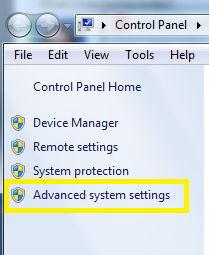
Then click on “Advanced system settings” on the left.
Click the “Environment Variables” button.
Then in the Environment Variables window, click New.
Enter the details for the TNS_ADMIN variable. The value needs to be the path to your tnsnames.ora file, typically located at [ORACLE_HOME]networkadmin. The path will look something like the value shown below (it depends on where Oracle is installed on your system).

Hope this helps.
 The Data Community
thanks its working
LikeLike
thank you…working good…
LikeLike
Very helpful thank you so much!!
LikeLike
Its work Man
LikeLike
Super!
Thanks A Lot .. It Worked great.
LikeLike