
If you get this error during Step 4 of the Upgrade Assistant for upgrading OBIEE 10g RPD and/or Catalog to 11g, then this post might be helpful.
UPGAST-00014: unable to connect to WebLogic Server at localhost:7001
t3://localhost:7001: Destination unreachable; nested exception is: java.net.ConnectException: Connection refused; No available router to destination

Perform the following steps that may resolve your problem:
– Log in to Administration Console. http://yourserver:7001/console
– Click the ‘Servers’ link.

Then in the Summary of Servers page / Configuration tab, click ‘AdminServer(admin)’.

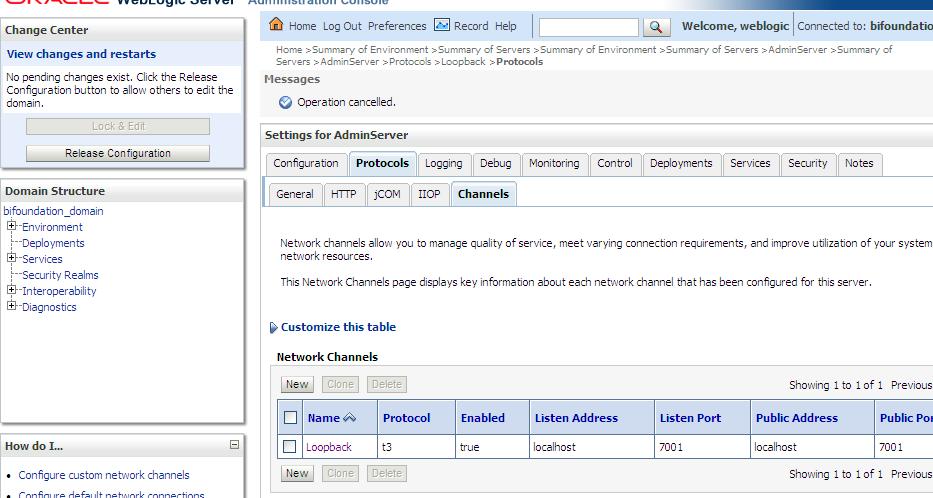
– From the Settings for AdminServer page, select the ‘Protocols’ tab, then the ‘Channels’ subtab.
– And then Click ‘Lock & Edit’ button in the upper left Change Center.

– Click the New button to begin creating a new Network Channel.
– Enter the following information…
Name: Loopback (or whatever name you like)
Protocol: t3
– The click Next

– The enter …
Listen Address: localhost
Listen port: 7001
Click Finish

The new Network Channel (Loopback) is added. Activate the changes by clicking on the “Activate Changes” button.
Now, retry running the Upgrade Assistant. There is no need to restart any of the services.
You should now get past Step 4 (the point at which you were getting the error before).
 The Data Community
It works..Thanks you.
LikeLike